TikTok Ads Manager: Setup, Policies & Verification (2026)

4
Distinct account entities in TikTok’s advertising architecture — Business Center, Ads Manager, Business Account, and TikTok for Business — each serving a separate function. Conflating them is the #1 reason newcomers stall before their first campaign launches.
Source: TikTok Ads Manager Help Center 2026; TikAdSuite 2026
What Is TikTok Ads Manager?
TikTok Ads Manager is the campaign-management interface where advertisers create, launch, and optimize TikTok advertising campaigns. It operates at the execution layer of TikTok’s advertising ecosystem — the place where budgets are set, targeting is configured, creative is uploaded, and performance is reported. It is not the same as the Business Center, not the same as a TikTok Business Account, and not the same as TikTok for Business. The distinction between those four entities is where the majority of first-time advertisers get stuck, and resolving it is the first task before any campaign decision is made.
The hierarchy works as follows. TikTok for Business is the commercial brand umbrella covering all of TikTok’s advertising products. Business Center is the administrative layer inside that umbrella — the asset manager where multiple ad accounts, pixels, product catalogs, team members, and agency-authorization workflows are held in one place. Ads Manager is the campaign layer: the campaign → ad group → ad structure where every operational decision about spend, audiences, and creative lives. A TikTok Business Account is the verified organic profile that must be linked as the ad identity for any campaign — since January 2026, this link is mandatory in all major markets, not an optional configuration step. Each entity has a different URL, a different login path, and a different permission scope. Confusing them costs setup time; proceeding without understanding them costs money.
The account structure question settled, the decisions that follow are sequential. Choose a campaign objective before selecting formats — the objective determines which pricing model is available and which creative specs apply. See TikTok campaign objectives for the full objective map. Install the pixel before the first campaign goes live — conversion campaigns without pixel data cannot optimize, and the learning phase burns budget without generating signal. See TikTok Pixel and tracking for setup and attribution configuration. MB Adv Agency has found that new-account setup failures — wrong hierarchy, missing pixel, unverified Business Account — account for more first-campaign underperformance than any targeting or creative decision made afterward.
Key Takeaways
- Business Center and Ads Manager are separate tools with separate logins. Business Center is the asset-management layer (pixels, ad accounts, team roles, agency access). Ads Manager is where campaigns are built and run. Understanding which one you are in at any given time prevents the most common setup errors.
- Custom Identity — the option to run ads without a linked verified profile — was closed in January 2026. All campaigns in major markets now require a verified TikTok Business Account linked as ad identity. This is a prerequisite, not optional configuration.
- The business verification deadline was May 22, 2026. Accounts that missed it lose access to Business Suite analytics, the Commercial Music Library, and advanced destination and lead-gen features.
- An approved ad can be subsequently disapproved. TikTok’s re-review policy allows suspension of live ads when user-signal thresholds (hide rate, report volume) trigger a secondary review. Monitor the review queue after launch, not just at submission.
- TikTok’s optimization logic is creative-first, not audience-first. Porting a Meta audience-segmentation playbook to TikTok — with detailed interest stacks and narrow demographics — restricts the algorithm below its effective learning threshold at budgets under $5,000 per month.
- A TikTok Business Account with zero organic followers can run In-Feed and TopView ads. Organic reach and paid reach are separate systems. Follower count has no bearing on ad delivery.
TikTok Ads Manager vs. Meta Ads Manager: Three Places the Mental Model Breaks
TikTok Ads Manager uses the same campaign → ad group → ad hierarchy as Meta Ads Manager. The structural similarity leads experienced Meta advertisers to assume the optimization logic is equivalent. It is not — and the three specific translation failures below account for the majority of underperformance in TikTok’s first 30 days for accounts migrated from Meta without adjustment.
Targeting depth. Meta rewards audience segmentation — layered interests, custom audiences, and lookalikes built on specific pixel events. TikTok’s algorithm performs better with broad targeting, particularly at monthly budgets below $5,000. Adding detailed interest and demographic restrictions at small budgets narrows the algorithm’s learning pool below the threshold it requires to exit the learning phase efficiently. The result: higher CPMs, slower optimization, and first-month ROAS below the Meta equivalent — not because TikTok is a worse platform, but because the Meta audience-first playbook conflicts with how TikTok’s auction and delivery system are designed. For how targeting options work inside Ads Manager, see TikTok audience targeting.
Creative role. Meta’s system prioritizes audience selection as the primary variable: find the right person, serve any version of the ad. TikTok’s algorithm is creative-first: the video’s quality and hook strength are the primary signals that determine which audience the algorithm distributes the ad to. A performing TikTok ad is not a polished brand video served to a retargeted segment; it is native-format content that earns algorithmic distribution by matching the platform’s engagement patterns. For the specific hook and format structures that TikTok’s delivery system rewards, see TikTok creative best practices.
Policy sensitivity. TikTok’s review system is more aggressive than Meta’s in the health, finance, and “organic-feeling claims” categories. MB Adv Agency has found that direct-response ad copy passing Meta’s review without modification — particularly before/after framing, benefit-led health claims, or financial outcome statements — triggers TikTok disapproval under the misleading claims category. Treating Meta approval as a proxy for TikTok approval is the single most consistent disapproval pattern in new-account onboarding. Review copy against TikTok’s specific prohibited-claims taxonomy before submission. For CPM, CPC, and ROAS benchmarks relevant to both platforms, see TikTok Ads metrics and costs.
Account Architecture: Business Center, Ads Manager, Business Account
TikTok’s advertising infrastructure involves four distinct entities that share a brand umbrella but operate independently. Business Center is the administrative layer — the dashboard where multiple ad accounts, pixels, product catalogs, team members, and agency partners are managed. Ads Manager is the execution layer — where campaigns are built, budgets are set, creative is uploaded, and reporting is read. A TikTok Business Account is the verified organic profile that serves as the public-facing ad identity every campaign must reference since January 2026. TikTok for Business is the overall commercial platform brand, not an operational tool.
| Entity | Role | Where it lives | Common confusion |
|---|---|---|---|
| TikTok for Business | Commercial platform brand umbrella | business.tiktok.com (entry point) | Treated as an interface — it’s a brand, not a tool |
| Business Center | Asset manager: ad accounts, pixels, catalogs, team roles, agency authorization | business.tiktok.com/dashboard | Conflated with Ads Manager — separate login and URL |
| TikTok Ads Manager | Campaign execution: campaign → ad group → ad structure, budgets, targeting, creative, bidding, reporting | ads.tiktok.com | Treated as the starting point — Business Center setup comes first |
| TikTok Business Account | Verified organic profile linked as mandatory ad identity since January 2026; unlocks analytics, Commercial Music Library, lead-gen and destination links | TikTok app (organic profile settings) | Assumed to require a large following — zero followers required |
Sources: TikTok Ads Manager — Learn About Identity; TikTok — About Business Verification.
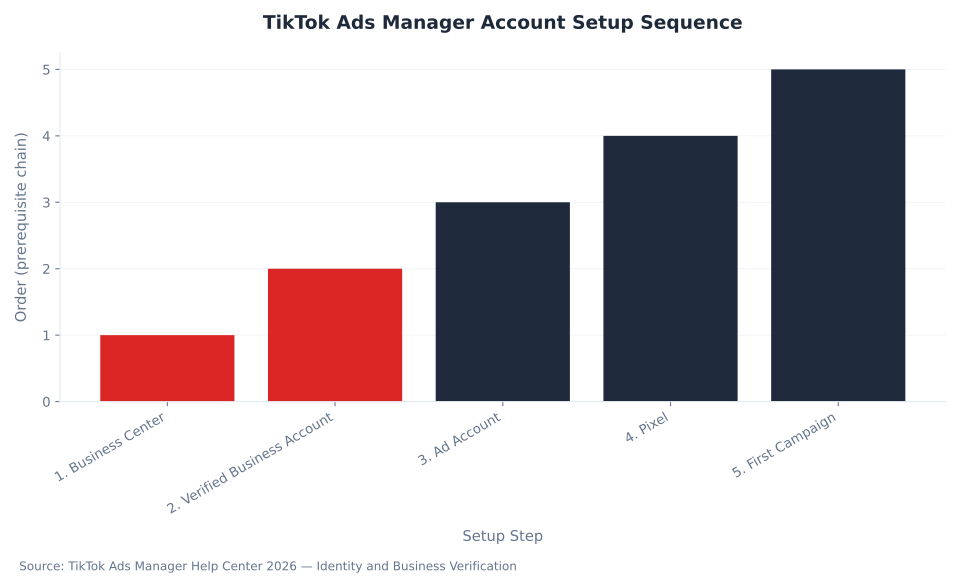
The setup sequence is non-negotiable: Business Center must exist before an Ad Account can be created inside it; a verified TikTok Business Account must be linked before any campaign can launch; and the pixel must be installed and mapped to conversion events before a conversion-objective campaign can optimize against purchase or lead events. Skipping or reversing steps in this chain is the structural cause of setup paralysis. The chart below renders the prerequisite sequence in order. For ad format selection within the Ads Manager campaign builder, see TikTok ad formats. For the campaign-objective selection that precedes format choice, see TikTok campaign objectives.
For agency account managers onboarding clients: the Business Center authorization workflow allows an agency’s Business Center to request managed access to a client’s ad account without taking ownership of the client’s assets. The client approves from their own Business Center; the agency then manages campaigns within the granted permission scope. For social media PPC management engagements on TikTok, this authorization path keeps asset ownership clearly with the client and is the setup structure MB Adv Agency uses for all managed accounts.
TikTok Ad Disapprovals: The Six Reason Categories
TikTok’s ad review system covers six broad disapproval categories. Misleading claims and landing-page issues are fixable by editing creative or updating the destination URL. Ad categorization and IP violations require a different response — the creative is not the problem, the campaign configuration or the underlying rights situation is. Understanding which category applies determines whether an edit resolves the disapproval or whether a full reconfiguration and re-submission is required.
| Category | Common triggers | Fixable by editing creative? |
|---|---|---|
| Misleading claims | Superlative statements without evidence, before/after comparisons, unapproved health or financial outcome claims | Yes — remove or qualify the claim |
| Landing page | URL mismatch between ad and destination, low-quality or non-loading page, destination that does not match ad product | Yes — update destination URL |
| Creative quality | Static images without movement, low resolution, logo-only visuals, missing AI-generated content disclosure where required | Yes — replace with compliant creative |
| Ad categorization | Financial services, healthcare, or political ads not flagged as special categories at ad group level | No — requires ad group reconfiguration |
| IP / audio copyright | Commercial tracks used without license, third-party brand assets used without authorization | No — requires licensed audio or rights clearance |
| Prohibited content | Counterfeit goods, certain weapon-adjacent or adult content, products prohibited in the target market | No — structural policy violation |
Sources: TikAdSuite — Why Your TikTok Ad Was Rejected: 2026 Fixes; TikTok Ads Manager — Ad Review FAQ.
An ad that passes initial review can be suspended mid-flight. TikTok’s re-review policy activates when user-signal thresholds — hide rate, report volume — flag a live ad for secondary review. Check the Ads Manager review queue dashboard daily during the first 72 hours of any new campaign.
The appeal process uses TikTok’s One Click Appeal system. In Ads Manager, click the Disapproved label → select “View more” to read the specific policy reason and linked help article → submit the appeal with a written explanation (up to 2,000 characters) and up to five supporting files (PNG, JPG, or PDF, 10 MB each per file). Evidence-based appeals resolve in 24–72 hours. One appeal is available per ad group: once used for any ad within the group, the appeal option closes for the remaining ads in that group. Sources: TikTok Ads Manager — One Click Appeal; TikAdSuite — How to Appeal TikTok Ad Rejections 2026. For audio compliance, TikTok’s Commercial Music Library — accessible through a verified Business Account — provides a catalog of royalty-safe tracks that clear the IP category by default. For finance PPC services on TikTok, incorrect ad categorization in the financial services category is the most common disapproval trigger and cannot be resolved by editing creative alone.

TikTok Ads account setup done right — from Business Center to first campaign
MB Adv Agency manages TikTok Ads accounts for SMBs and mid-market brands, including Business Center configuration, pixel setup, and policy-compliant creative review.
See social media PPC services →What Changed in 2026: Custom Identity Is Closed
TikTok phased out Custom Identity in January 2026. Custom Identity was the feature that allowed advertisers to run campaigns without linking a verified TikTok profile — a workaround used by direct-response advertisers and agencies whose clients did not have or did not want to expose an organic TikTok presence. The closure applied across all major markets simultaneously, with four weeks’ public notice. Any setup guide written before January 2026 describes a workflow that no longer exists.
The practical consequence: there is no path to launching a TikTok campaign in 2026 without a verified TikTok Business Account linked as the ad identity. Business verification requires the legal business name, registered business address, and supporting documentation — certificate of incorporation, government-issued business registration, or equivalent. Verification takes 1–3 business days after document submission. Plan for this lead time before any campaign launch date. Sources: TikTok For Business — Custom Identity Transition; House of Marketers — TikTok Removes Custom Identity 2026; Social Media Today — TikTok Phases Out Custom Identity.
A separate deadline affects existing accounts: May 22, 2026 was the cutoff for business verification on Business Accounts that had not yet completed the process. Accounts that missed the deadline lose access to Business Suite analytics beyond basic metrics, the Commercial Music Library (which supplies royalty-safe audio for ads, directly relevant to the IP disapproval category above), advanced destination link features, and lead-gen profile functionality. Source: Growth Pro Partners — TikTok Business Verification Deadline May 2026. For platform-level trends including Smart+ automation changes in Q2 2026 and what they mean for campaign structure, see TikTok Ads strategy and trends.
Three Misconceptions That Stall First-Time Advertisers
The three misconceptions below are not beginner errors. They are structural misreads of how TikTok’s system works — and they affect experienced Meta advertisers and agency teams as much as first-timers. Each one produces a specific, predictable failure mode.
“I need a big following to run TikTok ads.” This is false. A TikTok Business Account with zero organic followers can run In-Feed ads, Spark Ads (if creator partnership exists), and TopView ads. Organic reach and paid reach are entirely separate delivery systems on TikTok — the algorithm that distributes paid ads does not consult follower count, engagement history, or account age when determining delivery. The misconception is understandable given TikTok’s reputation as an organic-virality platform, but it causes SMBs to delay advertising while building an audience variable that has no bearing on ad performance. Local service businesses — the same audience pursuing social media PPC in Los Angeles or social media PPC in New York — can launch TikTok In-Feed campaigns from a freshly created Business Account with no prior TikTok presence. Source: TikAdSuite — TikTok Ads Requirements 2026.
“If TikTok approved my ad, it’ll run until I pause it.” This was true before TikTok’s re-review policy. It is no longer accurate. An ad that passes initial automated and human review can be flagged for secondary review at any point during its active run if user signals — hide rate or report volume — cross TikTok’s internal thresholds. Advertisers have had live, performing ads suspended mid-flight without advance warning. The operational response: set up Ads Manager email alerts for status changes and check the review queue dashboard in the first 72 hours after any new ad goes live, not just at submission.
“TikTok Ads Manager works like Meta Ads Manager — I can translate my setup directly.” The campaign → ad group → ad structure looks identical, but the optimization logic and effective use of targeting differ materially. Meta rewards detailed audience segmentation; TikTok’s algorithm performs better with broad targeting at equivalent budgets, specifically under $5,000 per month. Porting a Meta playbook to TikTok without adjusting audience breadth and creative format produces measurable underperformance in the first 30 days of a new account. The mental model to carry in from Meta — detailed audience, polished brand creative, CPC as primary KPI — conflicts with TikTok’s creative-first, broad-audience, VTR-led optimization logic on every dimension. Source: TikTok Ads Manager — Learn About Identity.
Frequently Asked Questions
What is the difference between TikTok Business Center and TikTok Ads Manager?
Business Center and Ads Manager serve different layers of the same advertising infrastructure. Business Center is the administrative layer — it exists at business.tiktok.com and functions as the asset manager for an organization’s TikTok advertising resources. Inside Business Center, an advertiser creates and houses multiple ad accounts, installs and manages pixels, connects product catalogs, assigns team member roles (admin, operator, analyst), and handles agency-authorization requests. It is where ownership and access to advertising assets live. Ads Manager is the campaign execution layer — it exists at ads.tiktok.com and is where campaigns are built, ad groups are configured, creative is uploaded, budgets are set, and performance data is reported. A newly created ad account in Business Center becomes the entity that connects to Ads Manager. The practical implication: Business Center setup is a prerequisite for Ads Manager use, not a parallel path. Agencies managing multiple clients operate one Business Center and connect to multiple client ad accounts from within it, keeping asset ownership separate from campaign access.
Do I need a TikTok Business Account to run ads, and does follower count matter?
A verified TikTok Business Account is mandatory for all campaigns in major markets since January 2026. Custom Identity — the previous option to run ads without a linked verified profile — was closed across all major markets in January 2026 with four weeks’ notice. The Business Account must complete identity verification: business legal name, registered address, and supporting documentation (certificate of incorporation or equivalent government-issued business registration). Verification processing takes 1–3 business days. Follower count has no bearing on ad eligibility or delivery. A Business Account created the same day verification is submitted — with zero posts and zero followers — can run In-Feed and TopView ads as soon as verification is approved. The setup time calculation: documentation preparation (0–1 day) + verification processing (1–3 business days) + Business Center and Ad Account configuration (0–1 day) + pixel installation (0–1 day) = minimum 2–4 business days of runway before a campaign is live. Plan accordingly for any time-sensitive launch.
Why was my TikTok ad approved and then subsequently disapproved?
TikTok operates a two-stage review system. The first review — automated policy scanning followed by human review for flagged ads — produces the initial Approved or Rejected status. An approved ad can then trigger a secondary review at any point during its active delivery if user-generated signals cross internal thresholds. The specific signals TikTok monitors include hide rate (the percentage of users who select “hide this ad”) and report volume (the number of users who actively flag the ad for policy concerns). When either signal exceeds threshold, the ad enters re-review automatically. If the secondary review identifies a policy issue — even one not caught in the initial pass — the ad is suspended without advance notice. The categories most associated with post-approval suspension are misleading claims that read as acceptable on first review but generate disproportionate user feedback, and creative that feels compliant in isolation but triggers policy concerns in the context of user response. The resolution path is the One Click Appeal process described above. For ads operating in health, finance, or “claims-heavy” categories, monitoring the Ads Manager review queue during the first 72 hours after launch is the standard operating procedure.
How long does TikTok ad review take, and what is the appeal timeline?
Standard first-submission review takes up to 24 hours for most ad types. Ads submitted during peak periods or flagged for manual review by the automated scanning layer take longer — the platform does not publish a maximum SLA for manually reviewed ads. The appeal timeline is separate: One Click Appeals resolve in 24–72 hours when submitted with a written explanation and supporting evidence. An appeal with only the mandatory reason field and no supporting documentation resolves at the slower end of that range. The calculation for campaign-launch planning: first-submission review (up to 24 hours) + potential re-submission after correction (up to 24 hours) + one appeal cycle if needed (24–72 hours) = a worst-case timeline of 5–6 days from first submission to a confirmed approved state. For time-sensitive campaigns, submit creative at least one week before the intended launch date. One appeal is available per ad group: once the appeal option is used for any ad within the group, it closes for the remaining ads in that group, regardless of outcome. Plan multi-creative ad groups to use the appeal strategically on the highest-value creative first.
Questions about your TikTok Ads account setup?
Talk through account structure, verification requirements, or policy compliance with the MB Adv team.
About MB Adv Agency →Methodology
This pillar draws on TikTok Ads Manager official help documentation (ads.tiktok.com), TikTok For Business blog announcements, and verified third-party reporting: TikAdSuite (2026), House of Marketers (2026), Social Media Today (2026), and Growth Pro Partners (2026). The Custom Identity closure (January 2026) and business verification deadline (May 22, 2026) are confirmed against TikTok’s official announcement and multiple independent trade sources. No CPM or CPC benchmark tables are included — cost data lives in TikTok Ads metrics and costs. MB Adv Agency operational observations are qualitative, not derived from specific client data. Last updated: May 2026. Reviewed by MB Adv Agency, May 2026.

As a Google Ads expert, I bring proven expertise in optimizing advertising campaigns to maximize ROI.
I specialize in sharing advanced strategies and targeted tips to refine Google Ads campaign management.
Committed to staying ahead of the latest trends and algorithms, I ensure that my clients receive cutting-edge solutions.
My passion for digital marketing and my ability to interpret data for strategic insights enable me to offer high-level consulting that aims to exceed expectations.
Google Partner Agency
We're a certified Google Partner Agency, which means we don’t guess — we optimize withGoogle’s full toolkit and insider support.
Your campaigns get pro-level execution, backed by real expertise (not theory).

4.9 out of 5 from 670+ reviews on Fiverr.
That’s not luck, that’s performance.
Highly recommend Matteo to set up your server side tracking. He has a deep understanding of e-commerce tracking and will go above and beyond to make sure everything is set up correctly and working 100%. If you are scaling your store this set up is non-negotiable in my opinion and there isn't many people who have this much knowledge or put the effort in to get it right. Thanks again!

avorodesign.com
I can only recommend Matteo! He was very patient, professional and very knowledgeable about GA4, Consent Mode v2, and GDPR compliance. Communication was clear, and the setup was done professionally and efficiently. Highly recommend him for anyone needing reliable tracking implementation.

www.natureiki.life
Matteo shines in the realm of online professionals. His work is not only deep in data but also complemented by his proactive communication and cooperation, setting a new standard for freelancers. If you want someone who truly exceeds expectations, look no further. Highly recommended!

www.omanbeverlysmyth.com
Exceptional Service Beyond Expectations - Outstanding Service Impeccable depth, flawless delivery, and exceptional language fluency—this service exceeded all expectations. Highly recommended. Matteo truly ROCKS!!!

ium-paris.com
Top-notch, always highly value working with Matteo. An absolute Google Ads Genius. This is approximately the 8th time I have hired him and he's helped us get 6-7 ROAS. We are excited in continuing to improve our lead flow. Hire this guy if you need Google Ads help. Thanks Matteo!

www.dleeventgroup.com
I finally found the guy who can setup server side tracking and all the ecosystem properly. I definitely recommend Matteo. He is very responsive, kind and wants to dig into things. He configured GA4, Meta, Google Ads, Outbrain and google consent v2 with Cookiebot. Thanks Matteo.

inomega.fr
MB Adv delivered exceptional work with outstanding professionalism and lots of patience, taking time to see effects of changes made and not just do the work and submit it. The proactive communication and video summaries of the work completed made working with Matteo a pleasure, as he consistently went above and beyond. Highly recommended for web analytics projects! We are already working on another project.

www.withnellsensors.co.uk
Working with Matteo on my Google Ads was a game-changer. He's not just a strategist, he's a true partner. He understood my goals and tailored a campaign that perfectly reached my target audience. I'm grateful for his expertise and dedication.

dccargo.com
Click-driven mind
with plastic-brick obsession.
We build Google Ads campaigns with the same mindset we use to build tiny brick worlds: strategy, patience, and zero tolerance for wasted pieces.
Data is our blueprint. Growth is the only acceptable outcome.