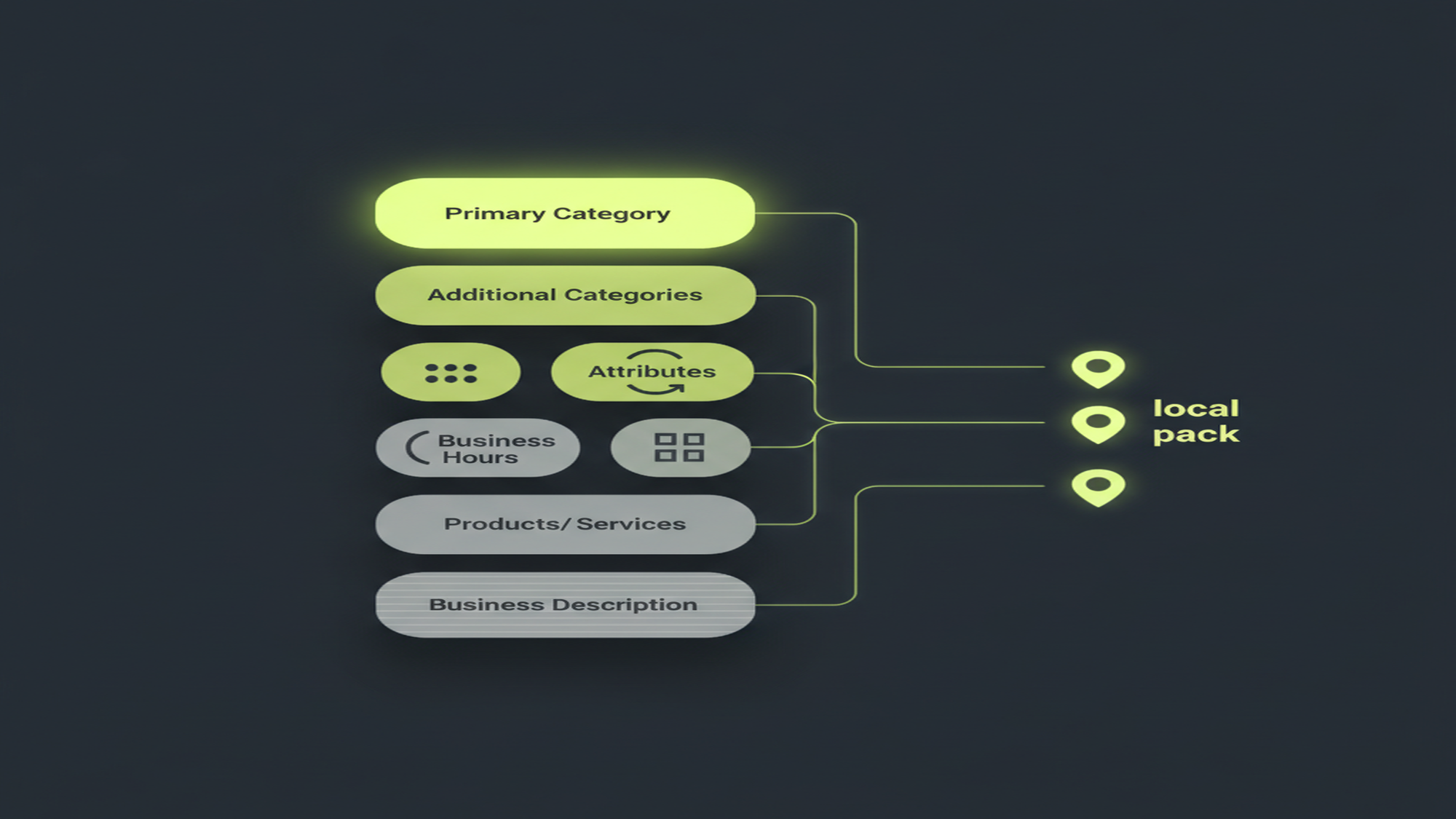
What Are Google Posts? Types, Lifespan & Best Practices

The rule that changed — Google Posts
6 months
A Google Post now stays visible and is archived after 6 months — not after about 7 days. Google retired the old “What’s new” weekly auto-expiry around 2021, yet most guides still tell you to post weekly or your profile goes blank. It does not.
Source: Google Business Profile Help — Create or edit a post
What Are Google Posts?
A Google Post is a short update you publish from your Google Business Profile (GBP) that appears directly on your business listing across Google Search and Google Maps, at no cost. It is not an ad, and it carries no cost-per-click. Posts sit alongside your reviews, photos, hours, and services — free content you control, on the exact surfaces where a local customer is already deciding whether to call you. “Google My Business,” or GMB, is the legacy name; Google renamed the product Google Business Profile on November 4, 2021. For the full picture of what a profile is, see what is a Google Business Profile (GBP).
There are exactly three current post types: Updates (labeled “What’s new”), Offers, and Events (Google, Create or edit a post). An Update is a general announcement — news, a new service, a photo, a “we’re hiring” note. An Offer is a time-bound promotion with a validity window and an optional coupon code. An Event is a dated happening — a sale, an open house, a workshop — that runs from a start date to an end date. All three appear on both Search and Maps, which is the point most owners miss: this is not a social feed nobody sees; it is merchandising space that sits under the map pin, not buried three clicks deep.
You create posts from wherever you manage the profile today: the inline profile-edit panel in Google Search (search your business name while signed in), the Google Maps app, or Business Profile Manager at business.google.com for multi-location accounts. The standalone Google My Business app was discontinued in 2022, so any guide telling you to “download the app” is describing a path that no longer exists.
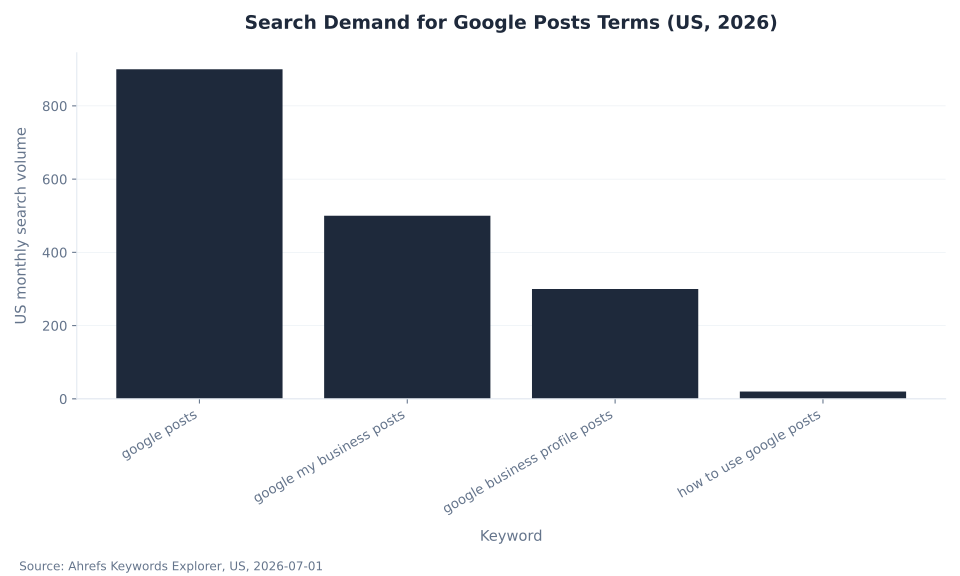
Search demand for the topic still leans on the legacy name. The head term “google posts” carries the most volume, but “google my business posts” still pulls hundreds of US searches a month — a live signal that the pre-2021 GMB label persists in how people search, and a reason to note the rebrand on first reference.
Search Demand for Google Posts Terms (US, 2026)
The MB Adv Agency read: a Google Post is the lowest-effort, highest-placement free content a local business owns. It sits directly beneath the map pin on Search and Maps, and most profiles in most local markets simply leave the slot empty — which is a gift to any competitor willing to fill it.
Key Takeaways
- Google Posts are free updates on your listing, not ads. They publish from your Google Business Profile and show on Search and Maps at no cost — there is no cost-per-click and no ad account required.
- There are exactly three current types. Updates (“What’s new”), Offers, and Events. A separate COVID-19 post type existed from around 2020 but was retired around 2022 — it is gone.
- Posts do not expire after a week. Google retired the roughly 7-day auto-expiry around 2021. A post now stays visible and is archived after 6 months; dated Offers and Events stay live until their end date passes.
- There is no official character or image spec. Google publishes neither. The “1,500 characters” and “400×300px” figures you will see are third-party estimates, not a Google rule.
- Posts are an engagement surface, not a ranking factor. Google documents three local ranking factors — relevance, distance, prominence. Posts can lift clicks and conversions; they are not a documented lever on where you rank.
The Three Current Post Types
Every current Google Post is one of three types, and choosing the right one decides which fields you get and how long the post stays on your profile. The table below sets them side by side; the sections that follow give Offers and Events their own detail, because those two carry the most execution nuance.
| Type | Purpose | Key fields | How long it stays visible | Best-use example |
|---|---|---|---|---|
| Update (“What’s new”) | General news and announcements | Headline/text, photo or video, optional call-to-action button and link | Archived after 6 months | “New service launched,” a fresh photo, “we’re hiring” |
| Offer | Time-bound promotion or deal | Title, start + end date, photo, optional coupon code, terms, redemption link | Until the end date passes | “$89 AC tune-up through August” |
| Event | A dated happening | Title, start + end date (optional times), photo, optional CTA button | Until the event end date passes | Grand opening, open house, workshop |
Source: Google, Create or edit a post. Lifespan behavior current as of July 2026.
Update Posts (“What’s New”)
The Update — labeled “What’s new” in the editor — is the general-purpose post. Use it for a new service, a seasonal note, a staff hire, a fresh photo, or any announcement that is not a dated deal or a scheduled event. An Update takes a headline and body text, a photo or short video, and an optional call-to-action button (“Learn more,” “Call now,” “Book”) pointed at a page you choose. With no date range, an Update stays visible and is archived after 6 months, which makes it the right container for evergreen messages — and a reason to keep them current, because a “Happy 4th of July” Update you forget about is still on your profile in December.
Offer Posts: Put a Promotion on Your Listing
An Offer post is purpose-built for a time-bound deal — “$89 AC tune-up through August,” “20% off new-patient exams,” “free estimate this month.” Beyond the headline and image, the Offer type supports fields a plain Update does not: a start and end date that controls how long it shows, and an optional coupon code, terms and conditions, and a redemption link to a landing page (Google, Create or edit a post).
Because it carries an explicit validity window, an Offer stays live through its end date rather than being archived on the general schedule — which makes it the correct container for anything with a deadline. Create it from the same surfaces you use to manage the profile, add a title and image, set the dates, and publish; it appears on Search and Maps and drops off after the end date passes.
The MB Adv Agency framing, honed on the paid campaigns we run that complement a free GBP: treat an Offer post as the free-listing twin of a promotion you would otherwise only push through ads. Match the offer to real intent — seasonal service specials, first-time-customer incentives, clearance — and always attach the redemption link with UTM tracking so you can see downstream conversions. Set the end date honestly so the profile never shows an expired deal. A seasonal special on your profile pairs naturally with a paid push; see, for a concrete vertical, our HVAC PPC services or dental PPC services.
One caution applies to every post: promotional content still has to obey GBP’s content and restricted-industry rules. Regulated verticals — alcohol, financial services, health — cannot push offers subject to local regulation. Read the overview of GBP content guidelines before publishing a promotion in a regulated field.
Event Posts: Schedule a Dated Happening
An Event post announces something with a date: a grand opening, an open house, a workshop, a live demo, a seasonal sale weekend, a webinar. The Event type requires a title and a start and end date (with optional times), and — the load-bearing mechanic — an Event post stays visible until its end date passes, rather than being archived on the general 6-month schedule (Google, Create or edit a post). That makes Events the correct type for anything you want reliably shown right up to the day it happens.
Scheduling is straightforward: create the Event, set the window, add a photo and a call-to-action button such as “Sign up” or “Learn more” pointing at a registration or details page, and publish. It appears on the profile in Search and Maps immediately and drops off after the end date. If the event changes your open hours that day, pair the Event post with a Special hours entry on the profile (Google, Set special hours) so the listing tells one consistent story.
The MB Adv Agency view for the local businesses we work with: Events are underused because owners assume “posting” means daily social-style updates, when the higher-leverage move is one well-timed Event post per real happening, published a week or two ahead so it accrues visibility before the date. For businesses that lean on foot traffic and appointments, that single post can do more than a month of filler. To understand what actually determines where the listing itself ranks, see optimizing business categories for better visibility, and for a local trade example, our plumbing PPC services.

The paid layer that complements a free profile
Turn Local Visibility Into Booked Jobs
Google Posts are free, but turning local visibility into booked work usually takes a paid layer too. MB Adv Agency runs the Google Ads and Local Services Ads side that complements a well-managed Business Profile. Talk to our team about the campaigns that fit your market.
Talk to our team →How Long Posts Last — and Three Rules That Are Wrong
The single highest-value correction on this topic: Google Posts no longer expire after about 7 days. That was true once — the original “What’s new” post had a roughly 7-day auto-expiry — but Google retired that behavior around 2021, and the current rule is that a post stays visible and is archived after 6 months unless you set a shorter date range (Google, Create or edit a post; retirement date reported by Search Engine Land and Sterling Sky). Dated Offers and Events behave more intuitively: they stay live until their end date passes, then move out of the visible slot.
So the real rule is the opposite of the myth: an evergreen Update you publish today is still showing on your profile half a year from now, not next Tuesday. You are not on a weekly treadmill to avoid a blank profile; you are curating what a searcher sees — and stale posts stick around longer than owners expect, which is its own argument for keeping them current. Nearly every pre-2021 tutorial still repeats the 7-day rule, so it is the drift-trap to correct first.
Two more claims from stale guides are simply out of date. First, there is no COVID-19 post type anymore. Google launched a dedicated COVID-19 post type around April 2020 and retired it around 2022 (Search Engine Roundtable); the complete current set is the three types above — nothing else. Any template listing a fourth “COVID-19” or “special announcement” option is describing a removed feature. For an urgent operational message today, use a standard Update and set Special hours if hours change.
Second, Google publishes no official character limit or image-dimension spec for posts. The widely repeated “1,500 characters” and “400×300px” figures trace to bloggers and tools, not to a Google support page — so do not present them as a rule. Posts truncate on the profile with a “Read more” link, so the honest guidance is to front-load your message in the first line or two and use a clear, high-quality landscape image, not to write to an invented cap.
How to Use Posts Effectively
The effective pattern is not “post daily.” It is to keep something current, relevant, and clickable in the slot: lead with a real photo, write a specific headline a searcher would act on, always attach a destination link with UTM tracking, use the right type for the job, and refresh before content goes stale. The table below turns that into a working cadence.
| What to post | Recommended cadence | Do | Don’t | Destination-link note |
|---|---|---|---|---|
| Evergreen Update | When there is real news; refresh before it goes stale | Lead with a real photo; front-load the headline | Post filler daily to “stay active” | Link to the most relevant page, UTM-tagged |
| Offer | One per real promotion, set to the offer’s dates | Include a clear deadline and redemption link | Leave an expired deal showing | Tag the redemption link so GA4 tracks conversions |
| Event | One per real happening, published 1–2 weeks ahead | Set start and end dates plus a CTA button | Treat every day as an “event” | Point the CTA at a registration or details page |
Cadence guidance from MB Adv Agency practice; mechanics from Google, Create or edit a post.
Two honest constraints the thin pages skip. First, you can no longer track how many people saw or clicked an individual post. Post-level insights were removed when Insights became Performance on February 20, 2023 (Google, Performance on your Business Profile). Effectiveness is now inferred from profile-level actions in Performance — calls, direction requests, website clicks — plus the UTM-tagged destination links you attach, tracked in GA4. To measure the actions posts help drive, see understanding Performance reports in GBP.
Second, Google does not document posts as a local ranking factor. Local results are driven by relevance, distance, and prominence (Google, Improve your local ranking); posts are an engagement and conversion surface, not a documented lever on where you rank. For what actually drives the local pack, see how GBP impacts local rankings. The MB Adv Agency read for agency-managed profiles: post because it merchandises your free listing and converts the traffic you already earn — not because it is a ranking hack it is not. Free listings are the organic layer; when a seasonal offer needs to reach beyond existing profile traffic, that is a paid job — see our PPC services or PPC campaign management.
Frequently Asked Questions: Google Posts
Next in the Google Business Profile series
Measure What Posts Help Drive
Post-level view and click insights are gone, so effectiveness now lives in profile-level actions. See how to read calls, directions, and website clicks in the Performance report.
Read the Performance reports guide →Methodology & Sources
This pillar is the best-practices anchor for the Google Posts cluster; it absorbs the older offer and event sub-pages and settles the “what are these, which types exist, do they expire, and how do I use them” questions in one place. The three current post types, the Offer and Event date fields, and the 6-month archive behavior are from Google’s create-a-post help page (support.google.com/business/answer/7342169). The removal of post-level insights in the Insights → Performance transition (February 20, 2023) is from support.google.com/business/answer/9918094; the three local ranking factors from support.google.com/business/answer/7091; Special hours from support.google.com/business/answer/9876800. The retirement of the roughly 7-day expiry (around 2021) and the COVID-19 post type (around 2022) are dated via named local-SEO authorities — Search Engine Land, Sterling Sky, and Search Engine Roundtable — not a Google page. Search-demand figures are from Ahrefs Keywords Explorer (US, July 1, 2026) and are estimates, not Google-published numbers. No mbadv client metrics appear in this article; all agency perspective is qualitative. Reviewed by MB Adv Agency, July 2026.
In today's digital landscape, businesses are constantly seeking ways to enhance their online visibility and engage with customers effectively. One powerful tool that has emerged in the realm of local online marketing is Google Posts. Understanding what Google Posts are and how to utilize them effectively can significantly influence your marketing strategy.
Overview of Google Posts
Google Posts are a feature available within Google My Business (GMB) that allows businesses to share updates, offers, events, and more directly on their Google listing. These posts appear in your Google Maps and search results, giving potential customers an immediate glimpse of what's happening with your business.
This feature is especially valuable for local businesses as it integrates seamlessly with Google Search and Maps. When users search for relevant services or your business name, Google Posts can enhance your business's visibility by displaying timely information and engaging content right at the top of the search results.
There are several types of Google Posts that you can create, including:
- What's New - General updates about your business.
- Event - Details about upcoming events you are hosting.
- Offer - Information about special promotions or discounts.
Each type of post serves a specific purpose and can cater to different customer needs and actions. Google Posts are also time-sensitive, with new posts ideally maintained to keep your audience informed and engaged.
In addition to the basic types of posts, businesses can also utilize features like call-to-action buttons, which encourage users to take specific actions such as booking an appointment, visiting a website, or calling directly. This interactive element not only boosts engagement but also helps convert casual browsers into paying customers. Furthermore, the visual aspect of Google Posts cannot be overlooked; including images or videos can significantly increase user interaction and make your posts more appealing.
Moreover, the analytics provided by Google My Business allow business owners to track the performance of their posts. Insights such as views, clicks, and engagement rates can inform future marketing strategies and help businesses understand what resonates most with their audience. By regularly analyzing these metrics, businesses can refine their content and posting strategies to maximize their reach and effectiveness on the platform.
Benefits for Visibility and Engagement
Utilizing Google Posts can provide numerous benefits that enhance both visibility and engagement for your business. One primary advantage is increased visibility on search engine results pages (SERPs). By effectively using Google Posts, you can capture users' attention before they even visit your website or Google My Business listing.
Moreover, these posts allow you to communicate directly with potential customers. By sharing timely offers or important business updates, you encourage users to take action. For instance, a well-timed offer post can drive foot traffic to your physical store, while an event post can boost attendance at local gatherings.
Furthermore, Google Posts engage customers both visually and contextually. With the option to include images and call-to-action buttons, you can create a more interactive experience. Customers are more likely to engage with content that stands out, leading to higher interaction rates with your posts.
Analytics in Google My Business also allow businesses to track the performance of their posts. You can monitor views, clicks, and interactions, providing valuable insights into what resonates with your audience. This data can help refine your marketing strategy, ensuring that your future posts yield even better results.
In addition to these benefits, Google Posts can also enhance your brand's storytelling capabilities. By sharing behind-the-scenes content, customer testimonials, or success stories, you can create a narrative that resonates with your audience. This not only humanizes your brand but also fosters a sense of community among your customers, making them feel more connected to your business.
Another significant advantage is the ability to leverage seasonal trends and local events. By aligning your posts with holidays, community happenings, or even trending topics, you can tap into the zeitgeist, making your content more relevant and timely. This strategic approach not only boosts engagement but also positions your business as an active participant in the local landscape, enhancing your reputation and appeal.
Tips for Creating Impactful Posts
To maximize the effectiveness of your Google Posts, consider these practical tips:

- Keep it Concise: Google Posts have a character limit, so aim for clear and concise messages. Use straightforward language to get your point across quickly.
- Use High-Quality Images: Visual content captures attention. Ensure that any images you include are professional and relevant to your message.
- Include a Call to Action: Direct customers on what to do next. Whether you want them to "Learn More," "Book Now," or "Visit Today," a clear call to action can guide user behavior.
- Timing is Key: Post updates regularly to keep your audience engaged. Be strategic about timing your posts around holidays, events, or upcoming promotions.
- Experiment with Content: Don’t hesitate to try different post types or messages. Monitor the performance of each to see what your audience prefers.
By following these tips, you can create engaging and effective Google Posts that resonate with your audience and ultimately drive results.
Additionally, consider the use of storytelling in your posts. Sharing a brief narrative about your business, a customer success story, or the journey behind a product can create a deeper connection with your audience. People are naturally drawn to stories, and incorporating them into your posts can make your content more relatable and memorable. This approach not only humanizes your brand but also encourages engagement as customers feel more invested in your narrative.
Another important aspect to keep in mind is the optimization of your posts for search engines. Incorporating relevant keywords related to your business can enhance the visibility of your posts in search results. This means doing a bit of research to understand what terms your target audience is using when searching for services or products like yours. By strategically placing these keywords in your posts, you can improve your chances of being discovered by potential customers who are actively looking for what you offer.

As a Google Ads expert, I bring proven expertise in optimizing advertising campaigns to maximize ROI.
I specialize in sharing advanced strategies and targeted tips to refine Google Ads campaign management.
Committed to staying ahead of the latest trends and algorithms, I ensure that my clients receive cutting-edge solutions.
My passion for digital marketing and my ability to interpret data for strategic insights enable me to offer high-level consulting that aims to exceed expectations.
Google Partner Agency
We're a certified Google Partner Agency, which means we don’t guess — we optimize withGoogle’s full toolkit and insider support.
Your campaigns get pro-level execution, backed by real expertise (not theory).
4.9 out of 5 from 670+ reviews on Fiverr.
That’s not luck, that’s performance.
Highly recommend Matteo to set up your server side tracking. He has a deep understanding of e-commerce tracking and will go above and beyond to make sure everything is set up correctly and working 100%. If you are scaling your store this set up is non-negotiable in my opinion and there isn't many people who have this much knowledge or put the effort in to get it right. Thanks again!
avorodesign.com
I can only recommend Matteo! He was very patient, professional and very knowledgeable about GA4, Consent Mode v2, and GDPR compliance. Communication was clear, and the setup was done professionally and efficiently. Highly recommend him for anyone needing reliable tracking implementation.
www.natureiki.life
Matteo shines in the realm of online professionals. His work is not only deep in data but also complemented by his proactive communication and cooperation, setting a new standard for freelancers. If you want someone who truly exceeds expectations, look no further. Highly recommended!

www.omanbeverlysmyth.com
Exceptional Service Beyond Expectations - Outstanding Service Impeccable depth, flawless delivery, and exceptional language fluency—this service exceeded all expectations. Highly recommended. Matteo truly ROCKS!!!
ium-paris.com
Top-notch, always highly value working with Matteo. An absolute Google Ads Genius. This is approximately the 8th time I have hired him and he's helped us get 6-7 ROAS. We are excited in continuing to improve our lead flow. Hire this guy if you need Google Ads help. Thanks Matteo!

www.dleeventgroup.com
I finally found the guy who can setup server side tracking and all the ecosystem properly. I definitely recommend Matteo. He is very responsive, kind and wants to dig into things. He configured GA4, Meta, Google Ads, Outbrain and google consent v2 with Cookiebot. Thanks Matteo.

inomega.fr
MB Adv delivered exceptional work with outstanding professionalism and lots of patience, taking time to see effects of changes made and not just do the work and submit it. The proactive communication and video summaries of the work completed made working with Matteo a pleasure, as he consistently went above and beyond. Highly recommended for web analytics projects! We are already working on another project.

www.withnellsensors.co.uk
Working with Matteo on my Google Ads was a game-changer. He's not just a strategist, he's a true partner. He understood my goals and tailored a campaign that perfectly reached my target audience. I'm grateful for his expertise and dedication.
dccargo.com
Click-driven mind
with plastic-brick obsession.
We build Google Ads campaigns with the same mindset we use to build tiny brick worlds: strategy, patience, and zero tolerance for wasted pieces.
Data is our blueprint. Growth is the only acceptable outcome.