GBP Messaging, Q&A & Bookings: What's Live in 2026

Google Business Profile — Interaction Features
July 31, 2024
The day Google discontinued Business Profile messaging (chat) and the call-history log. New chats were blocked from July 15, 2024, and Google’s stated reason was low usage. There is no “messaging” toggle to find — this page decodes what is retired, what is retiring, and the one interaction feature that is genuinely live: bookings.
Source: Google Business Profile Help — messaging discontinuation
What Happened to Google Business Profile Messaging?
If a guide tells you to “turn on messaging in your Google Business Profile so customers can text you from Google,” it is describing a feature that no longer exists. Google discontinued Business Profile messaging (chat) and the call-history log on July 31, 2024. The ability to start new chats was blocked from July 15, 2024, and quote requests plus chat FAQs were removed alongside it. Past chat records were exportable through Google Takeout only until August 30, 2024. There is no chat inbox, no missed-call log, and no “reply to messages” workflow inside Google Business Profile (GBP) anymore — and no setting to switch any of it back on.
The removal is permanent, not an outage or a regional rollout gap. The Google Business Profile Help page confirms the discontinuation, and Google’s stated reason was low usage — worth naming, because it means there is nothing to wait out. The Google Business Messages developer API also ended in 2024, so the third-party and CRM integrations that used to route GBP chats went dark at the same time. This is the honest legacy-term decoder for the “engagement” corner of GBP: the slug itself names a feature that got switched off.
What remains as contact surfaces is cleaner than the old advice implied. The profile still shows on Google Search and Maps with a phone-call button and website links, and for eligible accounts only, customers can see a text/SMS or WhatsApp contact option surfaced from the profile — but that is account-gated, not the old universal chat. New to the platform or catching up on what changed? See what is Google Business Profile (GBP) for the full picture, including the Google My Business (GMB) rename and the sunset standalone app. The MB Adv Agency read: this is the single highest-value correction in the engagement corner of GBP, because the web is saturated with “enable Google messaging to win leads” advice that points at a dead feature — and an owner who follows it wastes twenty minutes hunting for a toggle that was removed.
Key Takeaways
- GBP messaging is gone. Native chat and the call-history log were discontinued on July 31, 2024; new chats were blocked from July 15, 2024. Google’s stated reason was low usage. There is no messaging toggle in Search, Maps, or Business Profile Manager.
- Q&A is being retired too. The My Business Q&A API was discontinued on November 3, 2025, and the public Q&A section is phasing out from December 3, 2025. Seeding your own FAQs is a dead tactic — the surface is being replaced by Google’s AI “Ask” / “Ask Maps.”
- Bookings is the one live interaction feature. Reserve with Google lets eligible local-service categories take appointments straight from the profile. It is live, category-gated, and where appointment demand actually converts.
- Contact now runs through actions, not conversations. The live stack is the phone-call button (Calls), website link clicks (Website clicks), directions (Directions), bookings (Bookings), and — for eligible accounts — text/SMS or WhatsApp. A free profile costs nothing; see how much does Google Business Profile cost for the free-vs-paid breakdown.
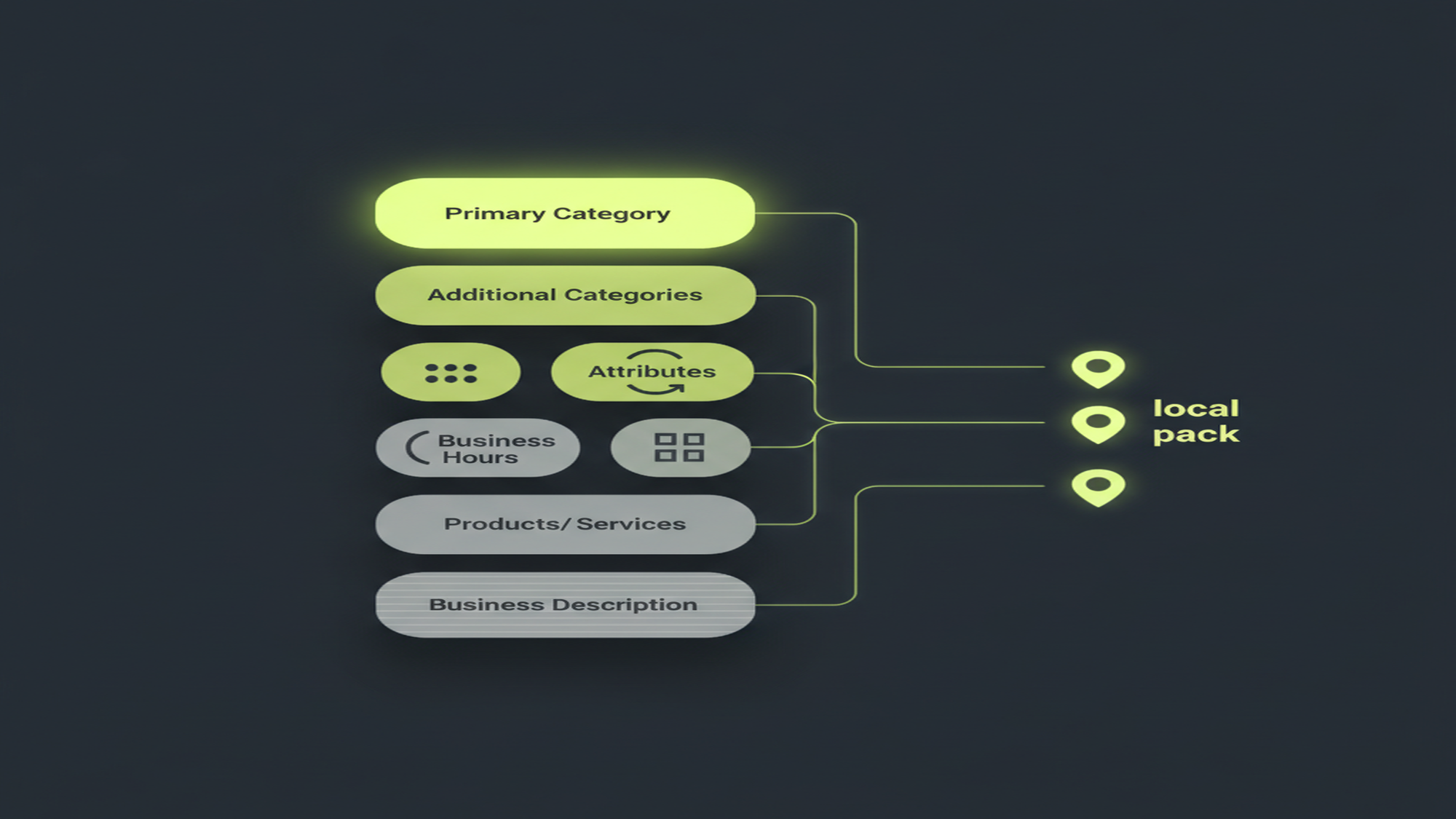
- Feed the fields the AI reads. Ask Maps builds answers from your categories, services, attributes, hours, photos, and reviews. The effort that once went into Q&A seeding now belongs in complete, accurate profile fields and genuine reviews.
Feature Status at a Glance: Retired, Retiring, and Live
The engagement corner of Google Business Profile has three interaction features people still search for — and two of the three have been switched off. The table below is the honest status board: messaging and the call-history log are retired, public Q&A is being retired and replaced by AI, and Bookings (Reserve with Google) is the one interaction feature that is genuinely live.
| Feature | Status | Key date(s) | How to reach the business now / what replaced it |
|---|---|---|---|
| Messaging / chat | Discontinued | July 31, 2024 (new chats blocked July 15, 2024) | Phone-call button, website links; text/SMS or WhatsApp for eligible accounts only |
| Call history (missed-call log) | Discontinued | July 31, 2024 (alongside chat) | The Performance “Calls” click-count metric remains (a separate feature) |
| Business Messages developer API | Ended | 2024 | Third-party and CRM chat routing went dark at the same time |
| Q&A (public Questions & Answers) | Retiring → AI | API off November 3, 2025; public Q&A phasing from December 3, 2025 | Gemini “Ask” / “Ask Maps” — answers built from profile fields and reviews |
| Bookings / Reserve with Google | Live | Ongoing | Book from the profile via a Reserve-with-Google partner or a booking URL (category-gated) |
Sources: Google, messaging discontinuation; Google, My Business Q&A API change log; Google, Reserve with Google.
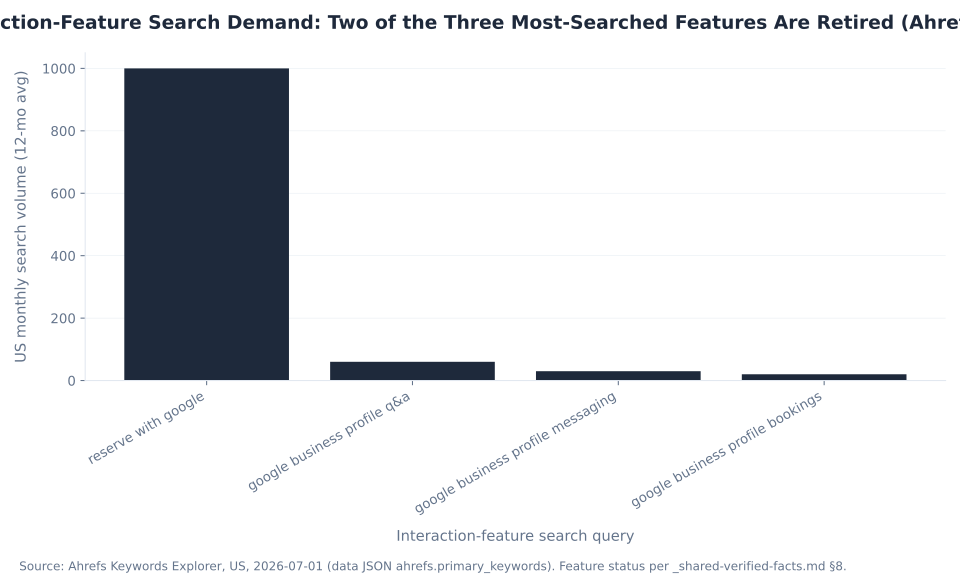
Interaction-Feature Search Demand: Two of the Three Most-Searched Features Are Retired (Ahrefs, US, 2026)
The search data underscores the through-line. About 1,050 US searches a month land on these four interaction-feature queries, and roughly 90 of them — the Q&A and messaging terms — point at features that no longer accept new activity. “reserve with google” (1,000/mo) is the dominant term, and it maps to the one live feature. The demand persists years after the features changed, which is exactly why stale “turn on GBP chat” content keeps ranking. For what each remaining contact action reports, see understanding Performance reports in GBP.
What Happened to Q&A on Google Business Profile?
The public Questions & Answers section — the community feature where anyone could ask a question on your profile, and where owners were coached to “seed their own FAQs to control the narrative” — is being phased out. The My Business Q&A API was discontinued on November 3, 2025 (announced September 15, 2025), and the public Q&A section began phasing out from December 3, 2025. Existing questions can still display during the wind-down, but no new Q&A content can be added.
That kills a tactic a lot of GBP playbooks still teach. “Seed your own questions and answers so the answers you want are the ones customers see” is advice for a closing feature — the Q&A API change log and the Business Profile API sunset schedule both confirm the November 3, 2025 shutoff. The job did not disappear; it moved upstream, into the profile fields and reviews that Google’s AI now reads.
What Is Ask Maps?
“Ask Maps” is Google’s Gemini-powered conversational Maps search, rolling out from around March 2026. Instead of an owner-seeded Q&A list, it generates answers to a searcher’s questions directly from your Business Profile fields and reviews — categories, attributes, services, hours, photos, and review text. Google has also announced deeper Gemini-to-Business-Profile integration for drafting review responses and updating hours. The practical consequence: keeping those fields complete and accurate now matters more than typing answers into a box that is closing.
With Q&A retiring, your reviews do double duty — a trust signal and a source Ask Maps reads to answer questions. See why customer reviews matter for local SEO for getting and responding to reviews the right way. The MB Adv Agency framing is simple: the “answer customers’ questions” job is still there, but it is now won by the completeness of your profile, not by a Q&A box you monitor.
Bookings and Reserve with Google: The One Live Interaction Feature
With chat and Q&A gone, Bookings (Reserve with Google) is the only interactive feature Google still ships on the profile — and it is very much live. Eligible businesses let customers book an appointment directly from the Search or Maps profile, either through a Reserve-with-Google scheduling partner — Square, Fresha, Setmore, Mindbody, and 150+ certified tools — or a pasted booking URL. The verticals it covers are the appointment-driven ones: dining, beauty, fitness, health, home services, and financial services.
The feature is category-gated: the profile’s primary category has to be one Google maps to a booking action before the “Book” button appears. Two facts get garbled into a false “Reserve with Google shut down” rumor, and both are wrong. First, the partner portal was rebranded “Actions Center” — a rename, not a shutdown. Second, the only booking vertical actually retired is tours / activities / attractions (“Things to Do”), which moved to a separate redirect-based “Google Things to Do” flow. Every ordinary appointment-based local business still books normally, per the Google Business Profile Help page and the Reserve with Google Help center.
The MB Adv Agency view: a booking button is the highest-intent action a free profile can offer, because it collapses “found you” and “committed to you” into one tap. For appointment-based local businesses — the gyms and studios and home-services trades where the booking and the phone call are the whole game — it is the single most valuable thing to turn on.

Turn Local Visibility Into Booked Jobs
Chat Is Gone. The Phone Still Rings.
Your free profile surfaces the call and the booking. The paid campaigns we run — Google Ads and Local Services Ads — make more of them happen alongside it. Talk to our team about turning local visibility into booked work.
Talk to our team →How Customers Actually Reach You Now
Strip out the two retired features and the GBP contact surface is cleaner than the old advice implied — it just runs through actions, not conversations. The live stack is the phone-call button, website link clicks, directions requests, text/SMS or WhatsApp for eligible accounts, bookings for booking-enabled categories, and — increasingly — Ask Maps answering a shopper’s question before a contact button is ever tapped.
| Contact method | How it works | Where it appears | Performance metric | Notes |
|---|---|---|---|---|
| Phone-call button | Tap to call your listed number | Search + Maps profile | Calls | The single highest-intent action on most local profiles |
| Website link | Click through to your site | Search + Maps profile | Website clicks | Keep the URL current and working |
| Directions | Route a customer to your address | Maps + local pack | Directions | Storefronts and hybrid businesses |
| Text/SMS or WhatsApp | Contact option surfaced from the profile | Search + Maps profile (eligible accounts only) | — | Account-gated; not the old universal chat |
| Bookings / Reserve with Google | Book an appointment from the profile | Search + Maps profile | Bookings | Category-gated; local-service verticals |
| Ask Maps | AI answers a question before a contact tap | Maps (Gemini) | — | Built from your profile fields and reviews |
Sources: Google, Performance metrics; Google, messaging discontinuation. Status and mechanic facts; no benchmark numbers.
One reporting wrinkle is worth naming. The Messages metric still exists in the Performance report as a historical field, but with native messaging discontinued it no longer reflects an active feature for the vast majority of profiles. The live contact-action metrics are Calls, Website clicks, Directions, and Bookings, per Google’s Performance documentation. Because there is no chat to “respond fast” to anymore, the conversion levers are simply accuracy and prominence — a correct phone number, a working website link, an up-to-date booking URL, and complete hours. Get those right and the profile does its job. For what each metric means, see understanding Performance reports in GBP; to turn that visibility into booked leads, see our lead-generation PPC services.
What This Means: Feed the Fields the AI Now Reads
The clean strategic conclusion — and the reason this page earns its keep — is that the engagement surface of Google Business Profile has collapsed into two things: the contact actions (call, website, directions, booking) and the profile content that feeds Google’s AI answers (categories, attributes, services, hours, photos, and reviews, which Ask Maps and AI Overviews now draw from). Owner effort that a 2022 playbook would have sent into chat response-time SLAs and Q&A seeding belongs, instead, in two places: generating and responding to genuine reviews, and keeping every profile field complete and accurate.
This is where the honest MB Adv Agency angle lives. Our team does not manage GBP profiles — but the paid campaigns we run convert on the same actions a free profile surfaces. Google Ads and, for local-service trades, Local Services Ads (pay-per-lead) both close on a call, a website visit, or a booking. A well-kept free profile and a paid lead-gen campaign are two doors to the same phone number. For how the free and paid sides complement each other, see Google Business Profile vs Google Ads and how much does Google Business Profile cost; for the paid side itself, start with the PPC services overview or talk to our team.
Frequently Asked Questions: GBP Messaging, Q&A, and Bookings
Next in the Google Business Profile series
What Is Google Business Profile?
Now that you know what happened to messaging and Q&A, get the full picture of the platform — the GMB-to-GBP rename, the sunset standalone app, and how the profile works on Search and Maps today.
Read the GBP overview →Methodology & Sources
This pillar is the honest legacy-term decoder for the engagement corner of Google Business Profile; depth on the Performance metrics and the reviews layer lives in the linked siblings. The messaging and call-history discontinuation (July 31, 2024; new chats blocked July 15, 2024; Takeout export to August 30, 2024) is from Google’s Business Profile Help page; Google’s stated reason was low usage, not privacy. The Q&A API shutoff (November 3, 2025; announced September 15, 2025) is from the My Business Q&A API change log and the Business Profile API sunset schedule. Bookings / Reserve with Google details are from Google Business Profile Help and the Reserve with Google Help center. Performance-metric definitions are from Google’s Performance page, and the Ask Maps / Gemini context from the Google blog. Search-demand figures are Ahrefs Keywords Explorer 12-month US averages (2026-07-01) and are search demand, not traffic. No mbadv client metrics appear in this article; all agency perspective is qualitative. Reviewed by MB Adv Agency, July 2026.
In an increasingly digital world, businesses need to find effective ways to connect with their customers. Google Business Profile (GBP) is a powerful tool that allows businesses to manage their online presence across Google, including Search and Maps. One of the standout features of GBP is its messaging capability, which enables businesses to communicate with customers directly. This article will delve into the messaging feature, how to enable and manage it, and tips for ensuring effective communication.
What is the messaging feature?
The messaging feature in Google Business Profile is a tool that allows businesses to send and receive messages from potential customers directly through their GBP listing. When a customer searches for a business on Google and views the business profile, they can click on the message button to initiate a conversation.
This feature is especially beneficial for small and medium-sized enterprises that may not have dedicated customer service teams. It enables businesses to respond quickly to customer inquiries, which can lead to increased customer satisfaction and potentially drive more sales.
Messages received through GBP are managed within the Google Business Profile app or through the Google Maps app, making it easy for business owners to stay connected while on the go. Customers can ask questions about products or services, inquire about operating hours, and get the answers they need quickly. This seamless integration into existing platforms allows businesses to maintain a professional presence without the need for complex systems or additional software, making it an accessible option for all types of businesses.
Moreover, the messaging feature supports multimedia content, allowing businesses to share images, links, and even videos in their responses. This capability can enhance customer interactions by providing visual context, such as showcasing a new product or demonstrating a service, which can further entice potential customers and drive engagement.
Benefits of the messaging feature
The messaging feature offers numerous advantages for businesses looking to enhance their customer communication. One of the most significant benefits is instant communication. In a world where speed is critical, being able to respond to queries in real-time can drastically improve customer experience.
Additionally, messaging helps build trust and rapport. When a business is quick to respond to messages, it showcases its dedication to customer service. This builds a positive reputation that can encourage new customers to choose your business over competitors. The immediacy of responses can also reduce the likelihood of customers turning to rival businesses for their needs, as they feel acknowledged and valued by your brand.
Furthermore, the messaging feature can be used to gather valuable feedback. By engaging with customers directly, business owners can gauge customer sentiment and identify areas for improvement. This two-way communication not only helps in understanding customer preferences but also allows businesses to adapt their offerings based on real-time insights, ensuring they remain competitive and relevant in their market.
Common use cases for messaging
Many businesses leverage the messaging feature for various purposes, including:
- Product inquiries: Customers often reach out to ask for more information about specific products, such as features, pricing, or availability.
- Service questions: Prospective clients may want to know details about the services offered, including how to book an appointment or consultation.
- Operational hours: Customers frequently inquire about business hours, especially during holidays or unusual circumstances.
- Location and directions: Some customers may need assistance with directions or want to confirm the address of the business.
In addition to these common inquiries, businesses can also utilize the messaging feature for promotional purposes. For instance, they can inform customers about special offers, upcoming events, or new product launches directly through the messaging platform. This proactive approach not only keeps customers informed but also encourages them to engage with the business more frequently, fostering a sense of community and loyalty.
Another innovative use case is for appointment scheduling. Many service-based businesses can streamline their booking process by allowing customers to message directly for availability, making it easier for both parties. This not only reduces the back-and-forth often associated with scheduling but also enhances the overall customer experience, leading to higher satisfaction and retention rates.
How to enable and manage messages
Enabling the messaging feature on your Google Business Profile is a straightforward process. Below are the steps to follow:
- Sign in to your Google Business Profile: Use your business account credentials to log in.
- Access the messaging settings: From your main dashboard, navigate to the "Messages" tab found within the menu.
- Enable messaging: Toggle the messaging option to 'on'. This will allow customers to start messaging you directly.
- Download the Google Business Profile app: For effective management, download the app to your mobile device. This will enable you to respond to messages quickly and on-the-go.
Managing incoming messages
Once messaging is enabled, it is crucial to stay on top of incoming communications. The Google Business Profile app provides a centralized location for all messages, making it easy to track and respond to inquiries promptly.
Set aside specific times throughout the day to check and respond to messages, ensuring that no inquiry goes unanswered for long. Quick replies help maintain customer engagement and convey a sense of professionalism. Consider using templates for common responses to save time while still providing personalized service. This approach not only streamlines your communication process but also ensures that your brand voice remains consistent across all interactions.
It's also important to customize your messaging settings to suit your business needs. You can choose to set an automated response for after-hours inquiries, letting customers know when they can expect a reply. Additionally, consider including links to your website or social media profiles in your automated messages to encourage further engagement and provide customers with easy access to more information about your offerings.
Tracking performance
Understanding how your messaging feature is performing can provide insights into customer engagement. Google gives businesses access to messaging insights, including the number of messages sent and the response time. Monitoring these metrics will help you gauge the effectiveness of your communication strategies.
Additionally, maintaining a log of frequently asked questions can assist in refining your responses. Over time, you may notice common trends or topics that customers inquire about, allowing you to improve your business offerings and the information available online. Analyzing this data can also help you identify peak messaging times, enabling you to allocate resources more efficiently during busy periods. Furthermore, consider soliciting feedback from customers about their messaging experience, which can provide valuable insights into areas for improvement and enhance overall customer satisfaction.
Tips for effective communication
To maximize the benefits of messaging through Google Business Profile, consider the following tips for effective communication with your customers:

- Be prompt: Aim to respond to messages as quickly as possible. A fast response can dramatically improve customer satisfaction.
- Stay professional: Regardless of the nature of the inquiry, it’s essential to maintain professionalism in your responses. Use proper grammar and be polite.
- Personalize your messages: Whenever possible, personalize your responses by addressing customers by their names and tailoring the content to their specific questions.
- Be concise: While it’s important to provide adequate information, keep your messages clear and to the point to avoid overwhelming the customer.
- Encourage feedback: After addressing an inquiry, invite customers to provide feedback about your service. This not only shows that you value their opinion but also helps improve your business practices.
Utilizing automated responses
Implementing automated messaging responses can help maintain communication, especially during busy hours or when you’re unavailable. Automated responses should include basic information and an estimated time for a detailed response.
For instance, you could create automated replies for FAQs such as operating hours or how to locate your business. This way, customers receive immediate assistance while awaiting a more comprehensive reply. Additionally, consider setting up automated messages for common inquiries about your products or services, which can streamline the communication process and free up your time for more complex customer interactions.
Follow up
After resolving a customer inquiry, following up can leave a positive impression. A simple message checking in to see if they have any further questions or need assistance with anything else can go a long way in building customer loyalty.
Moreover, following up can also serve as an opportunity to inform customers about new products, services, or promotions that may interest them. This not only keeps your business top-of-mind but also encourages repeat engagement. By demonstrating that you care about their experience even after the initial interaction, you foster a sense of community and trust, which can be invaluable in today’s competitive market.
Using messaging effectively in Google Business Profile can significantly enhance customer engagement, leading to improved customer satisfaction and retention. By implementing these strategies, businesses can make the most of this powerful communication tool.

As a Google Ads expert, I bring proven expertise in optimizing advertising campaigns to maximize ROI.
I specialize in sharing advanced strategies and targeted tips to refine Google Ads campaign management.
Committed to staying ahead of the latest trends and algorithms, I ensure that my clients receive cutting-edge solutions.
My passion for digital marketing and my ability to interpret data for strategic insights enable me to offer high-level consulting that aims to exceed expectations.
Google Partner Agency
We're a certified Google Partner Agency, which means we don’t guess — we optimize withGoogle’s full toolkit and insider support.
Your campaigns get pro-level execution, backed by real expertise (not theory).
4.9 out of 5 from 670+ reviews on Fiverr.
That’s not luck, that’s performance.
Highly recommend Matteo to set up your server side tracking. He has a deep understanding of e-commerce tracking and will go above and beyond to make sure everything is set up correctly and working 100%. If you are scaling your store this set up is non-negotiable in my opinion and there isn't many people who have this much knowledge or put the effort in to get it right. Thanks again!
avorodesign.com
I can only recommend Matteo! He was very patient, professional and very knowledgeable about GA4, Consent Mode v2, and GDPR compliance. Communication was clear, and the setup was done professionally and efficiently. Highly recommend him for anyone needing reliable tracking implementation.
www.natureiki.life
Matteo shines in the realm of online professionals. His work is not only deep in data but also complemented by his proactive communication and cooperation, setting a new standard for freelancers. If you want someone who truly exceeds expectations, look no further. Highly recommended!

www.omanbeverlysmyth.com
Exceptional Service Beyond Expectations - Outstanding Service Impeccable depth, flawless delivery, and exceptional language fluency—this service exceeded all expectations. Highly recommended. Matteo truly ROCKS!!!
ium-paris.com
Top-notch, always highly value working with Matteo. An absolute Google Ads Genius. This is approximately the 8th time I have hired him and he's helped us get 6-7 ROAS. We are excited in continuing to improve our lead flow. Hire this guy if you need Google Ads help. Thanks Matteo!
www.dleeventgroup.com
I finally found the guy who can setup server side tracking and all the ecosystem properly. I definitely recommend Matteo. He is very responsive, kind and wants to dig into things. He configured GA4, Meta, Google Ads, Outbrain and google consent v2 with Cookiebot. Thanks Matteo.
inomega.fr
MB Adv delivered exceptional work with outstanding professionalism and lots of patience, taking time to see effects of changes made and not just do the work and submit it. The proactive communication and video summaries of the work completed made working with Matteo a pleasure, as he consistently went above and beyond. Highly recommended for web analytics projects! We are already working on another project.

www.withnellsensors.co.uk
Working with Matteo on my Google Ads was a game-changer. He's not just a strategist, he's a true partner. He understood my goals and tailored a campaign that perfectly reached my target audience. I'm grateful for his expertise and dedication.
dccargo.com
Click-driven mind
with plastic-brick obsession.
We build Google Ads campaigns with the same mindset we use to build tiny brick worlds: strategy, patience, and zero tolerance for wasted pieces.
Data is our blueprint. Growth is the only acceptable outcome.