What Is Google Business Profile (GBP)? 2026 Guide

US search demand — Ahrefs, 2026
176,000/mo
US searches for the legacy name “Google My Business” — still ahead of the current name “Google Business Profile” (152,000/mo). Google renamed the product on November 4, 2021, and most of the web has not caught up. That gap is why the rename is the first thing this guide settles.
Source: Search Engine Land (Nov 4, 2021); Ahrefs Keywords Explorer (US, 2026-07-01)
What Is Google Business Profile (GBP)?
A Google Business Profile (GBP) is the free listing a business owns and manages that controls how it appears across Google’s local surfaces — Google Search, Google Maps, and the local/map pack that sits above the organic results for location-intent queries. It holds your name, address, phone, hours, categories, attributes, description, photos, products and services, posts, and reviews: the structured information Google reads to decide whether, where, and how prominently to show your business when someone searches with local intent. It is free to create, verify, and manage, and it is the local-SEO equivalent of getting your website indexed — the foundational presence that makes a local business eligible to be found.
Before any of the mechanics, one correction sets up everything else: this product used to be called Google My Business (GMB). Google renamed it Google Business Profile on November 4, 2021, and moved management directly into Google Search and Google Maps. “Google My Business” and “GMB” are now the legacy names, surviving only in developer surfaces. A guide that tells you to download the “Google My Business app” is describing a product that no longer exists.
Three things a Business Profile is not, because each is a common confusion: it is not a website — Google’s old free business.site builder was shut down in 2024; it is not an ads account — you do not pay for placement through GBP, and creating and managing a profile is free; and it is not the Google Maps app — Maps is one of the surfaces your profile appears on, not the profile itself. This page is the orientation anchor for the whole cluster: it settles what GBP is, what it was called, whether it is the same as Maps, whether it is free, whether you need one, and where it is heading — then routes you to the depth. When you are ready to claim yours, how to create a Google Business Profile covers the sign-up, business-info, and verification steps, and the free-versus-paid picture lives in Google Business Profile vs Google Ads.
Key Takeaways
- Google Business Profile is your free local presence on Google — not a website and not an ads account. It is the listing that controls how your business shows on Google Search, Google Maps, and the local/map pack.
- It was renamed from Google My Business (GMB) on November 4, 2021. The standalone GMB app was discontinued in 2022. There is no app to download; you manage the profile inside Search and Maps.
- GBP and Google Maps are not the same thing. The profile is the single record you own; Maps and Search are two surfaces that render it. Edit the profile once and both update.
- Creating, verifying, and managing a Business Profile is free. There is no premium tier of GBP itself. Google Ads and Local Services Ads are the separate paid products you can layer on top.
- A local business can operate without a profile — at a real disadvantage. Without one you forfeit eligibility for the local/map pack, the highest-visibility local surface. A claimed, verified, complete profile is table stakes.
Google My Business to Google Business Profile: The Rename, Decoded
Most confusion about this product traces to a single terminology gap. The web is saturated with “how to set up your Google My Business listing” guides that show an app and a dashboard that were pulled years ago. If your tutorial still says “Google My Business” and tells you to “download the app,” it is describing a product that no longer exists. On November 4, 2021, Google renamed Google My Business to Google Business Profile and moved profile management out of a separate destination and directly into the tools most owners already use — Google Search and Google Maps. The standalone Google My Business app was then discontinued in 2022 — Google never published a single hard cutoff day, so the honest phrasing is “gone since 2022,” not a specific date.
| Legacy belief (stale content) | The correct 2026 fact | When |
|---|---|---|
| “Google My Business (GMB)” is the product | Renamed Google Business Profile (GBP); management moved into Search + Maps | Nov 4, 2021 |
| “Download the Google My Business app” | Standalone GMB app discontinued; there is no app to download | 2022 |
| “Go to the GMB dashboard” | Manage inline via Google Search (search your business name), the Google Maps app, or Business Profile Manager (business.google.com) for multi-location and bulk work | Current |
| “Use the free GBP website builder” | business.site websites shut down (off Mar 1, 2024; “page not found” after Jun 10, 2024) | 2024 |
| “GMB is dead / the API is gone” | “GMB” and “Google My Business” survive only in developer surfaces — the mybusiness.googleapis.com API domain and package names | Current |
Sources: Search Engine Land (Nov 4, 2021); Google Business Profile Help. Names current as of 2026-07-01.
The MB Adv Agency read: this is the single highest-value correction on the platform. An owner following an old guide will spend twenty minutes hunting for an app that was pulled years ago. Leading with “it is Google Business Profile now, and you manage it inside Search and Maps” is the orientation that makes every other guide legible. For the full sign-up and verification sequence — where video verification is now the default method — see how to create a Google Business Profile.
Google Business Profile vs Google Maps: What’s the Difference?
This is the distinction that trips up more owners than any other. The clean framing: your Google Business Profile is the single record of your business that you own and edit. Google Maps is one surface where that record is displayed; Google Search — including the local/map pack — is another. When you update your hours in your Business Profile, the change propagates to both your Maps listing and your Search knowledge panel, because they are reading the same profile. So the questions people actually ask resolve cleanly: the data is one profile; Maps and Search are two windows onto it, and you can edit the profile through either window (or through Business Profile Manager).
| Question people ask | The answer |
|---|---|
| Is my Google Maps listing the same as my Business Profile? | No — the profile is the single record you own and edit; Maps is one surface it is displayed on, and Search (including the local pack) is another. |
| Where do I manage my listing — Maps or the profile? | Either window edits the same underlying profile. Update once (for example, your hours) and it appears in both Maps and the Search knowledge panel. |
| What feeds the local/map pack? | The Business Profile — name, rating, review count, address, hours, and photos are drawn primarily from it. |
Source: Google Business Profile Help. Framing web-verified 2026-07-01.
A useful mental model from the MB Adv Agency team: think of GBP as the database row and Google Maps and Google Search as two front-ends that render it. You optimize the row once; it improves your appearance everywhere the row is shown. This is a definitional distinction, not a “which is better” comparison. For how that single record then drives where you rank — how Google’s relevance, distance, and prominence factors turn a complete profile into local/map pack visibility — see how GBP impacts local rankings.
Why a Complete Profile Matters — and Whether You Can Succeed Without One
Google documents three local ranking factors: relevance, distance, and prominence (“Local results are mainly based on relevance, distance, and prominence” — Google Business Profile Help). Your profile is the primary input to all three: relevance comes from your categories, services, and description; distance is measured from the searcher to the address or service area on your profile; prominence is informed partly by links and by your number of reviews. The profile also populates the local pack — the roughly three-listing block with a map that sits above the organic results for location-intent searches, drawing its name, rating, review count, hours, and photos straight from Business Profiles.
So the honest answer to “can a small business succeed without a GBP?” is: yes, technically — but at a real disadvantage. Without a profile you can still have a website and run ads, but you forfeit eligibility for the local/map pack (the highest-visibility local surface), you do not appear as a rich result in Maps, and you cede that space to competitors who claimed their profile. For a local business, that is the equivalent of opting out of the front page of local search. The MB Adv Agency view: for the local businesses we work with, a claimed, verified, complete profile is not a growth tactic, it is table stakes — the free baseline that has to exist before paid local strategy is worth layering on. See how GBP impacts local rankings for how relevance, distance, and prominence are quantified.
Search Demand for Google Business Profile Head Terms (US, 2026)


Local visibility, paired with paid search
Getting Found in Local Search
Your free Google Business Profile handles the organic side. The paid campaigns that complement it — Google Ads and Local Services Ads — are where our team comes in. A free profile is the local baseline; managed PPC services and campaign management sit on top of it, and for the trades — plumbers, HVAC, and more — the free profile plus paid search is the standard local stack (see, for example, our plumbing PPC services).
Talk to our team →Where Google Business Profile Is Heading: The AI Direction
Established owners keep asking a fair question: with AI Overviews and “Ask Maps” changing local search, is GBP still worth the effort? The honest answer is that the surfaces are changing, but they all still draw from the profile — so a complete profile matters more, not less. Four changes define the direction in 2025–2026.
| AI feature | Status | What it does |
|---|---|---|
| AI “Suggest description” | Live / GA | Drafts your business description for you to review and edit (Google) |
| AI “Ask” / “Ask Maps” replacing public Q&A | Rolling (~2026) | Gemini-generated answers drawn from your profile fields and reviews; the old public Q&A section is being retired |
| Gemini ↔ Business Profile | Announced / rolling (Jun 10, 2026) | Connect your profile to Gemini “with a single tap” to ask about performance, draft review responses, and update hours |
| AI-suggested review replies | Limited test (not GA) | US, Brazil, and India since about March 2026 — editable drafts a human submits |
Sources: Google Business Profile Help; Google Blog (Jun 10, 2026); Whitespark. AI Overviews appeared on 68% of local searches vs local packs on 39% (Whitespark, Q2 2025 estimate — not a Google figure).
The MB Adv Agency read: the through-line is unmistakable — every one of these AI surfaces reads from the profile. “Ask Maps” answers, Gemini responses, and AI Overviews all pull from your categories, attributes, services, hours, photos, and review text. So the businesses with clean, complete, accurate profiles are the ones the AI has good material to work with. GBP is not being replaced by AI; it is becoming the source data for it. That reframes the cost question, too: a free profile is now the input to the fastest-growing local surfaces — for the full free-versus-paid breakdown, see how much does Google Business Profile cost.
Three Corrections That Signal Stale GBP Knowledge
1. “Google My Business is the current product — I need to download the app.” Both halves are wrong, and this is the platform’s number-one correction. Google renamed Google My Business to Google Business Profile on November 4, 2021, and the standalone GMB app was discontinued in 2022. There is no app to download. You manage your profile by signing in to Google and searching your business name in Google Search (the edit panel appears inline), by editing your listing in the Google Maps app, or — for multi-location and bulk work — through Business Profile Manager at business.google.com. A guide that tells you to install the GMB app predates the 2021–2022 changes.
2. “Google Business Profile and Google Maps are the same thing.” Not the same thing. Your Business Profile is the single record you own and manage; Google Maps is one of the surfaces that record is displayed on, and Google Search (including the local/map pack) is another. Both listings render the same underlying profile, which is why updating your hours or category once, in your profile, changes how you appear in both places at once. You can edit through the Maps app, but you are editing the profile, not a separate “Maps listing.”
3. “A Google Business Profile costs money — it is part of my ad spend.” No. Creating, verifying, and managing a Google Business Profile is free, and there is no premium or paid tier of GBP itself. What you pay for is entirely separate: Google Ads (including Local Search Ads) and Local Services Ads, the pay-per-lead product for local service businesses. The clean framing: GBP is your free organic local presence; Google Ads and LSA are the separate paid advertising you can layer on top. For the full free-versus-paid picture see how much does Google Business Profile cost, and for how the two roles differ see Google Business Profile vs Google Ads: key differences.
Frequently Asked Questions: Google Business Profile
Next in the Google Business Profile series
Ready to Claim Yours?
You know what a Business Profile is — now create one. The setup guide covers signing in, adding your business information, and passing verification (video verification is now the default method).
Read the setup guide →Methodology & Sources
This pillar is the orientation anchor for the Google Business Profile cluster; depth lives in the linked siblings. The GMB → GBP rename (November 4, 2021) and the app discontinuation (2022) are from Search Engine Land and Google’s own documentation. The “creating a Business Profile is free” statement is from support.google.com/business/answer/2911778; the three local ranking factors (relevance, distance, prominence) from support.google.com/business/answer/7091; the AI “Suggest description” tool from support.google.com/business/answer/13682007; the Gemini integration from the Google Blog (June 10, 2026). The AI Overviews figure — 68% of local searches versus local packs on 39% — is a Whitespark Q2 2025 estimate, not a Google figure, and is attributed as such. Head-term search volumes are from Ahrefs Keywords Explorer (US, 12-month average, retrieved 2026-07-01). No mbadv client metrics appear in this article; MB Adv Agency perspective is qualitative. Reviewed by MB Adv Agency, July 2026.
The digital landscape continues to evolve, and businesses are increasingly recognizing the importance of having a strong online presence. One of the tools that has emerged to facilitate this is Google Business Profile (GBP). This platform acts as a cornerstone for local businesses looking to enhance their visibility on Google's search engine and Maps. In this article, we will explore what Google Business Profile is, its overview, importance for local businesses, and the key benefits it offers for visibility and engagement.
What is Google Business Profile (GBP)?
Google Business Profile, formerly known as Google My Business, is a free tool provided by Google that allows businesses to manage their online presence across Google platforms. GBP enables businesses to create an interactive profile that appears in search results and on Google Maps.
By setting up a profile, businesses can provide essential information such as their address, phone number, website, operating hours, and types of services offered. This information is crucial for potential customers trying to find local services or places of interest, as it directly influences their purchasing decisions.
Furthermore, Google Business Profile allows users to engage with the business through features such as messaging, posting updates, and responding to customer reviews. This level of interaction not only fosters a community around the brand but also contributes to customer loyalty and satisfaction. Additionally, businesses can utilize insights provided by GBP to analyze customer interactions and optimize their strategies accordingly, ensuring they remain competitive in their local markets.
Components of Google Business Profile
Understanding the various components of GBP can help business owners harness its full potential:
- Business Information: This is the foundational aspect that includes basic details like the name, location, and contact information.
- Photos and Videos: Visual content plays a vital role in attracting customers. GBP allows businesses to upload images and videos that showcase their products, services, or premises.
- Reviews: Customer reviews can have a significant impact on reputation. GBP provides a platform for businesses to showcase ratings and feedback from customers.
- Posts: Businesses can share updates, offers, or events through posts, which can engage customers and keep them informed.
In addition to these components, GBP also features a Q&A section where potential customers can ask questions directly related to the business. This feature not only provides an opportunity for businesses to address inquiries promptly but also allows them to highlight frequently asked questions that may assist in guiding customer decisions. Moreover, the ability to add attributes, such as "wheelchair accessible" or "women-owned," helps businesses stand out and cater to specific customer needs, enhancing their visibility in search results.
Another significant aspect of GBP is the integration with Google Ads, allowing businesses to promote their services directly within search results. This synergy can lead to increased visibility and higher engagement rates, as potential customers are more likely to click on ads that are relevant to their immediate needs. By leveraging these tools, businesses can not only improve their online presence but also drive foot traffic and online conversions, ultimately contributing to their growth and success in an increasingly digital marketplace.
Overview of Google Business Profile
The overview of Google Business Profile reveals how it integrates with various Google services. When a user searches for a business or a product, GBP often appears as a panel on the right side of the search results, providing immediate information. This enhances the likelihood of customer engagement because relevant data is readily available. The panel typically includes essential details such as the business name, address, phone number, hours of operation, and even a link to the website, all designed to facilitate quick decision-making for potential customers.

Moreover, Google Business Profile plays a significant role in search engine optimization (SEO). By optimizing the profile with relevant keywords, businesses can improve their chances of appearing in local search results, thereby increasing their visibility to nearby consumers. This is particularly important in today's digital landscape, where consumers often rely on their mobile devices to find local services. A well-optimized GBP can lead to increased foot traffic, higher conversion rates, and ultimately, greater revenue for businesses.
Setting Up Your Google Business Profile
Creating an effective GBP is a straightforward process but requires attention to detail. Here are the steps involved:
- Claim Your Business Listing: If your business already appears on Google, begin by claiming it. If not, you can create a new listing.
- Fill Out Your Profile Completely: Ensure all sections are filled with accurate and up-to-date information. This includes not just the basics, but also special features like attributes that highlight what makes your business unique, such as "wheelchair accessible" or "free Wi-Fi."
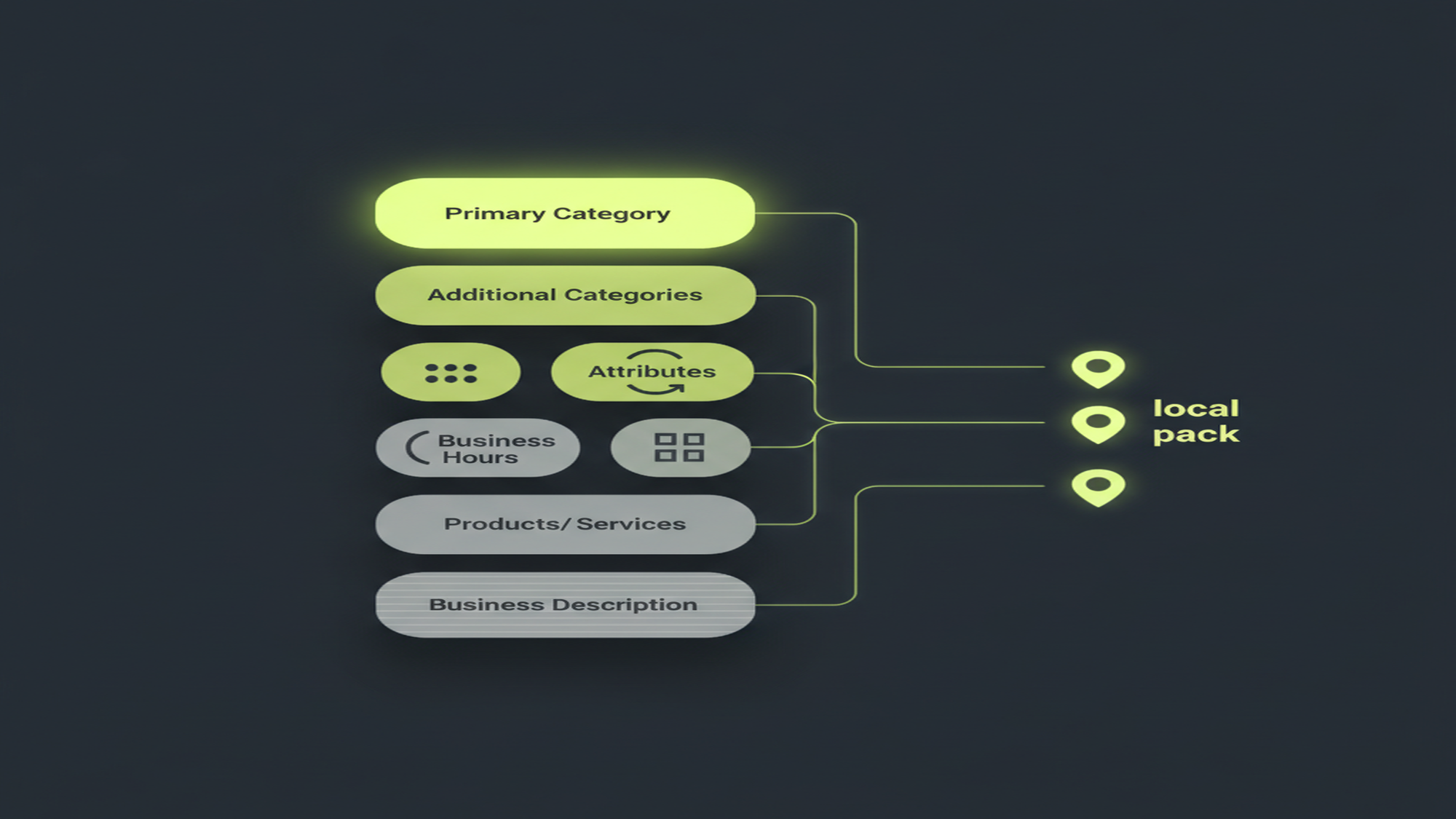
- Choose the Right Business Categories: Select categories that best match your services to improve searchability. Google allows you to choose a primary category and additional categories, which can help refine your audience reach.
- Add Images: High-quality images can significantly enhance your profile's attractiveness. Consider including photos of your products, your team, or even your workspace to give potential customers a feel for your business atmosphere.
- Encourage Reviews: Actively engage your customers to leave reviews and respond to them promptly. Positive reviews not only build credibility but also contribute to your ranking in local search results.
Additionally, it’s beneficial to regularly update your Google Business Profile with new information, such as seasonal hours or special promotions. This not only keeps your profile fresh but also signals to Google that your business is active, which can positively influence your search ranking. Engaging with customers through posts, Q&A, and messaging features can further enhance your profile, creating a dynamic presence that encourages interaction and fosters community trust.
Importance for Local Businesses
For local businesses, Google Business Profile is not just an optional tool but a necessity. Given that many consumers rely on Google to discover local services, maintaining an optimized profile ensures higher visibility in a crowded marketplace. This visibility can be the difference between a thriving business and one that struggles to attract customers. With the right information, photos, and updates, businesses can create a compelling online presence that draws in potential clients who may not have otherwise discovered them.
Additionally, GBP can impact local SEO rankings, making it easier for potential customers to find the business through their mobile devices. Recent statistics indicate that nearly 76% of consumers visit a business within a day of searching for it on their smartphones. This underscores the critical role that GBP plays in capturing local traffic. Furthermore, as mobile searches continue to rise, businesses that optimize their profiles with accurate information, engaging photos, and relevant keywords are more likely to appear in the coveted local pack, which can significantly increase foot traffic and sales.
Engaging the Local Community
Another significant aspect of Google Business Profile is the ability to engage with the local community actively. By sharing posts about special promotions, events, or community involvement, businesses can foster relationships with local customers and enhance brand loyalty. Regular updates can keep the audience informed and excited about what the business has to offer, creating a sense of anticipation and connection that can lead to repeat visits.
Moreover, responding to customer reviews, whether positive or negative, demonstrates a commitment to customer service and responsiveness. This level of engagement can lead to word-of-mouth referrals, which are invaluable for local businesses. When customers see that a business values their feedback, they are more likely to share their positive experiences with friends and family, further amplifying the business's reach. Additionally, showcasing customer testimonials or highlighting community partnerships can enhance credibility and trust, making the business a go-to choice for local consumers seeking reliable services.
Key Benefits for Visibility and Engagement
The benefits of using Google Business Profile extend beyond just having an online presence. Here are some key advantages:

- Enhanced Visibility: As mentioned, GBP puts business information front and center, increasing the likelihood of attracting customers.
- Boosted Credibility: A well-maintained profile with positive reviews can enhance a business's credibility in the eyes of potential customers.
- Insights and Analytics: GBP offers insights that allow business owners to track performance, understand customer behavior, and tailor marketing strategies accordingly.
- Customer Interaction: With features like messaging and posts, businesses can directly interact with customers, providing timely responses and enhancing customer service.
Moreover, the ability to showcase products and services through the Google Business Profile can significantly enhance a business's appeal. By uploading high-quality images and detailed descriptions, businesses can create a visually engaging experience that draws in potential customers. This visual representation not only helps in capturing attention but also allows businesses to convey their brand story effectively. Additionally, businesses can highlight special offers or promotions, which can further entice customers to choose them over competitors.
Another noteworthy advantage of utilizing Google Business Profile is the integration with Google Maps. This feature ensures that customers can easily find a business's physical location, making it more convenient for them to visit. The inclusion of directions, hours of operation, and contact information streamlines the customer journey, reducing barriers to engagement. Furthermore, businesses can leverage the Q&A section to address common inquiries, fostering an informed customer base and minimizing the need for repetitive communication.
Conclusion
In conclusion, Google Business Profile is an invaluable tool for local businesses seeking to improve their online presence. By understanding what GBP offers and how to maximize its features, businesses can ensure they stand out in search results, engage effectively with customers, and ultimately drive more foot traffic and sales.
As digital consumer habits continue to evolve, leveraging tools like Google Business Profile will undeniably become increasingly important for local businesses aiming for success in the competitive marketplace.

As a Google Ads expert, I bring proven expertise in optimizing advertising campaigns to maximize ROI.
I specialize in sharing advanced strategies and targeted tips to refine Google Ads campaign management.
Committed to staying ahead of the latest trends and algorithms, I ensure that my clients receive cutting-edge solutions.
My passion for digital marketing and my ability to interpret data for strategic insights enable me to offer high-level consulting that aims to exceed expectations.
Google Partner Agency
We're a certified Google Partner Agency, which means we don’t guess — we optimize withGoogle’s full toolkit and insider support.
Your campaigns get pro-level execution, backed by real expertise (not theory).
4.9 out of 5 from 670+ reviews on Fiverr.
That’s not luck, that’s performance.
Highly recommend Matteo to set up your server side tracking. He has a deep understanding of e-commerce tracking and will go above and beyond to make sure everything is set up correctly and working 100%. If you are scaling your store this set up is non-negotiable in my opinion and there isn't many people who have this much knowledge or put the effort in to get it right. Thanks again!
avorodesign.com
I can only recommend Matteo! He was very patient, professional and very knowledgeable about GA4, Consent Mode v2, and GDPR compliance. Communication was clear, and the setup was done professionally and efficiently. Highly recommend him for anyone needing reliable tracking implementation.

www.natureiki.life
Matteo shines in the realm of online professionals. His work is not only deep in data but also complemented by his proactive communication and cooperation, setting a new standard for freelancers. If you want someone who truly exceeds expectations, look no further. Highly recommended!

www.omanbeverlysmyth.com
Exceptional Service Beyond Expectations - Outstanding Service Impeccable depth, flawless delivery, and exceptional language fluency—this service exceeded all expectations. Highly recommended. Matteo truly ROCKS!!!

ium-paris.com
Top-notch, always highly value working with Matteo. An absolute Google Ads Genius. This is approximately the 8th time I have hired him and he's helped us get 6-7 ROAS. We are excited in continuing to improve our lead flow. Hire this guy if you need Google Ads help. Thanks Matteo!
www.dleeventgroup.com
I finally found the guy who can setup server side tracking and all the ecosystem properly. I definitely recommend Matteo. He is very responsive, kind and wants to dig into things. He configured GA4, Meta, Google Ads, Outbrain and google consent v2 with Cookiebot. Thanks Matteo.
inomega.fr
MB Adv delivered exceptional work with outstanding professionalism and lots of patience, taking time to see effects of changes made and not just do the work and submit it. The proactive communication and video summaries of the work completed made working with Matteo a pleasure, as he consistently went above and beyond. Highly recommended for web analytics projects! We are already working on another project.
www.withnellsensors.co.uk
Working with Matteo on my Google Ads was a game-changer. He's not just a strategist, he's a true partner. He understood my goals and tailored a campaign that perfectly reached my target audience. I'm grateful for his expertise and dedication.
dccargo.com
Click-driven mind
with plastic-brick obsession.
We build Google Ads campaigns with the same mindset we use to build tiny brick worlds: strategy, patience, and zero tolerance for wasted pieces.
Data is our blueprint. Growth is the only acceptable outcome.