
How Much Does Google Business Profile Cost? (2026)

Google Business Profile Cost 2026
$0
A Google Business Profile is free — $0 to create, $0 to verify, $0 to manage, with no subscription and no premium tier. You pay only for optional Google Ads (per click) or Local Services Ads (per lead).
Profile, verification & management: $0 · Local Services Ads cost per lead ~$34–$249 by trade (The Media Captain, Aug 2025) · blended ~$53 (SearchLight Digital, Feb 2026)
How Much Does Google Business Profile Cost in 2026?
A Google Business Profile is free — $0 to create, $0 to verify, and $0 to manage, with no subscription and no premium tier. There is no paid or premium tier of the profile itself. The literal answer to “how much does Google Business Profile cost?” and “is Google Business Profile free?” is identical: the profile is free, per Google’s own documentation — “Creating a Business Profile and listing your business on Google is free.”
You pay Google only when you choose to run separate, optional paid advertising alongside the free profile: Google Ads (including Local Search Ads that promote your listing across Search and Maps), which is auction-priced and billed per click; or Local Services Ads (LSA), which is billed per qualified lead — a call, message, or booking — at a per-lead price Google sets by trade, market, and competition. Table 1 gives the cost answer at a glance; the sections that follow decode the billing model and the named Local Services Ads cost-per-lead benchmarks.
| Item | Cost | What it requires |
|---|---|---|
| Creating a Google Business Profile (claim / add your business) | $0 — free | A Google account and your business info; managed in Google Search + Maps (or Business Profile Manager for multi-location) |
| Verification (video / phone / email / postcard — Google assigns the method) | $0 — free | Complete the method Google assigns; you cannot freely pick the method, but none of them cost money |
| Managing the profile (categories, description, photos, hours, products & services, Google Posts, reviews, Performance reports) | $0 — free, no premium tier | A verified profile; every content and reporting feature is included at no cost |
| Appearing in the local / map pack (organic placement on Search & Maps) | $0 — free (organic) | Earned via relevance, distance, and prominence — a complete, accurate, well-reviewed profile; you cannot pay to rank organically |
| Google Ads (incl. Local Search Ads that promote your profile on Search & Maps) — optional, paid | Pay-per-click (CPC) — auction-priced; budget you set | A linked Google Ads account, campaign, and budget; you pay per click, not for the profile |
| Local Services Ads (LSA) — the top-of-Search unit with the “Google Verified” badge, for eligible local/home-services trades — optional, paid | Pay-per-lead (call / message / booking) — Google sets the per-lead price by trade, market & competition | An LSA account, screening/verification for the “Google Verified” badge, an eligible trade + service area, and a budget; you pay per lead, not per click and not for the profile |
Sources: Google, “Creating a Business Profile … is free” (no paid or premium tier); Google, “How Local Services Ads work” (LSA charges per qualified lead; Google sets the per-lead price). Not mbadv client data.
MB Adv Agency frames the cost question the same way for every local business: the profile is your free organic presence on Search and Maps, and Google Ads and Local Services Ads are the separate, optional paid advertising that can accelerate it. “Google My Business” is the legacy name — Google renamed it Google Business Profile on November 4, 2021, so a business owner who still types “GMB cost” is looking at the same free product. For the full free-organic-versus-paid comparison, see Google Business Profile vs Google Ads: key differences; new to the product entirely, start with what a Google Business Profile is.
Is Google Business Profile Free? Why There Is No Price Tag
Yes — a Google Business Profile is free, and the most common misconception behind the search “Google Business Profile pricing” is that there is a cost structure to decode. There is not. Creating the profile, completing verification (video, phone, email, or postcard — whichever method Google assigns), and managing every content and reporting feature all carry a cost of $0. A business owner who has created a profile, verified it, and is actively managing categories, photos, reviews, Google Posts, and the free Performance reports has spent exactly $0. That is the entire “Google Business Profile pricing” story: no tier, no subscription, no listing fee.
The cost question only becomes a number question when a business links the profile to paid Google advertising. At that point the cost is set entirely by the model you choose: Google Ads bills per click on an auction-priced budget you control, and Local Services Ads bills per qualified lead at a price Google sets by trade, market, and competition. Neither one is required to have a profile or to appear in the local pack — both are optional accelerants layered on top of a free organic foundation. Creating a Google Business Profile is the free first step; the paid layer is a separate decision that comes later, once you want lead volume beyond what organic delivers.
The distinction that most cost pages get wrong is the billing unit. Local Services Ads are priced per lead, not per click — and Google, not an auction of your keyword bids, sets that per-lead price. That single fact is why a generic “average Google Ads CPC” number from a benchmark roundup describes neither Google Business Profile (which is free) nor Local Services Ads (which is pay-per-lead). The named, dated cost-per-lead datasets below tell the real story, and the source-discipline table decodes exactly which numbers apply to which product.
What Local Businesses Search: The Free/Cost Head Terms
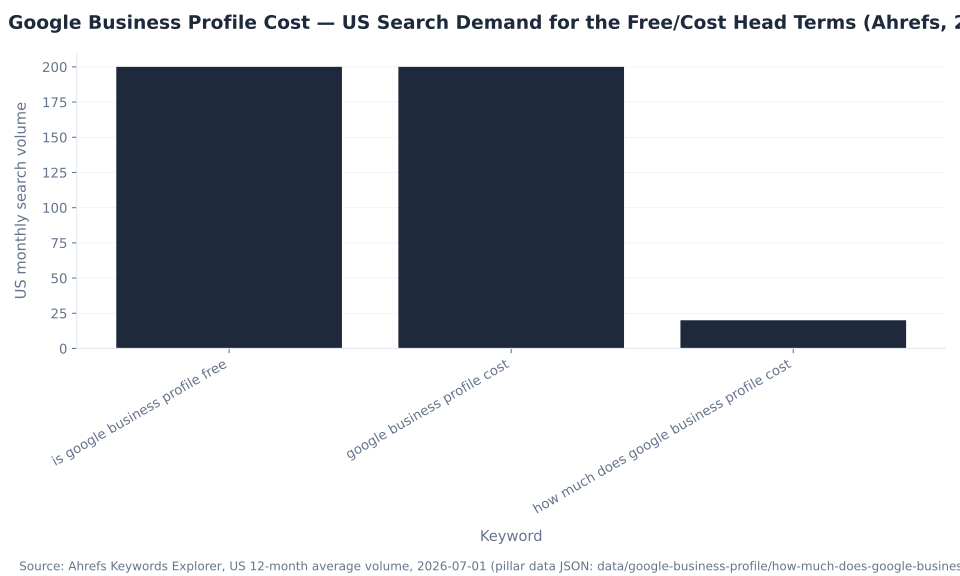
The binary free/cost intent dominates demand for this topic. “Is google business profile free” runs 200 US searches per month at KD 89, and “google business profile cost” runs 200 per month at KD 1 (Ahrefs Keywords Explorer, US, 2026-07-01) — the two highest-volume head terms. The exact-match query “how much does google business profile cost” adds 20 per month and is the anchor for this page. The existing URL already holds 9,230 Search Console impressions across 347 keywords (position 17.2) in the 90-day window — the reason this guide leads with the literal “$0, free, no premium tier” answer instead of burying it under benchmarks.
| Keyword | US monthly volume | KD | Note |
|---|---|---|---|
| is google business profile free | 200 | 89 | Binary yes/no head term — answered “$0, free” above the fold |
| google business profile cost | 200 | 1 | Head-term variant; KD 1 — very winnable |
| how much does google business profile cost | 20 | — | The exact slug and the mandatory H2 anchor for this section |
Source: Ahrefs Keywords Explorer, US 12-month average volume, 2026-07-01, plus the pillar GSC export (90-day window 2026-04-02–2026-07-01: 7 clicks / 9,230 impressions / 347 keywords / position 17.2). Not mbadv client data.
Every version of this page answers the same two sequential questions a local business arrives with: first, “is this free, or is there a catch?” and then, “what — if anything — will I actually pay Google for?” The answer to the first is unqualified: the profile is free. The answer to the second is the optional paid layer decoded in the tables below.
The Source-Discipline Rule: Google Ads CPC Is Not LSA Cost Per Lead
The number that most frequently misleads local businesses researching Google costs is the WordStream/LocaliQ “average Google Ads CPC” — a headline figure of roughly $4–$6 per click that appears in benchmark roundups. That figure is paid-Search data: keyword-targeted text ads on the Google results page, billed per click. It has nothing to do with Local Services Ads, which are billed per lead at a price Google sets, and nothing to do with Google Business Profile, which is free. MB Adv Agency treats this as a hard source-discipline rule — the local-advertising analog of a mistake that misstates a budget by an order of magnitude.
| Source | Figure | Scope | Status |
|---|---|---|---|
| The Media Captain — trade range | $34–$249 per lead | LSA cost-per-lead; 100+ accounts; Aug 2025 | ✅ Named LSA source — use (per-trade) |
| SearchLight Digital — blended | $53 per lead | LSA cost-per-lead; 888 contractors; Feb 2026 | ✅ Named LSA source — use (blended) |
| WordStream — LSA guide | ~$60 per lead | LSA average; guide page updated 2026-04-30 | ⚠ Directional context only — not charted per-trade |
| WordStream/LocaliQ — “Google Ads Benchmark” CPC | ~$4–$6 per click | Google + Microsoft Search campaigns; not LSA, not GBP | ✗ WRONG PRODUCT — paid-Search only; excluded |
| Google Business Profile itself | $0 | Free tool; no premium tier | ✅ Google-documented — the headline answer |
Sources: The Media Captain (Aug 2025, 100+ accounts); SearchLight Digital (Feb 2026, 888 contractors); WordStream, “Google Local Services Ads” guide (~$60 LSA CPL, page updated 2026-04-30); Google ($0 profile). WordStream/LocaliQ’s flagship “Google Ads Benchmarks” reports are paid-Search only and are excluded from every benchmark here. Not mbadv client data.
The discipline is simple and load-bearing: for Google Business Profile cost, the answer is $0; for Local Services Ads cost per lead, use the named LSA datasets (The Media Captain, SearchLight Digital, and WordStream’s LSA guide) with their sample sizes — and never borrow a paid-Search CPC and present it as an LSA or GBP cost. WordStream itself only cites an LSA number inside a guide (about $60 average cost per lead), not inside its flagship Search-only benchmark report. If your Google Ads or Local Services Ads spend feels high relative to the leads it returns, a Google Ads PPC audit is the fastest way to find where the budget is going and whether your cost per lead is in line with your trade.
Local Services Ads Cost Per Lead by Trade (The Media Captain)
Once a local business understands the profile is free, the real money question is what a lead costs through Local Services Ads — and the answer is set almost entirely by trade. The Media Captain (Jason Parks) reports cost-per-lead averages across 100+ managed client accounts, published August 26, 2025. These are cost-per-lead figures — a call, message, or booking — not cost-per-click, and not a Google-published or universal number.
| Trade | Avg cost per lead | Directional note |
|---|---|---|
| Personal Injury (law) | $249 | Highest in the dataset; very high case value drives fierce competition and per-lead price |
| Roofer | $162 | High-ticket home-services trade; seasonal and storm-driven demand spikes competition |
| HVAC | $80 | High-volume, high-competition trade; strong seasonal peaks (summer/winter) |
| Fencing | $71 | Mid-ticket project trade; competition varies widely by metro |
| Plumbing | $69 | High-volume emergency + planned demand; dense advertiser field in most markets |
| Estate Lawyer | $45 | Professional-services trade; lower volume than home services but high client value |
| Painter | $40 | Mid-volume home-services trade; competition varies by season and metro |
| Landscaper | $39 | Seasonal demand; strong spring/summer peaks in most regions |
| Drywall / Handyman | $34 | High-volume, lower-ticket trade; among the least expensive leads in the dataset |
| Locksmith | $34 | Emergency, lower-ticket trade; tied for the least expensive lead in the dataset |
| ★ Trade spread (this dataset) | ~$34 → $249 | A 7×+ spread driven almost entirely by trade — the single biggest LSA cost driver |
Source: The Media Captain (Jason Parks), “Google Local Service Ad Statistics” (published Aug 26, 2025; cost-per-lead averages across 100+ managed client accounts). These are LSA cost-per-lead figures, not cost-per-click and not a Google-published or universal number. Do not apply WordStream/LocaliQ’s “average Google Ads CPC” (a paid-Search figure) to any row. Not mbadv client data.
The ~7× spread from Locksmith and Handyman ($34) to Personal Injury ($249) is the headline: locate your trade before you budget. High case or ticket value — law, roofing — pulls the per-lead price up, while higher-volume, lower-ticket trades run cheaper. This is a vendor benchmark, so read it alongside a second named dataset rather than as a fixed rate card. For a higher-cost-per-lead home-services trade, see our roofing PPC services; for a high-volume trade with strong seasonal peaks, our HVAC PPC services.
Local Services Ads Cost Per Lead by Trade (SearchLight Digital)
SearchLight Digital’s February 2026 home-services benchmark is the larger-sample named LSA dataset: 888 contractors, $6.72M in spend, and 126,650 leads. It reports a blended figure plus per-trade breakdowns, and it pairs with The Media Captain to triangulate a realistic range — the two datasets overlap on HVAC and plumbing, which lets a reader sanity-check the numbers rather than trust a single source.
| Trade | Avg cost per lead | Directional note |
|---|---|---|
| Blended (all home-services trades) | $53 | The dataset-wide average across 888 contractors and 126,650 leads |
| Water Heater | $71 | Highest cost per lead in this dataset; high-intent, high-ticket replacement work |
| Drain / Sewer | $59 | Specialized plumbing sub-trade; higher urgency, higher per-lead price |
| Plumbing | $57 | Slightly above the blended average; high-volume, high-competition trade |
| General (contracting) | $54 | Close to the blended average; broad trade with wide project-value range |
| HVAC | $51 | SearchLight reports ~9.55× ROAS — the strongest return in the dataset despite mid-range CPL |
| Electrical | $39 | Lowest cost per lead in this dataset; ~8.52× ROAS at a ~$1,434 avg ticket |
| ★ Trade spread (this dataset) | ~$39 → $71; blended $53 | Figures are gross (pre-credit); ~6–7% of leads are refunded via disputes, so effective CPL runs slightly lower |
Source: SearchLight Digital, “Google Local Service Ads Cost Per Lead” (Feb 2026 home-services benchmark; 888 contractors, $6.72M in spend, 126,650 leads). LSA cost-per-lead, gross (pre-credit) — SearchLight notes ~6–7% of leads are refunded via disputes, so effective cost per lead sits slightly below these numbers. A named vendor dataset, not a Google or universal figure. Not mbadv client data.
The two datasets overlap where it counts: HVAC reads ~$51 here versus ~$80 at The Media Captain, and Plumbing ~$57 versus ~$69 — different samples, periods, and account mixes, so the honest presentation is the range, not a single “true” number. SearchLight’s figures are gross, before dispute credits; because roughly 6–7% of leads are refunded, a real effective cost per lead runs slightly below the gross benchmark. Turning a free profile into measurable, paid lead volume is exactly what our lead-generation PPC work does — the paid complement to your organic local presence.

The Billing-Model Decoder: Free Profile vs Google Ads vs Local Services Ads
For a business deciding where — if anywhere — to spend, the useful frame is not “what does Google cost” but “which surface costs money, and per what unit.” There are three surfaces, and only two of them bill you at all. The free profile is the organic foundation; Google Ads and Local Services Ads are the optional paid placements, each with its own billing unit.
| Surface / product | Cost model | Requires an ad account? | Placement |
|---|---|---|---|
| Google Business Profile (the free organic listing on Search & Maps) | $0 — no cost per click, per lead, or per impression; no premium tier | No — a Google account and a verified profile; no ad account needed | Organic local / map pack, the business panel on Search, and the Maps listing; earned via relevance, distance, prominence |
| Google Ads (incl. Local Search Ads that promote your profile on Search & Maps) | Pay-per-click (CPC) — auction-priced; bids and budget you control | Yes — a linked Google Ads account, campaign, and budget | Paid ad slots on Search and Maps; you are charged when someone clicks |
| Local Services Ads (LSA) — the top-of-Search unit with the “Google Verified” badge (eligible local/home-services trades) | Pay-per-lead (call, message, or booking) — Google sets the per-lead price by trade, market & competition (not a keyword auction of your bids) | Yes — an LSA account plus screening/verification for the “Google Verified” badge and an eligible trade + service area | The LSA unit at the very top of Search results (above regular ads); you are charged per qualified lead, not per click |
Sources: Google, “Creating a Business Profile … is free” (no ad account required, no premium tier); Google, “How Local Services Ads work” (per qualified lead; Google sets the per-lead price; the “Google Verified” badge consolidated Google Guaranteed / Google Screened / License Verified in Oct 2025 and the money-back guarantee was discontinued); Google Ads Help (Local Search Ads = auction-priced per click). Not mbadv client data.
The practical read: the profile costs nothing and requires no ad account; Google Ads bills you per click through a linked ad account; Local Services Ads bills you per qualified lead at a Google-set price and puts your listing, with the “Google Verified” badge, at the very top of Search for eligible trades. For the full free-organic-versus-paid comparison — how each one complements the other — see Google Business Profile vs Google Ads: key differences. For end-to-end paid media across both products, see our PPC services.

What Drives Your Local Services Ads Cost Per Lead Up or Down
Because Google sets the LSA per-lead price rather than an auction of your keyword bids, the levers that move your cost per lead are structural, not tactical bid tweaks. The table below pulls the drivers into one scannable view — from the trade itself (the single biggest factor) to the review and service-area work that quietly protects your effective cost per lead.
| Lever | How it moves your LSA cost per lead |
|---|---|
| Trade / vertical | The biggest structural driver: The Media Captain’s data runs ~$34 (locksmith/handyman) to ~$249 (personal injury) — a 7×+ spread. High case/ticket value (law, roofing) pulls per-lead price up; higher-volume, lower-ticket trades run cheaper |
| Geography / market | Google sets the per-lead price by market; dense, competitive metros cost more per lead than smaller markets for the same trade. Your service area shapes both price and volume |
| Competition density | More advertisers competing for the same leads raises the price Google sets; seasonal surges (storm season for roofing, peak summer/winter for HVAC) intensify competition and per-lead cost |
| Reviews & rating | A higher review count and rating improve LSA ranking, which drives more — and often more cost-efficient — lead flow. The free-profile review work directly affects your paid-lead economics |
| Responsiveness & lead quality | Fast answer rates and high booked-job rates improve ranking and return; unqualified leads that meet dispute criteria can be credited (automated ML review), lowering your effective cost per lead |
| Service-area & job-type settings (2024–2025 rules) | Disputes were automated in mid-2024 (ML auto-review ~72h, auto-credits ~30 days); in 2025 Google stopped crediting “job type not serviced” and “geo not serviced” leads — so precise settings now protect your effective cost per lead |
Sources: The Media Captain (Aug 2025, 100+ accounts — trade spread) and SearchLight Digital (Feb 2026, 888 contractors — blended CPL + dispute-credit rate); Google, “How Local Services Ads work” (per-lead pricing set by Google; automated disputes; “Google Verified” badge Oct 2025). Cost-driver analysis is structural; no single benchmark covers every combination of trade, market, and settings. Not mbadv client data.
The pattern MB Adv Agency sees across the paid campaigns we manage that complement a free profile: the review and responsiveness work that costs nothing on the profile side is what lowers the effective cost per lead on the paid side. A strong review profile improves LSA ranking; tight service-area and job-type settings stop you paying for leads Google no longer credits. For a trade with a dense advertiser field, see our plumbing PPC services; for one of the higher-cost-per-lead legal verticals in the data, our personal-injury law PPC services.

The Cost Structure: $0 Profile vs the Variable LSA Layer
The clearest way to see what Google Business Profile costs is to lay the free foundation next to the optional paid layer. The profile and its verification are a flat $0; the only cost is Local Services Ads, and that cost is a range — low, blended, and high — not a single price. The contrast between the flat $0 base and the variable pay-per-lead layer is the whole cost story in one view.
| Cost component | Cost (USD) | Notes |
|---|---|---|
| GBP profile (create + manage) | $0 | No account fee, no per-feature charge, no premium tier |
| GBP verification (video/phone/email/postcard) | $0 | Free whatever method Google assigns |
| LSA low (~Locksmith / Handyman) | $34 | Cheapest charted trade; The Media Captain, Aug 2025 |
| LSA blended (SearchLight) | $53 | Blended across 888 contractors; SearchLight Digital, Feb 2026 |
| LSA high (Personal Injury) | $249 | Most expensive charted trade; The Media Captain, Aug 2025 |
Sources: Google and Google verification (for the $0 items); The Media Captain, Aug 2025 and SearchLight Digital, Feb 2026 (for the LSA range). Never substitute a WordStream/LocaliQ ~$4–$6 “average Google Ads CPC” here — GBP is free and LSA is pay-per-lead. Not mbadv client data.
Read left to right: the two $0 bars are the free profile tier, Google-documented and with no premium upgrade; the three right-hand bars encode the paid LSA range — low ~$34 (Locksmith/Handyman), blended $53 (SearchLight), high $249 (Personal Injury). To measure what the free tier is actually delivering — calls, direction requests, website clicks — before you commit to the paid layer, use the free Performance reports in GBP.
The 2025 LSA Changes That Reset What Your Money Buys
Budgeting Local Services Ads on older content is a trap, because three 2024–2025 changes reset what a dollar of LSA spend buys. None of them changes the headline answer — the profile is free — but each one changes the paid-layer math, and the biggest is that “Google Guaranteed,” with its money-back guarantee, is gone.
| Change | What happened | Why it affects cost |
|---|---|---|
| “Google Verified” badge (~Oct 20, 2025) | Consolidated Google Guaranteed + Google Screened + License Verified into one blue “Google Verified” badge | The money-back guarantee (historically up to $2,000) was discontinued; the badge now signals vetting only — license, insurance, background checks where applicable — with no financial backing |
| Lead disputes automated (mid-2024) | ML auto-reviews leads (~72h) and auto-applies credits (~30 days), replacing the manual dispute flow | Faster credits, but the process is machine-driven; SearchLight reports ~6–7% of leads refunded, so effective CPL runs slightly below gross |
| Stopped crediting mis-targeted leads (2025) | Google stopped crediting “job type not serviced” and “geo not serviced” leads | Raises the real cost of poorly targeted campaigns — precise service-area and job-type settings now directly protect your effective cost per lead |
| Eligibility-gated product | Not every business or trade can run LSA; screening/verification is a prerequisite for the badge | Budget only after confirming your trade and market are eligible; the profile stays free regardless |
Sources: Search Engine Journal, “Google Verified” badge rollout (~Oct 20, 2025 — consolidated the badges; money-back guarantee discontinued); Google, “How Local Services Ads work”; SearchLight Digital (Feb 2026 — ~6–7% dispute-credit rate). Not mbadv client data.
A cost page written before October 2025 that still promises “Google Guaranteed money-back protection” is describing a program that no longer exists. Budget the paid layer on what is true in 2026: a “Google Verified” badge that signals vetting, automated dispute credits, and a stricter crediting policy that rewards tight targeting. Our PPC campaign management keeps those settings dialed in so the effective cost per lead stays honest.
How to Budget the Paid Layer on Top of a Free Profile
The recommendation MB Adv Agency gives every local business is the same: build the free profile fully first, then decide whether to layer paid advertising on top. The profile is the highest-leverage local-marketing work available, and it costs nothing — categories, reviews, photos, accurate hours, and Google Posts are all free and are what earn placement in the local pack above the organic results.
When you are ready to buy leads through Local Services Ads, work the numbers in order: confirm the profile is free and that no cost begins until you run Google Ads or LSA; identify your trade and locate its expected cost-per-lead range in the named datasets (Table 4 for The Media Captain, Table 5 for SearchLight Digital); confirm your average job value and target return, then work out how many leads you can afford at your trade’s cost per lead; set a weekly LSA budget and bidding mode that gives Google enough volume to price and rank you; complete screening and verification for the “Google Verified” badge; and tighten service-area and job-type settings so you do not pay for leads Google no longer credits.
The cost-per-click or cost-per-lead question applies only to that optional paid layer. The profile itself simply costs nothing — so the decision is never “free or paid,” it is “free foundation, plus paid acceleration when the lead math works.” For city-level help pairing a free profile with paid campaigns, see our local guides for HVAC PPC in Flagstaff, AZ and roofing PPC in Austin, TX.
The Profile Is Free — the Paid Layer Isn’t
Google Ads and Local Services Ads are where a specialist earns its keep
MB Adv Agency runs the paid campaigns that complement a free profile — Google Ads and Local Services Ads — so your cost per lead stays in line with your trade. Talk to our team about the paid side of local search.
Talk to our team →The Google Verified Reset: Budgeting LSA in 2026
If you are budgeting Local Services Ads from content written before late 2025, the single most important correction is the badge. In October 2025 Google consolidated Google Guaranteed, Google Screened, and License Verified into one blue “Google Verified” badge and discontinued the money-back guarantee that had historically backed Google Guaranteed businesses up to $2,000. The badge still signals vetting — license, insurance, and background checks where applicable — but it carries no financial refund promise. Planning LSA around a money-back guarantee in 2026 is planning around a program that is gone.
The second shift is quieter but hits cost directly: lead disputes were automated in mid-2024, and in 2025 Google stopped crediting “job type not serviced” and “geo not serviced” leads. SearchLight’s February 2026 figures are gross, before credits, with roughly 6–7% of leads refunded — so precise service-area and job-type settings now separate a healthy effective cost per lead from a bloated one. The trend across 2024–2026 is consistent: LSA still delivers high-intent leads, but the program rewards accurate targeting and a strong review profile more than ever, and it no longer softens a bad campaign with a guarantee. For the organic ranking work that lowers the paid cost, see how your profile impacts local rankings.
A Free Profile Is Not a Lesser Version — It Is the Whole Product
Because “how much does it cost” implies there must be a paid upgrade that unlocks the good features, it is worth stating the opposite plainly: there is no premium Google Business Profile. The features that drive local ranking and conversions are all free, and they are what earn placement in the local pack that appears above the organic results.
The primary category is the single strongest relevance signal in the local pack, and it costs nothing to set. Reviews feed prominence — one of Google’s three documented local ranking factors alongside relevance and distance — and they are free to earn; a strong review profile also improves Local Services Ads ranking and lowers effective cost per lead, so the free work directly reduces the paid cost. Photos, Google Posts, accurate hours, attributes, and products and services are all free and all live. The free Performance reports (calls, directions, website clicks, views, search terms) are the measurement layer you use to decide whether paid ads are worth layering on at all.
Paid advertising does not buy you a “better profile” — it buys additional placement (a Local Search Ad in Maps, or the LSA unit at the top of Search) on top of the organic foundation. The practical answer for most local businesses: build the free profile fully first, because it is the highest-leverage local-marketing work you can do and it costs nothing, then decide whether to accelerate with paid Google Ads or Local Services Ads. Before you buy leads, the cheapest lead engine is a strong review profile — see why customer reviews matter for local SEO and optimizing your business categories. MB Adv Agency’s honest angle is narrow and clear: the local businesses we work with own the free profile themselves, and we run the paid campaigns that complement it.
Google Business Profile Cost FAQ
Cost Per Lead Creeping Up?
A structural fix is usually faster than raising your budget
High cost per lead often traces to trade targeting, service-area settings, or a thin review profile. Our team finds the structural issue and brings your cost per lead back in line.
Google Ads PPC audit →All PPC servicesMethodology & Sources
Every cost figure in this guide is either $0 — the free profile, sourced to Google’s own documentation — or a named, dated Local Services Ads cost-per-lead benchmark with a stated sample size. The $0 answer comes directly from Google (“Creating a Business Profile and listing your business on Google is free”); it is not an estimate and not subject to the vendor caveats that apply to the LSA numbers.
The Local Services Ads figures are third-party agency datasets: The Media Captain (100+ accounts, Aug 2025) and SearchLight Digital (888 contractors, $6.72M spend, 126,650 leads, Feb 2026). They are presented with sample sizes and as ranges, and reconciled honestly where they overlap (HVAC ~$51 vs ~$80; Plumbing ~$57 vs ~$69). SearchLight’s figures are gross, before dispute credits; effective cost per lead runs ~6–7% lower. WordStream’s LSA guide (~$60) is cited as directional context only. WordStream/LocaliQ’s flagship “Google Ads Benchmarks” reports are paid-Search data and are excluded from every benchmark here — applying a Search CPC to LSA or GBP is the number-one local-advertising cost-research mistake.
MB Adv Agency has no Google Business Profile or local-SEO management service and no GBP or LSA client benchmark dataset, so the point of view here stays qualitative: our team, the local businesses we work with, and the paid campaigns we manage that complement a free profile. No mbadv client metric appears anywhere in this guide. Last updated 2026-07-01. To discuss the paid side of local search, talk to our team.
In the digital age, businesses are continuously looking for effective ways to enhance their online presence. One key tool that can aid in this endeavor is Google Business Profile (GBP), formerly known as Google My Business. This platform assists businesses in managing their online listings, making them more visible to potential customers. However, one common question arises: how much does it cost to utilize Google Business Profile? This article discusses GBP pricing, the benefits of having a free profile, and tips for maximizing return on investment (ROI).
Overview of GBP pricing
Google Business Profile is primarily known for being free to use. This aspect makes it an enticing option for small business owners and entrepreneurs eager to market their services without incurring additional costs. However, it’s important to understand the complete narrative surrounding GBP costs, including any potential expenses associated with its use.

While creating, maintaining, and optimizing a GBP is free, businesses must consider the following potential costs:
- Advertising Costs: While GBP itself is free, businesses may choose to invest in Google Ads to drive more traffic to their profiles. This can involve budgeting for pay-per-click (PPC) campaigns that target specific keywords relevant to their services.
- Third-Party Services: Some businesses turn to digital marketing agencies or consultants for assistance with managing their GBP and associated online presence. These services come at a cost, but can provide significant expertise.
- Additional Features: Some advanced features, such as additional listings or enhanced insights provided through various third-party tools, might incur costs.
Overall, while the base GBP service is free, businesses must consider these elements when calculating the total investment in their online visibility. Moreover, it’s crucial for businesses to stay updated on the evolving landscape of online marketing, as Google frequently introduces new features and updates that can impact how GBP is utilized. For instance, recent enhancements have included options for booking appointments directly through the profile, which can streamline customer interactions but may require integration with specific booking software that could involve additional fees.
Furthermore, the competitive nature of local search results means that simply having a GBP is not enough. Businesses must actively engage with their profiles by regularly updating content, responding to customer reviews, and utilizing posts to share news or promotions. This ongoing commitment can lead to increased visibility and customer engagement, but it may also necessitate dedicating time or resources to ensure the profile is optimized and reflects the brand accurately. In this way, the investment in GBP can yield significant returns, but it’s essential to approach it with a comprehensive strategy that considers both free and potential paid elements.
Benefits of a free profile
The absence of direct costs associated with Google Business Profile doesn’t diminish its value. In fact, there are numerous advantages of having a free profile that can positively impact a business’s growth.

Increased Online Visibility
One of the most significant benefits of a GBP is increased online visibility. By claiming and verifying your business profile, you ensure that your business appears in local search results and on Google Maps. This visibility can enhance foot traffic to physical locations and drive more inquiries for service-based businesses. Moreover, a well-optimized profile can help businesses rank higher in search results, making it easier for potential customers to discover them amidst the competition. With the rise of mobile searches, having a prominent presence on Google can be a game-changer, particularly for local businesses looking to attract nearby customers.
Accessible Customer Engagement
Google Business Profile allows businesses to engage directly with customers. Through features such as customer reviews, Q&A sections, and posts, businesses can respond to inquiries, address concerns, and build relationships with their clientele. These interactions can enhance a business's reputation and foster customer loyalty. Furthermore, businesses can showcase their personality and brand voice through regular updates and posts, keeping customers informed about promotions, events, or new offerings. This level of engagement not only humanizes the brand but also encourages customers to return, knowing they are valued and heard.
Insights and Analytics
Another notable benefit of GBP is the provision of insights and analytics. Users receive valuable data regarding how customers find their profile, the search queries used, and the actions taken on the listing. This information can be crucial for optimizing marketing strategies and informing business decisions. For instance, businesses can identify peak times when customers are searching for their services, allowing them to tailor their advertising efforts accordingly. Additionally, understanding customer demographics and preferences can guide product offerings and service enhancements, ensuring that businesses remain competitive and relevant in a rapidly changing market.
Enhanced Brand Credibility
Having a Google Business Profile also contributes significantly to a business's credibility. A verified profile signals to potential customers that the business is legitimate and trustworthy. This is particularly important in today’s digital landscape, where consumers often conduct thorough research before making purchasing decisions. Positive reviews and high ratings displayed on the profile can further bolster this credibility, encouraging new customers to choose your business over competitors. Additionally, businesses can showcase their achievements, such as awards or recognitions, directly on their profile, further enhancing their reputation in the eyes of potential clients.
Cost-Effective Marketing Tool
In addition to its visibility and engagement benefits, a Google Business Profile serves as a cost-effective marketing tool. Unlike traditional advertising methods, which can be expensive and often yield uncertain results, a GBP allows businesses to promote themselves at no cost. By regularly updating their profile with fresh content, businesses can keep their audience engaged and informed without breaking the bank. This is particularly advantageous for small businesses or startups that may have limited marketing budgets. Furthermore, the ability to post updates, offers, and events means that businesses can actively market themselves in real-time, adapting quickly to changing market conditions or customer interests.
Tips for maximizing ROI
While having a Google Business Profile is cost-effective, optimizing it effectively can maximize its return on investment. Here are some actionable tips to enhance your GBP's performance:
Complete Your Profile
It might sound basic, but ensuring that every section of your GBP is completed can significantly enhance its effectiveness. Include your business name, address, phone number, hours of operation, and a detailed description of your services. Make sure to add high-quality images as well, as these can attract more customers. Additionally, consider incorporating relevant keywords in your business description. This can help improve your visibility in local searches, making it easier for potential customers to find you when they need your services the most.
Encourage Customer Reviews
Positive customer reviews not only bolster your reputation but can also influence prospective customers. Encourage satisfied customers to leave reviews on your GBP. Responding to reviews, both positive and negative, demonstrates to potential customers that you care about their experiences and are engaged with their feedback. You might also consider implementing a follow-up strategy post-purchase, where you can send a thank-you email that includes a gentle reminder to leave a review. This approach can increase the likelihood of receiving feedback, further enhancing your profile's credibility.
Utilize Posts and Updates
Google allows businesses to publish posts directly on their GBP. Utilize this feature to share news, updates, special promotions, or events. This keeps your customers informed and can drive traffic to your website or physical location. Regularly updating your profile shows that your business is active and relevant. Moreover, using engaging visuals and clear calls-to-action in your posts can significantly increase engagement rates, encouraging customers to interact with your content and take the desired actions.
Monitor Insights & Adjust Strategies
As mentioned earlier, GBP offers insights and analytics. Regularly monitor these metrics to understand what is working and what isn't. Adjust your strategies based on data collected, such as peak times for customer interactions or popular search terms leading to your profile. This data-driven approach allows you to fine-tune your marketing efforts, ensuring that you are reaching your target audience effectively and maximizing your ROI.
Regularly Update Information
Ensure that all information on your GBP is current and accurate. This includes your hours of operation, contact details, and any changes in services offered. Outdated information can lead to customer frustrations and lost opportunities. Additionally, consider seasonal updates or temporary changes, such as holiday hours or special events, to keep your audience informed and engaged. This proactive communication can enhance customer loyalty and trust in your brand.
Moreover, integrating your GBP with other marketing channels can create a cohesive brand presence. For instance, sharing your GBP link on social media platforms or including it in email marketing campaigns can drive more traffic to your profile, increasing visibility and engagement. By leveraging multiple channels, you create a more robust online presence that can attract a wider audience and ultimately lead to higher conversion rates.

As a Google Ads expert, I bring proven expertise in optimizing advertising campaigns to maximize ROI.
I specialize in sharing advanced strategies and targeted tips to refine Google Ads campaign management.
Committed to staying ahead of the latest trends and algorithms, I ensure that my clients receive cutting-edge solutions.
My passion for digital marketing and my ability to interpret data for strategic insights enable me to offer high-level consulting that aims to exceed expectations.
Google Partner Agency
We're a certified Google Partner Agency, which means we don’t guess — we optimize withGoogle’s full toolkit and insider support.
Your campaigns get pro-level execution, backed by real expertise (not theory).
4.9 out of 5 from 670+ reviews on Fiverr.
That’s not luck, that’s performance.
Highly recommend Matteo to set up your server side tracking. He has a deep understanding of e-commerce tracking and will go above and beyond to make sure everything is set up correctly and working 100%. If you are scaling your store this set up is non-negotiable in my opinion and there isn't many people who have this much knowledge or put the effort in to get it right. Thanks again!
avorodesign.com
I can only recommend Matteo! He was very patient, professional and very knowledgeable about GA4, Consent Mode v2, and GDPR compliance. Communication was clear, and the setup was done professionally and efficiently. Highly recommend him for anyone needing reliable tracking implementation.

www.natureiki.life
Matteo shines in the realm of online professionals. His work is not only deep in data but also complemented by his proactive communication and cooperation, setting a new standard for freelancers. If you want someone who truly exceeds expectations, look no further. Highly recommended!

www.omanbeverlysmyth.com
Exceptional Service Beyond Expectations - Outstanding Service Impeccable depth, flawless delivery, and exceptional language fluency—this service exceeded all expectations. Highly recommended. Matteo truly ROCKS!!!

ium-paris.com
Top-notch, always highly value working with Matteo. An absolute Google Ads Genius. This is approximately the 8th time I have hired him and he's helped us get 6-7 ROAS. We are excited in continuing to improve our lead flow. Hire this guy if you need Google Ads help. Thanks Matteo!

www.dleeventgroup.com
I finally found the guy who can setup server side tracking and all the ecosystem properly. I definitely recommend Matteo. He is very responsive, kind and wants to dig into things. He configured GA4, Meta, Google Ads, Outbrain and google consent v2 with Cookiebot. Thanks Matteo.

inomega.fr
MB Adv delivered exceptional work with outstanding professionalism and lots of patience, taking time to see effects of changes made and not just do the work and submit it. The proactive communication and video summaries of the work completed made working with Matteo a pleasure, as he consistently went above and beyond. Highly recommended for web analytics projects! We are already working on another project.

www.withnellsensors.co.uk
Working with Matteo on my Google Ads was a game-changer. He's not just a strategist, he's a true partner. He understood my goals and tailored a campaign that perfectly reached my target audience. I'm grateful for his expertise and dedication.
dccargo.com
Click-driven mind
with plastic-brick obsession.
We build Google Ads campaigns with the same mindset we use to build tiny brick worlds: strategy, patience, and zero tolerance for wasted pieces.
Data is our blueprint. Growth is the only acceptable outcome.