
Google Business Profile Categories & Optimization (2026)
Google Business Profile Optimization 2026
#1
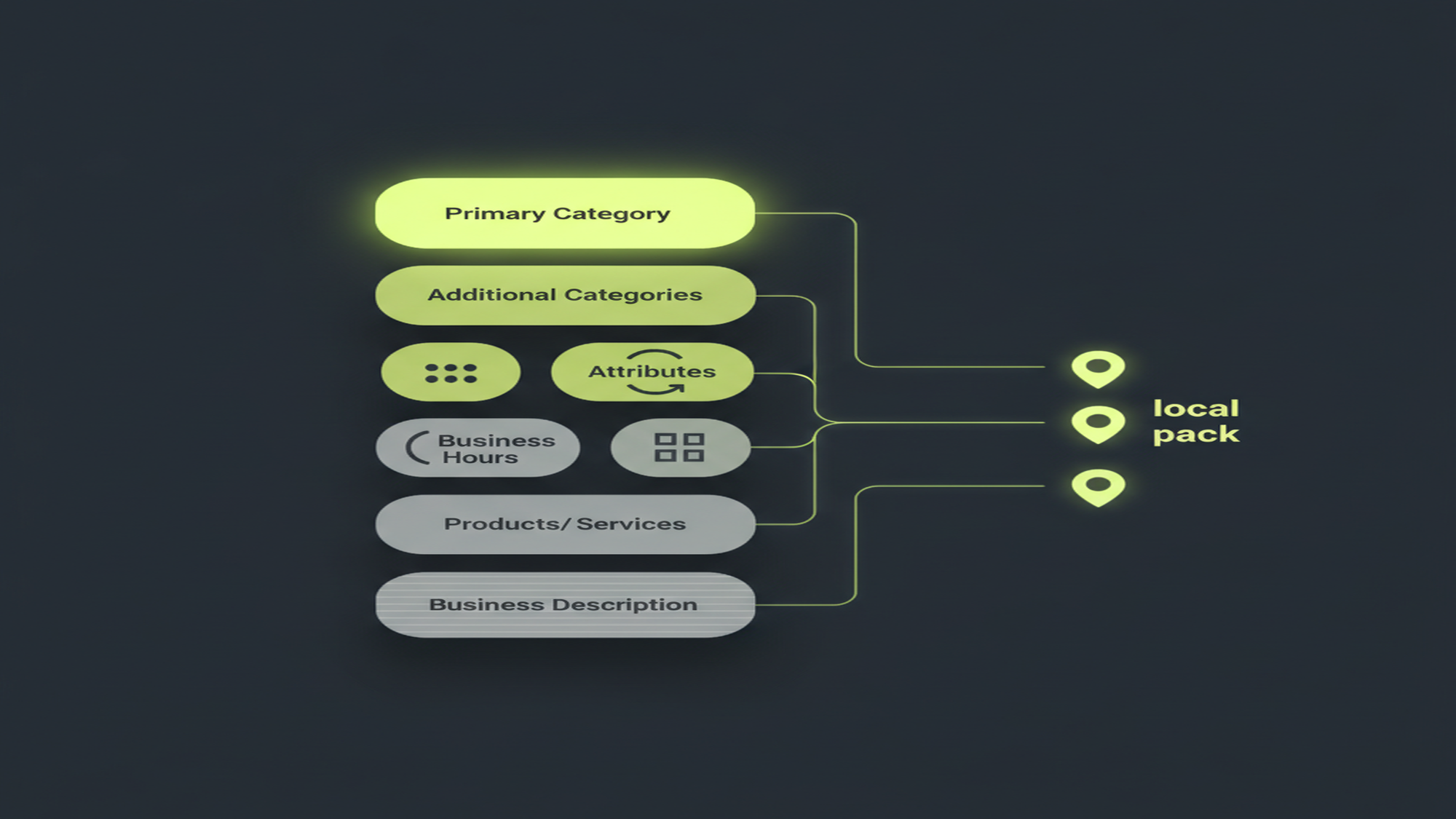
Your primary category is the single strongest Google Business Profile local-pack signal — ranked #1 among GBP-owned factors in Whitespark’s Local Search Ranking Factors (2023, reaffirmed 2026).
1 primary + up to 9 additional categories (10 total) · profile fields sit inside the ~32% “GBP signals” slice of the local pack (Whitespark 2026 expert-survey estimate, not Google) · AI Overviews on 68% of local searches (Whitespark Q2 2025)
Which Google Business Profile Fields Actually Move Local Visibility in 2026?
In local search, your Google Business Profile (GBP) fields are your keywords. There is no keyword-bidding box on a profile — Google decides which local queries you are eligible for by reading your category, services, description, and attributes. Among them, the primary category is the strongest relevance signal, and it is the field most businesses set too broadly. This pillar is the complete profile-optimization reference: business categories (1 primary + up to 9 additional), attributes (identity, accessibility, and amenities), the business description, business hours, the Products and Services editors, photos and videos, and a field-by-field optimization checklist. Every mechanic below traces to Google’s own support.google.com/business documentation or a named third-party study.
First, the naming. This tool was called “Google My Business” (GMB) until Google renamed it “Google Business Profile” on November 4, 2021 and moved profile management directly into Google Search and Google Maps. “Google My Business” now survives only in developer surfaces (the API domain and package names), not the consumer product. Treat “GMB” as the legacy name on first reference and use “GBP” throughout. If you are still setting up, start with what is Google Business Profile (GBP) and how to create a Google Business Profile; this pillar assumes a claimed, verified profile and focuses on optimizing the fields inside it.
What Owners Search About: The Profile-Field Demand Cluster
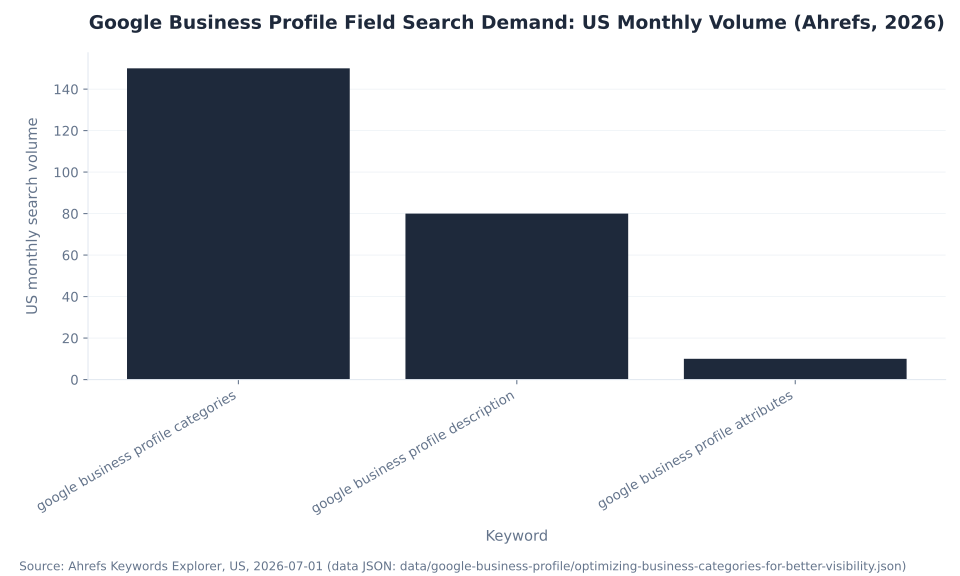
Search demand across the profile-field keywords this pillar targets mirrors the pillar’s own priority order. “Google business profile categories” is the highest-volume term at 150 US monthly searches (Ahrefs, 2026-07-01) and the hardest at KD 23; “google business profile description” follows at 80/mo (KD 11), mapping to the business-description section; and “google business profile attributes” sits at 10/mo (KD 5). The demand ordering — categories, then description, then attributes — validates leading with categories as the single highest-leverage edit. MB Adv Agency uses this same order when auditing a local client’s profile: category first, description second, everything else third.
| Keyword | US monthly vol. | Global vol. | KD | CPC (USD) | Intent / notes |
|---|---|---|---|---|---|
| google business profile categories | 150 | 450 | 23 | $1.10 | The head-term cluster — highest volume, hardest term; the field this pillar leads with |
| google business profile description | 80 | 150 | 11 | $1.30 | Feeds the id="business-description" section and the “business descriptions examples” intent |
| google business profile attributes | 10 | 40 | 5 | — | Low-volume, low-difficulty absorbed intent (the attributes taxonomy) |
Source: Google Business Profile Help (field definitions); Ahrefs Keywords Explorer, US, 2026-07-01 (12-month average monthly volume). Demand concentrates on “categories” (150/mo, KD 23) — the field this pillar leads with as the highest-leverage edit. Not mbadv client data.
Why the Primary Category Is the Highest-Leverage Field
Google publicly documents only three broad local ranking factors — relevance, distance, and prominence (Google Business Profile Help) — and publishes no weighted percentages for individual fields. The widely cited claim that the primary category is the #1 GBP local-pack factor comes from Whitespark’s Local Search Ranking Factors (an expert survey of about 47 local SEOs), not from Google’s algorithm. Attribute the weight to Whitespark by name and year; never present it as a Google-published number, and never source GBP ranking weights from BrightLocal (whose Local Consumer Review Survey covers consumer behavior, not ranking weights).
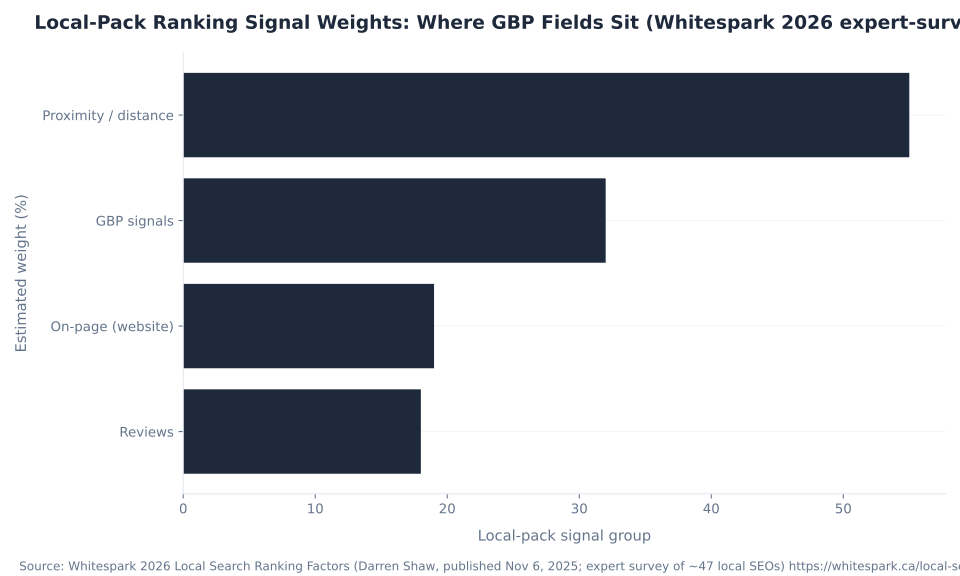
Here is why that framing matters. The fields this pillar optimizes — categories, attributes, description, and hours — all sit inside the roughly 32% “GBP signals” slice of the local pack (Whitespark 2026 expert-survey estimate). Proximity is the single biggest local-pack factor at about 55%, but proximity is the searcher’s location relative to the business — it is not directly controllable. That makes the ~32% GBP-signals slice the largest lever the business actually owns, and the primary category is the strongest single signal within it. “Optimize your profile” is really “maximize the controllable third of the local-pack equation,” and the primary category is where that starts.
The mistake we see constantly among the local businesses we work with is a primary category one level too generic: a company that installs and services air conditioning listing itself under “Contractor” instead of “HVAC contractor,” or a firm that only does personal-injury work listing “Lawyer” instead of “Personal injury attorney.” Google matches the specific category to the specific query, so the more precise your primary category, the more precisely you surface. For the full relevance / distance / prominence model and how categories feed it, see how GBP impacts local rankings.
1
primary category — the strongest GBP local-pack signal (Whitespark)
9
additional categories max (10 total) — a ceiling, not a target
~32%
of local-pack weight is “GBP signals” (Whitespark 2026 estimate)
9
identity “from the business” attributes you can self-select
68%
of local searches show AI Overviews (Whitespark Q2 2025)
$0
GBP itself is free — you pay only for Google Ads / Local Services Ads
Sources: Whitespark 2026 Local Search Ranking Factors (expert-survey estimate, not Google); Whitespark Q2 2025 local-search study; Google Business Profile Help. Not mbadv client data.
Product Editor vs. Services Editor (Both Live — Not the Sunset Website Builder)
The Products and Services editors are alive and well in 2026 — and they are not the shut-down website builder, a drift-trap that trips up half the guides still online. Google did sunset something in 2024: the free business.site website builder (GBP Websites) went dark. But that has nothing to do with the Product editor or the Services editor inside your profile, both of which remain fully live. The Services editor lets service-area and professional businesses expand Google-recommended services or add custom ones; the Product editor lets local stores list physical goods directly. Any guide that tells you “GBP retired products and services” is confusing them with the website builder. This section answers the “managing products and services in GBP” intent.
| Dimension | Product editor | Services editor |
|---|---|---|
| Who it is for | Local stores selling physical goods without an online purchase platform or a live stock feed | Service-area and professional businesses (plumbers, dentists, lawyers, salons) listing the services they offer |
| What you add | Products with name, price, category, description, and image — displayed on the profile | Google-recommended services (expand the suggested list) and custom services with descriptions |
| Policy / rules | Products must comply with Shopping ads policy; violations can remove all products | Follow content guidelines; service names and descriptions add relevance signals for matching queries |
| AI tooling | A US-only AI “scene generation” (Product Studio) tool for product imagery | — |
| When NOT to use it | Barcoded retailers with real inventory should use a POS + Local Inventory app instead of the manual editor | — (populate it for any service business) |
| Status | LIVE in 2026. ⚠ NOT the same as the free business.site website builder (GBP Websites), which shut down in 2024 (off Mar 1, redirected until Jun 10, then “page not found”). Applies to both editors. |
Sources: Google Business Profile Help — Product editor and Services editor (both editors LIVE; Product editor for local stores without an online purchase platform; Shopping-ads-policy compliance; US-only AI scene generation; barcoded retailers use a POS + Local Inventory app; Services editor recommended + custom services). The business.site website builder shut down in 2024 — distinct from these editors. Not mbadv client data.
A plumber uses the Services editor to tell Google it does “water heater installation,” “drain cleaning,” and “sump pump repair” as distinct services, each a potential query match — see our plumbing PPC and legal PPC work for how service lines map to both organic categories and paid campaigns. Do not leave those editors empty because of a myth.
Business Categories: Primary vs. Additional (The Load-Bearing Field)
A Google Business Profile has one primary category plus up to nine additional categories — ten total — and the primary is the strongest ranking signal. Choose the single most-specific category that describes what you primarily do, then reserve the additional slots for real, distinct service lines. The most common category error is over-adding, not under-adding: padding the list with tangential categories spreads Google’s understanding of the business thinner and can pull it into queries it cannot serve well. Categories also unlock features — booking buttons, menus, order links, and certain “more hours” types appear only for relevant categories — so precision has a functional payoff beyond ranking.
| Aspect | Primary category | Additional categories | Source |
|---|---|---|---|
| How many | Exactly 1 | Up to 9 (10 categories total) | Google Business Profile Help |
| Ranking weight | The single strongest GBP local-pack signal — ranked #1 in Whitespark’s Local Search Ranking Factors (2023; reaffirmed 2026) | Secondary relevance — help only for genuinely offered services; loosely related ones dilute | Whitespark 2023 / 2026 (expert-survey estimate, NOT a Google-published weight) |
| What it unlocks | Eligibility for category-specific features — booking buttons, menus, order links, and certain “more hours” types appear only for relevant categories | Can broaden which queries you are eligible for — but only for real service lines | Google Business Profile Help |
| Best practice | Pick the single most-specific category that describes what you primarily do (e.g. “HVAC contractor,” not “Contractor”) | Add only ~2–3 tightly relevant categories that map to distinct services you actually offer | Google Business Profile Help; Whitespark 2023 |
| Common error | Too generic — the wrong primary is a top negative factor | Over-adding loosely related categories — dilutes relevance | Whitespark 2023 |
| Can you change it? | Yes — but a primary-category change can trigger re-verification; space edits out about a week after verifying | Yes — add or remove anytime; lower re-verification risk than a primary change | Google Business Profile Help (re-verification triggers) |
Sources: Google Business Profile Help — categories (1 primary + up to 9 additional = 10; most-specific primary; over-adding dilutes; categories unlock features); Whitespark Local Search Ranking Factors (primary category = #1 GBP local-pack signal). The “#1” ranking claim is a Whitespark expert-survey estimate, not a Google-published weight — never attribute a category ranking weight to Google or BrightLocal. Not mbadv client data.
Our rule of thumb for the accounts we manage: the most-specific single primary, then two or three additional categories that map to real service lines — no more. A roofing company that adds “Gutter cleaning service” and “Siding contractor” only helps itself if it actually does those jobs. See a trades example in our roofing PPC and HVAC PPC work, where nailing the primary category and running paid search on the same terms compounds organic and paid local visibility.
Where GBP Fields Sit in the Local-Pack Weighting
The best current named source for GBP local-pack ranking weights is Whitespark’s Local Search Ranking Factors (Darren Shaw, published November 6, 2025). These are expert-survey estimates, not Google-published weights — Google documents only relevance, distance, and prominence with no percentages. Read the table as a map of leverage: proximity is the biggest factor but is the searcher’s location, while the ~32% GBP-signals slice is the part the business controls.
| Local-pack signal group | Weight (~%) | Note |
|---|---|---|
| Proximity / distance | ~55 | Single biggest local-pack factor — where the searcher is versus the business; not directly controllable |
| GBP signals | ~32 | ★ Where categories, attributes, description, hours, and completeness live — the profile-field lever this pillar optimizes |
| On-page (website) | ~19 | The business’s own site relevance signals |
| Reviews | ~18 | Rising for 2026 (Whitespark reports ~16–20%; 18 used as the midpoint) |
Source: Whitespark 2026 Local Search Ranking Factors (Darren Shaw; survey of about 47 local SEOs). Expert-survey estimate, NOT Google’s algorithm; Google publishes no weighted per-field percentages. Figures rounded and secondary-summarized — verify against the primary report before printing. Reviews shown at 18 (Whitespark reports ~16–20%; midpoint). Never attribute to Google or BrightLocal. Not mbadv client data.
The takeaway for any local business: since proximity (~55%) is fixed by the searcher, the fields you fill are the largest lever you own, and the primary category is the strongest single signal within them. To turn that eligibility into booked calls and jobs, the paid half of local visibility — Google Ads and Local Services Ads that surface above and beside the local pack — is what our lead-generation PPC and PPC services teams run alongside a complete profile.
Attributes: The Most-Neglected Free Trust Lever
Attributes are the “from the business” facts that populate your profile and, increasingly, the filters and highlights Google shows on Search and Maps. They fall into three groups — identity, accessibility, and amenities — and the identity set has expanded well beyond what most guides list. Critically, the available attribute set varies by primary category, which is another reason the primary comes first: it determines which attributes you are even offered. Filling these is free, takes minutes, and gives Google structured facts it can match to increasingly specific and AI-driven local queries. This section answers the “what are attributes in Google Business Profile” question in full.
| Attribute group | Examples | Key notes | Source |
|---|---|---|---|
| Identity (“from the business”) | Women-owned, Veteran-owned, Black-owned, Latino-owned, LGBTQ+ owned, Small business, Disabled-owned (added ~Oct 2023), Indigenous-owned (added Nov 2023), Asian-owned | Opt-in, multiple-selectable, reversible anytime. The owner self-identifies; they can display as profile highlights | Google Business Profile Help; blog.google |
| Accessibility | Wheelchair-accessible entrance / restroom / seating / parking; assistive listening; Auracast broadcast audio (newer) | Show as scannable icons on Search and Maps; high trust value for the searchers who filter on them | Google Business Profile Help |
| Amenities / service options | Free Wi-Fi, outdoor seating, recycling, restroom, and category-specific options (e.g. dine-in / takeout / delivery for food businesses) | The available set varies by primary category — set the primary correctly first to unlock the right options | Google Business Profile Help |
| Where to set them | Edit profile → “More” / attributes section, via Google Search (“my business”), the Maps app, or Business Profile Manager (multi-location). Only attributes relevant to your primary category are offered. | — | Google Business Profile Help |
Sources: Google Business Profile Help — attributes; blog.google and Search Engine Roundtable (identity-attribute additions: Disabled-owned ~Oct 2023; Indigenous-owned Nov 2023; Auracast accessibility). The exact amenity set is category-dependent; the examples are illustrative, not exhaustive. Not mbadv client data.
For practices and trades balancing a complete profile with patient- or customer-acquisition ads — accessibility attributes and special holiday hours on a dental practice, for instance — see our dental PPC work. Your description and attributes also have to follow Google’s content rules; keyword-stuffing them risks suspension, so read overview of GBP content guidelines before you write.
Business Hours: Regular, Special, and “More Hours”
A complete profile sets regular hours, special hours (holidays and one-off events, including a temporary-closure block of up to six days), and the applicable “more hours” secondary types — and in 2024 Google added religious-service more-hours types (Mass, Confession, Jummah, Sabbath, Worship service, and more), a recency signal thin pages miss. “More hours” require regular hours to be set and, again, depend on your primary category. This section answers the “setting business hours including special hours” intent.
| Hours type | What it is | Examples / values | Requirement |
|---|---|---|---|
| Regular hours | Your standard day-by-day opening hours shown on Search and Maps | Mon–Fri 8:00–17:00, etc.; you can add split hours (e.g. a lunch break) | The baseline — must be set before “more hours” are available |
| Special hours | Holiday / one-off event overrides, and a temporary-closure block (up to 6 days) | Closed on a public holiday; reduced hours on an event day; a short closure for renovations | Set ahead of holidays — wrong holiday hours are a common trust and CX failure |
| “More hours” (secondary) | Category-specific secondary hours for particular services | Access, Brunch, Delivery, Drive-through, Happy hours, Kitchen, Online service hours, Pickup, Senior hours, Takeout | Require regular hours set + depend on your primary category |
| “More hours” — religious-service types (added 2024) | Newer more-hours types for places of worship and related businesses | Breakfast, Confession, Dinner, Jummah, Mass, Prayer, Sabbath, Worship service, Adoration | Same rules — regular hours + relevant primary category |
Source: Google Business Profile Help — business hours (regular; special incl. temporary-closure up to 6 days; the “more hours” secondary list; the 2024 religious-service additions; more-hours require regular hours + depend on primary category). Which more-hours types are offered is category-dependent; not every business will see all of them. Not mbadv client data.
Accurate hours are a High-priority completeness item: a customer who drives to a business that is closed when Google says it is open is a trust failure that a special-hours entry would have prevented. To confirm whether your field work is paying off, read the right Performance signals — Interactions, calls, directions, and website clicks — in understanding performance reports in GBP.

Google Business Profile Field Limits: What You Can Set
The Google-documented field counts encode the pillar’s two central rules. Categories: exactly 1 primary + up to 9 additional, and the best practice is not to fill all nine. Attributes: the 9 identity options (expanded with Disabled-owned in about October 2023 and Indigenous-owned in November 2023) are free trust signals most profiles leave blank. “More hours”: the roughly 10 base secondary types require regular hours set and depend on the primary category. Every figure below is a count from Google’s own documentation, not an estimate.
| Profile field | Count / limit | Note |
|---|---|---|
| Primary category (max) | 1 | The single highest-leverage slot — the strongest GBP local-pack signal |
| Additional categories (max) | 9 (10 total) | A ceiling, not a target — best practice is ~2–3 tightly relevant; over-adding dilutes |
| Identity “from the business” attributes | 9 | Asian-, Black-, Latino-, LGBTQ+-, Disabled-, Indigenous-, Veteran-, Women-owned, Small business |
| “More hours” secondary types (base set) | ~10 | Access, Brunch, Delivery, Drive-through, Happy hours, Kitchen, Online service hours, Pickup, Senior hours, Takeout — plus 2024 religious-service types |
Sources: Google Business Profile Help — attributes, business hours, and categories. The 9 additional-category slots are a MAX, not a target; the available attribute set and more-hours types both vary by primary category. Verify current counts against the live Help pages at publish — Google adds more-hours types periodically. Not mbadv client data.
Why a Complete Profile Matters More in 2026
AI Overviews now appear on 68% of local searches — nearly double the 39% that still show a traditional 3-pack (Whitespark, Q2 2025). The two rates overlap (a single search can show both), so they are independent prevalence rates, not a 100%-summing split. The takeaway for this pillar: the profile fields you optimize — categories, attributes, description, services, hours — are the source data Google’s AI local surfaces (AI Overviews and the Gemini-powered “Ask Maps”) read from. A complete, precisely-categorized profile is now the input to both the AI answer and the local pack, not just the pack.
| Local SERP feature | Share of local searches (%) | Note |
|---|---|---|
| AI Overviews | 68 | Dominate informational / upper-funnel local queries; draw answers from GBP fields (categories, attributes, services, hours, reviews) |
| Local packs (3-pack) | 39 | Still dominate transactional intent; data drawn primarily from the Business Profile |
Source: Whitespark Q2 2025 local-search study (AI Overviews on 68% of local searches; local packs on 39%). Third-party study, not a Google-published figure. The two rates OVERLAP — independent prevalence rates, not a split. Softer related estimates (“8% of local keywords,” “50%+ visibility drops”) are third-party and must be hedged if used. Not mbadv client data.
Completeness is a bigger visibility lever in 2026 than it was when the 3-pack was the only local surface. That is the honest agency angle MB Adv Agency takes with every local client: we run the paid side — Google Ads and Local Services Ads — that complements a free, complete GBP presence. Local visibility is city-by-city, too; our dental PPC in Austin, TX guide shows how the organic profile and the paid campaign reinforce each other in one market.
The Profile Field Optimization Checklist
One scannable pass across every field, ordered by leverage. Category precision first, then the completeness fields that build trust and unlock features, then the compliance guardrail on your business name. Priorities are practitioner-ordered against the Whitespark ranking hierarchy (category first) and Google’s compliance rules (name accuracy).
| Field | Optimization action | Priority | Source / note |
|---|---|---|---|
| Primary category | Choose the single most-specific category that matches what you primarily do (e.g. “Emergency plumber,” not “Plumber,” if that is your focus) | Highest | Whitespark 2023 (#1 GBP local-pack factor) |
| Additional categories | Add ~2–3 tightly relevant categories for distinct real services; do not over-add (up to 9) | Medium-High | Google Business Profile Help (over-adding dilutes) |
Business description (id="business-description") | Fill the “from the business” description — write naturally for humans, lead with what you do and where you serve; use Google’s AI “Suggest description” as a first draft, then edit. No keyword-stuffing. | Medium-High | Google Help (AI “Suggest description” LIVE); content rules (no keyword stuffing) |
| Attributes | Set all relevant identity, accessibility, and amenity attributes offered for your category | Medium | Google Business Profile Help (set varies by primary category) |
| Services / Products editor | Service businesses: populate the Services editor with each service. Local retail: use the Product editor. Both are live. | Medium | Google Business Profile Help (both editors LIVE; not the sunset website builder) |
| Photos & videos | Add owner photos and videos regularly (storefront, team, work). ⚠ You can no longer track photo views — measure by completeness + Interactions, not a photo-view count. | Medium | Google Help (photo insights removed 2023) |
| Regular + special hours | Keep regular hours accurate; set special (holiday) hours ahead of time; add applicable “more hours” types | High | Google Business Profile Help (regular / special / more hours) |
| Business name accuracy | Use the real-world business name only — no keyword-stuffing the name (it risks suspension) | Critical (compliance) | Google Help (name-accuracy rule; keyword-stuffing = top suspension cause) |
Sources: Google Business Profile Help (categories, attributes, description, hours, products/services, content guidelines); Performance (photo insights removed 2023); AI “Suggest description” (LIVE). Not mbadv client data.

Get Found in Local Search
A complete, precisely-categorized profile earns the free visibility — the paid campaigns capture the demand it cannot
Optimizing your free Google Business Profile is the organic half of local visibility. The paid half — Google Ads and Local Services Ads that surface above and beside the local pack — is what MB Adv Agency runs on top of it. Talk to our team about getting found in local search.
Talk to our teamPhotos and Videos: A Real Signal, and the Metric Google Deleted
Photos and videos — owner-uploaded and customer-uploaded — populate the profile and local results and are a genuine engagement signal. Add them regularly: storefront, team, completed work, and interior shots give both searchers and Google fresh, specific material. This section answers the “how to add photos and videos to your profile” intent.
The trap is measurement. You can no longer track “photo views.” Google removed photo insights (and post insights) when it retired the legacy “Insights” dashboard and replaced it with “Performance” in 2023 (Google Business Profile Help). Businesses still hunting for a “photo views” number are looking for a metric that no longer exists. Measure photos by completeness and by the profile Interactions they help drive — calls, directions, and website clicks — not by a deleted view count. The full measurement picture is in understanding performance reports in GBP.
How to Write a Google Business Profile Business Description
The business description is the free-text “from the business” field where you tell Google and searchers, in your own words, what you do and where you serve. It is the field most owners leave empty from the day they claim the listing — and the one that answers the common search “business descriptions examples.” The rule is simple: write naturally for humans, not for keywords. Lead with what you do and the area you serve, name your core services in plain language, and keep it specific to the real business. Keyword-stuffing the description (or the business name) is against Google’s content rules and risks suspension, so resist the urge to cram in city and service terms.
A strong description reads like a clear, human introduction. Example, for a service business: “Cedar Park Plumbing is a family-owned plumbing company serving Austin and the surrounding Hill Country since 2004. We handle emergency repairs, water-heater installation and replacement, drain cleaning, and repiping for homeowners and small businesses. Our licensed technicians offer upfront pricing and same-day service across the greater Austin area.” That example leads with the business name and location, names concrete services, and adds a genuine differentiator (upfront pricing, same-day service) — without stuffing a list of keywords. Write the equivalent for your own business, in your own voice.
Google now offers a live AI “Suggest description” writer (Google Business Profile Help) that drafts a description for you from your profile data. Use it the way MB Adv Agency uses any AI first draft: generate it, then edit it into something accurate and specific. The AI draft is a starting point, not a finished field — confirm every claim is true, add the local detail and differentiators only you know, and remove anything generic. A human-edited AI draft beats both a blank field and an unedited one. Because the description has to follow Google’s content rules, pair this with overview of GBP content guidelines before you publish.
One more precision note for the searchers arriving on “gbp business description”: the description is a relevance and trust signal that supports your other fields — it does not replace an accurate primary category. Set the category first (it is the strongest signal), then write a description that reinforces it in human language. Together they tell Google a consistent story about what your business is and who it serves.
Google Business Profile Optimization FAQ
Turning Eligibility Into Leads
A well-categorized profile turns local searches into eligibility — a paid program turns eligibility into booked jobs
Once your profile is complete, the next lever is the paid campaign that runs alongside it. Our PPC campaign management and Google Ads audit teams build the plan that compounds organic and paid local visibility.
Book a callMethodology & Sourcing
This is a data-profile reference: every category rule, attribute, hours type, editor fact, and count is from Google’s official support.google.com/business documentation or the shared verified-facts baseline (web-verified 2026-07-01). Ranking-weight numbers appear only where attributed to Whitespark’s Local Search Ranking Factors (2023 and the November 6, 2025 “2026” edition; an expert survey of about 47 local SEOs) — never Google, never BrightLocal. Google documents only relevance, distance, and prominence with no per-field percentages.
Search-demand figures are from Ahrefs Keywords Explorer (US, 2026-07-01). The 68% / 39% AI-Overviews figures are overlapping prevalence rates from Whitespark’s Q2 2025 study, not a 100%-summing split. Field counts are Google-documented but Google adds more-hours types and identity attributes over time — confirm current counts against the live Help pages at publish. No WordStream or LocaliQ figures appear anywhere: they have zero GBP coverage, and GBP itself is free.
MB Adv Agency has no Google Business Profile or local-SEO service page and no GBP client dataset, so all agency POV is qualitative — “our team,” “the local businesses we work with,” “the paid campaigns that complement a free GBP.” No client metric is invented. The primary CTA is contact our team; the honest cross-sell is the paid Google Ads and Local Services Ads work that complements a complete profile.
In the competitive landscape of online business, ensuring that your company stands out is crucial. One of the critical aspects of achieving this is through optimizing your business categories. When done correctly, this optimization can significantly enhance your visibility, attract the right customers, and ultimately drive higher conversions. This article will delve into the importance of selecting the right categories, how to update them effectively, and provide tips to make the best choices for your business.
Importance of selecting the right categories
The selection of business categories is not merely about organizing services or products; it plays a vital role in how customers find you. When potential customers search for services or products online, they typically use specific keywords that align with predefined categories. Therefore, if your business is categorized correctly, it increases the chances of your listings being displayed in search results.

Categories act as the connecting dots between consumer searches and your business offerings. If a customer is looking for "Italian restaurants" and your restaurant is categorized under "General Dining," you may miss out on a significant opportunity. By ensuring that you are in the right category, you can enhance your relevance in search results, attracting more visitors to your site.
Additionally, proper category alignment can boost your credibility. When a business is placed in an appropriate category, it signals to customers that you understand your industry and can be considered an expert. This perceived authority can encourage customers to choose your service over a competitor who may not have the same visibility or categorization finesse.
Moreover, the right categories can also facilitate customer trust. In today's digital landscape, consumers are often overwhelmed with choices, and they tend to gravitate towards businesses that present themselves clearly and professionally. When your offerings are neatly categorized, it not only helps in navigation but also instills confidence in potential customers that they are making an informed choice. A well-structured category system can lead to a more positive user experience, encouraging repeat visits and fostering customer loyalty.
Search Engine Optimization Benefits
From an SEO perspective, proper category selection can greatly influence how search engines index your site. Categories and subcategories provide context for the search engines about what your business offers. When these elements are optimized, your website is more likely to rank higher in search engine results pages (SERPs).
Using keywords relevant to your business in your category descriptions and titles can also enrich your site’s SEO. For instance, if you run a boutique coffee shop, utilizing "Specialty Coffee" within your business category can attract customers actively searching for that specific niche. This practice not only enhances your visibility but also aligns with user intent, making it easier for consumers to find you.
In addition to keyword optimization, leveraging local SEO through category selection can significantly enhance your online presence. By incorporating location-based keywords into your categories, you can attract local customers who are searching for services in their vicinity. For example, a "Vegan Bakery in Brooklyn" not only specifies the type of service but also the geographical area, making it easier for nearby customers to discover your business. This localized approach can be particularly beneficial for small businesses looking to establish a strong community presence.
Competitive Advantage
Furthermore, carefully selected categories allow you to carve out a unique space in a crowded market. Many businesses may overlook the significance of proper categorization, giving you an edge. By ensuring your business is listed among the right category peers, you can effectively target a more engaged audience. This competitive advantage is one that can set your business apart and enable you to capture a larger market share.
Additionally, being strategic about your categories can help you identify gaps in the market. By analyzing competitors and their category choices, you can uncover opportunities to position your business in a less saturated space. This proactive approach not only helps in attracting a niche audience but also allows for the development of specialized marketing strategies that resonate with specific consumer needs. In a world where differentiation is key, the right category selection can be a powerful tool in your business arsenal.
How to update categories
Updating your business categories is a straightforward process, yet many companies neglect this vital task regularly. The digital landscape is continuously evolving, which means your business categories should evolve too. Here’s how to keep them accurate and relevant.
Firstly, start by conducting a thorough review of your current categories. This requires understanding where you stand in terms of product or service offering. Are your categories outdated? Are they still aligning with your current objectives? Taking a step back to analyze your existing categories can highlight areas for improvement. A well-structured category system not only enhances user experience but also improves your search engine optimization (SEO) efforts, making it easier for potential customers to find your business online.
Once you've identified gaps or mismatches, you can start to explore alternative categories. Most platforms allow you to browse the available categories to find a more appropriate fit. When choosing new categories, ensure they are frequently searched by your target audience and reflective of your brand’s offerings. Additionally, consider the competitive landscape; understanding how your competitors categorize their products can provide valuable insights and help you differentiate your offerings in a crowded market.
Using Analytics for Insights
Utilizing analytical tools can be incredibly useful in this process. Tools like Google Analytics or website tracking features provide insights into how users are finding you and what terms they are searching. With this knowledge, you can adjust your categories to better meet user expectations. Furthermore, analyzing user behavior can reveal trends over time, allowing you to anticipate shifts in consumer interest and adapt your categories proactively rather than reactively.
After making the necessary changes, monitor your performance closely. This will help you understand if the new categories are positively impacting your visibility and engagement. Remember to revisit this process semi-annually or annually to ensure ongoing relevance. Regularly checking your analytics can also help you identify any new opportunities or emerging trends that may warrant further adjustments to your categories.
Engaging with the Audience
Additionally, consider reaching out to your customers. Prompt feedback through surveys or direct communication can guide you in evaluating whether your categories resonate with your audience. Knowing your customers' preferences can lead you to better categorize your offerings and highlight what they value most. Engaging with your audience not only fosters loyalty but can also provide a wealth of information that might not be evident through analytics alone.
Moreover, leveraging social media platforms to solicit feedback can be an effective strategy. By creating polls or asking open-ended questions, you can gather insights directly from your followers about their perceptions of your categories. This engagement not only makes customers feel valued but also creates a sense of community around your brand, which can be instrumental in driving long-term success. Listening to your audience can ultimately guide your decision-making and ensure your categories remain aligned with their needs and expectations.
Tips for category selection
Selecting the right categories for your business requires strategic thinking and insights into your market and target audience. Here are some essential tips to help you make effective category selections.

- Research Competitors: Examine how competing businesses categorize themselves. This can give you insights into industry standards and help you identify gaps you may exploit.
- Consider User Intent: Think like a customer. What terms would your target audience use to find services or products similar to yours? Implementing user-centric thinking can improve your categorization.
- Stay Updated: Keep abreast of trends in your industry. As products evolve or new categories emerge, being agile and ready to adapt your categories can keep your business relevant.
- Test Variations: Don't hesitate to experiment with different categorizations. A/B testing on various platforms can reveal which categories draw more traffic.
- Optimize for Local Searches: If your business is location-dependent, include geographical modifiers in your categories to attract local customers effectively.
Additionally, it’s crucial to leverage analytics tools to track the performance of your selected categories. By analyzing metrics such as click-through rates and conversion rates, you can gain deeper insights into which categories resonate most with your audience. This data-driven approach allows you to make informed decisions, ensuring that your categories not only reflect your offerings but also align with consumer behavior. Moreover, consider soliciting feedback from your customers directly; surveys or informal conversations can reveal valuable perspectives on how they perceive your categories and what they expect from your business.
Another important aspect of category selection is the integration of SEO best practices. Utilizing relevant keywords within your category names and descriptions can significantly enhance your visibility on search engines. This means conducting thorough keyword research to identify terms that potential customers are searching for. Additionally, consider the hierarchy of your categories; a well-structured category system can improve user experience on your website, making it easier for visitors to navigate and find what they need. By combining strategic category selection with SEO optimization, you create a powerful synergy that can drive more traffic and ultimately lead to increased sales.

As a Google Ads expert, I bring proven expertise in optimizing advertising campaigns to maximize ROI.
I specialize in sharing advanced strategies and targeted tips to refine Google Ads campaign management.
Committed to staying ahead of the latest trends and algorithms, I ensure that my clients receive cutting-edge solutions.
My passion for digital marketing and my ability to interpret data for strategic insights enable me to offer high-level consulting that aims to exceed expectations.
Google Partner Agency
We're a certified Google Partner Agency, which means we don’t guess — we optimize withGoogle’s full toolkit and insider support.
Your campaigns get pro-level execution, backed by real expertise (not theory).
4.9 out of 5 from 670+ reviews on Fiverr.
That’s not luck, that’s performance.
Highly recommend Matteo to set up your server side tracking. He has a deep understanding of e-commerce tracking and will go above and beyond to make sure everything is set up correctly and working 100%. If you are scaling your store this set up is non-negotiable in my opinion and there isn't many people who have this much knowledge or put the effort in to get it right. Thanks again!
avorodesign.com
I can only recommend Matteo! He was very patient, professional and very knowledgeable about GA4, Consent Mode v2, and GDPR compliance. Communication was clear, and the setup was done professionally and efficiently. Highly recommend him for anyone needing reliable tracking implementation.

www.natureiki.life
Matteo shines in the realm of online professionals. His work is not only deep in data but also complemented by his proactive communication and cooperation, setting a new standard for freelancers. If you want someone who truly exceeds expectations, look no further. Highly recommended!

www.omanbeverlysmyth.com
Exceptional Service Beyond Expectations - Outstanding Service Impeccable depth, flawless delivery, and exceptional language fluency—this service exceeded all expectations. Highly recommended. Matteo truly ROCKS!!!

ium-paris.com
Top-notch, always highly value working with Matteo. An absolute Google Ads Genius. This is approximately the 8th time I have hired him and he's helped us get 6-7 ROAS. We are excited in continuing to improve our lead flow. Hire this guy if you need Google Ads help. Thanks Matteo!

www.dleeventgroup.com
I finally found the guy who can setup server side tracking and all the ecosystem properly. I definitely recommend Matteo. He is very responsive, kind and wants to dig into things. He configured GA4, Meta, Google Ads, Outbrain and google consent v2 with Cookiebot. Thanks Matteo.

inomega.fr
MB Adv delivered exceptional work with outstanding professionalism and lots of patience, taking time to see effects of changes made and not just do the work and submit it. The proactive communication and video summaries of the work completed made working with Matteo a pleasure, as he consistently went above and beyond. Highly recommended for web analytics projects! We are already working on another project.

www.withnellsensors.co.uk
Working with Matteo on my Google Ads was a game-changer. He's not just a strategist, he's a true partner. He understood my goals and tailored a campaign that perfectly reached my target audience. I'm grateful for his expertise and dedication.
dccargo.com
Click-driven mind
with plastic-brick obsession.
We build Google Ads campaigns with the same mindset we use to build tiny brick worlds: strategy, patience, and zero tolerance for wasted pieces.
Data is our blueprint. Growth is the only acceptable outcome.