GBP Performance Report: Insights Is Now Performance (2026)

GBP Performance Report 2026
Performance
It is called “Performance,” not “Insights.” Google retired the legacy Insights dashboard on February 20, 2023 — photo and post view metrics are gone, and Views are now counted as unique.
8 current metrics · 4 metrics removed in 2023 · Search keywords updated monthly · sub-15-impression terms hidden as “<15” · Views unique across 4 surface buckets
What the Google Business Profile Performance Report Shows in 2026
The reporting dashboard on a Google Business Profile (GBP) is called the Performance report, and it counts the customer actions and views your free profile earns on Google Search and Google Maps. Three plain corrections come first, because most published guides still describe a screen that no longer exists: (1) the report is “Performance,” not “Insights” — Google retired the legacy Insights dashboard on February 20, 2023; (2) photo view and post view metrics are gone — they were removed in the 2023 transition and cannot be turned back on; and (3) Views are now counted as unique — once per user, per day, per surface bucket — so post-2023 counts are structurally lower for the same real demand.
Everything else in this guide translates the current report into plain language: what each of the eight surviving metrics counts, why the Views number that “dropped” almost never means what worried owners think it means, how the Search keywords report behaves (and where it hides your data), and how to close the reporting gap GBP leaves by tagging your profile links with UTM parameters so Google Analytics 4 (GA4) attributes the traffic. Lead with the demand signal, not the vanity number: the Interactions rollup — the actions people actually took — is a more honest health signal than raw Views.
This distinction between a free organic presence and paid advertising runs through the whole report. GBP itself is free; the paid campaigns that complement it live in Google Ads. For the clean split, see Google Business Profile vs Google Ads: key differences, and for the full free-vs-paid breakdown, see how much Google Business Profile costs. MB Adv Agency reads GBP reporting as the top of a measurable funnel, not the end of it.
Key Takeaways: The GBP Performance Report at a Glance
The Performance report rewards a reader who knows what changed in 2023. The load-bearing facts:
- “Insights” is now “Performance.” The legacy dashboard was retired February 20, 2023. Any guide that walks you through “Insights” describes a screen gone for three years.
- Eight metrics survive: the Interactions rollup, plus Calls, Messages, Bookings, Directions, Website clicks, Views (Search + Maps), and Searches. Type-specific rows (Products, Menus, Offers, hotel booking metrics) appear only for the business types they apply to.
- Four things were removed: photo insights, post insights, the old Direct / Discovery / Branded search classification, and the directions customer-location breakdown.
- Views are unique now. Counted once per user, per day, per surface bucket — so a lower Views count after 2023 is usually the counting change, not a traffic loss.
- The Search keywords report is monthly, ~6 months deep, and undercounts. Terms under 15 impressions are hidden as “<15.” Read it directionally and export it monthly.
- Website clicks stop at the click. Tag your profile links with UTM parameters so GA4 attributes the traffic and follows it to conversions.
Two of these takeaways — the demand signal in Searches and the actions in Interactions — feed directly into smarter profile decisions. Use the language your customers actually type when you set your business categories for better visibility, and read the demand data alongside how GBP impacts local rankings so you never mistake a reporting metric for a ranking report.
GBP Performance Reporting: The Numbers That Define It
Seven Google-documented parameters shape how the Performance report behaves. Each is a fact about the product, not a benchmark — and each explains a decision the sections below make.
| Parameter | Value | What it means |
|---|---|---|
| Report name | Performance (formerly Insights) | Renamed and rebuilt; “Insights” is the legacy term |
| Insights retirement date | February 20, 2023 | The date the legacy dashboard was retired |
| Current metrics | 8 | Interactions, Calls, Messages, Bookings, Directions, Website clicks, Views, Searches |
| Metrics removed in 2023 | 4 | Photo insights, post insights, the Direct/Discovery/Branded split, the directions-location breakdown |
| Search keywords cadence | Monthly | Was quarterly before 2023 — 3× fresher |
| Search keywords history | ~6 months | Short lookback — export monthly to keep the trend line |
| Impression suppression floor | “<15” | Terms under 15 impressions in the period are hidden |
| Views counting | Unique × 4 buckets | Once per user/day across Search-mobile, Search-desktop, Maps-mobile, Maps-desktop |
Sources: Google, “Performance reporting on your Business Profile” (current metric set; Search keywords updated monthly; ~6-month history; the “<15” floor); Sterling Sky (Views counted as unique per user/day/surface bucket since 2023); shared verified-facts §4. Not mbadv client data.
The Current GBP Performance Metric Set: What Each Metric Counts
The Performance report centers on an Interactions rollup plus the actions and views below. This is the load-bearing reference for the whole pillar — it decodes every metric on the current report so you know exactly what each number represents before you act on it.
| Metric | What it counts | Notes / caveat |
|---|---|---|
| Interactions (rollup) | The total of the customer actions below (calls, messages, bookings, directions, website clicks) over the selected period | A top-of-report summary; drill into each action for the real signal — the rollup hides which action drove engagement |
| Calls | Number of times the call button was tapped from the profile | A tap, not a connected or answered call. The standalone Call History log (timestamped missed calls) was sunset Jul 31, 2024 — this click-count metric remains |
| Messages | Number of message conversations | Native GBP chat was discontinued Jul 31, 2024 — for most profiles the messaging surface (and this metric) is effectively gone; it persists only for accounts eligible for text/SMS or WhatsApp |
| Bookings | Number of appointments/bookings made from the profile | Appears only if you use a Reserve with Google booking partner (Square, Fresha, Setmore, and similar) |
| Directions | Number of direction requests (taps on the Directions button) | A physical-visit-intent proxy. Now a simple count — the pre-2023 breakdown of where requests came from was removed |
| Website clicks | Number of clicks on the profile’s website link | Stops at the click — GBP cannot see what happened next. Enrich with UTM tags to follow this traffic (and conversions) in GA4 (see the UTM tracking section) |
| Views (Search + Maps) | Number of profile views across Google Search and Google Maps | Now unique — counted once per user, per day, per surface bucket (Search/mobile, Search/desktop, Maps/mobile, Maps/desktop). Pre-2023 counted repeat views, so today’s counts are structurally lower |
| Searches (Search keywords) | The search terms people used to find your profile, with an impression count per term | Updated monthly; ~6-month window; terms under 15 impressions hidden as “<15”; a known undercount. Replaced the old Direct/Discovery/Branded split |
| Products / Menus / Offers (type-specific) | Interactions with product, menu, or offer content on the profile | Appear only for the business types they apply to (menus for restaurants, for example); hotels see additional booking metrics |
Sources: Google, “Performance reporting on your Business Profile” (current metric set: Interactions, Calls, Messages, Bookings, Directions, Website clicks, Views, Searches; type-specific metrics appear only for applicable business types); Sterling Sky (Views counted as unique per user/day/surface bucket post-2023); shared verified-facts §4 (metric set + unique views), §8 (messaging + Call History sunset Jul 31, 2024). Not mbadv client data.
Insights Is Now Performance: What Was Renamed, Recounted, and Removed
If you came here searching for your Google Business Profile Insights, here is the plain answer: the Insights dashboard no longer exists. Google retired the legacy “Insights” report on February 20, 2023 and replaced it with “Performance,” which you open by signing in, searching your business name on Google Search, and clicking the Performance panel (or through Business Profile Manager for multi-location accounts). The rename was a rebuild, not a relabel: several metrics owners built monthly reports around were removed at the same time, and the surviving metrics were recounted.
Every row below is a before/after that corrects a piece of stale published advice. The most consequential are the two removals near the bottom of every old report — photo insights and post insights — and the Views recount, which is why so many owners think their visibility collapsed when it did not.
| Metric / feature | Legacy “Insights” (pre-Feb 2023) | Performance (current) | Status |
|---|---|---|---|
| Dashboard name | “Insights” | “Performance” | Renamed Feb 20, 2023 |
| Photo insights / photo views | Present (photo view counts) | Not available | Removed by 2023 — no photo-view metric exists now |
| Post insights (post views / clicks) | Present | Not available | Removed — you can no longer measure post performance inside GBP |
| “How customers search for your business” (Direct / Discovery / Branded) | Present (a vague 3-way classification) | Replaced by the actual Searches / Search keywords report | Removed / replaced — actual search terms now, not buckets |
| Views counting | Counted repeat views (inflated) | Unique per user / per day / per surface bucket | Recounted 2023 — why post-2023 view counts fell |
| Directions customer-location breakdown | Present (where direction requests came from) | Simple count only | Removed |
| Search keywords cadence | Quarterly | Monthly (~6-month window) | Changed 2023 — fresher, but still an undercount |
| Call History (timestamped missed-call log) | Present (a separate feature) | Discontinued (the Calls click-count metric remains) | Sunset Jul 31, 2024 |
Sources: Google, “Performance reporting on your Business Profile”; Sterling Sky, RioSEO, and Hurrdat Marketing (Insights→Performance transition, Feb 20, 2023; removed metrics); shared verified-facts §4 (rename + removed metrics: photo/post insights, Direct/Discovery/Branded, directions location, device split; monthly cadence; unique views) and §8 (Call History sunset Jul 31, 2024). The photo-insights removal date is reported inconsistently, so the status reads “removed by 2023.” Not mbadv client data.
Post insights leaving the report is a genuine measurement loss: you can no longer see how a Google Post performed inside GBP. For what Google Posts still do and how to use them without native post metrics, see what Google Posts are and how to use them effectively. MB Adv Agency treats the rename as the fastest credibility test for any local-SEO advice: if it still says “Insights,” it is describing a 2021 product.
Search Queries and Customer Actions: How the Search Keywords Report Behaves
The Searches / Search keywords report is the most useful thing in Performance and the most misread. It shows the actual terms people used to find your profile, with an impression count per term — the single best window into the language your local customers use, and the replacement for the old, vaguer Direct / Discovery / Branded classification. It has two hard limits every serious user must internalize: a documented undercount, and a “<15” wall that hides your long tail.
| Behavior | Detail | Why it matters |
|---|---|---|
| Update cadence | Monthly (was quarterly before 2023) | A fresher signal for category and description decisions than the old quarterly data |
| History window | ~6 months rolling | Limited lookback — export monthly if you need longer trend lines |
| What it shows | The search terms that triggered impressions of your profile, with an impression count per term | Reveals the actual language customers use — not clicks or actions; pair it with the customer-action metrics |
| The “<15” floor | Any term with fewer than 15 impressions in the period is suppressed and shown as “<15” | A privacy floor — the API returns no value below it. A large share of your long tail is invisible; the visible list is the top of the distribution |
| Known undercount | The report is a documented undercount of total search demand | Treat totals as a floor, never a census — use for relative, directional signal |
| Impressions ≠ actions | A term counts when it triggered a view, not when someone called or clicked | Do not mistake a high-impression term for a high-converting one; cross-reference the customer-action metrics |
| Programmatic access | The Business Profile Performance API (search-keywords endpoint) | For multi-location pulls at scale — but the API is access-gated (allowlist approval required; new Cloud projects start at zero quota) |
Sources: Google, “Performance reporting on your Business Profile” (Search keywords, monthly, impression counts); Google Business Profile Performance API docs (search-keywords endpoint; sub-15-impression terms returned as a threshold value, not an exact number; access-gated); shared verified-facts §4 (monthly cadence, ~6-month window, the “<15” floor + undercount) and §10 (Business Profile APIs are access-gated). Not mbadv client data.
The right way to use this report, in MB Adv Agency’s experience with the local businesses we work with, is directional: read the relative prominence of terms and the language patterns, feed that into your primary-category and description decisions, and export it every month because there is no long lookback. Then take those real customer terms into optimizing your business categories for better visibility — the keyword report is the raw material for smarter category choices.
Analyzing Calls, Directions, and Website Clicks: The Customer-Action Decoder
Under the Interactions rollup sit the actions that map to demand: Calls, Directions, Website clicks (plus Messages and Bookings where they apply). These are the report’s real currency — knowing what each one does and does not count keeps your reading honest. A call is a tap, not a connected call; a direction request is a foot-traffic proxy, not a visit; a website click stops at the click.
| Customer action | What the metric counts | What it tells you | Caveat |
|---|---|---|---|
| Calls | Taps on the call button | Call-intent demand generated by the profile | A tap, not a connected or answered call. No per-call log since Call History was sunset Jul 31, 2024 |
| Directions | Taps on the Directions button | Physical-visit intent (a foot-traffic proxy) | A count only — the pre-2023 breakdown of where requests came from is gone |
| Website clicks | Clicks on the website link | Clickthrough demand to your site | GBP cannot see the outcome — tag the link with UTMs to follow the visit and conversions in GA4 |
| Messages | Message conversations started | Messaging-contact demand | Native GBP chat discontinued Jul 31, 2024 — most profiles show none; only eligible text/SMS or WhatsApp accounts still see this |
| Bookings | Bookings made via a Reserve with Google partner | Appointment-booking demand (the closest thing to a conversion inside GBP) | Appears only if you have a booking integration connected |
| Interactions (rollup) | The sum of the actions above over the period | Total profile engagement at a glance — a better health signal than raw Views | A rollup; drill into each action for the real story rather than trending the total alone |
Sources: Google, “Performance reporting on your Business Profile” (Calls, Directions, Website clicks, Messages, Bookings under the Interactions rollup); Google, “Changes to messaging and call history”; shared verified-facts §4 (customer actions; directions-location removal) and §8 (native messaging + Call History discontinued Jul 31, 2024; Reserve with Google / bookings live). Not mbadv client data.
Calls, Directions, and Website clicks are where free GBP visibility becomes a business outcome — and where a paid program picks up the slack the free profile cannot measure. Local service businesses live and die by the phone: pair the Calls metric with a measurable paid program through our HVAC PPC services, and if healthy Website clicks are not turning into booked jobs, that is a lead-generation problem — see our lead-generation PPC services.
UTM Tracking: How to See GBP Traffic in Google Analytics 4
GBP’s native reporting has a hard ceiling: it shows Website clicks but not what happened next. It cannot tell you whether that visitor requested a quote, booked, or bounced — that lives in your website analytics, and by default GA4 often lumps GBP profile clicks in with general organic search. The fix is a standard Google Analytics mechanic applied deliberately: append UTM parameters to the links in your profile so GA4 attributes that traffic to your Business Profile and lets you follow it through to conversions.
| UTM parameter | What it sets | Recommended value for GBP (convention) | Notes |
|---|---|---|---|
| utm_source | The referrer/source of the traffic | google (or gbp / google-business-profile) | Identifies the click as coming from your profile; pick one value and keep it consistent |
| utm_medium | The channel type | organic (or referral) | Keep this consistent so GA4’s channel grouping files GBP traffic predictably — this is where it otherwise blends into general organic |
| utm_campaign | The campaign label you filter on | gbp-profile | The label you segment on in GA4 (Acquisition → Traffic acquisition / Sessions by campaign) |
| utm_content (optional) | Distinguishes which profile link was clicked | website-link / appointment-link / menu-link | Use to separate the different link fields on the profile so you can compare them in GA4 |
| utm_term (optional) | Historically a paid-search keyword slot | — (usually unused for GBP) | Leave blank unless you have a specific segmentation need |
| Where to apply | The profile’s link fields | Website link · Appointment / Bookings URL · Menu / Order links | Append the parameters directly to the destination URL; do not use a tracking redirect in the website field |
Sources: Google Analytics Help — Collect campaign data with custom URLs (utm_source, utm_medium, utm_campaign, utm_term, utm_content — the standard GA4 campaign parameters; tagged traffic appears under the source/medium you set in Acquisition → Traffic acquisition); shared verified-facts §4 (GBP’s native Website-clicks metric stops at the click, so UTM tagging is the GA4 workaround for downstream attribution). The specific source/medium/campaign values are a practitioner convention, not a Google-published GBP spec — set them to match your existing GA4 channel groupings. Not mbadv client data.
This is the workaround MB Adv Agency treats as non-negotiable for any local business that wants to know what its free Google presence is worth — and it is the same measurement discipline that makes the paid campaigns we manage accountable. If your Website clicks are healthy but leads are not following, the gap is usually downstream of GBP: a Google Ads PPC audit traces the traffic from click to conversion and finds where it is leaking.
Why Your GBP Views “Dropped”: Unique Views Explained
The metric that generates the most panic is Views, because Google redefined it. A view is now counted once per user, per day, per surface bucket — Search/mobile, Search/desktop, Maps/mobile, Maps/desktop — and only on an actual profile visit. Before 2023, repeat views by the same person were all counted, so raw view counts were higher for the same underlying demand. An owner who compares this year’s unique Views to last year’s inflated repeat Views concludes their visibility crashed, when they are reacting to a counting change, not a real trend.
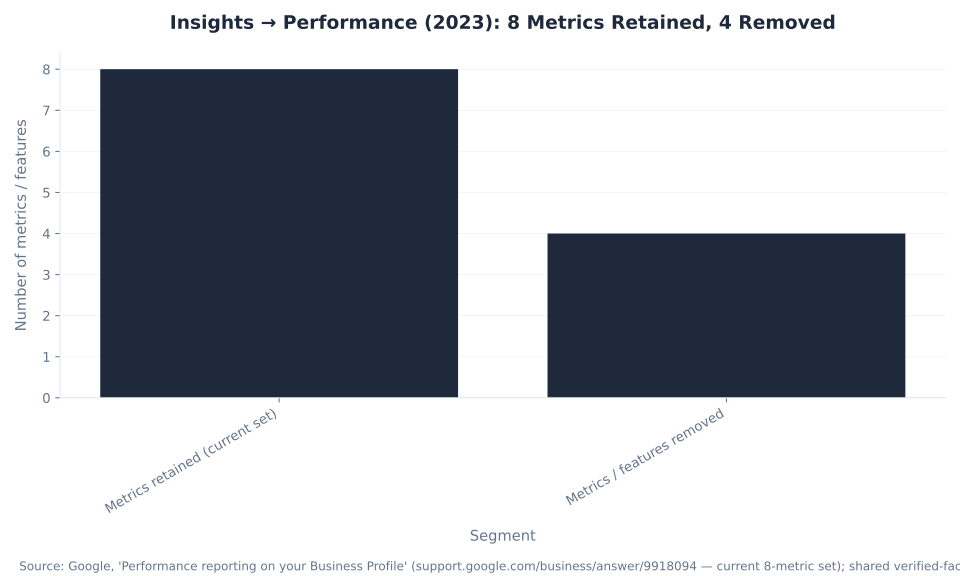
The 2023 change was a rebuild that kept a compact metric set and deleted several metrics. The counts below frame the whole transition — eight metrics retained, four removed — and explain why an old report will never reconcile with a new one.
| Segment | Count | What it is |
|---|---|---|
| Metrics retained (current set) | 8 | Interactions, Calls, Messages, Bookings, Directions, Website clicks, Views, Searches |
| Metrics / features removed | 4 | Photo insights, post insights, the Direct/Discovery/Branded split, the directions customer-location breakdown |
| Surface buckets for unique Views | 4 | Search/mobile, Search/desktop, Maps/mobile, Maps/desktop — a view counts once per user, per day, in each |
Sources: Google, “Performance reporting on your Business Profile” (current 8-metric set); Sterling Sky (unique Views across four surface buckets); shared verified-facts §4 (removed metrics, Feb 2023 transition). §4 also folds a pre-2023 device-split into the Views recount; the four above are the clean, unambiguous removals. Not mbadv client data.
The honest, reassuring read for a worried owner is usually this: a lower Views number after 2023 is the recount, not a collapse. The Interactions rollup — the actions people took — is a far more reliable health signal than the Views vanity number, and the durable measure of value lives downstream in GA4 (via UTM tags) and in the paid program that complements the free profile.
Metrics Google Removed in 2023 (Why Your Old Report Will Not Match)
A report built around metrics Google deleted in 2023 is a report built on sand. If a guide tells you to “monitor your photo views” or “track how customers found you as Direct, Discovery, or Branded,” it is describing metrics that no longer exist. Here is exactly what is gone and what replaced it.
| Removed metric / feature | What it used to show | What to use instead |
|---|---|---|
| Photo insights | Photo view counts and photo-quantity comparisons | No native replacement — photo performance cannot be measured inside GBP |
| Post insights | Post views and post clicks | No native replacement; use UTM-tagged post links so GA4 measures the clickthrough |
| Direct / Discovery / Branded classification | A 3-way “how customers search for your business” bucket | The Searches / Search keywords report — actual terms, not buckets |
| Directions customer-location breakdown | Where direction requests originated (ZIP/city) | The Directions count only — no location detail |
| Call History (missed-call log) | A timestamped log of missed calls (a separate feature) | The Calls click-count metric (sunset Jul 31, 2024) |
Sources: shared verified-facts §4 (removed in the Insights→Performance transition: photo insights, post insights, the Direct/Discovery/Branded classification, the directions customer-location breakdown) and §8 (Call History sunset Jul 31, 2024); Google Performance documentation. Not mbadv client data.
The through-line is simple: anchor your reporting on the actions that survived — Calls, Directions, Website clicks, and the Search keywords demand signal — and stop expecting numbers Google deleted. For the free profile that generates all of this at no cost, see how much a Google Business Profile costs.
The Reporting Guardrails You Must Design Around
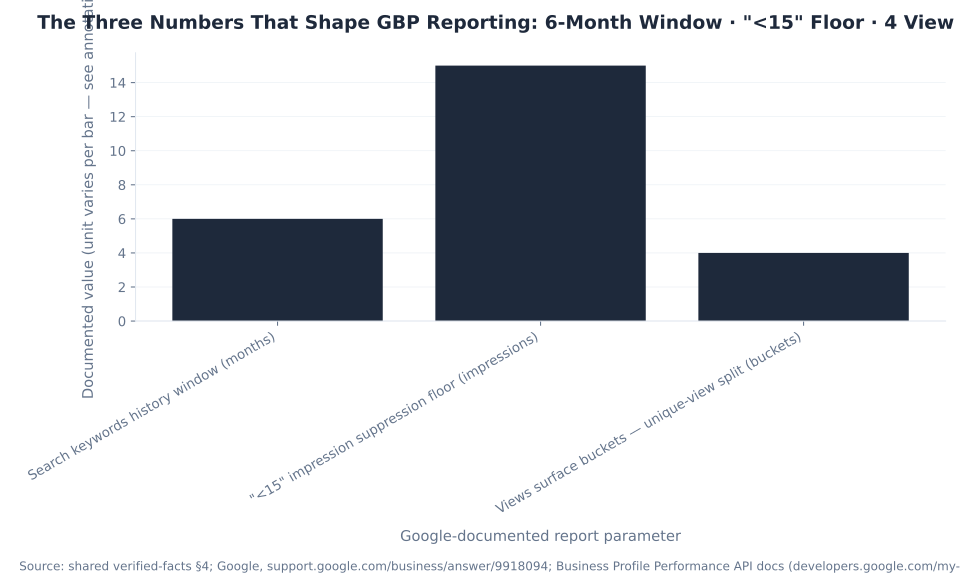
Three Google-documented parameters dictate how you handle GBP reporting — and together they justify the recommended workflow: export monthly, tag your links with UTMs for GA4, and trust Interactions over raw Views. Read each bar as a labeled parameter; the units differ.
| Guardrail | Value | Unit | Why it drives the recommendation |
|---|---|---|---|
| Search keywords history window | 6 | months | Short lookback — export the report monthly or you lose the trend line |
| “<15” impression suppression floor | 15 | impressions | Any term under 15 impressions in the period is hidden as “<15” (a privacy floor; the API returns no value below it) — the long tail is invisible, so read the report directionally |
| Views surface buckets (unique-view split) | 4 | buckets | Views are counted once per user/day across Search/mobile, Search/desktop, Maps/mobile, Maps/desktop — post-2023 counts are structurally lower, so trust Interactions + GA4, not raw Views |
Sources: shared verified-facts §4; Google, “Performance reporting on your Business Profile”; Business Profile Performance API docs (sub-15-impression terms returned as a threshold, not an exact value); Sterling Sky (unique views). Not mbadv client data.
The recommendation these numbers add up to: GBP’s native report is a monthly, ~6-month, undercounted, unique-counted snapshot — so export it monthly, read keywords directionally, and close the ceiling with UTM tags so GA4 attributes profile clicks and follows them to conversions. Local visibility that reads well in the Performance report still needs a measurable paid layer to turn Calls and clicks into booked jobs — something we build for markets like HVAC PPC in Flagstaff, AZ.
Measure What Your Profile Is Worth
GBP’s free reporting stops at the click — the value lives downstream
If you want the full picture of what your local visibility is turning into, MB Adv Agency’s team connects your profile, GA4, and paid campaigns into one measurable funnel — and traces every click from GBP to conversion.
Talk to our team →Get a Google Ads PPC auditSearch Demand: “Insights” Still Outdraws “Performance”
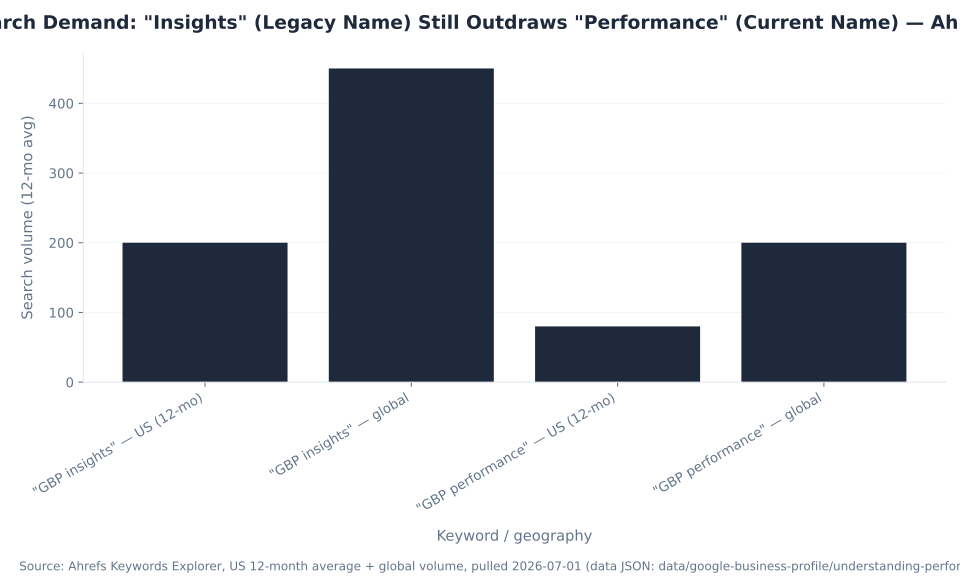
Three years after the rename, search demand is still anchored to the retired name. The two primary keywords for this report, from Ahrefs Keywords Explorer (US 12-month average plus global, pulled 2026-07-01): “google business profile insights” draws about 200 US searches a month (450 global), against roughly 80 US (200 global) for “google business profile performance.” The legacy term carries about 2.5× the US demand of the current name. That is the practical reason this guide leads with the correction: most searchers still ask for “Insights,” so the rename answer is the dominant citation slot.
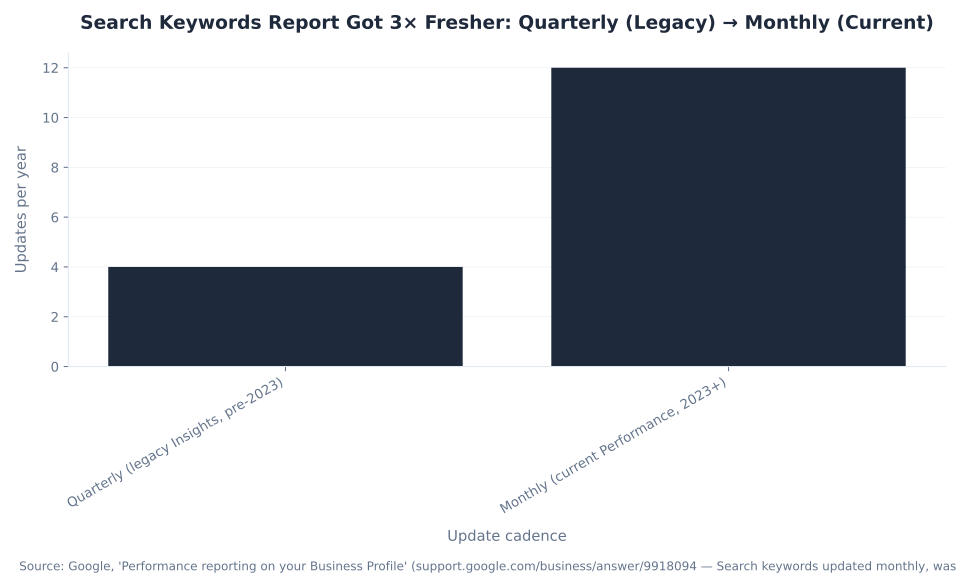
The one unambiguous improvement in the 2023 rebuild is freshness. The Search keywords report moved from quarterly (4 updates a year) to monthly (12 updates a year) — roughly 3× fresher input for your primary-category and description decisions. It is still a ~6-month window and a documented undercount, so the discipline is to export it monthly and read it directionally. The volume figures here are search demand, not cost: GBP reporting is a free tool, and no CPC or spend figure appears anywhere in this guide.
Reporting demand is a demand signal, not a ranking report. Your Views and Searches data tells you what people looked for and how often — for how relevance, distance, and prominence actually drive the local pack, see how GBP impacts local rankings. And because the free profile’s reporting covers only the free surface, the paid side sits in Google Ads — the clean division of labor is covered in Google Business Profile vs Google Ads.
The Business Profile Performance API: Programmatic Access at Scale
For a single location, the Performance panel on Google Search is enough. For a brand with dozens or hundreds of locations, pulling numbers by hand is not an option — that is what the Business Profile Performance API is for. It exposes the same metrics programmatically, including a search-keywords endpoint, so a multi-location operator can aggregate performance across an entire portfolio and load it into a real reporting stack.
Two facts keep expectations honest. First, the API is access-gated: every new Google Cloud project starts with zero quota, and you must request access and be allowlisted before any call returns data — it is not a case where anyone can call it on day one. Second, the API inherits the report’s limits: the “<15” suppression is enforced at the API layer too, where sub-15-impression terms are returned as a threshold value rather than an exact number. The API scales the data collection; it does not lift the suppression floor or the undercount.
The Performance API is one of the Business Profile APIs that replaced the deprecated monolithic Google My Business API. When a client’s local footprint is large enough to justify the engineering, MB Adv Agency wires the Performance API into the same reporting stack that tracks the paid program — so free-profile signal and paid performance sit in one view. For teams that would rather start with the paid side that is fully measurable today, see our PPC services.
GBP Performance Report FAQ
Free Visibility, Measurable Growth
Turn Calls, Directions, and Website clicks into booked jobs
Free GBP visibility is the top of the funnel; converting it is a lead-generation problem. MB Adv Agency runs the paid program — Google Ads and Local Services Ads — that complements your free profile and reports cleanly in Google Ads and GA4.
Lead-generation PPC →All PPC servicesHVAC PPCMethodology and Sources
This is an upgrade-in-place of the existing understanding-performance-reports-in-gbp URL. Every mechanic is drawn from Google primary documentation or a named local-SEO source, web-verified 2026-07-01: Google, “Performance reporting on your Business Profile” (the current 8-metric set; Search keywords updated monthly; ~6-month history; the “<15” floor); the Business Profile Performance API docs (search-keywords endpoint; sub-15-impression terms returned as a threshold; access-gated); Google, “Changes to messaging and call history” (native chat and Call History discontinued Jul 31, 2024); Google Analytics Help — custom campaign URLs (the UTM parameters); and Sterling Sky (Views counted as unique per user/day/surface bucket post-2023). The Insights→Performance transition date (February 20, 2023) and the removed-metric list are corroborated by RioSEO and Hurrdat Marketing and consolidated in shared verified-facts §4.
Two disclosures on the numbers. The search-demand figures (200 / 450 / 80 / 200) are Ahrefs search volumes, not costs — there is no CPC, spend, or benchmark-dollar figure anywhere in this guide, because GBP reporting is free and paid-search benchmark sources (such as WordStream or LocaliQ) have zero relevance to a free reporting tool. The two cadence figures (4 and 12 updates a year) are arithmetic restatements of Google’s documented “quarterly → monthly” cadence, not third-party benchmarks. The “removed = 4” count reflects the four clean, unambiguous metric/feature removals; §4 also folds a pre-2023 device-split into the Views recount.
MB Adv Agency has no Google Business Profile or local-SEO client benchmark dataset, so all agency point of view is qualitative and no client metric is invented. mbadv is a Google and PPC agency; the honest framing throughout is that GBP is a free organic presence and the paid campaigns we manage — Google Ads and Local Services Ads — are the measurable complement. For the paid side, talk to our team.
In the realm of business management, particularly with the growth of digital tools, understanding performance reports has become crucial. One such tool is Google Business Profile (GBP), which provides insights that can immensely help businesses optimize their online presence. In this article, we will explore what performance reports entail in GBP, delve into the various performance metrics, discuss how to access and interpret these reports, and finally, provide examples of actionable insights drawn from the data.
Overview of performance metrics
Performance metrics in GBP serve as essential indicators that reflect how well a business is performing online. These metrics can range from the number of views a business profile receives to the direct actions taken by users after viewing the profile. Understanding these metrics is vital for businesses aiming to enhance their visibility and engagement with potential customers.

Some of the key performance metrics include:
- Profile Views: This metric indicates how many people have viewed your business profile. A higher number signifies more visibility.
- Search Appearances: This shows how often your business appeared in search results, reflecting the effectiveness of your SEO strategy.
- Customer Actions: Actions can include clicks to call, direction requests, or visits to your website. Monitoring these actions helps in assessing user engagement.
- Reviews and Ratings: Customer reviews not only influence potential customers but also impact local SEO, making it critical to monitor.
- Post Engagement: This indicates how well your posts resonate with your audience, showcasing the effectiveness of your content strategy.
Each metric provides a different lens through which businesses can analyze their online performance. For instance, a spike in profile views coupled with a high number of customer actions is an encouraging sign, indicating successful outreach and customer interest. Conversely, a drop in search appearances might signal the need for a reevaluation of your SEO tactics or content strategy, prompting timely adjustments to regain visibility.
Understanding the nuances of these metrics can also lead to more tailored marketing strategies. For example, if a business notices that certain posts generate significantly more engagement than others, it can pivot its content strategy to focus on similar themes or formats. This not only maximizes engagement but also fosters a deeper connection with the audience, as the business aligns its offerings with customer interests and preferences.
Importance of Tracking performance metrics
While it may be tempting to overlook the importance of tracking these metrics, doing so can hinder a business's growth potential. Regularly monitoring performance reports can help identify trends, areas of opportunity, and potential weaknesses that need to be addressed.
Moreover, performance metrics enable data-driven decision-making. Businesses can adjust their strategies—be it marketing campaigns, promotional offers, or customer engagement efforts—based on the insights gleaned from performance reports. This proactive approach fosters a dynamic business environment that evolves with consumer needs. For instance, if a particular promotional offer leads to a significant increase in customer actions, businesses can consider implementing similar offers more frequently or even developing a loyalty program that builds on this success.
Additionally, tracking performance metrics can also enhance customer relationships. By understanding how customers interact with their profiles and posts, businesses can tailor their communication to better meet customer expectations. This could involve responding to reviews in a timely manner, addressing customer feedback, or creating content that directly addresses common questions or concerns raised by customers. Such engagement not only improves customer satisfaction but also builds a loyal customer base that feels valued and heard.
How to access and interpret reports
Accessing performance reports in GBP is a straightforward process, thanks to Google's user-friendly interface. To begin, business owners need to log in to their Google Business Profile account. Once logged in, they can navigate to the 'Insights' tab, where all performance metrics are displayed comprehensively.

Upon accessing the reports, users will notice various sections, each dedicated to a specific metric. Understanding how to interpret these reports is just as crucial as accessing them. Here are some steps to interpret performance reports effectively:
- Analyze Trends Over Time: Look for patterns by comparing data over days, weeks, or months. Identify any significant increases or drops in metrics.
- Relate Metrics to Business Activities: Correlate changes in metrics with specific marketing activities, promotions, or changes in service.
- Focus on Key Performance Indicators (KPIs): Instead of getting lost in all data, hone in on the metrics that align with your business goals.
- Utilize Visual Aids: Take advantage of graphs and charts offered in the reports, which can simplify complex data.
Interpreting reports effectively necessitates patience and practice. Over time, business owners will develop an intuitive understanding of their reports, enhancing their ability to make informed decisions. This ongoing analysis can also reveal new opportunities for growth, such as identifying peak times for customer engagement or discovering which services are most popular among clients.
Moreover, it’s important to remember that these reports are not just numbers; they tell a story about customer behavior and preferences. By delving deeper into the data, businesses can uncover insights that may lead to innovative strategies or adjustments in service offerings that resonate more with their target audience.
Frequency of Reviewing Reports
To harness the full benefits of these insights, businesses should establish a routine for reviewing their performance reports. Depending on the volume of interaction and changes in their operations, weekly or monthly reviews may be beneficial.
Regular reviews will not only help in staying informed about performance trends but will also facilitate timely adjustments to business strategies that can yield better results in high-stakes situations. For instance, if a sudden drop in customer engagement is detected, immediate action can be taken to investigate potential causes, such as changes in competitor activity or shifts in customer preferences.
Additionally, setting specific goals for each review period can help maintain focus and drive results. By establishing targets based on previous performance, businesses can measure their progress and adapt their tactics accordingly. This proactive approach ensures that businesses remain agile and responsive to the ever-changing market landscape, ultimately leading to sustained growth and success.
Examples of actionable insights
Extracting actionable insights from GBP performance reports can significantly propel businesses toward achieving their goals. Here are a few practical examples of what can be implemented based on data extracted from performance reports:
- Enhancing Online Content: If a particular post experienced higher engagement than others, consider analyzing it for common themes or approaches. Create similar content that resonates with your audience. This might involve experimenting with different formats, such as videos or infographics, which can often lead to even greater engagement levels.
- Improving SEO Strategies: If the reports indicate low search appearances, it may be necessary to revisit keyword strategies or update business descriptions to align with common search terms. Additionally, consider conducting a competitor analysis to identify keywords that are driving traffic to similar businesses, allowing for a more competitive edge in search rankings.
- Engaging with Customers: Regularly monitor reviews and ratings. A prompt response to both positive and negative feedback not only helps in building customer loyalty but also enhances credibility. Furthermore, consider implementing a follow-up system to reach out to customers after their purchase, encouraging them to leave feedback and share their experiences, which can further enhance your online reputation.
- Targeting Local Markets: If data reveals a considerable amount of direction requests, consider focusing on local SEO tactics and advertising campaigns aimed at your surrounding community. This could include partnerships with local businesses or sponsoring community events, which can increase visibility and foster goodwill among local customers.
By distilling performance reports into actionable insights, businesses can directly inform their strategies, resulting in more intentional and effective customer engagement. Moreover, leveraging these insights can help businesses stay ahead of market trends and adapt to changing consumer preferences, ensuring they remain relevant in an ever-evolving landscape.
In addition to the aforementioned strategies, businesses can also utilize performance reports to identify peak engagement times. By analyzing when customers are most active, businesses can schedule posts and promotions to maximize visibility and interaction. This data-driven approach not only enhances marketing efforts but also fosters a deeper connection with the audience, as content is delivered when they are most receptive.

As a Google Ads expert, I bring proven expertise in optimizing advertising campaigns to maximize ROI.
I specialize in sharing advanced strategies and targeted tips to refine Google Ads campaign management.
Committed to staying ahead of the latest trends and algorithms, I ensure that my clients receive cutting-edge solutions.
My passion for digital marketing and my ability to interpret data for strategic insights enable me to offer high-level consulting that aims to exceed expectations.
Google Partner Agency
We're a certified Google Partner Agency, which means we don’t guess — we optimize withGoogle’s full toolkit and insider support.
Your campaigns get pro-level execution, backed by real expertise (not theory).
4.9 out of 5 from 670+ reviews on Fiverr.
That’s not luck, that’s performance.
Highly recommend Matteo to set up your server side tracking. He has a deep understanding of e-commerce tracking and will go above and beyond to make sure everything is set up correctly and working 100%. If you are scaling your store this set up is non-negotiable in my opinion and there isn't many people who have this much knowledge or put the effort in to get it right. Thanks again!

avorodesign.com
I can only recommend Matteo! He was very patient, professional and very knowledgeable about GA4, Consent Mode v2, and GDPR compliance. Communication was clear, and the setup was done professionally and efficiently. Highly recommend him for anyone needing reliable tracking implementation.

www.natureiki.life
Matteo shines in the realm of online professionals. His work is not only deep in data but also complemented by his proactive communication and cooperation, setting a new standard for freelancers. If you want someone who truly exceeds expectations, look no further. Highly recommended!

www.omanbeverlysmyth.com
Exceptional Service Beyond Expectations - Outstanding Service Impeccable depth, flawless delivery, and exceptional language fluency—this service exceeded all expectations. Highly recommended. Matteo truly ROCKS!!!

ium-paris.com
Top-notch, always highly value working with Matteo. An absolute Google Ads Genius. This is approximately the 8th time I have hired him and he's helped us get 6-7 ROAS. We are excited in continuing to improve our lead flow. Hire this guy if you need Google Ads help. Thanks Matteo!

www.dleeventgroup.com
I finally found the guy who can setup server side tracking and all the ecosystem properly. I definitely recommend Matteo. He is very responsive, kind and wants to dig into things. He configured GA4, Meta, Google Ads, Outbrain and google consent v2 with Cookiebot. Thanks Matteo.
inomega.fr
MB Adv delivered exceptional work with outstanding professionalism and lots of patience, taking time to see effects of changes made and not just do the work and submit it. The proactive communication and video summaries of the work completed made working with Matteo a pleasure, as he consistently went above and beyond. Highly recommended for web analytics projects! We are already working on another project.

www.withnellsensors.co.uk
Working with Matteo on my Google Ads was a game-changer. He's not just a strategist, he's a true partner. He understood my goals and tailored a campaign that perfectly reached my target audience. I'm grateful for his expertise and dedication.

dccargo.com
Click-driven mind
with plastic-brick obsession.
We build Google Ads campaigns with the same mindset we use to build tiny brick worlds: strategy, patience, and zero tolerance for wasted pieces.
Data is our blueprint. Growth is the only acceptable outcome.