
Manage Multiple Locations in Google Business Profile

Bulk verification eligibility — Google, 2026
10+
brick-and-mortar locations of the same business is the bar for Google Business Profile bulk verification — the tool that verifies many storefronts at once instead of one at a time. Below that threshold, and for service-area businesses, each location verifies individually.
Where You Actually Manage Multiple Locations
If you run more than one storefront — a franchise, a regional chain, a multi-branch trade or auto or dental business, or an agency roster of location listings — the first question is not a feature question. It is a surface question: where do you actually manage all of these at once? Google Business Profile (GBP — the tool most people still call “Google My Business” or “GMB,” renamed on November 4, 2021) is built around one profile per real-world location, so a business with several storefronts hits questions a single-location owner never faces. Getting to the right surface first is what makes the rest of the workflow legible.
Here is the split that orients everything. When Google renamed Google My Business to Google Business Profile and discontinued the standalone GMB app in 2022, it moved single-location management directly into Google Search and the Google Maps app — you sign in, search your business name, and edit the profile inline. What most stale guides miss is that Google did not shut down the old business.google.com dashboard. It retained it as Business Profile Manager for multi-location and bulk management, at business.google.com/locations. So the correct mental model is a fork: one location → manage in Search and Maps; many locations → manage in Business Profile Manager, where you see every location in one list, filter and bulk-edit, run bulk verification, and manage user access and location groups.
The belief that “business.google.com is dead, everything is in Search now” is the single most common orientation error a multi-location operator makes — it sends people to the one surface where the bulk tools are not exposed. New to the platform, or still calling it Google My Business? Start with what is Google Business Profile (GBP) for the GMB→GBP rebrand and how the profile shows on Search and Maps. This page is the multi-location anchor: it routes you to the right door and settles the duplicate-listing question.
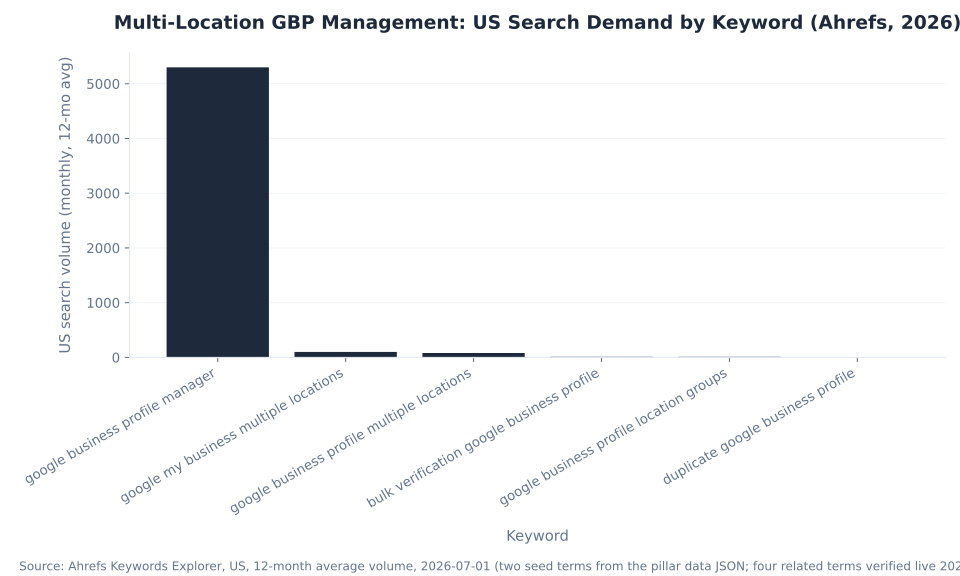
Multi-Location GBP Management: US Search Demand by Keyword (Ahrefs, 2026)
The demand picture is worth stating plainly, because it shapes how this page is written. Most of the volume sits on one navigational query — “google business profile manager,” about 5,300 US searches a month — where the searcher wants the tool, not a tutorial. Every descriptive multi-location query (“google business profile multiple locations,” “bulk verification,” “location groups”) is genuinely thin. So the job here is to catch that navigational intent, point it at the right door, and then own the small but qualified descriptive and duplicate-listing long tail.
Key Takeaways
- Many locations are managed in Business Profile Manager, not in Search. Single profiles are edited inline in Google Search and the Maps app; multi-location and bulk management live at
business.google.com/locations. Sending yourself to the wrong surface is the most common multi-location mistake. - Bulk verification has a hard bar: 10+ brick-and-mortar locations of the same business. Service-area businesses do not qualify, and it is not a way to verify an agency’s roster of separate clients.
- Location groups and user roles are the delegation layer. Add owners and managers so a team or an outside partner can manage the profiles they own without anyone sharing a login — and grant the least access that does the job.
- Duplicate listings are a suspension risk, not a cosmetic nuisance. A duplicate splits a location’s reviews, photos, and ranking signals across two pins, and duplicate listings are on Google’s documented list of top suspension causes.
- Audit for duplicates before they cost you. It is cheaper to merge a stray pin than to appeal a hard suspension — finding and resolving duplicates is core multi-location hygiene.
Single Profile vs. Business Profile Manager: Where Each Task Happens
The cleanest way to internalize the surface split is to look at it task by task. The same job — editing hours, verifying a location, adding a teammate — happens in a different place depending on whether you run one profile or many. The table below is the map. Everything in the right-hand column is what you lose if you accept the “everything is in Search now” myth and never open Business Profile Manager.
| Task | Single location (Google Search / Maps app) | Many locations (Business Profile Manager, business.google.com/locations) |
|---|---|---|
| Edit business info (name, hours, category) | Inline, one profile at a time | Bulk-edit across the full location list |
| Verify a location | Individually, by the method Google assigns | Individually, or bulk verification for 10+ same-business locations |
| See all locations at once | Not available | The full location list, filterable and sortable |
| Add users / delegate access | Per profile | Centralized user management with owner and manager roles |
| Organize into groups | Not available | Location groups (a shared container for a set of profiles) |
Sources: Google Business Profile Help — verify your business; Google — bulk verification. Management surfaces per Google’s current documentation.
The right column is the whole reason Business Profile Manager still exists. It is where a multi-location operator sees the entire portfolio in one place, edits at scale, and manages who can touch what. The MB Adv Agency read: lead the operator to this surface first, and the rest of the multi-location workflow — verification, delegation, duplicate cleanup — becomes a set of ordinary tasks instead of a hunt for tools that seem to have vanished.
Bulk Verification: The 10+ Location Threshold
Verifying locations one at a time — by video recording, phone, or postcard — does not scale past a certain size. Google’s answer is bulk verification, and its eligibility line is exact and worth stating plainly: it is available to a business with 10 or more brick-and-mortar locations of that same business (Google Business Profile Help). A qualifying chain submits a spreadsheet of its locations and goes through Google’s review.
Two groups routinely assume they qualify and do not. First, service-area businesses (SABs) do not qualify for bulk verification at all. Second, it cannot cover an agency’s whole client roster — it verifies one business’s own many storefronts, not many separate businesses managed under one account (Sterling Sky). Treating bulk verification as a client-roster shortcut leads to a rejected submission and a stalled rollout.
Everything else verifies individually, by the method Google assigns — the operator does not freely choose. For the decision framing that separates bulk from individual verification, the turnaround differs sharply by method: phone or SMS is near-instant; video recording review runs up to five business days; a postcard code arrives in about 14 days. Depth on the individual methods — video, phone, postcard, and how Google picks one — lives in the setup sibling: see how to create a Google Business Profile.
The MB Adv Agency framing for the local operators we work with: treat the 10-location threshold and the “same business, brick-and-mortar” test as the gate, get location data clean and consistent before submitting, and do not plan a rollout around bulk verification if the business is service-area — those locations verify individually, method by method.
Location Groups and User Access: The Delegation Layer
Once a business runs several locations, the next questions are organizational rather than technical: how do you keep locations tidy, and how do you let the right people manage them? Business Profile Manager answers both. It lets you organize profiles into location groups — a shared container for a set of locations — and add users with defined roles (owners and managers) so a regional manager, a marketing hire, or an outside agency can edit the profiles they are responsible for without anyone handing over account credentials.
This is a risk decision, not just a convenience. A suspended owner or manager account cascades to the profiles it controls (Google Business Profile Help), so who has access, and at what level, is a governance question. The MB Adv Agency read: the local businesses we work with are best served by adding people and partners with the least access that does the job, keeping ownership tightly held, and removing access when someone leaves — the same hygiene that protects a paid Google Ads account protects a multi-location GBP portfolio.
Consistent, well-governed location data is also what lets each profile earn its own ranking. Keeping every location’s categories, hours, and attributes right is part of that: see optimizing business categories for better visibility, and how GBP impacts local rankings for relevance, distance, prominence, and the local pack. Running paid campaigns across a lot of locations is its own discipline — the PPC campaign management and lead-generation work that sits alongside a free GBP presence needs the same consistency the profiles do.

Paid campaigns across many locations
Running Ads Across a Lot of Locations?
Your multi-location Google Business Profile presence is free. The Google Ads and Local Services Ads that sit alongside it — run per-location, kept as consistent as the profiles — are where our team comes in.
Talk to our team →Duplicate Listings: Find Them, Fix Them, Before They Suspend You
Duplicates are the failure mode multi-location operators hit most, so this section treats them as a first-class problem. They arise more easily than owners expect: Google auto-generates unclaimed listings from third-party data; two people at the same company each create and claim a profile for one location; an address move or a rebrand spawns a second pin instead of updating the first; a merger inherits another entity’s listings.
The damage is real. A duplicate splits a location’s reviews, photos, and ranking signals across two pins, so neither ranks as well as one consolidated profile would, and customers land on the wrong or unmonitored one. And critically, duplicate listings are on Google’s documented list of top suspension causes (Google Business Profile Help; Sterling Sky) — two profiles for one real-world location can be read as misrepresentation. This is not a nuisance to leave for Google to sort out.
The resolution path depends on who controls the duplicate. The table below is the decision map.
| Situation | Where to act / what to do | Outcome |
|---|---|---|
| You own both profiles | Request a merge or removal in Business Profile Manager so the two consolidate onto the one you keep | Reviews, photos, and ranking signals merge onto a single canonical profile |
| Someone else owns the duplicate | Report it and, where needed, claim it first through the profile | The duplicate is removed or transferred and the signals stop splitting |
| Unclaimed, auto-generated duplicate | Claim it, or report it on Maps (“Suggest an edit → Close or remove → Duplicate”) | Google removes it or marks it a duplicate; one profile remains live |
Sources: Google — prohibited & restricted content / suspension causes; Google — suspensions; Sterling Sky. Confirm the current merge / report UI labels in your account.
The MB Adv Agency read: audit for duplicates before they cause a suspension, not after — it is cheaper to merge a stray pin than to appeal a hard suspension. Because duplicates are a documented suspension trigger, the deeper suspensions-and-appeals mechanics belong with the policy sibling: see overview of GBP content guidelines for what causes suspensions and how the reinstatement flow works. For multi-branch operators — real-estate or automotive chains, for instance — the paid campaigns can be run per-location alongside the profiles, and managing local PPC city by city pairs naturally with a multi-location footprint (for example, PPC management in Austin, TX).
Three Corrections That Signal Stale Multi-Location Advice
1. “business.google.com is gone — you have to manage everything inside Google Search now.” No. Google moved single-location editing into Search and the Maps app when it retired the standalone GMB app in 2022, but it kept business.google.com alive as Business Profile Manager specifically for multi-location and bulk management, at business.google.com/locations. That is where you see all your locations in one list, bulk-edit, run bulk verification, organize location groups, and manage user access — none of which the single-profile Search and Maps editing surface exposes.
2. “Bulk verification lets an agency verify all its clients’ listings at once.” No. Bulk verification is for a single business with 10 or more brick-and-mortar locations of that same business — a chain or franchise verifying its own storefronts. It is not a way to verify an agency’s roster of separate client businesses, and service-area businesses do not qualify for it at all. Agencies and multi-brand operators still verify separate businesses individually, by whatever method Google assigns per profile.
3. “A duplicate listing is harmless — Google just picks one and shows it.” No — duplicates actively hurt you and can get you suspended. A duplicate splits a location’s reviews, photos, and ranking signals across two pins, so neither performs as well as a single consolidated profile, and customers can find the unmonitored one. More seriously, duplicate listings are on Google’s documented list of top suspension causes. Duplicates are something to actively find, merge, or remove as part of multi-location hygiene, not to leave for Google to sort out.
Frequently Asked Questions: Managing Multiple Locations in GBP
Next in the Google Business Profile series
Set Up and Verify a New Location
Bulk verification only covers qualifying chains; every other location verifies individually. See the current verification methods Google assigns per profile.
Read the setup guide →Methodology & Sources
This pillar is the multi-location and bulk-management anchor for the Google Business Profile cluster; depth on verification methods and on suspensions lives in the linked siblings. The management-surface split (single profiles in Search and Maps; Business Profile Manager retained at business.google.com/locations for multi-location and bulk) and the standalone-app sunset (2022) are from Google’s documentation (support.google.com/business/answer/7107242). The GMB→GBP rebrand (November 4, 2021) is Google’s own. Bulk verification eligibility — 10+ brick-and-mortar locations of the same business, service-area businesses excluded, not an agency-roster tool — is from support.google.com/business/answer/4490296 and Sterling Sky (sterlingsky.ca/passing-gbp-bulk-verification). Verification turnaround (video up to five business days) is from support.google.com/business/answer/14271705. Duplicate listings as a top suspension cause, and the suspended owner/manager cascade, are from support.google.com/business/answer/3038177 and support.google.com/business/answer/4569145. Search-demand figures are Ahrefs Keywords Explorer (US, 12-month average, 2026-07-01). No mbadv client metrics appear in this article; all agency perspective is qualitative. Reviewed by MB Adv Agency, July 2026.
Managing a business across multiple locations presents both challenges and opportunities. With the rise of digital platforms, effective management of these locations has become increasingly crucial. This is particularly true for businesses using Google Business Profile (GBP) to enhance their online presence. In this article, we will explore how to manage multiple locations in GBP, emphasizing the importance of multi-location management, the steps to set up and manage these locations, and tips for maintaining consistency.
How to Manage Multiple Locations in GBP
Google Business Profile allows businesses to create a presence on Google, showcasing services, locations, and customer reviews. For companies with multiple locations, managing each GBP effectively can improve visibility, attract more customers, and streamline operations. This article delves into effective strategies and best practices to ensure your multi-location approach is successful.
1. Create Separate GBP Listings for Each Location
The first step in managing multiple locations in GBP is to create individual business listings for each site. Each listing should contain specific information tailored to that location, including the address, phone number, business hours, and services offered. This specificity helps in improving local SEO, allowing potential customers to find you more easily on Google.
To set up your listings, navigate to your Google Business Profile Manager. From there, you can add new locations and choose different categories for each site based on the services they provide. Utilizing specific keywords relevant to each location will enhance the chances of being found by local searchers. Additionally, consider adding high-quality images that represent each location's unique atmosphere or offerings. Visual content can significantly influence customer decisions, making it essential to showcase what makes each location special.
2. Utilize Bulk Location Management Tools
For larger businesses with numerous locations, managing each listing can become overwhelming. Fortunately, Google provides bulk location management tools that streamline the process. This feature allows you to upload and manage multiple locations simultaneously, ensuring that information is updated across all listings. Keeping your details uniform across locations prevents inaccuracies that can confuse potential customers.
Utilizing these tools not only saves time but also ensures that all listings are aligned with your brand's image and messaging. Regular audits of the listings help track changes and updates, which can improve your overall business performance on Google. Moreover, consider integrating customer feedback mechanisms across all locations. Encouraging reviews and responding to them promptly can enhance customer engagement and foster a sense of community around each location.
3. Monitor Location Performance
Once your locations are set up, monitoring their performance is essential. Google Business Profile offers insights into how customers find and interact with your locations. Key metrics such as views, searches, and customer actions can provide valuable information on each location's effectiveness.
By analyzing this data, you can identify trends, understand customer preferences, and make informed decisions on marketing strategies. Regularly reviewing performance can also help identify underperforming locations and allow you to allocate resources efficiently. Additionally, consider implementing location-specific promotions or events based on the insights gathered. Tailoring your marketing efforts to the unique demographics and preferences of each area can significantly boost engagement and drive foot traffic to your stores.
Importance of Multi-Location Management
Managing multiple locations effectively in GBP is crucial for several reasons. Understanding the full scope of why this management matters can help businesses optimize their strategies.
1. Enhanced Visibility
Each location has a different audience and customer base. By managing separate GBP listings, each location can properly address its local market. Enhanced visibility on Google Maps and local search results translates to increased foot traffic and potential sales. Additionally, when customers search for services near them, having dedicated listings for each area boosts your chances of being found. This visibility not only improves customer acquisition but also strengthens your brand's presence in diverse markets, allowing you to compete more effectively against local competitors.
2. Local Customer Engagement
Each location may have its unique clientele. Effective multi-location management allows for tailored engagement strategies. Responding to reviews and questions specific to each location not only builds customer trust but also enhances your brand’s reputation locally. Customers value personalized interactions and localized customer service, which can significantly impact customer loyalty. Furthermore, engaging with local events or community initiatives can foster a deeper connection with the audience, encouraging repeat business and word-of-mouth referrals that are invaluable in local markets.
3. Brand Consistency vs. Local Customization
A key challenge in multi-location management is striking a balance between maintaining a consistent brand image and allowing for local customization. Each location might require slight adjustments in messaging or service offerings based on the local culture or demographics. Effective management allows you to uphold your brand’s core values while adapting to specific customer needs. This adaptability can manifest in various ways, such as seasonal promotions that resonate with local traditions or partnerships with local businesses that enhance your offerings. By embracing both consistency and customization, you can create a cohesive brand experience that feels relevant and engaging to each community you serve.
4. Performance Tracking and Analytics
Another critical aspect of multi-location management is the ability to track performance metrics for each location individually. By analyzing data such as foot traffic, customer reviews, and sales figures, businesses can gain insights into what strategies are working and where improvements are needed. This data-driven approach enables managers to make informed decisions, optimize marketing efforts, and allocate resources more effectively. Additionally, understanding local trends and customer preferences can help in forecasting demand and adjusting inventory accordingly, ensuring that each location is well-equipped to meet customer needs.
5. Streamlined Operations
Managing multiple locations also necessitates streamlined operations to ensure consistency in service delivery. Implementing standardized procedures across locations can help maintain quality control and efficiency. However, it’s essential to allow for flexibility where necessary, as different locations may face unique operational challenges. By leveraging technology such as centralized management software, businesses can coordinate schedules, inventory, and employee training, ensuring that all locations operate smoothly and cohesively. This operational efficiency not only enhances customer satisfaction but also reduces overhead costs, contributing to a healthier bottom line.
Steps for Setting Up and Managing Locations
Setting up multiple locations on GBP is straightforward, but managing them effectively requires strategic planning and execution. Here are the essential steps for successful multi-location management.

1. Verify Each Listing
The first important step after creating each listing is to verify them. Google requires verification to ensure that businesses are legitimate and operated from the listed locations. This process typically involves receiving a postcard with a verification code to the provided address.
Verification is crucial as it enhances your credibility on the platform and allows you to utilize all features of Google Business Profile, such as posts and insights. Ensure that all listings are verified to fully leverage your GBP management capabilities. Additionally, consider using the bulk verification option if you have numerous locations, as this can streamline the process and save time, allowing you to focus on other critical aspects of your business.
2. Optimize Each Profile
Once verified, optimizing the profiles for SEO is necessary. Fill out each section thoroughly, including business descriptions, operating hours, and services offered. High-quality images can make a substantial difference in attracting customers, so be sure to upload relevant visuals for each location.
Utilize GBP attributes to showcase special features specific to each location, such as outdoor seating or accessibility options. This level of detail improves customer engagement and can significantly increase conversion rates. Additionally, consider incorporating local keywords into your business descriptions to enhance visibility in local search results. Engaging with customer reviews and responding promptly can also foster a sense of community and encourage repeat visits.
3. Regularly Update Information
Keeping information updated is paramount. Whether it’s changes in hours, new services, or special promotions, accurate and current information prevents customer confusion and enhances their experience. Regularly checking and updating listings, maintaining seasonal promotions, and ensuring that all services reflect real-time offerings will maintain customer trust.
Moreover, leveraging Google Posts to share updates or events can keep your audience informed and engaged. These posts can highlight new menu items, upcoming events, or special discounts, creating a dynamic presence that encourages customers to return. Monitoring insights and analytics is also essential; understanding customer behavior and engagement patterns can guide your updates and promotional strategies, ensuring they resonate with your target audience effectively.
Tips for Maintaining Consistency
In multi-location management, it’s essential to maintain consistency to ensure a uniform brand identity across all locations. Here are some practical tips.

1. Unified Brand Guidelines
Establish clear brand guidelines that detail how each location should represent your business online. This includes imagery, tone of voice, and messaging. Providing each location with these guidelines can help maintain consistency, even while allowing for localized touches.
2. Centralized Management Tool
Investing in a centralized management tool can help simplify the process. These tools can assist in managing reviews, updating information, and accessing analytics across all locations from a single dashboard. Streamlining operations saves time and resources, ensuring that your brand stays consistent across all platforms.
3. Train Location Managers
Finally, training location managers on the importance of maintaining brand standards is critical. They should understand their role in the larger picture of multi-location management and be equipped with the tools and resources necessary to succeed.
Regular training sessions can help keep all team members informed about changes in GBP policies and highlight best practices for customer engagement.
In conclusion, managing multiple locations in Google Business Profile effectively requires strategic planning, regular monitoring, and a commitment to maintaining brand consistency. By following the steps outlined in this article, you can enhance your business's visibility, engage better with customers, and ultimately increase your success across all locations.

As a Google Ads expert, I bring proven expertise in optimizing advertising campaigns to maximize ROI.
I specialize in sharing advanced strategies and targeted tips to refine Google Ads campaign management.
Committed to staying ahead of the latest trends and algorithms, I ensure that my clients receive cutting-edge solutions.
My passion for digital marketing and my ability to interpret data for strategic insights enable me to offer high-level consulting that aims to exceed expectations.
Google Partner Agency
We're a certified Google Partner Agency, which means we don’t guess — we optimize withGoogle’s full toolkit and insider support.
Your campaigns get pro-level execution, backed by real expertise (not theory).

4.9 out of 5 from 670+ reviews on Fiverr.
That’s not luck, that’s performance.
Highly recommend Matteo to set up your server side tracking. He has a deep understanding of e-commerce tracking and will go above and beyond to make sure everything is set up correctly and working 100%. If you are scaling your store this set up is non-negotiable in my opinion and there isn't many people who have this much knowledge or put the effort in to get it right. Thanks again!

avorodesign.com
I can only recommend Matteo! He was very patient, professional and very knowledgeable about GA4, Consent Mode v2, and GDPR compliance. Communication was clear, and the setup was done professionally and efficiently. Highly recommend him for anyone needing reliable tracking implementation.

www.natureiki.life
Matteo shines in the realm of online professionals. His work is not only deep in data but also complemented by his proactive communication and cooperation, setting a new standard for freelancers. If you want someone who truly exceeds expectations, look no further. Highly recommended!

www.omanbeverlysmyth.com
Exceptional Service Beyond Expectations - Outstanding Service Impeccable depth, flawless delivery, and exceptional language fluency—this service exceeded all expectations. Highly recommended. Matteo truly ROCKS!!!

ium-paris.com
Top-notch, always highly value working with Matteo. An absolute Google Ads Genius. This is approximately the 8th time I have hired him and he's helped us get 6-7 ROAS. We are excited in continuing to improve our lead flow. Hire this guy if you need Google Ads help. Thanks Matteo!

www.dleeventgroup.com
I finally found the guy who can setup server side tracking and all the ecosystem properly. I definitely recommend Matteo. He is very responsive, kind and wants to dig into things. He configured GA4, Meta, Google Ads, Outbrain and google consent v2 with Cookiebot. Thanks Matteo.

inomega.fr
MB Adv delivered exceptional work with outstanding professionalism and lots of patience, taking time to see effects of changes made and not just do the work and submit it. The proactive communication and video summaries of the work completed made working with Matteo a pleasure, as he consistently went above and beyond. Highly recommended for web analytics projects! We are already working on another project.

www.withnellsensors.co.uk
Working with Matteo on my Google Ads was a game-changer. He's not just a strategist, he's a true partner. He understood my goals and tailored a campaign that perfectly reached my target audience. I'm grateful for his expertise and dedication.

dccargo.com
Click-driven mind
with plastic-brick obsession.
We build Google Ads campaigns with the same mindset we use to build tiny brick worlds: strategy, patience, and zero tolerance for wasted pieces.
Data is our blueprint. Growth is the only acceptable outcome.