
Best Practices for Optimizing Product Feeds (2026)

Google Merchant Center 2026
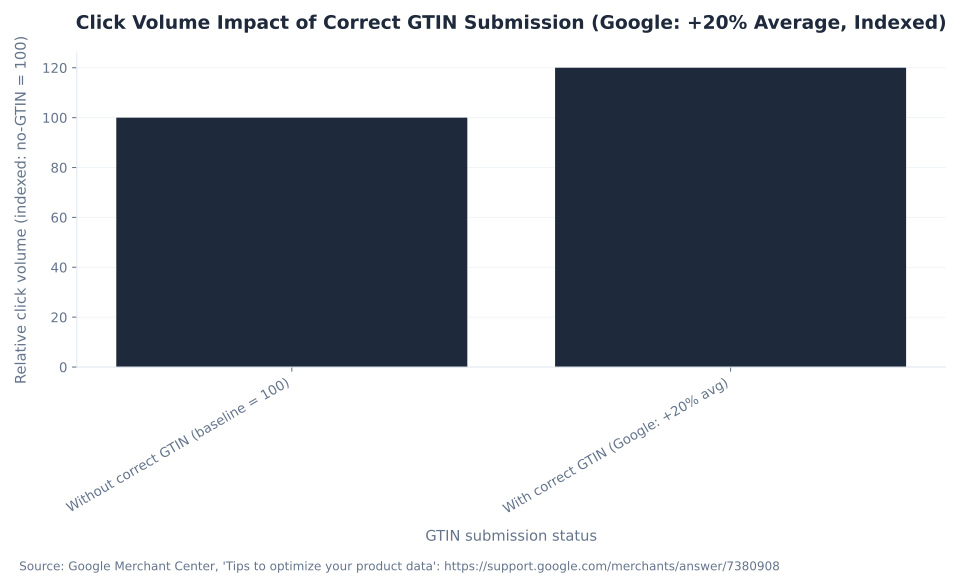
+20%
Average click increase with correct GTINs
Source: Google Merchant Center, Tips to optimize your product data (web-verified 2026-06-30). Google reports that retailers who added correct GTINs to their product data saw a 20% increase in clicks on average. GTINs are free to add from manufacturer spec sheets.
Product Feed Optimization in Google Merchant Center Next (2026)
In a standard Google Search campaign, you choose your keywords. In Google Shopping — free product listings and paid Shopping ads alike — Google matches your products to queries by reading your product data source (the term Merchant Center Next uses for what was previously called a product feed). There is no keyword field in Shopping. Your product title functions as a broad-match keyword, your description extends coverage into the long tail, your images determine whether clicks follow impressions, and your unique identifiers signal to Google's auction engine that your product is a known, trusted item. Optimizing the product data source is therefore the core optimization activity in Shopping — not bid management, not audience layering, not ad copy. The data is the campaign structure.
This guide covers the five levers that move Shopping performance in Merchant Center Next: product titles (the 150-character spec, the ~70-character visible window, and the vertical-specific attribute order), product descriptions (the 5,000-character limit and why the first 160–500 characters carry disproportionate weight), product images (the full spec table — current minimums, the incoming January 31, 2027 universal 500×500 px enforcement, and the recommended 1,500×1,500 px threshold Google uses internally), feed quality (and the myth-correction: Google publishes no feed quality score — the actual signals are product status, the Needs attention view, and the separate Top Quality Store program), and Product Studio (Google's free AI image and text tool in 2026, with its exact region limits). It also covers unique identifiers (GTINs), listing visibility, custom labels, seasonal timing, and the Preemptive Item Disapproval mechanic.
All merchants migrated to Merchant Center Next by September 2024. Classic Merchant Center flows — the Diagnostics tab, the Feeds section, the Feed Rules page — no longer exist in the same form. The current terms are data sources (not feeds), attribute rules (not feed rules), and Needs attention (not Diagnostics). Throughout this guide, current Merchant Center Next terminology is used; legacy terms are noted where confusion is common.
Before optimizing, the foundation is understanding what a data source actually contains — required attributes, unique identifiers, and how supplemental sources work. See what is a product feed in Google Merchant Center for that baseline. Optimization is only as good as your refresh cadence — for scheduling, attribute rules, and automatic item updates, see managing and automating product feeds. For fixing active disapprovals — price and availability mismatches, invalid GTINs, and image violations — see debugging feed disapprovals and errors in Merchant Center. The programs layer that turns feed quality into incremental reach is covered in overview of Merchant Center programs.
At MB Adv Agency, our Shopping feed management team works with merchants across ecommerce verticals from fashion and furniture to beauty and electronics. The pattern we see consistently: merchants who fix their titles to front-load brand and key attributes, correct their images to the recommended 1,500×1,500 px resolution, and add correct GTINs to their top-selling products see the highest-impact gains — before any bid adjustment. The feed is the lever. This guide covers how to pull it.
Key Takeaways
- Product data is the keyword system in Shopping. There are no keyword fields. Google reads your title, description, and attributes to match products to queries. Optimizing the data source is the primary campaign optimization activity.
- Titles: 150-character max, ~70 characters shown. Front-load brand + product type + key differentiator in the first 70 characters. Use vertical-specific attribute order (apparel: Brand → Gender → Product Type → Color → Size). No ALL CAPS, no promotional text — these trigger disapproval or Google auto-rewrite via Product Data Customization.
- Descriptions: 5,000-character max, plain text only. Put the most important information in the first 160–500 characters. Google recommends 500–1,000 characters for practical optimization. No HTML, no links, no promotional text.
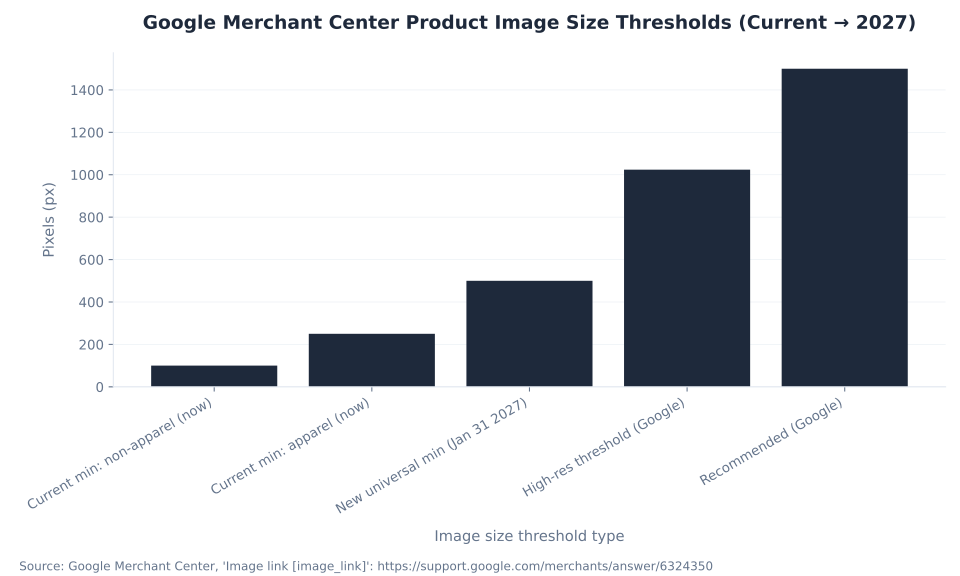
- Images: recommended 1,500×1,500 px or larger. The current minimums are 100×100 px (non-apparel) and 250×250 px (apparel). A new universal 500×500 px minimum is enforced from January 31, 2027, with warnings active since April 14, 2026. The "800px recommended" figure is not in current Google documentation. No promotional overlays on the primary image_link.
- Feed quality score: it does not exist. Google publishes no single feed quality score. The real signals are product status (Approved / Limited / Not Approved / Under Review / Processing) and the Needs attention view. Merchants chasing a score that is not in Merchant Center have been looking at the wrong metric.
- GTINs: +20% clicks on average (Google stat). Google reports that products with correct GTINs see a 20% increase in clicks on average. GTINs are free to add from manufacturer spec sheets. Use
identifier_exists: noonly for genuinely identifier-less goods. - Product Studio is free and built into Merchant Center Next. AI image generation, background swapping, resolution upscaling, video animation (AU/CA/IN/JP/UK/US), and AI title and description suggestions. Not available in Russia or France.
Product Descriptions: Specifications and Best Practices
The description attribute is the long-tail extension of your title. Google reads it to understand product context beyond what the title covers, and it surfaces in some ad formats and the free listing detail page. The five-thousand-character maximum sounds generous, but the field has hard formatting and content constraints that catch merchants off-guard.
| Specification | Value | Notes |
|---|---|---|
| Maximum characters | 5,000 | Google product data spec, description attribute (answer/6324374) |
| Recommended length | 500–1,000 characters | Google product data spec guidance — practical optimization range |
| Critical zone | First 160–500 characters | Most visible in Shopping results and ad formats — lead with the key product fact, not brand boilerplate |
| Format | Plain text only | No HTML tags. Tags are not rendered — they display as raw characters and trigger description quality issues |
| Prohibited content | Links to other sites; promotional text ("Free shipping," "Sale ends Sunday"); ALL CAPS; pricing or discount percentages; competitor mentions | Google product data spec — prohibited items trigger disapproval or description quality warnings |
| AI-generated descriptions | Use structured_description attribute (not description) | Introduced with Conversational Attributes (January 2026). Optimized for AI and conversational search queries. Opt-out available via Products → Automations. |
Source: Google Merchant Center, product data specification — description attribute (support.google.com/merchants/answer/6324374), web-verified 2026-06-30.
Write the description as if the first sentence is the only sentence a shopper will read. Lead with the product's function, its key specification or differentiating ingredient, and the category — not the brand story. The brand is already in your title and the brand attribute. Descriptions are also where keyword depth for the long tail lives: a title for a camera lens covers the model and aperture; the description covers "full-frame compatible," "weather-sealed," and "macro capable" — the qualifier queries that drive informed buyers.
Product Images: Google Merchant Center Recommended Image Size and Requirements (2026)
Google recommends 1,500×1,500 pixels or larger for all products. This is the resolution Google uses to serve high-quality placements across all Shopping formats. Images below 1,024 px fall below Google's high-resolution threshold. The widely-cited "800px recommended" figure is not in current Google documentation — it is a drift trap from older guides.
Two spec changes are active right now and one is incoming. The current enforced minimums are 100×100 px for non-apparel and 250×250 px for apparel. A new universal minimum of 500×500 px takes effect January 31, 2027 — Google began issuing warnings in Merchant Center's Needs attention view on April 14, 2026. Merchants currently meeting the 100/250 floor but submitting images below 500×500 are already seeing warnings and will receive disapprovals after the enforcement date. Google also announced it would auto-upscale some images using AI as a safety net — but that is not a substitute for submitting compliant images.
Image violations are consistently the most common and most avoidable disapproval category in the merchant feeds reviewed by MB Adv Agency's Shopping team. The two primary failure modes: images below the resolution floor (now 100/250, soon 500) and promotional overlays on the primary image_link image — both cause immediate disapproval with no grace period.
| Specification | Current requirement (enforced now) | Incoming change (enforcement Jan 31, 2027) | Source |
|---|---|---|---|
| Minimum size — non-apparel | 100 × 100 px | 500 × 500 px (universal — all products). Warnings active since Apr 14, 2026. | Google MC answer/6324350 |
| Minimum size — apparel | 250 × 250 px | 500 × 500 px (same universal floor applies) | Google MC answer/16989427 |
| ★ Recommended size | 1,500 × 1,500 px or larger (high-quality threshold ≥1,024 px). The old "≥800px" figure is NOT in current Google docs. | Recommended size unchanged — use 1,500 × 1,500 px now | Google MC image requirements |
| Maximum file size | 16 MB | No change | Google MC image requirements |
| Maximum resolution | 64 megapixels | No change | Google MC image requirements |
| Frame fill | Product fills 75–90% of the image frame | No change | Google MC image requirements |
| Background | White or neutral background preferred (especially for non-apparel products) | No change | Google MC image requirements |
| Overlays / watermarks / text | Prohibited. No promotional overlays, watermarks, or text on image_link — immediate disapproval, no grace period | Always prohibited — no change | Google MC Shopping policies |
| Primary vs. additional images | image_link = main product image (Shopping results); additional_image_link = lifestyle or alternate views. The Jan 2027 500×500 enforcement applies to both attributes. | 500×500 floor applies to additional_image_link as well from Jan 31, 2027 | Google MC spec update 2026 |
Sources: Google Merchant Center, "Image link [image_link]" (answer/6324350) and "Merchant Center product data specification update 2026" (answer/16989427), web-verified 2026-06-30. [Operator review] The April 14, 2026 warning-start date and January 31, 2027 enforcement date for the universal 500×500 minimum are load-bearing — re-confirm against the live Google Merchant Center image requirements page at publish. The recommended 1,500×1,500 px figure is from the live image requirements page. The 1,024 px high-resolution threshold is from Google documentation; re-confirm the specific source page at publish. NEVER cite "800px recommended."
Product Studio's image-upscaling tool is a practical solution for product images that are compliant now but will fall below the January 2027 500×500 floor — it is free and built into Merchant Center Next. For lifestyle or seasonal creative, use additional_image_link (where scene images and overlays are permitted) and keep the primary image_link clean.
Product Titles: Vertical-Specific Structure and Prohibited Content
Every thin optimization guide says "put keywords in your title." The instruction that actually works in Shopping is: front-load the attributes that matter most for your vertical, in the order shoppers use to filter. The 150-character title limit is generous, but only ~70 characters are shown in standard Shopping results. The first 70 characters must contain brand, product type, and the most differentiating attribute — not "Shop our amazing collection of..." The table below documents the vertical-specific attribute order Google's product data specification recommends, with the most common disapproval-triggering errors by vertical.
In a January 2025 DataFeedWatch case study, United RV applied AI-generated title rewriting to 3,500 Google Shopping products, rebuilding every title to front-load brand, product type, and key attributes per Google's best practices. Category A saw a +17% CVR increase and Category B saw a +44% CVR increase over two weeks. Improvements were visible "the very next day after pushing AI-generated titles live" (DataFeedWatch). These are DataFeedWatch-published figures for one RV merchant; see the DataFeedWatch case study for full methodology.
| Vertical | Recommended attribute order (first ~70 chars matter most) | Example | Common errors causing disapproval or auto-rewrite |
|---|---|---|---|
| Apparel | Brand → Gender → Product Type → Color → Size → Material | Levi's Women's 501 Original Jeans — Stonewash Blue — W28/L30 | Size/color buried past 70 chars; "SALE" or "Best Seller" in title; store name placed first. Fashion merchants: see fashion PPC for scale-title discipline. |
| Electronics / tech | Brand → Product Type → Model → Key Spec (storage/RAM/color) | Samsung Galaxy S24 Ultra Smartphone — 256GB — Titanium Black | Generic "Smartphone" without model; specs buried; all-caps model number |
| Home & furniture | Brand → Product Type → Material → Color → Dimensions | IKEA KALLAX Shelf Unit — White — 77×147 cm | Dimensions missing or in wrong unit; material omitted. For dimension-heavy catalogs: see furniture PPC. |
| Beauty / health | Brand → Product Type → Key Ingredient or Formula → Size / Count | CeraVe Moisturising Cream — Dry Skin — 340g | Health claim language ("clinically proven") in title; size/count missing |
| Food / grocery | Brand → Product Name → Flavor/Variant → Size / Unit Count | Oatly Barista Edition Oat Drink — 1 Litre — Pack of 6 | Pack size buried; serving count vs. pack count ambiguous |
| Universal prohibitions | ALL CAPS text (explicitly prohibited by Google spec); promotional language ("FREE shipping," "SALE," "Best Deal," "Act Now"); store name as filler when the brand attribute exists; promotional price or discount percentage in the title | Disapproval or Google auto-rewrite via Product Data Customization | |
Sources: Google Merchant Center, "Title best practices" and product data specification (support.google.com/merchants/answer/188494); DataFeedWatch AI Feed Optimization Case Study (January 2025), web-verified 2026-06-30. [Operator review] The ~70-character visible-in-results figure is from the verified baseline (Pass C); the live spec page confirmed 150-char max but did not state an explicit display truncation character count — re-verify against the title best-practices article at publish.
Google Product Data Customization rewrites titles automatically when it detects non-compliance or thin content. If your titles are non-compliant, Google's rewrite is not guaranteed to represent your product accurately. The practical implication: own your titles before Google does. Use a supplemental data source with attribute rules to apply title transformations at scale without touching your primary data source — the workflow is covered in managing and automating product feeds.
The "Feed Quality Score" Myth: What Feed Quality Actually Looks Like in Merchant Center Next
Google does not publish a feed quality score. This is the most-searched metric in Merchant Center optimization — and it does not exist as a Google-published number. The term "feed quality score" originates from third-party feed management vendors and the SEO content ecosystem. It has never appeared in Merchant Center's own interface. Merchants who have been chasing a score they cannot find are looking for something that is not there.
What Merchant Center Next actually shows is a set of distinct signals: per-item product status, the Needs attention view (item-level issues ranked by click potential), and the separate Top Quality Store program — which scores the merchant's purchase experience, not the feed data. The table below maps each signal to its location in the Merchant Center Next UI and what to optimize against it.
| Signal | What it shows | Where to find it | What to optimize |
|---|---|---|---|
| Product status | Approved (eligible), Limited (eligible with restrictions), Not Approved (disapproved — not eligible), Under Review, Processing. These are the Merchant Center Next labels. Legacy labels (Active / Pending / Disapproved / Expiring) no longer apply. | Products → All products → Status column | Drive all revenue products to Approved. Zero Not Approved on top-selling SKUs. |
| Needs attention view | Item-level issues ranked by click potential: High / Medium / Low. Top three high-impact cards shown first; full list below. "View history" for audit trail. Replaced the old Diagnostics tab. | Products → Needs attention | Fix all High click-potential issues first; work Medium/Low as time allows. Zero High issues = the quality target. |
| Account-level issues | Warnings (fix within the period shown) or full account suspension. Misrepresentation = immediate suspension. Most other violations receive a warning period first. | Products → Needs attention (top of page) | Resolve before the warning period expires. See debugging feed disapprovals and errors for the full fix guide. |
| Top Quality Store / Store Quality program | A separate merchant experience program — scored on shipping speed, return policy, site speed, and purchase experience. Scores the store behavior, not feed data. Affects free listings trust signals. | Growth → Manage programs (if enrolled) | Optimize separately from product data. Fast shipping + clear returns + secure checkout = the levers. |
| Feed quality score | Does NOT exist in Google Merchant Center. It is a third-party vendor construct. There is no single number to find, track, or report. | Nowhere — it is not in Merchant Center | Use product status + Needs attention + Top Quality Store as the actual proxies. |
Sources: Google Merchant Center, "About product status" and "About item issues" (support.google.com/merchants/answer/7092792); "About Top Quality Store" (Growth → Manage programs); web-verified 2026-06-30. [Operator review] Confirm the five product status labels (Approved / Limited / Not Approved / Under Review / Processing) are the current Merchant Center Next terms at publish — Google periodically updates status label names. Re-confirm the Top Quality Store program name and enrollment path. The statement "Google publishes no feed quality score" is load-bearing — confirm no Google-published feed-level score has been introduced since the web-verify date.
The practical quality target is simple: zero disapprovals, zero High click-potential issues in Needs attention, and Approved status on every revenue-driving product. That is the Merchant Center Next equivalent of a "perfect feed quality score" — expressed in the signals Google actually publishes.

Google Product Studio: AI Capabilities, Availability and Limits (2026)
Product Studio is free, built into Merchant Center Next, and covers image generation, resolution upscaling, video animation, and AI-generated titles and descriptions. It is not a replacement for professional product photography — especially for high-end catalogs where brand-consistent imagery drives purchase decisions. It is a practical tool for generating lifestyle scene variants from a single product shot, upscaling images that are approaching the upcoming 500×500 minimum, and templating seasonal creative without a full creative production cycle.
Two availability limitations are confirmed as of 2026-06-30 (exact Google quote from answer/13708167): "Product Studio is available to all Merchant Center users except those based in RU and FR." And for video generation: "The Generate Video feature is only available for merchants in Australia, Canada, India, Japan, the UK, and the US."
| Capability | What it does | Availability / limits |
|---|---|---|
| Background change / removal | Generate lifestyle scenes around a product, swap or strip backgrounds to white/neutral | Free. All MC users except RU and FR. |
| Image upscaling | AI-enhance an existing image to a higher resolution — useful for products approaching the Jan 2027 500×500 minimum | Free. All MC users except RU and FR. Verify output meets 75–90% frame-fill requirement. |
| Image generation | Generate new product visuals from text prompts and existing images | Free. All MC users except RU and FR. Does NOT support: hands, wall art, light fixtures. Does not support regulated goods (alcohol, pharmaceuticals, weapons, tobacco, gambling-related products). |
| Video animation / generation | Animate product images into short videos for Performance Max / YouTube Shopping; AI video generation from product photos | AU / CA / IN / JP / UK / US only. Not available in Russia or France. Free. |
AI title suggestions (structured_title) | AI-generated product title surfaced in Merchant Center. Accepted via the structured_title attribute — not the title attribute | Free. All MC users except RU and FR. Opt-out: Products → Automations. |
AI description suggestions (structured_description) | AI-generated descriptions optimized for Conversational Attributes and AI search queries (January 2026) | Free. All MC users except RU and FR. Use structured_description attribute, not description. |
| Seasonal templates | Pre-built seasonal backgrounds and scene templates — generate scene variants from a product photo for peak-period creative | Free. All MC users except RU and FR. Use with additional_image_link (overlays permitted there). Do NOT add promotional text to images in the primary image_link slot. |
Source: Google Merchant Center, "About Product Studio for Merchant Center" (support.google.com/merchants/answer/13708167), confirmed via direct page fetch 2026-06-30. [Operator review] Product Studio capabilities evolve frequently. Re-confirm at publish: (a) video generation country list; (b) Russia/France exclusion; (c) whether structured_description / Conversational Attributes have expanded beyond initial markets; (d) the structured_title vs. title attribute split. The "wall art" limitation is confirmed from Google's own help text (using "walled art" in the source — likely a typo for "wall art").
Product Data Optimization Checklist (Google Merchant Center Next, 2026)
The checklist below organizes the optimization work covered in this guide by priority: Critical items cause immediate disapprovals with no grace period; High items affect the broadest set of queries and impressions; Medium items are important but not immediately blocking; Low items are campaign-level benefits with no Shopping ranking impact. Run through this list in priority order before turning on or scaling any Shopping or Performance Max campaign.
| Area | Check | Priority |
|---|---|---|
| Price & availability accuracy | Feed price and availability match the landing page and the schema.org structured data on the server-rendered HTML. Automatic item updates is on by default — verify your structured data is accurate. | Critical — PID triggers immediately, no warning period |
| Images | Primary image_link ≥1,500×1,500 px; no overlays/watermarks; product fills 75–90% of frame; check Needs attention for image warnings (500×500 enforcement Jan 31, 2027) | High — overlays cause immediate disapproval |
| Titles | Brand + product type + key attribute in first ~70 chars; no promotional text; no ALL CAPS; under 150 chars total. Check for auto-rewrite flags in Needs attention. | High — affects every impression and query match |
| Unique identifiers (GTIN) | Submit manufacturer-assigned GTIN for all products that have one. Use identifier_exists: no only for genuinely identifier-less goods. Fallback: brand + mpn. | High — Google reports +20% clicks on average with correct GTINs |
| Needs attention: High issues | Open Products → Needs attention. Zero High click-potential issues on revenue-driving products. All priority items resolved. | High — these affect top-impression products |
| Descriptions | Most important info in first 160–500 chars; plain text only (no HTML); no links, no promo language, no competitor mentions; 500–1,000 chars recommended (max 5,000) | Medium-High |
google_product_category | Use the most specific taxonomy category, expressed as the full path | Medium |
| Variant attributes | Group variants with item_group_id; submit color, size, gender, age_group, material for apparel. Required for apparel with variants. | Medium (required for apparel) |
| Custom labels | Use custom_label_0–custom_label_4 for campaign segmentation (margin tier, seasonality, bestseller, price band) | Low-Medium (campaign management benefit) |
Sources: Google Merchant Center product data specification (answer/7052112); Google, "Tips to optimize your product data" (answer/7380908); web-verified 2026-06-30. The GTIN "+20% clicks" is Google's own cited figure. The Critical rating for price/availability accuracy reflects the Preemptive Item Disapproval (PID) mechanic — no warning period.
Listing Visibility: Unique Identifiers, Product Category, and Variant Attributes
Feed quality is necessary but not sufficient for Shopping visibility. Three attribute groups determine whether your products surface in the right queries at the right frequency: unique identifiers (GTINs signal a known product to Google's matching engine), google_product_category (precision here directly affects query-to-product match accuracy), and variant attributes (which prevent duplicate product cards and enable size/color filtering in results). Custom labels unlock campaign segmentation — they have no effect on organic visibility but are essential for Shopping and Performance Max bid strategy.
| Attribute | Requirement | Impact / notes |
|---|---|---|
| GTIN | Submit the manufacturer-assigned GTIN where one exists. Accepted formats: UPC (12 digits), EAN (13 digits), JAN (8 or 13 digits), ISBN-10 (10 digits), ISBN-13 (13 digits). | Google reports +20% clicks on average for products with correct GTINs (answer/7380908). Incorrect GTINs generate a warning then disapproval. Use identifier_exists: no only for genuinely identifier-less goods. |
| Brand + MPN (fallback) | When no GTIN exists, submit brand + mpn as the identifier pair. | Weaker signal than GTIN but prevents the identifier-missing warning. Private-label sellers without any GTIN should use identifier_exists: no. |
google_product_category | Use the most specific Google product taxonomy path — e.g., "Apparel & Accessories > Clothing > Shirts & Tops" (not just "Apparel & Accessories"). | A vague top-level category reduces match accuracy for Shopping queries. The full Google product taxonomy is available at support.google.com. Google auto-assigns a category if you omit it — usually a top-level category that underspecifies the product. |
| Variant attributes (apparel) | Group variants with item_group_id. Submit color, size, gender, age_group, material for apparel. Required for apparel products with variants. | Prevents duplicate product cards in results. Enables size and color filtering. Missing item_group_id causes variant products to compete against each other in the same auction. |
Custom labels (custom_label_0–custom_label_4) | Internal segmentation — never shown to shoppers. Use for margin tier, seasonality flag, bestseller rank, price band, or campaign priority. | No direct effect on organic visibility or Shopping ranking. Enables bid strategy splits in Shopping and Performance Max campaigns — a campaign management tool, not a visibility tool. |
| Price & availability accuracy | Feed price and availability must match the landing page and the schema.org structured data on the page's server-rendered HTML. | Critical. Mismatches trigger Preemptive Item Disapproval (PID) — immediate, no warning period, requires manual review to reinstate. See debugging feed disapprovals and errors. |
Sources: Google Merchant Center, product data specification — unique identifiers (answer/160161); "Tips to optimize your product data" (answer/7380908) for GTIN +20% clicks; Google product taxonomy (support.google.com); web-verified 2026-06-30. The GTIN "+20% clicks on average" is Google's own published figure — attribute to Google at every usage. Not mbadv client data.
Systematic identifier and category work across a large catalog is the kind of optimization that a Google Shopping feed management engagement prioritizes first — it lifts the floor for the entire catalog rather than optimizing individual products. For a full audit of identifier coverage and category precision in your existing data source, an ecommerce PPC audit surfaces the gaps before you run them.
Seasonal Feed Readiness: What to Have Live Before Your Peak Window
Price and availability accuracy failures are the most common cause of Shopping disruption during high-traffic windows. A Preemptive Item Disapproval during peak traffic is a lost opportunity with no recovery time — review periods during Black Friday or holiday weekends are not accelerated. The seasonal optimization discipline is: get your feed, promotions data source, and price history synchronized weeks before the peak, not days. The table below provides a T-minus framework — anchored to your peak window, not to calendar dates, since different verticals have different peaks.
| Task | Why it matters at peak | Timing |
|---|---|---|
| Verify price + availability accuracy | Price mismatches = Preemptive Item Disapproval (PID) — immediate, no warning. A disapproval during peak traffic has no fast-path recovery. | 2–3 weeks before peak — fix while review time is available |
| Set up a Promotions data source for sale offers | Sale badges on Shopping listings appear only when a Promotions data source is live and the offer is approved. Approval takes time. Do NOT put "SALE" in the product title — it triggers disapproval. | 1–2 weeks before promotions start — submission + approval lead time. Promotions add-on available in ~13 countries. See Merchant Center programs overview. |
| Establish sale-price history | Sale annotations in US Shopping ads require the product to have been at the original price for a qualifying period: 5 days in the past 30 OR 15 days in the past 200. Without this history, the sale annotation will not appear. | 2–4 weeks before the sale start — establish qualifying price history in advance |
Submit seasonal images via additional_image_link | Lifestyle and seasonal scene images belong in additional_image_link (overlays permitted there). The primary image_link must stay clean. Use Product Studio seasonal templates to generate scene variants quickly. | Before the season starts |
| Increase feed update frequency | Products expire after 30 days without an update. During flash sales and fast-moving promotions, daily or sub-daily scheduled fetches or Content API pushes keep price and availability current. Automatic item updates are a safety net, not a substitute. | During peak window — shift to daily or sub-daily updates. See managing and automating product feeds. |
| Zero High-priority Needs attention issues before peak | Running with High click-potential disapprovals during peak traffic means the products generating the most impressions are ineligible — the worst possible timing. | 2 weeks before peak — run a Needs attention audit and resolve everything |
Sources: Google Merchant Center, "About automatic item updates"; "About promotions" (add-on; ~13 countries); sale-price history rules (US Shopping ads: 5 days/30 OR 15 days/200); "Products → Needs attention"; web-verified 2026-06-30. The sale-price history rules differ by surface (US Shopping ads / free listings / non-US / Local Inventory Ads) — this table uses the US Shopping ads rule as the primary example. [Operator review] Re-verify the Promotions add-on country count and approval timelines at publish.

Systematically optimize your product data source with MB Adv Agency
Systematically optimizing titles, images, identifiers, and category assignments across a live merchant catalog — and keeping them compliant as Google's specs evolve — is the core of our Google Shopping feed management service. If you are not sure which optimization gaps are costing you the most clicks or causing active disapprovals, an ecommerce PPC audit identifies the highest-impact fixes before you run them.
For apparel merchants running Shopping at scale — where title structure by gender, color, and size, and image compliance across thousands of variants are the specialized disciplines — see our fashion PPC service. For home and furniture merchants dealing with dimension-heavy titles and high-resolution lifestyle vs. white-background image requirements, see our furniture PPC service.
What Product Feed Optimization Actually Delivers (Sourced Evidence)
Google's own product data specification puts one number on the table for identifier optimization: "Retailers who've added correct GTINs to their product data have seen a 20% increase in clicks on average" (Google Merchant Center, Tips to optimize your product data, confirmed 2026-06-30). This figure is an average across all product categories. Individual category results differ. The stat is attributable to Google — it is not mbadv client data and not a benchmark fabricated from partial information.
For title optimization, the most specific named-source case data available is a January 2025 DataFeedWatch case study on AI title rewriting. United RV applied DataFeedWatch's AI title optimization to 3,500 Google Shopping products, rebuilding every title to front-load brand, product type, and key attributes per Google's best practices. Results after two weeks: Category A saw a +17% CVR increase; Category B saw a +44% CVR increase. Improvements were visible "the very next day after pushing AI-generated titles live" (DataFeedWatch). These are DataFeedWatch-published figures for one RV/camper merchant across one two-week period — not a universal benchmark and not mbadv client data. See the full DataFeedWatch AI Feed Optimization Case Study for methodology. Only CVR lift was disclosed; no CPC or impression-volume data were reported.
The two external data points above are from different optimization levers (identifiers vs. titles), measured differently (click volume vs. conversion rate), and cannot be combined into an aggregate "feed optimization impact" number. What they share is the mechanism: better product data → more accurate query-to-product matching → more relevant impressions → more purchase-intent clicks. The feed is the signal Google reads to decide whether your product is the right answer for a given search. Better data means more correct answers.
For ecommerce merchants across verticals from beauty and supplements to furniture and electronics, the MB Adv Agency Shopping feed team treats product data optimization as the prerequisite to bid strategy — not the follow-up. A campaign running on incomplete or non-compliant data is not a campaign that benefits from bid changes. The feed work comes first.
Five Misconceptions That Cost Merchants Shopping Performance
1. "I have a good feed quality score." This is the most common myth in Merchant Center optimization. Google publishes no feed quality score — the term does not exist in Merchant Center Next. Third-party feed management vendors use it to describe their own internal scoring systems, not a Google metric. The actual proxies to track are: zero Not Approved products on revenue SKUs, zero High click-potential issues in Needs attention, and Approved status across the catalog. That is what Google shows; there is no number behind it.
2. "The recommended image size is 800px or 1,024px." Both figures circulate widely on older guides but neither is in current Google documentation. Google's current recommendation is 1,500×1,500 px or larger. The 1,024 px figure represents Google's high-resolution threshold — images above it are classified as high-resolution, not as the recommended size. The 800px figure has no current Google source. Use 1,500×1,500 px or larger now; it future-proofs against the January 31, 2027 universal 500×500 px enforcement.
3. "Putting 'Free Shipping' and 'SALE' in the title attracts more clicks." Google's product data specification explicitly prohibits promotional language, ALL CAPS text, and gimmicky characters in the title attribute. These trigger disapproval or automated title replacement via Product Data Customization — which means Google rewrites your title with its own version, which is not guaranteed to represent your product accurately. Promotional offers belong in the Promotions data source (separate add-on), where they display as sale badges beneath Shopping listings without touching the product title.
4. "I don't need GTINs for my private-label products." This is correct for genuinely identifier-less goods (custom, handmade, vintage, private-label products with no manufacturer-assigned GTIN). For those, identifier_exists: no is the right submission. But merchants who skip GTINs on branded products that do have manufacturer-assigned GTINs are forfeiting what Google describes as a 20% click increase on average — and generating a warning that leads to disapproval. The check is simple: does the manufacturer publish a GTIN for this product? If yes, submit it.
5. "Feed rules" and "feeds" are the current Merchant Center terms. All retailers migrated to Merchant Center Next by September 2024. The current terms are data sources (not feeds) and attribute rules (not feed rules). Guides that instruct you to "go to your feed settings" or "set up feed rules" describe legacy Classic Merchant Center navigation that no longer exists in the same form. Supplemental data sources and attribute rules are accessed differently in Merchant Center Next — and are the correct workflow for attribute-level overrides without touching the primary data source.
Frequently Asked Questions
What is the recommended image size for Google Merchant Center?
Google recommends 1,500×1,500 pixels or larger for all products. This is Google's "high-quality" threshold for Shopping placements across all formats. The current enforced minimums are 100×100 px for non-apparel products and 250×250 px for apparel. A new universal minimum of 500×500 px takes effect January 31, 2027, with warnings active in Merchant Center since April 14, 2026. Merchants currently meeting the 100/250 px floor but below 500 px are already seeing warnings and will receive disapprovals from January 31, 2027. The widely-cited "800px recommended" figure is not in current Google documentation. Use 1,500×1,500 px or larger now. Source: Google Merchant Center image requirements (answer/6324350), web-verified 2026-06-30.
Is there a feed quality score in Google Merchant Center?
No — Google publishes no feed quality score. The term is a construct from third-party feed management vendors. It does not appear in Merchant Center Next's interface. What Google actually shows is product status (Approved, Limited, Not Approved, Under Review, Processing), the Needs attention view (item-level issues ranked by click potential: High, Medium, Low), and the separate Top Quality Store program (which scores the merchant purchase experience, not product data). There is no single number to find or report. The practical quality target: zero Not Approved products on revenue SKUs, zero High click-potential issues in Needs attention. Source: Google Merchant Center, "About product status" (answer/7092792), web-verified 2026-06-30.
What are the Google Merchant Center image requirements?
Current enforced minimums: 100×100 px (non-apparel), 250×250 px (apparel). A universal 500×500 px minimum is enforced from January 31, 2027. Google recommends 1,500×1,500 px or larger. Maximum file size: 16 MB. Maximum resolution: 64 megapixels. The product should fill 75–90% of the frame. No promotional overlays, watermarks, or text on the primary image_link image — immediate disapproval, no grace period. Lifestyle and scene images belong in additional_image_link. The 500×500 enforcement from January 2027 applies to both image_link and additional_image_link. Source: answer/6324350, web-verified 2026-06-30.
How many characters can a product title be in Google Merchant Center?
The maximum is 150 characters. Only ~70 characters are visible in standard Google Shopping results — so the most important attributes (brand, product type, key differentiator) must appear in the first 70 characters. Prohibited content: ALL CAPS text, promotional language ("FREE SHIPPING," "SALE," "Best Deal"), gimmicky characters, and store name when the brand attribute already provides it. These violations trigger disapproval or automated title replacement via Product Data Customization. AI-generated titles use the structured_title attribute, not the title attribute. Source: Google product data specification, title attribute (answer/188494), web-verified 2026-06-30.
What is the product description limit in Google Merchant Center?
The maximum is 5,000 characters. Google recommends 500–1,000 characters for practical optimization. The most important product information should appear in the first 160–500 characters, where it is most visible in Shopping results and ad formats. Descriptions must be plain text only — no HTML tags, no links, no promotional language, no competitor mentions. Prohibited: promotional text ("Free shipping," "Sale ends Sunday"), ALL CAPS, pricing information, competitor names. AI-generated descriptions use the structured_description attribute (introduced January 2026 with Conversational Attributes), not the description attribute. Source: answer/6324374, web-verified 2026-06-30.
What is Google Product Studio in Merchant Center?
Product Studio is a free AI tool built into Merchant Center Next that handles: image generation from text prompts, background swapping and removal, image resolution upscaling, video animation of product photos (AU/CA/IN/JP/UK/US only), AI-suggested titles via the structured_title attribute, and AI-suggested descriptions via structured_description. It is available to all Merchant Center users except those based in Russia (RU) and France (FR). Known limitations: does not support images with hands, wall art, or light fixtures. Also not supported: image or video creation for regulated goods (alcohol, drugs, pharmaceuticals, gambling-related products, weapons, tobacco, fireworks). Use seasonal templates with additional_image_link — not the primary image_link — to keep the main product image clean. Source: answer/13708167, web-verified 2026-06-30.
Ready to optimize your Google Shopping catalog?
The MB Adv Agency Shopping feed team works across ecommerce verticals — apparel, beauty, home goods, electronics, food — managing product data sources, title structures, image compliance, and identifier coverage at catalog scale. We start with the data; the bid strategy follows. Explore our Google Shopping feed management service or start with an ecommerce PPC audit to identify the highest-impact gaps in your current data source.
Our full ecommerce PPC agency services and PPC services hub cover Shopping, Performance Max, and paid search for product-retail merchants. For vertical-specific Shopping work: fashion PPC and furniture PPC.
Methodology
This pillar consolidates seven absorbed Google Merchant Center pages covering product titles, descriptions, images, listing visibility, feed quality signals, Product Studio, and seasonal optimization. Every specification, status label, and product attribute in this guide traces to Google's official Merchant Center documentation (support.google.com/merchants) or the shared verified-facts baseline, web-verified June 30, 2026. The GTIN "+20% clicks on average" is Google's own cited figure from answer/7380908 — attributed to Google at every usage. The DataFeedWatch CVR lift figures (+17%, +44%) are from the DataFeedWatch AI Feed Optimization Case Study (January 2025) for United RV — a single merchant case study, not a cross-industry benchmark.
No mbadv client metrics. MB Adv Agency has no proprietary Google Shopping feed performance dataset. Agency POV in this guide is qualitative: "the most common disapproval category we see," "when we audit merchant feeds." Every quantified claim is attributed to Google or a named third party. No WordStream or LocaliQ Shopping cost figures appear anywhere in this guide — their only Shopping figure is a stale 2019 CPC estimate not applicable to 2026 optimization benchmarks.
Verify before publish: The April 14, 2026 warning-start date and January 31, 2027 enforcement date for the universal 500×500 px image minimum are load-bearing — re-confirm against the live Google Merchant Center image requirements page (answer/6324350) and product data specification update (answer/16989427) at publish. The "feed quality score does not exist" statement is load-bearing — confirm no Google-published feed-level quality score has been introduced. Product Studio capabilities evolve frequently — re-verify at publish. Last updated: 2026-06-30.
In the fast-paced world of e-commerce, optimizing product feeds is essential for businesses aiming to enhance visibility and increase sales potential. A product feed serves as a bridge connecting your inventory to various online platforms, including search engines, comparison shopping sites, and social media. This article discusses best practices for optimizing product feeds, focusing on how to improve feed quality, tips for maximizing visibility, and examples of effective feeds.
Best Practices for Optimizing Product Feeds
Optimizing product feeds is not merely about including the right keywords; it encapsulates a series of strategies designed to fine-tune your product listings. High-quality product feeds can influence both how your products rank in search results and how potential customers perceive your brand. By adhering to best practices, businesses can ensure that their feeds perform at an optimal level.
First and foremost, it's important to maintain comprehensive and consistent data across all platforms where your product feed is displayed. This includes having uniform product titles, descriptions, prices, and images. Inconsistent data can lead to the misrepresentation of products and ultimately confuse customers.
- Conduct regular audits: Regularly check your feeds for accuracy and completeness.
- Use automated tools: Leveraging automated feed management tools can help simplify the optimization process.
- Keep up with platform specifications: Different platforms have unique requirements; staying updated can enhance performance.
Understanding Data Attributes
Each product in your feed consists of multiple attributes, such as title, description, price, and availability. Understanding these attributes is crucial for effective optimization. Each platform may prioritize specific attributes differently. Knowing which details matter most can lead to better visibility and conversions.
For instance, Google Merchant Center emphasizes the importance of having accurate product categorization. Providing precise category information assists algorithms in matching your products to relevant searches. Additionally, including attributes such as brand, GTIN (Global Trade Item Number), and color can further enhance your product's discoverability. These details not only help in search ranking but also cater to customers who filter their searches based on specific criteria.
Image Optimization
Images are often the first impression a customer has of your product. Therefore, investing time in product image optimization can yield significant returns. High-quality images that depict your product from multiple angles can improve click-through rates. Moreover, images that are optimized for fast loading times can enhance the user experience, reducing bounce rates and encouraging potential buyers to explore your offerings further.
Additionally, consider the following tips:
- Use high-resolution images.
- Avoid cluttered backgrounds.
- Include images with a 360-degree view for better customer engagement.
Keyword Excellence
Keywords play a vital role in ensuring that your products are discoverable. Researching and utilizing high-performing keywords can drastically improve visibility. Incorporating relevant keywords into your titles and descriptions while avoiding keyword stuffing is essential to provide value to both search engines and customers. Utilizing tools like Google Keyword Planner or SEMrush can help identify trending keywords that resonate with your target audience.
Furthermore, consider long-tail keywords, which are often less competitive and can attract highly relevant traffic. For example, instead of just using "running shoes," you might optimize for "men's lightweight running shoes for marathon training." This not only targets a specific audience but also increases the likelihood of conversion, as customers searching for these terms are often further along in their purchasing journey.
How to Improve Feed Quality
Improving the quality of your product feed is paramount for driving traffic and increasing sales. Feed quality extends beyond basic data accuracy; it encapsulates various elements designed to enhance user experience and engagement.

One of the fundamental aspects of improving feed quality is ensuring complete and readable product descriptions. Clear, concise, and informative descriptions can help customers make informed purchasing decisions and reduce return rates. Additionally, incorporating keywords naturally into your descriptions can boost your visibility in search results, making it easier for potential customers to find your products. This strategic use of language not only aids in search engine optimization (SEO) but also resonates with the audience by addressing their needs and concerns directly.
Structured Data Markup
Utilizing structured data markup can significantly enhance the way your products appear in search engine results. Structured data is standardized code that helps search engines understand the content on your page better, thereby improving the relevance of your listings. Implementing structured data for your products can also facilitate the display of rich snippets, including product ratings, prices, and availability. These visual enhancements not only attract more clicks but also instill a sense of trust and credibility among potential buyers, as they can see essential information at a glance without having to click through.
Regularly Update Your Feed
Regular feed updates are necessary for maintaining quality and relevancy. Make it a habit to update your feeds with new product information, price changes, and stock levels. This constant refresh keeps your listings current, which is critical in the dynamic world of online shopping. Furthermore, consider implementing a schedule for these updates to ensure consistency and reliability. For instance, weekly updates can help you stay ahead of competitors and keep your audience engaged with the latest offerings.
Moreover, seasonal trends and promotional events often create opportunities for businesses. Tailoring your product feed to highlight seasonal items during relevant times can lead to higher visibility and increased customer interest. For example, during the holiday season, featuring gift guides or themed collections can capture the attention of shoppers looking for the perfect presents, thus driving more traffic to your site.
Monitor Performance Metrics
Monitoring the performance of your product feed can offer invaluable insights. Make it a point to analyze metrics such as click-through rates, conversion rates, and bounce rates. Data analysis can help you identify ineffective listings and areas for improvement. Regularly reviewing these metrics allows you to adapt your strategy quickly, ensuring that your feed remains aligned with customer preferences and market trends.
- Set performance benchmarks.
- Use analytics tools to track important metrics.
- Refine your strategy based on data-driven insights.
In addition to tracking standard metrics, consider exploring customer feedback and reviews as part of your performance evaluation. Understanding what customers appreciate or dislike about your products can provide deeper insights into how to refine your feed further. Engaging with this feedback not only enhances your product descriptions but also fosters a sense of community and trust between your brand and its customers.
Tips for Maximizing Visibility
Maximizing visibility requires a multi-faceted approach that includes keyword optimization, feed structure, and engaging content. Here, we delve into actionable tips that can enhance the visibility of your product feed across multiple platforms.

Choose the Right Platforms
Understanding where your target audience frequently shops is crucial for maximizing visibility. Marketplaces like Amazon might differ vastly from niche platforms. Verifying compatibility with your products can help maximize outreach and sales.
Researching where competitors are successful can also guide your platform choices. Look into their strategies, listings, and customer interactions to identify best practices that can be applied to your own feeds. Additionally, consider the demographics of each platform; for instance, platforms like Etsy cater to handmade and vintage items, attracting a different audience than a tech-focused site like Newegg. Tailoring your approach to fit the unique characteristics of each platform can significantly enhance your visibility.
Utilize Promotional Opportunities
Many platforms offer promotional tools that allow your products to stand out. Paid advertising and sponsored listings can increase visibility significantly. Consider participating in these programs to elevate your product feed's performance. Furthermore, seasonal promotions and flash sales can create urgency and attract more attention to your listings, especially during peak shopping times like holidays or back-to-school seasons.
In addition to paid promotions, leveraging social media advertising can also boost visibility. Platforms like Facebook and Instagram allow for targeted ads that can reach specific demographics based on interests and behaviors. Crafting visually appealing ads that highlight your products can drive traffic to your listings and increase overall engagement.
Engage with Customers
Engagement with your customer base can indirectly impact visibility. Encourage reviews and user-generated content to build credibility and trust, which can lead to enhanced visibility. Satisfied customers who provide feedback can turn into brand ambassadors, spreading word-of-mouth and increasing organic reach.
Moreover, consider implementing a loyalty program or referral incentives to motivate existing customers to share their experiences with friends and family. Engaging with customers through social media platforms can also foster a community around your brand. Regularly posting updates, responding to inquiries, and sharing behind-the-scenes content can create a more personal connection, encouraging customers to remain loyal and advocate for your products.
Examples of Effective Feeds
Learning from successful product feeds can provide practical insights for improvement. Here are examples renowned for their effectiveness:
Amazon’s Product Listings
Amazon excels in product listings due to their detailed descriptions, customer reviews, and relevant images. Their effective use of keywords ensures high visibility, and their automated inventory management prevents out-of-stock scenarios.
eBay’s Competitive Pricing
eBay has effectively utilized algorithms to display competitive pricing in its product feeds. Their dynamic pricing strategy enables sellers to adjust prices based on demand, significantly enhancing product visibility and sales potential.
Shopify’s Customer Integration
Shopify provides an easy integration for merchants to optimize their product feeds for various channels. Their customizable product feeds allow businesses to tailor their listings for targeted marketing, making effective use of data-driven insights to drive sales.
In conclusion, optimizing product feeds is a critical component of e-commerce success. By implementing best practices related to feed quality, visibility options, and analyzing successful examples, businesses can position themselves effectively in a competitive landscape.

As a Google Ads expert, I bring proven expertise in optimizing advertising campaigns to maximize ROI.
I specialize in sharing advanced strategies and targeted tips to refine Google Ads campaign management.
Committed to staying ahead of the latest trends and algorithms, I ensure that my clients receive cutting-edge solutions.
My passion for digital marketing and my ability to interpret data for strategic insights enable me to offer high-level consulting that aims to exceed expectations.
Google Partner Agency
We're a certified Google Partner Agency, which means we don’t guess — we optimize withGoogle’s full toolkit and insider support.
Your campaigns get pro-level execution, backed by real expertise (not theory).

4.9 out of 5 from 670+ reviews on Fiverr.
That’s not luck, that’s performance.
Highly recommend Matteo to set up your server side tracking. He has a deep understanding of e-commerce tracking and will go above and beyond to make sure everything is set up correctly and working 100%. If you are scaling your store this set up is non-negotiable in my opinion and there isn't many people who have this much knowledge or put the effort in to get it right. Thanks again!
avorodesign.com
I can only recommend Matteo! He was very patient, professional and very knowledgeable about GA4, Consent Mode v2, and GDPR compliance. Communication was clear, and the setup was done professionally and efficiently. Highly recommend him for anyone needing reliable tracking implementation.
www.natureiki.life
Matteo shines in the realm of online professionals. His work is not only deep in data but also complemented by his proactive communication and cooperation, setting a new standard for freelancers. If you want someone who truly exceeds expectations, look no further. Highly recommended!

www.omanbeverlysmyth.com
Exceptional Service Beyond Expectations - Outstanding Service Impeccable depth, flawless delivery, and exceptional language fluency—this service exceeded all expectations. Highly recommended. Matteo truly ROCKS!!!

ium-paris.com
Top-notch, always highly value working with Matteo. An absolute Google Ads Genius. This is approximately the 8th time I have hired him and he's helped us get 6-7 ROAS. We are excited in continuing to improve our lead flow. Hire this guy if you need Google Ads help. Thanks Matteo!

www.dleeventgroup.com
I finally found the guy who can setup server side tracking and all the ecosystem properly. I definitely recommend Matteo. He is very responsive, kind and wants to dig into things. He configured GA4, Meta, Google Ads, Outbrain and google consent v2 with Cookiebot. Thanks Matteo.

inomega.fr
MB Adv delivered exceptional work with outstanding professionalism and lots of patience, taking time to see effects of changes made and not just do the work and submit it. The proactive communication and video summaries of the work completed made working with Matteo a pleasure, as he consistently went above and beyond. Highly recommended for web analytics projects! We are already working on another project.

www.withnellsensors.co.uk
Working with Matteo on my Google Ads was a game-changer. He's not just a strategist, he's a true partner. He understood my goals and tailored a campaign that perfectly reached my target audience. I'm grateful for his expertise and dedication.
dccargo.com
Click-driven mind
with plastic-brick obsession.
We build Google Ads campaigns with the same mindset we use to build tiny brick worlds: strategy, patience, and zero tolerance for wasted pieces.
Data is our blueprint. Growth is the only acceptable outcome.