
Google Merchant Center Programs: Free Listings, LIA & More (2026)

Google Merchant Center Programs 2026
7 Programs
One is on by default — free product listings across the Shopping tab, Search, Images, Lens, YouTube, Maps, and Gemini
Google Shopping Graph: 60 billion product listings as of May 2026
Source: Vidhya Srinivasan, Google I/O May 2026
What Are the Google Merchant Center Programs?
Google Merchant Center organizes its distribution channels into a set of programs — sometimes called add-ons in the Merchant Center Next interface — that answer one question: where can your products appear, and who pays for it? The answer maps to a decision tree: free listings (organic, no cost, no Google Ads account), Shopping ads and Performance Max (paid CPC, via Google Ads), Local Inventory Ads (paid or free, in-store inventory for nearby shoppers), promotions (offer-annotation layer on free and paid listings), product ratings (aggregated star scores on individual products), Google Customer Reviews (store-level seller badge), and dynamic remarketing (retargeting add-on drawing from the same feed). One program not on this list: Buy on Google — discontinued September 26, 2023. See what Google Merchant Center is for a full orientation to the platform itself.
The single most important thing to take from this programs overview: free product listings are on by default in every new Merchant Center Next account. If you have uploaded products and passed policy review, you are already showing for free across the Shopping tab, Google Search, Images, Lens, YouTube, Maps, and Gemini. Merchants who do not know this leave the organic floor unclaimed while spending budget on Shopping ads for the same queries. Both programs draw from the same product feed and neither uses keyword targeting.
| Program | What it does | Status (2026) | Requires Google Ads? |
|---|---|---|---|
| Free product listings | Organic product results across Shopping tab, Search, Images, Lens, YouTube, Maps, Gemini | Active — enabled by default (Marketing → Marketing methods) | No |
| Shopping ads / Performance Max | Paid CPC product ads; premium placement in Shopping tab and Search results | Active | Yes (linked account) |
| Local Inventory Ads (LIA) | Paid and free ads for in-store inventory; shows nearby shoppers what is on your shelves and offers pickup options | Active — paid in 93 countries; free local listings in 47 | Yes (for paid LIA) |
| Promotions | Special offer and coupon annotations shown with free and paid listings | Active — exactly 13 countries; requires promotions data source (add-on) | No (free listings); Yes (Shopping-ad annotations) |
| Product ratings | Aggregated star ratings on individual product listings (Shopping ads and free listings) | Active — minimum 50 reviews; review_id required since July 8, 2024 | No |
| Google Customer Reviews | Store/seller rating badge via post-purchase survey opt-in (separate program from product ratings) | Active — 69 countries; no wind-down confirmed [Verify] | No |
| Dynamic remarketing | Retargets past visitors with the specific products they viewed; uses the existing Merchant Center feed (no separate feed required) | Active — enable under Settings → Add-ons | Yes (linked account and remarketing tag) |
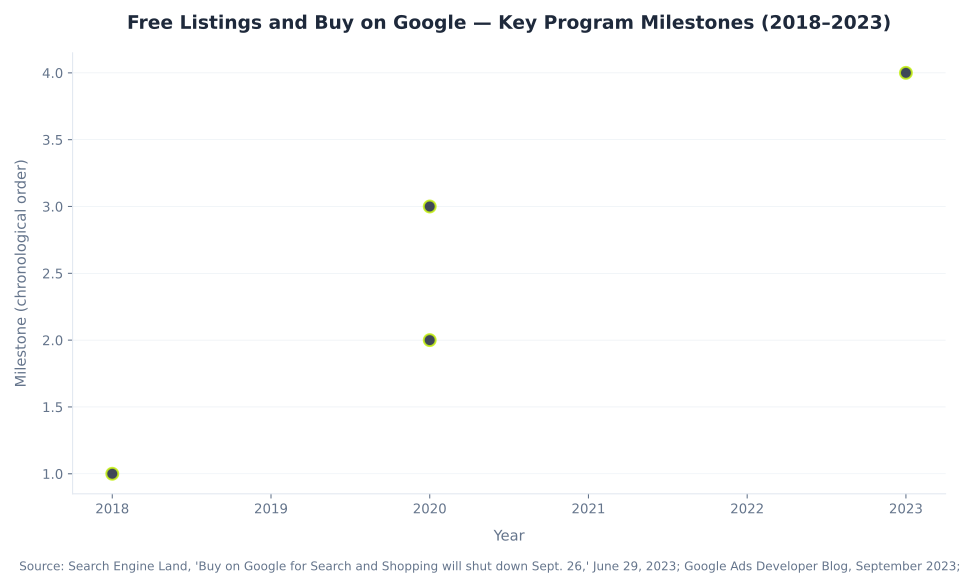
| Buy on Google | Checkout on Google (shopper purchases without leaving Google). Name chain: Shopping Actions (2018) → Buy on Google (Dec 2020) → discontinued. | DISCONTINUED — September 26, 2023. No enrollment path; all traffic routes to the merchant's own site. | N/A |
Sources: support.google.com/merchants (free listings default-on; LIA 93 paid / 47 free countries; promotions 13 countries; product ratings min 50; Google Customer Reviews 69 countries); Search Engine Land (Buy on Google discontinued September 26, 2023). [Operator review — verify Google Customer Reviews active status and any program-status changes before publish.]
Free Product Listings: What They Are and How to Verify They Are On
Free product listings are the no-cost baseline program in Google Merchant Center. Every approved product in your data source has the organic floor available to it: your products appear in the Shopping tab, Google Search result pages, Google Images, Google Lens, YouTube, Google Maps, Google Business Profile storefronts, and Gemini AI-generated responses — all without a CPC bid, without a daily budget, and without a linked Google Ads account. Google opened the Shopping tab to free product listings on April 21, 2020 (a structural shift away from the previously paid-only Shopping model), and renamed the program from “Surfaces across Google” to “free listings” / “free product listings” in December 2020. Thousands of guides still use the old name. The correct current label is free listings or free product listings. At MB Adv Agency, verifying the free-listings toggle is one of the first checks in every Merchant Center audit — a surprising number of feed management engagements reveal it was inadvertently switched off during an account reconfiguration.
How to verify free listings are enabled: In Merchant Center Next, go to Marketing → Marketing methods and confirm the toggle is on. For new accounts, it is on by default. No Google Ads account is needed; no separate opt-in flow exists. The included_destination feed attribute at the product level can exclude individual products from free listings if needed (use Free_listings — the legacy value Surfaces_across_Google is still accepted in data sources but the program name and UI label are retired). For best practices on improving free-listings performance through data quality, see product feed optimization best practices.
The Shopping Graph that powers free listings has grown from 45 billion product listings (October 2024) to 60 billion as of Google I/O May 2026 (Vidhya Srinivasan, Google I/O 2026). Sundar Pichai at NRF 2026 noted that more than 2 billion of those listings are refreshed every single hour. Free listings feed directly into this index — every approved product becomes a listing Google serves across all eight surfaces listed below. The Shopping feed management work that improves paid Shopping ads (titles, GTINs, image quality, price accuracy) is identical to what improves organic free-listings ranking — the two programs share the same data quality levers.
| Google surface | What appears | Eligibility notes |
|---|---|---|
| Shopping tab | Product cards (image, title, price, store) in the dedicated Shopping results tab on google.com | Primary free-listings surface; opened to free results April 21, 2020 |
| Google Search | Product carousels and rich product units within standard Search results pages | Shown for commercial and transactional queries; typically below paid Shopping ads |
| Google Images | Product results surfaced when a user searches in Images or hovers on an image result | High-value surface for visually-searchable products (apparel, home goods, jewelry) |
| Google Lens | Products matched to visual and camera-based search queries | Growing surface; image quality and GTIN accuracy are the key matching signals |
| YouTube | Product listings in Shopping-integrated video content and the product shelf | Linked YouTube channel or algorithmic matching; increasingly prominent as video-commerce grows |
| Google Maps | In-store product listings in local search and Maps results (for merchants with a linked Business Profile) | Requires a linked Google Business Profile; primarily the local inventory angle |
| Gemini / AI Overviews | Products surfaced in AI-generated responses drawing from the Shopping Graph | Emerging; AI Performance Insights (tracking brand share-of-voice in AI surfaces) rolled out in US, Canada, Australia, India, and New Zealand in May 2026 |
| Business Profile storefront | “See what’s in store” product grid on the merchant’s Google Business Profile | Requires a linked and active Google Business Profile; useful for brand discovery |
How to enable: Marketing → Marketing methods in Merchant Center Next (enabled by default for new accounts; confirm the toggle is on). No Google Ads account required. Source: Google, “Free listings overview,” support.google.com/merchants/answer/13889434. [Operator review — verify AI Performance Insights surface eligibility and rollout countries before publish.]
Free Listings vs Paid Shopping Ads: The Definitive Comparison
The most common framing mistake is to position free listings and Shopping ads as alternatives requiring a choice. They are complementary layers on exactly the same product data, and the correct answer to “free listings vs Shopping ads — which should I choose?” is: both, running in parallel. Neither program uses keyword bidding. Both read the same Merchant Center product data — title, description, GTIN, category, price, availability — and algorithmically match your products to user queries. You optimize by improving the feed, not by building keyword lists. This mechanical identity is why feed quality investment at MB Adv Agency lifts both organic free-listings coverage and paid Shopping performance simultaneously: the data quality levers are the same for both surfaces.
The differences are cost, placement priority, and one prerequisite: free listings are organic (no cost, no Google Ads account required, secondary placement in the Shopping tab, primary in Images, Lens, Maps, YouTube, and Gemini); Shopping ads are CPC-bid via Google Ads (you pay per click, premium top-of-page placement, requires a linked Google Ads account — see how to link Merchant Center with Google Ads). Running only Shopping ads without free listings enabled wastes the organic floor: you pay for premium placement on competitive queries but miss free coverage on long-tail, image-search, and Maps traffic. Running only free listings caps reach to secondary placement. The full-funnel strategy is paid campaigns for the highest-commercial queries plus free listings for the organic surface — both drawing from the same product feed. For the cost breakdown of Shopping ads and how Merchant Center's programs relate to budget, see how much Google Merchant Center costs.
| Dimension | Free listings | Paid Shopping ads |
|---|---|---|
| Cost | Free — no CPC, no budget required, no Google Ads account needed | CPC-based — you bid and pay per click via Google Ads (Shopping and Performance Max campaigns) |
| Placement priority | Secondary — typically below paid listings in the Shopping tab; primary in Images, Lens, Maps, YouTube, Gemini | Premium — top of the Shopping tab and Search results; eligible for the highest-visibility slots |
| Requires Google Ads account | No — Merchant Center only | Yes — a linked Google Ads account is mandatory |
| Uses keyword targeting | No — Google matches the product feed to queries algorithmically | No — same algorithmic feed-matching; you optimize bids and budget, not keywords |
| Data source | Same Merchant Center product data (data source / feed) | Same Merchant Center product data — Shopping ads require a linked MC feed |
| Surfaces | Shopping tab, Search, Images, Lens, YouTube, Maps, Gemini, Business Profile | Shopping tab, Search (top positions); Display and YouTube via Performance Max |
| Primary optimization lever | Product data quality (title, GTIN, images, price and availability accuracy) | Product data quality plus bid strategy, campaign structure, and budget in Google Ads |
| Sale-price eligibility | Price-history requirement: 30 days in past 200 for free listings (non-consecutive) | US Shopping ads: 5 days in past 30 OR 15 days in past 200 (non-consecutive) |
| Which should you use? | ★ Both. Free listings = the no-cost organic floor (especially strong in long-tail, Images, Maps). Shopping ads = paid scale for high-commercial queries. They run in parallel from the same feed — enabling one does not disable the other. | |
Sources: Google, “Free listings overview,” (free listings default-on; no Google Ads required; Marketing methods control); Google, “About Shopping ads,” (Shopping ads require linked MC feed; neither program uses keyword targeting). [Operator review — verify sale-price history rules against current support pages before publish.]
Buy on Google: A Legacy Decoder (Discontinued September 26, 2023)
Buy on Google no longer exists. Merchants who encounter it in older guides and search for it in the Merchant Center UI will not find it — because it was discontinued on September 26, 2023 (US, Search and Shopping tab). There is no enrollment path, no toggle in Merchant Center Next, and no “Buy on Google” add-on. Any current guide describing how to enroll is describing a program that was retired over two years ago.
The complete name chain for the record: Google launched Shopping Actions in 2018 — a checkout-on-Google feature that let shoppers complete purchases without leaving Google, routing transactions through Google's payment infrastructure rather than the merchant's own site. In December 2020 (the same month the free-listings rename happened), Shopping Actions was renamed Buy on Google. On June 29, 2023, Google announced via email to US retailers that Buy on Google would shut down. On September 26, 2023, the shutdown completed. Google’s stated rationale: “support an open ecosystem by connecting shoppers directly with merchants” — meaning all purchase intent now routes to the merchant's own checkout rather than Google's. The full account of the shutdown is documented by Search Engine Land and the Google Ads Developer Blog.
This section exists because “buy on google” still registers as a searched term (50 US monthly searches, Ahrefs June 2026, KD 33), and the absorbed zombie “how-to-enroll-in-the-buy-on-google-program” carried direct traffic from merchants following outdated guides. The id=“buy-on-google” anchor here is the definitive correction — a legacy decoder that tells the reader what happened to the program they read about and why it is not findable in Merchant Center. For a fuller comparison of what Merchant Center does versus what Google Ads does, see Google Merchant Center vs Google Ads.
Local Inventory Ads (LIA): Google Merchant Center’s In-Store Bridge
Local Inventory Ads is the one program in the Merchant Center suite that bridges in-store physical inventory to nearby online shoppers. While all other GMC programs serve catalog-level, geography-agnostic product data, LIA lets physical and omnichannel retailers submit a local product feed (what is on the shelves of each location) and link a Google Business Profile — so when a shopper near one of your stores searches for a product you stock, Google shows them that specific item is available nearby, with one of three pickup modes.
LIA runs as a paid program in 93 countries and as free local product listings in 47 countries (both verified from the primary support page at support.google.com/merchants/answer/14615117 as of 2026-06-30). Prior industry sources cited “80+ countries” for paid LIA and “~45 countries” for free local listings — the live support page lists each country explicitly and the correct counts are 93 and 47 respectively. For omnichannel furniture and home-goods retailers running both a physical showroom and an e-commerce channel, LIA is often the highest-ROI program extension — see our furniture PPC service for the in-store + online Shopping approach.
2026 compliance item — pickup_cost attribute: The pickup_cost attribute becomes mandatory in the United Kingdom, Switzerland, and EEA countries by September 30, 2026 for any merchant using Local Inventory Ads or free local listings that involve an in-store pickup cost or minimum order value. UK, Swiss, and EEA merchants with LIA enabled should add this attribute to their local product feed before the enforcement deadline. (FeedArmy and other feed management resources document this deadline from Google’s Merchant Center spec update. [Operator review — verify the September 30, 2026 deadline and country scope against current support.google.com/merchants docs before publish.])
| Feature | Detail |
|---|---|
| What it is | Paid ads (and free local listings) that promote in-store inventory to nearby shoppers searching on Google |
| Availability | Paid LIA in 93 countries; free local product listings in 47 countries |
| How it works | Submit a local product feed (in-store inventory data) + link a Google Business Profile → Google shows nearby shoppers the product, store, and pickup option |
| Pickup modes | Pickup Today (available right now in store) · Pickup Later — inventory (stocked, not immediately available) · Pickup Later — product data (general stock flags, no inventory-level feed) |
pickup_method attribute | Optional since the 2024 LIA simplification (previously required) |
★ pickup_cost attribute — 2026 compliance | Mandatory in UK, Switzerland, and EEA by September 30, 2026. UK and EEA merchants with LIA enabled must add this attribute before the deadline. [Verify deadline against current support.google.com/merchants docs before publish.] |
| March 2025 update | Loyalty benefit integration added — loyalty pricing can be surfaced in LIA for merchants using the loyalty_program attribute |
| Who it is for | Physical retailers and omnichannel merchants; not applicable to online-only merchants |
| Requirements | Local product feed · linked Google Business Profile · Google Ads account (for paid LIA) · LIA program enabled in Merchant Center |
Source: Google, “Local inventory ads and free local listings overview,” support.google.com/merchants/answer/14615117 (paid LIA 93 countries; free local 47 countries; pickup modes; pickup_method optional since 2024; loyalty integration March 2025 — web-verified 2026-06-30). [Operator review — verify pickup_cost September 30, 2026 deadline and loyalty integration details.]
Promotions: The Offer-Annotation Add-On
Promotions is the program that adds a “Special offer” annotation below product listings — visible on both free listings and Shopping ads. A shopper sees a clickable callout like “10% off” or “Free shipping on orders over £50” attached to your product card. Clicking it expands the offer details. Promotions run as an add-on through a promotions data source enabled under Settings → Add-ons in Merchant Center Next. The program is active in exactly 13 countries (verified 2026-06-30 from support.google.com/merchants/answer/13422697): Australia, Brazil, Canada, France, Germany, India, Italy, Japan, South Korea, Netherlands, Spain, United Kingdom, and United States.
The critical policy risk with promotions: submitting expired, invalid, or misleading offers falls under the Misrepresentation policy as the “untrustworthy promotions” sub-category — triggering an immediate Misrepresentation suspension with no grace period. Every promotion must be real, redeemable at the time of display, and accurately described. Google’s automated promotions extraction from merchant websites is in closed beta (not generally available as of 2026-06-30). Plan for a 12–24 hour review window for promotions submitted via data source before they appear on listings — do not submit a time-sensitive offer at the last minute.
| Item | Detail |
|---|---|
| What it does | Adds a “Special offer” annotation (e.g. “10% off”, “Free shipping”) below the product listing in Shopping ads and free listings |
| How to submit | Via a promotions data source — enabled as an add-on under Settings → Add-ons in Merchant Center Next |
| Supported countries | Exactly 13 countries: Australia, Brazil, Canada, France, Germany, India, Italy, Japan, South Korea, Netherlands, Spain, United Kingdom, United States [Verify current list before publish] |
| Maximum duration | 6 months per promotion |
| Automated extraction | Google can extract promotions from the merchant’s website automatically — currently in closed beta, not generally available |
| Policy risk — untrustworthy promotions | High risk. “Untrustworthy promotions” is a sub-category of the Misrepresentation policy — submitting expired, invalid, or misleading offers triggers a Misrepresentation suspension (immediate; no grace period). |
| Where it shows | On free listings and Shopping ads as a clickable “Special offer” annotation — clicks expand the offer details |
| Review time | Promotions submitted via data source typically take 12–24 hours to be reviewed and approved |
Source: Google, “Get started with Promotions,” support.google.com/merchants/answer/13422697 (13 countries; promotions data source; max 6-month duration; automated extraction in closed beta — web-verified 2026-06-30). [Operator review — verify current supported-country list and confirm whether automated promotions extraction has moved to GA before publish.]

Product Ratings and Google Customer Reviews: Two Distinct Programs
A persistent confusion in Merchant Center documentation is the conflation of product ratings and Google Customer Reviews as a single program. They are entirely separate: different data sources, different enrollments, different placements, different what they rate. Product ratings aggregate star scores on individual product listings; Google Customer Reviews collects store-level seller feedback via a post-purchase survey. Google Customer Reviews is documented as active in 69 countries as of 2026-06-30. No wind-down or discontinuation has been confirmed for either program. Any claim of Google Customer Reviews shutting down is unconfirmed and should not be cited.
| Dimension | Product ratings | Google Customer Reviews |
|---|---|---|
| What they rate | Individual products — aggregated stars on a specific item | The store / seller — a merchant-level star rating and badge |
| Data source | Product reviews feed submitted to Merchant Center (or via approved third-party review aggregators) | Post-purchase opt-in survey Google sends to the buyer (merchant adds survey opt-in module at checkout) |
| Minimum to qualify | 50 reviews across products | Google-determined threshold (not publicly disclosed) [Verify] |
| Key 2024 requirement | review_id required since July 8, 2024 — each review in the feed must have a unique identifier | — |
| Where it shows | Stars on Shopping ads and free listings for that specific product | Seller/store-level badge shown in Search results and on the merchant’s store page |
| Status (2026) | Active | Active — 69 countries; no wind-down confirmed [Verify] |
| Enrollment | Submit a product reviews feed to Merchant Center (or via an approved aggregator) | Opt into Google Customer Reviews in Merchant Center; add the survey opt-in badge to your checkout page |
Sources: Google, “About Google Customer Reviews,” support.google.com/merchants/answer/14628991 (active; no sunset language; 2026-06-30); Google, “Google Customer Reviews FAQ,” support.google.com/merchants/answer/14632922 (69 countries); support.google.com/merchants (product ratings — min 50 reviews; review_id required since July 8, 2024). [Operator review — verify Google Customer Reviews active status and product-ratings review minimum before publish.]

Dynamic Remarketing: The Feed-Powered Retargeting Add-On
Dynamic remarketing is a Google Ads add-on that draws from the same Merchant Center product feed to show past visitors the specific products they viewed on your site — personalizing retargeting at scale without requiring a separate feed. A shopper who viewed a specific blue sofa on your site and left without purchasing is served an ad featuring that exact sofa (image, price, title) when they browse the Google Display network or watch YouTube. The feed data that drives free listings and Shopping ads is the same data that powers the dynamic remarketing creative. To enable dynamic remarketing, you link a Google Ads account, enable the dynamic remarketing add-on in Merchant Center, and add the Google remarketing tag (or a GA4 tag with remarketing enabled) to your site. For full setup guidance on linking accounts, see how to link Merchant Center with Google Ads.
| Item | Detail |
|---|---|
| What it is | A retargeting add-on that serves past site visitors ads featuring the specific products they viewed, drawn from the existing Merchant Center product feed |
| Feed requirement | No separate feed required — dynamic remarketing uses the same Merchant Center data source that drives free listings and Shopping ads |
| Google Ads account | Required — a linked Google Ads account is mandatory; dynamic remarketing campaigns run in Google Ads |
| Remarketing tag | Google remarketing tag (or GA4 with remarketing enabled) must be on your site to collect visitor and product-view data |
| Where ads serve | Google Display Network; YouTube; Performance Max audience signals |
| How to enable | Settings → Add-ons in Merchant Center Next; then create a dynamic remarketing campaign in Google Ads |
Source: support.google.com/merchants (dynamic remarketing add-on; uses existing feed; requires Google Ads account and remarketing tag). [Operator review — verify current dynamic remarketing setup steps in Merchant Center Next before publish.]
Five Misconceptions About Merchant Center Programs — Corrected
1. “Free listings is called Surfaces across Google.” That name was retired in December 2020. The current label is free listings or free product listings. In Merchant Center Next the control lives under Marketing → Marketing methods, not “Destinations” (that label is also retired). The included_destination attribute value moved from Surfaces_across_Google to Free_listings; the legacy value is still accepted in data sources but the program name and UI label are gone. Any guide telling you to “enable Surfaces across Google” is describing an outdated label.
2. “You need a Google Ads account before your products show on Google Shopping.” For paid Shopping ads, yes — a linked Google Ads account is mandatory. For free product listings, no. Free listings are on by default in Merchant Center Next and require only a verified, claimed store with approved products. Merchants run free listings for months before linking Google Ads; the Google Ads account is the gateway to paid reach, not to any Shopping presence at all.
3. “Buy on Google is still available for enrollment.” It is not. Google discontinued Buy on Google on September 26, 2023 (US, Search and Shopping tab). There is no enrollment path, no toggle, and no add-on. The program name chain (Shopping Actions 2018 → Buy on Google December 2020 → discontinued September 26, 2023) is a factual record, not a live offering.
4. “Shopping ads use keywords, and free listings do not.” Neither program uses keywords. Both free listings and Shopping ads match the product feed to user queries algorithmically — Google reads the title, GTIN, description, category, price, and availability attributes and decides which searches to match. Merchants who search for “Shopping ads keywords” expecting to build a keyword list will not find one because there is none. Feed quality (titles, GTINs, image resolution, price accuracy) is the optimization lever for both surfaces.
5. “Google Customer Reviews is winding down / being discontinued.” This claim is unconfirmed. Google Customer Reviews is documented as active in 69 countries with no sunset language anywhere on the support pages as of 2026-06-30. The only 2026 Google Merchant Center sunset is the Content API for Shopping (replaced by Merchant API v1 GA August 2025; Content API shutdown August 18, 2026) — a developer API entirely unrelated to the customer reviews feature. Do not conflate the two, and do not cite any claim of Google Customer Reviews discontinuation.
Search Demand and the Two 301-Risk Anchors in This Cluster
This pillar absorbs seven pages from the google-merchant-center cluster. The GSC footprint before consolidation is dominated by two zombie pages: how-to-enable-free-listings-in-google-merchant-center (2,061 impressions over 90 days, position 17.47, top keyword “free listing google shopping”) and difference-between-free-listings-and-paid-shopping-ads (660 impressions, position 12.01, top keyword “product listing ads vs google shopping”). Together: 2,721 impressions and zero clicks — thin-content pages that surface but do not satisfy. The id=“free-listings” and id=“free-vs-paid” sections above are the load-bearing anchors that absorb both footprints. Rollback-watch “free listing google shopping” and bare “free listing” for 7–14 days after 301 redirects go live.
Ahrefs head terms in this cluster: “local inventory ads” (150 US monthly, KD 0, CPC $0.35) is the highest-volume entry and the lowest-difficulty ranking opportunity. “Buy on google” (50 US monthly, KD 33) continues to generate searches from merchants who encountered it in older guides — the id=“buy-on-google” section is the definitive correction for that search intent. Source: Ahrefs keywords-explorer, US, June 2026 (data JSON, 2026-06-30).
How to Enable and Maximize Merchant Center Programs
The setup sequence for Merchant Center programs follows a natural dependency order: the free organic baseline first, then paid amplification, then add-on annotation layers.
- Verify free listings are on (Marketing → Marketing methods). This is the first check in any Merchant Center audit at MB Adv Agency. The toggle is on by default for new Merchant Center Next accounts, but it can be inadvertently disabled. Confirm it is active before spending budget on Shopping ads — you are leaving free organic impressions on the table otherwise. No Google Ads account needed. Source: support.google.com/merchants/answer/13889434.
- For in-store inventory, enable Local Inventory Ads. Submit a local product feed with your in-store inventory data, link a Google Business Profile, and enable the LIA program in Merchant Center. For paid LIA you also need a linked Google Ads account. UK, Switzerland, and EEA merchants must add the
pickup_costattribute before September 30, 2026. Source: support.google.com/merchants/answer/14615117. - For promotions, enable the promotions data source under Settings → Add-ons. Build offers that comply with the Misrepresentation policy — every promotion must be real, redeemable, and accurately described at the time of display. Allow 12–24 hours for review. Available in 13 countries.
- For product ratings, submit a product reviews feed. A minimum of 50 reviews across your catalog is required for stars to display. Every review must include a
review_id(required since July 8, 2024). Stars appear on both Shopping ads and free listings. - For paid Shopping ads, Performance Max, and dynamic remarketing, link a Google Ads account. See how to link Merchant Center with Google Ads. Then enable the dynamic remarketing add-on (Settings → Add-ons) and add the Google remarketing tag to your site. The existing product feed powers dynamic remarketing — no separate feed is required.
The highest-leverage action in this sequence for most merchants: investing in Shopping feed quality before scaling paid campaigns. Feed quality is the shared lever for free listings and Shopping ads — it lifts organic coverage and paid performance from the same data work. For a broader ecommerce paid-media strategy layered on top of this organic baseline, see our ecommerce PPC agency service.

Maximize Both Free and Paid Shopping
Feed quality is the shared lever for free listings and Shopping ads
Both free listings and Shopping ads serve from the same Merchant Center data source. Our Google Shopping feed management team audits and manages the catalog that drives both organic and paid Shopping performance.
Get a Feed AuditThe commercial landscape these programs operate in is large and growing. Sundar Pichai at NRF 2026 (January 11, 2026) stated: “It has over 50 billion product listings, including inventory, prices and reviews. More than 2 billion of those listings are refreshed every single hour.” (Google Blog, NRF 2026 remarks.) By Google I/O May 2026, the Shopping Graph had grown to 60 billion products. Free listings feed directly into this index — every approved product in a merchant’s Merchant Center data source becomes a listing Google serves to matching searches across all eight surfaces. The scale of the organic reach available through the free-listings program is not marginal: it is the same index that powers Google’s entire Shopping ecosystem, and it is accessible to any merchant with an approved Merchant Center account at zero CPC cost.
The Google Shopping Graph: Scale Behind the Free Listings Program
Free product listings draw from and feed into the Google Shopping Graph — the index of product listings that powers Google’s entire commerce infrastructure. Three sourced milestones document the scale of this index:
- October 2024: 45 billion product listings — Google Blog, “Google Shopping AI Update,” October 15, 2024 (exact quote: “the 45 billion product listings in Google’s Shopping Graph”)
- January 2026 (NRF): 50 billion product listings plus more than 2 billion refreshed every hour — Sundar Pichai, NRF 2026 remarks, January 11, 2026
- May 2026 (Google I/O): 60 billion products — Vidhya Srinivasan, Google I/O May 2026
Every approved product in a merchant’s Merchant Center data source enters this index. The 2 billion/hour refresh rate reflects the freshness infrastructure underlying price and availability accuracy across all Shopping surfaces. This scale also explains why neither free listings nor Shopping ads use keyword bidding: at 60 billion listings, Google’s matching algorithm operates at a depth no keyword list could replicate. Feed quality — accurate titles, confirmed GTINs, current pricing, high-resolution images — is the lever that determines where in the ranking your products surface across all eight Google surfaces.
Google Merchant Center Programs: FAQ
Running Shopping Ads and Free Listings?
The same feed quality that lifts free listings ranking also improves paid Shopping performance
Our ecommerce PPC agency manages the full Shopping stack — free listings verification, feed optimization, Shopping campaigns, and Performance Max — or see our PPC services for the broader paid-media picture.
Methodology
This pillar consolidates seven absorbed pages from the google-merchant-center cluster: the programs overview page (the pillar slug itself, updated in place), how-to-enable-free-listings-in-google-merchant-center (2,061 GSC impressions, position 17.47 — the id=“free-listings” section carries this footprint), difference-between-free-listings-and-paid-shopping-ads (660 impressions, position 12.01 — id=“free-vs-paid” carries this footprint), shopping-ads-vs-free-listings-which-should-you-choose (0 clicks, folds into free-vs-paid), how-to-enroll-in-the-buy-on-google-program (0 impressions; id=“buy-on-google” is the legacy decoder), submitting-promotions-and-offers-in-merchant-center (0 impressions; absorbed into the promotions section), and what-is-the-local-inventory-ads-program (26 impressions; id=“local-inventory-ads” carries this footprint).
All program statuses, country counts, dates, and requirements are sourced from official Google Merchant Center documentation (support.google.com/merchants) and named third-party sources (Search Engine Land, Google Ads Developer Blog, Google Blog), web-verified against live pages on 2026-06-30. Key corrections applied from the enrichment file: paid LIA is available in 93 countries (not “80+”); free local listings are in 47 countries (not “~45”); promotions are available in exactly 13 named countries; Google Customer Reviews is confirmed active in 69 countries. No mbadv client metrics appear anywhere in this pillar — all agency POV is qualitative. Shopping CPC benchmarks are not included here; see the cost pillar for that data. Our Shopping feed management team uses the free-listings toggle check and LIA program audit as standard steps in every new Merchant Center engagement.
The digital marketing landscape has transformed how businesses connect with their customers, particularly through online shopping. One critical tool in this realm is Google Merchant Center, which allows merchants to manage how their product information appears on various Google platforms. This article provides a comprehensive overview of Merchant Center programs, highlighting their importance, benefits, and available options.
What are Merchant Center programs?
Merchant Center programs are designed to streamline the way retailers showcase their products online. They facilitate the process of getting product information from retailers to customers efficiently and effectively. By leveraging these programs, merchants can ensure their products are visible in search results and can reach their target audience more effectively.

At its core, the Merchant Center serves as a hub for product data that retailers submit to Google. This data informs various Google services including Shopping Ads, Free Listings, and more. In essence, the Merchant Center acts as the bridge between a retailer's inventory and potential customers searching for relevant products.
Retailers can create an account in the Merchant Center, where they can upload their product feeds. These feeds contain key product details such as titles, descriptions, prices, and images. Once the feed is approved, the products can be eligible for a range of programs offered by Google.
One of the standout features of the Merchant Center is its integration with Google Ads, allowing retailers to create targeted advertising campaigns that leverage the product data they have uploaded. This means that merchants can tailor their ads to specific demographics, locations, and even times of day, maximizing their visibility and potential sales. Additionally, the Merchant Center supports dynamic remarketing, which enables retailers to re-engage users who have previously interacted with their products, showcasing items they viewed or added to their carts, thereby enhancing the likelihood of conversion.
Furthermore, the Merchant Center is continually evolving to meet the needs of modern retailers. With the introduction of features like the Performance Dashboard, merchants can gain valuable insights into how their products are performing across various platforms. This data can inform strategic decisions, helping retailers optimize their listings and advertising efforts. By analyzing metrics such as clicks, impressions, and conversion rates, merchants can fine-tune their approach, ensuring they remain competitive in an ever-changing digital marketplace.
Available options (e.g., free listings, Shopping Ads)
Merchant Center programs offer several options for retailers to promote their products. Among the most prominent options are free listings and Shopping Ads. Each serves distinct purposes but shares a common goal of increasing product visibility and driving sales.
- Free Listings: This option allows retailers to showcase their products on Google without any cost. Free listings appear in Google Search results and Google Shopping, providing merchants an avenue to reach customers organically. They require compliance with Google’s guidelines, which include having an updated product feed and maintaining a high standard of data accuracy. Retailers can leverage this opportunity to enhance their brand presence, as products can be discovered by potential customers who may not have been familiar with their offerings. This organic visibility can lead to increased traffic and ultimately, higher conversion rates.
- Shopping Ads: Unlike free listings, Shopping Ads are paid advertisements that enable retailers to feature their products with images, prices, and product details directly within search results. Retailers bid on these ads in a competitive auction environment, which means that their visibility can increase significantly if they are willing to allocate more budget towards advertising. The visual nature of Shopping Ads often leads to higher click-through rates, as consumers are drawn to the imagery and detailed information provided upfront. This format allows retailers to stand out in a crowded marketplace, making it easier for customers to make informed purchasing decisions.
- Local Inventory Ads: Retailers with a brick-and-mortar presence can benefit from Local Inventory Ads, which help attract customers to physical store locations. By showing local inventory availability in search results, these ads serve customers who prefer to shop in person. This feature not only drives foot traffic but also enhances the customer experience by providing real-time stock information, ensuring that shoppers can find what they need without unnecessary delays.
Additional options and features
In addition to free listings and Shopping Ads, there are various other features and options available to merchants using Google Merchant Center. These include:
- Smart Shopping Campaigns: An automated approach to advertising that combines standard Shopping and Display Ads, optimizing for the best performance. This feature uses machine learning to analyze data and identify the most effective ad placements, allowing retailers to maximize their return on investment with minimal manual effort.
- Merchant Promotions: This feature allows retailers to highlight special offers and promotions, enhancing the appeal of their product listings. By showcasing discounts and limited-time offers, retailers can create a sense of urgency that encourages customers to act quickly, potentially leading to increased sales during promotional periods.
- Content API: The Content API provides a programmatic interface for merchants to manage their product data efficiently, allowing for real-time updates without manual intervention. This capability is particularly beneficial for retailers with large inventories, as it streamlines the process of keeping product information accurate and up-to-date, ultimately improving the customer experience.
Furthermore, retailers can also take advantage of features like dynamic remarketing, which allows them to re-engage users who have previously interacted with their products. By displaying tailored ads to these users based on their browsing behavior, retailers can significantly improve their chances of conversion. Additionally, the integration of Google Analytics with Merchant Center provides valuable insights into customer behavior, enabling retailers to refine their marketing strategies and better target their audiences.
Another noteworthy option is the ability to create product feeds that are optimized for specific channels. Retailers can customize their feeds to cater to different platforms, ensuring that their products are presented in the most effective way possible across various online marketplaces. This flexibility not only enhances visibility but also allows retailers to tap into diverse customer segments, maximizing their reach and potential sales opportunities.
Benefits of enrolling
Enrolling in Merchant Center programs can yield significant advantages for retailers of all sizes. One of the primary benefits is enhanced visibility, as products are more likely to be seen by potential customers through both organic and paid listings. This can lead to increased traffic to a retailer's website and, ultimately, higher sales. The ability to showcase products across multiple channels, including Google Search and Google Shopping, ensures that retailers can reach a broader audience, tapping into diverse consumer behaviors and preferences.

Another important benefit is access to valuable data insights. Retailers can analyze how their products are performing in terms of visibility, clicks, and conversions. This data-equipped approach allows retailers to make informed adjustments to their product listings or advertising strategies, maximizing their return on investment. Moreover, the ability to segment data by demographics or geographic locations enables retailers to tailor their marketing efforts more precisely, ensuring that they are targeting the right audience with the right messages.
Furthermore, utilizing Google Merchant Center programs can drive brand recognition. When potential customers see a retailer’s products across different platforms—even for free listings—they begin to recognize the brand, which can lead to higher customer trust and recurring purchases. This brand visibility is particularly crucial in competitive markets where standing out is essential for attracting and retaining customers. Consistent branding across listings can also enhance brand loyalty, as consumers are more likely to return to a retailer they recognize and trust.
Increased conversion rates
By using effective product images, compelling descriptions, and promotional offers, retailers can enhance their product listings, further improving the likelihood of conversions. When potential buyers see and click on Listings or Shopping Ads, they are already in a shopping mindset, making them more likely to complete a purchase. Additionally, incorporating user-generated content, such as reviews and ratings, can further bolster credibility and encourage hesitant buyers to take the plunge, as they see positive feedback from other customers.
Conversely, leveraging local inventory ads can boost store visits, as customers might prefer to buy from a nearby retailer. As these ads clarify stock availability, they can significantly influence decision-making, offering a substantial advantage to physical retailers. This local focus not only drives foot traffic but also fosters community engagement, as customers feel more connected to businesses that are part of their local landscape. Retailers can even promote special in-store events or offers through these ads, creating a sense of urgency and encouraging immediate visits.
Streamlined product management
The Merchant Center also simplifies product management. By centralizing product data, retailers can quickly modify listings, add new products, or remove obsolete ones. This efficiency can save time and reduce the manual labor often associated with maintaining accurate listings across multiple platforms. Retailers can also automate certain processes, such as inventory updates and price adjustments, ensuring that their listings are always current and competitive.
Moreover, the integration of various tools within the Merchant Center allows retailers to optimize their product feeds more effectively. Features such as feed rules and automatic item updates help ensure that listings are not only accurate but also optimized for search algorithms. This means that retailers can focus more on strategy and less on the nitty-gritty of product management, ultimately leading to a more agile and responsive business model. The ease of use and flexibility offered by the Merchant Center empowers retailers to adapt quickly to market changes, ensuring they remain relevant and competitive in a fast-paced digital environment.

As a Google Ads expert, I bring proven expertise in optimizing advertising campaigns to maximize ROI.
I specialize in sharing advanced strategies and targeted tips to refine Google Ads campaign management.
Committed to staying ahead of the latest trends and algorithms, I ensure that my clients receive cutting-edge solutions.
My passion for digital marketing and my ability to interpret data for strategic insights enable me to offer high-level consulting that aims to exceed expectations.
Google Partner Agency
We're a certified Google Partner Agency, which means we don’t guess — we optimize withGoogle’s full toolkit and insider support.
Your campaigns get pro-level execution, backed by real expertise (not theory).
4.9 out of 5 from 670+ reviews on Fiverr.
That’s not luck, that’s performance.
Highly recommend Matteo to set up your server side tracking. He has a deep understanding of e-commerce tracking and will go above and beyond to make sure everything is set up correctly and working 100%. If you are scaling your store this set up is non-negotiable in my opinion and there isn't many people who have this much knowledge or put the effort in to get it right. Thanks again!
avorodesign.com
I can only recommend Matteo! He was very patient, professional and very knowledgeable about GA4, Consent Mode v2, and GDPR compliance. Communication was clear, and the setup was done professionally and efficiently. Highly recommend him for anyone needing reliable tracking implementation.
www.natureiki.life
Matteo shines in the realm of online professionals. His work is not only deep in data but also complemented by his proactive communication and cooperation, setting a new standard for freelancers. If you want someone who truly exceeds expectations, look no further. Highly recommended!

www.omanbeverlysmyth.com
Exceptional Service Beyond Expectations - Outstanding Service Impeccable depth, flawless delivery, and exceptional language fluency—this service exceeded all expectations. Highly recommended. Matteo truly ROCKS!!!
ium-paris.com
Top-notch, always highly value working with Matteo. An absolute Google Ads Genius. This is approximately the 8th time I have hired him and he's helped us get 6-7 ROAS. We are excited in continuing to improve our lead flow. Hire this guy if you need Google Ads help. Thanks Matteo!

www.dleeventgroup.com
I finally found the guy who can setup server side tracking and all the ecosystem properly. I definitely recommend Matteo. He is very responsive, kind and wants to dig into things. He configured GA4, Meta, Google Ads, Outbrain and google consent v2 with Cookiebot. Thanks Matteo.
inomega.fr
MB Adv delivered exceptional work with outstanding professionalism and lots of patience, taking time to see effects of changes made and not just do the work and submit it. The proactive communication and video summaries of the work completed made working with Matteo a pleasure, as he consistently went above and beyond. Highly recommended for web analytics projects! We are already working on another project.

www.withnellsensors.co.uk
Working with Matteo on my Google Ads was a game-changer. He's not just a strategist, he's a true partner. He understood my goals and tailored a campaign that perfectly reached my target audience. I'm grateful for his expertise and dedication.
dccargo.com
Click-driven mind
with plastic-brick obsession.
We build Google Ads campaigns with the same mindset we use to build tiny brick worlds: strategy, patience, and zero tolerance for wasted pieces.
Data is our blueprint. Growth is the only acceptable outcome.