
Google Merchant Center vs Google Ads: Key Differences

Google Merchant Center vs Google Ads 2026
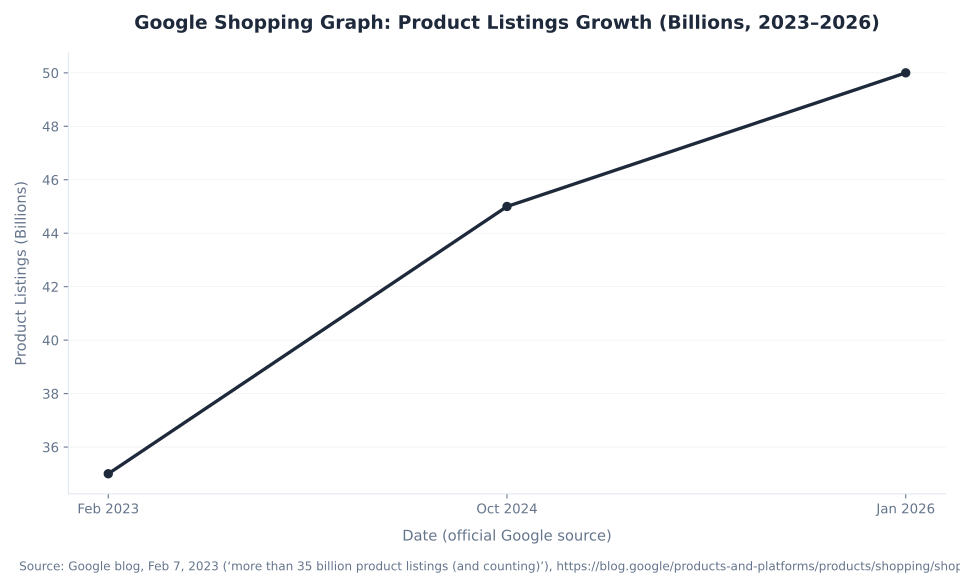
50 Billion
Product listings in Google’s Shopping Graph — the catalog Merchant Center builds, and the data layer Google Ads Shopping campaigns run on
Merchant Center = WHERE YOUR PRODUCT DATA LIVES (free) · Google Ads = WHERE YOU ADVERTISE (CPC) · Free listings need only Merchant Center · Shopping ads require both linked · People shop across Google more than a billion times a day
What Is Google Merchant Center?
Google Merchant Center is a free Google tool that serves as the product data hub for retailers selling on Google surfaces. It is where you upload and manage product information — titles, images, prices, availability, GTINs, and custom attributes — and where Google stores and validates that data before surfacing it across its ecosystem. Setting up a Merchant Center account does not start advertising. It creates a catalog. Think of it as the inventory system for Google Shopping: the data goes in here, and from here it powers two things simultaneously: free product listings (organic product results at zero cost) and the feed that paid Shopping campaigns and Performance Max retail campaigns read.
The scale of the ecosystem Merchant Center populates is significant context for any ecommerce merchant evaluating whether and how to use it. The Shopping Graph — the product catalog backed by Merchant Center data sources — held more than 35 billion product listings as of February 2023 (Google blog, Feb 7, 2023), grew to 45 billion by October 2024 (Google blog, Oct 15, 2024), and reached over 50 billion by January 2026 (Sundar Pichai, NRF, Google blog, Jan 11, 2026). That same October 2024 post noted that “people shop across Google more than a billion times a day.” The growth from 35B to 50B — roughly 43% in three years — reflects global adoption of Merchant Center as the standard data submission layer for product retailers on Google.
Merchant Center is now rebuilt as Merchant Center Next, with all retailers migrated by September 2024. The core function is unchanged — product data goes in, Google surfaces it — but the interface, terminology, and analytics are substantially updated. Free product listings across the Shopping tab, Search, Images, Lens, YouTube, Maps, and Google’s AI surfaces (AI Overviews, Gemini, AI Mode) are the baseline value proposition of Merchant Center, available at zero cost to any verified retailer.
Merchant Center Next: What Changed in 2024
Google rebuilt Merchant Center from the ground up — announced at Google Marketing Live on May 23, 2023, and completed for all retailers by September 2024. The core product data function is the same, but the interface and terminology changed significantly. Any pre-2024 comparison guide that references the old Diagnostics tab, the old feed terminology, or the old product status labels describes the product as it existed before September 2024.
| Classic Merchant Center (pre-Sept 2024) | Merchant Center Next (current) | Notes |
|---|---|---|
| Feeds | Data sources | Primary + supplemental. Input methods: file upload, Google Sheets, scheduled fetch, Merchant API, auto website crawl |
| Diagnostics tab | Products → Needs attention | Issues ranked by click potential: High / Medium / Low. The correct first step in any Shopping diagnostic |
| Feed rules | Attribute rules | Rules that transform attribute values at the data source level before product approval |
| Destinations / Surfaces across Google | Marketing methods | On by default on new accounts. No Google Ads account required for free listings. Managed under Marketing → Marketing methods |
| Active / Pending / Disapproved / Expiring | Approved / Limited / Not Approved / Under Review / Processing | New product status labels in Merchant Center Next. Limited = runs with reduced eligibility. Not Approved = disapproved |
Additional Merchant Center Next changes that invalidate older guides: US tax settings were removed on July 1, 2025 (Google now auto-calculates US sales tax for Shopping listings — no manual tax table setup required or available). The Merchant API v1 went GA in August 2025 and is the current developer path; the older Content API for Shopping shuts down August 18, 2026. Any technical integration guide referencing the Content API is pointing to a deprecated path. For the full overview of Merchant Center’s ecosystem, features, and future direction, see our Google Merchant Center overview.
What Is Google Ads?
Google Ads is the advertising platform where you create campaigns, set budgets, choose bid strategies, and pay for placements. For ecommerce and retail merchants, the two most relevant campaign types are Shopping campaigns (standard Shopping) and Performance Max retail campaigns (PMax). Both use product data read from a linked Merchant Center account to build ads dynamically — there are no ad headlines to write and no keywords to bid on in Shopping campaigns. The product data source is the ad creative and the targeting layer simultaneously.
Google Ads also runs Search, Display, Video (YouTube), App, and Demand Gen campaigns — none of which require Merchant Center. A brand or service business runs Google Ads for Search and Video without any Merchant Center connection. The Merchant Center requirement is specific to Shopping and PMax retail campaign types only. Standard Shopping campaigns must be created directly in Google Ads; any campaign created from inside Merchant Center is now a Performance Max campaign.
Free Product Listings vs Paid Shopping Ads: The Clean Separation
Most merchants assume Merchant Center is only useful when paired with Google Ads spending. It is not. Google opened the Shopping tab to free product listings on April 21, 2020, and free listings are on by default on new Merchant Center accounts (under Marketing → Marketing methods — no opt-in required, no Google Ads account needed). Products in a verified Merchant Center account appear for free across the Shopping tab, Search results, Images, Lens, YouTube, Maps, and — in the AI era — Google’s Gemini surfaces and AI Overviews. These organic product results cost $0 per impression and $0 per click. The Shopping Graph with 50 billion product listings and 1 billion+ daily shopping sessions runs substantially on this free-listing layer.
Paid Shopping ads and PMax retail campaigns layer on top of the same product catalog. They deliver premium placement with bid control, targeting segmentation via custom labels (0–4), and conversion optimization — but they require: a Google Ads account, a one-time MC–Google Ads account link, a campaign with a budget and bid strategy, and CPC spend. The practical recommendation for serious ecommerce merchants: run both simultaneously. Free listings serve as the always-on organic baseline at zero cost; paid Shopping and PMax provide the controlled reach layer for high-intent queries and high-margin products. For a comparison of Merchant Center programs — free listings, Shopping ads, Promotions, and Local Inventory Ads — see the Merchant Center programs overview.
Google Merchant Center vs Google Ads: Key Differences
The single most important distinction in all of Google Shopping: Merchant Center is WHERE YOUR PRODUCT DATA LIVES. Google Ads is WHERE YOU ADVERTISE. They are not the same product. They do not overlap. They are separate accounts, separate dashboards, and separate logins that serve distinct roles in the Google Shopping ecosystem — connected by a deliberate one-time linking action.
The most common reason Shopping campaigns fail to launch or fail to scale is confusion about which tool owns which function. A merchant who sees “Limited” products in Merchant Center and underperforming campaigns in Google Ads simultaneously has two problems in two tools — and a Google Ads bid change will not fix a Merchant Center data disapproval, just as a Merchant Center feed optimization will not fix a Google Ads budget exhaustion. Knowing which tool owns what is the first diagnostic decision in every Shopping account audit our Google Shopping feed management team runs.
| Dimension | Google Merchant Center (Merchant Center Next) | Google Ads |
|---|---|---|
| Role / what it is | WHERE YOUR PRODUCT DATA LIVES — the catalog / data source that feeds Google’s surfaces | WHERE YOU ADVERTISE — the campaign platform where you build Shopping / PMax and pay CPC |
| What it holds | Product data sources (titles, images, prices, availability, GTINs); free-listing eligibility; diagnostics (Needs attention); policy enforcement; competitive pricing and Best Sellers analytics | Shopping campaigns, Performance Max retail campaigns, Search / Display / Video / App / Demand Gen campaigns; bid strategies; budgets; conversion tracking; campaign-level performance reporting |
| Account cost | Free — no account fee, no listing fee, no per-product charge (Google, Merchant Center is a free tool) | You pay per click (CPC) on Shopping / PMax; cost is the budget and bids you set |
| Free product listings | Yes — on by default. Products appear organically across Shopping tab, Search, Images, Lens, YouTube, Maps, and Gemini / AI surfaces at $0 cost. No Google Ads account needed (support.google.com) | No free listings in Google Ads. All placements cost CPC. Paid Shopping / PMax are premium placements with bid control |
| Uses keywords? | No — Google matches data source attributes (title, description, category, GTIN) to queries automatically | Shopping / PMax: no keywords (Google matches the product data source). Search campaigns: yes, keywords |
| Required for Shopping ads? | Yes — mandatory. Shopping / PMax retail campaigns cannot exist without a linked Merchant Center data source | Required for Shopping / PMax. Not required for free listings (free listings need only MC) |
| Where product errors surface | Products → Needs attention (MC Next). Item-level: Approved / Limited / Not Approved / Under Review / Processing. Account-level: warnings / suspension | Campaign eligibility warnings if the linked data source has too many disapprovals, but product-level diagnostics live in MC — not Google Ads |
| Performance reporting | Product-level performance across ALL Google surfaces (free listings + paid, split); Best Sellers; Price Competitiveness / Price Insights; Competitive Visibility | Campaign / ad-group / product-group performance; ROAS; spend pace; conversion value; bidding insights |
| Link relationship | The data source; initiates the link (Settings → Linked accounts / Access and services) | The campaign platform; approves the link and reads the data source to build Shopping / PMax ads dynamically |
Sources: Google, “Merchant Center is a free tool,” support.google.com/merchants/answer/188493; free listings on by default: support.google.com/merchants/answer/13889434. Merchant Center Next terminology throughout: data sources, Needs attention, Approved/Limited/Not Approved/Under Review/Processing.
How Merchant Center and Google Ads Connect: The Data Flow
The connection between Merchant Center and Google Ads is a one-time account link — not automatic, not assumed. Without it, Google Ads cannot read the Merchant Center data source, and Shopping / PMax campaigns cannot serve. The link grants Google Ads read access to the product catalog; performance data (impressions, clicks, cost, conversions, ROAS) then flows back into Google Ads reporting. Product-level performance across all Google surfaces (including free listings) reports back into Merchant Center’s Performance tab separately.
The practitioner phrase “the feed is the new keyword” (Optmyzr / Store Growers / ZATO — industry phrase, not an official Google formulation) captures the structural implication: in Shopping, optimizing the product titles, images, GTINs, and attributes in the Merchant Center data source is the equivalent of keyword and ad copy optimization in Search. Including correct GTINs increases clicks on Shopping ads by an average of 20% (Google official). The step-by-step data flow is documented in Table 4 below, and the full linking workflow — including the GA4 connection for free-listing insights, Google Tag Manager setup, and dynamic remarketing via the linked data source — is covered in our linking Merchant Center with Google Ads guide.
| Step | Where it happens | What it does |
|---|---|---|
| 1. Author the data source | Merchant Center | Upload product data via file upload, Google Sheets, scheduled fetch, Merchant API, or auto website crawl. Required attributes: id, title, link, image_link, availability, price, description. Brand required for most physical goods. See what is a product feed in Google Merchant Center |
| 2. Verify and claim website | Merchant Center | Confirm domain ownership via HTML file, HTML meta tag, Google tag, GTM, or Google Analytics. Automatic item updates (price and availability from schema.org structured data) activate after claim |
| 3. Products approved in diagnostics | Merchant Center | Products → Needs attention. Products reach “Approved” status to be eligible for Shopping ads or free listings. Price / availability mismatch triggers Preemptive Item Disapproval immediately |
| 4. Link MC to Google Ads | Either tool | One-time account link: MC → Settings → Linked accounts; Google Ads → Tools → Linked accounts. Grants Google Ads read access to the Merchant Center product catalog. One MC links to multiple Google Ads accounts (agency model) |
| 5. Create Shopping / PMax campaign | Google Ads | Standard Shopping: create directly in Google Ads, select linked MC account as data source, set budget and bid strategy and product groups. PMax: create in Google Ads or from inside MC (campaigns initiated from MC are PMax automatically) |
| 6. Google reads the data source → builds the ad | Google’s systems | Google reads product title, image, price, availability from the data source and assembles the Shopping ad dynamically. No keywords — Google matches the data source to the user’s search query. GTINs increase clicks by an average of 20% (Google official) |
| 7. Performance data flows back | Google Ads (campaigns); Merchant Center (products) | Google Ads: impressions, clicks, cost, conversions, ROAS by campaign / product group. MC Performance tab: impressions and clicks by product across free listings and paid (split filterable). Paid-Shopping conversions tracked via Google Ads conversion actions — NOT the GA4–MC link |
Note on the GA4–Merchant Center link (support.google.com/merchants/answer/13881610): this link surfaces GA4 key-event data in Merchant Center for free-listing performance insights only. It is NOT the conversion-tracking mechanism for paid Shopping ads — paid Shopping conversions require Google Ads conversion actions and the Google tag or enhanced conversions.
Do You Need Both? The Dependency Matrix
The direct answer: for free listings, Merchant Center only (no Google Ads required). For paid Shopping ads or Performance Max retail campaigns, both linked. The asymmetry is structural and non-negotiable: Merchant Center does not require Google Ads, but Google Ads Shopping and PMax retail campaigns require a linked Merchant Center data source — always, without exception. For the full Merchant Center programs overview — free listings, Shopping ads, Promotions, and Local Inventory Ads — see overview of Merchant Center programs.
| Scenario | Possible? | What you get | What you miss |
|---|---|---|---|
| Merchant Center only (no Google Ads) | Yes | Free product listings across Shopping tab, Search, Images, Lens, YouTube, Maps, Gemini / AI surfaces. Product diagnostics. Price Competitiveness analytics. Zero ad spend | No Shopping / PMax paid ads. No bid control, no premium placement, no targeting control. Organic placement only (no guarantee of appearing for a given query) |
| Google Ads Shopping / PMax (no Merchant Center) | No — impossible | — | Shopping / PMax retail campaigns require a linked Merchant Center data source — always, no exceptions. Google Ads cannot create a Shopping or PMax product ad from data that does not exist in a linked Merchant Center account |
| Both linked (the recommended setup) | Yes — the full stack | Free listings (always-on organic baseline) PLUS paid Shopping / PMax (premium placement and bid control and custom targeting via custom labels and ROAS optimization). Both use the same product data source | Nothing — this is the recommended setup for any merchant serious about Google Shopping reach |
| Google Ads Search / Display / Video (no Merchant Center) | Yes (no product ads) | All non-Shopping campaign types (Search, Display, YouTube / Video, App, Demand Gen) work in Google Ads without Merchant Center. These campaigns do not use a product data source | No Shopping campaigns, no PMax retail campaigns, no dynamic remarketing using the product data source (dynamic remarketing add-on requires the MC data source). Brand and non-ecommerce advertisers run Google Ads this way |
Cost Comparison: What Merchant Center Costs vs What Google Ads Shopping Costs
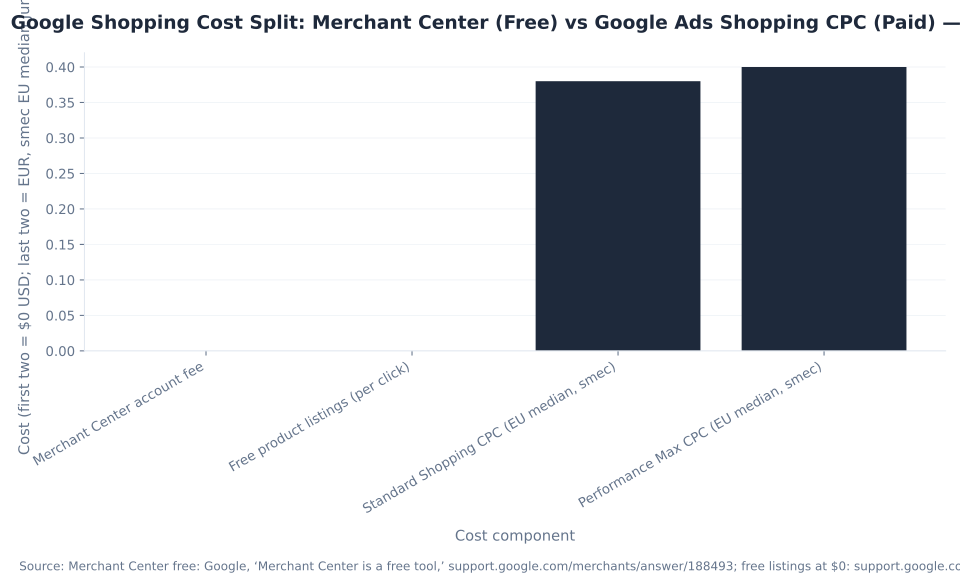
The cost equation is clean: Merchant Center is free. You pay via Google Ads. There is no account fee for Merchant Center, no listing fee, no per-product charge, and no cost for organic clicks on free listings. The cost of Shopping advertising is entirely a Google Ads budget item — CPC on Shopping or PMax placements. The full cost breakdown, including how to estimate a realistic Google Ads Shopping budget by category and market, is in how much does Google Merchant Center cost.
| Cost component | Merchant Center | Google Ads (Shopping / PMax) |
|---|---|---|
| Account / platform fee | $0 — free to create and maintain | $0 account fee — but you pay per click (CPC) on ad spend |
| Free product listings | $0 — organic impressions and clicks on free listings cost nothing | — (free listings do not run through Google Ads; no Google Ads account needed) |
| Paid Shopping / PMax ads | $0 — MC supplies the data; it does not charge for Shopping placements | You pay CPC — the budget and bids you set in Google Ads, charged per click |
| Shopping CPC benchmark — European (current) | — | Median Standard Shopping ≈ €0.38; median PMax ≈ €0.40 (smec, Jun 29, 2026; ~€650M ad spend; 8 verticals). Best current named-source figure (global data labeled European) |
| Shopping CPC benchmark — US by industry (2025 data) | — | Fashion $0.69, Electronics $0.89, Beauty & Skincare $0.87, Home & Furniture $0.58, Automotive $0.56, Pet Supplies $0.82 (AdBacklog, Apr 2025, US Standard Shopping, methodology not fully disclosed) |
Source guardrail: The smec figures (€0.38 / €0.40) are European medians from a live dashboard (~€650M spend, 8 verticals); US rates differ by vertical. The AdBacklog US figures (Apr 2025, 2025 data, methodology not fully disclosed) are the closest available US-specific, per-industry Shopping CPC estimates from a named source. No US Shopping CPC with a disclosed methodology is available from a named source as a single headline figure — use “—” rather than extrapolating. WordStream / LocaliQ figures ($5.26 / $5.42) are Google + Microsoft Search CPC only and do not apply to Shopping CPC.
What You Do in Each Tool: Task-by-Task Split
The clearest practical expression of the Merchant Center vs Google Ads distinction is the task split: every action a merchant takes in their Shopping stack belongs definitively in one tool or the other. The diagnostic implication: start in Merchant Center before touching Google Ads. A feed disapproval that blocks 30% of your products is invisible in Google Ads — you only see the campaign underperforming. The fix is in Merchant Center’s Products → Needs attention, not in Google Ads’ bid settings.
| Task | Where it lives | Notes |
|---|---|---|
| Upload / manage product data | Merchant Center | Data sources (file upload / Google Sheets / scheduled fetch / Merchant API / auto website crawl). Formerly “feeds” |
| Fix product disapprovals / “Needs attention” items | Merchant Center | Products → Needs attention (MC Next). Issues ranked by click potential: High / Medium / Low |
| Optimize product titles, images, descriptions, GTINs | Merchant Center | Title and image optimization in the data source (or via attribute rules). GTINs improve match quality. “The feed is the new keyword” (Optmyzr / Store Growers / ZATO — industry phrase, not official) |
| Enable / manage free product listings | Merchant Center | Marketing → Marketing methods. On by default on new accounts. No Google Ads account needed |
| Check price competitiveness vs market | Merchant Center | Price Competitiveness / Price Insights report (benchmark vs market by category and country) |
| Link Merchant Center to Google Ads | Either tool | MC: Settings → Linked accounts / Access and services → add Google Ads customer ID. One-time action |
| Create a Shopping or Performance Max campaign | Google Ads | Standard Shopping: create directly in Google Ads only. Any campaign created from inside Merchant Center is now a PMax campaign. Requires a linked MC data source |
| Set bids, budget, bid strategy (tROAS, Maximize Conversions) | Google Ads | All bidding and budget controls live in Google Ads. Merchant Center has no bidding interface |
| Segment products with custom labels into campaign product groups | Google Ads (labels authored in MC) | Custom labels (0–4) are authored in the Merchant Center data source; used as segmentation handles in Google Ads campaign product groups |
| Track paid Shopping conversions | Google Ads | Paid-Shopping conversions tracked in Google Ads via conversion actions and Google tag / enhanced conversions. The GA4–MC link is for free-listing insights only |
| View campaign ROAS, spend pacing, ad performance | Google Ads | ROAS, conversion value, spend, CPC — all campaign-level metrics live in Google Ads. MC Performance tab shows product-level data, not campaign-level spend or ROAS |
Reporting Split: What Each Tool Shows You
After linking, both tools surface performance data — but they report different slices of the same activity, and mixing them up wastes diagnostic time. Merchant Center’s Performance tab reports product-level data across ALL Google surfaces (free listings and paid combined, with a filter to split them). Google Ads reports campaign-level spend, ROAS, and conversion data. The most common overstatement: treating the GA4–Merchant Center link as a conversion-tracking mechanism for paid Shopping ads. It is not. That link surfaces GA4 key-event data in Merchant Center for free-listing performance insights only. Paid Shopping conversion data always comes from Google Ads conversion actions (support.google.com/merchants/answer/13881610).
| What you want to know | Where to look | Report / tab in that tool |
|---|---|---|
| Which products are approved / disapproved / limited | Merchant Center | Products → Needs attention (issues ranked by click potential: High / Medium / Low) |
| How products perform across ALL Google surfaces (including free listings) | Merchant Center | Performance tab (impressions, clicks, CTR, purchases, purchase rate; filter by free listings vs paid) |
| How prices compare to competitors in the same category | Merchant Center | Price Competitiveness / Price Insights (benchmark vs market by category and country) |
| What products are trending / best-sellers in my category | Merchant Center | Best Sellers (by category and country) |
| How Shopping visibility compares to competitors | Merchant Center | Competitive Visibility (relative visibility, page-overlap rate, higher-position rate vs competitors) |
| How Shopping / PMax campaigns are spending vs target | Google Ads | Campaigns → performance (spend, impressions, clicks, CPC, budget pacing) |
| ROAS / conversion value for paid campaigns | Google Ads | Campaigns → conversion columns; asset groups (PMax) or product groups (Shopping) |
| Paid Shopping conversion tracking (purchases attributed to ads) | Google Ads | Conversions (set up via Google tag / enhanced conversions in Google Ads). The GA4–MC link does NOT track paid Shopping conversions — it surfaces GA4 data in MC for free-listing insights only |
| AI-era: brand share-of-voice in AI Mode / AI Overviews / Gemini | Merchant Center | AI Performance Insights (rolling out from May 2026; US / CA / AU / IN / NZ) — tracks brand share-of-voice in AI-surface placements. [Verify rollout at publish] |
Common “Which Tool?” Questions Answered
| Question | Answer |
|---|---|
| Is Google Merchant Center the same as Google Ads? | No. Separate products, separate accounts, separate dashboards. Merchant Center = product catalog and free listings. Google Ads = campaigns, bids, and where you pay CPC |
| Do I need a Google Ads account to use Merchant Center? | No — for free product listings only. Yes — for Shopping campaigns or Performance Max retail campaigns (both require a linked MC data source) |
| Where do I fix my product disapprovals? | Merchant Center — Products → Needs attention. Google Ads cannot fix product-level disapprovals |
| Where do I change my Shopping bids? | Google Ads — campaign bid strategy and product-group-level bid adjustments. Merchant Center has no bidding interface |
| Where do I set my Shopping budget? | Google Ads — daily campaign budget for Shopping / PMax. Merchant Center holds no billing; Google Ads is billed for clicks |
| Where do I add new products? | Merchant Center — via a data source (file upload, Google Sheets, scheduled fetch, Merchant API, or auto website crawl). Google Ads does not hold product data |
| I set up Merchant Center — are my products advertising? | Partly. Free listings are on by default and eligible to appear organically at no cost. Paid Shopping ads are NOT running unless you have a linked Google Ads account with an active Shopping or PMax campaign and a budget |
| My Shopping ads stopped — which tool has the problem? | Start in Merchant Center — check Needs attention for product disapprovals or policy issues. If products are healthy, move to Google Ads — check campaign eligibility, budget exhaustion, and bid strategy performance |
| What happened to Google “feeds” and the “Diagnostics” tab? | Renamed in Merchant Center Next (all retailers migrated September 2024): “feeds” → data sources; “Diagnostics” tab → Products → Needs attention; “feed rules” → attribute rules. Product statuses: Active / Pending / Disapproved / Expiring → Approved / Limited / Not Approved / Under Review / Processing |

Four Misconceptions That Cause Real Problems
Misconception 1: “I set up Google Merchant Center, so my products are now being advertised on Google.” Setting up Merchant Center gives you a catalog and free listings eligibility — which is real value — but NOT paid Shopping ads. Free product listings (organic results across the Shopping tab, Search, Images, Lens, YouTube, Maps, and AI surfaces) are on by default and cost nothing. But paid Shopping ads and Performance Max retail campaigns are a separate product that requires: a Google Ads account, a one-click MC–Google Ads account link, a campaign with a budget and bid strategy, and a CPC you pay for every click. “Merchant Center is set up” and “Shopping ads are running” describe two different actions, in two different tools, with two different cost profiles.
Misconception 2: “Google Ads and Google Merchant Center are basically the same tool — one includes the other.” They are separate products with separate accounts, separate dashboards, separate logins, and non-overlapping functions. A Google Ads account without a linked Merchant Center runs Search, Display, Video, App, and Demand Gen campaigns — but cannot run Shopping campaigns or PMax retail campaigns. A Merchant Center account without a Google Ads link serves free organic product listings across Google surfaces — but cannot run paid Shopping ads. The link between them is a deliberate one-time action (MC → Settings → Linked accounts; Google Ads → Tools → Linked accounts), not automatic. Neither account contains the other.
Misconception 3: “Merchant Center is free, so using it costs nothing regardless of what I do.” Merchant Center itself has no account fee, no listing fee, and no per-product charge — this is accurate. Free product listings also cost nothing. But if you run Shopping campaigns or Performance Max retail campaigns through a linked Google Ads account using your Merchant Center data source, you pay per click in Google Ads at Shopping-CPC rates. The full cost equation: Merchant Center account = $0; free listings = $0; Shopping ads / PMax = your Google Ads CPC × your clicks. The smec European median (Jun 2026, ~€650M ad spend, 8 verticals) puts Standard Shopping CPC at €0.38 median and PMax at €0.40; AdBacklog (Apr 2025, US, 2025 data, methodology not fully disclosed) shows US Standard Shopping CPC ranging $0.56–$0.89 across six verticals. These CPC rates are Google Ads costs, not Merchant Center costs.
Misconception 4: “The GA4–Merchant Center link tracks my Shopping ad conversions.” The GA4–Merchant Center link (support.google.com/merchants/answer/13881610) surfaces GA4 key-event data in Merchant Center for free-listing performance insights specifically — it is NOT the conversion-tracking mechanism for paid Shopping ads. Paid Shopping conversions are tracked in Google Ads via Google tag and enhanced conversions. This distinction matters because merchants who assume the GA4–MC link handles all conversion reporting often have zero paid conversion data in Google Ads, which breaks smart bidding (tROAS, Maximize Conversion Value) entirely.
The MB Adv Agency View: Where Each Tool Breaks First
The Shopping audits the MB Adv Agency feed management team runs most often find one of two root causes: a healthy data source with weak campaign structure, or a strong campaign structure reading from a disapproved or incomplete data source. These are two different problems in two different tools. The diagnostic always starts in Merchant Center — check Needs attention for product-level issues before opening Google Ads. A feed disapproval is invisible in Google Ads campaign reporting; you only see the campaign underperforming and the impression share declining. The fix lives in the Merchant Center data source, not in the Google Ads bid settings.
The strategy layer above the data source — deciding how to split budget across free listings, Shopping campaigns, and Performance Max, and which products to prioritize with custom labels — is where an ecommerce PPC agency adds leverage. And the ongoing campaign management work — bid strategy selection, campaign structure, product group segmentation, and performance monitoring — is covered under PPC campaign management. Both the data-source layer (Merchant Center) and the campaign layer (Google Ads) require active management; they do not optimize themselves once set up.
For verticals where Shopping CPC is highest — Electronics ($0.89/click in AdBacklog’s US data), Beauty & Skincare ($0.87), and Pet Supplies ($0.82) — the ecommerce PPC audit and Google Ads audit services identify whether underperformance traces to the data layer (Merchant Center product issues) or the campaign layer (Google Ads structural or bidding issues). The two tools, the two layers, and the two diagnostic paths are the reason the distinction between them matters in practice and not just in theory. For a broader view of how this fits the ecommerce PPC landscape, see our PPC services overview. For industry-specific Shopping context, we cover fashion PPC, beauty products PPC, electronics PPC, and pet supplies PPC — all verticals where Google Shopping is a primary acquisition channel.
For the full Google Merchant Center ecosystem overview — including the Shopping Graph, the Merchant Center Next rebuild, where it’s heading with AI Performance Insights and the Merchant API — see our Google Merchant Center overview. For the full data source deep-dive — required vs optional attributes, GTINs, and how the data source becomes a Shopping ad — see what is a product feed in Google Merchant Center.
Frequently Asked Questions
Is Google Merchant Center the same as Google Ads?
No. Google Merchant Center and Google Ads are separate products with separate accounts, separate dashboards, and non-overlapping functions. Merchant Center is where your product data lives — the catalog, free listings eligibility, product diagnostics (Products → Needs attention), and competitive analytics (Price Competitiveness, Best Sellers, Competitive Visibility). Google Ads is where you advertise — Shopping campaigns, Performance Max, budgets, bids, conversion tracking, and where you pay CPC. The link between them is a deliberate one-time action, not automatic and not assumed. Neither account contains the other.
Do I need a Google Ads account to use Google Merchant Center?
No, for free product listings only. A Merchant Center account alone gives you organic product visibility across the Shopping tab, Search, Images, Lens, YouTube, Maps, and AI surfaces (AI Overviews, Gemini, AI Mode) at zero cost — no Google Ads account required (support.google.com/merchants/answer/13889434). Yes, for paid Shopping campaigns or Performance Max retail campaigns — those require a linked Google Ads account with an active campaign and budget. The practical recommendation: use both simultaneously. Free listings provide the always-on organic baseline at zero cost; Shopping and PMax provide paid reach with bid control.
Can I run Google Shopping ads without Merchant Center?
No — this is impossible. Shopping campaigns and Performance Max retail campaigns in Google Ads require a linked Merchant Center account as the product data source, always, with no exceptions. Google Ads cannot build a Shopping or PMax product ad from data that does not exist in a linked Merchant Center account. There are no keywords to bid on in Shopping because the product data source is the targeting layer. The feed is mandatory.
I set up Merchant Center — are my products now advertising on Google?
Partly. Free product listings are on by default on new Merchant Center accounts (under Marketing → Marketing methods) and eligible to appear organically at no cost across Google Shopping, Search, Images, and AI surfaces. Paid Shopping ads are NOT running unless you have a separate linked Google Ads account with an active Shopping or Performance Max campaign and a budget. Setting up Merchant Center and having Shopping ads running are two separate actions in two separate tools with two separate cost profiles.
Where do I fix product disapprovals?
In Google Merchant Center — specifically in Products → Needs attention (Merchant Center Next). Issues are ranked by click potential: High, Medium, and Low impact. Google Ads cannot fix product-level disapprovals; they must be resolved in the data source in Merchant Center. The standard diagnostic workflow: start in Merchant Center Needs attention, resolve product issues first, then move to Google Ads to check campaign eligibility, budget, and bid strategy performance.
What happened to Google “feeds” and the “Diagnostics” tab?
Both were renamed in Merchant Center Next (all retailers migrated by September 2024). “Feeds” are now called data sources. The “Diagnostics” tab is now Products → Needs attention. “Feed rules” are now attribute rules. Product statuses changed from Active / Pending / Disapproved / Expiring to Approved / Limited / Not Approved / Under Review / Processing. Additionally, US tax settings were removed on July 1, 2025. Any guide referencing the old Diagnostics tab or feed terminology describes the product before September 2024.
How do I link Google Merchant Center to Google Ads?
From Merchant Center: Settings → Linked accounts (or Access and services) → add your Google Ads customer ID. From Google Ads: Tools → Linked accounts → accept the link. It is a one-time action that grants Google Ads read access to your Merchant Center product catalog. Once linked, Shopping and Performance Max campaigns in Google Ads read your data source to build product ads dynamically. One Merchant Center account links to multiple Google Ads accounts — the standard model for agencies managing a merchant’s account. Full linking workflow: linking Merchant Center with Google Ads.
When diving into the realm of online advertising and e-commerce, two tools stand out prominently: Google Merchant Center and Google Ads. Despite their close relationship, each serves a distinct purpose and can significantly influence your marketing strategy. Understanding the key differences between these two platforms can help businesses make informed decisions about how to best utilize them for their advertising efforts.
Overview of Merchant Center and Ads
Google Merchant Center is essentially a hub for managing product listings for e-commerce businesses. It allows retailers to upload their product inventory and make it available for various Google services, including Google Shopping. By providing detailed information about products such as pricing, availability, and product descriptions, businesses can enhance their visibility to potential customers browsing on Google.

On the other hand, Google Ads is a comprehensive advertising platform that enables businesses to create and manage ads that appear across Google’s extensive network, including search results, websites, and apps. With Google Ads, advertisers can set specific goals, target audiences, and measure the performance of their campaigns. It's built to drive traffic, increase sales, and enhance brand awareness through various advertising formats, including text ads, display ads, and video ads.
Key Differences in Functionality
While both Google Merchant Center and Google Ads are crucial for e-commerce marketing, their functionality differs markedly:
- Purpose: Merchant Center is focused on product data management, whereas Google Ads is designed for creating and managing advertising campaigns.
- Data Requirements: Merchant Center requires detailed product feeds, including images and specifications, while Google Ads utilizes performance metrics and audience targeting strategies.
- Visibility Opportunities: Products listed in the Merchant Center can be featured in Google Shopping ads, which drive traffic directly to product pages, while Google Ads encompasses a broader range of ad placements.
The Relationship Between the Two
These two platforms are interlinked, as Google Merchant Center serves as a data source for Google Ads. When creating Shopping campaigns in Google Ads, businesses rely on the product information uploaded in Merchant Center. Therefore, an effective advertising strategy often requires integrating both tools to maximize visibility and sales.
By syncing data between Google Merchant Center and Google Ads, e-commerce businesses can ensure that their advertisements reflect current inventory and pricing, which is crucial for maintaining customer trust. This seamless integration can result in higher click-through rates and improved ad performance, as potential customers are more likely to engage with ads that display accurate and enticing offers.
Moreover, the synergy between these platforms allows for advanced features such as dynamic remarketing. This capability enables businesses to show tailored ads to users who have previously interacted with their products, reminding them of items they viewed or added to their cart. By leveraging this personalized approach, retailers can significantly enhance their chances of conversion, as they are reaching out to an audience that has already expressed interest in their offerings.
Additionally, businesses can utilize Google Analytics in conjunction with both Merchant Center and Google Ads to gain deeper insights into customer behavior and campaign effectiveness. By analyzing data such as user engagement, conversion rates, and sales performance, e-commerce retailers can refine their strategies, optimize their product listings, and ultimately drive better results. This data-driven approach not only aids in making informed decisions but also helps in allocating budgets more effectively across various advertising channels, ensuring that every dollar spent contributes to the overall growth of the business.
When to Use Each Tool
Determining when to use Google Merchant Center versus Google Ads depends on your specific business needs and objectives. Here are some scenarios that can guide you:
- Use Google Merchant Center when:
- You have a catalog of products that need to be advertised on Google Shopping.
- You want to manage product listings and ensure they are up-to-date for Google’s various platforms.
- You aim to leverage local inventory ads to attract customers to your physical store.
- Use Google Ads when:
- You wish to drive traffic through targeted search ads or display advertising.
- You’re looking to establish a broader brand presence beyond product-specific advertising.
- You want to run promotional campaigns that do not necessarily revolve around physical products.
It’s worth noting that businesses can efficiently use both tools for a well-rounded marketing approach. Combining the sturdy product data from Merchant Center with the expansive reach of Google Ads can carve out a unique selling proposition for your business. For example, a company might use Merchant Center to manage its inventory effectively while simultaneously using Google Ads to create campaigns highlighting seasonal promotions or flash sales.
Furthermore, the integration of Google Merchant Center with Google Ads allows for dynamic remarketing, which can significantly enhance customer engagement. By showcasing products that users have previously viewed or added to their shopping carts, businesses can remind potential customers of their interest, nudging them closer to making a purchase. This strategy not only helps in recovering potentially lost sales but also builds a more personalized shopping experience, which can lead to higher conversion rates.
Additionally, understanding the metrics and performance indicators from both platforms can provide valuable insights into consumer behavior and preferences. By analyzing data from Google Ads, such as click-through rates and conversion tracking, alongside the product performance metrics from Google Merchant Center, businesses can refine their marketing strategies. This data-driven approach enables companies to optimize their ad spend, ensuring that they are targeting the right audience with the right products at the right time.
Benefits of Combining the Two
The integration of Google Merchant Center and Google Ads can offer numerous advantages that can amplify the effectiveness of your advertising strategy:

- Streamlined Advertising: Having both tools in sync streamlines the ad creation process, allowing businesses to quickly respond to inventory changes and market demands.
- Targeted Marketing: By utilizing product data from Merchant Center within Google Ads, businesses can target their ads more effectively to reach relevant audiences based on specific products and categories.
- Performance Analytics: Combining data allows businesses to get comprehensive insights into campaign performance, enabling informed decisions on optimizations and strategy adjustments.
- Improved User Experience: Accurate and appealing product ads enhance the customer journey, as users are more likely to click on ads that present truthful information about products and pricing.
Moreover, the benefits extend further when optimized campaigns lead to higher conversion rates. With more products attracting clicks through ads, there's an increased likelihood of sales, which translates into higher revenues for businesses. This synergistic relationship not only boosts sales but also enhances brand visibility in a competitive market, as ads that are well-targeted and relevant are more likely to be shared and recommended by satisfied customers.
Additionally, the integration fosters a more cohesive marketing strategy. Businesses can create dynamic remarketing campaigns that showcase products users have previously viewed, thereby increasing the chances of conversion. This personalized approach not only captures the interest of potential customers but also builds brand loyalty as consumers appreciate the tailored experience. Furthermore, the ability to leverage seasonal trends and promotions through these platforms allows businesses to stay ahead of the curve, ensuring that they can capitalize on peak shopping times effectively.
In conclusion, understanding the distinctions between Google Merchant Center and Google Ads is crucial for any e-commerce business. While they serve different purposes, mastering their uses and combining their strengths can lead to a robust and effective online advertising strategy. By efficiently leveraging product data and targeted advertising, businesses can achieve heightened visibility, increased sales, and improved customer satisfaction.

As a Google Ads expert, I bring proven expertise in optimizing advertising campaigns to maximize ROI.
I specialize in sharing advanced strategies and targeted tips to refine Google Ads campaign management.
Committed to staying ahead of the latest trends and algorithms, I ensure that my clients receive cutting-edge solutions.
My passion for digital marketing and my ability to interpret data for strategic insights enable me to offer high-level consulting that aims to exceed expectations.
Google Partner Agency
We're a certified Google Partner Agency, which means we don’t guess — we optimize withGoogle’s full toolkit and insider support.
Your campaigns get pro-level execution, backed by real expertise (not theory).
4.9 out of 5 from 670+ reviews on Fiverr.
That’s not luck, that’s performance.
Highly recommend Matteo to set up your server side tracking. He has a deep understanding of e-commerce tracking and will go above and beyond to make sure everything is set up correctly and working 100%. If you are scaling your store this set up is non-negotiable in my opinion and there isn't many people who have this much knowledge or put the effort in to get it right. Thanks again!
avorodesign.com
I can only recommend Matteo! He was very patient, professional and very knowledgeable about GA4, Consent Mode v2, and GDPR compliance. Communication was clear, and the setup was done professionally and efficiently. Highly recommend him for anyone needing reliable tracking implementation.

www.natureiki.life
Matteo shines in the realm of online professionals. His work is not only deep in data but also complemented by his proactive communication and cooperation, setting a new standard for freelancers. If you want someone who truly exceeds expectations, look no further. Highly recommended!

www.omanbeverlysmyth.com
Exceptional Service Beyond Expectations - Outstanding Service Impeccable depth, flawless delivery, and exceptional language fluency—this service exceeded all expectations. Highly recommended. Matteo truly ROCKS!!!

ium-paris.com
Top-notch, always highly value working with Matteo. An absolute Google Ads Genius. This is approximately the 8th time I have hired him and he's helped us get 6-7 ROAS. We are excited in continuing to improve our lead flow. Hire this guy if you need Google Ads help. Thanks Matteo!
www.dleeventgroup.com
I finally found the guy who can setup server side tracking and all the ecosystem properly. I definitely recommend Matteo. He is very responsive, kind and wants to dig into things. He configured GA4, Meta, Google Ads, Outbrain and google consent v2 with Cookiebot. Thanks Matteo.
inomega.fr
MB Adv delivered exceptional work with outstanding professionalism and lots of patience, taking time to see effects of changes made and not just do the work and submit it. The proactive communication and video summaries of the work completed made working with Matteo a pleasure, as he consistently went above and beyond. Highly recommended for web analytics projects! We are already working on another project.

www.withnellsensors.co.uk
Working with Matteo on my Google Ads was a game-changer. He's not just a strategist, he's a true partner. He understood my goals and tailored a campaign that perfectly reached my target audience. I'm grateful for his expertise and dedication.
dccargo.com
Click-driven mind
with plastic-brick obsession.
We build Google Ads campaigns with the same mindset we use to build tiny brick worlds: strategy, patience, and zero tolerance for wasted pieces.
Data is our blueprint. Growth is the only acceptable outcome.