GSC Page Indexing Report (Index Coverage) 2026
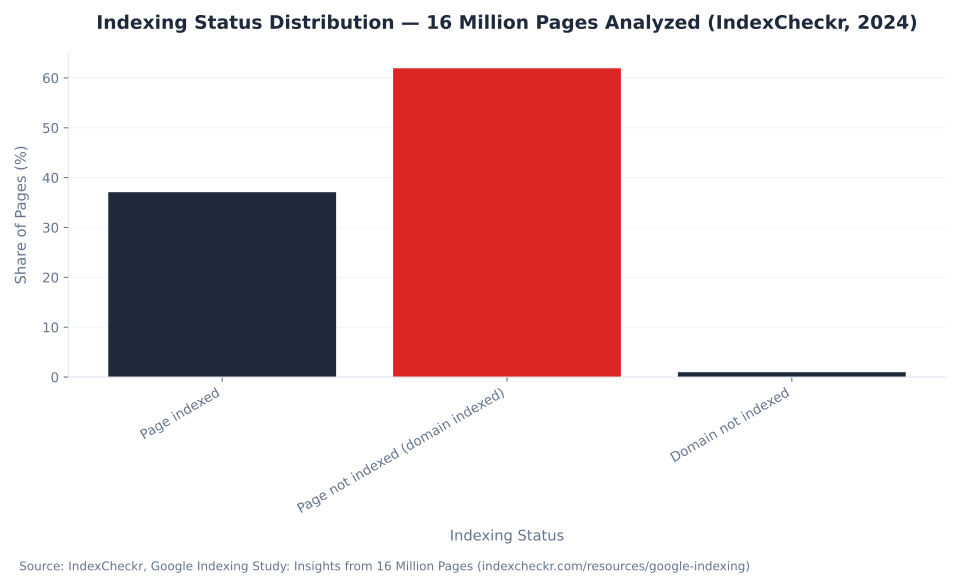
61.94%
of all web pages analyzed are not indexed by Google — the Page indexing report (formerly the Index Coverage report) is the essential diagnostic for understanding why content stays out of search results. Across 16 million pages studied, only 37.08% were indexed.
Source: IndexCheckr, Google Indexing Study: Insights from 16 Million Pages, 2024 (indexcheckr.com/resources/google-indexing)
What Is the Page Indexing Report (formerly the Index Coverage Report)
The Page indexing report — renamed from the Index Coverage report in 2022 — is the Google Search Console section that shows which of your site's URLs Google has indexed and exactly why it left specific pages out. Every URL Google knows about appears here with either an Indexed or Not indexed status, and every Not indexed URL gets a named reason.
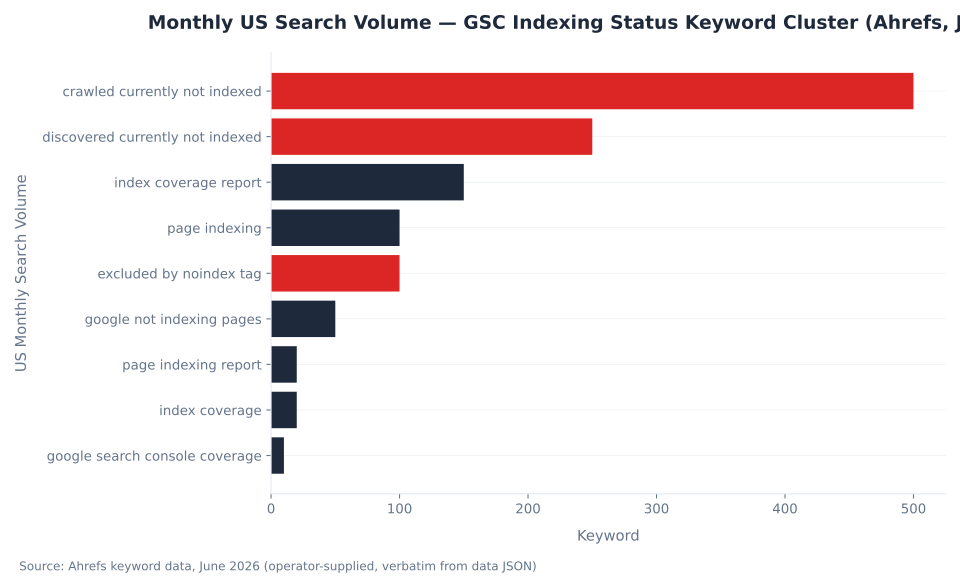
Google redesigned GSC navigation announced at Google I/O in May 2022. The "Coverage" nav section became "Pages"; the report became the "Page indexing report." Google's live help article is titled Page indexing report — confirming the rename is the current canonical name, first reported in May 2022. Both names remain in active use: "index coverage report google search console" generates 150 searches per month (Ahrefs, June 2026) — this article uses both names so it surfaces for either search.
The report displays two tabs. Indexed means Google crawled, rendered, and added the URL to its index — those pages are eligible to appear in search results. Not indexed means Google knows the URL exists but has not indexed it. Every Not indexed URL carries a named reason drawn from a taxonomy of 14 labels — the core reference this article documents. The report lives under Indexing > Pages in current GSC navigation. For broader context on what GSC tracks and why, see the Google Search Console overview and the foundational core SEO concepts like canonicalization and crawl budget.
The report is a triage tool, not a to-do list. The most common mistake is treating every Not indexed URL as a defect. "Alternate page with proper canonical tag," "Excluded by noindex tag," and "Page with redirect" are expected healthy outcomes of deliberate site architecture. The diagnostic value is in the unexpected exclusions: "Crawled - currently not indexed" on pages you want ranking, a growing "Discovered - currently not indexed" count signaling crawl budget pressure, or a submitted-vs-indexed gap pointing to a content quality problem.
Key Takeaways
- Sort statuses before fixing. Three buckets: Expected (no action), Investigate, Fix immediately. Most Not indexed URLs in a healthy site are Expected.
- "Crawled - currently not indexed" is a quality signal. Google visited the page and chose not to index it — no technical fix applies. Improve content depth and uniqueness.
- Validate fix does not speed up recrawling. It starts a reporting window in GSC. To accelerate recrawl: use the URL Inspection tool > Request indexing or resubmit your sitemap.
- Track the submitted/indexed ratio, not the raw count. The Sitemaps report ratio (indexed ÷ submitted × 100%) is the ongoing health metric. A declining ratio signals worsening content quality assessment.
- "Discovered - currently not indexed" at scale means crawl budget, not quality failure. On large sites, Googlebot hasn't reached those URLs yet.
- Canonicalization statuses are errors only when Google chose wrong. "Alternate page with proper canonical tag" = healthy. "Duplicate, Google chose different canonical than user" = act.
61.94%
Not-indexed rate across 16 million pages analyzed — the scale of the indexing challenge across the web
IndexCheckr, Google Indexing Study, 2024
500/mo
US monthly searches for "crawled currently not indexed" — the cluster's top-demand term at KD 12
Ahrefs keyword data, June 2026
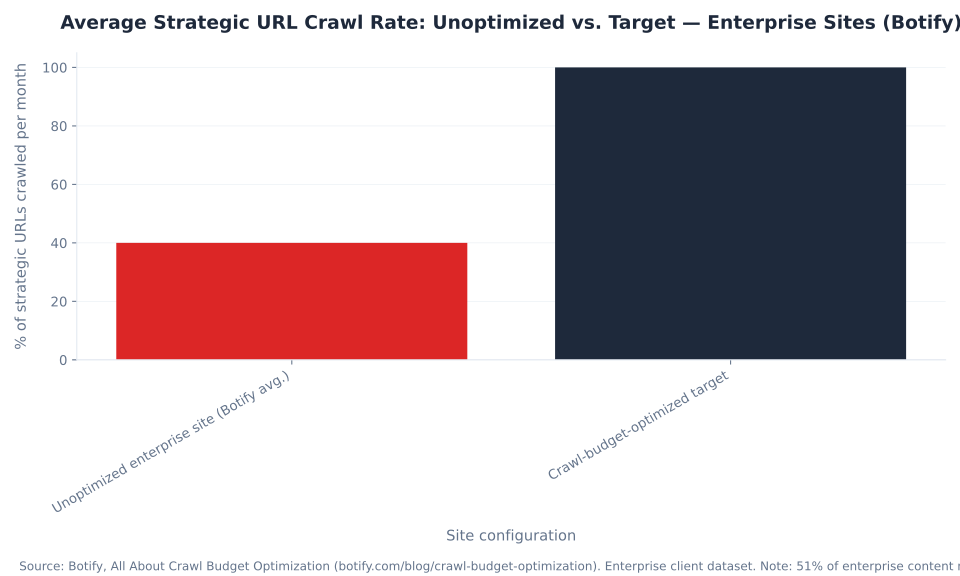
40%
Strategic URLs crawled monthly on unoptimized enterprise sites — the gap that causes "Discovered - currently not indexed" spikes at scale
Botify, All About Crawl Budget Optimization (enterprise data)
~6 months
Duration of temporary URL removal requests in the GSC Removals tool before the URL reappears after the six-month window unless a permanent action is taken server-side
Google Help, Removals and SafeSearch reports tool
2+ weeks
Minimum Validate fix monitoring window for Page indexing issues — determined by Googlebot's normal crawl schedule
Google Help, Validation details
51%
Enterprise website content missed by Googlebot on average — confirming why "Discovered" status can persist across thousands of URLs
Botify enterprise client data
Crawled vs. Discovered: The Two Most Searched Indexing Statuses
The two most searched indexing statuses in Google Search Console are "Crawled - currently not indexed" and "Discovered - currently not indexed." They look similar but represent fundamentally different problems with different fix paths.
| Status | What it means | What causes it | How to fix it |
|---|---|---|---|
| Crawled - currently not indexed | Google visited and rendered the page but chose not to index it. No technical blocker. | Thin content, near-duplicates, auto-generated pages, weak internal linking, low external authority. | Content quality improvement: increase depth and uniqueness, consolidate thin pages. Technical actions (sitemaps, Request indexing) do not help. |
| Discovered - currently not indexed | Google knows the URL exists (via sitemap or internal link) but has not crawled it yet. | Crawl budget constraints on large sites; deep crawl path; new URLs not yet in crawl queue. | For priority pages: add to sitemap, use URL Inspection > Request indexing. For large-scale: review crawl budget via internal link structure and crawl depth. |
The distinction matters because the fix path is opposite. "Crawled - currently not indexed" means Google already looked at the page and made a quality judgment — submitting it to a sitemap or clicking Request indexing does not change that judgment. "Discovered - currently not indexed" means Google hasn't gotten there yet — the sitemap and Request indexing are precisely the right tools. Misdiagnosing which status you have leads to wasted effort.
For large sites (100K+ pages), a count of thousands of "Discovered - currently not indexed" URLs is often a crawl budget allocation problem, not a content quality problem. The Sitemaps & URL Inspection guide covers the specific tools — sitemap submission and Request indexing — that apply to this status. MB Adv Agency has found that on content-heavy sites, the "Crawled - currently not indexed" count spikes most reliably after content culls or CMS template changes that reduce per-page uniqueness — the clearest signal that the content, not the technical setup, is the variable.
Why Pages Aren't Indexed: The Complete Status Reference (Page Indexing / Index Coverage Report)
The Page indexing report (formerly the Index Coverage report) groups all Not indexed URLs by reason. The table below documents every named reason in the current GSC UI, what each means, its typical cause, and how to triage it. Three triage categories: Expected (no action needed), Investigate (audit before acting), and Fix immediately.
| Reason label | What it means | Typical cause | Triage / Fix |
|---|---|---|---|
| Crawled - currently not indexed | Google crawled and rendered the page but chose not to index it. No technical blocker. | Thin content, near-duplicates, auto-generated pages, weak internal and external linking. | Fix (content): Improve depth and uniqueness; consolidate thin pages. Technical actions do not help. |
| Discovered - currently not indexed | Google knows the URL exists but has not yet crawled it. | Crawl budget constraints; deep crawl path; new URLs. | Investigate: Add to sitemap; Request indexing for priority pages; review crawl depth for large sites. |
| Duplicate without user-selected canonical | Multiple pages with near-identical content; no canonical tag tells Google which is preferred. Google chose a canonical, but it is not necessarily your intended canonical. | URL parameter variants (?sort=asc), session IDs, www vs non-www, trailing slash variants, HTTP vs HTTPS without redirect. | Fix (technical): Implement canonical tags on all variants pointing to the preferred URL; add preferred URL to sitemap; verify via URL Inspection. |
| Duplicate, Google chose different canonical than user | A canonical tag exists pointing to URL A, but Google treats URL B as canonical instead. | The canonical destination (URL A) is weaker than URL B in Google's signals: fewer internal links, not in sitemap, lower authority, or accidentally blocked. | Fix: Strengthen the canonical destination — add to sitemap, improve internal linking to it, verify it returns 200 and is not blocked. |
| Alternate page with proper canonical tag | This page has a canonical tag pointing to a different URL; Google correctly respects it and does not index this page. | Pagination, AMP/desktop pairs, hreflang alternates, print versions. | Expected: Verify the canonical target is indexed. Only act if this URL should NOT have a canonical pointing away from it. |
| Excluded by 'noindex' tag | A meta robots noindex tag or X-Robots-Tag: noindex header is present; Google respects it. | Deliberate exclusion of admin pages, thank-you pages, internal search results, staging pages promoted accidentally. | Expected OR Fix: Remove the tag only if the noindex is unintentional. Use Request indexing after removal. |
| Blocked by robots.txt | Googlebot is disallowed from crawling this URL by robots.txt. The page cannot be indexed because it was never crawled. | Overly broad Disallow rules; accidental disallowing of a production path; CDN or subdomain with its own robots.txt. | Fix (if unintentional): Update robots.txt to allow the path. If the page also has a noindex tag, removing the robots.txt block exposes that tag to Googlebot — address both. |
| Soft 404 | Server returned HTTP 200 but page content signals "not found" to Google — empty content, "No results found," "Product unavailable." | Deleted product pages returning 200, empty category pages, search results pages with zero results, "coming soon" placeholders. | Fix: Return proper HTTP 404 or 410 for genuinely missing pages; add real content to thin pages; redirect deprecated pages to a relevant live page. |
| Not found (404) | Server returned HTTP 404. The page does not exist or no longer exists. | Deleted pages, migrated pages without redirects, typos in sitemap URLs. | Fix: If the page should exist — investigate why it's 404. If intentionally deleted — 410 is more definitive; remove stale URLs from sitemap. |
| Page with redirect | This URL redirects to another URL; Google does not index the redirecting URL itself. | Deliberate redirects (301, 302, 307), redirect chains, redirect loops. | Expected (301) / Investigate (302): Verify the destination is indexed. Flatten redirect chains to a single hop. Flag 302/307 as investigate — temporary redirects. |
| Server error (5xx) | Server returned a 5xx response when Googlebot tried to crawl. | Server overload, timeout, misconfigured hosting, Googlebot rate-limited by server config. | Fix immediately: Identify and resolve the 5xx. Check server logs for Googlebot request patterns if intermittent. |
| Blocked due to access forbidden (403) | Server returned HTTP 403 when Googlebot tried to crawl. | Incorrect login requirements applied to public pages; firewall or CDN blocking Googlebot IP ranges. | Fix: Verify the URL should be publicly accessible; check CDN/WAF rules against Googlebot IP ranges (developers.google.com/search/apis/ipranges/googlebot.json). |
| Indexed, not submitted in sitemap | The page IS indexed but was not in any submitted sitemap. | Google found the page via internal or external links. | No action required (good outcome): Google found and indexed the page. Consider adding to sitemap for explicit coverage tracking. |
| Page indexed without content | Google indexed the page but found no content to display. | Rendering failures on JavaScript-heavy pages; pages requiring login to render full content; 403 during render after crawl. | Fix: Ensure the page renders correctly for Googlebot. Use URL Inspection > Test live URL to see what Googlebot rendered. |
When you open the Page indexing report, sort the Not indexed reasons into three buckets before acting on anything. Expected (Alternate page with proper canonical tag, Excluded by 'noindex' tag, Page with redirect): these confirm your architecture is working — only act if a URL should NOT be excluded. Investigate (Crawled - currently not indexed, Discovered - currently not indexed, Duplicate without user-selected canonical): cross-reference with recent site changes, content quality, and crawl budget signals before deciding on a fix. Fix immediately (Server error 5xx, Blocked due to access forbidden 403 when unintentional, Soft 404 on pages that should return real content): these block Google from content you want indexed and need direct resolution.
"Submitted and indexed" is a separate positive status in the Sitemaps report — not to be confused with "Indexed, not submitted in sitemap" in the Page indexing report. Cross-referencing indexation data with the Performance report shows whether indexed pages are actually generating clicks and impressions, which is the downstream measure that matters. Full reason definitions appear in Google's official documentation at support.google.com/webmasters/answer/7440203 and support.google.com/webmasters/answer/156336.
The Submitted vs. Indexed Gap: Reading the Sitemaps Report
The Sitemaps section of Google Search Console shows two numbers for each submitted sitemap: Submitted (URLs parsed from the sitemap file) and Indexed (how many of those Google chose to index). The gap between these two numbers — and how it changes over time — is one of the most useful indexing health signals GSC provides.
| Submitted/Indexed ratio | Interpretation | Action |
|---|---|---|
| ≥ 90% | Healthy — near-full indexation of submitted pages. | Monitor for regressions. |
| 70–89% | Acceptable for sites with deliberate exclusions (pagination, faceted nav, hreflang). | Audit the non-indexed reasons; confirm exclusions are intentional. |
| 50–69% | Yellow flag — significant content Google is choosing not to index. | Cross-reference with Page indexing report; audit for thin/duplicate content; check for accidental robots.txt blocks. |
| < 50% | Red flag — either a technical problem or a systemic content quality issue. | Treat as a crawl health audit: robots.txt, canonical conflicts, content quality, crawl budget. |
| Submitted > Indexed AND rising over time | Progressively worsening — Google is devaluing the content corpus. | Content consolidation or quality improvement program required. |
| Sudden drop in indexed count | Acute event — likely a site change (migration, robots.txt edit, mass canonicalization). | Correlate with deployment log; check robots.txt for accidental broad Disallow. |
The Sitemaps view does not break down the gap by reason — for that, open the Page indexing report and filter by the specific sitemap. Applying that filter shows which reason labels account for the submitted-but-not-indexed URLs, turning a raw gap into an actionable diagnosis. Full documentation for the Sitemaps report is at Google Help, Sitemaps report.
A widening gap over time — where the submitted count stays constant but the indexed count declines — is the strongest signal that Google is progressively devaluing the content corpus. A sudden drop correlates almost always with a site change. Tracking the ratio in a simple spreadsheet monthly is a sufficient monitoring cadence for most content sites. Use the Performance report to track organic traffic trends alongside indexation — a declining indexed count that does not correspond to a traffic drop can mean the lost pages were not generating clicks anyway, which changes the priority of the fix.
Monthly US Search Volume — GSC Indexing Status Keyword Cluster (Ahrefs, June 2026)
Validate Fix in Google Search Console: States, Timelines, and What It Actually Does
Validate fix is the mechanism in the Page indexing report for confirming that an issue category has been resolved. After fixing an indexing problem — removing an accidental noindex, correcting a robots.txt block, fixing a server error — you click Validate fix on the affected reason category to start GSC's tracking window. The critical clarification: clicking Validate fix does not make Google recrawl your pages faster.
| Validation state | What it means | What to do |
|---|---|---|
| Not started | You have not yet requested validation for this issue category. | Fix the issue first, then click Validate fix. |
| Pending / Validation in progress | GSC is monitoring affected URLs for recrawl and resolution confirmation. | Wait — validation takes two weeks or more depending on crawl frequency (Google Help). Do not click Validate fix again. |
| Passed | Google confirmed the issue is resolved on the checked URLs. | No action needed; monitor for recurrence. |
| Failed | Google recrawled one or more affected URLs and the issue is still present. | Re-examine the fix; verify with URL Inspection; correct and re-request validation. |
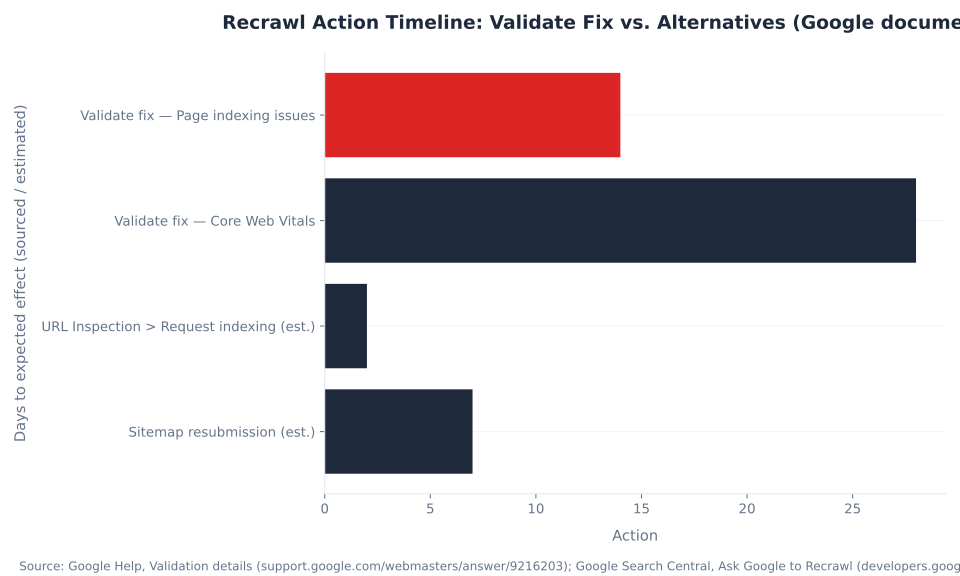
"Validate fix does not speed up recrawling." John Mueller confirmed this directly: the button "will only track how things are being reprocessed and won't speed up reprocessing itself" (Search Engine Roundtable). The validation timeline — "two weeks or more depending on crawl frequency" per Google Help — is determined entirely by Googlebot's normal crawl schedule for the site. Practitioners who click Validate fix and then observe recrawl activity within hours are seeing Googlebot's scheduled crawl, not a validation-triggered crawl.
To actually accelerate recrawling of specific fixed pages, use these two mechanisms: (1) URL Inspection tool > Request indexing for individual priority pages — this sends a signal to Googlebot's crawl queue, subject to a daily quota that Google does not publish; (2) Resubmit your sitemap containing the fixed URLs — this gives Googlebot a refreshed priority signal for the URL set. Use Validate fix for its actual purpose: audit trail and issue-resolution confirmation. The URL Inspection and sitemap tools are the correct mechanism for accelerating recrawl. Full documentation on requesting recrawl is at Google Search Central.
Indexing Status Distribution — 16 Million Pages Analyzed (IndexCheckr, 2024)
Canonicalization Statuses in the Page Indexing Report
Four Page indexing report statuses relate directly to canonicalization — Google's process of selecting a single preferred URL when multiple pages share near-identical content. These statuses are Google's canonicalization decisions made visible. They are only errors when Google chose the wrong canonical, not when Google and the site owner agree.
| Status | Is it an error? | First check | Resolution |
|---|---|---|---|
| Alternate page with proper canonical tag | No — expected. | Is the canonical target URL itself indexed? | Verify via URL Inspection. Only act if this URL should NOT be canonicalized away. |
| Duplicate without user-selected canonical | Yes — Google chose a canonical; it is not necessarily your intended canonical. | Does any canonical tag exist on these pages? | Add canonical tags on all variants pointing to the preferred URL; add preferred URL to sitemap. |
| Duplicate, Google chose different canonical than user | Yes — Google overrode your canonical tag. | Which URL did Google select? (URL Inspection tool) | Strengthen the preferred URL: add to sitemap, improve internal linking, verify it returns 200 and is not blocked. |
| Indexed, not submitted in sitemap | No — good outcome (page is indexed). | None required. | Consider adding to sitemap for explicit tracking. No action needed. |
Google selects the canonical based on its own quality signals, which can differ from the rel="canonical" hint provided by the site. The canonical hint is not a directive — it is a signal. Signals Google uses: which URL appears in sitemaps, which URL has more internal links, which has stronger external backlink signals, which is served on the preferred protocol (HTTPS vs HTTP), and which has better performance and quality signals overall. Full guidance on canonical consolidation is at Google Search Central: Consolidate duplicate URLs. For a broader treatment of SEO concepts like canonical tags and duplicate content, the glossary covers the foundational principles.
Average Strategic URL Crawl Rate: Unoptimized vs. Target — Enterprise Sites (Botify)
Temporary and Permanent URL Removal: Using the GSC Removals Tool
The URL Removals tool in Google Search Console handles two distinct use cases: temporary removal of a URL from search results (for urgent situations requiring up to six months of suppression) and removing outdated cached content or snippets. Neither option is a permanent deletion mechanism — permanent removal requires server-side action.
| Tool / action | Duration | What it does | When to use |
|---|---|---|---|
| Temporary removal (URL Removals tool → Temporarily hide) | ~6 months (Google Help: "A successful request lasts only about six months") | Hides the URL from Google Search results. Googlebot can still crawl the URL. The page reappears after the blackout period unless permanent action is taken. | Urgent removal of sensitive content while a permanent fix is prepared (e.g. accidentally published PII, confidential document) |
| Permanent removal (server-side action required) | Indefinite | Return HTTP 404 or 410 on the URL; OR add noindex meta tag; OR return 401/403 with no cached content. These are site-level changes, not GSC-level. | Long-term removal: discontinued pages, deprecated content, migrated URLs you don't want indexed |
| Outdated content removal (via Removals tool) | Until next Googlebot crawl of the URL | Targets cached snippets and images in Search, not the URL itself. For third-party content you do not control. | Stale snippets or images appearing in Search for URLs you own but cannot edit immediately |
The temporary removal tool does not prevent Googlebot from crawling the URL — Googlebot continues to crawl and index the content in Google's internal systems during the blackout period. The ~6-month duration is the only confirmed timeline from Google documentation. Plan permanent fixes (correct server response or noindex tag) within that window. Full documentation is available at Google Help, Removals and SafeSearch reports tool and Search Engine Land's guide to Google's removal tools.
Diagnosing Indexing Issues: A Symptom-by-Symptom Framework
Indexing issues manifest in several distinct patterns, each pointing to a different starting point in GSC. The table below maps the symptom to the correct report section and what to look for — avoiding the common trap of opening the URL Inspection tool for every indexing question when a report-level view is more efficient.
| Symptom | Start here | What to look for |
|---|---|---|
| Large number of Not indexed pages, reason unclear | Page indexing report → Not indexed tab → sort by count | Identify top reason by volume; classify as Expected / Investigate / Fix |
| Sudden drop in indexed page count | Page indexing report → date range filter; cross-check Sitemaps report "Indexed" count | Correlate with deployment log; look for robots.txt changes, mass 404s, or canonical errors introduced in the same window |
| Submitted count >> Indexed count in Sitemaps | Sitemaps report + Page indexing report filtered by that sitemap | Identify the dominant Not indexed reason for submitted-but-not-indexed URLs |
| Specific page not appearing in Search | URL Inspection tool → Test live URL | Check render, canonical, indexing status, last crawl date, and any coverage issues shown |
| "Crawled - currently not indexed" spike | Page indexing report → filter to this reason; review affected URLs | Review content depth/uniqueness; check for recent CMS template changes that reduced per-page uniqueness |
| Validated fix not confirming resolution | Validation details screen + URL Inspection on a sample of affected URLs | Confirm the fix is live on the server; check whether the fix is partial (some URLs still affected); re-request if confirmed fixed on all |
The URL Inspection tool — accessible via the search bar at the top of GSC or the Inspect URL link in the Page indexing report — is the fastest single-page check. It shows the last-crawled HTML, the canonical Google selected, and the current coverage status with its reason label. For bulk diagnosis, the Page indexing report's filter-by-sitemap and filter-by-reason combination is faster than inspecting URLs individually. Core Web Vitals issues can affect how Google prioritizes crawling and are a secondary signal worth reviewing when "Crawled - currently not indexed" counts rise without a clear content explanation. Full URL Inspection tool documentation is at Google Help, URL Inspection tool.
Crawl Budget and 'Discovered - Currently Not Indexed' at Enterprise Scale
On sites with tens of thousands or hundreds of thousands of pages, 'Discovered - currently not indexed' is the indexing status most directly tied to crawl budget — Googlebot's allocation of resources to a specific site. Botify's analysis of enterprise client data (sites with 1M+ pages) quantifies the gap between what large sites have and what Google actually crawls.
| Metric | Botify enterprise finding |
|---|---|
| Strategic URLs crawled monthly — unoptimized enterprise site | 40% (60% of strategic URLs are NOT crawled monthly) |
| Enterprise sites (1M+ pages) vs. smaller sites — crawl ratio gap | 33% lower crawl ratio on enterprise sites |
| Enterprise content missed by Googlebot on average | 51% of content on a typical enterprise website |
These figures explain why "Discovered - currently not indexed" counts in the thousands or tens of thousands are routine on large enterprise sites — not an indication of a content quality problem, but a reflection of how Googlebot allocates its crawl budget across a large URL space. For sites of this scale, improving the crawl ratio requires structural changes: flatter internal link architecture, sitemap segmentation by priority, crawl-rate adjustments via GSC settings, and elimination of low-value URL parameters consuming crawl budget. Full enterprise crawl budget analysis is available at Botify, All About Crawl Budget Optimization and Botify, Crawl Ratio, Render Ratio, and Why They Matter for SEO.
MB Adv Agency has found that on large e-commerce and publisher sites, addressing crawl budget waste — specifically by removing or canonicalizing low-value parameter URLs that consume Googlebot's attention — reliably reduces the 'Discovered - currently not indexed' count over a 60-90 day window. The mechanism is freeing up crawl capacity for the URLs that matter.
For SMB content sites (under 10,000 pages), crawl budget is not a limiting factor. A "Discovered - currently not indexed" count in the hundreds on a small site points to content quality or internal linking, not crawl allocation. The Botify enterprise data does not apply to sites at that scale. For large-scale indexing monitoring, GSC API and automation for large-scale indexing monitoring covers the programmatic approach to tracking crawl coverage across high-page-count sites.
Recrawl Action Timeline: Validate Fix vs. Alternatives (Google documentation)
Indexing Issues Holding Back Your Organic Growth?
Diagnosing the root cause — crawl budget, canonicalization conflicts, content quality gaps, or a technical configuration problem — requires reading multiple GSC signals together. MB Adv Agency provides technical SEO diagnostic reviews starting with the Page indexing report.
Get a Technical SEO Review →Data sources used for this article: Ahrefs keyword data (June 2026, US market, operator-supplied); IndexCheckr, “Google Indexing Study: Insights from 16 Million Pages” (2024, indexcheckr.com/resources/google-indexing); Botify, crawl budget and crawl ratio research (enterprise client dataset, 2024–2025, botify.com/blog/crawl-budget-optimization); Google Search Console Help documentation (support.google.com/webmasters); Search Engine Land and Search Engine Roundtable (2022–2026 coverage); Google Search Central developer documentation (developers.google.com/search). Submitted/indexed ratio thresholds are practitioner benchmarks and are not published by Google. Last updated: June 2026. Reviewed by MB Adv Agency, June 2026.

As a Google Ads expert, I bring proven expertise in optimizing advertising campaigns to maximize ROI.
I specialize in sharing advanced strategies and targeted tips to refine Google Ads campaign management.
Committed to staying ahead of the latest trends and algorithms, I ensure that my clients receive cutting-edge solutions.
My passion for digital marketing and my ability to interpret data for strategic insights enable me to offer high-level consulting that aims to exceed expectations.
Google Partner Agency
We're a certified Google Partner Agency, which means we don’t guess — we optimize withGoogle’s full toolkit and insider support.
Your campaigns get pro-level execution, backed by real expertise (not theory).

4.9 out of 5 from 670+ reviews on Fiverr.
That’s not luck, that’s performance.
Highly recommend Matteo to set up your server side tracking. He has a deep understanding of e-commerce tracking and will go above and beyond to make sure everything is set up correctly and working 100%. If you are scaling your store this set up is non-negotiable in my opinion and there isn't many people who have this much knowledge or put the effort in to get it right. Thanks again!

avorodesign.com
I can only recommend Matteo! He was very patient, professional and very knowledgeable about GA4, Consent Mode v2, and GDPR compliance. Communication was clear, and the setup was done professionally and efficiently. Highly recommend him for anyone needing reliable tracking implementation.

www.natureiki.life
Matteo shines in the realm of online professionals. His work is not only deep in data but also complemented by his proactive communication and cooperation, setting a new standard for freelancers. If you want someone who truly exceeds expectations, look no further. Highly recommended!

www.omanbeverlysmyth.com
Exceptional Service Beyond Expectations - Outstanding Service Impeccable depth, flawless delivery, and exceptional language fluency—this service exceeded all expectations. Highly recommended. Matteo truly ROCKS!!!

ium-paris.com
Top-notch, always highly value working with Matteo. An absolute Google Ads Genius. This is approximately the 8th time I have hired him and he's helped us get 6-7 ROAS. We are excited in continuing to improve our lead flow. Hire this guy if you need Google Ads help. Thanks Matteo!

www.dleeventgroup.com
I finally found the guy who can setup server side tracking and all the ecosystem properly. I definitely recommend Matteo. He is very responsive, kind and wants to dig into things. He configured GA4, Meta, Google Ads, Outbrain and google consent v2 with Cookiebot. Thanks Matteo.

inomega.fr
MB Adv delivered exceptional work with outstanding professionalism and lots of patience, taking time to see effects of changes made and not just do the work and submit it. The proactive communication and video summaries of the work completed made working with Matteo a pleasure, as he consistently went above and beyond. Highly recommended for web analytics projects! We are already working on another project.

www.withnellsensors.co.uk
Working with Matteo on my Google Ads was a game-changer. He's not just a strategist, he's a true partner. He understood my goals and tailored a campaign that perfectly reached my target audience. I'm grateful for his expertise and dedication.

dccargo.com
Click-driven mind
with plastic-brick obsession.
We build Google Ads campaigns with the same mindset we use to build tiny brick worlds: strategy, patience, and zero tolerance for wasted pieces.
Data is our blueprint. Growth is the only acceptable outcome.