What Is Google Search Console? (2026 Guide)

90.02%
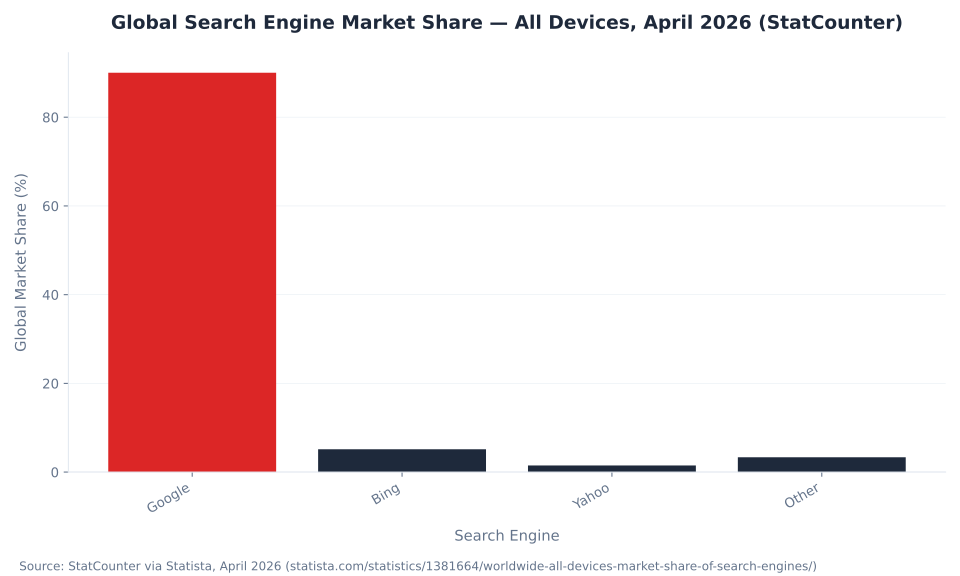
Google holds 90.02% of global search market share across all devices — making Search Console the first-party monitoring tool for the effective entirety of search traffic for most sites.
Source: StatCounter via Statista, April 2026
What Is Google Search Console
Google Search Console is Google's free, first-party search monitoring tool that shows how Googlebot crawls, indexes, and ranks your site — including search performance data (clicks, impressions, CTR, average position), crawl coverage, indexing status, manual actions, and structured data validity across four search surfaces.
The most persistent confusion about Search Console is that it duplicates Google Analytics 4. It does not. GSC is Google's side of the data relationship: it reads directly from Google's search log and crawl log — server-side infrastructure that records every query, every crawl request, and every indexing decision. GA4 is the user's side: it runs as JavaScript on your pages and captures browser events after a visitor lands on the site. One measures how Google sees the site; the other measures what users do once they arrive. The two data sources are not interchangeable, and the numbers will never match — not because either tool is broken, but because they measure fundamentally different events at different layers of the stack.
What GSC specifically measures spans four search surfaces: Search results, Discover, Google News, and Shopping. The Performance report tracks clicks, impressions, average position, and CTR for each. Beyond performance data, GSC surfaces crawl coverage, indexing status with detailed reason codes (via the Page indexing report, formerly called Index Coverage), manual actions issued by Google's review team, and structured data validity across all enhancement types. As of 2026, clicks on external links shown in Google's AI Mode count as GSC clicks, and pages appearing in AI Mode responses count as impressions — a material change to how impression spikes should be interpreted. A site seeing a sharp rise in impressions without corresponding ranking improvement is appearing in AI Mode responses, not necessarily climbing the traditional organic rankings. Source: Search Engine Land, 2026.
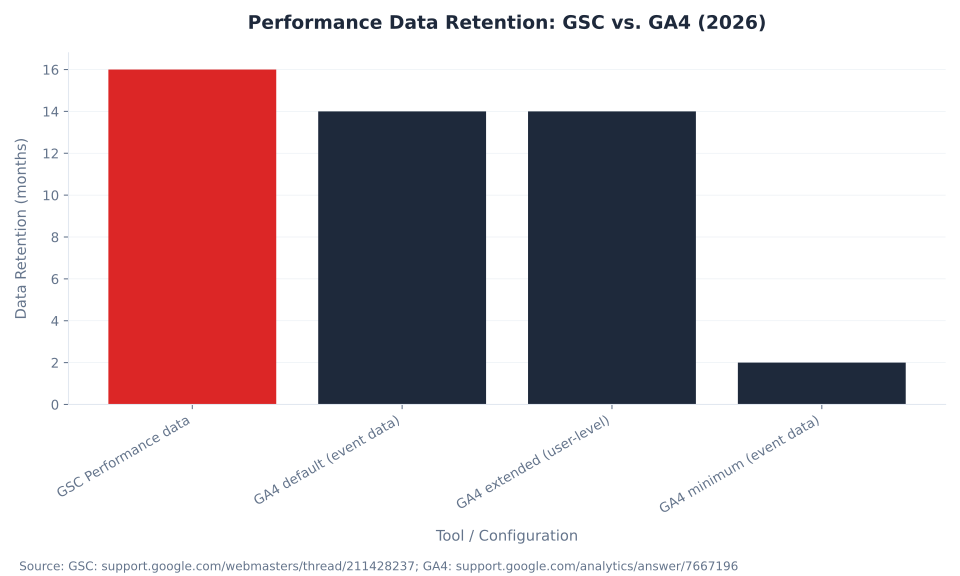
Search Console is free at every level. No billing, no minimum spend, no Google Ads account required, and no tiers with limited features. The free status extends to the Search Console API — site owners pulling data programmatically for export to BigQuery or a data warehouse pay nothing beyond standard cloud storage costs. This matters because the 16-month data retention hard limit inside the GSC interface means any site doing year-over-year analysis past that horizon must export data via the API before it ages out permanently. For a full treatment of the foundational terminology around Search Console's role in the broader measurement stack, see the SEO glossary.
MB Adv Agency has found that Search Console is the single most-used diagnostic starting point in client technical reviews — not because it surfaces the most granular data, but because it is the authoritative record of how Google itself sees the site. When a ranking drops, an indexing error surfaces, or a structured data enhancement stops appearing in search results, GSC is where the root cause is confirmed, not estimated.
What Is GSC
GSC is the standard abbreviation for Google Search Console — Google's free tool for monitoring how a website is crawled, indexed, and ranked in Google Search. The two terms are used interchangeably in SEO practice; all functionality, reports, and data discussed throughout this guide apply equally to both names.
Key Takeaways
- GSC is free, with no tiers or prerequisites. No billing, no Google Ads account, and no paid tier exist. The Search Console API is also free (subject to usage quotas). Any Google account can add and verify a property using one of the supported verification methods.
- Two property types — and the choice is permanent for that property. A Domain property covers all subdomains, all protocols (http and https), and all paths, verified via DNS TXT record only. A URL-prefix property covers the exact protocol and path specified, verified via HTML file, HTML meta tag, Google Analytics, Google Tag Manager, or DNS record. You can add a second property of a different type, but you cannot change the type of an existing property.
- Performance data has a 16-month hard limit — no exceptions. Clicks, impressions, CTR, and average position are permanently deleted when they age past 16 months. There is no UI archive, no recovery path, and no extension option. Site owners running year-over-year analysis beyond this window must export data via the GSC API before it ages out.
- GSC is not GA4, and the numbers will never match. GSC reads from Google's search infrastructure (server-side); GA4 reads from JavaScript on your pages (client-side). A large discrepancy between GSC clicks and GA4 organic sessions is expected and is not a sign that either tool is broken — it reflects systematic differences in what each tool counts.
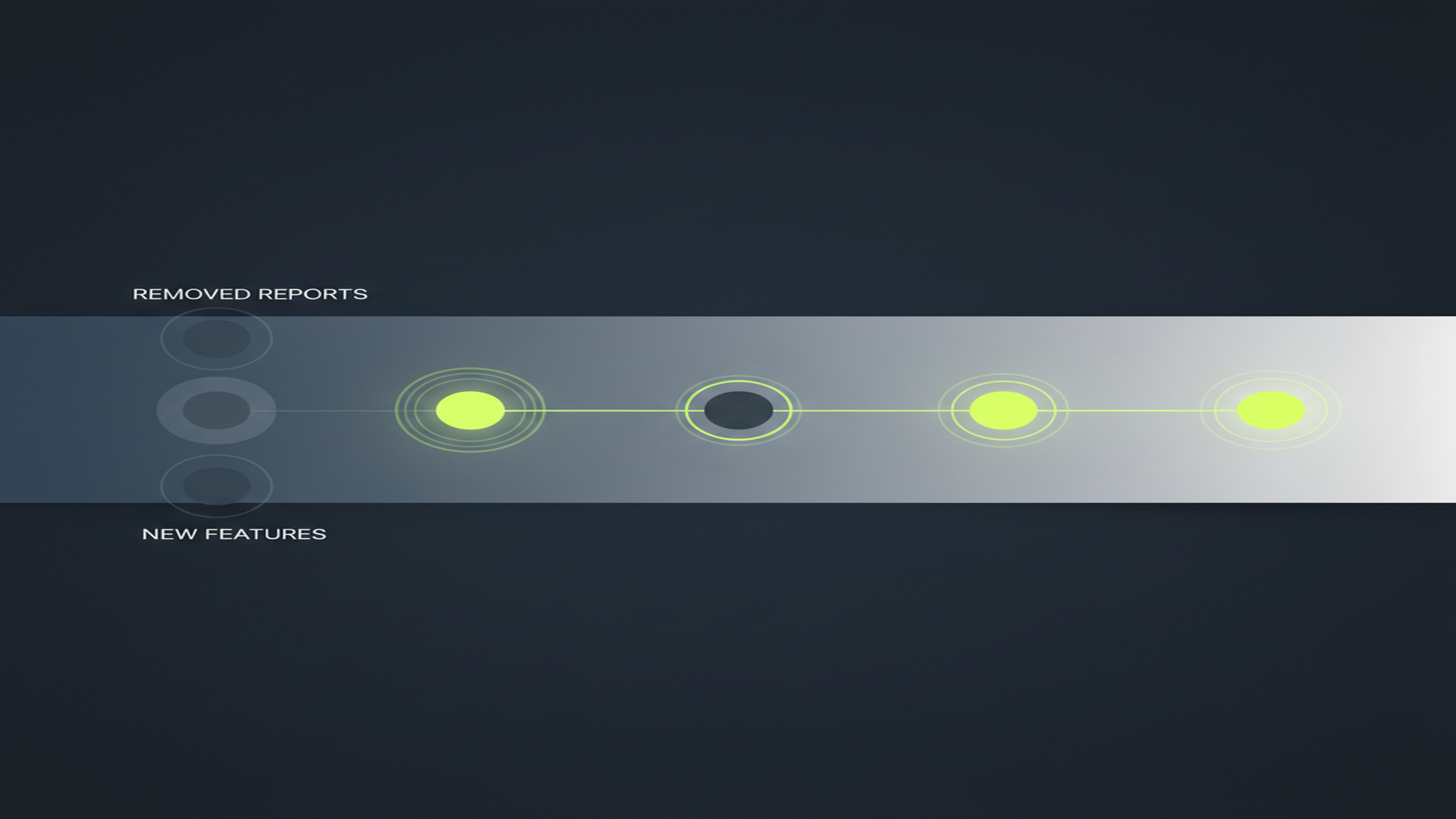
- The 2026 report inventory covers 16+ sections. Performance (Search results, Discover, News, Shopping), URL Inspection, Page indexing (formerly Index Coverage), Sitemaps, Core Web Vitals, Mobile Usability, Enhancements, Links, Manual Actions, Security Issues, Shopping/Merchant listings, Insights (integrated June 2025), 24-hour view (launched December 2024), and weekly/monthly aggregation views (launched December 2025). See the Performance report guide for a full breakdown of the clicks, impressions, and position metrics.
- GSC clicks and GA4 organic sessions always differ for five documented reasons. Cookie consent rejections, JavaScript blocking, bot filtering differences, session-window logic (one user bouncing and returning = 2 GSC clicks, potentially 1 GA4 session), and scope (GA4 organic counts all search engines; GSC counts only Google) all drive systematic discrepancy. The gap is structural, not a configuration error.
90.02%
Google's global search market share across all devices, April 2026 — the factual basis for why GSC is the default search monitoring tool for most sites
Source: StatCounter via Statista, April 2026
16 months
GSC Performance data retention hard limit — clicks, impressions, CTR, and average position are permanently deleted when data ages past this window; no extension, no recovery
Source: Google Search Console Help Community thread 211428237
KD 1
Keyword difficulty for "google search console vs google analytics" — a nearly uncontested informational query at 350 US monthly searches despite AI Overview presence in the SERP
Source: Ahrefs, May 2026
Google Search Console Property Types
Before GSC collects any data for a site, the owner must add a property and choose its type. That choice is permanent for that property — the type of an existing property cannot be changed. A second property of a different type can always be added alongside the first, but data collection for a given property type begins only from the date that property is verified.
The Domain property is the right choice for nearly all production sites. It aggregates data across every variant of the domain — www and non-www, http and https, and every subdomain — into a single unified view. A URL-prefix property on https://www.example.com/ misses http://example.com/, m.example.com/, and blog.example.com/ entirely. Site owners who set up a URL-prefix property on each subdomain separately end up with fragmented data and no aggregate view across the property. The Domain property requires only a DNS TXT record added once at the domain registrar; that single record covers all subdomains automatically. Source: support.google.com/webmasters/answer/10431861.
| Property attribute | Domain property | URL-prefix property |
|---|---|---|
| Covers | All subdomains + http/https + all paths for the domain | Exact protocol + subdomain + path only |
| Example | example.com covers www.example.com, blog.example.com, http://example.com/, https://example.com/ |
https://www.example.com/ covers only that exact protocol and subdomain — nothing else |
| Verification methods | DNS TXT record only | HTML file upload, HTML meta tag, Google Analytics, Google Tag Manager, DNS record |
| Best for | Nearly all production sites where DNS access is available | Subdirectory-level properties (e.g., a separate property for /blog/) or when DNS access is unavailable |
| Data aggregation | Unified across all domain variants — one complete view | Fragmented — traffic on non-matching protocol or subdomain is invisible |
http:// to https:// and the property was verified on the http://www.example.com/ prefix, every visit after the migration lands on the secure version — which is not covered by that property. The GSC interface shows zero clicks and zero impressions going forward, not because the site stopped ranking, but because all post-migration traffic is invisible to the wrongly-scoped property. Add the https:// URL-prefix property (or replace both with a Domain property) to restore data visibility. Source: support.google.com/webmasters/answer/10432366.
| Method | Domain property | URL-prefix property | Notes |
|---|---|---|---|
| DNS TXT record | Required | Optional | Added at your domain registrar; covers all subdomains automatically once verified |
| HTML file upload | Not available | Available | Download the verification file from GSC and upload it to the site root |
| HTML meta tag | Not available | Available | Add <meta name="google-site-verification" ...> to the <head> of the home page |
| Google Analytics | Not available | Available | Requires edit permission in the GA property and the matching GA tag live on the site |
| Google Tag Manager | Not available | Available | Requires Publish access in the GTM container; the container must be live and firing on the page |
For sites verifying via Google Tag Manager, see the Google Tag Manager glossary for setup context on container publishing and tag firing conditions. After verification is complete, the next step is submitting a sitemap and using URL Inspection to confirm individual URLs are indexed correctly — both are covered in the Sitemaps and URL Inspection guide.
MB Adv Agency recommends the Domain property as standard for every production site where the client controls their own DNS. The unified data view eliminates the most common source of GSC confusion — missing traffic after migrations or subdomain restructuring — and it requires only one verification step at the registrar level. In every onboarding audit where a client had previously set up a URL-prefix property, there has been at least one variant of the domain generating traffic that was invisible to that property.
Key Features of Google Search Console
Google Search Console's 2026 report inventory spans 16+ sections covering search performance, indexing, enhancements, links, security, and content intelligence. The Page indexing report — the current official name for what was previously called Index Coverage — is the central hub for diagnosing why pages are or are not appearing in Google Search.
GSC has expanded significantly since its 2015 rebrand from Google Webmaster Tools. The current 2026 inventory reflects that growth: 16+ report sections organized across performance data, crawl and index management, rich results validation, link analysis, security monitoring, and content intelligence. Three additions in the last 18 months have extended the tool's diagnostic range: the 24-hour performance view launched in December 2024, giving practitioners hourly granularity for the most recent ~24 hours after any major publish or site change; Search Console Insights, which was fully integrated into the main GSC dashboard in June 2025 (replacing the standalone beta that had existed since 2021); and weekly and monthly aggregation views, launched December 2025, which smooth daily fluctuations to reveal longer-term performance trends.
One notable change to the Enhancements report inventory: FAQ rich results stopped appearing in Google Search on May 7, 2026. The FAQ rich result report and FAQ support in the Rich Results Test were subsequently removed in June 2026. FAQ is no longer an active enhancement type. Source: Search Engine Land — Google to no longer support FAQ rich results. The active Enhancements report types as of June 2026 are breadcrumbs, product, review snippets, and video.
| Report / section | What it shows | Primary use case |
|---|---|---|
| Overview | High-level snapshot of clicks, impressions, Page indexing status, Core Web Vitals status, and enhancement alerts | First-check health monitoring; surfaces active alerts without drilling into individual reports |
| Performance → Search results | Clicks, impressions, CTR, average position by query / page / country / device / date | Ranking and visibility analysis; query discovery; CTR benchmarking by position |
| Performance → Discover | Impressions and clicks from the Google Discover feed | Content freshness and topic interest signals for editorial teams |
| Performance → Google News | Impressions and clicks from Google News | Publisher and news SEO performance tracking |
| Performance → Shopping | Impressions and clicks from Shopping surfaces | E-commerce visibility monitoring for Merchant Center-linked properties |
| URL Inspection | Crawl, index, and rich-result status for a specific URL; live test against the current Googlebot | Diagnosing individual URL indexing issues; confirming a recently published page is indexed |
| Page indexing (formerly Index Coverage) | All URLs Google knows about and their indexing status — Indexed, Not indexed — with specific reason codes for each non-indexed URL | Finding and resolving crawl and indexing blocks at scale; deep-dive in Index coverage & indexing |
| Sitemaps | Submitted sitemaps, discovery status, submission error count | Sitemap submission and ongoing error monitoring |
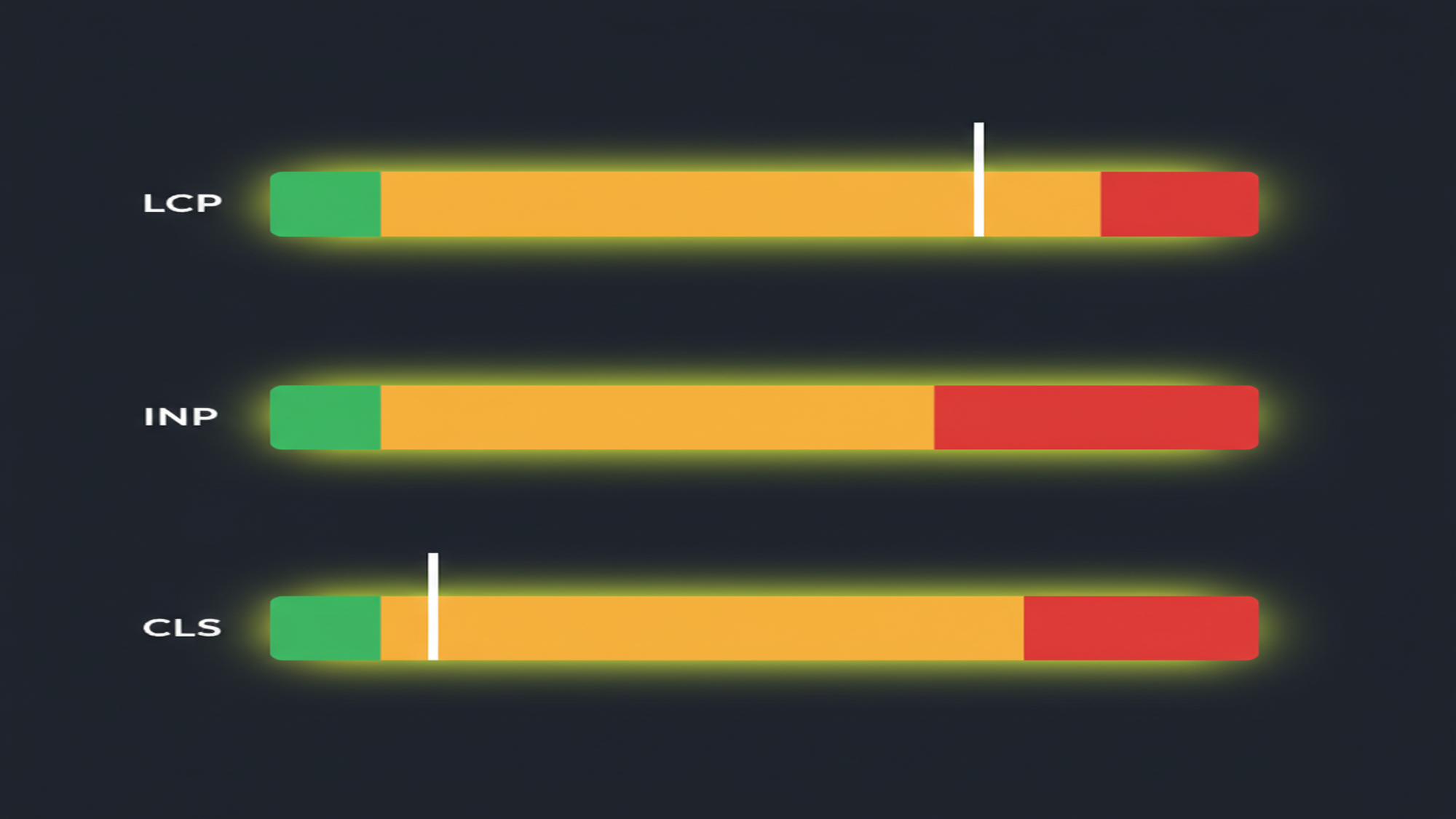
| Core Web Vitals | LCP, INP, CLS by URL group for mobile and desktop, derived from Chrome User Experience Report (CrUX) field data | Page experience signals; identifying and prioritizing failing URL groups |
| Mobile Usability | Pages with mobile usability errors — tap targets, viewport configuration, font size issues | Mobile-first indexing readiness; pre-launch mobile QA |
| Enhancements (note: FAQ removed May 2026; active types: breadcrumbs, product, review snippets, video) | Rich result status for structured data types present on the site — valid, with warnings, or with errors | Structured data validation and error resolution; rich result eligibility monitoring — full guide at Enhancements and rich results |
| Shopping / Merchant listings | Product markup and listing status for Merchant Center-linked properties | Shopping SEO; product data quality management |
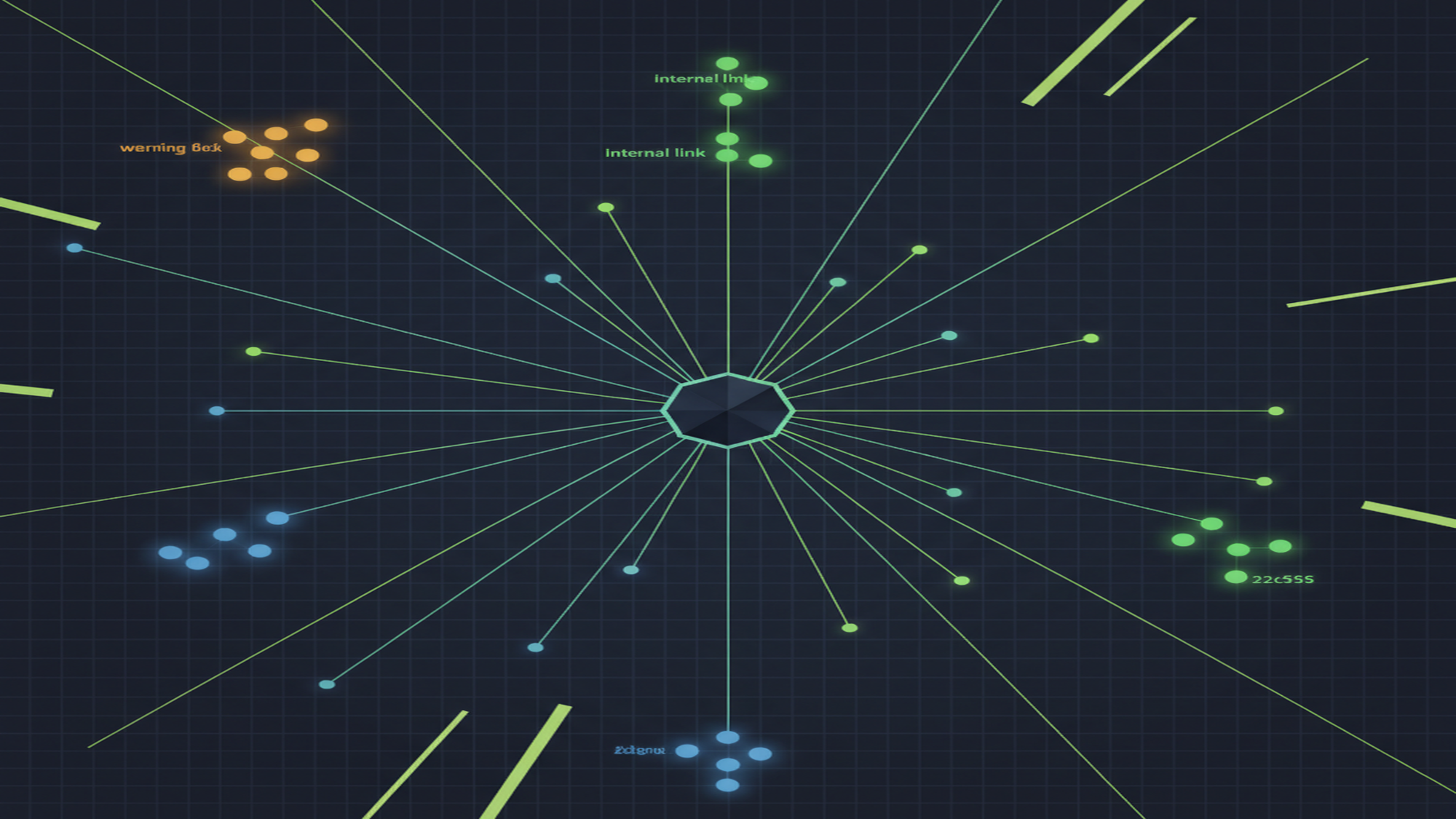
| Links | Top external links, top internal links, top linked pages, top linking anchor text | Link profile audit; internal link structure analysis |
| Manual Actions | Any Google-issued manual penalty applied to the property by a human reviewer | Penalty detection; tracking reconsideration request status |
| Security Issues | Hacked content, malware, and phishing flags identified by Google's Safe Browsing systems | Security monitoring; immediate response to site compromises |
| Insights (integrated June 2025 — includes social channels YouTube / TikTok / Instagram added December 2025) | Content-level performance: trending queries, new and lost rankings, top content, traffic source overview including social channel performance in Google Search | Content strategy; quick-win identification for non-technical site owners and content teams |
| 24-hour view (December 2024) + weekly/monthly views (December 2025) | 24-hour view: hourly performance data for the last ~24 hours in Search, Discover, and News. Weekly/monthly views: aggregated Performance chart views that smooth daily fluctuations | Post-publish monitoring; algorithm update impact assessment; long-term trend analysis without daily noise |
The Performance report is the most frequently used section for most practitioners — for a full breakdown of how clicks, impressions, CTR, and average position data work within it, see the Performance report and search analytics guide. For a deep-dive into the Page indexing report and how to resolve indexing errors, see Index coverage and indexing in GSC. For structured data validation and rich results, see Enhancements and rich results.
Google Search Console vs. Google Analytics
Google Search Console and Google Analytics 4 are complementary tools, not duplicates. GSC reads from Google's search infrastructure — server-side, query-level data that exists before a user ever lands on the site. GA4 reads from JavaScript tracking on your pages — client-side, session-level data that begins when the user arrives. One answers "how does Google see my site?"; the other answers "what do users do once they arrive?"
| Dimension | Google Search Console | Google Analytics 4 |
|---|---|---|
| Data source | Google's search infrastructure (search log, crawl log) — server-side | JavaScript tracking on your pages (browser/device events) — client-side |
| Primary question | How does Google crawl, index, and rank my site? | What do users do on my site after they arrive? |
| Organic traffic metric | Clicks (search-result-level) | Sessions / users (site-level) |
| Query data | Full query strings, always visible | Mostly "(not provided)" for organic traffic |
| Covers traffic from | Google Search only (Search results, Discover, Google News, Shopping) | All traffic sources: organic (all search engines), paid, social, direct, referral |
| Indexing / crawl data | Yes — Page indexing, URL Inspection, Sitemaps | No |
| On-site events / conversions | No | Yes — form fills, button clicks, purchases, scroll depth, and custom events |
| Data retention | 16 months (Performance data) — hard limit, no extension | Up to 14 months by default in GA4 (configurable; BigQuery export removes limit) |
| Cost | Free — no tiers, no Ads account required | Free (GA4); paid tier: Google Analytics 360 |
| Typical user | SEO practitioners, developers, site owners | Marketing analysts, product teams, UX researchers |
The two metrics that practitioners most often compare — GSC "clicks" and GA4 "organic sessions from Google" — will never match. Five structural reasons drive the discrepancy. First, cookie consent: GA4 requires cookies to be accepted (or consent mode to fire) to record a session; GSC records the click regardless of cookie state. A user who clicks a search result and rejects the consent banner is 1 GSC click and 0 GA4 sessions. Second, JavaScript blocking: GA4 requires JavaScript to load on the page; GSC does not. Any client with JS disabled or blocked by a content security policy generates GSC data that GA4 cannot capture. Third, bot filtering: GA4 automatically filters known bot traffic; GSC does not exclude bots from click counts — meaning automated crawlers that trigger search results contribute to GSC impressions and sometimes clicks, while they are excluded from GA4 entirely.
Fourth, session window logic: a single user who clicks a search result, immediately bounces, and clicks the same result again within GA4's session timeout window registers as 2 GSC clicks and potentially 1 GA4 session. Fifth, scope: GA4 organic counts sessions from all search engines — Bing, Yandex, DuckDuckGo, and others — while GSC counts only Google-sourced clicks. A site with 10% of organic traffic from Bing has that portion appearing in GA4 organic but not in GSC at all. A large discrepancy between GSC clicks and GA4 organic sessions is expected and is not a sign that either tool is broken. Per Google's own documentation, the tools complement each other — neither is a subset of the other. Source: Refresh Agent, GA4 vs. GSC data discrepancies.
The practical rule is direct: if the question is about search visibility, rankings, crawling, or indexing, GSC is the right tool. If the question is about on-site behavior, conversions, or engagement across all traffic sources, GA4 is the right tool. Using both together — GSC for the search diagnostic layer, GA4 for the behavior and conversion layer — gives a complete picture that neither tool delivers alone.
MB Adv Agency has found that the most productive workflow is to start any search performance investigation in GSC — where query data is always complete and indexing status is directly verifiable — and then move to GA4 to assess what happens after the click: conversion rate by landing page, engagement by organic segment, and behavior differences between mobile and desktop visitors. The two tools answer different questions, and treating them as redundant wastes the diagnostic power of both.
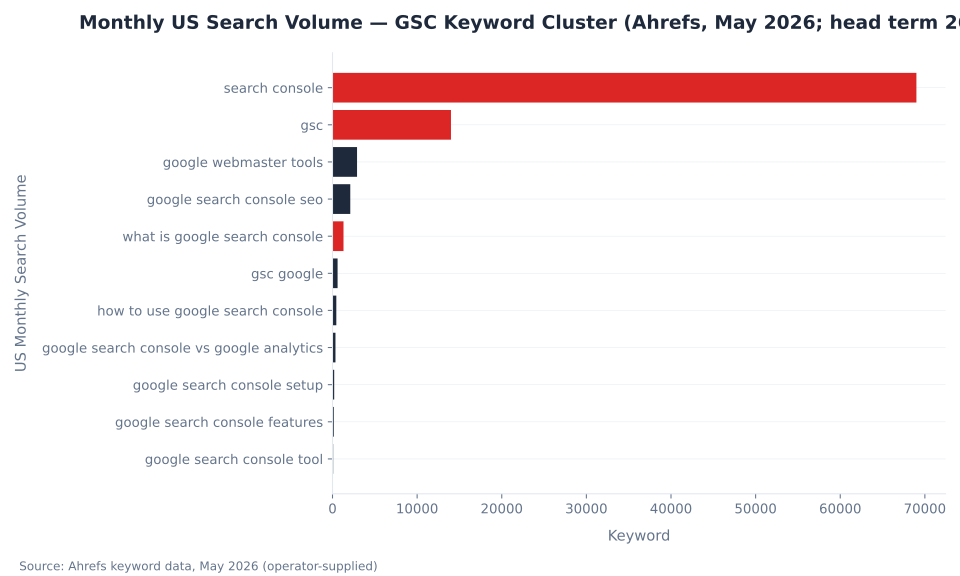
Monthly US Search Volume — GSC Keyword Cluster (Ahrefs, May 2026; head term 260K shown separately)
Google Search Console Setup
Adding a property to Google Search Console takes under 5 minutes for a Domain property with DNS access, or 10–15 minutes for a URL-prefix property using HTML file or meta tag verification. The Domain property is the recommended default for any production site where DNS access is available.
| Step | Action | Notes |
|---|---|---|
| 1 | Go to search.google.com/search-console and click "Add property" | Requires a Google account — the same account that will manage the property going forward |
| 2 | Select the "Domain" property type and enter the domain (e.g., example.com) |
Do not include www., https://, or any protocol in the Domain field — enter the bare domain only |
| 3 | Copy the DNS TXT record provided by GSC | The record looks like: google-site-verification=abc123... — copy the full string exactly |
| 4 | Log in to your domain registrar (e.g., GoDaddy, Namecheap, Cloudflare) and add the TXT record to the DNS configuration for the domain | DNS propagation takes minutes to a few hours depending on the registrar and TTL settings — most complete within 15–30 minutes |
| 5 | Return to GSC and click "Verify" | GSC checks for the TXT record; if propagation is complete, verification succeeds immediately. If it fails, wait 15–30 minutes and retry — do not re-generate the TXT record |
| 6 | Submit your sitemap via the Sitemaps report | See Sitemaps & URL Inspection for the full submission process and error resolution |
For URL-prefix properties — the appropriate choice when DNS access is unavailable or when adding a subdirectory-level property — five verification methods offer more flexibility: HTML file upload (download the verification file from GSC and upload to the site root), HTML meta tag (add the verification <meta> tag to the home page <head>), Google Analytics (requires edit permission in the GA property plus a matching GA tag firing on the site), Google Tag Manager (requires Publish access in the GTM container, with the container live on the page), and DNS TXT record (same as Domain verification — available as an option for URL-prefix properties too). For GTM verification context, see the Google Tag Manager glossary.
Tracking multiple sites in one GSC account is straightforward: a single Google account holds multiple properties, and the property selector in the GSC top bar switches between them instantly. There is no cross-property aggregate dashboard in Search Console — each property is viewed independently. This is a key difference from a GA4 account structure, where an account-level view aggregates across properties. Site owners managing ten or more properties — agencies and enterprise teams in particular — use the GSC API to pull data from multiple properties programmatically rather than toggling between them in the interface. For programmatic property management and bulk data export, see the GSC API and automation guide.
Global Search Engine Market Share — All Devices, April 2026 (StatCounter)
Google Search Console for SEO
Google Search Console is the foundational tool for SEO because it provides direct access to Google's view of the site. It is the only source where query data is always visible — unlike GA4's "(not provided)" — crawl and index status are directly reportable, and any manual actions from Google's review team are disclosed in full.
| Keyword | US Monthly Volume | Keyword Difficulty | Notes |
|---|---|---|---|
| search console | 69,000 | 84 | Shortened variant of head term; same parent topic |
| gsc | 14,000 | 46 | Ambiguous acronym — also resolves to apartments and school districts in search |
| google webmaster tools | 2,900 | 48 | Former product name (pre-2015 rebrand) — still generating 2,900 US searches/month |
| google search console seo | 2,100 | 76 | — |
| what is google search console | 1,300 | 78 | Primary definitional target; AI Overview + video in SERP |
| gsc google | 600 | 68 | Winner page's best-ranking term (pos 13.6 GSC) |
| how to use google search console | 450 | 67 | AI Overview + video present in SERP |
| google search console vs google analytics | 350 | KD 1 | Standout low-competition opportunity — nearly uncontested despite AI Overview presence |
| google search console setup | 200 | 68 | AI Overview + question features in SERP |
| google search console features | 150 | — | Second winner page's toehold term (pos 4.35 GSC, 6,203 impressions) |
| google search console tool | 80 | 78 | — |
Google's dominance in global search is the factual backbone of why GSC is the default search monitoring tool for most sites. Google holds 90.02% of global search market share across all devices as of April 2026 (StatCounter via Statista). On mobile specifically, that share rises to 94.6%; on desktop it sits at 79.1% — the lower desktop figure reflects Bing's growth on Windows devices via Copilot integration, though Bing's overall global share remains at 5.14% (StatCounter, January–April 2026). Source: Statista, global search engine market share, April 2026.
For sites without significant Bing, Yahoo, or other-engine organic traffic, GSC captures the effective entirety of search performance data. A site generating 95% of its organic clicks from Google has 5% of search data that GSC cannot show — everything else is covered. This is why GSC is the starting point for any SEO investigation: indexing status, query data, ranking position, and structured data validity all read directly from Google's systems, with no sampling, no estimation, and no dependency on third-party panels. For practitioners who need to track the remaining non-Google search traffic, GA4's organic channel is the complementary source. For a full treatment of the measurement stack, see the SEO glossary.
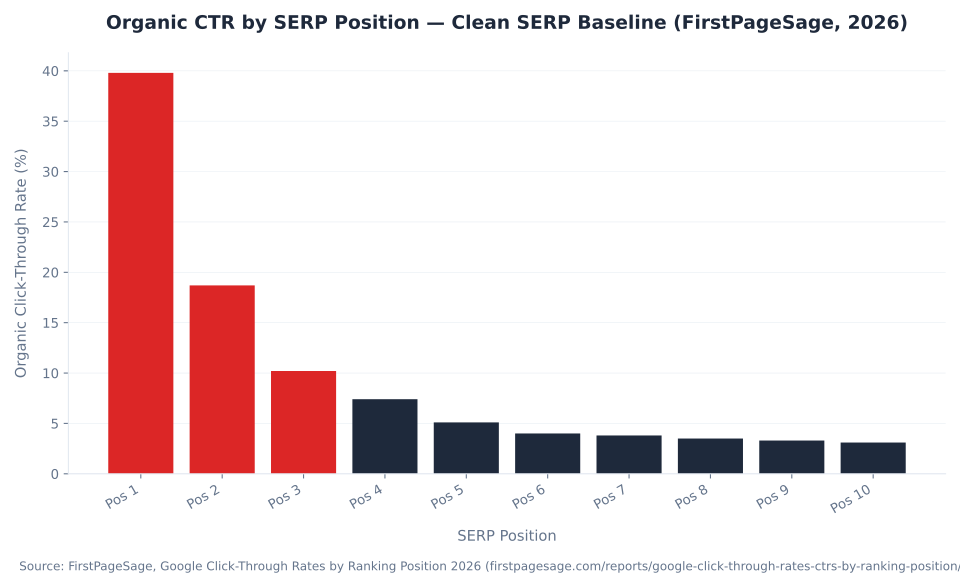
Organic CTR by SERP Position — Clean SERP Baseline (FirstPageSage, 2026)
Average Position and CTR in Google Search Console
Average position in GSC is the impression-weighted average ranking across all queries for a page — a position-1 page on a 1-impression query counts equally to a position-1 page on 10,000 impressions in that calculation. CTR at each position determines how many of those ranked appearances translate into actual clicks.
| SERP Position | Organic CTR |
|---|---|
| 1 | 39.8% |
| 2 | 18.7% |
| 3 | 10.2% |
| 4 | 7.4% |
| 5 | 5.1% |
| 6 | 4.0% |
| 7 | 3.8% |
| 8 | 3.5% |
| 9 | 3.3% |
| 10 | 3.1% |
Source: First Page Sage 2026 — clean-SERP baseline (no AI Overviews, shopping modules, or featured snippets). On queries where AI Overviews are present, Ahrefs' February 2026 study (300,000 keywords, aggregated GSC data) found a 58% CTR reduction for top-ranking pages — position 1 CTR drops from 7.3% to 1.6% on AI Overview queries. Source: Ahrefs, February 2026.
In GSC's Performance report, average position is impression-weighted and sampled. A page ranking position 5 on a 50,000-impression query and position 1 on a 10-impression query will show an average position higher than 5, even though the dominant traffic driver is the position-5 query. This is why filtering by query and sorting by impressions gives a more accurate picture than relying on the blended "average position" metric alone. For a full breakdown of how to read and filter the Performance report data correctly, see the Performance report and search analytics guide.
The Ahrefs 58% CTR reduction finding (February 2026) is directly observable in GSC data: sites seeing impressions spike without corresponding click or position improvements are appearing in AI Overviews without being cited. If the site is cited, it sees a 35% click boost per the same study. GSC's Performance report is the diagnostic tool for this pattern — compare CTR before and after AI Overview rollout periods using the date comparison feature to isolate AI Overview impact from organic ranking changes.
How to Use Google Search Console
The "check it occasionally" model leaves most GSC value untapped. A structured cadence — immediate checks after major site changes, weekly indexing scans, monthly performance reviews, quarterly link and structured data audits — surfaces problems in weeks rather than months and ensures no penalty or indexing block compounds undetected.
| Frequency | Action | Report | Why it matters |
|---|---|---|---|
| Within 24–48h of major change (publish/migration/robots.txt) | Check 24-hour view for click/impression spike or drop; URL Inspection on changed pages | Performance (24h), URL Inspection | Catch indexing blocks before they compound |
| Weekly | Page indexing — new "Not indexed" spikes; Manual Actions and Security Issues for new entries | Page indexing, Manual Actions, Security Issues | Surface crawl problems and penalties early |
| Monthly | Performance — top queries and pages trend; Core Web Vitals — new failing URL groups | Performance, Core Web Vitals | Track ranking momentum; catch CWV regressions after CMS changes |
| Quarterly | Links — external link volume trend; Enhancements — structured data error rate | Links, Enhancements | Link profile health; rich result eligibility |
| After algorithm updates | Performance — before/after comparison; Page indexing — crawl anomalies | Performance, Page indexing | Assess site-specific impact |
Cadence recommendations based on Google Search Central documentation. No published study quantifies time-to-detection improvement by check frequency; cadence is practitioner guidance, not a sourced benchmark.
The Insights panel (integrated into the main GSC dashboard June 30, 2025 — no longer a standalone beta) surfaces content-level signals without requiring report-by-report drilling: trending queries, new and lost rankings, top content, and traffic source overview. In December 2025, Insights expanded to include social channel performance data — YouTube, TikTok, and Instagram performance in Google Search results. This makes Insights the fastest daily health check for content teams who need a top-line signal without opening the full Performance report. For the direction GSC is heading and upcoming feature signals, see the GSC trends and future guide.
The 24-hour view (launched December 2024) shows the most recent ~24 hours with hourly granularity for Search results, Discover, and Google News. Available metrics: clicks, impressions, average CTR, average position — with full dimension breakdowns by query, page, country, and device. This is the correct first-response tool after publishing a high-priority piece or after a robots.txt change. The weekly and monthly aggregation views (launched December 2025) complement it by smoothing daily noise for longer-term trend reading — all three time-granularity options are now available from the same Performance report drop-down.
MB Adv Agency recommends this cadence to every client following a site migration: immediate URL Inspection checks on all redirected and newly canonicalized pages within the first 24 hours, then a structured weekly review of Page indexing for the first month to confirm that no pages drop from indexed to "Crawled — currently not indexed" as Googlebot re-evaluates the restructured site. The monthly cadence restarts from the post-migration baseline once the index stabilizes. For the Core Web Vitals portion of the monthly check, see the Core Web Vitals and page experience guide. For the quarterly links and security portion, see Links, Manual Actions, and Security in GSC.
Google Search Console Tool — Key Terms Reference
A reference table of core GSC terminology — the tool introduces terminology not used elsewhere in SEO (impressions vs. clicks, average position, Domain vs. URL-prefix, Manual Actions) and practitioners benefit from a single-view definition of the exact vocabulary the interface uses.
| Term | Definition | Common confusion |
|---|---|---|
| Impression | Your page appeared in a Google search result and was scrolled into view | Does not mean anyone clicked; a page can have thousands of impressions and zero clicks |
| Click | A user clicked your result and landed on your page | Counted at the search-result level; one user can generate multiple clicks if they bounce and return |
| Average position | Average ranking position across all queries that generated impressions for that page | Position 1 = top of results; aggregated averages mask query-level variance — always filter by query to see the real distribution |
| CTR (Click-Through Rate) | Clicks ÷ Impressions — the share of searchers who saw your result and clicked it | CTR benchmarks vary heavily by SERP layout — AI Overviews, ads above the fold, and featured snippets all compress organic CTR substantially |
| Domain property | A GSC property covering all subdomains and protocols for a domain — verified via DNS TXT record only | Often confused with URL-prefix; one Domain property replaces the need for separate www/non-www and http/https properties |
| URL-prefix property | A GSC property covering only the exact URL prefix specified — multiple verification options available | Does not cover other protocols or subdomains; the most common GSC setup error is setting this to the wrong protocol (http vs https) |
| Coverage / Page indexing | Report showing URL indexing status and reason codes for non-indexed pages — current official name is "Page indexing" | "Coverage" is the old name (still widely cited); both terms refer to the same report |
| Manual Action | A human reviewer at Google has applied a penalty to the property | Different from an algorithmic ranking drop — manual actions are always listed explicitly in the Manual Actions report; algorithm drops are not |
| Core Web Vitals (CWV) | LCP, INP, CLS measured from real-user Chrome data (CrUX) — three page experience signals tracked in the GSC Core Web Vitals report | The CWV report uses field data (real users), not lab data — scores differ from Lighthouse/PageSpeed Insights, which run synthetic tests |
| Search Console Insights | Integrated into the main GSC dashboard June 2025; no longer a standalone beta. In December 2025, expanded to include social channel performance data (YouTube, TikTok, Instagram) | Older documentation describes it as a "beta" or "separate tool" — both descriptions are outdated as of June 2025 |
Browse the full Google Search Console glossary for term-by-term definitions across all GSC reports. For site owners using GSC in a local SEO context — tracking local pack visibility, managing a Google Business Profile alongside GSC data — see the Google Business Profile glossary for the complementary local search terminology.
Performance Data Retention: GSC vs. GA4 (2026)
GSC Showing Indexing Issues, Manual Actions, or Unexplained Ranking Drops?
Diagnosing the root cause — crawl budget, structured data errors, algorithm impact, or a technical configuration problem — requires reading multiple GSC signals together. MB Adv Agency provides technical SEO diagnostic reviews.
Get a Technical SEO Review →All data in this article is current as of June 2026. Google Search Console mechanics — property types, verification methods, report inventory, data retention, and free status — are sourced from official Google documentation: support.google.com, developers.google.com, and the Google Search Central Blog. Search engine market share figures use StatCounter via Statista (April 2026). Organic CTR baselines are from FirstPageSage's 2026 meta-analysis (clean-SERP conditions). AI Overview CTR impact is from Ahrefs' February 2026 study (300,000 keywords, aggregated GSC data). Keyword volume figures use Ahrefs (May 2026, operator-supplied).
Impression data anomaly (May 13, 2025 – April 27, 2026): A confirmed Google logging error inflated GSC impression counts platform-wide during this window. Clicks and all other metrics were not affected. Historical impression figures from this period remain permanently inflated and are not used as benchmarks anywhere in this article. Any site that saw an impressions drop in late April or early May 2026 likely observed the fix taking effect, not a real ranking loss. Source: searchengineland.com/google-search-console-bug-inflated-impression-counts-473530.
No MB Adv client performance data is cited — all quantitative claims trace to an external source listed in the article. Key source domains: support.google.com, developers.google.com, searchengineland.com, firstpagesage.com, ahrefs.com, statista.com.

As a Google Ads expert, I bring proven expertise in optimizing advertising campaigns to maximize ROI.
I specialize in sharing advanced strategies and targeted tips to refine Google Ads campaign management.
Committed to staying ahead of the latest trends and algorithms, I ensure that my clients receive cutting-edge solutions.
My passion for digital marketing and my ability to interpret data for strategic insights enable me to offer high-level consulting that aims to exceed expectations.
Google Partner Agency
We're a certified Google Partner Agency, which means we don’t guess — we optimize withGoogle’s full toolkit and insider support.
Your campaigns get pro-level execution, backed by real expertise (not theory).

4.9 out of 5 from 670+ reviews on Fiverr.
That’s not luck, that’s performance.
Highly recommend Matteo to set up your server side tracking. He has a deep understanding of e-commerce tracking and will go above and beyond to make sure everything is set up correctly and working 100%. If you are scaling your store this set up is non-negotiable in my opinion and there isn't many people who have this much knowledge or put the effort in to get it right. Thanks again!

avorodesign.com
I can only recommend Matteo! He was very patient, professional and very knowledgeable about GA4, Consent Mode v2, and GDPR compliance. Communication was clear, and the setup was done professionally and efficiently. Highly recommend him for anyone needing reliable tracking implementation.

www.natureiki.life
Matteo shines in the realm of online professionals. His work is not only deep in data but also complemented by his proactive communication and cooperation, setting a new standard for freelancers. If you want someone who truly exceeds expectations, look no further. Highly recommended!

www.omanbeverlysmyth.com
Exceptional Service Beyond Expectations - Outstanding Service Impeccable depth, flawless delivery, and exceptional language fluency—this service exceeded all expectations. Highly recommended. Matteo truly ROCKS!!!

ium-paris.com
Top-notch, always highly value working with Matteo. An absolute Google Ads Genius. This is approximately the 8th time I have hired him and he's helped us get 6-7 ROAS. We are excited in continuing to improve our lead flow. Hire this guy if you need Google Ads help. Thanks Matteo!

www.dleeventgroup.com
I finally found the guy who can setup server side tracking and all the ecosystem properly. I definitely recommend Matteo. He is very responsive, kind and wants to dig into things. He configured GA4, Meta, Google Ads, Outbrain and google consent v2 with Cookiebot. Thanks Matteo.

inomega.fr
MB Adv delivered exceptional work with outstanding professionalism and lots of patience, taking time to see effects of changes made and not just do the work and submit it. The proactive communication and video summaries of the work completed made working with Matteo a pleasure, as he consistently went above and beyond. Highly recommended for web analytics projects! We are already working on another project.

www.withnellsensors.co.uk
Working with Matteo on my Google Ads was a game-changer. He's not just a strategist, he's a true partner. He understood my goals and tailored a campaign that perfectly reached my target audience. I'm grateful for his expertise and dedication.

dccargo.com
Click-driven mind
with plastic-brick obsession.
We build Google Ads campaigns with the same mindset we use to build tiny brick worlds: strategy, patience, and zero tolerance for wasted pieces.
Data is our blueprint. Growth is the only acceptable outcome.