How Search Engines Work: Crawling, Indexing & Ranking

How Search Engines Work 2026
3 Stages
Search engines work in three stages — crawling, indexing, and ranking — and getting through each stage is not guaranteed. A page can be crawled and never indexed, and indexed and never rank.
Crawling: Googlebot discovers & fetches URLs · Indexing: Google renders, resolves the canonical & stores eligible pages · Ranking: Google’s systems order the most relevant indexed pages (Google, “In-depth guide to how Google Search works”)
How Search Engines Work: Crawling, Indexing, and Ranking
Search engines work in three stages — crawling, indexing, and ranking — and Google is explicit that getting through each stage is not guaranteed. Crawling is the discovery step: Googlebot finds URLs, mostly by following links and reading sitemaps, then fetches them and renders each page with an evergreen Chromium engine. Indexing is the storage step: Google processes the fetched page, resolves which URL is canonical, and decides whether the page earns a place in the Google index. Ranking, which Google also calls serving, is the ordering step: when someone searches, Google’s ranking systems select and order the most relevant, highest-quality indexed pages for that exact query.
The single most useful thing to understand about this pipeline is that the three stages are separate gates. A URL can be crawled and never indexed, because Google judged it not worth storing. A page can be indexed and never reach page one, because the relevance and quality systems ranked other pages above it. And — the classic trap — a page can be blocked from crawling yet still appear in results if other pages link to it. So when a page is not showing up, the first diagnostic question is never “why does it not rank” but “which gate did it fail?” Table 1 lays out the three stages side by side.
| Stage | What Google does | Google’s terms | What you control | How it fails |
|---|---|---|---|---|
| 1. Crawling | Googlebot discovers URLs (mostly via links + sitemaps) and fetches them; renders with an evergreen Chromium engine | Googlebot (smartphone), URL discovery, rendering (WRS) | Internal links, sitemaps, robots.txt, server speed and health | URL never discovered; blocked by robots.txt; server errors or timeouts |
| 2. Indexing | Renders, processes content, resolves the canonical, and decides whether to store the page in the Google index | The Google index, canonicalization, noindex | Content quality and uniqueness, canonical hints, noindex rules | “Crawled – currently not indexed”; duplicate or thin content; noindex |
| 3. Ranking (serving) | For each query, selects and orders the most relevant, highest-quality indexed pages | Ranking systems, relevance, quality signals | Content relevance, links, E-E-A-T signals, page experience | Indexed but buried below page one |
Source: Google, “In-depth guide to how Google Search works” — crawling, indexing, and serving are three stages, and “getting through each stage is not guaranteed.” Not mbadv client data.
This crawl → index → rank pipeline is the engine underneath everything covered in what SEO is, and it is the reason the free crawl-and-index dashboard, Google Search Console, is the first tool every practitioner reaches for. The rest of this guide goes gate by gate: the control that governs crawling (robots.txt), the discovery aid that feeds it (XML sitemaps), the large-site concern that constrains it (crawl budget), the default rendering it uses (mobile-first indexing), and the unsampled record of what actually happened (log-file analysis).
Crawling, Indexing, and Ranking Are Three Separate Gates
The most expensive mistake in technical SEO is assuming that a page which cleared one gate cleared all three. Google’s own documentation frames search as three stages and states plainly that getting through each stage is not guaranteed. That means “not showing up” is not one problem — it is three possible problems, and the fix is completely different at each. Treating a page that Google never indexed as if it were a ranking problem is how teams waste weeks tuning content on a URL that never entered the index in the first place.
The diagnostic sequence follows the pipeline. First, was the page discovered and crawled? If Googlebot never fetched it, no amount of content work helps — you fix discovery (internal links, sitemap) and crawlability (robots.txt, server status). Second, was it indexed? A crawled page reported as “Crawled – currently not indexed” failed the storage gate, usually on quality, duplication, or a stray noindex — you fix the page, not the keywords. Third, is it indexed but ranking below page one? That is the only genuine ranking problem, and it is where content relevance, links, and page experience come in. Search Console’s URL Inspection tool tells you which gate a URL is at; server logs tell you whether Googlebot ever arrived at all.
Getting your pages cleanly through the crawl and index gates is the heart of technical SEO, and the report that shows exactly which URLs cleared the indexing gate — and which were excluded, and why — is the Index Coverage report in Search Console. MB Adv Agency treats the three-gate model as the starting point of every organic-search diagnosis, because it turns a vague “the page is not working” into a precise, testable question with a specific fix.
What People Search: Demand for the Crawl, Index, and Rank Terms
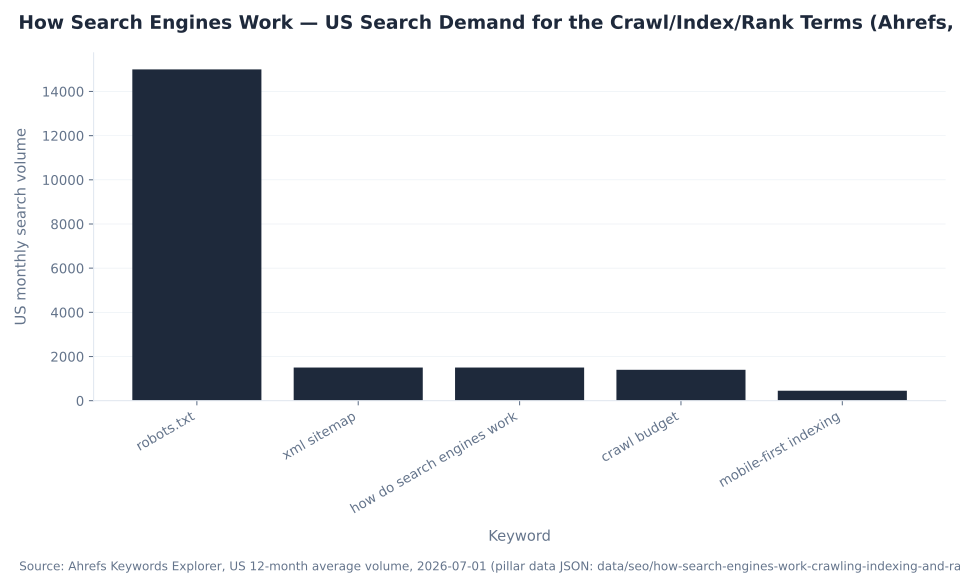
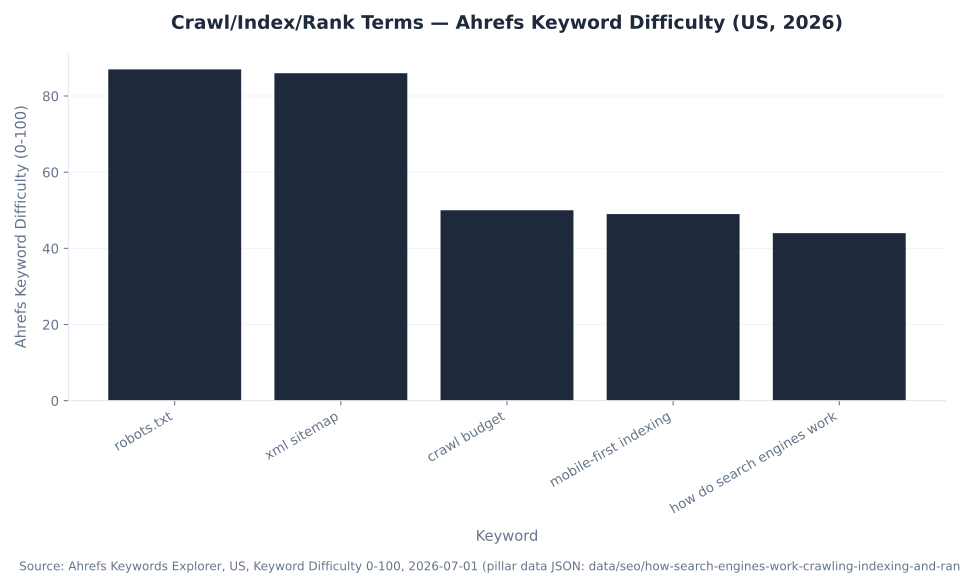
The demand behind this topic is dominated by one term: robots.txt, at 15,000 US searches per month (Ahrefs Keywords Explorer, US, 2026-07-01) — by far the highest-volume query in the cluster, and also one of the hardest at KD 87. The get-started head term, how do search engines work, runs 1,500 per month at KD 44, the most winnable of the set and the reason this pillar leads with the literal three-stage answer. Table 2 shows the search demand and difficulty for the five core terms this guide consolidates.
| Keyword | US monthly volume | Global volume | KD (0-100) | Note |
|---|---|---|---|---|
| robots.txt | 15,000 | 42,000 | 87 | Highest-volume term in the cluster; 301 target for the id=“robots-txt” anchor |
| xml sitemap | 1,500 | 7,900 | 86 | High-difficulty head term; 301 target for id=“xml-sitemaps” |
| how do search engines work | 1,500 | 2,800 | 44 | The get-started head term; the most winnable of the set |
| crawl budget | 1,400 | 3,800 | 50 | 301 target for id=“crawl-budget” |
| mobile-first indexing | 450 | 1,100 | 49 | 301 target for id=“mobile-first-indexing” |
Source: Google Search Central for the mechanics; Ahrefs Keywords Explorer, US 12-month average volume and Keyword Difficulty, 2026-07-01 (pillar data JSON). Across the 90-day Search Console window (2026-04-02 to 2026-07-01), all six source URLs in this cluster recorded 0 clicks and 0 impressions — real demand, captured by none of the old pages. Not mbadv client data.
The strategy this data dictates is direct: win the lower-difficulty get-started term, build the deepest single reference on the topic, and give each high-volume control term (robots.txt, xml sitemap, crawl budget, mobile-first indexing) its own deep-linkable section on this page. The sections that follow do exactly that, gate by gate.
robots.txt Controls Crawling, Not Indexing
The correction that earns the most citations, because so much published content still gets it wrong, is this: robots.txt controls crawling, not indexing. A robots.txt file is a Robots Exclusion Protocol file — standardized as IETF RFC 9309 in 2022 — that tells compliant crawlers which URLs not to fetch. It does not remove a page from the index. A URL disallowed in robots.txt but linked from elsewhere can still be indexed, shown as a bare URL with no snippet, because Google could not read the page to write one.
The intuitive fix backfires. To keep a page out of the index you use noindex — a meta robots tag or an X-Robots-Tag header — but Google only sees that rule if it is allowed to crawl the page. Block the page in robots.txt and Googlebot never fetches it, never sees the noindex, and the URL can linger in results indefinitely. The load-bearing rule is therefore precise: to stop crawling, use robots.txt; to stop indexing, use noindex and leave the page crawlable. Table 3 is the decoder that settles the confusion in one glance.
| Control | Governs | Stops crawling? | Stops indexing? | Correct use |
|---|---|---|---|---|
robots.txt Disallow | Crawling | Yes (for compliant bots) | No — a blocked-but-linked URL can still be indexed (no snippet) | Stop Googlebot fetching a section; save crawl on low-value URLs |
noindex (meta robots / X-Robots-Tag) | Indexing | No (the page must stay crawlable) | Yes — removes the page from the index | Keep a crawlable page out of results; do not also block it in robots.txt |
rel=canonical | Duplicate consolidation | No | No — it is a hint, not a directive | Point Google to the preferred URL among duplicates |
| 301 redirect | Crawling + consolidation | Redirects the fetch | The old URL drops from the index over time | Permanently move a URL and pass its signals |
Sources: Google, “Introduction to robots.txt”; Google, “Block search indexing with noindex”; Google, “Canonicalization” (canonical is a hint). robots.txt is the Robots Exclusion Protocol, standardized as IETF RFC 9309 (2022). Not mbadv client data.
Because the two controls solve opposite problems, the same page should almost never carry both. If you want a low-value section fetched less, use robots.txt; if you want a specific page kept out of results, use noindex and confirm the page stays crawlable so Google can read the rule. The report that surfaces a URL indexed against your intent — or excluded when you wanted it in — is the Index Coverage report, which is where this decoder becomes a daily diagnostic rather than a piece of trivia.
The robots.txt Directives Google Supports
A robots.txt file lives at the domain root (/robots.txt), is served as UTF-8 plain text, and is built from a small set of directives. Getting the syntax right matters, because a single overbroad Disallow can hide an entire section from Googlebot. Table 4 lists the directives Google actually supports, and flags the one that many older tutorials still tell you to use but Google ignores.
| Directive | Purpose | Example |
|---|---|---|
User-agent: | Names the crawler the following rules apply to | User-agent: Googlebot |
Disallow: | Path Googlebot should not crawl | Disallow: /cart/ |
Allow: | Exception that re-permits a path under a disallow | Allow: /cart/help |
Sitemap: | Absolute URL of your XML sitemap (a discovery hint) | Sitemap: https://example.com/sitemap.xml |
Crawl-delay: | Ignored by Google (respected by some other engines) | — set crawl-rate signals via server health instead |
Source: Google, “Introduction to robots.txt” and Google’s robots.txt specification — supported directives are User-agent, Disallow, Allow, and Sitemap; Crawl-delay is ignored. robots.txt must sit at the domain root and be UTF-8. Not mbadv client data.
The practical takeaway is that robots.txt is a scalpel for crawl control, not a switch for removing pages. Use it to keep Googlebot out of infinite faceted combinations, internal search results, and cart or checkout paths; point it at your sitemap with the Sitemap: line; and manage crawl rate through server speed and health rather than a Crawl-delay line Google never reads. The server-health and measurement plumbing that supports this — the paid-media analog of getting your technical foundation right — is the kind of work covered by server-side tracking.
XML Sitemaps: A Discovery Aid With Hard Limits
An XML sitemap is a machine-readable list of your URLs that helps Google find pages it can miss — deep, new, or sparsely linked ones — along with hints such as last-modified dates. It is a discovery aid, not an indexing guarantee: Google still decides independently what to index and how to rank it. A sitemap that lists noindex, non-canonical, redirected, or blocked URLs actively hurts, because it sends mixed signals about which URLs you actually want. Table 5 answers the limit questions people search for directly.
| Rule | Limit / requirement |
|---|---|
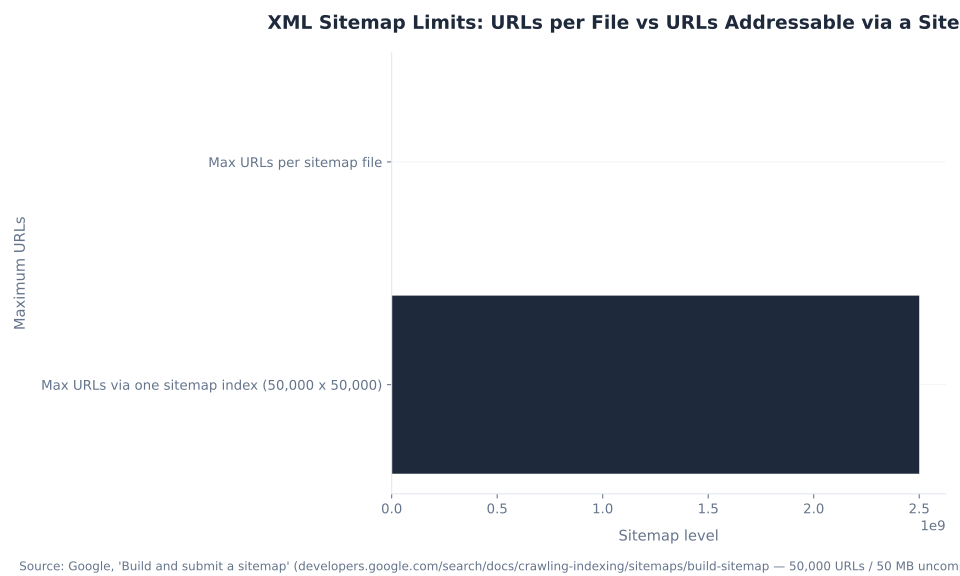
| Max URLs per sitemap file | 50,000 |
| Max uncompressed file size | 50 MB (can be gzip-compressed for transfer) |
| Encoding | UTF-8 |
| More than 50,000 URLs? | Split into multiple sitemaps and reference them from a sitemap index file |
| Max sitemaps per sitemap index | 50,000 (so one index addresses up to ~2.5 billion URLs) |
| Supported formats | XML (recommended), RSS/Atom, plain text (one URL per line) |
| Submission | Sitemap: line in robots.txt + submit in Search Console |
| Does it guarantee indexing? | No — a discovery aid only; list canonical, indexable URLs |
Sources: Google, “Build and submit a sitemap” (50,000 URLs / 50 MB uncompressed per file) and the sitemaps.org protocol. Not mbadv client data.
The capacity ladder is the teaching point: a single file caps at 50,000 URLs, and nesting up to 50,000 sitemaps inside one sitemap index addresses up to roughly 2.5 billion URLs — one file suffices for a small site, an index is the pattern for an enterprise catalog. The mistakes that hurt are structural, not size-related: keep noindex, non-canonical, redirected, and blocked URLs out. You submit and monitor sitemaps — and inspect a single URL’s crawl and index status — in Sitemaps and URL Inspection inside Search Console.
Crawl Budget Is a Large-Site Concern
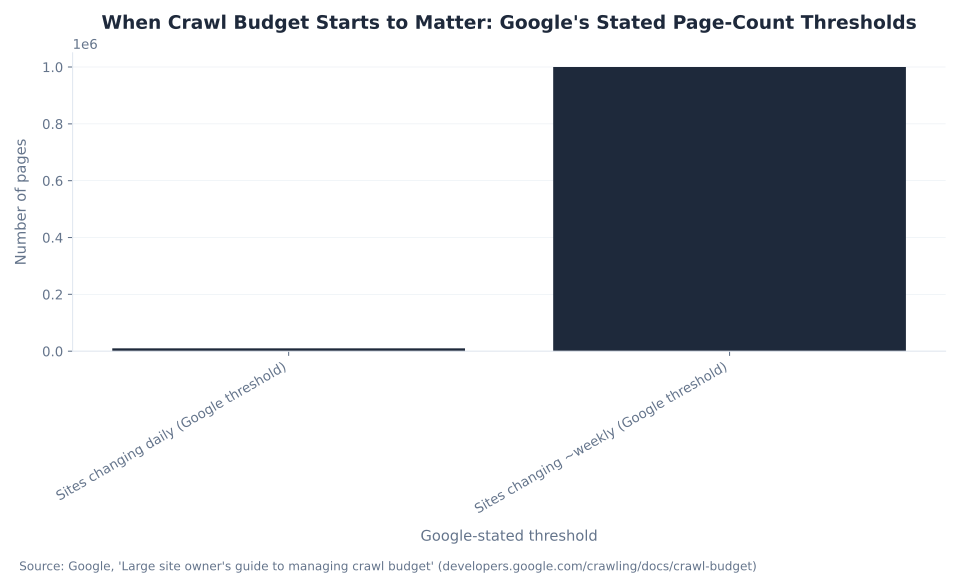
Crawl budget is real, and for the overwhelming majority of sites it is not your problem. Google’s large-site guide draws the line clearly: crawl budget is worth managing only for a very large site — 1,000,000+ pages changing roughly weekly — or a medium-plus site of 10,000+ pages changing daily. Those are large ecommerce catalogs with faceted navigation, marketplaces, and big publishers. Below that, Google states plainly that most sites are crawled efficiently and never need to manage it. Table 6 puts the thresholds next to real site profiles.
| Site profile | Approx. size | Manage crawl budget? |
|---|---|---|
| Small business, blog, or brochure site | Under ~1,000 pages | No — Google crawls efficiently; focus on content and links |
| Growing site | ~1,000–10,000 pages | Rarely — only if content changes very rapidly |
| Medium-plus, daily-changing content | 10,000+ pages | Yes — Google’s stated threshold (news, active marketplaces) |
| Very large site, ~weekly-changing content | 1,000,000+ pages | Yes — Google’s stated threshold (big ecommerce, publishers) |
Source: Google, “Large site owner’s guide to managing crawl budget”. Crawl budget = crawl capacity limit (how much Googlebot can fetch without overloading your server) + crawl demand (how much Google wants to crawl you). Not mbadv client data.
Where crawl budget applies, the levers are technical: fix slow and 5xx responses, remove low-value URLs (infinite faceted combinations, session IDs, endless calendars), consolidate duplicates, and keep sitemaps and internal links pointed at the canonical URLs you actually want crawled. Where it does not apply — on a 300-page site — the honest advice is to spend the day on content and links instead. Large SaaS sites tend to hit these limits first, which is why we pair the crawl-budget conversation with our SaaS software PPC work; big ecommerce catalogs with faceted navigation are the other classic case, matched by our fashion PPC campaigns on the paid side.
HTTP Status Codes and How Googlebot Treats Them
When a page is not indexed, the status code Googlebot received is often the fastest diagnostic. A page has to return a clean 200 to be eligible for indexing; redirects, errors, and blocks each change the outcome in a specific, predictable way. Table 7 is the reference for reading “why is this page not indexed?” from the response Googlebot actually got.
| Status | Meaning | Effect on crawl / index |
|---|---|---|
| 200 OK | Success | Page is eligible to be indexed (subject to quality and canonical) |
| 301 / 308 | Permanent redirect | Google follows; consolidates signals to the target; old URL drops over time |
| 302 / 307 | Temporary redirect | Google follows; keeps the original URL as canonical |
| 404 / 410 | Not found / Gone | Removed from the index over time (410 slightly faster) |
| 429 / 5xx | Too many requests / server error | Google slows crawling and retries; persistent errors drop pages |
robots.txt Disallow | Blocked (not a status code) | Not crawled; the URL can still be indexed if linked (no snippet) |
Source: Google, “How HTTP status codes, and network and DNS errors, affect Google Search”. Not mbadv client data.
Reading these outcomes correctly saves real time. A page stuck out of the index because it returns a soft 404 or a 5xx is a server problem, not a content problem; a page that resolves through a chain of 302s keeps the wrong canonical; and a section blocked in robots.txt but still surfacing as a bare URL is the crawling-versus-indexing confusion from Table 3, seen from the status side. You cross-check all of these against Google’s own view of each URL in the Index Coverage report.
Log-File Analysis: The Unsampled Crawl Truth
To know what Googlebot really did — which URLs it fetched, how often, with what status codes, and where it wasted crawl — the unsampled source of truth is your server access logs. Every request is recorded: URL, timestamp, HTTP status, user-agent, and bytes. Search Console’s Crawl Stats report is useful, but it is a sampled subset; the raw logs are complete. Because the user-agent string is trivially spoofed, verify a request is genuinely Googlebot by reverse-DNS or Google’s published IP ranges before you trust a log line. Table 8 shows what each log signal reveals.
| Log field / signal | What it tells you |
|---|---|
| User-agent (verify via reverse-DNS / Google IPs) | Whether the visitor was genuinely Googlebot — the UA string is spoofable |
| URL + timestamp | The exact crawl frequency of each page — which money pages get crawled, and how often |
| HTTP status | The real distribution of 200 / 301 / 404 / 5xx Googlebot hit, versus what you assume |
| Requested path patterns | Crawl waste on parameter, faceted, and session URLs; orphan pages never fetched |
| Bytes / response time | Server health that shapes crawl capacity |
Sources: Google, “Large site owner’s guide to managing crawl budget” and Google, “Verifying Googlebot”; the Screaming Frog Log File Analyser and Botify are the standard tools. Not mbadv client data.
Logs are the unsampled ground truth of every request; Crawl Stats is a useful but sampled view. This gap is how large sites find orphaned pages Googlebot never reaches, crawl waste on parameter URLs, and the real crawl frequency of their revenue pages — none of which a sampled dashboard reliably shows. The same discipline of measuring what actually happened, rather than what a dashboard estimates, is how MB Adv Agency runs the paid Google campaigns that sit alongside this organic work; keeping both accountable to real data is exactly what our PPC campaign management is built to do.
Mobile-First Indexing Is Complete
A lot of 2026 content still describes mobile-first indexing as something that is “rolling out.” It is not — it is finished. Google announced “mobile-first indexing is here” in October 2023 and removed the final Search Console crawler setting in mid-2024. The smartphone Googlebot is now the default indexing crawler, so Google indexes the mobile rendering of your pages. Table 9 traces the timeline and states the present-tense status.
| Milestone | Date | What it means |
|---|---|---|
| Mobile-first indexing announced | 2016 | Google begins the multi-year shift |
| Rollout underway for most sites | 2018–2020 | Sites migrated to smartphone-Googlebot indexing in waves |
| “Mobile-first indexing is here” | Oct 2023 | Google declares it essentially complete |
| Final Search Console crawler setting removed | ~Jul 2024 | The last “primary crawler” control disappears from Search Console |
| Status in 2026 | Complete | The smartphone Googlebot is the default — Google indexes the mobile rendering of your pages |
Source: Google Search Central Blog, “Mobile-first indexing is here” (Oct 2023; the smartphone Googlebot is the default; the final Search Console crawler setting was removed in mid-2024). Not mbadv client data.
The practical rule: content, structured data, and links must exist in your mobile layout. Anything that lives only in a desktop-only version — a block of text hidden on mobile, structured data injected only on the desktop template, links tucked into a desktop-only menu — is effectively invisible to Google, because the smartphone Googlebot is what it indexes. There is nothing left to “migrate to”; the work is confirming that your mobile page contains everything your desktop page does. The same corpus of crawled-and-indexed mobile pages is what feeds the newer AI surfaces covered in how AI is changing SEO.
How to Help a Page Pass All Three Gates
Because crawling, indexing, and ranking are separate gates, the way to get a page found is to walk them in order and confirm each one before moving on. The sequence below is the one MB Adv Agency uses to diagnose an organic-visibility problem, and it maps directly to the controls detailed above.
1. Make the URL discoverable. Link to the page from other pages on your site and include it in your XML sitemap, so Googlebot finds it through both links and the sitemap. 2. Confirm it is crawlable and returns 200. Check that the URL is not disallowed in robots.txt and that it returns a clean HTTP 200 — not a redirect chain, a soft 404, or a 5xx. 3. Confirm it is indexable. Ensure the page carries no stray noindex and has a clean, self-referencing canonical, so Google is allowed to store it. 4. Verify the mobile rendering. Because mobile-first indexing is the default, confirm the smartphone version contains all the content, structured data, and links present on desktop.
5. Inspect which gate it is at. Use Search Console’s URL Inspection tool to see whether the page was discovered, crawled, and indexed, so you fix the right gate instead of guessing. 6. On large sites, check the logs. Analyze server access logs to see the real crawl frequency of your revenue pages and where Googlebot wastes crawl on parameter or faceted URLs. This ordered process is why the free crawl-and-index dashboard is the center of the workflow — start with tracking performance in Google Search Console and its URL Inspection tool, and monitor discovery through Sitemaps and URL Inspection. Do the gates in order and “the page is not working” becomes a specific, fixable finding every time.
Organic Discovery + Paid Search, Working Together
The crawl → index → rank pipeline is where organic visibility is won or lost
Your team owns the crawl-and-index foundation. MB Adv Agency runs the paid side — Google Ads and PPC — that complements your organic search, so the two channels reinforce each other instead of competing. Talk to our team about the paid search that sits alongside your SEO.
Talk to our team →Same Corpus, New Surfaces: Mobile-First and AI Search
Two shifts define how the pipeline behaves in 2026, and neither one changes the fundamentals. The first is that mobile-first indexing is complete: the smartphone Googlebot is the default, so the version of your page that gets crawled, indexed, and judged is the mobile one. The present-tense advice is simply to make sure your mobile page contains everything your desktop page does — the same content, the same structured data, the same links. Page experience, including Core Web Vitals, feeds the same crawl-and-render pipeline; a fast, healthy site supports crawl capacity and is easier for Googlebot to work through.
The second shift is the rise of AI surfaces — AI Overviews and AI Mode — and here the key fact is that they draw from the same crawled-and-indexed corpus. An AI Overview can only cite a page that Google crawled and indexed; a page that failed the crawl or index gate is invisible to the AI answer for exactly the same reason it is invisible to the ten blue links. So the pipeline is not made obsolete by AI search — it is the prerequisite for it. Everything layered on top, and what genuinely changes for practitioners, is covered in how AI is changing SEO; the server-speed and page-experience signals that support both crawl capacity and user experience are tracked in Core Web Vitals and page experience.
The through-line MB Adv Agency keeps in front of every client is that the crawl → index → rank model is durable. Surfaces change — desktop to mobile, ten blue links to AI answers — but a page still has to be discovered, stored, and selected to appear anywhere. Get the three gates right and you are eligible across every surface Google builds on top of its index.
The Drift Corrections That Decide Whether Your Pages Get Found
SEO advice drifts month to month, and four corrections are load-bearing enough that getting them wrong quietly costs indexing and visibility. Each one is a documented Google position, not an opinion, and each maps to a specific gate in the pipeline.
Blocking a page in robots.txt does not remove it from Google. robots.txt controls crawling, not indexing; a disallowed-but-linked URL can still be indexed as a bare URL with no description. To keep a page out of results, use noindex and leave the page crawlable so Google can read the rule. Submitting an XML sitemap does not make Google index or rank your pages. A sitemap is a discovery aid — it helps Google find URLs faster; it does not guarantee indexing and has no direct effect on ranking, and listing noindex or non-canonical URLs in it actively hurts.
Not every site needs to optimize crawl budget. It is a large-site concern — Google’s thresholds are roughly 1,000,000+ pages changing weekly or 10,000+ changing daily. Time spent “optimizing crawl budget” on a small site is time not spent on content and links. rel=canonical does not force Google’s choice. It is a hint, one of several canonicalization signals alongside redirects, HTTPS, internal links, and sitemaps; Google can select a different canonical than the one you declare. Keeping these four straight is the difference between a page that clears all three gates and one that silently fails at crawl or index — and it is the same discipline that shows up when Google’s ranking systems and algorithm updates decide where an already-indexed page lands.
How Search Engines Work FAQ
Own the Foundation, Add the Paid Layer
A clean crawl-and-index foundation makes every paid click work harder
The pages Google can crawl and index are the same pages your paid search sends traffic to. Our team runs the Google Ads and PPC that complement your organic search — ask us where paid and organic reinforce each other.
See our PPC services →Talk to our teamMethodology & Sources
Every mechanic in this guide is documented by Google. The three-stage crawl → index → rank model, the distinction between robots.txt (crawling) and noindex (indexing), the 50,000-URL and 50 MB sitemap limits, the crawl-budget page-count thresholds, and the completion of mobile-first indexing all come from Google’s official Search Central and crawling-indexing documentation, the sitemaps protocol, and IETF RFC 9309. These are Google’s own statements, not estimates, so they are not subject to the caveats that apply to third-party benchmarks.
The only numeric datasets are search-demand figures. US and global search volumes and Keyword Difficulty for the crawl, index, and rank terms come from Ahrefs Keywords Explorer (US, 2026-07-01), and the observation that all six source URLs in this cluster recorded 0 clicks and 0 impressions comes from the pillar’s Search Console export over the 90-day window (2026-04-02 to 2026-07-01). No distribution of “crawls by status code” or “share of sites on mobile-first” is charted, because no credible public dataset for either exists — charting one would be fabrication.
MB Adv Agency has no SEO or technical-SEO service page and no SEO client benchmark dataset, so the point of view here stays qualitative: our team, and the paid Google Ads and PPC campaigns we run that complement your organic search. No client metric appears anywhere in this guide. Last updated 2026-07-01. To discuss the paid search that sits alongside your SEO, talk to our team.
Understanding how search engines operate is essential for anyone looking to optimize their content for better visibility online. The process of searching and ranking involves three primary stages: crawling, indexing, and ranking. Each stage plays a vital role in ensuring that users receive the most relevant results for their queries. This article will delve into each of these stages, explaining their significance and offering tips for optimization.
Overview of the search engine process
The search engine process begins with the crawling of websites across the internet. Crawling involves automated bots, or spiders, that scour the web for new and updated pages. These bots follow links from one page to another, collecting data along the way. This initial stage is crucial because it enables search engines to discover fresh content and keep their databases up to date. The efficiency of this crawling process can significantly impact how quickly new information becomes available to users. As the internet continues to grow exponentially, search engines continuously enhance their crawling algorithms to ensure they can keep pace with the vast amount of content being published daily.

Once the bots have identified and crawled the new content, the next step is indexing. During this phase, the information collected by the crawlers is organized and stored in a massive database. The search engine uses sophisticated algorithms to analyze the content and determine which keywords and phrases are relevant to each page. This process ensures that when a user enters a query, the search engine can retrieve the most pertinent results quickly. Indexing not only involves storing the text of web pages but also includes metadata, images, and even video content. This comprehensive approach allows search engines to provide a rich array of results that cater to diverse user preferences and needs.
The final stage in the search engine process is ranking, where the indexed pages are evaluated against various ranking factors. This step determines the order in which search results appear on a user's screen. Factors such as keyword relevance, site authority, user experience, and more play a role in this evaluation. The ultimate goal is to deliver the best possible results for each search query, ensuring user satisfaction. Search engines employ complex algorithms that are constantly refined to adapt to changing user behaviors and emerging trends. Additionally, they may incorporate machine learning techniques to improve the accuracy of their rankings over time, allowing them to better understand the context and intent behind user searches.
Importance of each step
Each step in the search engine process—crawling, indexing, and ranking—holds significant importance in maintaining the integrity and efficiency of search engines. When it comes to crawling, the key aspect is thoroughness. Search engines need to crawl as many pages as possible to ensure comprehensive coverage of the internet. If a page is missed, it will not be indexed, and users will never discover it through search results. Additionally, the frequency of crawling is also crucial; websites that update their content regularly may require more frequent crawls to capture the latest information. This dynamic nature of the web means that search engines must continuously adapt their crawling strategies to keep up with the ever-evolving landscape of online content.

Indexing is equally important, as it determines how well a page will perform in search results. A well-structured index allows search engines to respond quickly to user queries by retrieving relevant data efficiently. If a website's data is poorly indexed, it could lead to lower visibility, regardless of the quality of the content. Furthermore, the way content is organized and tagged can significantly influence indexing. For instance, the use of meta tags, structured data, and sitemaps can enhance a page's chances of being indexed correctly, allowing search engines to understand the context and relevance of the content more effectively.
Lastly, ranking is critical because it directly impacts user experience. The majority of users tend to click on results that appear on the first page of search results. Thus, understanding the factors that influence ranking can significantly affect a website’s performance. High-ranking pages typically receive more traffic, leading to greater brand exposure and potential conversions. Moreover, ranking algorithms are constantly evolving, incorporating factors such as user engagement metrics, mobile-friendliness, and site speed. As a result, website owners must stay informed about these changes and continuously optimize their content and strategies to maintain or improve their search visibility.
Tips for optimizing each phase
Crawling optimization tips
To ensure that search engine bots can effectively crawl your website, consider the following tips:
- Optimize Your Site Structure: A clear and logical site structure with a designated hierarchy helps bots navigate your website more efficiently.
- Create a Sitemap: Submitting a sitemap to search engines provides a roadmap of all your pages, assisting with crawlers' discovery efforts.
- Use Robots.txt Wisely: This file can guide crawlers on which parts of your site should or should not be indexed, ensuring that only relevant pages are prioritized.
Additionally, consider implementing breadcrumb navigation on your site. This not only enhances user experience by providing a clear path back to previous pages but also helps search engines understand the relationship between different pages on your site. Another effective strategy is to minimize the use of JavaScript and Flash for essential content, as these technologies can hinder crawlers from accessing your information. Instead, opt for HTML and CSS, which are more crawler-friendly, ensuring that your content is readily available for indexing.
Indexing optimization tips
Improving how your content is indexed is essential for visibility. Keep these tips in mind:
- Utilize High-Quality Content: Writing comprehensive, well-researched content increases the likelihood of your pages being favorably categorized.
- Optimize Metadata: Ensure that your title tags and meta descriptions are clear, relevant, and contain essential keywords to help your content get indexed accurately.
- Maintain Internal Linking: Internal links can guide crawlers from one page to another, enhancing the indexation process.
Moreover, consider leveraging schema markup to provide search engines with additional context about your content. This structured data can enhance how your pages are displayed in search results, potentially leading to rich snippets that attract more clicks. Regularly auditing your indexed pages is also crucial; tools like Google Search Console can help you identify any indexing issues and rectify them promptly, ensuring that your most important content remains visible to users.
Ranking optimization tips
Finally, to climb the ranks in search results, here are some strategies to bolster your performance:
- Focus on Keywords: Conduct keyword research to understand what terms are being searched and incorporate them naturally into your content.
- Improve User Experience: Ensuring that your website loads quickly, is mobile-friendly, and has an intuitive design can positively affect your ranking.
- Build Quality Backlinks: Links from reputable sites serve as a vote of confidence for your content, which can help elevate your rank in search results.
In addition to these strategies, consider creating engaging multimedia content such as videos, infographics, and podcasts. These formats not only enhance user engagement but can also lead to increased shares and backlinks, further boosting your ranking potential. Regularly updating your content is another key tactic; search engines favor fresh, relevant information, so revisiting and refreshing older posts can help maintain your visibility and authority in your niche.

As a Google Ads expert, I bring proven expertise in optimizing advertising campaigns to maximize ROI.
I specialize in sharing advanced strategies and targeted tips to refine Google Ads campaign management.
Committed to staying ahead of the latest trends and algorithms, I ensure that my clients receive cutting-edge solutions.
My passion for digital marketing and my ability to interpret data for strategic insights enable me to offer high-level consulting that aims to exceed expectations.
Google Partner Agency
We're a certified Google Partner Agency, which means we don’t guess — we optimize withGoogle’s full toolkit and insider support.
Your campaigns get pro-level execution, backed by real expertise (not theory).
4.9 out of 5 from 670+ reviews on Fiverr.
That’s not luck, that’s performance.
Highly recommend Matteo to set up your server side tracking. He has a deep understanding of e-commerce tracking and will go above and beyond to make sure everything is set up correctly and working 100%. If you are scaling your store this set up is non-negotiable in my opinion and there isn't many people who have this much knowledge or put the effort in to get it right. Thanks again!
avorodesign.com
I can only recommend Matteo! He was very patient, professional and very knowledgeable about GA4, Consent Mode v2, and GDPR compliance. Communication was clear, and the setup was done professionally and efficiently. Highly recommend him for anyone needing reliable tracking implementation.
www.natureiki.life
Matteo shines in the realm of online professionals. His work is not only deep in data but also complemented by his proactive communication and cooperation, setting a new standard for freelancers. If you want someone who truly exceeds expectations, look no further. Highly recommended!

www.omanbeverlysmyth.com
Exceptional Service Beyond Expectations - Outstanding Service Impeccable depth, flawless delivery, and exceptional language fluency—this service exceeded all expectations. Highly recommended. Matteo truly ROCKS!!!
ium-paris.com
Top-notch, always highly value working with Matteo. An absolute Google Ads Genius. This is approximately the 8th time I have hired him and he's helped us get 6-7 ROAS. We are excited in continuing to improve our lead flow. Hire this guy if you need Google Ads help. Thanks Matteo!
www.dleeventgroup.com
I finally found the guy who can setup server side tracking and all the ecosystem properly. I definitely recommend Matteo. He is very responsive, kind and wants to dig into things. He configured GA4, Meta, Google Ads, Outbrain and google consent v2 with Cookiebot. Thanks Matteo.
inomega.fr
MB Adv delivered exceptional work with outstanding professionalism and lots of patience, taking time to see effects of changes made and not just do the work and submit it. The proactive communication and video summaries of the work completed made working with Matteo a pleasure, as he consistently went above and beyond. Highly recommended for web analytics projects! We are already working on another project.

www.withnellsensors.co.uk
Working with Matteo on my Google Ads was a game-changer. He's not just a strategist, he's a true partner. He understood my goals and tailored a campaign that perfectly reached my target audience. I'm grateful for his expertise and dedication.
dccargo.com
Click-driven mind
with plastic-brick obsession.
We build Google Ads campaigns with the same mindset we use to build tiny brick worlds: strategy, patience, and zero tolerance for wasted pieces.
Data is our blueprint. Growth is the only acceptable outcome.