Sitemaps & URL Inspection in Google Search Console

50,000
Maximum URLs per sitemap file — the hard limit Google Search Central applies to every format. Exceed it and Googlebot stops reading at URL 50,000 with no error shown in the Sitemaps report.
Source: Google Search Central, Build and Submit a Sitemap, 2026
What Is a Sitemap (and When Do You Need One)
A sitemap is a file that lists the URLs on a website so that search engine crawlers can discover them. It is not a page visitors see — it is an instruction set for Googlebot. Google Search Central defines a sitemap as a way to tell Google which pages you consider important and to provide structured metadata about each one. Submission does not guarantee crawling, and crawling does not guarantee indexing.
Google accepts seven sitemap formats: the standard XML sitemap, sitemap index files, RSS 2.0 and Atom 1.0 feeds, plain text, the Google News sitemap extension, image sitemaps, and video sitemaps. Each serves a different content type and discovery need. The standard XML format handles most sites. The Google News format serves news publishers with time-sensitive editorial content that needs Googlebot attention within minutes of publication. Image and video sitemaps extend discovery to media assets Googlebot cannot find as easily by following links alone.
Not every site needs a sitemap. Google's documentation states that sites with roughly 500 pages or fewer — where all pages are reachable via internal links from the homepage — can rely on Googlebot's link-following to discover pages without one. A well-linked 30-page business site gains little from a sitemap. A 10,000-page e-commerce catalog — where product pages three levels deep are not linked from the homepage — depends on it as the primary crawl-discovery mechanism. For a broader grounding in crawling, indexing, and technical SEO concepts, the SEO glossary provides the conceptual framework.
The URL Inspection tool covers the second half of this pillar and is equally misunderstood. It provides two distinct views of any URL: what Google recorded at its most recent crawl (the Google Index view), and what Googlebot would find if it fetched the page right now (the Live Test). These views regularly differ. A page blocked by robots.txt two weeks ago and unblocked today still shows as blocked in the Google Index view. The Live Test shows the current state. Using both views in the right order — index view to understand what Google holds, live test to confirm a fix has taken effect — is the core skill for diagnosing indexing problems. Start with What Is Google Search Console if you are new to the tool before going deeper here.
Together, sitemaps and the URL Inspection tool are the two direct levers a site owner has over what Google crawls and indexes. Sitemaps tell Google which URLs exist and which the site owner considers indexable. The URL Inspection tool shows what Google actually did with those URLs — and what it would do right now. Neither one causes indexing. Both improve the speed and reliability of discovery and diagnostic confidence.
- Sitemaps are discovery hints, not indexing instructions. Submitting a URL tells Google the URL exists. It does not cause Google to crawl it, and crawling does not cause indexing.
- Use both submission methods. Declare the sitemap in
robots.txtfor passive all-crawler discovery. Submit via the GSC Sitemaps report for the monitoring and error-detection feedback loop. Neither replaces the other. - The URL Inspection tool has two views. The Google Index view reflects past crawl state. The Live Test reflects current server state. Use both when diagnosing a missed or excluded page — they answer different questions. Reconcile results with the Index Coverage & Indexing report for the full picture.
- Request Indexing is a scarce resource. The button has a small daily limit per property — around 10–12 URLs per day per secondary sources. Run the Live Test first to confirm no blocking issues exist before using it.
- Seven sitemap formats exist, each with different limits. The Google News sitemap allows 1,000 URLs in a rolling 48-hour window — a fundamentally different tool from a standard XML sitemap (50,000 URLs / 50 MB). Treat them as separate instruments.
- The Sitemaps report shows discovery, not indexing. The URL count in the report reflects how many URLs Googlebot found in the sitemap — not how many it indexed. Use the Performance report to see which discovered URLs are actually ranking.
50,000
Max URLs per sitemap file (all formats). Source: Google Search Central, 2026.
50 MB
Max uncompressed file size per sitemap. Gzip compression strongly recommended. Source: Google Search Central, 2026.
500
Max sitemaps submitted per GSC property (UI and API). Source: GSC Sitemaps report, 2026.
1,000
Max URLs in a Google News sitemap — 50× lower than every other format. Rolling 48-hour window. Source: Google Search Central, 2026.
robots.txt Sitemap Directive vs. GSC Submission: Why You Need Both
There are two ways to notify Google about a sitemap: declaring it in robots.txt with the Sitemap: directive, and submitting it directly through the GSC Sitemaps report. They are not interchangeable. Each serves a different function, and using only one leaves a gap.
The robots.txt Sitemap: directive is passive. It announces the sitemap's location to every crawler that fetches robots.txt — not just Googlebot. Per the Google robots.txt specification, the Sitemap: line is independent of any User-agent: rules and applies to all compliant crawlers. There is no status report, no error feedback, and no URL count visible to the site owner. It is an announcement, not a registration.
GSC Sitemaps submission is active and Google-only. It registers the sitemap with the verified property and provides the full feedback loop: fetch status, URL count discovered, parsing errors, and the date of Googlebot's last fetch. It requires a verified GSC property with owner-level permissions. It does nothing for Bingbot or other crawlers.
Best practice is both. Declare the sitemap in robots.txt so all crawlers find it passively — and so Googlebot finds it even if the GSC property is lost or re-verified. Submit via GSC for the monitoring and error-detection feedback loop that robots.txt cannot provide.
| Dimension | robots.txt Sitemap: directive | GSC Sitemaps report submission |
|---|---|---|
| Discovery mechanism | Passive: announces location on every robots.txt fetch | Active: registers sitemap with the verified GSC property |
| Crawler scope | All crawlers that respect robots.txt (Googlebot, Bingbot, others) | Google only |
| Feedback loop | None — no status, error detail, or URL count visible | Full: fetch status, URL count discovered, errors, last fetch date |
| Requires GSC property | No | Yes — verified property with owner permissions |
| Placement | Anywhere in robots.txt; independent of User-agent lines | GSC UI (Sitemaps > Add a new sitemap) or API |
| Best use | Always: ensures all crawlers find the sitemap regardless of GSC status | Always: enables monitoring, error detection, and status tracking |
Sitemap Formats Google Accepts: A Reference Guide
Google supports seven sitemap formats. Choosing the right one depends on content type, update frequency, and the discovery problem the sitemap needs to solve. The standard XML format covers the vast majority of use cases. The Google News format is a functionally distinct tool — a rolling freshness feed, not a URL inventory. Google Search Central's sitemap guide covers the full format specifications.
| Format | Max URLs / file | Best for | Key limitation |
|---|---|---|---|
| XML Sitemap | 50,000 / 50 MB | Most sites — pages, posts, products | No crawl-freshness signal; full URL set only |
| Sitemap Index | 50,000 child sitemaps | Sites over 50,000 URLs; content-type segmentation | Index itself counts against the 500-sitemap GSC submission limit |
| RSS 2.0 / Atom 1.0 | No defined cap (recent items only) | News/blog publishers with frequent updates; CMS-generated feeds | Covers recent content only; not a full site URL inventory |
| Plain text | 50,000 / 50 MB | Simple sites with page URLs only | No metadata (no lastmod, no priority); no media support |
| Google News Sitemap | 1,000 URLs (rolling 48-hour window) | News publishers; time-sensitive editorial content | Must be continuously updated; URLs older than 2 days should be removed |
| Image Sitemap | 50,000 / 50 MB | Sites with images requiring discovery (e-commerce, editorial, stock) | Only <image:loc> is required; caption/geo_location/title/license tags deprecated August 2022 |
| Video Sitemap | 50,000 / 50 MB | Sites where video is the primary page content | Video must be the main page content; all video URLs must be publicly crawlable |
The Google News sitemap is the format most frequently confused with a standard XML sitemap. Its 1,000-URL ceiling and 48-hour rolling window make it a freshness feed — not a URL registry. It is designed to be updated continuously (minutes to hours after publication), not batched weekly. CMS plugins for major publishing platforms handle this automatically. A news publisher submitting 5,000 article URLs into a News sitemap and expecting normal XML behavior will find Googlebot ignoring everything outside the 48-hour window.
Image sitemaps underwent a deprecation in August 2022. Google removed support for the extension tags <image:caption>, <image:geo_location>, <image:title>, and <image:license>. They have had no effect on indexing since that date. Only <image:loc> is required. Leaving deprecated tags in an image sitemap is harmless but adds file size without benefit — remove them on the next sitemap refresh.
Sitemap Limits: URLs, File Size, and GSC Submission Caps
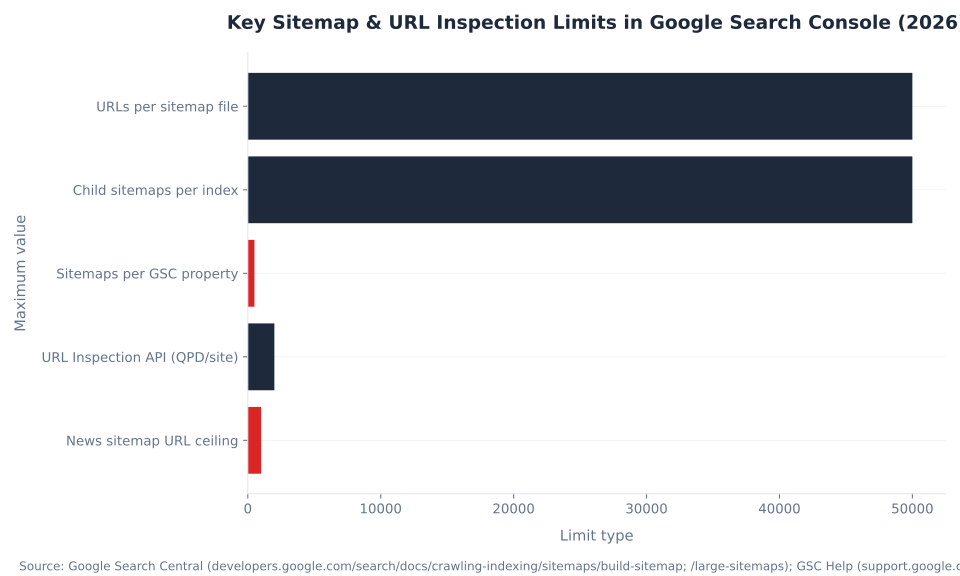
Sitemap limits operate at three levels: per-file limits (URL count and file size), sitemap index limits (child sitemaps per index), and GSC property limits (sitemaps submitted per property). These are separate constraints that can be hit independently. The 500-sitemaps-per-property cap is the one most frequently conflated with the 50,000-URLs-per-file limit — they measure different things. Source: Google Search Central, Manage Your Sitemaps With Sitemap Index Files, 2026.
| Limit type | Value | Notes |
|---|---|---|
| URLs per sitemap file | 50,000 | Applies to all formats. Split into child sitemaps under a sitemap index if over this limit. |
| Uncompressed file size | 50 MB | Gzip compression strongly recommended; the 50 MB limit applies to the uncompressed content. |
| Child sitemaps per sitemap index | 50,000 | An index referencing 50,000 child sitemaps of 50,000 URLs each gives theoretical coverage of 2.5 billion URLs. |
| Sitemaps submitted per GSC property | 500 | Applies to both UI and API submissions. A sitemap index counts as one submission; its child sitemaps do not count separately. |
| Google News sitemap freshness window | 48 hours | Articles older than 2 days should be removed from the News sitemap (or the <news:news> metadata stripped). |
| hreflang alternate entries | Do not count toward 50,000 | <xhtml:link> alternate entries do not increment the URL counter; only the primary <loc> tag counts. |
| Encoding requirement | UTF-8 | All sitemap formats. Non-UTF-8 encoding triggers "Has errors" in the GSC Sitemaps report. |
The hreflang nuance matters for international sites. A URL with 10 language alternates declared via <xhtml:link> in the sitemap still counts as one URL against the 50,000 limit — not 11. Only the primary <loc> tag increments the counter. This means a 40,000-URL multilingual site with 5 alternate languages per URL can keep everything in a single sitemap file without approaching the ceiling.
For the URL Inspection API — relevant to programmatic crawl workflows — the per-site limit is 2,000 queries per day and 600 queries per minute, per the Search Console API usage limits page. Full programmatic URL inspection is covered in the GSC API & Automation sibling pillar.
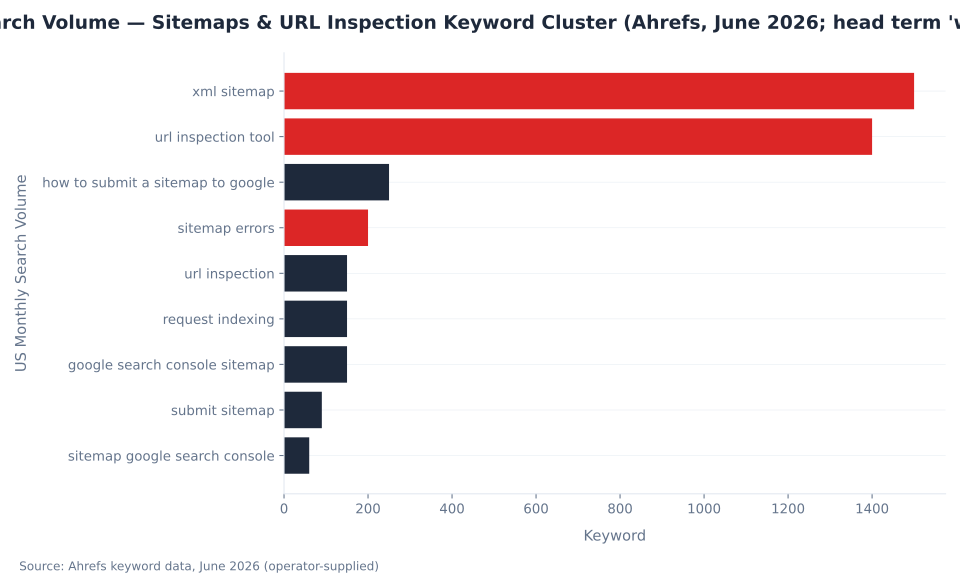
Monthly US Search Volume — Sitemaps & URL Inspection Keyword Cluster (Ahrefs, June 2026; head term 'what is a sitemap' 29K shown separately)
Google Index View vs. Live Test: What Each Shows
The URL Inspection tool presents two distinct datasets within the same interface. The Google Index view shows Google's stored state from the most recent crawl. The Live Test fetches the page from the live server at the moment you click the button. Conflating them is the most common diagnostic mistake — and it leads to acting on the wrong data. Source: GSC Help, URL Inspection tool; Inspect and troubleshoot a single page, 2026.
| Dimension | Google Index view | Live Test view |
|---|---|---|
| What it reflects | Google's stored state from the last crawl | Current live server state, fetched on demand |
| Data age | As of Google's last crawl date (shown in the report) | Real-time at the moment of the test |
| Coverage status | Yes — "URL is on Google," "Excluded," "Error," with reason codes | No — shows crawlability only, not indexing status |
| Canonical assessment | Google's chosen canonical vs. user-declared canonical at last crawl | Fresh canonical assessment based on current page signals |
| Rendered HTML | DOM rendered at the last Googlebot visit | DOM from the live test crawl (reflects current JavaScript execution) |
| Enhancements / structured data | Enhancements detected at last crawl — see Enhancements & rich results in GSC | Enhancements found in the current live page |
| Request Indexing button | Available from this view | Not applicable — live test does not trigger indexing |
| Primary use case | Understand current Google index state; diagnose why a page is excluded | Confirm a fix is live before requesting reindex; debug render or crawl blocks |
| Does NOT show | Whether a fix applied today is recognized | Manual actions, content removals, quality or security issues |
The gap between the two views is most damaging when debugging a recent change. If a page was blocked by robots.txt two weeks ago and the block was removed today, the Google Index view still shows the page as blocked — because that is what Google last recorded. The Live Test shows the block is gone. Acting on the index view alone leads to a false conclusion that the problem persists. Acting on the live test alone ignores the indexing history Google holds.
The diagnostic rule: run the Google Index view first to understand what Google currently holds. Run the Live Test to confirm whether a fix has taken effect. Then use Request Indexing only if the Live Test returns clean results.
The Live Test result "URL is available to Google" does not mean the page is indexed or will be indexed. It means the page is currently reachable by Googlebot and not blocked by robots.txt or HTTP errors. The full indexing diagnosis comes from the index view's coverage status code — a page showing "URL is available to Google" on a live test can simultaneously show "Duplicate without user-selected canonical" or "Crawled — currently not indexed" in the index view. Once pages are indexed, use the Performance report to track clicks, impressions, and position for each URL.
Sitemap Format URL Limits per File (Google Search Central, 2026)

How to Submit a Sitemap in Google Search Console
Submitting a sitemap in GSC takes three steps: verify the site property, navigate to Sitemaps in the left menu, enter the sitemap URL (relative to the property root), and click Submit. The submitted URL must return HTTP 200 and be accessible without authentication. If the sitemap is at https://example.com/sitemap.xml, submit sitemap.xml — GSC prepends the property root automatically.
After submission, the Sitemaps report shows the fetch status (Success, Pending, or an error), the number of URLs discovered in the sitemap, and the last time Googlebot fetched it. The "URLs discovered" count does not equal "URLs indexed." It is the count of URLs Googlebot found listed in the sitemap file — not a count of pages that are live in Google's index. Reconcile the discovered count with the Index Coverage report to see how many of those URLs are actually indexed. Also declare the sitemap in robots.txt with a Sitemap: directive pointing to the full URL (including https://) so all crawlers find it passively, independent of GSC status.
Common Sitemap Errors in the GSC Sitemaps Report
The Sitemaps report surfaces six error types. Each has distinct causes — and each requires a different fix. The "Couldn't fetch" error is the most commonly misdiagnosed: it does not always mean the sitemap is broken. It includes transient Googlebot-side fetch failures that resolve without action. Wait 24–48 hours before acting on a first "Couldn't fetch" occurrence to distinguish transient from persistent. Source: Sitechecker, Google Search Console Couldn't Fetch Sitemap, 2026.
| Error | Common causes | Fix |
|---|---|---|
| Couldn't fetch | Wrong URL; server 4xx/5xx; sitemap path blocked by Disallow: in robots.txt; transient Googlebot failure | Test URL in browser (must return 200); check robots.txt for rules covering the sitemap path; wait 48 hours before acting on first occurrence |
| Has errors | Invalid XML; non-UTF-8 encoding; unescaped & < > " characters; incorrect namespace declaration | Validate with XML linter; re-encode UTF-8; escape special characters as XML entities (& < etc.) |
| Property mismatch | Sitemap domain/protocol doesn't match verified GSC property (HTTP vs. HTTPS, www vs. non-www) | Submit sitemap to the matching property type; add both property variants to GSC if both are in use |
| Submitted URL not indexed | robots.txt block on the URL; noindex meta tag; thin or duplicate content; canonical pointing elsewhere | Run URL Inspection on the individual URL; read the coverage status reason code; fix the underlying quality or canonicalization issue — not a sitemap problem |
| Submitted URL seems to be a Soft 404 | CMS returns HTTP 200 but page has empty or near-empty content (deleted/empty page template) | Fix the page content or return a proper 404; if the page should not be indexed, add noindex and remove from sitemap |
| Submitted URL blocked by robots.txt | Disallow: rule in robots.txt covers the URL listed in the sitemap | Update robots.txt to allow the URL; re-submit after robots.txt propagation (~24 hours) |
The "Submitted URL not indexed" error is a diagnostic dead end if treated as a sitemap problem. Removing the URL from the sitemap does not fix the underlying issue, and resubmitting it more frequently does not override Google's quality assessment. The correct path is URL Inspection on the individual URL, reading the coverage status reason code, and addressing the root cause — whether that is a canonical conflict, thin content, or a noindex directive the CMS is injecting automatically.
Key Sitemap & URL Inspection Limits in Google Search Console (2026)
Request Indexing: When to Use It and When Not To
The Request Indexing button asks Google to prioritize recrawling a specific URL. It does not guarantee indexing will happen, and it does not bypass Google's quality signals. Google does not publish an official daily quota for the button. Secondary sources consistently place the practical ceiling at around 10–12 URLs per day per GSC property, after which the button becomes temporarily unavailable. The limit is property-level, not account-level, and resets the following day. Source: Alevdigital, Google Search Console Request Indexing: Limits, Time, Steps & Fixes, 2026.
| Scenario | Use Request Indexing? | Why |
|---|---|---|
| New, high-priority page just published | Yes — after confirming live test is clean | Accelerates discovery; most effective for fresh, quality content |
| Page significantly updated (price change, new content, corrected error) | Yes — after live test confirms the update is live | Signals recency to Googlebot; reduces lag between update and recrawl |
| robots.txt block just removed | Yes — after live test confirms block is gone | Clears the exclusion state faster than waiting for organic recrawl |
| "Crawled — currently not indexed" with no obvious technical issue | No — fix content first | Resubmission does not override Google's quality signal; address the content issue, then resubmit |
| Duplicate page with canonical pointing to another URL | No | Google indexes the canonical, not this URL; resubmission has no effect |
| Page with noindex tag | No | Google will not index a noindex page regardless of the request; remove the tag first |
| Mass-submitting 20+ URLs after a site relaunch | No — use sitemap submission | Burns the small daily quota; sitemap submission is more efficient for bulk discovery |
MB Adv Agency has found that the most common waste of the Request Indexing quota is submitting URLs that are excluded for quality reasons — pages with thin content, canonical mismatches, or near-duplicate issues. No volume of resubmission resolves a quality signal problem. The budget is better reserved for genuinely new or meaningfully updated pages where the Live Test confirms the page is clean and indexable.
For bulk discovery after a site relaunch or major content migration, submit an updated sitemap instead. Sitemap submission has no daily URL ceiling — it is the correct mechanism for sets of URLs that exceed the Request Indexing daily limit. Googlebot's crawl of a newly submitted sitemap is not instantaneous; processing time varies by site authority and crawl budget, but the sitemap submission approach is structurally more efficient than serial Request Indexing for large URL sets.
Sitemap Architecture: Single File, Segmented, and News
Sitemap architecture is not just a technical convenience — it is a content freshness signal. A flat sitemap containing 50,000 old and new URLs gives Googlebot no signal about which URLs are recent. A segmented architecture with a sitemap index referencing a rolling news sitemap and separate static sitemaps by content type allows Googlebot to prioritize high-freshness sections without re-fetching stable ones. Source: Google Search Central, Manage Your Sitemaps With Sitemap Index Files, 2026.
| Pattern | When to use | Structure | Tradeoffs |
|---|---|---|---|
| Single XML sitemap | Sites under ~5,000 URLs with uniform content type | sitemap.xml listing all URLs | Simplest to maintain; no per-type visibility in GSC; no crawl-prioritization signal |
| Content-segmented sitemap index | Sites with distinct content types (blog, products, landing pages) | sitemap-index.xml → sitemap-blog.xml, sitemap-products.xml, sitemap-pages.xml | Per-type monitoring in GSC; Googlebot targets high-value segments; more setup overhead |
| Freshness-first (news/media) | News publishers or any site with daily new content | sitemap-index.xml → rolling sitemap-news.xml (48-hour window) + sitemap-archive.xml | News sitemap must be continuously updated; archive sitemap carries older content; highest freshness signal |
| Hreflang sitemap (international) | Multi-language or multi-region sites | Standard XML with <xhtml:link> alternate tags per URL; alternates declared bidirectionally | Alternate URLs do not count against 50,000-URL limit; all alternate URLs must be listed on all variants |
| Programmatically generated | Large e-commerce or CMS-driven sites with frequent product/content changes | CMS plugin or server-side generation; refreshed daily or on content publish | Must exclude noindex, 404, and soft 404 URLs — including them pollutes the sitemap with non-indexable content |
MB Adv Agency consistently recommends segmenting sitemaps by content type for any site managing more than a few hundred pages. The per-segment visibility in the GSC Sitemaps report — seeing exactly how many blog URLs vs. product URLs Googlebot discovered from each child sitemap — is a practical diagnostic advantage. When product pages are not indexing but blog pages are, a segmented sitemap architecture makes that discrepancy immediately visible without manual URL-by-URL investigation.
Programmatically generated sitemaps require one quality discipline that is frequently skipped: excluding noindex, 404, and soft 404 URLs. Including them pollutes the sitemap with non-indexable content, inflates the "URLs discovered" count in the GSC report, and signals to Googlebot that the site owner has not curated the sitemap. The sitemap should contain only URLs the site actively wants indexed. For a deeper treatment of canonicalization and coverage status in relation to sitemap architecture, the Index Coverage & Indexing guide covers the diagnostic framework end-to-end.
URL Inspection Coverage Status Codes Explained
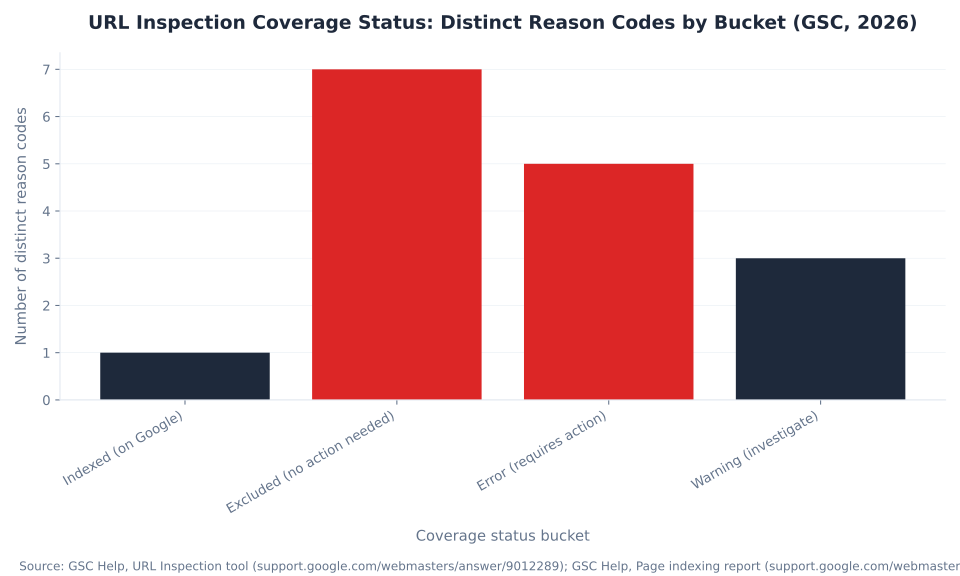
When the Google Index view shows a URL is not indexed, it displays one of 16 distinct reason codes across four status buckets: Indexed, Excluded, Error, and Warning. Understanding which bucket a URL falls into is the fastest way to determine the right action. Most non-indexed URLs land in the Excluded bucket — and most Excluded reasons are content or canonicalization issues, not technical errors. Source: GSC Help, Page indexing report; Search Console API usage limits, 2026.
| Status bucket | Distinct reason codes | Reason codes listed | Typical action |
|---|---|---|---|
| Indexed (URL is on Google) | 1 | URL is on Google | No action required |
| Excluded (no action needed in most cases) | 7 | Crawled — currently not indexed; Discovered — currently not indexed; Duplicate without user-selected canonical; Duplicate, Google chose different canonical than user; Alternate page with proper canonical tag; Page with redirect; Excluded by 'noindex' tag | Investigate quality, canonicalization, or intentional exclusion — depends on the specific code |
| Error (requires action) | 5 | Server error (5xx); Redirect error; Access denied (403); Not found (404); Submitted URL seems to be a Soft 404 | Fix the technical error on the server or in the redirect chain |
| Warning (should investigate) | 3 | Indexed, though blocked by robots.txt; Indexed without content; Page indexed without structured data | Review whether the indexed state is intentional; address if not |
The Excluded bucket (7 reason codes) vastly outnumbers the Error bucket (5 codes). This distribution matters for triage: most non-indexed URLs are excluded for content or canonicalization reasons — not technical failures. A site with 2,000 pages showing "Crawled — currently not indexed" has a content quality problem, not a server error. Treating it as a technical problem (resubmitting via sitemap, checking robots.txt) wastes diagnostic time. URL Inspection on a representative sample of excluded URLs is the correct starting point.
The Warning bucket includes "Indexed, though blocked by robots.txt" — a situation where Google indexed a page despite a Disallow: rule, typically because the URL was linked from other indexed pages. This is a common source of confusion: robots.txt blocks crawling, not indexing. If a URL is linked prominently from the homepage, Google indexes it even if robots.txt tells Googlebot not to crawl it. To prevent indexing of a blocked page, add a noindex meta tag (which requires making the page temporarily crawlable so Google can read the tag). For the full diagnostic framework connecting URL Inspection data to indexing actions, see Index Coverage & Indexing in GSC.
URL Inspection Coverage Status: Distinct Reason Codes by Bucket (GSC, 2026)
Crawling, indexing, and search visibility in one place
The SEO glossary covers every technical concept behind how Googlebot finds, evaluates, and ranks your pages — from canonical tags and crawl budget to structured data and Core Web Vitals.
Explore the SEO Glossary →Methodology
All sitemap limits and URL Inspection mechanics in this article are sourced directly from Google Search Central documentation and the Google Search Console Help center, cross-referenced June 2026: Build and Submit a Sitemap; What Is a Sitemap; URL Inspection tool; and the Page indexing report. The Request Indexing daily limit (~10–12 URLs per day per property) is sourced from secondary practitioners — Google does not publish an official quota. Keyword data is from Ahrefs, June 2026 (operator-supplied). FAQ rich result removal timeline sourced from Search Engine Land, May 2026. Reviewed by MB Adv Agency, June 2026.

As a Google Ads expert, I bring proven expertise in optimizing advertising campaigns to maximize ROI.
I specialize in sharing advanced strategies and targeted tips to refine Google Ads campaign management.
Committed to staying ahead of the latest trends and algorithms, I ensure that my clients receive cutting-edge solutions.
My passion for digital marketing and my ability to interpret data for strategic insights enable me to offer high-level consulting that aims to exceed expectations.
Google Partner Agency
We're a certified Google Partner Agency, which means we don’t guess — we optimize withGoogle’s full toolkit and insider support.
Your campaigns get pro-level execution, backed by real expertise (not theory).

4.9 out of 5 from 670+ reviews on Fiverr.
That’s not luck, that’s performance.
Highly recommend Matteo to set up your server side tracking. He has a deep understanding of e-commerce tracking and will go above and beyond to make sure everything is set up correctly and working 100%. If you are scaling your store this set up is non-negotiable in my opinion and there isn't many people who have this much knowledge or put the effort in to get it right. Thanks again!

avorodesign.com
I can only recommend Matteo! He was very patient, professional and very knowledgeable about GA4, Consent Mode v2, and GDPR compliance. Communication was clear, and the setup was done professionally and efficiently. Highly recommend him for anyone needing reliable tracking implementation.

www.natureiki.life
Matteo shines in the realm of online professionals. His work is not only deep in data but also complemented by his proactive communication and cooperation, setting a new standard for freelancers. If you want someone who truly exceeds expectations, look no further. Highly recommended!

www.omanbeverlysmyth.com
Exceptional Service Beyond Expectations - Outstanding Service Impeccable depth, flawless delivery, and exceptional language fluency—this service exceeded all expectations. Highly recommended. Matteo truly ROCKS!!!

ium-paris.com
Top-notch, always highly value working with Matteo. An absolute Google Ads Genius. This is approximately the 8th time I have hired him and he's helped us get 6-7 ROAS. We are excited in continuing to improve our lead flow. Hire this guy if you need Google Ads help. Thanks Matteo!

www.dleeventgroup.com
I finally found the guy who can setup server side tracking and all the ecosystem properly. I definitely recommend Matteo. He is very responsive, kind and wants to dig into things. He configured GA4, Meta, Google Ads, Outbrain and google consent v2 with Cookiebot. Thanks Matteo.

inomega.fr
MB Adv delivered exceptional work with outstanding professionalism and lots of patience, taking time to see effects of changes made and not just do the work and submit it. The proactive communication and video summaries of the work completed made working with Matteo a pleasure, as he consistently went above and beyond. Highly recommended for web analytics projects! We are already working on another project.

www.withnellsensors.co.uk
Working with Matteo on my Google Ads was a game-changer. He's not just a strategist, he's a true partner. He understood my goals and tailored a campaign that perfectly reached my target audience. I'm grateful for his expertise and dedication.

dccargo.com
Click-driven mind
with plastic-brick obsession.
We build Google Ads campaigns with the same mindset we use to build tiny brick worlds: strategy, patience, and zero tolerance for wasted pieces.
Data is our blueprint. Growth is the only acceptable outcome.