GSC Links, Manual Actions & Security Issues
Links Report — Official Limit
1,000
rows displayed in the GSC Links report main view. Google’s documentation calls it “a sample” — exports extend to 100,000 rows, and neither figure covers Google’s full known link graph. A documented May 2026 outage showed near-zero backlinks for thousands of sites while third-party tools showed no change: the links existed, the report simply was not surfacing them.
Source: Google Search Console Help (answer/9049606), June 2026
What the Links, Manual Actions, and Security Reports in Google Search Console Tell You
Three reports in Google Search Console share a common diagnostic purpose: they are the reports you open when something is wrong, or when you are stress-testing your site’s authority and safety standing with Google. The Links report shows which of your pages attract external backlinks, which external domains link to you most frequently, and how your internal linking is distributed across the site. The Manual Actions report shows whether a human reviewer on Google’s spam team has issued a penalty against your site. The Security Issues report flags active compromises — malware, hacked content, or social engineering — that Google has detected and is warning users about. These are not growth-measurement reports. Each answers a distinct diagnostic question, and each carries documented limits that are frequently misread.
The two highest-consequence misconceptions practitioners bring to these reports: the Links report shows all backlinks (it does not — it shows a sample, as Google’s own documentation states); and GSC has a dedicated broken-links report (it does not — 404 errors surface in the Page indexing report under the “Not found (404)” reason category, not in the Links report). Both corrections have real operational consequences for how you diagnose and fix site problems.
All three reports live in GSC’s left-rail navigation. The SEO glossary covers the broader vocabulary. Readers in triage — a Manual Actions or Security Issues notification is open right now — can skip directly to the reference tables below.
Key Takeaways
- The Links report is a sample — Google’s own documentation uses that word. Main-view tables cap at 1,000 rows; exports reach 100,000. Neither is a complete backlink database, and the report does not expose
nofollowstatus. - GSC has no dedicated broken-links report. URLs returning 404 errors surface in the Page indexing report under “Not found (404)” — with a rolling one-month lookback window, not a cumulative list.
- A manual action is a human decision by Google’s spam team, not an algorithmic filter. Algorithm changes do not appear in the Manual Actions report. The penalty requires a reconsideration request to lift.
- The disavow tool is separate from the Links report — a different URL, not linked from the GSC dashboard — and it does not support Domain properties. Most sites do not need it.
- Security Issues error-level flags trigger user-visible warning interstitials in search results, suppressing affected pages until Google’s review confirms the site is clean.
The Links Report: Structure, Limits, and What It Does Not Show
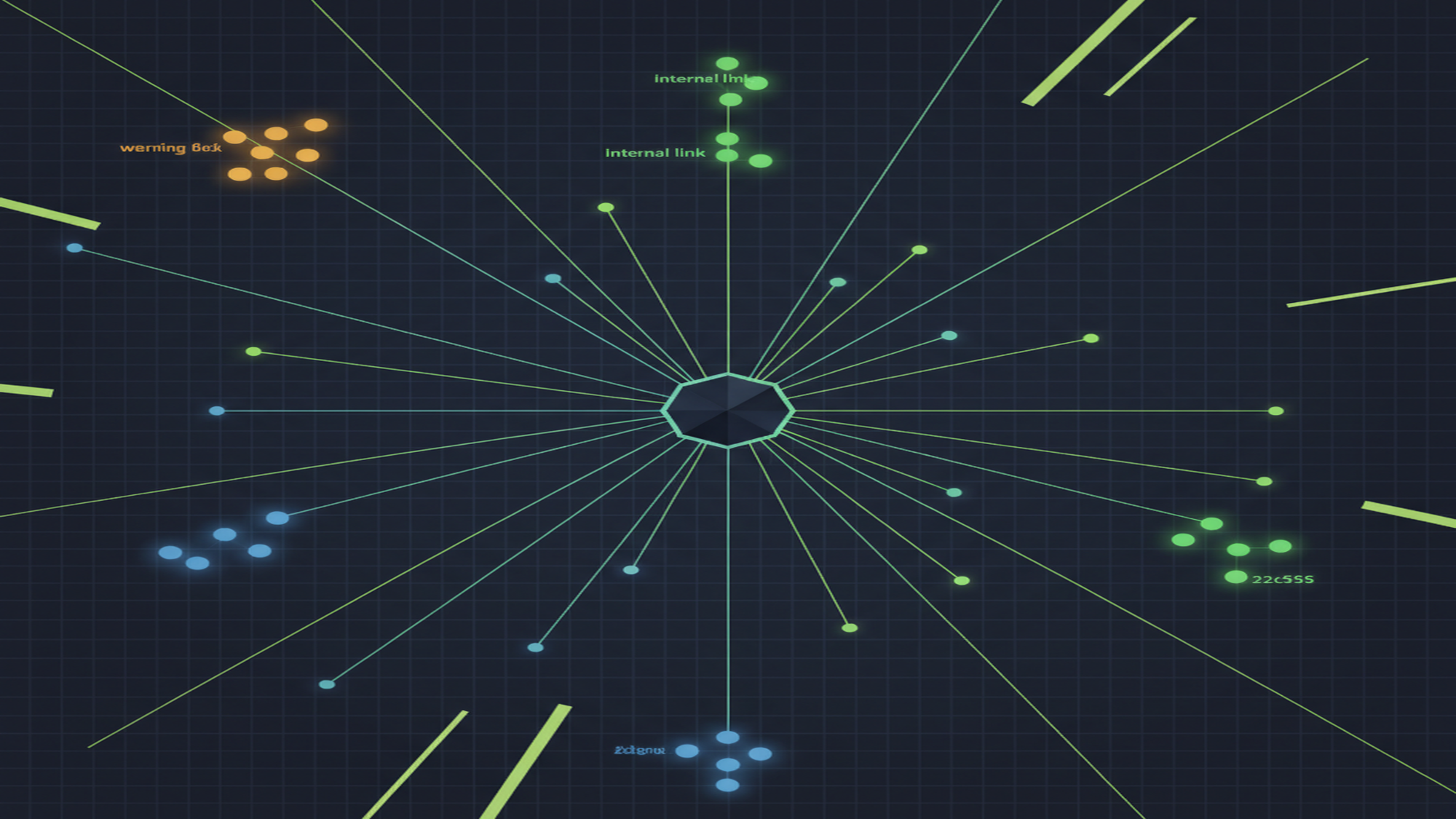
The Links report divides into External links and Internal links. External links contains three named sub-reports: Top linked pages (your pages with the most inbound backlinks), Top linking sites (external root domains linking to you most frequently, grouped at root-domain level), and Top linking text (anchor text distribution across all inbound external links). Internal links contains one sub-report: Top linked pages from within your own site, showing which pages receive the most internal link weight. Each sub-report answers a different question. Top linking sites is the authority-signal view. Top linking text is the anchor-text audit — unexpected distributions here can precede an unnatural-links manual action. Top internally linked pages is the site architecture view: if your highest-value pages do not appear near the top, internal linking is not reinforcing what matters.
Google’s official Links report documentation uses one word to describe the data: “a sample.” Tables in the main view cap at 1,000 rows; exports (CSV or Google Sheet) extend to 100,000 rows. Neither figure is Google’s complete link graph. The report also does not indicate whether a link carries a nofollow attribute — that is confirmed explicitly in the documentation, not inferred. Linking domains are grouped by root domain, stripping subdomain and subdirectory information, so www.example.com and blog.example.com both display as example.com. Different top-level domains are kept separate.
A documented outage on 21 May 2026 made the “sample” limitation concrete. The Links report began showing zero or 87–90% fewer backlinks for many sites. Search Engine Roundtable confirmed John Mueller acknowledged the issue and reverted to prior-week data. oPositive and ALM Corp confirmed third-party tools showed no corresponding drop. The links existed; the report was not surfacing them. For directional analysis of which domains link to you and what anchor text dominates, the Links report is reliable. For comprehensive link prospecting, gap analysis, or building a disavow file, use a dedicated backlink tool with its own crawler.
MB Adv Agency’s read: Top internally linked pages is underused. If your highest-converting pages are buried in this list, the fix is internal linking, not more content. Pair this with the Google Analytics 4 referral view to see which link paths are driving sessions.
There Is No Broken Links Report in Google Search Console
GSC has no dedicated broken-links report. There is no tab, section, or report in the current GSC interface that surfaces broken internal links as a standalone list. URLs returning 404 errors appear in the Page indexing report under the “Not found (404)” reason category — and only those Googlebot has attempted to crawl in the past month. Google’s Page indexing documentation states this directly: “To avoid showing you an eternally growing list of 404 errors, the Page indexing report shows only URLs that have shown 404 errors in the past month.” This is a rolling one-month window, not a cumulative historical record.
Site owners who expect a broken-links section and do not find one sometimes conclude their site has no broken links — a false negative. The correct workflow: Page indexing report → Not indexed tab → “Not found (404)”. Address only those 404s you actively link to or have listed in a sitemap — not every URL in the list. For external domains linking to your 404 pages, GSC surfaces nothing; a third-party backlink tool is required for redirect recovery. After fixing 404s, URL Inspection lets you request re-indexing of corrected pages individually.
Manual Actions Reference: Types, Triggers, and Fix Paths
The table below covers all General web search manual action types listed in Google’s Manual Actions help documentation as of June 2026, using the exact labels as they appear in the GSC interface. A manual action is issued by a human reviewer on Google’s spam team — it is not an algorithmic adjustment. Algorithm ranking changes are entirely separate and do not appear here. An unexplained rankings drop that predates a confirmed manual action often shows up first in the Performance report — cross-referencing both is the correct diagnostic sequence. News and Discover publishers have an additional set of action types not covered here; they apply only to those surfaces.
| Manual action type | What triggers it | Fix path |
|---|---|---|
| Unnatural links to your site | Artificial, deceptive, or manipulative inbound links violating spam policies | Remove links via outreach; disavow remainder; reconsideration request with documented outreach logs and disavow file |
| Unnatural links from your site | Outbound link patterns that appear paid or violate spam policies | Remove or add rel="nofollow" / rel="sponsored" to offending links; reconsideration request |
| Thin content with little or no added value | Low-quality pages: thin affiliate content, scraped content, auto-generated content, doorway pages | Substantially rewrite or consolidate affected pages; reconsideration request with before/after screenshots |
| Cloaking and/or sneaky redirects | Different content shown to Googlebot vs. users; or deceptive redirect chains | Fix the cloaking code or redirect logic; confirm via URL Inspection what Googlebot sees; reconsideration request |
| Sneaky mobile redirects | Mobile users redirected to different content than desktop visitors see | Fix mobile-specific redirect rules; test with mobile User-Agent; reconsideration request |
| Hidden text and/or keyword stuffing | Text hidden via CSS (same-color, zero font-size, off-screen) or excessive keyword repetition in content | Remove hidden text and over-dense keyword repetition; reconsideration request |
| Cloaked images | Images appear differently in search results than on the actual page | Fix image markup discrepancy; reconsideration request |
| User-generated spam | Spam in comments, forums, guestbooks, profiles, or file uploaders submitted by visitors | Remove spam content; harden UGC moderation (CAPTCHA, approval workflows, nofollow on UGC links); reconsideration request |
| Spammy free host | A significant portion of sites on a free-hosting platform violate spam policies — host-level action, not site-specific | Migrate to a reputable hosting provider; reconsideration request after migration |
| Structured data issue | Schema markup violates guidelines: invisible content marked up, misleading structured data, or markup misrepresenting page content | Fix structured data to reflect actual visible content; validate with Rich Results Test; reconsideration request |
| AMP content mismatch | AMP version differs substantially from the canonical non-AMP page in content or intent | Align AMP and canonical page content; reconsideration request |
| Site reputation abuse | Third-party content hosted on the site violates site reputation abuse policy (e.g., parasite SEO in a subdomain or subdirectory) | Remove offending third-party content or section; reconsideration request with documentation of removal |
| Back button hijacking | Site manipulates browser history to interfere with the user’s back-button navigation | Remove history/navigation manipulation code; reconsideration request |
| Site abused with third-party spam | Third parties have exploited the site to host spam content (unauthorized abuse, distinct from permitted third-party arrangements) | Remove abusive third-party content; patch the vulnerability; secure the site; reconsideration request |
| Major spam problems | Aggressive, scaled, or repeated spam violations: scaled content abuse, cloaking, scraping, severe repeat offenses | Comprehensive spam cleanup across the site; reconsideration request (Google’s review threshold for this type is high — evidence must be thorough) |
Security Issues Reference: Complete Type List and Remediation Path
The Security Issues report in GSC flags compromises and Safe Browsing violations that Google has detected on your site. Google’s Security Issues documentation groups issues into Error-level — these trigger user-visible warning interstitials in search results, effectively suppressing affected pages until the review is complete — and Warning-level, which are flagged in GSC but do not immediately trigger interstitials. Both levels require prompt remediation. After cleaning the compromise, use the URL Inspection tool to verify cleaned pages are accessible to Googlebot, then request a review through the Security Issues report.
| Security issue type | Category | What it means | Severity |
|---|---|---|---|
| Hacked: Malware | Hacked content | Malicious software specifically designed to harm users’ devices has been placed on your site by an attacker | Error |
| Hacked: Code injection | Hacked content | Attacker injected malicious code into pages (redirects, cryptomining scripts, iframe injection) | Error |
| Hacked: Content injection | Hacked content | Attacker added spammy links or text to existing pages — often pharmaceutical spam (the “pharma hack” pattern) | Error |
| Hacked: URL injection | Hacked content | Attacker created new spammy pages or URLs on your server without permission | Error |
| Deceptive pages | Social engineering | Pages that trick visitors into revealing personal information or downloading harmful software | Error |
| Deceptive embedded resources | Social engineering | Ads or embedded third-party elements within pages that mislead users in ways the host page itself does not | Error |
| Harmful downloads | Malware / unwanted software | Site offers downloads Google’s Safe Browsing identifies as malware or unwanted software | Error |
| Links to harmful downloads | Malware / unwanted software | Site links to external pages hosting malware or unwanted software | Error |
| Unclear mobile billing | Deceptive practices | Site does not sufficiently inform users about mobile charges before they are incurred | Error |
| Possible phishing detected on user login | Social engineering | Pages suspected of harvesting user credentials through phishing — flagged but interstitial not yet triggered | Warning |
| Uncommon downloads | Potentially unwanted | Files Google Safe Browsing has not previously encountered, flagged as potentially risky due to novelty | Warning |

Dealing with a manual action, a security flag, or a link-profile question?
MB Adv Agency handles GSC recovery, backlink analysis, and technical SEO audits — with documentation structured to pass Google’s reconsideration review.
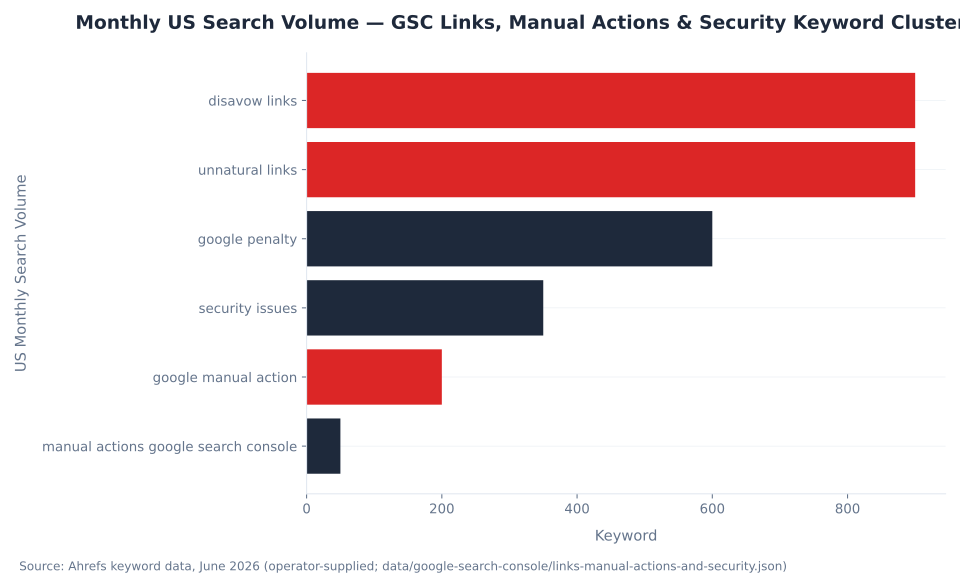
Get a GSC audit →Data and methodology: Search volume figures from Ahrefs, June 2026 (operator-supplied). Manual action type labels from Google Search Console Help (support.google.com/webmasters/answer/9044175), fetched June 2026, using exact labels as they appear in the GSC interface. Security issue types from the GSC Security Issues help page (support.google.com/webmasters/answer/9044101), fetched June 2026. Links report structure and data-limitation language from the official Links report help page (support.google.com/webmasters/answer/9049606). 404/Page indexing correction from support.google.com/webmasters/answer/7440203. Disavow tool status and Domain property limitation confirmed from support.google.com/webmasters/answer/2648487. May 2026 outage documented by Search Engine Roundtable. Reviewed by MB Adv Agency, June 2026.

As a Google Ads expert, I bring proven expertise in optimizing advertising campaigns to maximize ROI.
I specialize in sharing advanced strategies and targeted tips to refine Google Ads campaign management.
Committed to staying ahead of the latest trends and algorithms, I ensure that my clients receive cutting-edge solutions.
My passion for digital marketing and my ability to interpret data for strategic insights enable me to offer high-level consulting that aims to exceed expectations.
Google Partner Agency
We're a certified Google Partner Agency, which means we don’t guess — we optimize withGoogle’s full toolkit and insider support.
Your campaigns get pro-level execution, backed by real expertise (not theory).

4.9 out of 5 from 670+ reviews on Fiverr.
That’s not luck, that’s performance.
Highly recommend Matteo to set up your server side tracking. He has a deep understanding of e-commerce tracking and will go above and beyond to make sure everything is set up correctly and working 100%. If you are scaling your store this set up is non-negotiable in my opinion and there isn't many people who have this much knowledge or put the effort in to get it right. Thanks again!

avorodesign.com
I can only recommend Matteo! He was very patient, professional and very knowledgeable about GA4, Consent Mode v2, and GDPR compliance. Communication was clear, and the setup was done professionally and efficiently. Highly recommend him for anyone needing reliable tracking implementation.

www.natureiki.life
Matteo shines in the realm of online professionals. His work is not only deep in data but also complemented by his proactive communication and cooperation, setting a new standard for freelancers. If you want someone who truly exceeds expectations, look no further. Highly recommended!

www.omanbeverlysmyth.com
Exceptional Service Beyond Expectations - Outstanding Service Impeccable depth, flawless delivery, and exceptional language fluency—this service exceeded all expectations. Highly recommended. Matteo truly ROCKS!!!

ium-paris.com
Top-notch, always highly value working with Matteo. An absolute Google Ads Genius. This is approximately the 8th time I have hired him and he's helped us get 6-7 ROAS. We are excited in continuing to improve our lead flow. Hire this guy if you need Google Ads help. Thanks Matteo!

www.dleeventgroup.com
I finally found the guy who can setup server side tracking and all the ecosystem properly. I definitely recommend Matteo. He is very responsive, kind and wants to dig into things. He configured GA4, Meta, Google Ads, Outbrain and google consent v2 with Cookiebot. Thanks Matteo.

inomega.fr
MB Adv delivered exceptional work with outstanding professionalism and lots of patience, taking time to see effects of changes made and not just do the work and submit it. The proactive communication and video summaries of the work completed made working with Matteo a pleasure, as he consistently went above and beyond. Highly recommended for web analytics projects! We are already working on another project.

www.withnellsensors.co.uk
Working with Matteo on my Google Ads was a game-changer. He's not just a strategist, he's a true partner. He understood my goals and tailored a campaign that perfectly reached my target audience. I'm grateful for his expertise and dedication.

dccargo.com
Click-driven mind
with plastic-brick obsession.
We build Google Ads campaigns with the same mindset we use to build tiny brick worlds: strategy, patience, and zero tolerance for wasted pieces.
Data is our blueprint. Growth is the only acceptable outcome.