TikTok Pixel & Tracking: Setup, Events API and EMQ Guide (2026)
What Is the TikTok Pixel?
The TikTok Pixel is a JavaScript snippet installed on your website that records user actions — page views, add-to-cart events, purchases, lead form submissions — and transmits them to TikTok Ads Manager. The data feeds two systems: the attribution engine that credits which ads drove results, and the bid optimization algorithm that finds users likely to convert.
The pixel works by injecting tracking code on every page where it fires. When a user arrives from a TikTok ad, the pixel captures the TikTok Click ID (ttclid) from the URL — the attribution anchor connecting the on-site action to the ad that drove it. Without a properly installed pixel, TikTok Ads Manager has no conversion signal to optimize against, and the algorithm defaults to reach-based bidding rather than conversion-based optimization.
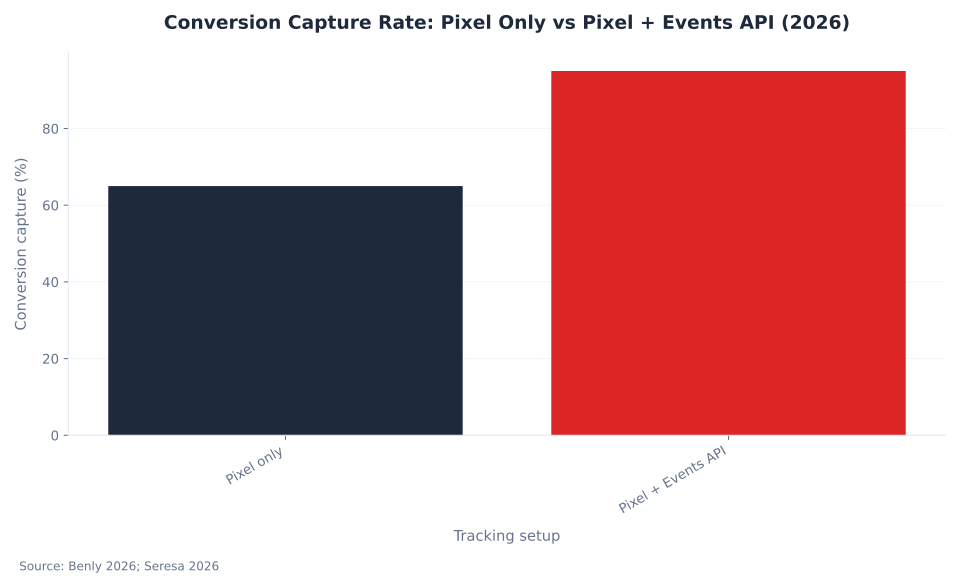
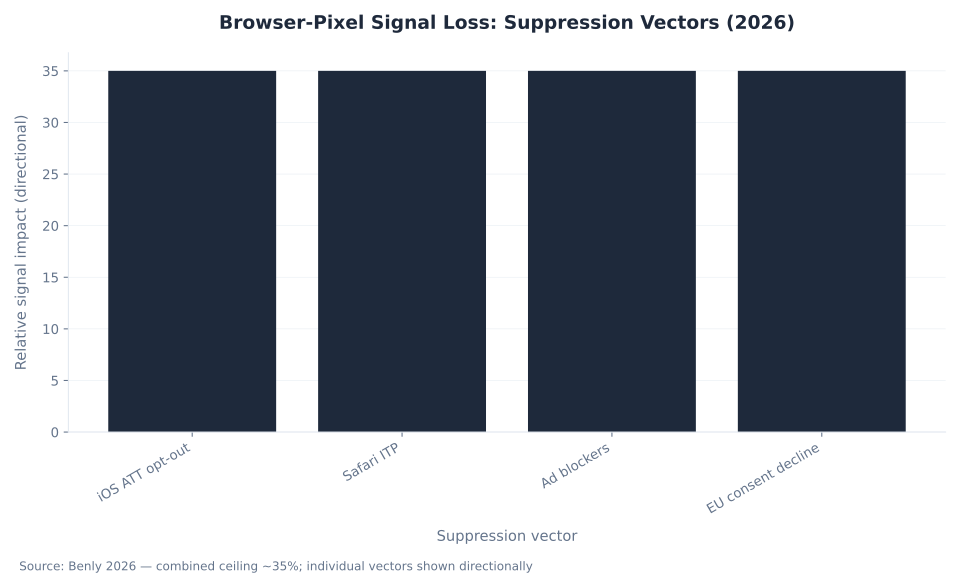
In 2026, a browser-only pixel captures roughly 65% of actual conversions (Benly, 2026; Seresa, 2026). iOS 14.5+ App Tracking Transparency (ATT), Safari Intelligent Tracking Prevention (ITP), ad blockers, and EU consent banners each suppress browser events before they reach TikTok. The combined ceiling is roughly 35% event block — structural, not a configuration error.
The Events API is the second layer. Instead of depending on the user's browser to fire an event, your server sends event data directly to TikTok's HTTPS endpoint — bypassing all browser-level restrictions. Running pixel + Events API together, with shared event_id deduplication, lifts total conversion capture to ~95%. Most TikTok advertisers have a pixel. Most never configure Events API. That gap is where optimization signal is lost and CPA silently inflates.
This pillar covers the complete tracking stack: pixel installation, Events API setup, Event Match Quality (EMQ) scoring, iOS/ATT signal recovery, GDPR compliance, and the canonical verification workflow. For campaign strategy context, see TikTok campaign objectives and TikTok ad costs and metrics — both depend on an intact measurement layer. MB Adv Agency audits pixel fire rate, EMQ score, and Events API configuration before recommending budget changes on any account.
The Two-Layer Tracking Stack
The TikTok Pixel is the required first layer — it captures browser-side events and the ttclid attribution anchor. The Events API is the required second layer — it sends server-side events with enriched customer identifiers that the browser cannot transmit. Neither layer alone constitutes a complete tracking setup in 2026.
Three problems arise from running the pixel without Events API:
- Signal loss: iOS ATT, Safari ITP, ad blockers, and consent banners suppress browser events. Pixel-only capture sits at ~65% — the algorithm optimizes against an incomplete picture.
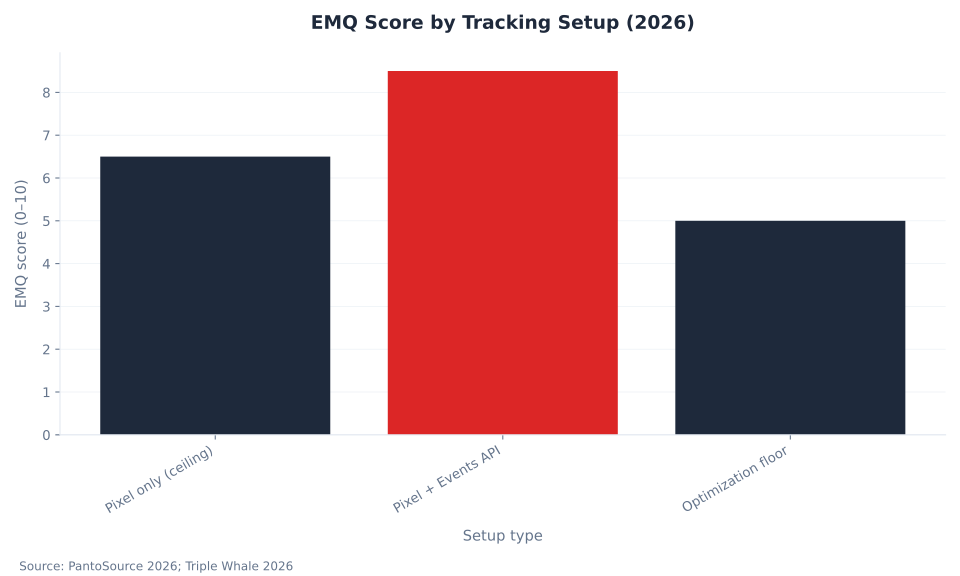
- Low EMQ: Without server-side customer identifiers (hashed email, phone, external ID), the Event Match Quality score stays below 6.5. Scores under 5.0 lose access to value-based bidding objectives.
- iOS attribution gaps: App-to-web conversion journeys through TikTok's in-app browser require server-side signal to reconstruct attribution. Pixel-only setups fall back to modeled data with higher variance.
The fix is not replacing the pixel with the Events API. Both must run in parallel. The pixel captures the ttclid and browser-visible micro-events. The Events API contributes server-side signals and enriches the attribution profile with first-party customer data. Event deduplication via a shared event_id parameter prevents double-counting when both layers fire for the same user action.
Advertisers managing TikTok ad formats across multiple campaign types or optimizing toward TikTok audience targeting segments need both layers active before meaningful ROAS measurement is possible. The TikTok Ads Manager guide covers where to find Events Manager in the platform.
| Metric | Pixel Only | Pixel + Events API | Source |
|---|---|---|---|
| Conversion capture rate | ~65% | ~95% | Benly 2026; Seresa 2026 |
| EMQ score ceiling | ~6.5 | 8.0+ | PantoSource 2026; Triple Whale 2026 |
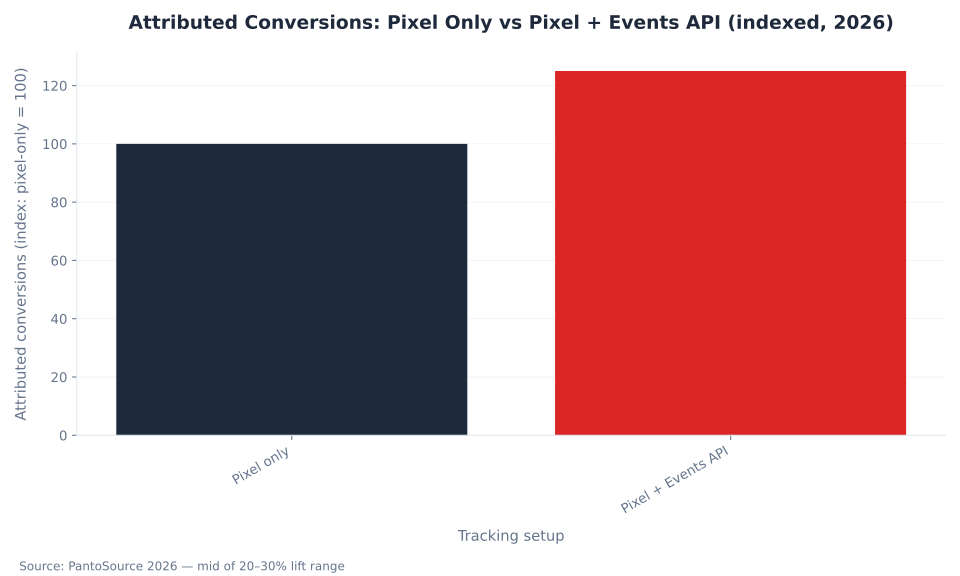
| Attributed conversions (indexed) | 100 | 120–130 | PantoSource 2026 |
| Events blocked (browser-side) | ~35% ceiling | Near zero | Benly 2026 |
| EMQ optimization floor | 5.0 — below this, value-based bidding objectives unavailable | TikTok Ads Manager 2026 | |
TikTok Pixel vs. Events API: Capabilities Compared
The pixel and the Events API solve different parts of the same problem. The pixel is browser-side — it captures what the browser sees and is willing to send. The Events API is server-side — it sends what your server knows, regardless of browser restrictions. The complete tracking stack requires both.
| Dimension | TikTok Pixel (Browser) | Events API (Server) |
|---|---|---|
| Signal source | User's browser | Your server |
| iOS ATT impact | High — ATT opt-out suppresses events | None — server bypasses browser restrictions |
| Safari ITP impact | High — strips third-party cookies | None |
| Ad blocker impact | High — blocks pixel requests | None |
| Customer identifiers sent | ttclid, IP, user-agent | + hashed email, phone, external ID |
| EMQ ceiling | ~6.5 (structural limit) | 8.0+ with enriched identifiers |
| GDPR gating | CMP consent required | CMP gating must be built explicitly |
| Setup complexity | Low — GTM or direct snippet | Medium-high — server-side development required |
| Deduplication required | No (fires alone) | Yes — shared event_id with pixel |
The Events API does not replace the pixel. The pixel captures the ttclid parameter — the URL-based click identifier that creates the attribution link from the TikTok ad to the on-site conversion. Without the pixel firing on the landing page to read this parameter, the Events API cannot attribute server-side events to TikTok campaigns. Both layers are necessary.
For e-commerce operations on Shopify, WooCommerce, and similar platforms, native TikTok integrations install both layers simultaneously (WeltPixel, 2026). For custom-built sites, Events API requires server-side development — typically an HTTP POST to https://business-api.tiktok.com/open_api/v1.3/event/track/ with your pixel ID and access token. E-commerce PPC services that include TikTok should budget for this implementation before the first campaign launches.
Event Match Quality (EMQ): The Optimization Scorecard
Event Match Quality (EMQ) is TikTok's 0–10 score measuring how reliably a fired event can be matched back to a TikTok user for attribution and bid optimization. A low EMQ score does not mean events aren't firing — it means they fire without enough customer identifiers to connect them to TikTok user profiles.
EMQ became central to TikTok's auction mechanics in late 2024 and in 2026 it directly gates access to optimization objectives. Accounts with EMQ below 5.0 lose access to value-based bidding objectives. Accounts at 8.0+ achieve full optimization capacity, including value optimization and broad audience targeting with algorithmic refinement (PantoSource, 2026; Triple Whale, 2026).
| EMQ Score | Status | What it means | Action required |
|---|---|---|---|
| 0–4.9 | Poor | Events firing without customer identifiers; value-based bidding unavailable | Add hashed email/phone via Events API immediately |
| 5.0–6.5 | Functional (pixel ceiling) | Pixel-only practical ceiling; basic optimization works, value bidding limited | Configure Events API to push above ceiling |
| 7.0–8.0 | Good | Server-side enrichment working; most optimization objectives available | Monitor; add external ID if not already sending |
| 8.0–10 | Excellent | Full optimization capacity; attributed conversions 20–30% above pixel-only baseline | Maintain; verify deduplication is working |
The identifiers that raise EMQ, in order of impact: hashed email address, hashed phone number, external ID (your CRM's user identifier), IP address, and user-agent. The pixel captures IP and user-agent automatically. Hashed email and phone require server-side transmission via Events API — the browser cannot reliably access these post-checkout without specific implementation effort.
A misconception: low EMQ means events aren't firing. The opposite is common — 100% event fire rate with EMQ 4.2 is a normal finding in pixel-only accounts. Events Manager shows green fire rate; EMQ panel shows poor match quality. The Pixel Helper confirms firing; it does not confirm correctness (Analytigrow, 2026). The fix is payload enrichment via Events API, not reinstallation.
MB Adv Agency checks EMQ scores during the first week of any new TikTok account setup, before recommending budget increases. An account at EMQ 4 spending $10,000/month is optimizing on an incomplete signal — the algorithm underestimates true conversion rate and adjusts bids downward, inflating CPA without any error message in Ads Manager. Fixing EMQ is a prerequisite to meaningful TikTok advertising strategy.
iOS, ATT, and Browser Privacy: Why Pixel-Only Tracking Breaks
Browser-pixel signal loss is not a single problem — it is four independent suppression vectors each removing a share of events. iOS ATT, Safari ITP, ad blockers, and EU consent banners operate independently and compound. The combined result is roughly 35% of pixel events blocked before they reach TikTok (Benly, 2026).
| Suppression vector | How it blocks pixel events | Events API fix |
|---|---|---|
| iOS 14.5+ ATT | System prompt asks users to allow or deny cross-app tracking; majority opt out, suppressing cross-app attribution signals | Server-side events bypass ATT entirely |
| Safari ITP | Strips third-party cookies regardless of ATT status; limits cross-site tracking via JavaScript storage | Server events unaffected by cookie restrictions |
| Ad blockers | Block pixel JavaScript from loading or intercept outgoing tracking requests at the network level | Server POST not interceptable by browser extensions |
| EU consent banners | Users who decline marketing consent generate zero pixel data; opt-in rates 40–60% in EU markets | CMP gating applies to both pixel and API equally |
iOS 14.5+ introduced App Tracking Transparency (ATT) as a system-level prompt. Before any app — including TikTok — can access the IDFA (Identifier for Advertisers) for cross-app tracking, it must display the ATT prompt and receive explicit user permission. The majority of iOS users who see this prompt deny permission. That denial suppresses the cross-app signal that previously connected in-app TikTok ad exposure to web conversions.
Safari ITP is a separate mechanism that operates regardless of ATT. ITP limits third-party cookie storage to 7 days in most cases and strips cross-site tracking parameters from URLs. The pixel relies on a first-party cookie to persist the ttclid across sessions — ITP restricts how long that cookie remains valid, compressing the attribution window for Safari users.
The Events API addresses ATT and ad-blocker suppression directly — server-side HTTP calls are not subject to browser-level restrictions. ITP's cookie limitations still affect the browser-side ttclid capture, which is why both layers running in parallel are the correct architecture: the pixel captures ttclid in real time on the landing page; the Events API fires the conversion event from the server without depending on that cookie persisting.
For iOS campaign reporting in TikTok Ads Manager, the "iOS Real-Time Conversion Reporting" feature integrates MMP iOS-modeled conversions and SAN (Self-Attributing Network) conversions to reconstruct attribution for opted-out iOS users. This feature functions only when the Events API is configured as the server-side signal source. Pixel-only setups produce higher-variance modeled data in iOS reporting.
Retail and finance advertisers working with retail PPC services or finance PPC services should treat iOS signal loss as a fixed operating cost, not a technical bug to fix. The Events API is the structural mitigation — not a workaround, but a permanent architectural requirement for accurate conversion tracking in the post-ATT era.
How to Install the TikTok Pixel: Step-by-Step Setup
TikTok Pixel setup requires six steps: create the pixel, choose the install method, deploy the base code, configure standard events, verify the setup, and optionally add Events API as the server-side layer. Each step has a specific verification checkpoint — completing a step without verifying it creates silent tracking failures that only surface weeks later as anomalous ROAS.
| Step | Action | Detail | Verification checkpoint |
|---|---|---|---|
| 1 | Create the pixel in Events Manager | TikTok Ads Manager → Assets → Events → Web Events → Create Pixel. Name it by property (e.g., "brand.com — main"). Copy the Pixel ID (format: CFXXXXXXXXXXXXXXXX). | Pixel ID appears in Events Manager dashboard with "Unverified" status |
| 2 | Choose install method | Standard Mode (event builder for click/URL-based events, no code) or Developer Mode (custom-coded events). For GTM, choose "Install Manually" — GTM handles the deployment, not TikTok's native integration flow. | Mode selected; if GTM, confirm GTM container is published on the target domain |
| 3 | Install base code via GTM | In GTM: create a Constant variable for your Pixel ID. Add the TikTok Pixel tag template (available in Community Template Gallery). Set trigger to "All Pages." Publish the container. The base code fires PageView on every page load (TikTok Help, 2026). | Open TikTok Pixel Helper Chrome extension on the site — green checkmark on any page confirms base code firing |
| 4 | Configure standard events | Priority order: Purchase (or CompletePayment) → InitiateCheckout → AddToCart → ViewContent → Lead. Each event fires only on the specific page or action it represents. Purchase must fire exclusively on the order-confirmation page. | Events Manager Test Events tab: complete a real purchase in test mode — Purchase event appears with correct value and currency parameters |
| 5 | Verify full setup | Three-tool verification: (1) Pixel Helper for fire confirmation on each page type. (2) Events Manager Test Events for parameter validation — check value, currency, content_id. (3) Events Manager EMQ diagnostic panel — check score after 24h of data (TikTok Help, 2026). | All three tools green; EMQ score visible (expect 5–6.5 for pixel-only; below 5 = configuration issue) |
| 6 | Configure Events API (recommended) | Events Manager → Web Events → your pixel → Set up Events API. Generate an Access Token. Send server-side events to https://business-api.tiktok.com/open_api/v1.3/event/track/ with matching event_id to deduplicate vs. the browser pixel. Include hashed email and phone in user object (Benly, 2026). | Events Manager shows API events alongside pixel events; EMQ rises to 7.0+ within 48h of enriched data |
The most common installation error is setting the Purchase or CompletePayment event to fire on all pages rather than exclusively on the order-confirmation page. TikTok Pixel Helper shows green — the event fires — but it fires on every page load, massively overcounting "purchases" and destroying ROAS data. The Events Manager Test Events tab is the only way to catch this: complete a real test purchase and verify the event fires exactly once, with the correct order value.
Stackmatix (2026) documents the most common GTM implementation path. For healthcare and legal advertisers with sensitive conversion events, see healthcare PPC guidance on what event types to fire vs. suppress to maintain HIPAA-adjacent data practices. The Events API adds a control layer: you decide which fields to include before transmission rather than relying on the browser to self-censor.
Agencies setting up multiple client accounts benefit from treating this six-step workflow as a standard SOP. MB Adv Agency runs this setup sequence on every new TikTok account before the first campaign launches — pixel fire confirmed, EMQ baseline recorded, Events API queued for the next sprint. Running campaigns before step 5 verification is complete means spending budget against an unchecked measurement layer.
Standard Events: What to Track and Why
TikTok standard events are predefined event types that the optimization algorithm recognizes and uses for bidding. Non-standard or custom event names do not feed TikTok's optimization models. The five events below cover the full e-commerce and lead-gen funnel; configure them in priority order, starting with the deepest funnel event.
| Event name | Fires on | Required parameters | Optimization use |
|---|---|---|---|
Purchase / CompletePayment | Order confirmation page only | value, currency, content_id, order_id | Purchase optimization, value-based bidding |
InitiateCheckout | Checkout page load | value, currency, content_id | Checkout optimization; TOFU bidding proxy |
AddToCart | Add-to-cart button click or cart page load | value, currency, content_id | ATC retargeting; catalog optimization |
ViewContent | Product detail page load | content_id, content_type | Product view retargeting; catalog signal |
Lead | Form submission confirmation | lead_id (if available) | Lead generation optimization |
Search | Site search results page | query | Intent signal for broad audience optimization |
Configure deep-funnel events first. The algorithm needs Purchase data to optimize toward purchases — ViewContent alone produces traffic campaigns optimized for page views, not buyers. For new accounts with low purchase volume (fewer than 50 purchases per week), InitiateCheckout as the optimization event gives the algorithm more signal to work with while Purchase volume builds. Shift optimization to Purchase once volume crosses 50/week.
Standard events feed the TikTok audience targeting custom audience system. Users who triggered AddToCart or ViewContent events become available as retargeting pools in Ads Manager. Without these events firing correctly, retargeting audiences do not populate — a silent failure that only appears when you try to create a retargeting campaign and find the audience size too small to activate.
GDPR Compliance for TikTok Pixel and Events API
Server-side tracking does not bypass GDPR consent requirements. The legal basis for processing personal data for advertising purposes under GDPR is explicit user consent — not the technical pathway the data travels. Running Events API through your server rather than the user's browser does not change the consent requirement; it changes where data is processed before transmission to TikTok.
TikTok Pixel is not strictly necessary for site operation — it exists solely for advertising measurement. Under GDPR, this means the only valid legal basis is explicit opt-in consent. The pixel tag must not fire before consent is granted (Benly, 2026; WebToffee, 2026). EU markets typically achieve 40–60% opt-in rates on consent banners — meaning 40–60% of EU sessions generate zero TikTok tracking data.
| Requirement | Implementation | Status check |
|---|---|---|
| Pixel gating | GTM tag trigger: fire pixel only when ad_storage = granted — NOT "All Pages" | Clean-session network scan: zero TikTok requests before consent click |
| Events API gating | CMP denied signal must prevent server-side API call; TikTok Events API does NOT auto-read Consent Mode v2 denied signals | Verify server logs: no API POST generated for sessions with consent denied |
| Limited Data Mode (LDM) | TikTok EU privacy feature: enable LDM by default, disable only for consented users. LDM restricts data use to aggregate measurement | LDM flag set in pixel base code for EU traffic (TikTok Help) |
| Data Processing Agreement | Sign TikTok's DPA in Ads Manager → Settings → Legal | DPA signed and dated; document for compliance records |
| Privacy policy | Disclose TikTok Pixel use, data categories collected, ByteDance transfer to US servers | Privacy policy names TikTok as data processor and references the DPA |
The Events API compliance advantage: you control what data enters the API payload before transmission to TikTok. Non-consented sessions can be filtered server-side — the CMP signal gates the API call. This is more reliable than depending on the browser to suppress the pixel tag, because server-side logic is not subject to GTM loading order issues or consent banner timing edge cases. But it requires explicit implementation: the gating logic must be built into your server-side code, not assumed from the API itself.
MB Adv Agency's EU onboarding protocol includes a CMP audit and server-side consent gating review before any TikTok campaign goes live for EU-based or EU-targeting clients. A campaign that fires pixel data before consent is granted creates GDPR exposure that no amount of retroactive technical fixing resolves — the unlawful processing already occurred. For healthcare and legal verticals with additional data-sensitivity requirements, see healthcare PPC services compliance guidance.
Verify consent gating with a clean browser session: clear all cookies, open the site in incognito mode, and run a network scan (browser DevTools → Network tab, filter by "tiktok") before clicking any consent button. Zero TikTok network requests before the consent click is the pass condition. Any TikTok request before consent is a GDPR failure requiring immediate remediation.
Verifying Your TikTok Pixel: The Three-Tool Workflow
TikTok Pixel Helper showing a green checkmark confirms the pixel fired — it does not confirm the event data is correct, that parameters are populated, or that the EMQ score is adequate for optimization. Pixel Helper is the first verification tool of three. All three steps are required for a verified tracking setup.
| Tool | What it confirms | What it does NOT confirm | Where to find |
|---|---|---|---|
| Pixel Helper | Pixel code fires on the page; events trigger | Parameter correctness; deduplication; EMQ score | Chrome Extension store — "TikTok Pixel Helper" |
| Events Manager — Test Events | Event type, parameters (value, currency, content_id), firing page, deduplication across pixel + API | EMQ score; attribution quality | Ads Manager → Assets → Events → your pixel → Test Events |
| Events Manager — EMQ Diagnostic | Match quality score (0–10); which identifiers are present; what's missing | Whether events fire; parameter values | Ads Manager → Assets → Events → your pixel → Overview tab |
Run verification in sequence: Pixel Helper first (fire confirmation), Test Events second (parameter validation with a real test action), EMQ diagnostic third (match quality baseline). Skipping step two is the most common error — agencies confirm the pixel fires, launch campaigns, and only discover three weeks later that the CompletePayment event fires with no value parameter, meaning zero revenue data reaches the algorithm.
For the Test Events tab, complete real actions on the site: add a product to cart, proceed to checkout, and if using a test payment gateway, complete a purchase. Each action should produce exactly one event in Test Events with the correct parameters. Multiple events for the same action indicate duplicate tag firing — a GTM trigger configuration error that overcounts conversions and corrupts bidding signals.
Debugging Common TikTok Pixel Issues
Most TikTok pixel issues fall into three categories: events not firing (installation failure), events firing with wrong data (configuration error), or events firing correctly but not attributing (EMQ/deduplication issue). Each category has a distinct diagnostic path and fix.
| Symptom | Likely cause | Diagnostic step | Fix |
|---|---|---|---|
| Pixel Helper shows no events | Base code not installed or GTM container not published | Check GTM preview mode — is the TikTok tag firing on All Pages? | Publish GTM container; verify Pixel ID is correct in the tag |
| Purchase event fires on all pages | GTM trigger set to "All Pages" instead of order-confirmation URL | Test Events tab: browse homepage — Purchase event appears | Change GTM trigger to fire only on /order-confirmation or equivalent URL |
| Events Manager shows conversions, Ads Manager shows zero | ttclid not captured; user not coming from TikTok ad | Check test event URL — does it include ttclid parameter? | Verify landing page URL preserves ttclid; check URL shortener/redirect stripping |
| EMQ score below 5.0 | Events firing without customer identifiers (pixel-only, no hashed PII) | EMQ diagnostic panel — check which identifiers are present | Implement Events API with hashed email + phone in user object |
| Duplicate conversions in Events Manager | Pixel and Events API both firing without deduplication | Test Events tab: one conversion shows two entries with same parameters | Ensure both pixel and API send matching event_id for the same event |
| No EU conversions in reporting | Consent gating working correctly (expected) OR CMP blocking pixel before consent click | Network scan post-consent: TikTok requests appear after consent click? | If no post-consent requests: fix GTM trigger to fire after ad_storage = granted signal |
URL redirect stripping is the least-discussed cause of attribution failure. When a user clicks a TikTok ad, the destination URL contains a ttclid parameter. If that URL passes through a redirect chain — URL shortener, affiliate link, or improperly configured tracking template — the ttclid is stripped before the user reaches the landing page. The pixel fires on the landing page but has no click ID to anchor attribution to. Check your URL structure in TikTok Ads Manager campaign settings.
For PPC management in New York, PPC management in Los Angeles, and PPC management in Chicago, local campaign tracking should be verified with geo-specific test traffic, since consent banner behavior and iOS prevalence vary by market.
TikTok tracking gaps cost more than the fix
Pixel-only accounts run on incomplete signal. MB Adv Agency audits EMQ scores, Events API configuration, and deduplication setup — and fixes what's broken before it silently inflates your CPA.
Get a tracking audit →Events API: Server-Side Implementation Guide
The Events API sends conversion events from your server directly to TikTok — bypassing the browser entirely. Implementation requires three components: an Access Token from Events Manager, server-side code that fires event payloads to TikTok's endpoint, and deduplication logic that matches server events to the parallel browser pixel events via a shared event_id.
The API endpoint is https://business-api.tiktok.com/open_api/v1.3/event/track/. Authentication uses an Access Token generated in Events Manager — navigate to your pixel, select "Set up Events API," and generate a long-lived token. This token is secret: store it in your server's environment variables, never in client-side code or a public repository.
The minimum viable Events API payload for a Purchase event includes:
- pixel_code: your Pixel ID (
CFXXXXXXXXXXXXXXXX) - event:
Purchase(must match the pixel's event name exactly) - event_id: a unique identifier for this specific event instance — shared with the browser pixel to enable deduplication
- event_time: Unix timestamp of the event
- user.email: SHA-256 hashed email address (lowercase, no spaces before hashing)
- user.phone_number: SHA-256 hashed phone (E.164 format before hashing)
- user.external_id: your CRM's unique user identifier (SHA-256 hashed)
- properties.value: order value as a number
- properties.currency: ISO 4217 currency code (e.g.,
USD)
event_id to merge them into one attributed conversion. Without event_id matching, both events count separately — doubling reported conversions and making every optimization decision wrong (Benly, 2026).Generate the event_id server-side at the time of the conversion event: a UUID or hash of order ID + timestamp works. Pass the same value to the browser pixel via a data layer push before the pixel fires. The browser pixel reads this event_id from the data layer and includes it in its payload. TikTok's deduplication logic then sees both payloads sharing the same event_id and merges them.
For Shopify stores, TikTok's native Shopify channel installs both layers and handles deduplication automatically. For WooCommerce, the WeltPixel TikTok Events API plugin replicates this behavior (WeltPixel, 2026). Custom implementations require the deduplication logic to be built explicitly.
After Events API goes live, verify in Events Manager that API events appear alongside pixel events — the source column distinguishes them. EMQ scores require 24–48 hours of data to update. Expect +2–3 EMQ points within 48 hours of successful Events API deployment with hashed email and phone included in the user object. For e-commerce PPC in New York or retail PPC in Los Angeles, the Events API is the tracking architecture standard for any competitive TikTok campaign.
Pixel Events and Retargeting Audiences
Every standard event fired by the TikTok Pixel populates a retargeting audience in TikTok Ads Manager. Users who triggered ViewContent, AddToCart, or InitiateCheckout without completing a purchase form high-intent retargeting pools — these are buyers who showed intent but did not convert on the first session.
Pixel-based audiences are available in Ads Manager under Assets → Audiences → Create Custom Audience → Website Traffic. You can segment by specific event type and recency window. Standard retargeting tiers:
- Cart abandoners (7-day):
AddToCartwithoutPurchase. Highest intent; smallest pool. - Checkout abandoners (14-day):
InitiateCheckoutwithoutPurchase. Near-buyer signal. - Product viewers (30-day):
ViewContentevents. Use for dynamic product ads with connected catalog. - Past purchasers (180-day):
Purchaseevents. Use for upsell, cross-sell, and LTV expansion.
Retargeting audience size depends directly on pixel event volume. An account with low purchase volume and no ViewContent or AddToCart events has no useful retargeting pools — every campaign runs cold. This is a compounding problem: poor pixel setup depresses EMQ, which raises CPA on prospecting campaigns, which generates less purchase volume, which reduces retargeting pool size.
Lookalike audiences built from pixel-event seeds depend on EMQ quality. A Lookalike based on 500 purchasers with EMQ 8.5 outperforms one at EMQ 4.2 — higher EMQ means more purchasers matched to TikTok profiles, giving the algorithm a richer behavioral signal to expand from. The full TikTok audience targeting guide covers Lookalike seeding in depth. For TikTok creative best practices, retargeting creative for cart abandoners should use urgency and social proof rather than awareness-level brand messaging.
Frequently Asked Questions
What is the TikTok Pixel and what does it actually track?
The TikTok Pixel is a JavaScript code snippet placed on your website that records user actions and sends them to TikTok Ads Manager. It tracks page views, product views (ViewContent), add-to-cart actions (AddToCart), checkout starts (InitiateCheckout), purchases (Purchase), and lead form submissions (Lead). These events feed two systems: the attribution engine that tells you which ads drove results, and the bid optimization algorithm that identifies users likely to convert. The pixel also captures the TikTok Click ID (ttclid) from the URL when a user arrives from a TikTok ad — this is the parameter that connects the on-site conversion back to the specific ad, ad set, and campaign. Without the pixel installed and firing correctly, TikTok Ads Manager has no conversion data to show in reporting or to use for optimization. The pixel is the foundational tracking layer; the Events API is the server-side complement that closes the signal gaps the pixel cannot reach on iOS and Safari.
What is a good EMQ score for TikTok, and how do I improve it?
Event Match Quality (EMQ) scores run from 0 to 10. The optimization floor is 5.0 — below this score, TikTok restricts access to value-based bidding objectives. The practical ceiling for a browser-pixel-only setup is ~6.5, because iOS ATT and Safari ITP structurally prevent the pixel from transmitting the customer identifiers that would push the score higher. A score of 8.0+ is the target for accounts running Events API alongside the pixel. The identifiers that raise EMQ are: hashed email address (highest impact), hashed phone number, external ID (your CRM's user identifier), IP address, and user-agent. The pixel captures IP and user-agent automatically. Hashed email and phone require the Events API — they cannot be reliably transmitted browser-side in a post-ATT environment. To improve EMQ: implement Events API, include hashed email and phone in every Purchase and Lead event payload, add external ID if your system has one. Expect +2–3 EMQ points within 48 hours of a correctly implemented Events API going live (PantoSource, 2026; Triple Whale, 2026).
How do I verify my TikTok Pixel is working correctly?
Verification requires three tools in sequence, not one. Step one: TikTok Pixel Helper (Chrome extension) — confirms the pixel code fires on each page type. A green checkmark confirms firing; it does not confirm data correctness. Step two: Events Manager Test Events tab (Ads Manager → Assets → Events → your pixel → Test Events) — complete real actions on your site (add to cart, checkout, purchase) and verify each event appears with correct parameters: value, currency, content_id, and order_id for Purchase events. This is the step most teams skip, and it is where misconfigured events reveal themselves. If Purchase appears for every page view, not just the order-confirmation page, the trigger is misconfigured. Step three: Events Manager EMQ diagnostic panel — check the EMQ score after 24 hours of real traffic data. Below 5.0 requires Events API implementation. Between 5.0 and 6.5 is the pixel-only functional range. Above 7.0 confirms server-side enrichment is working. All three tools passing is the verified state.
Does server-side tracking (Events API) fix GDPR compliance?
No. Server-side tracking changes the technical pathway data travels — it does not change the legal requirement for consent. Under GDPR, the legal basis for processing personal data for advertising purposes is explicit user consent, regardless of whether the data travels through the user's browser or your server. For EU operations, the Events API call must be gated by the same consent signal that gates the browser pixel: if a user declines marketing consent on your CMP banner, zero data — browser or server-side — reaches TikTok for that session. The compliance advantage of Events API is control: you decide what data enters the payload before transmission to TikTok, and you can filter non-consented sessions server-side before the API call fires. But this gating logic must be built explicitly — TikTok's Events API does not auto-read Consent Mode v2 denied signals. A clean-session network scan (no TikTok requests visible in DevTools before the user clicks consent) is the minimum verification test. EU campaigns that skip this check create GDPR exposure with every non-consented data transmission (Benly, 2026; WebToffee, 2026).
Why is my TikTok conversion tracking inaccurate after iOS 14?
iOS 14.5+ App Tracking Transparency (ATT) requires apps to request permission before accessing cross-app tracking identifiers. The majority of iOS users who see the ATT prompt deny it, breaking the cross-app attribution chain that connected TikTok ad exposure to website conversions. Safari ITP separately limits ttclid cookie persistence, compressing the attribution window for Safari users regardless of ATT status. The result: pixel-only accounts see iOS conversions undercounted — not because conversions didn't happen, but because the browser signal to attribute them was suppressed. The fix is Events API: server-side conversion events bypass ATT and ITP entirely. TikTok's iOS Real-Time Conversion Reporting integrates MMP modeled conversions to reconstruct attribution for opted-out iOS users, but requires Events API active as the server-side signal source. Without Events API, iOS reporting falls back to higher-variance modeled data.
What is event deduplication and why does it matter?
Event deduplication prevents double-counting when both the browser pixel and the Events API fire for the same conversion. Without deduplication, TikTok attributes two conversions from one real purchase — doubling reported volume, corrupting ROAS data, and causing the algorithm to optimize on a 2x-inflated signal. Deduplication works through a shared event_id parameter. Both the pixel payload and the API payload include the same event_id for the same event — typically a UUID generated at purchase time. When TikTok receives two events sharing the same event_id, it merges them into one attributed conversion. Verify by completing one test purchase and confirming exactly one event appears in Events Manager Test Events. Two entries for one purchase means event_id matching is broken and requires immediate remediation before ROAS data is trustworthy.
How does the TikTok Pixel feed retargeting and lookalike audiences?
Every standard event fired by the pixel populates retargeting pools in Ads Manager. Users who triggered AddToCart or InitiateCheckout without completing a Purchase become cart-abandoner and checkout-abandoner audiences — the highest-intent retargeting segments available. Users who triggered ViewContent on specific products become product-view audiences usable for dynamic product ads. Past purchasers (Purchase event, 180-day window) are the seed for LTV-expansion and cross-sell campaigns. Lookalike audiences built from pixel event seeds depend on EMQ quality: TikTok can only include users it matched to TikTok profiles when building a Lookalike. At EMQ 4.2 (pixel-only, no enrichment), a large share of your 500 purchasers are unmatched — the Lookalike expands from a smaller, lower-quality behavioral profile. At EMQ 8.5 (Events API with hashed email), more purchasers match, and the Lookalike algorithm builds from a richer behavioral signal. Higher EMQ directly improves Lookalike audience performance, not just attribution accuracy.
Planning TikTok campaigns for a specific market?
MB Adv Agency runs TikTok tracking audits and full campaign management for e-commerce, retail, and lead-gen advertisers.
About MB Adv Agency →Methodology
Data sources: TikTok Ads Help Center documentation; Benly, Seresa, WeltPixel (server-side tracking benchmarks 2026); PantoSource, Triple Whale, Analytigrow (EMQ analysis 2026); WebToffee, Benly (GDPR compliance 2026); Stackmatix and TikTok GTM documentation (pixel setup). Conversion-capture percentages derive from the ~35% pixel-event block ceiling (Benly 2026; Seresa 2026). EMQ ranges cite PantoSource 2026 and Triple Whale 2026. Attributed-conversion lift (20–30%) cites PantoSource 2026. No MB Adv client data is presented as a benchmark; POV sections reflect operational practice. Reviewed by MB Adv Agency, 2026-05.

As a Google Ads expert, I bring proven expertise in optimizing advertising campaigns to maximize ROI.
I specialize in sharing advanced strategies and targeted tips to refine Google Ads campaign management.
Committed to staying ahead of the latest trends and algorithms, I ensure that my clients receive cutting-edge solutions.
My passion for digital marketing and my ability to interpret data for strategic insights enable me to offer high-level consulting that aims to exceed expectations.
Google Partner Agency
We're a certified Google Partner Agency, which means we don’t guess — we optimize withGoogle’s full toolkit and insider support.
Your campaigns get pro-level execution, backed by real expertise (not theory).

4.9 out of 5 from 670+ reviews on Fiverr.
That’s not luck, that’s performance.
Highly recommend Matteo to set up your server side tracking. He has a deep understanding of e-commerce tracking and will go above and beyond to make sure everything is set up correctly and working 100%. If you are scaling your store this set up is non-negotiable in my opinion and there isn't many people who have this much knowledge or put the effort in to get it right. Thanks again!

avorodesign.com
I can only recommend Matteo! He was very patient, professional and very knowledgeable about GA4, Consent Mode v2, and GDPR compliance. Communication was clear, and the setup was done professionally and efficiently. Highly recommend him for anyone needing reliable tracking implementation.

www.natureiki.life
Matteo shines in the realm of online professionals. His work is not only deep in data but also complemented by his proactive communication and cooperation, setting a new standard for freelancers. If you want someone who truly exceeds expectations, look no further. Highly recommended!

www.omanbeverlysmyth.com
Exceptional Service Beyond Expectations - Outstanding Service Impeccable depth, flawless delivery, and exceptional language fluency—this service exceeded all expectations. Highly recommended. Matteo truly ROCKS!!!

ium-paris.com
Top-notch, always highly value working with Matteo. An absolute Google Ads Genius. This is approximately the 8th time I have hired him and he's helped us get 6-7 ROAS. We are excited in continuing to improve our lead flow. Hire this guy if you need Google Ads help. Thanks Matteo!

www.dleeventgroup.com
I finally found the guy who can setup server side tracking and all the ecosystem properly. I definitely recommend Matteo. He is very responsive, kind and wants to dig into things. He configured GA4, Meta, Google Ads, Outbrain and google consent v2 with Cookiebot. Thanks Matteo.

inomega.fr
MB Adv delivered exceptional work with outstanding professionalism and lots of patience, taking time to see effects of changes made and not just do the work and submit it. The proactive communication and video summaries of the work completed made working with Matteo a pleasure, as he consistently went above and beyond. Highly recommended for web analytics projects! We are already working on another project.

www.withnellsensors.co.uk
Working with Matteo on my Google Ads was a game-changer. He's not just a strategist, he's a true partner. He understood my goals and tailored a campaign that perfectly reached my target audience. I'm grateful for his expertise and dedication.

dccargo.com
Click-driven mind
with plastic-brick obsession.
We build Google Ads campaigns with the same mindset we use to build tiny brick worlds: strategy, patience, and zero tolerance for wasted pieces.
Data is our blueprint. Growth is the only acceptable outcome.