Pinterest Ads Targeting: The Complete 2026 Taxonomy

Pinterest Targeting — Q1 2026
96%
Of Pinterest searches are unbranded
That one fact decides how targeting works on Pinterest. People arrive to discover, not to ask for you by name — so the term a person types is the highest-intent signal you own. Keyword targeting is the core lever here, not an afterthought, and it pairs with interests, audiences, demographics, placements, and Performance+ targeting to form one layered structure.
Source: Pinterest-reported, surfaced via Sprout Social, "29 Essential Pinterest statistics for marketers." Pinterest reached 631M monthly active users in Q1 2026.
Pinterest Ads Targeting: The Complete Taxonomy of Telling Pinterest Who to Show Your Ad
On Pinterest, targeting starts from a fact that separates the platform from every other social network: about 96% of searches are unbranded. People arrive to find ideas, not to ask for a brand by name. Pinterest reports this figure through Sprout Social, and it reshapes the entire targeting model. The single highest-leverage move a new Pinterest advertiser makes is to treat the platform like paid search with pictures — build keyword lists the way you would for Google, layer interests on top, narrow with demographics, and expand with AI. Keywords are the core lever here, not a minor setting.
Pinterest exposes six targeting options inside Ads Manager: interests, keywords, audiences (including actalike), demographics, placement, and Performance+ targeting. These are not mutually exclusive choices. They layer. The standard combination is keywords plus interests, narrowed by demographic guardrails, with audiences added for retention and re-engagement, and Performance+ targeting left on to widen reach. This pillar is the complete taxonomy: what each option targets, how it triggers, and which combination a brand like yours should run from the first campaign.
The reframe most search and social advertisers miss is the weighting. A marketer arriving from Meta or TikTok reaches for audiences first and treats keywords as flavor. That ranking is backwards on Pinterest. The platform is a search-driven visual discovery engine, and its keyword tool is paid-search-grade: broad, phrase, and exact match, two negative match types, and up to 20,000 keywords per ad group. Pinterest documents the full match ladder. Audiences are real and powerful, but the platform's defining edge is keyword and interest targeting against high-intent unbranded search.
Two corrections run through this guide. First, Pinterest's expansion audience is the actalike audience, not a lookalike — and the difference is behavioral, not cosmetic. Second, Pinterest is female-majority but not female-only; Gen Z is its fastest-growing cohort and men are rising. Both corrections are load-bearing and both appear below. This guide covers interest, keyword, audience, demographic, placement, and Performance+ targeting in depth. For how targeting pairs with each campaign type, see Pinterest campaign objectives; for the tracking that three of the four audience types depend on, see the Pinterest tag and conversion tracking.
Six Things Every Advertiser Gets Wrong About Pinterest Targeting
The six targeting options look like a menu of separate choices. They are a stack. Each point below corrects a recurring error that causes advertisers to under-use the platform's highest-intent inventory or to import a vocabulary that does not fit.
- Keywords are the core lever, not a side setting. Pinterest is a search engine wearing a feed’s clothes. About 96% of searches are unbranded, and the keyword tool offers full broad/phrase/exact control with up to 20,000 keywords per ad group.
- It is “actalike,” not “lookalike.” Pinterest’s expansion audience matches on behavior — how your source audience acts on the platform — not demographic resemblance. The setting does not exist under the name “lookalike.”
- Three of the four audience types need the tag. Visitor and engagement audiences only exist if the Pinterest tag is installed and your domain is claimed. Customer-list audiences are the one exception.
- Pinterest is not “for women only.” It is about 70% female, but the female share is declining as men grow and Gen Z is the fastest-growing cohort. Defaulting to “women only” leaves a growing audience untouched.
- Performance+ targeting respects your guardrails. It is on by default for new campaigns and expands keywords and interests only — it does not override location or gender restrictions.
- Interests and keywords answer different questions. Interests match affinity (what a person likes); keywords match intent (what a person typed). The standard build runs both together, with keywords carrying the higher-intent signal.
The sections below walk through each targeting type, the match-type syntax that advertisers get wrong, and the layering order our team uses. For how match type and audience choice move your click cost, see how much Pinterest ads cost.
Pinterest Targeting: Key Numbers at a Glance
These are the platform-level figures that frame how a visual-discovery brand should build targeting. Every number traces to a named source in the methodology section — none is MB Adv client data.
Unbranded Search Share
96%
Of Pinterest searches carry no brand preference — Pinterest-reported via Sprout Social
Keywords Per Ad Group
20,000
Maximum keywords per ad group; Pinterest recommends at least 25 — Pinterest help
Female Share of Users
~70%
Female-majority, declining as men grow — Sprout Social 2026
Performance+ CPM Reduction
~17%
Lower CPM vs standard setup, Pinterest-reported testing — via Impression Digital
The 96% unbranded figure is the structural reason keyword targeting outweighs audience targeting on Pinterest: your ad surfaces against intent that has no brand attached. The 20,000-keyword ceiling and 25-keyword floor put Pinterest’s keyword tool on par with search platforms, not social feeds. Pinterest help confirms the keyword limits.
Four Pinterest Targeting Misconceptions — Corrected
These four errors appear in most Pinterest tutorials written for a social-first audience. Each is a factual mistake with a declarative correction backed by Pinterest’s own targeting documentation or web-verified platform behavior.
Misconception 1: Pinterest calls it a “lookalike” audience
False. Pinterest’s expansion audience is the actalike audience. Importing Meta’s vocabulary sends advertisers hunting for a “lookalike” setting that does not exist under that name and primes them to assume demographic resemblance is the matching basis. It is not. An actalike audience finds new people whose behavior on Pinterest mirrors a source audience — people likely to engage with your Pins or visit your site based on how your existing audience acts. Pinterest documents the actalike model, and Clix Marketing explains the behavioral basis. Use “actalike” everywhere; “lookalike” is the cross-platform analog, nothing more. Saying “lookalike” on Pinterest tells a platform-literate reader the page was written by someone who does not run the platform.
Misconception 2: Keyword targeting is a minor add-on
False. On Pinterest, keyword targeting is the core lever, because Pinterest is a search engine. People actively search for ideas, about 96% of searches are unbranded, and the keyword tool offers full broad, phrase, and exact match control with up to 20,000 keywords per ad group. Pinterest documents the full keyword system. Treating Pinterest as a pure feed-and-audience platform leaves its highest-intent inventory — search results — on the table. The correct model is “paid search with pictures, plus audiences,” and the budget consequence is direct: under-investing in keywords means competing for the feed while ignoring the query a person actually typed.
Misconception 3: Pinterest is for women only
False. Capping every campaign to women is the most expensive demographic mistake on Pinterest. The platform is female-majority — about 70% — but that share is gradually declining as men grow, and Gen Z is the fastest-growing cohort. Sprout Social documents the trend and Statista breaks the audience down by age and gender. Defaulting gender targeting to “women only” excludes a growing, valuable audience that already engages with the same product categories. The honest demographic picture, not the stereotype, should drive your guardrails.
Misconception 4: Turning on Performance+ blows past your geo and gender rules
False. Performance+ targeting expands your interest and keyword targeting only — it does not override location or gender restrictions. Pinterest states this directly. The feature is on by default for new campaigns and is toggleable at any time. The strategically correct framing is that Performance+ is a reach amplifier on top of your manual targeting, not a replacement for it: keep your hard constraints (geography, gender) and let the AI widen the soft ones (keywords, interests). Knowing this lets you leave it on for reach without fearing it will serve to the wrong country.
The Six Pinterest Targeting Types and How They Layer
Table 1 is the spine of this pillar: the six targeting options Pinterest exposes, what each one matches on, and the role each plays in a layered structure. Read the “role in the stack” column first — it tells you which options expand reach, which add intent, and which only narrow.
| Targeting type | What you target | Signal | Role in the stack |
|---|---|---|---|
| Keywords | Terms and phrases people search on Pinterest | Intent (what they typed) | Core lever — Pinterest is search-driven |
| Interests | Topics and tastes (broad “Home Decor” down to niche “Scandinavian Bedroom”) | Affinity (what they like) | Reach — pairs with keywords |
| Audiences | Customer list, site visitors, engagers, actalike | First-party data plus behavior | Retention and expansion (needs the tag) |
| Demographics | Age, gender, location, language, device | Attributes | Guardrails — narrow, do not expand |
| Placement | Where the ad shows: home feed (Browse), search results, related Pins | Surface and mindset | Browse vs Search context (default: all) |
| Performance+ targeting | AI auto-expansion using visual and written ad signals | AI (broadens keywords and interests) | On by default; respects geo and gender; toggleable |
Sources: Pinterest Business help, “Review and select targeting options” (the six targeting options; placement = home feed / search results / related Pins; default all placements); Pinterest Business help, “Pinterest Performance+ targeting” (visual and written ad signals; on by default; respects location and gender); Pinterest Business, “A marketer’s guide to Pinterest ads targeting”. Keywords are the core lever — the pillar’s thesis — because Pinterest is search-driven.
The order in that last column is deliberate. Keywords add intent and sit at the center because Pinterest is search-driven. Interests expand reach and pair naturally with keywords. Audiences handle retention and behavioral expansion, but three of the four require the tag. Demographics are guardrails — they narrow eligibility, they never expand it. Placement decides Browse versus Search context. Performance+ targeting is the AI amplifier that widens keywords and interests while leaving your demographic guardrails intact. Pinterest’s marketer guide frames the same layering: combine keywords and interests, then refine.
A brand new to Pinterest does not pick one option. The standard build is keywords plus interests in the same ad group, narrowed by a few demographic guardrails, with Performance+ targeting left on. Audiences are added once the tag is live. For how each campaign type exposes a different slice of this toolkit, see Pinterest campaign objectives, and for the visual-commerce verticals where this layering pays off most, our team builds it for fashion and home decor brands.
Keyword Targeting and the Match-Type Ladder
Keyword targeting is Pinterest’s search-grade lever and the most sophisticated keyword system of any social ad platform. Table 2 lays out the five match types and the syntax that advertisers get wrong — because the wrong syntax silently changes how a campaign spends.
| Match type | Syntax | How it triggers | Typical use |
|---|---|---|---|
| Broad (default) | kitchen design (no marks) | Keyword plus misspellings, synonyms, and related terms; word order does not matter | Discovery — pair with aggressive negatives |
| Phrase | "kitchen design" (quotes) | Searches containing the phrase in order plus close variants; extra words allowed | Controlled expansion around a known term |
| Exact | [kitchen design] (brackets) | The exact keyword plus close variants only; no broader variations | Scaling proven converters (bid highest) |
| Negative phrase | -"bedroom decor" | Excludes any search containing the full phrase | Block a wasteful theme of searches |
| Negative exact | -[bedroom decor] | Excludes only the exact search | Block one specific wrong query |
Limits: up to 20,000 keywords per ad group; Pinterest recommends at least 25 keywords per ad group. Sources: Pinterest Business help, “Set up keyword targeting” (broad/phrase/exact plus negative phrase and negative exact; quotes for phrase, brackets for exact; 20,000 max, 25+ recommended); Alisa Meredith, “Improving Pinterest Ads with Keyword Match Types”. Broad is the default match when no syntax is added.
The control-versus-reach tradeoff is identical to Google’s, and so is the discipline. Bid your proven converters on exact and phrase match, run broad match as a discovery layer, and prune relentlessly with negative phrase and negative exact. The syntax is explicit: "quotes" for phrase, [brackets] for exact, a leading - for negatives. Pinterest documents each match type and Alisa Meredith walks through the syntax with examples.
Two operational facts most guides omit: you can load up to 20,000 keywords per ad group, and Pinterest recommends at least 25 keywords per ad group for the algorithm to have enough signal. The practical build is a layered keyword set — a tight exact-match core for your money terms, a phrase-match tier for controlled expansion, and a broad-match discovery tier fenced in by negatives. Because keyword and search behavior carry the highest intent on Pinterest, this is where our team starts every account. For how match type moves your click cost, see how much Pinterest ads cost, and for the automated tools that widen these lists, see Pinterest ads optimization and AI.
Audience Targeting: The Four-Part Toolkit That Needs the Tag
Pinterest’s audience targeting has four building blocks — customer list, visitor/retargeting, engagement, and actalike. Three of the four are useless without the Pinterest tag and a claimed domain, which makes targeting and tracking one project, not two.
| Audience type | Who it reaches | Built from | Requirement |
|---|---|---|---|
| Customer list | Known customers (target or exclude) | Single-column CSV of hashed emails or mobile ad IDs (MAIDs) | A CRM or email list — no tag needed |
| Visitor / retargeting | People who visited your website | Site traffic captured by the Pinterest tag | Pinterest tag installed |
| Engagement | People who interacted with your Pins | Pin clicks, outbound clicks, saves, comments, video views from your confirmed domain | Claimed / confirmed domain |
| ★ Actalike (not “lookalike”) | New people who behave like a source audience | Any existing audience (customer list, visitor, or engagement) as the seed | A qualifying source audience |
Sources: Pinterest Business help, “Set up audience targeting” (customer list = CSV of hashed emails or MAIDs; visitor via tag; engagement = Pin clicks, outbound clicks, saves, comments, video views from a confirmed domain; actalike = behavior-based expansion from a source audience); Clix Marketing, “Expand Your Reach with Actalike Audiences on Pinterest”; LeadsBridge, “A step by step guide to Pinterest Audience Targeting”. The term is “actalike,” never “lookalike.”
The dependency most beginners miss is in the right-hand column. Visitor and engagement audiences only exist if the Pinterest tag is installed and your domain is claimed. The honest sequencing advice is to install the tag and claim your domain before you plan audiences, which is why this pillar links hard to the Pinterest tag and conversion tracking. Without the tag you are limited to customer-list uploads and prospecting; the rich retargeting layer simply is not available yet.
The customer list is the one audience that works without the tag: upload a single-column CSV of hashed emails or mobile ad IDs to target or exclude known customers. The engagement audience pulls from interactions with Pins from your confirmed domain — Pin clicks, outbound clicks, saves, comments, and video views. The actalike audience is the behavioral expansion built from any of the other three. MB Adv Agency treats this as a fixed order of operations: confirm the tag and domain, build customer-list and visitor audiences, then seed actalike expansion from your best-performing source. For dynamic retargeting that re-shows the exact products a visitor viewed, pair audiences with a product feed via Pinterest shopping ads and catalogs.

Interest Targeting: The Reach Layer That Pairs With Keywords
Interest targeting matches your ad to a person’s broad topic affinities and on-platform browsing behavior, not to demographic attributes. Pinterest organizes interests into a two-tier taxonomy: broad categories branch into granular sub-interests, and you target at either tier. Table 4 shows the structure with worked examples.
| Broad interest category | Example niche sub-interest | Reach vs precision |
|---|---|---|
| Home Decor | Scandinavian Bedroom; Open-Concept Kitchen | Broad = widest reach; niche = tighter affinity |
| Women’s Fashion | Capsule Wardrobe; Wedding Guest Outfits | Niche aligns creative to the moment |
| Beauty | Skincare Routines; Clean Beauty | Sub-interest sharpens relevance |
| Travel | Packing Tips; Weekend Getaways | Broad for awareness; niche for planning intent |
Sources: Pinterest Business help, “Set up interest targeting” (two-tier taxonomy, broad category down to niche sub-interest; affinity-based; available on all campaign types); Pinterest Business, “A marketer’s guide to Pinterest ads targeting” (combine interests with keywords). Sub-interest names are illustrative examples of the documented broad-to-niche structure; Pinterest does not publish a fixed count of interest categories.
Interest targeting is a reach tool, not a precision tool. Because it matches on affinity rather than intent, it broadens the eligible audience substantially — which is the point. Pinterest’s documentation recommends combining interest and keyword targeting rather than using either alone: interests expand reach, keywords add the intent signal. It is the one targeting type that requires neither the Pinterest tag nor a claimed domain, because it reads on-platform affinity rather than your first-party data, and it is available on every campaign type.
Two facts keep advertisers honest. The interest taxonomy is platform-managed: you cannot add custom interests or bid on specific interest categories the way you bid on keywords. And Pinterest does not publish a fixed number of interest categories, so any guide claiming a precise count is guessing. The operational fact that matters is the broad-to-niche structure — start broad for awareness, tighten to niche sub-interests to align creative with a specific moment. For home decor PPC and fashion PPC brands, niche sub-interests are where interest targeting earns its keep.
Demographics and Location Targeting on Pinterest
Demographics and location targeting are guardrails: they narrow who is eligible to see your ad, they never expand reach. Before the controls, get the demographic picture right — because the most common targeting mistake on Pinterest is built on a stereotype.
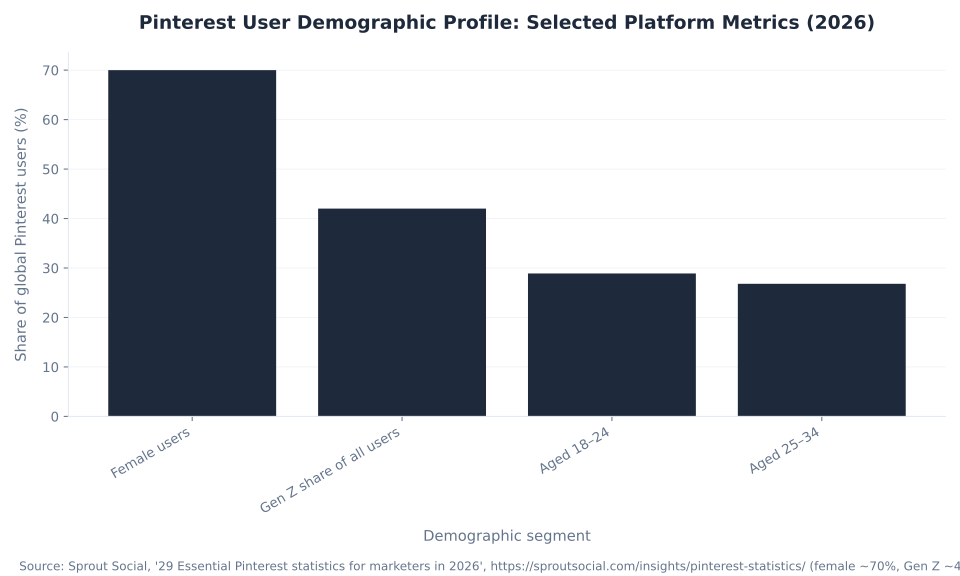
Pinterest is female-majority, at about 70% of global users, but that share is gradually declining as men grow, and Gen Z is the fastest-growing cohort. Sprout Social documents the trend, and Statista breaks the audience down: users aged 18–24 are 28.9% of global users and 25–34 are 26.8%. “Pinterest is for women only” is wrong, and it leads advertisers to cap gender to women and under-target both men and Gen Z. Two Gen Z figures circulate and must stay separate: Gen Z is about 42% of Pinterest’s user base, while about 39% of Gen Z as a generation use Pinterest. Those are different calculations.
| Demographic cut | Figure | Source |
|---|---|---|
| Female share of global users | ~70% (declining as men grow) | Sprout Social 2026 |
| Gen Z share of all users | ~42% (fastest-growing cohort) | Sprout Social 2026 |
| Users aged 18–24 | 28.9% of global users | Statista 2025 |
| Users aged 25–34 | 26.8% of global users | Statista 2025 |
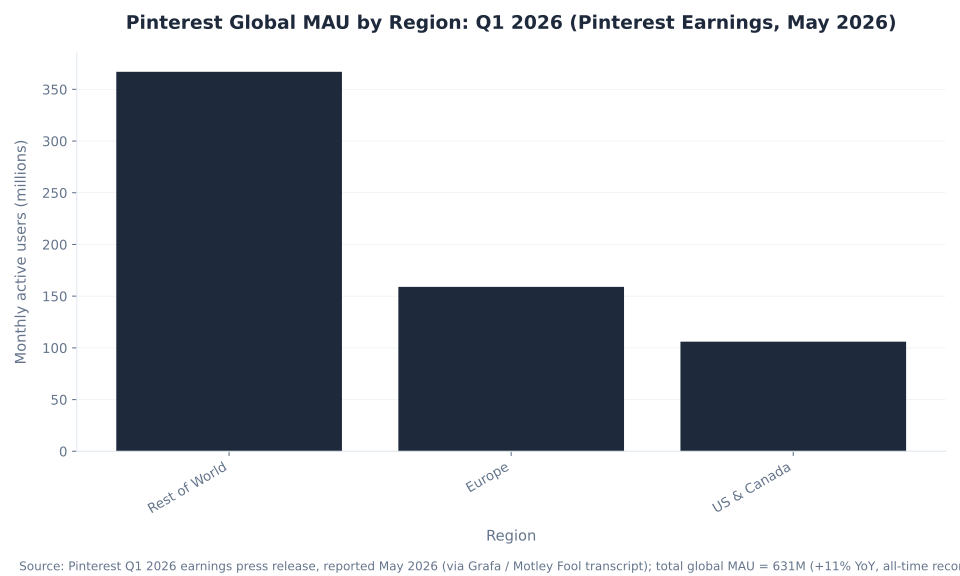
| Global monthly active users (Q1 2026) | 631M (+11% year over year) | Pinterest Q1 2026 earnings |
Sources: Sprout Social, “29 Essential Pinterest statistics for marketers” (~70% female; Gen Z ~42% of all users; fastest-growing cohort); Statista, “Global Pinterest user distribution by age and gender 2025” (18–24: 28.9%, 25–34: 26.8%); SocialChamp, “Who’s on Pinterest in 2026?” (demographic context). Share figures are vendor and Statista estimates, attributed — not stated as Pinterest-official.
Now the controls. Pinterest’s demographic and location targeting lets you set hard constraints on who sees an ad: age brackets, gender, location, language, and device. Location is the half of this section that the “location targeting” query is really asking about, and it is granular — you target by country, region, metro area, or postal code. Table 6 lays out each lever.
| Option | What you can set | Notes |
|---|---|---|
| Age | Age ranges and brackets | Gen Z is the fastest-growing cohort — do not over-narrow to 35+ |
| Gender | Female / male / all | ~70% female but men growing — “women only” leaves reach on the table |
| Location | Country, region, metro area, or postal code | The “location targeting” half of this section — granular down to postal code |
| Language | User app or content language | Pair with localized creative |
| Device | Mobile app / web / tablet | Pinterest is overwhelmingly mobile — most traffic is the app |
Source: Pinterest Business help, “Set up location targeting” (country, region, metro area, postal code; language; device; gender). Demographic context: Sprout Social and Statista. Demographic share figures are vendor and Statista estimates, attributed accordingly.
Use these as guardrails, not as your primary targeting. Set the geography your business actually serves, set language to match your creative, and leave gender open unless your product is genuinely single-gender. Our team’s rule is to narrow demographics last, after keywords and interests define the intent and affinity, so the guardrails trim waste without starving the algorithm of reach. Device targeting matters because Pinterest is overwhelmingly mobile; most traffic is the app. For baby products PPC and wedding PPC brands with strong regional or seasonal patterns, postal-code and metro location targeting pairs well with localized creative.
Placement Targeting: Browse vs Search
Placement decides where on Pinterest your ad appears, and it splits into two mindsets: Browse and Search. By default, campaigns run on all placements. Understanding the split changes how you read your reporting and where you push budget.
| Placement | Where the ad shows | Mindset | Best pairing |
|---|---|---|---|
| Browse | Home feed and related Pins | Lower-intent discovery — users are scrolling | Interests and audiences for reach |
| Search | Search results | High-intent — users typed a query | Keyword targeting (the natural partner) |
| All placements (default) | Home feed, search results, related Pins | Mixed | Pinterest’s recommended start; optimize from reporting |
Source: Pinterest Business help, “Review and select targeting options” (placement = home feed / search results / related Pins; Pinterest recommends running all placements and optimizing from reporting). “Browse” groups the home feed and related Pins; “Search” is the search-results surface.
Browse is the lower-intent discovery surface — the home feed and related Pins, where people are scrolling, not searching for something specific. Search is the high-intent surface, where someone has typed a query, which is exactly why keyword targeting and Search placement are natural partners. Running keyword campaigns on all placements by default means some budget serves to Browse, where keyword matching is less direct. Pinterest documents the placement options and recommends starting with all placements, then optimizing from reporting.
Restricting to Search only narrows reach but tightens intent alignment; restricting to Browse only removes the search-intent pool. MB Adv Agency starts most accounts on all placements to gather signal, then reallocates toward Search once the keyword set proves out — because Search is where Pinterest’s highest-intent inventory lives. For travel and luggage PPC and beauty products PPC brands, the Browse surface carries the planning-mode audience that keyword campaigns on Search later convert. For how placement interacts with cost, see how much Pinterest ads cost.
Performance+ Targeting: AI Expansion That Respects Your Guardrails
Pinterest Performance+ targeting uses the visual and written signals from your ad to reach additional people searching for or interested in relevant ideas, beyond the keywords and interests you picked by hand. Two facts change how you run it, and Table 8 shows what Pinterest reports it delivers.
First, it is switched on by default for new campaigns and can be turned off at any time. Second — and this is the load-bearing fact — it expands your interest and keyword targeting only. It does not override your location or gender restrictions. Pinterest states both points directly. So the correct mental model is simple: keep your hard constraints (geography, gender) and let the AI widen the soft ones (keywords, interests). Never call it “Performance Max” — that is a Google product. Pinterest’s suite is Performance+ targeting, and it sits alongside Performance+ campaigns, bidding, and creative as separate components.
| Performance+ feature | Reported figure | Source note |
|---|---|---|
| Performance+ targeting (CPM reduction) | ~17% lower CPM vs standard setup | Pinterest-reported testing |
| Performance+ creative (checkout revenue) | +19% checkout revenue | Pinterest-reported testing |
| Performance+ AI backgrounds (conversion rate) | +11% conversion rate | Pinterest-reported testing |
Source: Pinterest-attributed results via Impression Digital, “The Pinterest Performance+ Playbook” and Pinterest Business help, “Pinterest Performance+ targeting”. All figures are Pinterest’s own reported results from internal testing — not MB Adv client data and not independently audited. The 17% CPM reduction is specifically Performance+ targeting vs standard targeting setup, not a whole-campaign comparison. Three separate features and test populations; do not aggregate.
Pinterest reports that Performance+ targeting drove about a 17% reduction in CPM versus a standard setup in its testing. Attribute that to Pinterest, not to any agency, and read it as directional rather than guaranteed. Impression Digital’s playbook collects the Pinterest-attributed figures across the suite. The point for targeting is the mental model, not the percentage: leave Performance+ targeting on for reach, because it respects the guardrails you have already set. For the full automation suite — targeting, bidding, budget, and creative — see Pinterest ads optimization and AI, and for the product overview see Pinterest Performance+.

Pinterest Targeting Strategy
Six targeting options, one layered structure — built around the keyword.
The brands that get the most from Pinterest treat it like paid search with pictures: keywords for intent, interests for reach, audiences for retention, demographics for guardrails, and Performance+ to widen the soft constraints. See how MB Adv Agency builds keyword-plus-interest-plus-audience structures for fashion, home decor, and beauty brands.
Explore fashion PPC services →How to Build a Pinterest Targeting Strategy, Step by Step
The six targeting types are not a menu you pick one item from — they are a sequence you build in order. This is the order MB Adv Agency uses, and it follows the dependencies: tracking before audiences, intent before affinity, guardrails last, AI on top.
Step one: install the Pinterest tag and claim your domain. Visitor and engagement audiences only exist once this is done, so it comes first — before you plan any audience campaign. Pinterest documents the tag and domain dependency, and the full setup lives in the Pinterest tag and conversion tracking. Skipping this step caps you to customer-list uploads and prospecting.
Step two: build keyword lists with broad, phrase, and exact match plus negatives. Pinterest is search-driven, so keywords come before everything else in the targeting build. Start with a tight exact-match core for your money terms, add a phrase tier for controlled expansion, and run a broad tier as a discovery layer fenced in by negative phrase and negative exact. Aim for the recommended 25-plus keywords per ad group. Step three: layer relevant interests for reach — start broad, tighten to niche sub-interests to align creative with the moment.
Step four: add demographic guardrails. Set age, gender, location, language, and device to match the business you actually serve — and leave gender open unless your product is single-gender, because Pinterest is no longer female-only. Step five: upload customer lists and add visitor and engagement retargeting once the tag is live. Step six: build actalike audiences from your best source audience — the behavioral expansion that finds new people who act like your converters. Step seven: leave Performance+ targeting on to expand keywords and interests while your geo and gender guardrails hold. Pinterest confirms Performance+ respects those guardrails. For shopping ads and catalogs, the same audiences power dynamic product retargeting.
Actalike Audiences: Why the Word Matters
Search-and-social advertisers reflexively say “lookalike.” Pinterest’s term is “actalike,” and the difference is not a rebrand — it is a different matching model worth explaining.
An actalike audience finds new people whose behavior on Pinterest mirrors a source audience — people likely to engage with your Pins or visit your site based on how your existing audience acts, not merely people who resemble it demographically. Pinterest documents the actalike model and Clix Marketing explains the behavioral basis. You build an actalike from any source audience — a customer list, your site visitors, or an engagement audience — which is exactly why the audience types and the tag have to be in place first. The source audience needs to reach a qualifying size before Pinterest will build the expansion; LeadsBridge cites a working minimum to confirm against the live help page at setup.
Using the right vocabulary is also a credibility signal. A page that says “lookalike” tells a Pinterest-literate reader it was written by someone who does not run the platform. Mention “lookalike” once, as the cross-platform analog — Pinterest’s equivalent of what Meta calls a lookalike — then use “actalike” everywhere else.
Layering Targeting Types Without Over-Narrowing
The most common setup mistake is stacking every targeting type at once and strangling reach. Targeting types layer, but each layer is an AND condition that shrinks the eligible pool.
The honest answer to “do I have to choose?” is no — these layer — but the order and restraint matter. Keywords plus interests in one ad group is the standard combination: intent plus affinity. Add demographic guardrails sparingly, because each one is a hard filter. Add audiences for retention and expansion once the tag is live. Then leave Performance+ targeting on to widen the keyword and interest layers without touching your geo and gender rules. MB Adv Agency’s working rule is “widen the soft constraints, fix the hard ones”: let keywords, interests, and Performance+ do the expanding, and reserve demographics and location for the few constraints your business genuinely requires.
Over-narrowing shows up as thin delivery and a stalled learning phase. When a campaign cannot spend, the cause is usually too many stacked filters — an exact-only keyword set AND a single niche interest AND a narrow age bracket AND one metro. Loosen the soft layers first. For wedding PPC and baby products PPC brands, where seasonality and life-stage already narrow the audience, restraint on demographic stacking is what keeps the algorithm fed. See Pinterest campaign objectives for how the campaign type you choose shapes which of these layers you can use.
Frequently Asked Questions: Pinterest Ads Targeting
What is the difference between interest targeting and keyword targeting on Pinterest?
Interest targeting and keyword targeting answer two different questions. Interest targeting matches your ad to a person’s broad topic affinities and on-platform browsing behavior — the topics they save, follow, and engage with — organized into a two-tier taxonomy that runs from broad categories like Home Decor down to niche sub-interests like Scandinavian Bedroom. It is an affinity signal: what a person likes. Keyword targeting matches your ad to the terms a person actively types into Pinterest search. It is an intent signal: what a person wants right now. Because Pinterest is a search-driven discovery engine where about 96 percent of searches are unbranded, keyword targeting carries the higher-intent signal and is the platform’s core lever. The standard configuration layers both: keywords supply intent, interests widen reach. Pinterest’s own documentation recommends running them together rather than choosing one over the other, because each one covers a gap the other leaves open in your targeting.
What is a Pinterest actalike audience?
An actalike audience is Pinterest’s expansion audience: it finds new people whose behavior on Pinterest mirrors a source audience you already have. The matching basis is behavioral, not demographic — Pinterest looks for people likely to engage with your Pins or visit your site based on how your existing audience acts on the platform, not merely people who resemble it on paper. You build an actalike from any source audience: a customer list, your site visitors captured by the Pinterest tag, or an engagement audience. That dependency is why the audience types and the tag have to be in place first. The source audience must reach a qualifying size before Pinterest will build the expansion. Treat the actalike as a prospecting layer that scales your best-performing seed, and feed it your highest-quality source audience, because the model expands on behavior and a noisy seed produces a noisy, lower-quality expansion that wastes budget on the wrong people.
Does Pinterest have lookalike audiences?
Not under that name. Pinterest’s equivalent of what Meta calls a lookalike audience is the actalike audience, and the difference is more than vocabulary. A Meta lookalike leans on demographic and profile resemblance; a Pinterest actalike matches on behavior — how your source audience acts on the platform, including the Pins they engage with and the sites they visit. Advertisers importing the Meta playbook hunt for a “lookalike” toggle that does not exist by that label and assume demographic similarity is the matching logic. It is not. Use the term “actalike” when you work in Pinterest Ads Manager, build it from a customer list, visitor, or engagement source, and seed it with your strongest audience. Saying “lookalike” on Pinterest is a small tell that signals unfamiliarity with the platform to anyone who runs it, and it sends you searching for a setting that is filed under an entirely different name.
Is Pinterest Performance+ targeting on by default?
Yes. Performance+ targeting is switched on by default for new campaigns, and you can turn it off at any time. It uses the visual and written signals from your ad to reach additional people searching for or interested in relevant ideas, beyond the keywords and interests you selected by hand. The fact that changes how you should run it is its scope: Performance+ targeting expands your interest and keyword targeting only. It does not override your location or gender restrictions, which stay in force whether the feature is on or off. That makes it safe to leave on for reach — it will not serve to the wrong country or break a brand-safety geo rule. The correct mental model is a reach amplifier on top of your manual targeting, not a replacement for it: keep your hard constraints fixed and let the AI widen the soft ones. Never call it Performance Max — that is a Google product, not a Pinterest one.
How many keywords should I add to a Pinterest ad group, and what are the match types?
Pinterest supports up to 20,000 keywords per ad group and recommends at least 25 for the algorithm to have enough signal to work with. There are five match types. Broad match is the default — type the keyword with no marks and it triggers on misspellings, synonyms, and related terms regardless of word order. Phrase match wraps the term in quotation marks and triggers on searches containing the phrase in order, with extra words allowed. Exact match wraps the term in square brackets and triggers on the keyword plus close variants only. Negative phrase, written with a leading minus sign before a quoted phrase, excludes any search containing that phrase. Negative exact, a leading minus sign before a bracketed term, excludes only that exact search. Bid your proven converters on exact and phrase, run broad as a discovery layer, and prune with negatives. The syntax is load-bearing: getting it wrong silently changes how the campaign spends its budget.
Do I need the Pinterest tag to use audience targeting?
For three of the four audience types, yes. Visitor or retargeting audiences are built from site traffic captured by the Pinterest tag, so they do not exist until the tag is installed. Engagement audiences are built from interactions with Pins from your confirmed domain — Pin clicks, outbound clicks, saves, comments, and video views — so they require a claimed and confirmed domain. Actalike audiences are built from any of those source audiences, so they inherit the same dependency. The one exception is the customer-list audience: you upload a single-column CSV of hashed emails or mobile ad IDs, and that works without the tag because you supply the data directly. The practical sequencing rule is to install the tag and claim your domain before you plan any audience campaign. Targeting and tracking are one project, not two. Until the tag is live, you are limited to customer-list uploads and prospecting through keywords, interests, and demographics on Pinterest.
Is Pinterest only for women?
No, and building every campaign on that assumption is the most expensive demographic mistake on the platform. Pinterest is female-majority — about 70 percent of global users — but that share is gradually declining as men grow, and Gen Z is the fastest-growing cohort. Sprout Social documents the trend, and Statista breaks the audience down by age and gender. Two Gen Z figures circulate and should stay separate: Gen Z is about 42 percent of Pinterest’s user base, while about 39 percent of Gen Z as a generation use Pinterest. Those are different calculations and conflating them is a factual error. The targeting takeaway is to leave gender open unless your product is genuinely single-gender, and to avoid over-narrowing age to 35-plus when the youngest cohort is the one growing fastest. Set demographics as guardrails that match the business you serve, not as a filter built on an outdated stereotype that quietly excludes a growing, valuable audience.
Not sure how to layer the six targeting options?
Talk to our team about Pinterest targeting for your brand.
Turning keywords, interests, audiences, demographics, placements, and Performance+ targeting into one structure — keywords for intent, interests for reach, audiences for retention, demographics for guardrails — is what MB Adv Agency does for visual-discovery brands. We help brands get the targeting stack right before the first dollar of budget is committed.
Get in touch →Methodology and Sources
This pillar is built from Pinterest’s own help documentation — the targeting overview, keyword targeting, audience targeting, interest targeting, location, language, device, and gender targeting, and Performance+ targeting — plus web-verified secondary sources for the demographic picture (Sprout Social, Statista, SocialChamp) and the Performance+ figures (Impression Digital). Match-type guidance is corroborated by Alisa Meredith and audience guidance by Clix Marketing and LeadsBridge.
Every benchmark-style figure — the 96% unbranded search share, the demographic shares, the 20,000-keyword ceiling, and the Performance+ CPM reduction — is attributed to Pinterest-reported testing or a named vendor, and none is independently audited. No MB Adv Agency client metrics are cited; all MB Adv attributions are qualitative practitioner observations. Web-verified and last updated: 2026. Reviewed by MB Adv Agency.

As a Google Ads expert, I bring proven expertise in optimizing advertising campaigns to maximize ROI.
I specialize in sharing advanced strategies and targeted tips to refine Google Ads campaign management.
Committed to staying ahead of the latest trends and algorithms, I ensure that my clients receive cutting-edge solutions.
My passion for digital marketing and my ability to interpret data for strategic insights enable me to offer high-level consulting that aims to exceed expectations.
Google Partner Agency
We're a certified Google Partner Agency, which means we don’t guess — we optimize withGoogle’s full toolkit and insider support.
Your campaigns get pro-level execution, backed by real expertise (not theory).

4.9 out of 5 from 670+ reviews on Fiverr.
That’s not luck, that’s performance.
Highly recommend Matteo to set up your server side tracking. He has a deep understanding of e-commerce tracking and will go above and beyond to make sure everything is set up correctly and working 100%. If you are scaling your store this set up is non-negotiable in my opinion and there isn't many people who have this much knowledge or put the effort in to get it right. Thanks again!

avorodesign.com
I can only recommend Matteo! He was very patient, professional and very knowledgeable about GA4, Consent Mode v2, and GDPR compliance. Communication was clear, and the setup was done professionally and efficiently. Highly recommend him for anyone needing reliable tracking implementation.

www.natureiki.life
Matteo shines in the realm of online professionals. His work is not only deep in data but also complemented by his proactive communication and cooperation, setting a new standard for freelancers. If you want someone who truly exceeds expectations, look no further. Highly recommended!

www.omanbeverlysmyth.com
Exceptional Service Beyond Expectations - Outstanding Service Impeccable depth, flawless delivery, and exceptional language fluency—this service exceeded all expectations. Highly recommended. Matteo truly ROCKS!!!

ium-paris.com
Top-notch, always highly value working with Matteo. An absolute Google Ads Genius. This is approximately the 8th time I have hired him and he's helped us get 6-7 ROAS. We are excited in continuing to improve our lead flow. Hire this guy if you need Google Ads help. Thanks Matteo!

www.dleeventgroup.com
I finally found the guy who can setup server side tracking and all the ecosystem properly. I definitely recommend Matteo. He is very responsive, kind and wants to dig into things. He configured GA4, Meta, Google Ads, Outbrain and google consent v2 with Cookiebot. Thanks Matteo.

inomega.fr
MB Adv delivered exceptional work with outstanding professionalism and lots of patience, taking time to see effects of changes made and not just do the work and submit it. The proactive communication and video summaries of the work completed made working with Matteo a pleasure, as he consistently went above and beyond. Highly recommended for web analytics projects! We are already working on another project.

www.withnellsensors.co.uk
Working with Matteo on my Google Ads was a game-changer. He's not just a strategist, he's a true partner. He understood my goals and tailored a campaign that perfectly reached my target audience. I'm grateful for his expertise and dedication.

dccargo.com
Click-driven mind
with plastic-brick obsession.
We build Google Ads campaigns with the same mindset we use to build tiny brick worlds: strategy, patience, and zero tolerance for wasted pieces.
Data is our blueprint. Growth is the only acceptable outcome.