Pinterest Tag & Conversion Tracking: 2026 Setup Guide

Pinterest Measurement — 2026 Best Practice
2
Channels, One Counted Conversion
The Pinterest tag is two pieces of code — a base code on every page and event codes on action pages. In 2026 the complete setup is two channels: the browser tag and the server-side Conversions API, running in parallel and deduplicated with a shared event ID so each conversion is counted exactly once.
Source: Pinterest Business help, “The Pinterest Conversions API.” Tag-only tracking under-counts conversions as third-party cookies, Safari ITP, ad blockers, and iOS App Tracking Transparency erode browser signal.
The Pinterest Tag & Conversion Tracking: The Whole Stack, From Base Code to the Conversions API
The Pinterest tag is the measurement layer that turns a Pinterest ad account from a spending machine into a learning one. It is the code that tells Pinterest a Pinner viewed a product, added it to a cart, or completed a purchase — and that signal is what every conversion objective, every retargeting audience, and every Performance+ ROAS bid optimizes against. Searchers call it the “pinterest pixel”; the two names point at the same thing. (Pinterest Business help, “Track conversions with the Pinterest tag”)
This pillar covers the whole stack end to end: what the tag is (a base code plus event codes), the standard events it fires, three install methods, what Enhanced match adds, why the 2026 best practice runs the tag and the Conversions API together and deduplicated, how attribution windows changed on April 1, 2025, and how to debug with the Pinterest Tag Helper. It consolidates seven thin pages into one canonical reference.
The load-bearing idea: “the Pinterest tag” is not one snippet. The base code goes on every page and fires PageVisit; the event codes go only on action pages and must fire after the base code loads. Confuse the two and your data is silently wrong. The complete 2026 setup adds the Conversions API and Enhanced match, deduplicated with a shared event_id.
Tracking is not the last box to tick before launch — it is the first. Visitor and retargeting audiences only exist because the tag captures site traffic; dynamic retargeting needs the tag plus a catalog; and the Conversions and Catalog Sales objectives optimize against the events this tag fires. Set tracking up before you build audiences. For how those events become decisions, see Pinterest ads metrics & ROAS; for the objectives that consume this signal, see Pinterest campaign objectives; and for the account prerequisites, see Pinterest ads setup & policies.
Six Things Every Pinterest Advertiser Gets Wrong About Conversion Tracking
The tag looks like a single snippet you paste once and forget. It is a two-part architecture feeding a two-channel measurement system, and most broken accounts trace back to one of the errors below.
- The tag is two pieces, not one. The base code goes on every page and fires PageVisit; event codes go only on action pages and must load after the base code. Putting the Checkout event on the cart page instead of the order-confirmation page is the most common setup error.
- The browser tag alone is no longer a complete setup. The 2026 standard is the tag plus the Conversions API, deduplicated. A tag-only account under-counts conversions and starves the bidding algorithm of signal.
- Deduplication is not automatic. Tag and CAPI dedupe only when both events carry the same non-empty
event_idandevent_name. Skip it and conversions roughly double — a setup error readers misread as a CAPI bug. - Enhanced match is the cheapest match-rate win in the account. It sends SHA-256-hashed email (and phone on CAPI) so events still attribute when the cookie is gone. It is a setting, not a project, and most advertisers leave it off.
- Attribution windows changed on April 1, 2025. Pinterest removed the separate engagement window. A reported conversion drop around that date is the measurement moving, not the business.
- The Tag Helper is the hero debugging tool. A red icon with a count box shows how many events are firing and validates the event data and Enhanced match value before you waste budget on a broken signal.
Each point gets its own section below. Conversion tracking matters most for DTC brands with a real purchase funnel — our team stands up this stack for fashion, home decor, and beauty brands where every tracked checkout sharpens delivery.
Pinterest Conversion Tracking: The Numbers That Frame the Topic
US search demand for tag and tracking terms is thin — the largest head terms sit at 60 searches a month — but global demand is several times larger, which tells you who the audience is: international DTC and ecommerce operators running Pinterest worldwide. Every figure below traces to a named source in the methodology section.
“pinterest tag” — Global Volume
350
Monthly searches worldwide vs 60 in the US — Ahrefs, June 2026
Standard Events Documented
~20
Standard and extended event types; 11 form the commonly used core — Pinterest help
Dedup Window
24h
Tag and CAPI events pair within a 24-hour window via a shared event ID — integration vendors
Attribution Change
Apr 1 2025
The day Pinterest removed the engagement attribution window — Supermetrics
The thin US volumes are the structural reason a single canonical pillar beats seven scattered pages: domestic upside is limited, but the international long-tail for “pinterest tag” and “pinterest pixel” is real, and a well-structured reference is what earns it. (Pinterest developers, “Track conversions with the Pinterest tag”)
Pinterest Conversion Tracking Terms: US Monthly Search Volume (Ahrefs, June 2026)
Four Misconceptions That Break Pinterest Conversion Tracking
These are the corrections most likely to be quoted, because each one is a declarative fix for an error that produces plausible-looking but wrong data.
1. The Pinterest tag is not a single snippet. It is a base code plus event codes that go in different places. The base code must be on every page, where it carries your tag ID and fires PageVisit; the event codes go only on the pages where a specific action happens — Checkout on the purchase-confirmation page, AddToCart on the cart, Signup on the registration thank-you — and each event code fires after the base code loads. Putting the Checkout event on the wrong page, or omitting the base code from some templates, produces conversion data that looks fine and is quietly broken. (Pinterest Business help, “Add event codes”)
2. In 2026 the browser tag alone is not a complete conversion setup. A guide that says “install the Pinterest tag and you are tracking conversions” describes a pre-privacy world. Cookie deprecation, Safari ITP, ad blockers, and iOS App Tracking Transparency all erode what a browser pixel sees, so Pinterest’s documented best practice is to send conversions server-side via the Conversions API in parallel with the tag, using a shared event ID so each conversion is counted once. Treating the tag as sufficient on its own under-counts conversions and starves the bidding algorithm. (Pinterest Business help, “The Pinterest Conversions API”)
3. Deduplication does not happen automatically just because you turned on CAPI. Advertisers who enable CAPI alongside the tag and then watch conversions roughly double assume CAPI is broken. It is not — they skipped the one field that makes dedup work. Pinterest deduplicates browser and server events only when both carry the same non-empty event_id and event_name, the action source is a supported web or app value, and the duplicate arrives within a 24-hour window. Run tag plus CAPI without a shared event ID and you double-count. (Cometly, “Pinterest Conversion API setup guide 2026”)
4. A 2025 drop in attributed conversions is not necessarily a performance problem. Pinterest changed the attribution-window settings on April 1, 2025, removing the separate engagement window and aligning to a clicks-and-views model. Engagement-attributed conversions that used to be counted simply stopped appearing under that label. Any analysis that compares conversions across that date as if the measurement were constant is comparing two different rulers — check the in-product window setting before declaring a campaign broke. (Supermetrics, “Pinterest Ads attribution window settings change”)
MB Adv Agency’s view, from standing up tracking on visual-commerce accounts: the first two corrections are load-bearing. Get the base-code and event-code architecture right and add CAPI early, and almost every other tracking problem becomes a quick fix rather than a rebuild.
What Is the Pinterest Tag? Base Code vs Event Codes
The single most important fact in this pillar: the Pinterest tag is two distinct pieces of code with two jobs. The base code initializes tracking on every page and fires the PageVisit event automatically. The event codes are small additional snippets placed only on the specific pages where an action happens, and they fire a named conversion event — Checkout, AddToCart, Signup — after the base code has loaded. (Pinterest Business help, “Track conversions with the Pinterest tag”)
Get the architecture right and the rest is plumbing. Get it wrong — base code missing on some templates, an event code firing before the base code, the Checkout event sitting on the cart page instead of the order-confirmation page — and the data is wrong in ways the dashboard never flags. The table below is the reference: the base code, the commonly used standard events, where each one lives, and what it records.
| Element | Where it goes | What it tracks / does |
|---|---|---|
| Base code | Every page of the site (in <head>) | Carries your tag ID, initializes tracking, fires PageVisit by default; must load before any event code |
| PageVisit (event) | Product / article / primary pages | Counts people who view a key page |
| ViewCategory | Category / collection pages | Counts people who browse a category |
| Search | Site search results page | Counts people who search on your site |
| AddToCart | Cart / add-to-cart action | Items added to cart (pass value + currency) |
| AddToWishList | Wishlist action | Items saved to a wishlist |
| InitiateCheckout | First step of checkout | People who begin checkout |
| AddPaymentInfo | Payment step | Payment details entered |
| Checkout (the key conversion) | Order-confirmation page only | Completed purchases (pass value, currency, order_quantity) |
| Signup | Registration thank-you page | Account creations / list sign-ups |
| Lead | Lead-capture confirmation | Interest signals (form / inquiry) |
| WatchVideo | Pages with video | On-site video views |
| Custom (+ Subscribe, ViewContent, Contact) | Any page | Business-specific actions the standard events do not cover |
Sources: Pinterest Business help, “Add event codes” (full standard-event list); Pinterest Business help, “Track conversions with the Pinterest tag” (base code on every page; event codes on action pages; base loads first). Currency is required on AddToCart and Checkout; value and order_id are required for ROAS reporting.
Pinterest documents about 20 standard and extended event types; the table shows the core most accounts implement. Place the Checkout event with care — it belongs on the order-confirmation page only and carries the value and currency that ROAS reporting and Performance+ ROAS bidding depend on. For the objectives that consume these events, see Pinterest campaign objectives.
Pinterest Standard Events and the Data Each One Carries
Each standard event maps to a funnel stage and carries its own data fields. The value and currency fields are what make AddToCart and Checkout usable for ROAS reporting; omit them and the event still fires but the revenue picture is blank.
The grouping below mirrors how the conversion signal flows from discovery to purchase. The Checkout event is the anchor: it must fire on the order-confirmation page only, and it carries the order value and currency Pinterest needs to attribute revenue and power Performance+ ROAS bidding.
| Event name | Fires on | Key data to pass | Funnel stage |
|---|---|---|---|
| PageVisit | Product / article / primary pages | page_name | Awareness / Browse |
| ViewCategory | Category / collection pages | category | Awareness / Browse |
| Search | Site search results page | search_query | Awareness / Browse |
| AddToCart | Cart / add-to-cart action | value, currency, line_items | Consideration |
| AddToWishList | Wishlist action | line_items | Consideration |
| WatchVideo | Pages with video | video_title | Consideration |
| InitiateCheckout | First step of checkout | value, currency | Conversion |
| AddPaymentInfo | Payment step | value, currency | Conversion |
| Checkout (primary) | Order-confirmation page only | value, currency, order_quantity, order_id | Conversion |
| Signup | Registration thank-you page | — | Lead / Signup |
| Lead | Lead-capture confirmation | lead_type | Lead / Signup |
Source: Pinterest Business help, “Add event codes” (full standard-event list with required and recommended data fields). Funnel-stage groupings are a practitioner framing layered on Pinterest’s event list. A Custom event type covers any action the standard set does not.
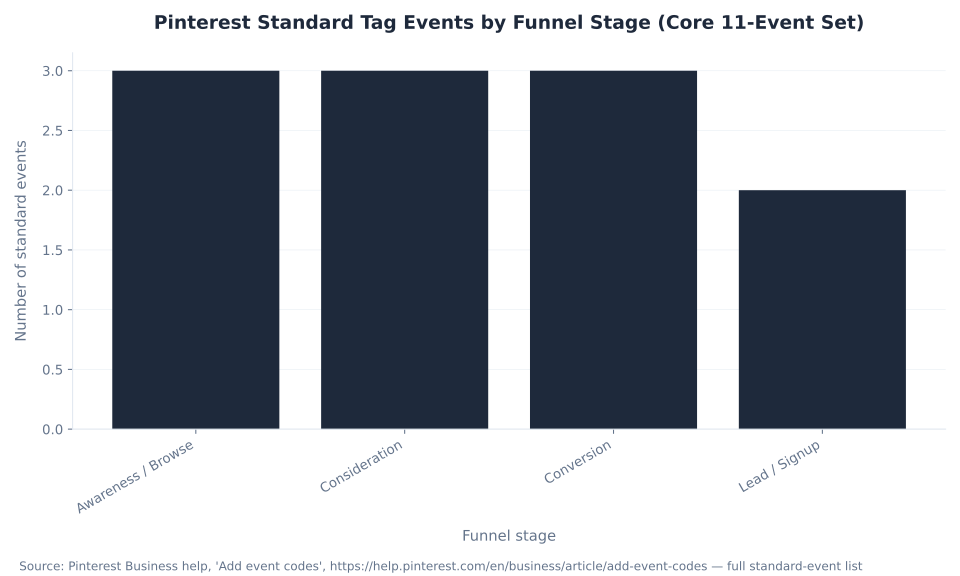
The chart below counts the core events by funnel stage. For how these events translate into reportable outcomes — conversions, CVR, ROAS — see Pinterest ads metrics & ROAS, and for the audiences they build, see Pinterest ads targeting.
Pinterest Standard Tag Events by Funnel Stage (Core 11-Event Set)

Tag, Enhanced Match, and the Conversions API: the Privacy-Era Stack
Conversion tracking in 2026 is a layered stack, not a single pixel: the browser tag is the baseline, Enhanced match raises how often Pinterest can connect an event back to a real Pinner, and the Conversions API recovers the events the browser loses. Run all three together, deduplicated, for the most complete signal.
| Layer | What it is | What it adds | Requires |
|---|---|---|---|
| Pinterest tag (browser) | Client-side JavaScript (base + event codes) in the browser | Baseline conversion + audience signal; powers visitor and retargeting audiences | Code on the site; survives only if cookies and JS are not blocked |
| Enhanced match | Hashed customer identifiers sent with the event | Higher match rate — attributes events even without a Pinterest cookie | Email (and phone on CAPI), SHA-256 hashed, email lowercased + trimmed first |
| Conversions API (CAPI) | Server-to-server event sending (web, in-app, in-store) | Resilience — recovers conversions the tag loses to cookie loss, ATT, and blockers | A server integration + a Conversions API token |
| ★ Tag + CAPI + dedup (2026 best practice) | Browser tag and CAPI running in parallel, deduplicated | Most complete, accurate signal — each conversion counted once | A shared event_id on both channels (+ matching event_name) |
Sources: Pinterest Business help, “Track conversions with the Pinterest tag”; Pinterest Business help, “The Pinterest Conversions API”; Pinterest developers, “Conversion best practices” (SHA-256 hashing; normalize email lowercase + trim); Stape, “Server-side tracking for Pinterest” (run tag + CAPI in parallel; dedup).
Enhanced match is the cheapest match-rate win in the account, and most advertisers leave it off. Match rate is Pinterest’s ability to tie a conversion event back to a real user; the higher it is, the better Pinterest optimizes toward people who convert. Enhanced match raises it by sending hashed identifiers — email, and on CAPI phone — alongside the event, so it still attributes when the cookie is gone. The privacy guardrail is non-negotiable and worth stating because nervous clients always ask: identifiers are hashed with SHA-256 before they leave your site, with email lowercased and trimmed first, so Pinterest never receives a raw email address. (Pinterest developers, “Conversion best practices”)
It is a setting, not a project. Turn it on for the tag, pass the hashed fields on CAPI, and you buy back match rate that cookie loss took away — at no media cost. In our work with DTC accounts, Enhanced match left off is the single most common reason a technically-installed tag underperforms on delivery.
How to Install the Pinterest Tag: Manual, GTM, or Partner Integration
There are three ways to get the tag live, plus a fourth path for the Conversions API. The right choice is the one that matches your stack and the people who maintain it. All four end at the same place: the base code on every page, event codes on action pages, and CAPI sending the same events server-side.
| Method | How it works | Best for | Tradeoffs |
|---|---|---|---|
| Manual (hard-code) | Paste the base code in <head> sitewide; add event codes to action pages | Custom sites with developer access; full control | Most error-prone (firing order, missing pages); needs a developer to change |
| Google Tag Manager (GTM) | Deploy base + event tags via GTM triggers and variables | Marketers who want tag control without engineering for every change | Requires correct triggers and variables; trigger-order mistakes still happen |
| Partner integration (e.g. Shopify) | Connect via a Pinterest partner platform; tag + CAPI often pre-mapped | Ecommerce platforms with a Pinterest app or connector | Fastest and lowest-error, but less custom-event flexibility than manual |
| CAPI — direct API | Server sends events to Pinterest with a Conversions API token (server-to-server) | Brands wanting maximum control and custom server logic | Developer-intensive; you own dedup (event_id) and hashing |
Sources: Pinterest Business help, “Track conversions with the Pinterest tag”; Pinterest Business help, “Set up the Pinterest tag with Google Tag Manager”; Pinterest Business help, “The Pinterest Conversions API” (direct vs partner integration); Converlay, “Pinterest Conversions API for Shopify”. Confirm the current Pinterest–Shopify integration depth against the live app listing before recommending a connector by name.
The sequencing that separates a campaign that compounds from one that stalls is the same regardless of method: create or confirm a Pinterest business account and claim your domain, install the base code sitewide, add event codes to action pages with value and currency where relevant, turn on Enhanced match, add the Conversions API in parallel with a shared event ID, then verify with the Tag Helper before you build a single audience or launch a conversion campaign. The account prerequisites — the business account and domain claim — are covered in Pinterest ads setup & policies.
MB Adv Agency typically routes ecommerce clients to the partner integration first for the lowest-error baseline, then layers a direct CAPI connection for the custom events a packaged app does not map. For subscription box and electronics brands with non-standard checkouts, the manual or direct-API path earns its extra effort.

Pinterest Attribution Windows and the April 1, 2025 Change
Pinterest’s long-quoted default was 30-day click, 30-day engagement, 1-day view. On April 1, 2025, Pinterest aligned its reporting to the industry standard and removed the separate engagement attribution window, leaving clicks and views. An account with no custom window selected now defaults to 30-day click plus 1-day view.
| Window component | Old default (pre-Apr 1, 2025) | New default (post-Apr 1, 2025) |
|---|---|---|
| Click window | 30 days | 30 days |
| Engagement window | 30 days | 0 — removed Apr 1, 2025 |
| View window | 1 day | 1 day |
Source: Supermetrics, “Pinterest Ads attribution window settings change — April 1, 2025” (engagement window removed; 60-day click options added). Verify the exact in-product default label in a live Ads Manager account before relying on it; both “1/1/1” and “30/30/1” framings circulate (Pinterest Business Community).
The practical consequence the thin pages never warned about: if reported conversions stepped down around that change, the measurement moved, not the business — engagement-attributed conversions stopped being counted under the old label. Pinterest notes that conversion values no longer align with their historical values after the change. Never quote a fixed window as immutable; check the attribution-window setting in Ads Manager for the account and recalibrate any comparison that straddles the date. (Supermetrics, “attribution window settings change”)
Pinterest Attribution Window: Default Settings Before and After April 1, 2025
Why Privacy Changes Made the Conversions API the Default
The privacy degradation of browser-only measurement is the root cause of CAPI, and framing it this way answers the question every measurement-mature marketer arrives with: is the tag alone still enough in 2026? It is not, and the table below is why.
| Privacy factor | Impact on browser-tag signal |
|---|---|
| Third-party cookie deprecation | Browsers block or expire third-party cookies, breaking cross-session attribution |
| Safari Intelligent Tracking Prevention (ITP) | Shortens third-party cookie lifetimes to 1–7 days, narrowing the attribution window |
| Ad blockers | Block the tag JavaScript from loading on a meaningful share of sessions |
| Apple App Tracking Transparency (ATT) | Users opt out of cross-app tracking; opted-out users generate no in-app signal |
| The CAPI answer | Server-side sending bypasses the browser entirely — cookies, blockers, and ATT do not affect what the server sends |
Source: Pinterest Business blog, “When cookies crumble: the Pinterest API for Conversions”; Pinterest Business help, “The Pinterest Conversions API”. Pinterest does not publish a tag-only vs Tag+CAPI capture percentage; the case rests on the mechanism, not a single lift number.
Server-side event sending is the answer because it sits outside the browser, where cookies, blockers, and ATT cannot reach. That is the entire argument for the Conversions API moving from advanced hygiene to default. Keep the framing qualitative — Pinterest does not publish a signal-loss percentage — but the direction is settled: a browser-only pixel consistently under-counts conversions it used to capture. (Pinterest Business blog, “When cookies crumble”)
Debugging the Pinterest Tag with the Tag Helper
Debugging is a first-class part of conversion tracking, not a footnote, and the Pinterest Tag Helper is the hero tool. The Tag Helper is a Chrome extension that shows a red icon with a count box indicating how many tagged events are firing on the current page, validates the event data you are passing, and validates the Enhanced match value. On asynchronous and single-page-app sites, the count accumulates as you navigate rather than resetting on each route change. (Pinterest developers, “Use Pinterest tag helper”)
Install the Tag Helper, load a page that should fire an event, and read the count. Zero events on a page that carries the base code points at a blocker or a consent gate; a PageVisit that fires while Checkout never does points at an event code on the wrong page or a firing-order problem. The symptom-to-cause-to-fix table below covers the patterns that account for most broken setups.
| Symptom | Likely cause | Fix |
|---|---|---|
| Tag Helper shows 0 events firing | Base code missing on the page, or blocked by an ad blocker / consent gate | Confirm the base code is in <head> sitewide; test with blockers off; check consent-mode wiring |
| PageVisit fires but Checkout never does | Event code on the wrong page, or firing before the base code loads | Put Checkout on the order-confirmation page; ensure the base code loads first |
| Conversions counted twice | Tag + CAPI both firing without a shared event_id (no dedup) | Pass an identical event_id and event_name on both channels; keep within 24 hours |
| Tag fires twice on one page load | Duplicate install (theme + GTM both add it), or SPA route changes re-firing | Remove the duplicate source; for SPAs, control firing on view changes |
| Low match rate / weak optimization | Enhanced match off, or identifiers not hashed and normalized correctly | Turn on Enhanced match; SHA-256 hash email (lowercased + trimmed) and phone |
| Wrong or empty event data in Tag Helper | Event-data names or values do not match Pinterest’s spec | Align field names to spec; pass currency + value on AddToCart and Checkout |
| Conversions dropped around a date | Attribution-window settings change (Apr 1, 2025), not a real drop | Check the window setting in Ads Manager; recalibrate cross-date comparisons |
Sources: Pinterest developers, “Use Pinterest tag helper” (red icon + count box; validates event data + Enhanced match; async-navigation accumulation); Pinterest Business help, “Verify the Pinterest tag”; Cometly, “Pinterest Conversion API setup guide 2026”; Supermetrics. Symptom-to-fix rows are practitioner diagnostics.
The doubled-conversions row is the one to internalize: it is the most common CAPI complaint and always a missing shared event ID, never a platform bug. Before declaring a campaign broke in 2025, check whether the attribution window changed underneath the report. For where to read the numbers, see Pinterest ads metrics & ROAS.
Who Searches for Pinterest Tracking, and Why It Justifies One Canonical Pillar
Search demand for tag and tracking terms is thin in the US but several times larger globally, and that gap is the strategic point. The audience is predominantly international DTC and ecommerce operators running Pinterest worldwide, and a single authoritative reference is what earns the international long-tail that seven scattered thin pages never could.
| Keyword | US monthly volume | Global monthly volume | Difficulty (KD) | Intent |
|---|---|---|---|---|
| pinterest tag | 60 | 350 | 5 | Informational / branded |
| pinterest conversion tracking | 60 | 100 | 19 | Informational / commercial |
| pinterest pixel | 50 | 250 | 3 | Informational / commercial |
| pinterest conversions api | 40 | 70 | 1 | Informational / commercial |
| install pinterest tag | 10 | 10 | — | Informational |
Source: Ahrefs keyword data, US and all-countries monthly search volume, June 2026 — data JSON. KD scores of 1–19 indicate low competition; the head-term CPC of $1.80–$2.00 confirms commercial intent. Not mbadv data.
Global demand for “pinterest tag” (350 a month) runs about six times the US volume (60), and “pinterest pixel” (250 global vs 50 US) about five times — which is why this page answers “pixel” as a direct synonym for the tag in the opening. The near-zero difficulty scores confirm the opportunity is structural, not competitive: the terms are winnable for any brand that publishes a complete, well-organized answer.
Pinterest Conversion Tracking Terms: Global Monthly Search Volume (Ahrefs, June 2026)

Pinterest Measurement Strategy
Running Pinterest ads for a DTC brand? Your conversion signal is only as good as the stack underneath it.
The tag, Enhanced match, and the Conversions API have to be installed in the right order and deduplicated to count each conversion once. MB Adv Agency stands up full Tag + CAPI tracking for visual-commerce brands in categories like fashion, home decor, beauty, and food & grocery DTC — where dedup and match rate move the numbers most.
Explore fashion PPC services →Why “Just the Tag” Stopped Being Enough — and What Replaced It
For years the browser tag was the whole story of conversion tracking on Pinterest. That era is over. The 2026 setup is the tag and the Conversions API running together with Enhanced match, deduplicated by a shared event ID — and the reason is privacy, not perfectionism. (Pinterest Business help, “The Pinterest Conversions API”)
Third-party cookies started disappearing, Safari ITP shortened cookie lifetimes, ad blockers grew, and Apple’s App Tracking Transparency cut the mobile signal — so a browser-only pixel began missing conversions it used to catch. Pinterest’s answer, like every major platform’s, is the Conversions API: a server-to-server connection that sends conversion events from your server directly to Pinterest, bypassing the browser entirely. The tag captures signals the server does not see; the server confirms conversions the browser misses; and a shared event ID lets Pinterest count each conversion once. (Stape, “Server-side tracking for Pinterest with Conversions API”)
The deduplication mechanic is worth stating precisely because it is where setups go wrong. Pinterest pairs a browser event and a server event into one only when both carry the same non-empty event_id and the same event_name, the action source is a supported web or app value, and the second event arrives within a 24-hour window. Pass the shared event ID and you get the most complete signal Pinterest can offer; omit it and you double-count. (Segment, “Pinterest Conversions API destination”)
MB Adv Agency treats this as table stakes for any conversion account, not an advanced upgrade. A tag-only brand leaves conversions — and therefore optimization signal — on the table, and that lost signal is exactly what the algorithm needs to find the next buyer. For clients the framing is that the second channel is the default; the only question is how to install it, not whether to.
Tracking sits underneath everything else in the account: audiences need the tag and a claimed domain, dynamic retargeting needs the tag plus a catalog, and the lower-funnel objectives optimize against the events the tag and CAPI produce. Build the signal first. See Pinterest shopping ads & catalogs for the catalog half of dynamic retargeting and Pinterest ads targeting for the audiences it builds.
Installing the Pinterest Tag, Step by Step
Installation starts before any code: create or confirm a Pinterest business account and claim your domain, because the domain claim is what unlocks engagement audiences and ties the tag to your account. Then generate the base code in Ads Manager under Conversions and place it in the <head> of every page — via manual hard-coding, Google Tag Manager, or a partner integration. (Pinterest Business help, “Track conversions with the Pinterest tag”)
Next, add event codes to the specific action pages: Checkout on the order-confirmation page, AddToCart on the cart, Signup on the registration thank-you page, passing value and currency where the event carries revenue. The base code fires PageVisit automatically; the event codes layer the named conversions on top. Confirm each one fires with the Tag Helper before moving on. For the prerequisite business-account and domain-claim steps, see Pinterest ads setup & policies.
Adding the Conversions API in Parallel
With the tag firing, add the Conversions API as the second channel. CAPI sends the same conversion events from your server directly to Pinterest, using a Conversions API token generated in Ads Manager, and supports web, in-app, and in-store events. You can build it as a direct API integration or connect it through a partner platform that pre-maps the events. (Pinterest Business help, “The Pinterest Conversions API”)
The one field that makes the two channels work as one is the shared event_id. For every conversion, send a unique identifier — a UUID or the order ID works — and use the identical value on both the browser tag and the server CAPI call, with the same event_name. That is what lets Pinterest deduplicate the pair into a single counted conversion within the 24-hour window. Skip it and the same purchase counts twice. (Cometly, “Pinterest Conversion API setup guide 2026”)
Turning On Enhanced Match
Enhanced match is the step that recovers attribution the cookie used to provide. On the tag it is a toggle in Ads Manager under the tag settings; on CAPI you pass a hashed email field and, optionally, a hashed phone field in the event payload. The identifiers are hashed with SHA-256, and the email is lowercased and trimmed before hashing, so no raw personal data leaves your site. (Pinterest developers, “Conversion best practices”)
Frame it for clients as a privacy-safe setting with an immediate payoff: a higher match rate means Pinterest can connect more conversions back to real Pinners, which sharpens delivery toward the people who actually buy. It costs nothing in media and takes minutes to enable. For beauty and electronics brands with high repeat-purchase rates, the match-rate lift from Enhanced match compounds across the customer file.
Reading Results in Conversion Insights
Conversion insights is Pinterest’s reporting view for holistic, cross-device conversion performance, fed by the tag and CAPI together. It is where you confirm that the events you installed are arriving and being attributed — the destination that closes the loop between installation and reporting. (Pinterest Business help, “Review Conversion insights”)
Use it to verify event volume and attribution after setup, then hand the deeper how-to-read-the-numbers work — conversions, CVR, ROAS — to Pinterest ads metrics & ROAS. Conversion insights tells you the signal is flowing; the metrics pillar tells you what to do with it.
Tracking Is the Foundation Every Other Pillar Depends On
Advertisers treat the tag as the last box to tick before launch. It is closer to the first. The whole account stands on top of the conversion signal it produces, which is why the sequencing advice matters more than any single setting.
Your visitor and retargeting audiences exist only because the tag captures site traffic; your engagement audiences need a claimed domain; dynamic retargeting needs the tag plus a catalog; and the Conversions and Catalog Sales objectives, plus Performance+ ROAS bidding, all optimize against the events the tag and CAPI fire. Install the tag, claim your domain, add CAPI, turn on Enhanced match, and confirm it all fires with the Tag Helper — before you build audiences or run a conversion campaign. Everything downstream is only as good as the signal underneath it, which is why campaign objectives, targeting, and shopping all link back here.
Frequently Asked Questions: Pinterest Tag & Conversion Tracking
What is the Pinterest tag?
The Pinterest tag is the piece of tracking code that records what people do on your site after seeing your Pinterest ads — page views, cart adds, and purchases — so Pinterest can attribute conversions and optimize delivery. Searchers also call it the “pinterest pixel”; the two names refer to the same thing. It is not a single snippet: it is a base code that goes on every page of your site and fires the PageVisit event, plus event codes that go only on action pages and fire named events like Checkout and AddToCart. The base code carries your tag ID and must load before any event code runs. The tag powers your visitor and retargeting audiences and feeds the Conversions and Catalog Sales objectives, which is why it is the foundation of a Pinterest account rather than a reporting afterthought, the first thing to install. (Pinterest Business help)
What is the difference between the base code and event codes?
They are two pieces of the tag with two different jobs and two different placements. The base code is installed on every page of your site, usually in the <head>, where it carries your tag ID, initializes tracking, and fires the PageVisit event by default. The event codes are smaller additional snippets placed only on the specific pages where an action happens: the Checkout event on the order-confirmation page, AddToCart on the cart, Signup on the registration thank-you page. Each event code has to fire after the base code has loaded, because the base code initializes the tracking the event code relies on. The most common setup error is placing the Checkout event on the cart page instead of the order-confirmation page, or omitting the base code from some templates — both produce conversion data that looks plausible and is wrong. (Pinterest Business help, Add event codes)
Do I need the Conversions API as well as the tag?
Yes. In 2026 the browser tag alone is not a complete conversion setup. Third-party cookie deprecation, Safari Intelligent Tracking Prevention, ad blockers, and iOS App Tracking Transparency all erode what a browser pixel sees, so a tag-only account under-counts conversions and starves the bidding algorithm of signal. The Conversions API is a server-to-server connection that sends conversion events from your server directly to Pinterest, bypassing the browser, so cookies and blockers do not affect it. Pinterest’s documented best practice is to run the browser tag and the Conversions API together, in parallel, with Enhanced match enabled and the two channels deduplicated by a shared event ID. The tag captures signals the server does not see, the server recovers conversions the browser misses, and the shared event ID makes sure each conversion is counted once rather than twice. (Pinterest Business help)
Why are my Pinterest conversions counted twice?
Doubled conversions almost always mean the tag and the Conversions API are both firing for the same event without a shared event ID, so Pinterest treats them as two separate conversions instead of one. Deduplication is not automatic when you enable CAPI; you have to pass the matching identifier yourself. Pinterest deduplicates a browser event and a server event into one only when both carry the same non-empty event_id and the same event_name, the action source is a supported web or app value, and the second event arrives within a 24-hour window. Send a unique identifier for each conversion — a UUID or the order ID — and use the identical value on both the browser tag and the server call. A second cause is a duplicate install, where a theme and Google Tag Manager both add the tag. Remove the duplicate source. (Cometly)
What is the Pinterest attribution window, and did it change?
The attribution window is the period after a click, view, or engagement during which Pinterest credits a conversion to your ad. Pinterest’s long-quoted default was 30-day click, 30-day engagement, and 1-day view. On April 1, 2025, Pinterest aligned its reporting to the industry standard and removed the separate engagement attribution window, so an account with no custom window selected now defaults to 30-day click plus 1-day view. This matters for reporting: if your attributed conversions stepped down around that date, the measurement moved, not the business — engagement-attributed conversions simply stopped being counted under the old label. Pinterest notes that conversion values no longer align with their historical values after the change. Check the attribution-window setting in Ads Manager for your specific account rather than treating any fixed window as immutable, and recalibrate comparisons that straddle the date. (Supermetrics)
How do I debug the Pinterest tag when it is not firing?
Start with the Pinterest Tag Helper, a Chrome extension that shows a red icon with a count box indicating how many tagged events are firing on the current page. It also validates the event data you are passing and the Enhanced match value, and on single-page-app sites the count accumulates as you navigate. Zero events on a page that should carry the base code points at a missing base code, an ad blocker, or a consent gate — confirm the base code is in the <head> sitewide and test with blockers off. A PageVisit that fires while Checkout never does points at an event code on the wrong page or a firing-order problem; put Checkout on the order-confirmation page and make sure the base code loads first. For wrong or empty event data, align your field names to Pinterest’s spec and pass currency and value on AddToCart and Checkout. (Pinterest developers)
Is your tag actually firing correctly?
Get a second set of eyes on your Pinterest tracking stack.
To audit whether your Pinterest tag is firing on the right pages — or to add the Conversions API and Enhanced match the way the 2026 best practice calls for, deduplicated so nothing double-counts — our team helps visual-commerce brands get the measurement foundation right before scaling spend. Get in touch to start.
Get in touch →Methodology and Sources
This pillar is built from Pinterest’s own help and developer documentation — “Track conversions with the Pinterest tag”, “Add event codes”, “The Pinterest Conversions API”, “Conversion best practices”, “Use Pinterest tag helper”, and “Review Conversion insights” — supplemented by web-verified secondary sources for deduplication mechanics and the attribution-window change: Stape, Cometly, Segment, Converlay, and Supermetrics. Search-demand figures are Ahrefs US and global monthly volumes, June 2026. All quantitative claims carry named attributions; the 24-hour deduplication window and the post-April-2025 default are flagged as items to verify in a live account, since both circulate in more than one framing. No MB Adv Agency client metrics are cited — every MB Adv attribution is a qualitative practitioner observation. Last updated and web-verified: June 2026. Reviewed by MB Adv Agency, June 2026.

As a Google Ads expert, I bring proven expertise in optimizing advertising campaigns to maximize ROI.
I specialize in sharing advanced strategies and targeted tips to refine Google Ads campaign management.
Committed to staying ahead of the latest trends and algorithms, I ensure that my clients receive cutting-edge solutions.
My passion for digital marketing and my ability to interpret data for strategic insights enable me to offer high-level consulting that aims to exceed expectations.
Google Partner Agency
We're a certified Google Partner Agency, which means we don’t guess — we optimize withGoogle’s full toolkit and insider support.
Your campaigns get pro-level execution, backed by real expertise (not theory).

4.9 out of 5 from 670+ reviews on Fiverr.
That’s not luck, that’s performance.
Highly recommend Matteo to set up your server side tracking. He has a deep understanding of e-commerce tracking and will go above and beyond to make sure everything is set up correctly and working 100%. If you are scaling your store this set up is non-negotiable in my opinion and there isn't many people who have this much knowledge or put the effort in to get it right. Thanks again!

avorodesign.com
I can only recommend Matteo! He was very patient, professional and very knowledgeable about GA4, Consent Mode v2, and GDPR compliance. Communication was clear, and the setup was done professionally and efficiently. Highly recommend him for anyone needing reliable tracking implementation.

www.natureiki.life
Matteo shines in the realm of online professionals. His work is not only deep in data but also complemented by his proactive communication and cooperation, setting a new standard for freelancers. If you want someone who truly exceeds expectations, look no further. Highly recommended!

www.omanbeverlysmyth.com
Exceptional Service Beyond Expectations - Outstanding Service Impeccable depth, flawless delivery, and exceptional language fluency—this service exceeded all expectations. Highly recommended. Matteo truly ROCKS!!!

ium-paris.com
Top-notch, always highly value working with Matteo. An absolute Google Ads Genius. This is approximately the 8th time I have hired him and he's helped us get 6-7 ROAS. We are excited in continuing to improve our lead flow. Hire this guy if you need Google Ads help. Thanks Matteo!

www.dleeventgroup.com
I finally found the guy who can setup server side tracking and all the ecosystem properly. I definitely recommend Matteo. He is very responsive, kind and wants to dig into things. He configured GA4, Meta, Google Ads, Outbrain and google consent v2 with Cookiebot. Thanks Matteo.

inomega.fr
MB Adv delivered exceptional work with outstanding professionalism and lots of patience, taking time to see effects of changes made and not just do the work and submit it. The proactive communication and video summaries of the work completed made working with Matteo a pleasure, as he consistently went above and beyond. Highly recommended for web analytics projects! We are already working on another project.

www.withnellsensors.co.uk
Working with Matteo on my Google Ads was a game-changer. He's not just a strategist, he's a true partner. He understood my goals and tailored a campaign that perfectly reached my target audience. I'm grateful for his expertise and dedication.

dccargo.com
Click-driven mind
with plastic-brick obsession.
We build Google Ads campaigns with the same mindset we use to build tiny brick worlds: strategy, patience, and zero tolerance for wasted pieces.
Data is our blueprint. Growth is the only acceptable outcome.