
Pinterest Ads Optimization & AI Guide (2026)

Nearly 80%
Pinterest Performance+ campaigns outperformed traditional ad setups in early Pinterest A/B testing — the sharpest indicator that Pinterest’s AI suite has crossed from optimization helper to the system that runs your campaign. Pinterest reaches 631 million monthly active users (Q1 2026 earnings). The gap between a Performance+-powered account and an unattended manual campaign is now measurable, attributable, and widening.
Source: Pinterest Performance+ product page (nearly 80% A/B testing result, Pinterest internal testing); Pinterest Q1 2026 earnings (631M MAU) — not mbadv client data
Diagnosing an Underperforming Pinterest Campaign: Work the Funnel Top-Down
The fastest way to fix a Pinterest campaign that isn't performing is to walk the funnel from the top and stop at the first broken stage — serving → impressions → CTR → outbound clicks → conversion → ROAS. Most advertisers jump straight to creative. That is the most expensive diagnostic mistake on Pinterest.
Before changing a single bid, keyword, or Pin design, answer a cleaner question: where in the funnel does your campaign actually break? A campaign not spending at all has a completely different root cause than one that generates impressions but fails to convert. Conflating those two states sends advertisers reshooting Pins for campaigns that were never delivering. Pinterest reaches 631 million monthly active users (Q1 2026, Pinterest earnings) — the inventory exists. The question is always why your campaign isn't reaching it, and the answer changes at every funnel stage.
Walk the funnel in order. A campaign not spending is likely in review, still inside the learning phase, built on an audience too narrow for Pinterest to find real inventory, or misscheduled. A campaign that serves but shows thin impressions has a bid or audience constraint — the bid sits below the auction floor, or targeting is over-restricted (exact-match keywords only, narrow interests, no actalike expansion). A campaign with healthy impressions but weak CTR has a creative and keyword-relevance problem: Pinterest surfaces Pins based on search and interest signals, and a Pin that mismatches those signals — weak focal image, no text overlay, wrong keyword match — bleeds impressions without earning clicks. For what strong creative looks like at this stage, see designing Pins for Pinterest ads alongside how Pinterest ads targeting affects reach and relevance.
MB Adv Agency has found that the majority of underperforming Pinterest accounts brought in for audit are broken at the serving or impression stage — not the creative stage. The correct fix is a bid increase or an audience broadening, not a reshoot. The most common self-inflicted wound: pulling budget from a campaign that never had a fair learning window to accumulate signal from in the first place.
A campaign with reasonable CTR but no conversions almost always has a downstream problem. Direct Links are the default and cannot be disabled on eligible Consideration, Conversion, and Catalog Sales campaigns — the click sends the user straight to the advertiser's site with no on-platform buffer. A slow, mismatched, or mobile-hostile landing page shows up immediately in CPA because there is nothing between the Pin and the purchase. Beyond the page, a misfiring Pinterest Tag + Conversions API (CAPI) is the other major culprit: conversions happen but aren't recorded, so the campaign reads as zero. For the full Tag and CAPI setup, see Pinterest Tag and conversion tracking. Only at the very bottom — real clicks, real conversions, but unprofitable ROAS — do you reach for bid surgery and audience refinement. See how much Pinterest ads cost for bid type mechanics and cost benchmarks by objective.
The table below maps each funnel stage to its most likely cause and fix, ordered top-down. Stop at the first row that matches your symptom. Check Pinterest ads metrics and ROAS first to confirm you're reading each metric correctly before running the diagnostic.
| Funnel stage / symptom | Most likely cause | Fix |
|---|---|---|
| Not serving / no spend | Ad still in review, campaign in learning phase, audience too narrow, or start date/budget mis-set | Confirm approval status; give learning a hands-off window; widen the audience or switch to Performance+ targeting; verify schedule and daily/lifetime budget are correctly set |
| Thin / low impressions | Bid below the auction floor, or targeting too restrictive (narrow interests, exact-match keywords only, no actalike audiences) | Raise the bid toward the suggested range; broaden interests and add phrase/broad keywords; enable Performance+ targeting to let the AI expand the audience automatically |
| Impressions but weak CTR | Creative / relevance: weak imagery, no text overlay, mismatched keyword intent, or wrong placement (Browse vs Search) | Test new Pin creative (vertical 2:3 ratio, clear focal point, text overlay, explicit CTA); align keywords to intent; test Performance+ creative AI background variations |
| Clicks but no conversions | Downstream break: slow or mismatched landing page (Direct Links send users straight to site) or broken Pinterest Tag / CAPI not recording conversions | Audit the landing page (speed, mobile UX, message match with the Pin); verify Tag + Conversions API with event deduplication; confirm the correct objective is set (Conversions or Catalog Sales) |
| Conversions present but ROAS is poor | Irrelevant search terms, over-broad targeting, bid too high vs product margin, or low-AOV product mix dominating spend | Add exclusion/negative keywords [Verify match types in Ads Manager]; tighten audiences; test Performance+ ROAS bidding; promote higher-margin products in catalog campaigns |
| Performance swings / lost conversions | Attribution window (~30-day click / 30-day engagement / 1-day view default — verify in product) or recent edits that reset the learning clock | Check the attribution-window setting before diagnosing a campaign problem; stop editing mid-learning; change one variable at a time after a defined hands-off test window closes |
Sources: Pinterest Business help — Direct Links, Conversions API, campaign objectives; Pinterest Performance+. Funnel ordering is a practitioner mental model, not a Pinterest-published ranking. [Operator review] Confirm attribution-window defaults and negative/exclusion keyword availability in a live Ads Manager account before publish — Pinterest changed attribution settings around April 2025. The ~50-conversion learning threshold is a practitioner heuristic, not a Pinterest-published figure.
What to Test and When: Pinterest Optimization Levers by Goal
Once you know which funnel stage is broken, each optimization goal maps to a specific lever — and testing the wrong one wastes both budget and learning-phase runway. Creative, targeting, bid, budget, and landing page are five distinct levers that fix five distinct problems.
The table below is an actionable translation of the funnel diagnostic above: once you've identified the broken stage, use this table to select what to test and understand the trade-off before you pull the lever. The discipline that most accounts miss: test one lever at a time, give the test a defined window before reading results, and never run a bid change simultaneously with a creative test. On Pinterest, two changes at once make the result unreadable and often reset the learning phase twice.
| Goal | Primary lever (what to test) | Trade-off / watch-out |
|---|---|---|
| Increase reach / impressions | Bid + audience breadth: raise bid toward the suggested range, broaden interests/keywords, or switch to Performance+ targeting to hand audience expansion to the AI | Widening too fast wastes spend on low-intent inventory; expand in steps and watch CTR and CPA, not impressions alone |
| Lift CTR / engagement | Creative: new Pin imagery, text overlay, explicit CTA, video; or Performance+ creative for AI-generated background variations on catalog ads | Test one creative variable at a time; refreshing too often resets learning before a winner becomes readable |
| Stop overpaying per click | Bid strategy: move from custom/manual to Performance+ automatic bidding for most-outcomes-at-lowest-cost; set a custom CPC ceiling on thin accounts where automatic bidding lacks conversion signal | Automatic bidding needs conversion volume to optimize; on a new or thin account a manual cap is often safer at launch |
| Fix clicks but no conversions | Landing page + tracking: page speed, message match with the Pin (Direct Links send users directly to site), verify Pinterest Tag + CAPI deduplication, confirm correct campaign objective | The bottleneck is almost always off-platform; no bid change fixes a page that doesn't close or a tag that doesn't fire |
| Improve ROAS / cut waste | Targeting refinement + ROAS bidding: exclusion keywords, audience tightening on high-spend/low-return segments, Performance+ ROAS bidding, shift budget toward higher-margin catalog products | Over-tightening starves discovery and learning; refine on patterns (spend-with-no-return), not single bad clicks |
| Help a campaign exit learning | Consolidate: merge small ad groups to concentrate conversion signal, raise budget to accelerate signal accumulation, stop mid-flight edits entirely until learning completes | Fewer, better-fed ad groups outperform many starved ones; ~50 conversions is the order-of-magnitude to target per ad group [Verify current guidance in Ads Manager] |
Sources: Pinterest Business help (campaign objectives, bidding, targeting, Performance+); Pinterest Performance+; Shopify, “Pinterest Ads Manager: complete guide for 2026”; ALM Corp, “Pinterest Ads in 2026: the complete guide”. The ~50-conversion heuristic and consolidate-over-split guidance are practitioner conventions — not a Pinterest-published figure. No figures here are mbadv client data.
For brands in visual-discovery DTC verticals — home decor, fashion, beauty — MB Adv Agency recommends building the optimization sequence around the funnel table above before touching any lever. The lever table is the next step; the diagnostic table is always first. For industry-specific conversion benchmarks that inform what “good ROAS” looks like on Pinterest, see home decor PPC, fashion PPC, and beauty products PPC.
The Learning Phase: Why Editing Too Early Is the Leading Cause of Campaigns That Never Stabilize
Pinterest's automated optimization requires a volume of conversion events to learn from — and every campaign edit resets the learning clock. The #1 self-inflicted performance problem on the platform is editing a campaign that is still learning, which guarantees it never learns.
The learning phase is not a cosmetic status indicator — it is the period during which Pinterest's system collects real-world signal about which audiences, times of day, placements, and creative elements generate the conversions you're optimizing for. During this period, the algorithm deliberately runs a broader, exploratory set of auctions before narrowing to the patterns it has identified as most efficient. Performance during learning is noisier than steady-state performance, and the most reliable thing an advertiser can do is not touch it. An edit to the bid, the budget, the audience, or the creative resets this signal accumulation, restarting the exploratory phase and extending the time before the campaign reaches reliable efficiency.
The second most common learning-phase failure mode is structural: too many small ad groups split the conversion signal so finely that none of them ever accumulates enough events to exit learning. A campaign with six ad groups each generating three conversions a week will never stabilize the same way that two ad groups generating nine conversions a week each will. The discipline the data consistently supports: consolidate ad groups so each is fed enough conversion volume to actually learn. A rough order-of-magnitude target is around 50 conversions per ad group [Verify current guidance in Ads Manager — treat as qualitative; this is a practitioner convention, not a published Pinterest threshold]. Fewer, better-fed ad groups outperform many starved ones on Pinterest, the same way they do on every auction-based platform.
On Pinterest, the counter-intuitive move is often to do less. Fewer ad groups. Fewer edits. A defined hands-off test window. The accounts MB Adv Agency sees stuck in perpetual learning almost always share one pattern: the account manager has been optimizing daily on data that doesn't yet have statistical meaning.
The practical protocol: set a defined test window before launching a campaign — long enough to accumulate meaningful signal at your typical conversion volume, and commit to making zero campaign edits during that window. When the window closes, change one variable, then repeat. If a campaign genuinely needs to exit learning faster, the most reliable levers are a budget increase (more spend = more auction entries = faster signal accumulation), a broader audience (more eligible impressions), or switching to a Performance+ campaign which gives the AI full control over targeting, bidding, and budget simultaneously to find conversion patterns faster. See Pinterest campaign objectives for which objectives support Performance+ automation and which require a manual setup.
Pinterest Performance+: The AI Suite That Automates Targeting, Bidding, and Creative
Pinterest Performance+ (launched October 2024) is not a single setting — it is a suite of AI-powered components that advertisers can adopt individually or together: Performance+ campaigns (full automation), Performance+ targeting (AI audience selection), Performance+ bidding including ROAS bidding, and Performance+ creative (AI backgrounds and dynamic creative selection). It is not Performance Max — that is Google's product.
The critical distinction most articles miss: Performance+ targeting and Performance+ bidding are layerable — you can add them to a standard manual campaign without fully committing to a Performance+ campaign. A full Performance+ campaign goes further, automating targeting, bidding, and budget together in a single AI-managed structure (available for Consideration, Conversions, and Catalog Sales objectives). The two are related but not identical: you can run Performance+ bidding on a manual campaign without giving the AI full campaign-level control. For campaign-type and objective context, see Pinterest campaign objectives and Pinterest ads targeting.
Pinterest reports that Performance+ campaigns outperformed traditional ad setups by nearly 80% in early A/B testing (Pinterest Performance+). That figure is Pinterest-reported from internal testing — attribute it to Pinterest and note that it covers the full adoption period as the feature exited beta. What it signals is directionally clear: the AI is producing results that a manually-optimized campaign structure at comparable spend is consistently unable to match. For visual-discovery DTC brands — furniture, subscription boxes, skincare — this is relevant because Pinterest's AI is trained on a Taste Graph with decades of intent signal from Pinners who use the platform specifically to discover and buy products.
| Component | What the AI does | Pinterest-reported result (attribute to Pinterest) |
|---|---|---|
| Performance+ campaigns | Automates targeting, bidding, and budget together (Consideration, Conversions, Catalog Sales objectives) | Outperformed traditional campaigns by nearly 80% in Pinterest A/B testing |
| Performance+ targeting | AI handles audience selection and expansion instead of manual targeting; layerable onto standard campaigns | −17% CPM vs standard set-up (Pinterest internal testing) |
| Performance+ bidding | Automatic “most outcomes for the lowest cost” bidding; layerable onto standard campaigns | −2% CPA vs custom bidding (Pinterest internal testing) |
| Performance+ ROAS bidding | Optimizes toward a return-on-ad-spend target rather than a CPA target | +10% higher ROAS vs standard setup (Pinterest internal testing) |
| Performance+ daily budgets | Dynamic daily budget pacing; AI shifts spend toward high-signal windows rather than distributing evenly | −3% CPA vs fixed daily budgets (Pinterest internal testing) |
| Performance+ creative | Generates AI backgrounds and creative variations for catalog-driven ads; includes image resizing for multi-placement optimization | +11% CVR from AI backgrounds; +19% checkout revenue attributed to Pinterest ads; +6% outbound clicks from image resizing |
| Performance+ Catalog Sales campaigns | Full Performance+ automation applied specifically to Catalog Sales campaigns (product-feed driven) | −20% CPA vs standard Catalog Sales setup (Pinterest internal testing) |
Source: Pinterest Performance+, business.pinterest.com/pinterest-performance-plus/ — all figures Pinterest-reported from internal A/B testing. [Operator review — verify before publish] ALL lift figures are Pinterest-reported and should be attributed to Pinterest in body copy — never presented as mbadv data. The Performance+ page updates figures as betas reach GA. Never write “Performance Max” for Pinterest — that is Google's product.
Pinterest Performance+ Reported Lifts: The Numbers Pinterest Published
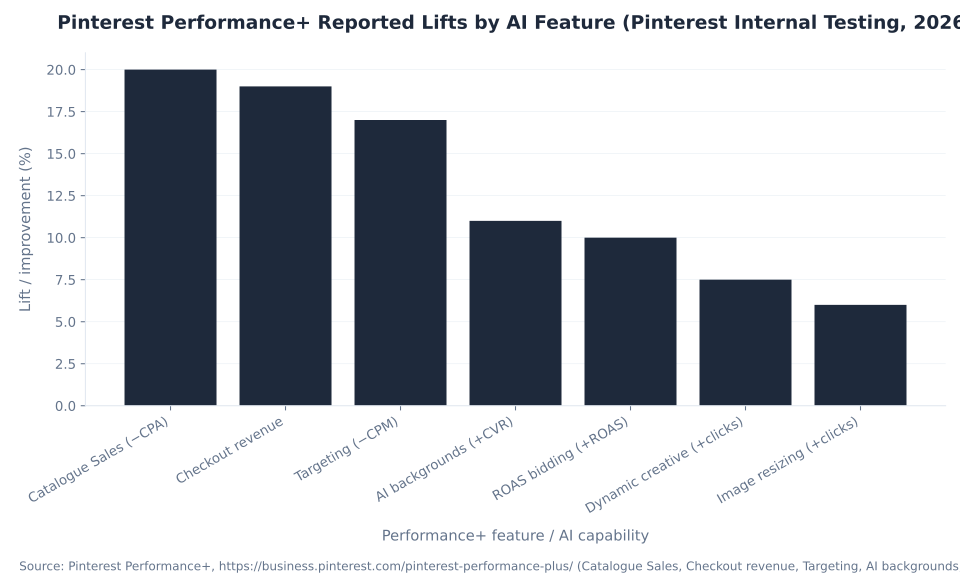
Pinterest's Performance+ internal testing data produces seven distinct lift figures across six product components. The chart below aggregates them for comparison. Catalog Sales campaigns show the largest gain at −20% CPA vs standard setup; Performance+ creative AI backgrounds drive +11% CVR and +19% checkout revenue. Every figure is Pinterest-reported — attribute to Pinterest, not mbadv.
The Wayfair case study is the most cited real-world result in Performance+ documentation: Wayfair achieved a +38% conversion rate and +6.7% ROAS using Performance+ (Pinterest-attributed, per the Pinterest Performance+ product page). Wayfair is a home-furnishings brand — a natural fit for Pinterest's visual-discovery audience of Pinners actively planning purchases in home categories. For advertisers in home decor and furniture, this is a meaningful directional signal that Performance+ performs well in catalog-heavy, high-consideration-purchase categories. It is not a guarantee of the same outcomes — attribution, catalog quality, creative, and conversion tracking setup all affect results.
The chart below visualizes the full Performance+ lift range. Note that Catalog Sales (−20% CPA) and Targeting (−17% CPM) represent cost reductions vs a baseline, while the remaining five figures (Checkout revenue +19%, AI backgrounds +11% CVR, ROAS bidding +10%, Dynamic creative +7.5% clicks, Image resizing +6% clicks) are positive performance gains. Dynamic creative selection — which evaluates multiple Performance+ creative variants and serves the best-performing one per impression — was announced at Cannes Lions 2026 and added +7.5% click volume vs the prior single-variant model.
The practical implication for campaign management: Performance+ isn't a single dial to turn. Each component addresses a specific efficiency gap. Advertisers seeing poor CPM on targeting should evaluate Performance+ targeting (−17% CPM). Those with healthy CTR but underperforming ROAS should test Performance+ ROAS bidding (+10% ROAS). Those with catalog-driven ads and white or plain backgrounds should test AI background generation (+11% CVR) before redesigning creative assets from scratch. See Pinterest ads metrics and ROAS for how to measure each improvement in your own reporting.
Performance+ Creative: AI Backgrounds, Dynamic Creative Selection, and What Changes for Creative Teams
Performance+ creative is the component of the suite that directly touches the ad itself — generating AI backgrounds for catalog-driven Pins, resizing images for different placements, and using dynamic creative selection to serve the best-performing creative variant per impression. The +11% CVR and +19% checkout revenue figures are Pinterest-reported from this feature specifically.
The AI backgrounds capability works on catalog-driven ads: Pinterest's system generates contextually relevant background scenes for product images rather than serving them against white or transparent backgrounds. The conversion lift (+11% CVR, +19% checkout revenue attributed to Pinterest ads) is Pinterest-reported from internal testing (Pinterest Performance+ Creative help page). The mechanism is straightforward: a product shown in a lifestyle context — a sofa in a styled living room, a skincare product on a bathroom shelf — signals how the product belongs in someone's life, which is exactly the intent Pinterest's audience brings to the platform. For brands where photography budgets constrain the volume of lifestyle creative, Performance+ creative AI backgrounds are a practical first test before committing to a full shoot.
Image resizing (+6% outbound clicks) addresses a different problem: catalog images are often in aspect ratios that don't fill the placements Pinterest's algorithm wants to serve them in. Performance+ creative automatically resizes to optimize for each placement, avoiding the cropping and padding artifacts that suppress CTR on non-native aspect ratios. These two features are available today via the Performance+ creative settings in Ads Manager.
Dynamic creative selection, announced at Cannes Lions June 2026, extends Performance+ creative further: instead of serving a single creative variant, the system evaluates multiple Performance+ creative variations and serves the one predicted to perform best for that specific impression — per user, per context, per moment. Pinterest reported +7.5% click volume vs the prior single-variant model (Pinterest Newsroom, Cannes 2026). Dynamic creative selection is a Cannes-announced feature; confirm its general availability status at publish before advising clients.
What changes for creative teams: the AI handles first-draft backgrounds and per-placement sizing, and the system selects among variants at the impression level. What does not change: the product photography quality, the brand guardrails, and the judgment of which creative directions to generate in the first place. Performance+ creative operates within the assets and parameters the advertiser provides — it does not invent new product angles or brand-appropriate aesthetics autonomously. For the creative best-practices that feed into Performance+ creative effectively, see designing Pins for Pinterest ads.
Pinterest Performance+ Reported Lifts by AI Feature (Pinterest Internal Testing, 2026)
Pinterest's 2026 Agentic Tooling: Business Assistant, Pinterest MCP, and Ask Pinterest
At Cannes Lions 2026, Pinterest announced a second wave of AI tooling that goes beyond campaign automation into agentic infrastructure: Business Assistant (an AI collaborator embedded in Ads Manager), Pinterest MCP (Model Context Protocol infrastructure connecting Pinterest's signals to third-party copilots), and Ask Pinterest (an experimental conversational shopping app). These are distinct from Performance+ — they operate at the strategy and workflow layer, not the campaign-execution layer.
Business Assistant is embedded directly in Ads Manager — and on mobile — and surfaces trend and visual insight signals that advertisers would otherwise have to discover manually. Pinterest's documented example: Business Assistant surfaced “clean beauty routine searches up 42% in one week” as a live trend signal, enabling a timely creative or targeting response. This is the product intelligence layer: instead of checking Pinterest Trends separately, the AI surfaces what's moving in your category in real-time within the tools where the decisions get made. Business Assistant was announced at Cannes Lions 2026; describe it as newly available early access tooling at publish.
Pinterest MCP (Model Context Protocol) is infrastructure, not a UI feature. It connects Pinterest's campaign data, analytics, and keyword signals to advertisers' own AI copilots and agentic tools via an open protocol. Alpha partners confirmed at Cannes Lions 2026 include PMG, Pacvue, Dentsu, Havas, Innovid by Mediaocean, and Omnicom's Jump450 (Pinterest Newsroom, Cannes 2026). For brands and agencies already using AI-native campaign management tooling, Pinterest MCP means Pinterest signals become a first-class input to those systems rather than requiring a manual data export step. This is early access / alpha — general availability and third-party tooling coverage will expand over time.
| Tool | What it is | 2026 status |
|---|---|---|
| Business Assistant | AI collaborator embedded in Ads Manager (and mobile); surfaces trend signals and visual insights in real time — e.g., “clean beauty routine searches up 42% this week” | Announced Cannes Lions June 2026; early access — verify GA status at publish |
| Pinterest MCP (Model Context Protocol) | AI-native infrastructure connecting Pinterest campaign/analytics/keyword signals to advertisers' copilots and agentic tools via open protocol | Alpha; confirmed partners: PMG, Pacvue, Dentsu, Havas, Innovid by Mediaocean, Jump450 (Omnicom) — Cannes Lions 2026 |
| Dynamic creative selection | Evaluates multiple Performance+ creative variants and serves the best-performing one per impression in real time; reported +7.5% click volume vs prior single-variant model | Announced Cannes Lions 2026; part of Performance+ creative suite — verify availability at publish |
| Ask Pinterest | Experimental app for conversational, visual-first, multi-step agentic shopping powered by Pinterest’s Taste Graph; not a self-serve ad product | Limited-access experiment — Cannes Lions 2026; not an ad buying product and not generally available |
Source: Pinterest Newsroom, “Pinterest unveils new AI tools for ads and personalized shopping” (Cannes Lions 2026). [Operator review — verify before publish] All four tools were announced at Cannes Lions June 2026. Business Assistant and Pinterest MCP are early access/alpha — confirm GA status and availability before advising clients. Ask Pinterest is experimental and not an ad product. One secondary source used “Creative Plus” as a product name; this was not confirmed on the primary Newsroom page — do not use “Creative Plus.” Pinterest renames AI features frequently — re-verify all product names at publish.
The combined implication of these Cannes tools for campaign management: Pinterest is building an agentic layer on top of its ad platform where the AI not only executes campaigns but surfaces opportunities, connects to external tooling, and — in Ask Pinterest's vision — engages shoppers in multi-step discovery directly. Advertisers who build their workflow around Pinterest MCP-compatible tools will receive the clearest signal about what's moving on the platform and what that means for their campaigns, without manual exports or delayed reporting cycles.
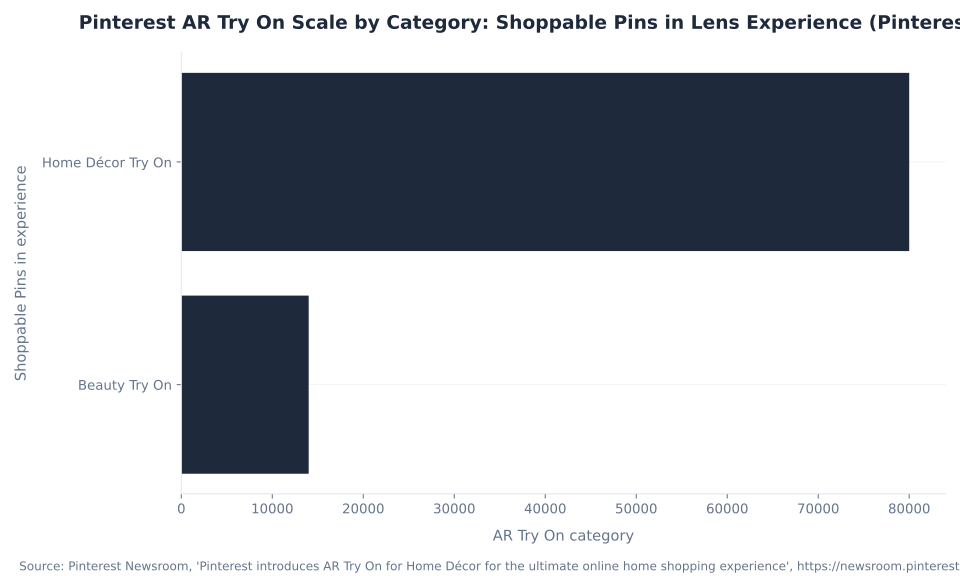
Pinterest AR Try On Scale by Category: Shoppable Pins in Lens Experience (Pinterest, 2026)
AR Try On for Beauty and Home Décor: Organic Commerce, Not a Self-Serve Ad Unit
Pinterest AR Try On is a Lens-powered shopping experience — not a standard self-serve ad format you select in Ads Manager. Try On-enabled Pins are 5× more likely to convert than standard Pins (Pinterest Newsroom), and Lens camera searches grew +126% year-over-year. The correct framing is an organic merchandising play, not a media line item.
Try On for Beauty covers about 14,000 shoppable Pins across lipstick, eyeshadow, and other beauty products. Try On for Home Décor covers 80,000 shoppable Pins, enabling Pinners to visualize furniture and décor in their own space using Lens. Home Décor partner brands include Crate & Barrel, CB2, Walmart, West Elm, and Wayfair. The usage data signals strong adoption among high-purchasing demographics: Pinterest reports Gen Z Beauty Try On usage up +28% and Millennial usage up +33% (Pinterest Newsroom, Pinterest introduces AR Try On for Home Décor).
The conversion lift is real and large — 5× is a meaningful signal for any brand whose products are visually evaluable before purchase. The mechanism is organic: when a retailer uploads a rich, properly-attributed product catalog with the metadata Pinterest's system requires for Try On eligibility, their products appear in the Lens Try On experience. The eligibility depends on catalog quality, product category, and region. This is an organic merchandising investment, not a media buy, and the return comes through catalog optimization rather than auction participation.
The misconception to address directly: “AR Try On” is not a Pinterest ad format available for purchase in Ads Manager. It is a Lens and shopping-catalog feature. Describing Try On as a media line item to a client is a category error that overpromises what can be bought. The correct advisory is: (1) ensure the product catalog is structured for Try On eligibility; (2) treat the 5× conversion lift as the return on catalog and merchandising quality, not paid media spend; (3) if any self-serve AR advertising capability exists in a specific region or account, verify it directly in Ads Manager before advising — [Operator review] before any client recommendation on AR ads availability. For beauty and skincare brands already active on Pinterest, see beauty products PPC and skincare PPC for the broader vertical context.
The +126% YoY growth in Lens camera searches is the broader market signal behind AR Try On's relevance. Pinners are actively using the camera as a search input — pointing it at a space, a color, or a product to find visually similar results and shopping options. For brands in home, beauty, and fashion, this means catalog quality and visual consistency directly affect how often their products surface in Lens results, even outside of any paid media. For the full catalog and shopping setup, see Pinterest shopping ads and catalogs.
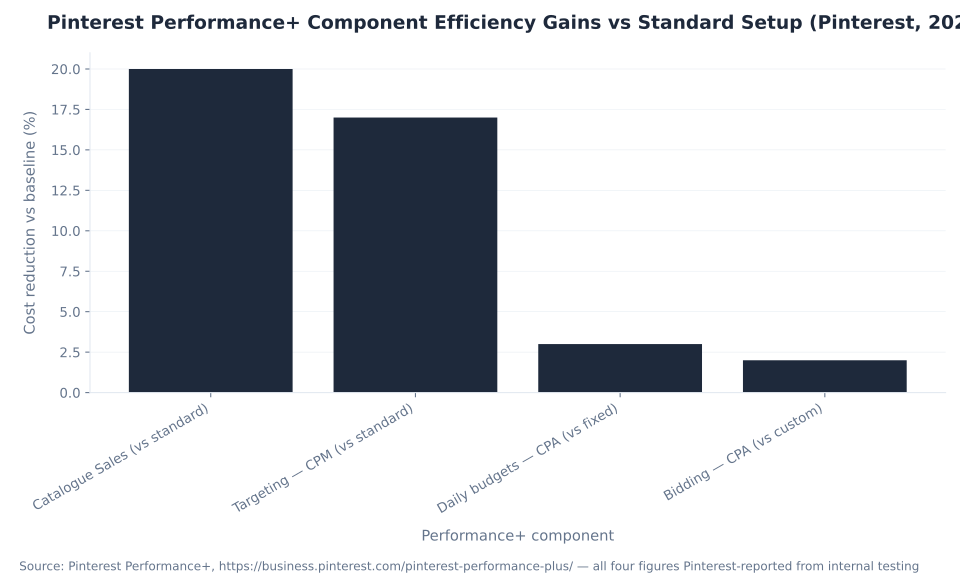
Pinterest Performance+ Component Efficiency Gains vs Standard Setup (Pinterest, 2026)
Showcase, Quiz, and Premiere Spotlight: The Emerging Pinterest Ad Formats Worth Buying in 2026
Three interactive ad formats beyond the standard Pin lineup are live and buyable in 2026: Showcase ads (swipeable interactive cards), Quiz ads (multiple-choice questions with a personalized results card), and Premiere Spotlight (a premium reserved video takeover). These build on the core format lineup covered in Pinterest ad formats.
These formats are distinctly different in buying model: Showcase and Quiz are self-serve through Ads Manager, while Premiere Spotlight is reserved and managed — you need a Pinterest sales representative to book it. Before planning any of these formats with a client, confirm current country availability in-product, as both Showcase and Quiz are expanding over time and region eligibility changes.
| Format | What it is | Buying model | Best fit |
|---|---|---|---|
| Showcase ad | A title card + up to ~4 swipeable, interactive feature cards, each with overlays and outbound links; users swipe through without leaving the feed | Self-serve via Ads Manager; expanding country availability [Verify in-product] | Brand storytelling, multi-product ranges, collection launches for home decor, fashion, and beauty brands |
| Quiz ad | Title card + up to 3 multiple-choice questions → a personalized results card matching the user to a product or recommendation; no app install required | Self-serve via Ads Manager; specs at Pinterest Review ad specs | Beauty shade finders, style quizzes, personalized subscription recommendations; highest engagement in fashion and beauty |
| Premiere Spotlight | Premium one-day video takeover: max-width video in the first home-feed and search slot (~50% of mobile screen); reserved for a single advertiser per day per market | Reserved/managed — requires a Pinterest sales rep; not self-serve (Pinterest Premiere Spotlight help) | Brand launch moments, product debuts, seasonal campaigns requiring maximum visual impact on a specific date |
Sources: Pinterest Business help — Showcase ads; Premiere Spotlight; Review ad specs (Quiz). [Operator review] Confirm country availability for Showcase and Quiz ads in Ads Manager before advising specific clients — eligibility expands over time. Premiere Spotlight requires a Pinterest rep — do not describe as self-serve. A vendor-circulating “8–12× recall” figure for Premiere Spotlight is not confirmed on any primary Pinterest page — omit.
The strategic case for Quiz ads is strongest in high-consideration product categories where personalization drives purchase confidence: beauty shade matching, skincare routine building, furniture style curation. For beauty and subscription brands, see beauty products PPC and subscription boxes PPC for the broader conversion context. Showcase ads do merchandising work that a standard Pin cannot — showing four different product angles, features, or use cases in one interactive unit without requiring a new page load. For food and beverage brands, a Showcase showcasing four recipe uses of the same product outperforms a single static Pin on consideration metrics for the same reason.
Direct Links Are the Default — and the Landing Page Is Now Part of Your Campaign
Direct Links send users straight to the advertiser's website on click — skipping the on-platform Pin closeup that previously buffered the experience. They are the default on eligible Consideration, Conversion, and Catalog Sales campaigns and cannot be disabled. Pinterest reports Direct Links drove +96% clicks-to-site and −38% cost-per-outbound-click on Consideration campaigns, and +68% clicks-to-site with +26% click-based conversions on Catalog Sales and Conversion campaigns.
The optimization consequence is structural, not incremental. For years the Pinterest mental model was that a click produced an on-platform closeup, and the landing page was a second, separate decision. That model is stale. When a Pinner clicks a Direct Link ad, they land on the advertiser's site within the same interaction. A slow page, a mismatched headline, a mobile layout that doesn't render correctly — all of these now show up directly in CPA and ROAS with no buffer. The gap between what the Pin promises and what the landing page delivers is now a campaign optimization variable, not a website problem to be handled separately. Source: Pinterest Business help — Direct Links.
| Campaign objective | Reported lift (Pinterest) | Implication for optimization |
|---|---|---|
| Consideration (formerly Traffic) | +96% clicks-to-site / −38% cost-per-outbound-click | Consideration campaigns now deliver nearly double the site traffic at substantially lower per-click cost; landing page quality is now the primary conversion lever |
| Catalog Sales + Conversions | +68% clicks-to-site / +26% click-based conversions | More clicks reach the site AND convert at a higher rate; product pages, cart flow, and checkout UX are now within scope of Pinterest campaign optimization |
Source: Pinterest Business help — Direct Links — figures are Pinterest-reported, not mbadv client data. Direct Links are the default on eligible campaigns and cannot be disabled.
The practical audit step that follows from this: when a Pinterest campaign generates clicks but no conversions, the first check is always the Direct Link destination, not the bid. Use Google PageSpeed Insights or a synthetic mobile test against the exact URL in the ad to measure load time and Core Web Vitals. Check message match — the Pin's visual and copy should accurately preview what the user lands on. If the Pin shows a lifestyle kitchen scene for a cookware brand, the landing page should show the featured product, not the brand homepage. These are campaign optimization decisions, even though they happen off-Pinterest.
Pinterest Performance+ Component Efficiency: Cost Reduction by Layer
Pinterest's internal testing shows that each Performance+ component produces a distinct cost reduction vs its non-AI baseline. The largest gain is at the Catalog Sales campaign level (−20% CPA vs standard catalog sales setup); targeting delivers −17% CPM vs standard; daily budget pacing and bidding add incremental reductions of −3% and −2% CPA respectively.
The chart below visualizes these efficiency gains. These are Pinterest-reported figures from internal testing — attribute to Pinterest and verify at publish, as Pinterest revises beta results as features reach general availability. The cost reductions compound when components are used together in a full Performance+ campaign: an advertiser running Performance+ targeting, bidding, and daily budgets simultaneously on a Catalog Sales campaign is stacking all four layers of efficiency, which is the basis of the overall “nearly 80%” A/B testing outperformance claim.
For advertisers who are not ready to adopt full Performance+ campaigns, the component approach offers a stepped entry: activate Performance+ targeting first to reduce CPM and validate audience expansion, then add Performance+ bidding for CPA efficiency, then move to daily budget pacing. Layering components incrementally — rather than switching to a full Performance+ campaign in one move — preserves more control over the learning transition, at the cost of slower efficiency gains compared to the all-in approach. For bid type and budget mechanics by objective, see how much Pinterest ads cost.
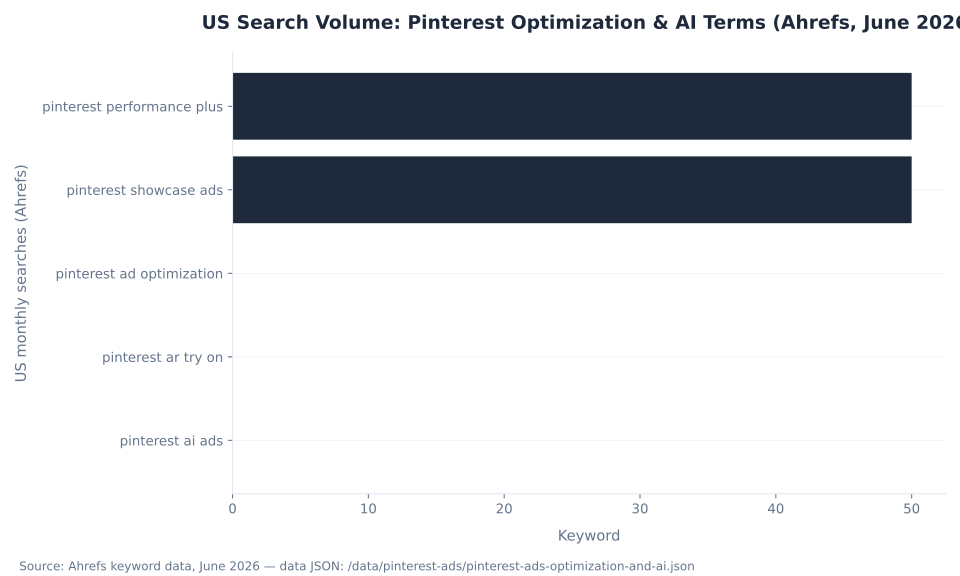
US Search Volume: Pinterest Optimization & AI Terms (Ahrefs, June 2026)
Running Pinterest ads for a home, fashion, or beauty brand?
MB Adv Agency works with visual-commerce brands to diagnose underperforming Pinterest campaigns, implement Performance+ where it earns its keep, and build the catalog and tracking setup that makes automation actually work. Our practice covers home decor, fashion, beauty, furniture, and food & beverage DTC brands.
See our visual-commerce PPC work →What to Hand Pinterest's AI and What to Keep: The Operator's Division of Labor in 2026
Pinterest's AI now handles the mechanical, high-volume work of campaign management reliably — audience expansion, per-impression creative selection, bid pacing, first-draft backgrounds. The human role has shifted to strategy, guardrails, and judgment: which products to push, what the ROAS floor is, what “brand-safe” means, and when to let a Performance+ campaign run wide vs hold it on a defined audience.
The automation-and-walk-away misconception is the one most likely to produce expensive disappointment. Performance+ campaigns need clean conversion signal — a correctly implemented Pinterest Tag + CAPI setup with event deduplication — before the AI has anything meaningful to optimize against. They need good creative that the AI can select among and adapt, not placeholder images. And they need a human guardrail on the ROAS or CPA target: without a rational efficiency floor, Performance+ ROAS bidding will optimize to whatever return is available, including returns below margin. Turning on automation without those inputs in place is not letting the AI work — it is asking the AI to work without inputs. The performance that follows is a reflection of the input quality, not a comment on the automation.
The correct hand-off model: automate the tasks that are mechanical and high-volume (audience expansion, per-impression creative ranking, bid adjustments by hour and placement, background generation); keep the decisions that require business context (which products are worth pushing at what margin, what brand-appropriate creative looks like before the AI adapts it, when seasonal context makes a campaign structure change justified). Business Assistant surfaces trend signals — “clean beauty routine searches up 42% this week” — but the decision about whether and how to respond to that signal belongs to someone who knows the brand's inventory, production lead times, and current campaign budget allocation. Pinterest MCP infrastructure delivers those signals to the advertiser's own AI copilot, but the strategy that interprets them is still the advertiser's.
The broader 2026 trajectory: the Pinterest ad stack is moving toward a model where the AI runs more of the campaign execution surface and the advertiser's role concentrates at the input and strategy layers. The accounts that perform best in this model are the ones that invest in clean conversion tracking, high-quality product catalogs for catalog ads and AR Try On eligibility, and a clear brief for what creative should communicate — then let Performance+ do the auction-level execution without interference.
The MB Adv Approach to Pinterest Campaign Optimization
MB Adv Agency treats Pinterest campaign optimization as a structured diagnostic process rather than a creative-first guessing game. When a Pinterest campaign isn't meeting its goals, our first question is always where in the funnel the signal breaks — and we work top-down through the delivery, impression, CTR, and conversion stages before touching any creative or bid. The funnel diagnostic approach is not unique to Pinterest, but the specific failure modes are: learning-phase sensitivity is higher than on Meta, audience narrowness thresholds are different, and the Direct Links default means the landing page is always a co-equal variable alongside the ad creative.
On Performance+, MB Adv Agency's working position is that the Performance+ suite earns its keep on accounts with sufficient conversion volume and clean tracking setup — and underdelivers predictably on accounts where the Tag or CAPI is misfiring, the audience is too narrow to find meaningful signal, or the creative assets provided are not strong enough for the AI to select meaningfully among. The pattern we see most often in underperforming automated campaigns: the conversion tracking was never validated post-launch, so the AI has been optimizing against phantom signal from day one. Fix the tracking, give the campaign a clean learning window, and Performance+ frequently performs well.
For brands in DTC visual-discovery categories — home decor, beauty, furniture — Pinterest is a high-intent platform where the audience arrives ready to discover and purchase, not just browse. The optimization work is about matching that intent with the right funnel stage: awareness campaigns for brand visibility, Consideration campaigns for traffic and early-stage discovery (aided by actalike audiences built from existing customer lists), and Performance+ Catalog Sales campaigns for the lower-funnel close. That full-funnel structure, running simultaneously, consistently outperforms any single-objective approach for brands whose product categories align with Pinterest's strongest purchase categories.
Pinterest Ads Optimization & AI: Frequently Asked Questions
Pinterest campaign stalled? ROAS slipping? Not sure which Performance+ features are worth turning on for your account?
MB Adv Agency runs Pinterest campaign diagnostics and Performance+ audits for visual-commerce brands. We identify where your funnel breaks, whether Performance+ is set up to work or just running on phantom signal, and what the right automation footprint looks like for your catalog size and conversion volume. Food & beverage and subscription box brands: we also work with those verticals on Pinterest.
Get a Pinterest audit →Methodology
This pillar draws on four data sources: (1) Ahrefs keyword data (June 2026, country: US) for search volume context on Pinterest optimization and AI terms; (2) Pinterest platform documentation — the Performance+ product page, Performance+ Creative help page, Direct Links help page, Conversions API help page, Showcase ads, Premiere Spotlight, and Review ad specs — accessed and verified June 2026; (3) Pinterest Newsroom — the Cannes Lions 2026 announcement (Business Assistant, Pinterest MCP, dynamic creative selection, Ask Pinterest) and the AR Try On for Home Décor article, both verified June 2026; (4) secondary vendor guides (Shopify, ALM Corp, Cropink) for optimization context. All numeric figures trace to a named primary source. No mbadv client metrics are cited — MB Adv attributions are qualitative editorial. Reviewed by MB Adv Agency, June 2026.

As a Google Ads expert, I bring proven expertise in optimizing advertising campaigns to maximize ROI.
I specialize in sharing advanced strategies and targeted tips to refine Google Ads campaign management.
Committed to staying ahead of the latest trends and algorithms, I ensure that my clients receive cutting-edge solutions.
My passion for digital marketing and my ability to interpret data for strategic insights enable me to offer high-level consulting that aims to exceed expectations.
Google Partner Agency
We're a certified Google Partner Agency, which means we don’t guess — we optimize withGoogle’s full toolkit and insider support.
Your campaigns get pro-level execution, backed by real expertise (not theory).

4.9 out of 5 from 670+ reviews on Fiverr.
That’s not luck, that’s performance.
Highly recommend Matteo to set up your server side tracking. He has a deep understanding of e-commerce tracking and will go above and beyond to make sure everything is set up correctly and working 100%. If you are scaling your store this set up is non-negotiable in my opinion and there isn't many people who have this much knowledge or put the effort in to get it right. Thanks again!

avorodesign.com
I can only recommend Matteo! He was very patient, professional and very knowledgeable about GA4, Consent Mode v2, and GDPR compliance. Communication was clear, and the setup was done professionally and efficiently. Highly recommend him for anyone needing reliable tracking implementation.

www.natureiki.life
Matteo shines in the realm of online professionals. His work is not only deep in data but also complemented by his proactive communication and cooperation, setting a new standard for freelancers. If you want someone who truly exceeds expectations, look no further. Highly recommended!

www.omanbeverlysmyth.com
Exceptional Service Beyond Expectations - Outstanding Service Impeccable depth, flawless delivery, and exceptional language fluency—this service exceeded all expectations. Highly recommended. Matteo truly ROCKS!!!

ium-paris.com
Top-notch, always highly value working with Matteo. An absolute Google Ads Genius. This is approximately the 8th time I have hired him and he's helped us get 6-7 ROAS. We are excited in continuing to improve our lead flow. Hire this guy if you need Google Ads help. Thanks Matteo!

www.dleeventgroup.com
I finally found the guy who can setup server side tracking and all the ecosystem properly. I definitely recommend Matteo. He is very responsive, kind and wants to dig into things. He configured GA4, Meta, Google Ads, Outbrain and google consent v2 with Cookiebot. Thanks Matteo.

inomega.fr
MB Adv delivered exceptional work with outstanding professionalism and lots of patience, taking time to see effects of changes made and not just do the work and submit it. The proactive communication and video summaries of the work completed made working with Matteo a pleasure, as he consistently went above and beyond. Highly recommended for web analytics projects! We are already working on another project.

www.withnellsensors.co.uk
Working with Matteo on my Google Ads was a game-changer. He's not just a strategist, he's a true partner. He understood my goals and tailored a campaign that perfectly reached my target audience. I'm grateful for his expertise and dedication.

dccargo.com
Click-driven mind
with plastic-brick obsession.
We build Google Ads campaigns with the same mindset we use to build tiny brick worlds: strategy, patience, and zero tolerance for wasted pieces.
Data is our blueprint. Growth is the only acceptable outcome.



