Meta Pixel & Conversions API: 2026 Tracking Guide
17.8%
lower cost per result for advertisers using the Conversions API alongside the Meta Pixel, compared to Pixel-only setups — per Meta’s April 2026 announcement. For any account optimizing toward conversions, the Conversions API is not an enterprise upgrade. It is the 2026 default.
Source: Segwise, “Meta Pixel and Conversions API: AI Updates 2026” citing Meta official data (April 15, 2026)
What Is the Meta Pixel — and Why It Now Lives Inside a Dataset
The Meta Pixel is the website data source within a Meta dataset — a JavaScript snippet that fires conversion events from a visitor’s browser to Events Manager. As of 2024–2025, Meta restructured Events Manager so the Pixel no longer exists as a standalone object. It now lives as one of several sources unified inside a dataset: a centralized container combining website (Pixel), server (Conversions API), app, offline, and messaging signals under a single ID and a single event stream.
The dataset ID is the same number that used to be the Pixel ID — no separate ID system was introduced. Leadsie’s 2026 analysis of the Meta dataset transition confirms that existing Facebook Pixel installations were auto-migrated to datasets with their event history intact. If your account predates 2024, your Events Manager now shows a dataset where a standalone Pixel used to appear — but the JavaScript snippet installed on your site functions identically.
The practical consequence is architectural: website Pixel events and server Conversions API events sent against the same dataset ID are designed to be received, deduplicated, and counted once. This is why the 2026 recommended setup is redundant by design — Pixel AND Conversions API firing for the same conversion event, not as a backup, but because each path captures what the other misses. The Pixel provides rich browser context (page URL, referrer, fbclid click ID); the CAPI sends events from your server and reaches Meta regardless of ad blocker or browser-tracking restrictions.
Any 2025 tutorial describing the Meta Pixel as a self-contained standalone object is describing the pre-2024 Events Manager architecture. The interface changed; the underlying tracking code did not. The gap between those two facts is the source of most “why does my tracking look different?” confusion.
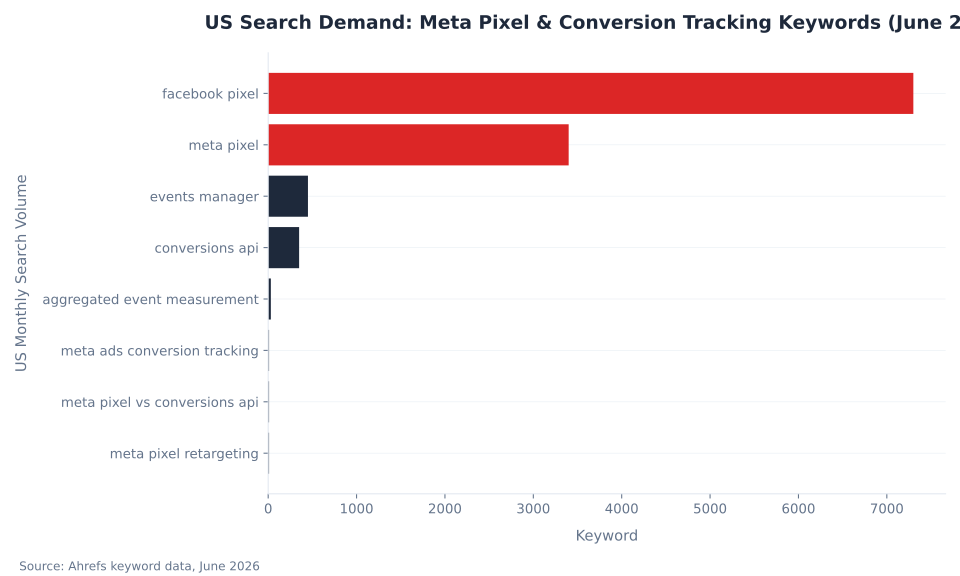
The term “Meta Pixel” remains correct for the browser-side data source and is still the dominant search term (7,300 US monthly searches for “facebook pixel,” 3,400 for “meta pixel”). The naming transition is an interface change, not a product fork. Tracking accuracy in 2026 depends on understanding both: the Pixel as the browser source and the dataset as the container that combines it with server-side signal. See Meta Ads audience targeting for how signal quality from this tracking stack determines the Custom Audiences and lookalike pools available to your campaigns, and Meta Ads metrics, reporting and optimization for how event match rates flow into the conversion numbers reported in Ads Manager.
Key Takeaways
Six facts that change how you set up and evaluate Meta conversion tracking in 2026:
- The Pixel is now a data source inside a dataset. Meta restructured Events Manager in 2024–2025. The Pixel is the website source within a dataset container; existing Pixels were auto-migrated; the dataset ID is the old Pixel ID.
- The 2026 recommended setup is Pixel plus CAPI, deduplicated by a shared
event_id. Both fire for the same conversion event; Meta merges them and counts one. Redundancy is the design. - Event Match Quality scores 3–5 for Pixel-only; 6–8+ with CAPI and hashed PII. EMQ measures how reliably Meta matches each event to a logged-in account. Low EMQ degrades Advantage+ optimization signal directly.
- CAPI accounts saw 17.8% lower cost per result compared to Pixel-only, per Meta’s April 2026 announcement.
- The 8-event AEM limit was removed in June 2025. All eligible standard and custom events now auto-aggregate per domain with no cap. The manual prioritization workflow and the AEM configuration tab no longer exist in Events Manager.
- 96% of US iOS users opted out of ATT tracking (Flurry Analytics, 2021). A browser-only Pixel captures an estimated 70–80% of true conversion events; CAPI pushes coverage to 90–98%.
Search Demand and the Naming Transition
"Facebook pixel" drives 7,300 US monthly searches versus 3,400 for "meta pixel" — together accounting for over 93% of tracked search demand in this cluster (Ahrefs, June 2026). The pillar targets both terms: Meta Pixel throughout for accuracy, with the Facebook Pixel alias named in the opening definition to capture both without disambiguation confusion.
| Keyword | US Monthly Searches | Ahrefs KD | Notes |
|---|---|---|---|
| facebook pixel | 7,300 | 79 | Primary search term; alias for Meta Pixel — target both |
| meta pixel | 3,400 | 67 | Current product name; trending up as Meta completes the rebrand |
| events manager | 450 | 0 | Naming-ambiguity trap; generic term, insufficient specificity to own |
| conversions api | 350 | 22 | Winnable secondary term; KD 22 with genuine intent signal |
| aggregated event measurement | 30 | 1 | Low volume, highly specific; target via FAQ and AEM section |
| meta ads conversion tracking | 10 | — | Long-tail; capture via comprehensive coverage |
| meta pixel vs conversions api | 10 | — | Comparison-intent; answered directly in comparison table below |
| meta pixel retargeting | 10 | — | Winner anchor; dedicated H2 section preserved below |
The large gap between "facebook pixel" (7,300) and everything else illustrates why the naming transition creates content opportunity: most high-volume searches use the old term, most accurate documentation uses the new one, and the pillar that bridges both — defining "Meta Pixel" while treating "Facebook Pixel" as a recognized synonym — captures the full demand pool. "conversions api" (KD 22) is the only mid-volume, genuinely winnable secondary term; it is directly targetted in the comparison section.
Meta Pixel vs. Conversions API vs. Both: Which Setup Works in 2026
In 2026, the correct answer is neither Pixel-only nor CAPI-only — it is both, deduplicated. Meta’s recommended setup is redundant by design: one conversion event sent from the browser (Pixel) and from the server (CAPI) simultaneously, merged via a shared event_id so Meta counts one conversion and discards the duplicate.
| Method | Data origin | Survives ad blockers / ITP / ATT | Typical EMQ | Role in 2026 |
|---|---|---|---|---|
| Pixel only (browser / client-side) | Visitor’s browser via base code + event code | No — ad blockers strip the request; ITP shortens cookies; ATT removes the IDFA match | 3–5 (OK range) | Captures rich browser context; post-ATT signal floor; insufficient alone for conversion optimization |
| CAPI only (server-side) | Your server sends events directly with hashed first-party data | Yes — request leaves your server, not the browser | 6–8+ (Good to Great when hashed PII included) | Durable signal; loses browser-side parameters (fbclid, referrer); rarely run alone |
| Pixel + CAPI deduplicated ✓ Recommended | Both — same event from browser and server, merged via shared event_id | Partial + full — Pixel for browser-visible users, CAPI for the rest; redundant coverage | Highest — browser context + server reliability | Meta’s recommended default in 2026; redundancy is the design, not a fallback |
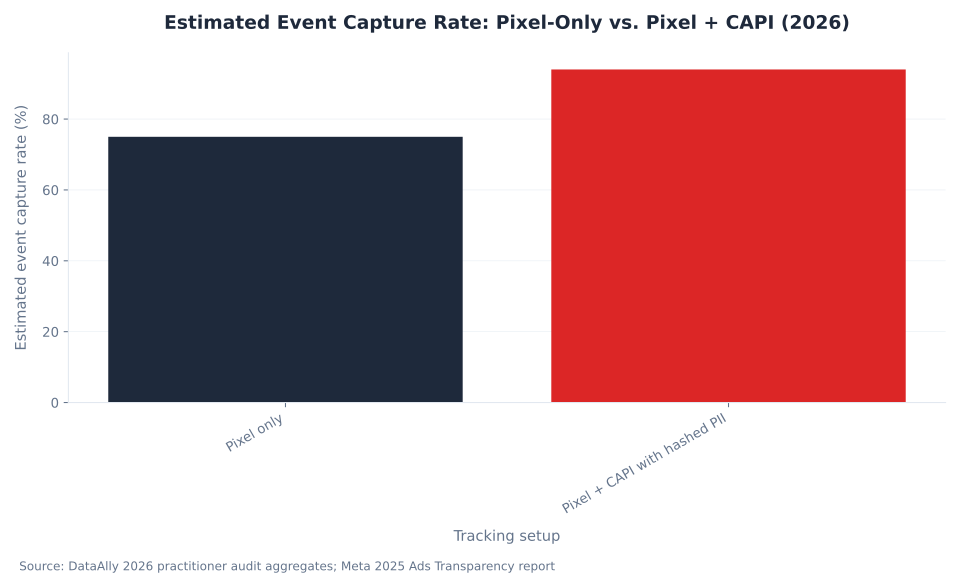
The quantitative case for the redundant setup: DataAlly’s 2026 practitioner audit aggregates put Pixel-only event capture at 70–80% of true conversions; Pixel-plus-CAPI with hashed PII captures 90–98%. Conversios’ 2026 analysis cites Meta’s own 2025 Ads Transparency report: over 50% of browser-side conversions now go untracked due to privacy regulations and cookie restrictions. The remaining 20–30% that CAPI recovers is not a marginal gain — it is the signal the Advantage+ algorithm uses to find the next buyer.
MB Adv Agency’s onboarding audit routinely surfaces a gap between Meta-reported conversions and backend records in accounts running a browser-only Pixel. The gap is structural, not a configuration error: it reflects the share of conversions that ad blockers, ITP, and iOS ATT prevent the browser from reporting.
The comparison above applies equally to DTC e-commerce brands and lead-gen accounts. For fashion PPC, beauty products PPC, and food and grocery DTC PPC brands, the Purchase event is the primary optimization target and incomplete tracking inflates cost-per-ROAS directly. For legal PPC, dental PPC, and financial services PPC accounts, the Lead event carries the same weight — and a low-EMQ Lead event trains Advantage+ on the wrong signal pattern.
Standard Events Reference: What Meta Tracks by Default
Meta recognizes 18 predefined event names — called standard events — for optimization and reporting. Standard events carry the most native Advantage+ optimization support: the algorithm is built around these names, and they produce richer training signal than custom events. Fire standard events via Pixel, CAPI, or both (deduplicated).
| Standard event | What it tracks | Primary use |
|---|---|---|
PageView | A page load (fired automatically by the base code) | Baseline traffic; website Custom Audience seed |
ViewContent | A view of a key page (product, listing, article) | Mid-funnel intent signal; retargeting seed |
Search | A site search action | Search-intent signal; search-abandon retargeting |
AddToCart | An item added to cart | E-commerce funnel; cart-abandon retargeting |
AddToWishlist | An item added to a wishlist | E-commerce intent signal |
InitiateCheckout | A checkout flow started | High-intent e-commerce signal |
AddPaymentInfo | Payment details entered during checkout | Late-funnel e-commerce signal |
Purchase | A completed purchase (requires value + currency params) | E-commerce primary conversion / ROAS optimization |
Lead | A lead submitted (form, signup, call) | Lead-gen primary conversion / Advantage+ training signal |
CompleteRegistration | A registration completed | SaaS / membership signup conversion |
Contact | A contact action (call, message, form) | Local-services / B2B lead signal |
Schedule | An appointment booked | Services / healthcare conversion signal |
StartTrial | A free trial started | SaaS funnel conversion |
Subscribe | A paid subscription started | Subscription / SaaS conversion |
SubmitApplication | An application submitted | Finance / education lead conversion |
CustomizeProduct | A product customization action | Niche e-commerce intent signal |
Donate | A donation submitted | Nonprofit conversion |
FindLocation | A store or location locator used | Local-services footfall signal |
Purchase and Lead are the two events with the strongest Advantage+ optimization support — implement these via both Pixel and CAPI (with deduplication) before adding any other event to the stack. Every other standard event provides funnel signal and retargeting seed data, but the algorithm primarily trains on the primary conversion event. See Jon Loomer’s guide to standard events, custom events, and custom conversions for the distinction between firing options and their optimization implications.
Custom Events and Custom Conversions: When Standard Events Are Not Enough
When no standard event fits the action you want to track, Meta offers two alternatives: custom events (coded into your Pixel or CAPI payload) and custom conversions (URL-rule-based, defined in Events Manager without additional code). Both are valid; both carry trade-offs versus standard events.
| Type | How it’s defined | Requires code? | Optimization support | Key caveat |
|---|---|---|---|---|
| Standard event | Meta-recognized event name (e.g. Purchase, Lead) fired from Pixel and/or CAPI payload | Yes — in your tag or CAPI payload | Best — natively understood by Advantage+ | Use for any action Meta already recognizes; covers the vast majority of conversion types |
| Custom event | Your own event name for business-specific logic (e.g. QuoteRequest) | Yes — in your tag or CAPI payload | Lower than standard events — less native algorithm support | Valid for actions no standard event covers; must be mapped to an optimization objective in Events Manager |
| Custom conversion | A URL-pattern or referrer rule applied in Events Manager (no new code required) | No — defined entirely in Events Manager UI | Moderate — rule-based, depends on underlying event signal quality | From September 2, 2025 Meta restricts custom conversions implying sensitive health or financial categories |
The September 2, 2025 sensitive-category restriction affects custom conversions whose names, URL patterns, or associated data imply specific medical conditions, credit status, or similarly restricted categories. This restriction does not affect standard events. Data-use terms and consent signaling requirements that govern what you can track via any conversion method are covered in Meta Ads policy, compliance and privacy.
US Search Demand: Meta Pixel & Conversion Tracking Keywords (June 2026)
Event Match Quality: How Tracking Accuracy Becomes Bid Signal
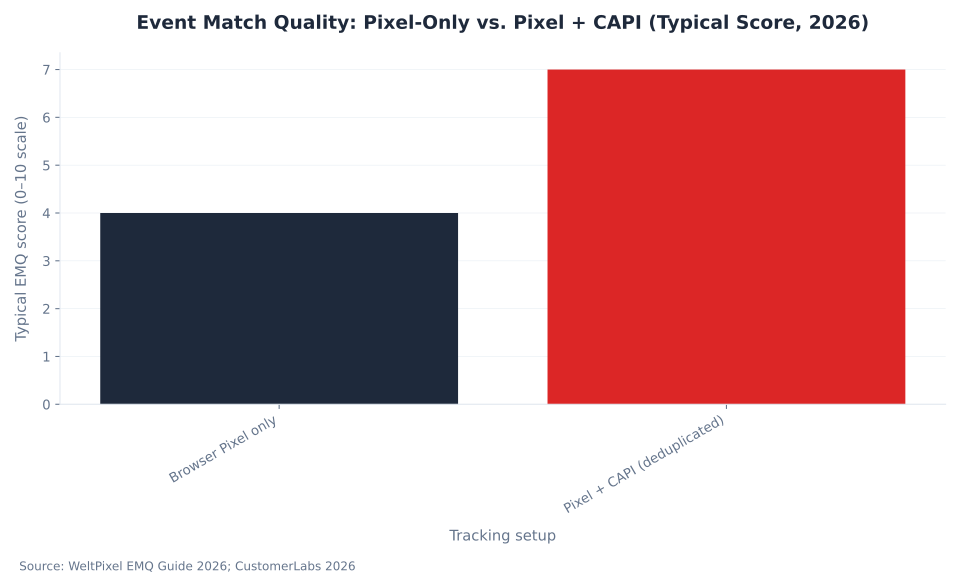
Event Match Quality (EMQ) is Meta’s 0–10 score measuring how reliably a conversion event you send can be matched to a specific logged-in Meta account. Higher EMQ means more events matched to real users — and more signal for Advantage+ to optimize bids. A browser-only Pixel typically scores 3–5 because it can only send cookies and IP address. Adding the Conversions API with hashed first-party data pushes scores to 6–8+.
| Rating | Score range | What it means for optimization |
|---|---|---|
| Great | 8–10 | Meta matches most events to logged-in users; full Advantage+ optimization signal available |
| Good | 5–7 | Reasonable match rate; some signal loss but algorithm can learn effectively |
| OK | 3–4 | Significant matching gaps; Pixel-only typical range; optimization signal is limited |
| Poor | 0–2 | Most events cannot be matched to accounts; Advantage+ ad optimization severely impacted |
| Setup | Typical EMQ range | Signal basis |
|---|---|---|
| Browser Pixel only | 3–5 (OK range) | Cookies, IP address, browser signals — all vulnerable to blocking and ITP truncation |
| Pixel + Conversions API (deduplicated) | 6–8+ (Good to Great) | Browser context plus server-side hashed PII (email, phone, name, IP, user agent) collected at the conversion point |
| Data point | Figure | Source and context |
|---|---|---|
| CPA improvement from higher EMQ | 15–25% better cost-per-action | Meta’s own data as cited by WeltPixel EMQ Guide 2026; vendor-reported, not independently audited |
| Conversion accuracy increase | 20–40% higher conversion accuracy after EMQ boost | CustomerLabs 2026; vendor-reported claim based on client aggregate |
| CPA reduction from adding CAPI | 17.8% lower cost per result (CAPI vs. Pixel-only) | Segwise 2026 citing Meta official data, April 15, 2026; no breakdown by vertical or account size |
EMQ is scored per dataset and is visible in Events Manager under your dataset’s Overview tab. The score reflects the completeness of customer data parameters sent with each event — email address, phone number, name, and external ID contribute the most. Niblin’s 2026 EMQ diagnosis guide confirms that hashed email alone — when collected at the conversion point and included in the CAPI payload — produces the single largest EMQ lift for most accounts.
MB Adv Agency finds that accounts adding hashed email and phone to their CAPI payloads see the most immediate EMQ lift — the score reflects PII completeness at the conversion point, not configuration quality in Events Manager. An EMQ of 6+ is the floor MB Adv targets before committing to conversion optimization campaigns for legal PPC, dental PPC, and financial services PPC clients where the Lead event carries all optimization signal.
Meta AEM Event Cap: Before vs. After June 2025
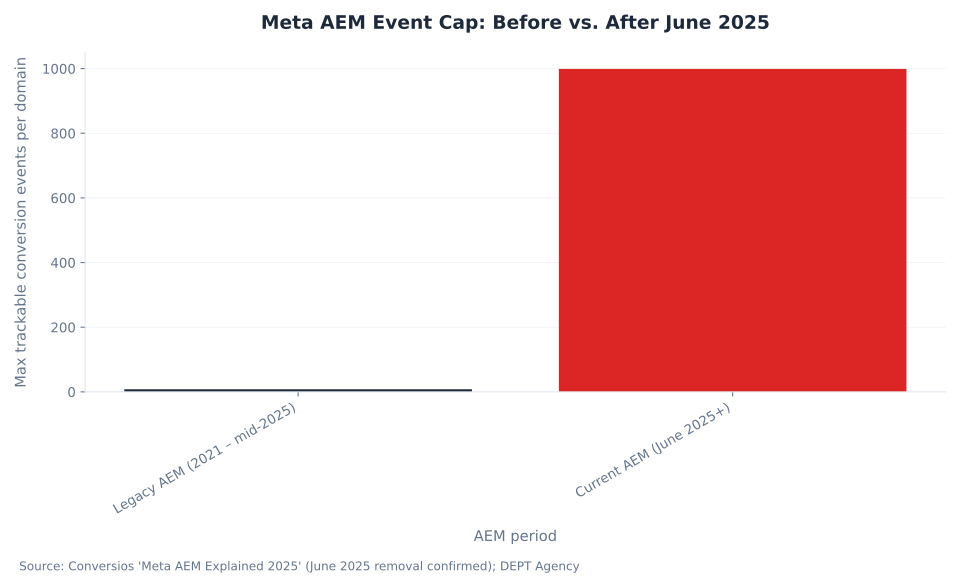
Aggregated Event Measurement: Before and After June 2025
Aggregated Event Measurement (AEM) is Meta’s privacy-preserving system for measuring web conversions from iOS 14.5+ users who opted out of ATT tracking. In June 2025, Meta removed the 8-event cap, eliminated manual prioritization, and deleted the AEM configuration tab from Events Manager entirely. Any guide describing the “select and rank your 8 priority events” workflow as current is citing a sunset process.
| Aspect | Legacy AEM (2021 – mid-2025) | Current AEM (June 2025 onwards) |
|---|---|---|
| Event cap per domain | Up to 8 conversion events per domain, manually ranked | No cap — all eligible standard and custom events processed automatically |
| Prioritization | Manual — you selected and ranked which 8 events reported for opted-out iOS users | Automatic — no manual ranking required or possible |
| AEM configuration tab in Events Manager | Present — required setup step | Removed — no manual AEM setup in Events Manager |
| Domain verification requirement | Tied to AEM event configuration; required | Not required for AEM; still recommended for custom conversions and link ownership |
| Value optimization | Manual value event ranking required | AEM automatically models conversion value in aggregate |
| Who it measures | Opted-out iOS 14.5+ web conversions, capped at 8 events | Same population; now with no event cap |
The practical impact of the June 2025 change was largest for multi-product DTC accounts that previously hit the 8-event constraint — forced to choose between tracking AddToCart, InitiateCheckout, and Purchase as separate priority events with no way to report all three simultaneously. Since June 2025, all three (and every other eligible event) aggregate automatically with no cap. Conversios’ June 2025 AEM update confirms the removal and the elimination of the manual configuration tab. DEPT Agency’s analysis confirms domain verification became optional for AEM at the same time.
AEM covers only conversions from iOS 14.5+ users who opted out of ATT. For users who granted ATT permission, or for non-iOS users, the standard Pixel and CAPI event stream applies in full. AEM is a fallback measurement layer, not a replacement for first-party tracking signal — the Pixel-plus-CAPI redundant setup provides better coverage of the full audience regardless of AEM.
Event Match Quality: Pixel-Only vs. Pixel + CAPI (Typical Score, 2026)
iOS 14.5 and the ATT Signal Loss: Why the Pixel Alone Is Not Enough
Apple’s App Tracking Transparency (ATT), mandatory since iOS 14.5 (April 26, 2021), requires every app to ask permission before tracking users across other apps and websites. Flurry Analytics measured 96% of US Facebook users opting out in May 2021. This damage to Meta’s cross-app match mechanism is structural — it has not reversed, and a browser-only Pixel in 2026 operates at the post-ATT signal floor.
| Geography | ATT opt-out rate for Facebook/Meta | Implication |
|---|---|---|
| United States | ~96% | Only ~4% of US iOS Facebook users granted cross-app tracking permission |
| Worldwide | ~88% | Global average; US/UK/AU markets (higher iOS share) trend toward the US figure |
| Tracking setup | Estimated event capture rate | What is missing |
|---|---|---|
| Browser Pixel only | 70–80% of true conversion events | Events blocked by ad blockers, Safari ITP, and iOS ATT opt-outs; 20–30% of bid signal is invisible to Advantage+ |
| Pixel + CAPI with hashed PII | 90–98% of true conversion events | Residual gap from incomplete PII at conversion point; CAPI cannot recover events with no server-side trigger |
Without the IDFA, Meta lost its primary mechanism for matching browser-side ad impressions to off-platform conversions. The Conversions API and hashed first-party data are the structural response: they match conversions through Meta’s logged-in user graph rather than through a device identifier the OS can refuse. Meta’s own 2025 Ads Transparency report estimates over 50% of browser-side conversions now go untracked due to privacy regulations and cookie restrictions — a figure consistent with the post-ATT environment the Pixel-only setup is operating in. Apple’s ATT framework documentation describes the opt-in requirement and its scope.
Event Deduplication: How event_id Prevents Double-Counting
When both the Pixel and CAPI fire for the same conversion, Meta receives two signals for one action. Without deduplication, it counts both as separate conversions — inflating reported metrics and sending corrupted bid signal to Advantage+. Deduplication requires two matching parameters in both events: event_id and event_name.
| Parameter | Browser Pixel field | CAPI server payload field | Matching requirement |
|---|---|---|---|
event_id | eventID in Pixel event call | event_id in CAPI payload | Exact match required — case-sensitive; trailing whitespace breaks deduplication |
event_name | Event name in Pixel call (e.g. Purchase) | event_name in CAPI payload | Exact match required — same standard or custom event name in both signals |
| Deduplication window | — | — | 48-hour rolling window (practitioner-documented: Analyzify 2026); re-verify against live Meta developer doc at publish) |
The five-step deduplication implementation process:
- At the moment of conversion, generate a unique string — UUID v4 or ULID — once per event occurrence. Do not reuse IDs across events.
- Pass this string as the
eventIDparameter in the browser Pixel event call. - Pass the identical string as the
event_idfield in the CAPI server payload. - Use the same
event_namevalue in both (e.g.,Purchase). A mismatch — even capitalization — causes deduplication failure. - Verify in Test Events: both events should appear under the same dataset with a deduplication indicator confirming one is merged.
The most common implementation failure is sending both events without a shared event_id. Meta cannot link them and counts both — reported conversions inflate by up to 2× and the bid signal trains on doubled data. The second most common failure is generating the event_id separately on the browser and server rather than generating it once and passing it to both paths.
Retargeting with the Meta Pixel: Building and Recovering Custom Audiences
Pixel-based retargeting requires a Custom Audience above Meta’s 100-person minimum, but practical delivery and audience segmentation begin at 1,000+ people per segment. iOS 14.5 ATT opt-outs structurally reduced retargeting pool sizes for browser-Pixel-only accounts; the Conversions API recovers a share of that gap by matching server-side events through Meta’s logged-in user graph.
| Audience size | Delivery behavior | Practical note |
|---|---|---|
| Below 100 | Below Meta’s minimum — audience will not deliver | No ads served; this is an absolute floor, not a soft limit |
| 100–999 | Meta’s technical minimum; delivery is possible but constrained | Optimization signal is thin; segment-level frequency capping is unreliable |
| 1,000–50,000 | Recommended range — sufficient signal for Meta to find quality matches | Effective for segmented retargeting (cart abandoners, product viewers) with consistent delivery |
| 50,000+ | Large-scale retargeting; broad awareness re-engagement | Sufficient for value-based lookalike seeding; segment granularity optional at this scale |
The iOS 14.5 ATT opt-out rate (96% of US Facebook users per Flurry) reduced the size of retargeting pools built from browser Pixel events in the Meta app ecosystem. A Pixel-only setup captures an estimated 40–60% of iOS conversions as retargeting-eligible events; adding CAPI recovers a meaningful share by sending server-side events that match through Meta’s logged-in user graph rather than through a device identifier the OS can refuse. The result: Pixel-plus-CAPI accounts build retargeting pools faster and at closer to true audience size.
MB Adv Agency builds retargeting audiences only after a full Pixel completeness audit. An undersized retargeting pool — below 1,000 per segment despite adequate site traffic — is the first diagnostic signal of a tracking gap, not a targeting strategy problem. Fixing the Pixel-to-CAPI coverage gap before segmenting the audience delivers more lift than any creative rotation on a broken pool.
For DTC brands in supplements and nutrition PPC and furniture PPC, where the purchase cycle is long and top-funnel retargeting pools (ViewContent, AddToCart) drive meaningful incremental revenue, a degraded pool directly reduces the retargeting inventory available for Advantage+ to optimize within. The Meta Ads audience targeting pillar covers how Custom Audience signal feeds into lookalike modeling and Advantage+ audience expansion.
Estimated Event Capture Rate: Pixel-Only vs. Pixel + CAPI (2026)
MB Adv Agency — Meta Ads Tracking Audit
Audit Your Meta Tracking Stack Before It Costs You Performance
A Pixel gap is invisible until you compare Ads Manager reports against your backend. MB Adv Agency runs a full conversion tracking audit — dataset verification, EMQ diagnosis, and CAPI implementation review — before committing to performance targets. We work with fashion, beauty products, and supplements brands, and manage Meta Ads from Chicago and Austin.
Get a Tracking Audit →Setting Up the Meta Pixel and Conversions API: The 2026 Stack
The 2026 setup involves six sequential steps: dataset verification, Pixel base code installation, standard event implementation, CAPI connection, event_id deduplication wiring, and Test Events verification. Complete each step before moving to the next — a CAPI connection that fires without a Pixel providing browser context (fbclid, referrer) loses attribution data that the server cannot replicate.
- Verify or create your dataset in Events Manager. Open Business Manager → Events Manager → Data Sources. If your account predates 2024, your existing Pixel has been auto-migrated to a dataset with the same ID and event history. If starting fresh, create a new dataset and note the dataset ID — it doubles as the Pixel ID for the browser snippet.
- Install the Meta Pixel base code. From your dataset, go to Connected Sources → Web → Pixel setup to generate the base snippet. Install via Google Tag Manager (GTM), your Shopify/WooCommerce plugin, or directly in the site
<head>. The base code firesPageViewautomatically on every page load. - Add standard events at conversion points. Implement
Purchase(withvalueandcurrency) for e-commerce orLeadfor lead-gen as your primary conversion events. Add funnel events (AddToCart,InitiateCheckout) for retargeting audience depth. Local-services accounts running Flagstaff HVAC PPC or Flagstaff roofing PPC typically prioritizeLeadandContactas their primary signals. - Connect the Conversions API. Meta offers three paths: a partner-integration (Shopify, WooCommerce, GTM server-side container — fastest for most accounts); Meta-Enabled CAPI (one-click setup for eligible accounts, announced April 2026); or direct API implementation from your server for full control. All three paths send events to the same dataset ID as the Pixel.
- Wire up
event_iddeduplication. At each conversion point, generate a unique UUID v4 or ULID. Pass it aseventIDin the browser Pixel event call and asevent_idin the CAPI server payload. Use the identicalevent_namein both. Any mismatch breaks deduplication. - Verify with Test Events. In Events Manager, go to your dataset → Test Events. Browse to your conversion page and confirm both the Pixel event and the CAPI event appear in the real-time stream. Check the event details for hashed PII parameters (email, phone) — their presence directly determines your EMQ score. A deduplication indicator confirms Meta merged the two signals into one.
Best practices post-setup: review EMQ score in Events Manager monthly; add hashed email to the CAPI payload if not already included (single largest EMQ lever); compare Meta-reported conversion volume against backend records quarterly; and verify deduplication is still functioning after any GTM, Shopify, or server-platform update. Accounts in service verticals — Missoula legal PPC or Missoula plumbing PPC — where the Lead event is the only optimization signal, a single deduplication failure inflates the reported conversion count and trains Advantage+ on phantom conversions.
Debugging Pixel Tracking Issues in Meta Ads
Two tools handle Meta Pixel debugging: Meta Pixel Helper (a Chrome extension showing which events fire on a given page) and Test Events inside Events Manager (a real-time event stream from your browser session confirming events reach Meta). Neither alone catches every tracking gap. The most common failure mode is invisible to both.
| Tool | What it shows | Access | Limitation |
|---|---|---|---|
| Meta Pixel Helper | Which Pixel events fire on the current page; parameter errors; duplicate event warnings | Chrome Web Store → install extension → browse to your site | Shows your browser session only; cannot detect ad-blocker suppression for other users |
| Test Events | Real-time event stream showing both Pixel and CAPI events as they reach Meta; deduplication status | Events Manager → your dataset → Test Events tab | Requires browsing in the same session; CAPI events also appear, enabling end-to-end verification |
The green-but-not-converting false positive. Pixel Helper showing green — events firing without errors — does not mean conversions are reaching Meta at scale. Ad blockers suppress the Pixel request entirely for users who have them active. Those users never send events, so there is nothing for Pixel Helper to flag as an error when you view the page from your own unblocked browser. The suppression is invisible in Pixel Helper and only surfaces when conversion volume is compared against backend records.
The three-step diagnostic process for a suspected tracking gap:
- Use Test Events to confirm event structure. Verify the correct event name fires, the required parameters are present (for Purchase:
value,currency; for Lead: at minimum a hashed email or phone), and both Pixel and CAPI signals appear with matchingevent_idvalues. - Run a backend comparison. Pull Meta-reported Purchase or Lead counts for the last 7 days using a 1-day click attribution window. Compare against backend order records or CRM form submissions for the same period.
- Interpret the gap. A gap below 10% is within normal attribution-window variation. A gap above 10–15% is a signal that browser-side blocking is material — CAPI implementation (or improvement) is the structural fix.
MB Adv Agency’s standard tracking audit starts with the backend comparison — Meta reports vs. CRM records — before any creative rotation, bid strategy change, or audience recommendation. A tracking gap is an infrastructure problem. Optimizing on top of broken infrastructure produces wrong answers faster.
Frequently Asked Questions
Accurate Tracking Is the Foundation — Not a Nice-to-Have
A Pixel gap is invisible until you compare Ads Manager against your backend. If your Pixel setup is incomplete, no optimization layer fixes the signal gap underneath it.
Contact MB Adv Agency →Methodology
Data and benchmarks in this article are sourced from: Ahrefs keyword data (June 2026, US); Meta April 2026 CAPI performance announcement via Segwise; WeltPixel Event Match Quality benchmarks (2026); CustomerLabs EMQ guide (2026); Niblin EMQ diagnosis (2026); DataAlly CAPI practitioner audit aggregates (2026); Flurry Analytics iOS ATT opt-out measurements (May 2021); Conversios AEM reporting (June 2025 update confirming 8-event limit removal); DEPT Agency AEM analysis (2025); Jon Loomer Digital standard events and custom conversion guide (2026); Koast.ai Custom Audience minimum documentation (2025); Leadsie Meta dataset transition analysis (2026); Watsspace event_id deduplication guide (2026); Analyzify deduplication window documentation (2026). All figures represent published benchmark ranges or practitioner audit aggregates; individual account results depend on vertical, iOS audience share, ad blocker prevalence, and CAPI PII completeness. Reviewed by MB Adv Agency, June 2026.

As a Google Ads expert, I bring proven expertise in optimizing advertising campaigns to maximize ROI.
I specialize in sharing advanced strategies and targeted tips to refine Google Ads campaign management.
Committed to staying ahead of the latest trends and algorithms, I ensure that my clients receive cutting-edge solutions.
My passion for digital marketing and my ability to interpret data for strategic insights enable me to offer high-level consulting that aims to exceed expectations.
Google Partner Agency
We're a certified Google Partner Agency, which means we don’t guess — we optimize withGoogle’s full toolkit and insider support.
Your campaigns get pro-level execution, backed by real expertise (not theory).

4.9 out of 5 from 670+ reviews on Fiverr.
That’s not luck, that’s performance.
Highly recommend Matteo to set up your server side tracking. He has a deep understanding of e-commerce tracking and will go above and beyond to make sure everything is set up correctly and working 100%. If you are scaling your store this set up is non-negotiable in my opinion and there isn't many people who have this much knowledge or put the effort in to get it right. Thanks again!

avorodesign.com
I can only recommend Matteo! He was very patient, professional and very knowledgeable about GA4, Consent Mode v2, and GDPR compliance. Communication was clear, and the setup was done professionally and efficiently. Highly recommend him for anyone needing reliable tracking implementation.

www.natureiki.life
Matteo shines in the realm of online professionals. His work is not only deep in data but also complemented by his proactive communication and cooperation, setting a new standard for freelancers. If you want someone who truly exceeds expectations, look no further. Highly recommended!

www.omanbeverlysmyth.com
Exceptional Service Beyond Expectations - Outstanding Service Impeccable depth, flawless delivery, and exceptional language fluency—this service exceeded all expectations. Highly recommended. Matteo truly ROCKS!!!

ium-paris.com
Top-notch, always highly value working with Matteo. An absolute Google Ads Genius. This is approximately the 8th time I have hired him and he's helped us get 6-7 ROAS. We are excited in continuing to improve our lead flow. Hire this guy if you need Google Ads help. Thanks Matteo!

www.dleeventgroup.com
I finally found the guy who can setup server side tracking and all the ecosystem properly. I definitely recommend Matteo. He is very responsive, kind and wants to dig into things. He configured GA4, Meta, Google Ads, Outbrain and google consent v2 with Cookiebot. Thanks Matteo.

inomega.fr
MB Adv delivered exceptional work with outstanding professionalism and lots of patience, taking time to see effects of changes made and not just do the work and submit it. The proactive communication and video summaries of the work completed made working with Matteo a pleasure, as he consistently went above and beyond. Highly recommended for web analytics projects! We are already working on another project.

www.withnellsensors.co.uk
Working with Matteo on my Google Ads was a game-changer. He's not just a strategist, he's a true partner. He understood my goals and tailored a campaign that perfectly reached my target audience. I'm grateful for his expertise and dedication.

dccargo.com
Click-driven mind
with plastic-brick obsession.
We build Google Ads campaigns with the same mindset we use to build tiny brick worlds: strategy, patience, and zero tolerance for wasted pieces.
Data is our blueprint. Growth is the only acceptable outcome.