Amazon Ads Policies: Approvals & Brand Registry (2026)

Amazon Ads — Standard Moderation Window
24 hrs
Amazon's stated typical review window for self-serve sponsored ads — usually within 24 hours, maximum 3 business days. A disapproval is not an account action. It is a fixable creative note with a stated reason. Read it, fix that specific element, resubmit the same ad.
Source: Amazon Ads — Ad moderation and approval: A complete guide for book advertisers
Amazon’s Approval Gate: What the System Reviews and What’s a Hard Stop
Two things stand between a seller and a live Amazon campaign: creative that clears moderation, and the right account structure for the format they want to run. The moderation side is faster and more forgiving than most sellers expect — most ads clear within 24 hours and most disapprovals are fixable in minutes by editing the stated element and resubmitting the same ad. The account-structure side is where the real planning lives: a Professional selling plan and the Amazon Ads console unlock Sponsored Products immediately, but the brand-building layer — Sponsored Brands, Brand Stores, Sponsored Display — sits behind Brand Registry, which requires a trademark.
This page covers both sides of that gate: the policy landscape (what Amazon permits, what it restricts, what it prohibits outright), the Brand Registry eligibility split, the disapproval-recovery workflow, and the Seller Central / Vendor Central console reality. Format depth — how Sponsored Products targeting works, how to build a Brand Store, how DSP inventory is bought — lives in the sibling guides: what Amazon Ads is, Amazon Stores, and Amazon DSP and Streaming TV. This page’s job is to get a seller approved and correctly set up, then route them onward.
Two misconceptions cause the most unnecessary friction in Amazon Ads onboarding. First: that ad moderation takes weeks — it is usually 24 hours, and the rejection notice states the specific reason. Second: that Brand Registry is a prerequisite for advertising on Amazon at all — it is a prerequisite only for formats above Sponsored Products. Both misconceptions are addressed in the FAQ below, but the short version is: the system is faster and more accessible than sellers arriving from Google or Meta typically assume.
Key Takeaways
- Sponsored Products is the universal entry point. Any seller with a Professional selling account can launch Sponsored Products — no Brand Registry, no trademark, no minimum spend required.
- Brand Registry gates every brand-building surface. Sponsored Brands, Sponsored Display, Brand Stores, Brand Analytics, A+ Content, and Amazon Attribution all require a registered or pending trademark and Brand Registry enrollment. Source: Seller Labs 2026; Amazon Brand Registry requirements.
- Moderation is usually 24 hours, maximum 3 business days. Stores and translated campaigns: up to 72 hours. Amazon advises submitting at least 1 week before any launch date to allow for review and a possible resubmission cycle.
- A disapproval is a creative note, not an account action. Amazon states the specific reason; revise that element and resubmit the same ad. Re-moderation after resubmission reflects in about 24–48 hours (Gourmet Ads operational estimate, not a published Amazon SLA).
- CBD and hemp are a hard wall. Amazon prohibits both selling and advertising CBD — named specifically on Amazon’s prohibited-products list. No appeal path exists. The “hemp extract” relabeling workaround is detected and removed.
- The Ads console is unified, not a separate connector. Seller Central and Vendor Central both feed one Amazon Ads console, merged in 2020. Access is via the Advertising menu in Seller Central or advertising.amazon.com — same credentials across all accounts.
Brand Registry: The Master Gate for Amazon’s Brand-Building Suite
Brand Registry is an Amazon enrollment program for brand owners. It requires an active registered trademark or a pending trademark application from a supported government IP office — such as the USPTO for Amazon.com. Enrollment is free. What it unlocks for advertising is the majority of Amazon’s brand-facing surfaces: Sponsored Brands, Sponsored Brands Video, Sponsored Display with enhanced audience targeting, Brand Stores, A+ Content, Brand Follow, Brand Analytics, Search Query Performance, and Amazon Attribution. Sources: Amazon Brand Registry requirements; Seller Labs 2026.
Sponsored Products is the one format Brand Registry does not gate. Any seller with an active Professional selling account — not an Individual account, which cannot run ads — can launch a Sponsored Products campaign immediately, with no trademark and no minimum spend. A daily budget set by the seller is the only budget constraint. This is the universal on-ramp: the one surface where the Brand Registry divide does not apply, and the format that accounts for roughly two-thirds to nearly three-quarters of Amazon’s total advertising revenue.
Brand Registry is not a budget prerequisite — it is a trademark documentation requirement. The gap between Sponsored Products and the full brand-building platform is a trademark filing, not a spend threshold.
For a seller without a trademark yet, Amazon’s IP Accelerator program connects sellers with IP attorneys and grants Brand Registry access while a trademark application is pending — compressing the wait from the typical 6–12 month trademark process. The IP Accelerator path is how sellers get Brand Registry benefits during that processing window. Filing the trademark is the concrete first action the gate imposes; the IP Accelerator makes the wait shorter. Source: Amazon Brand Registry requirements.
MB Adv Agency treats Brand Registry enrollment as the true Amazon Ads onboarding milestone for any brand that wants the full platform, not account creation. The operational recommendation is consistent: start earning with Sponsored Products now — the unit economics and search term data gathered in the first weeks are valuable regardless of Brand Registry status — and file the trademark in parallel rather than waiting. Brand Registry is the bottleneck for the entire brand-building layer. It is a documentation process, not an advertising process, which means the sooner the trademark filing happens, the sooner Brand Stores, Sponsored Brands, and the analytics suite become available.
Prohibited vs Restricted Categories: Where the Lines Are
Amazon’s creative-acceptance policy divides ineligible content into two tiers: prohibited (a hard wall — no ad path, no appeal) and restricted (eligible with compliant creative or extra verification). The distinction is the most operationally important thing a seller can know before building campaigns in a gray-area category: the response to a disapproval in a restricted category is fixable; in a prohibited category, there is nothing to fix. The table below maps the major category groups to their tier and what it means for advertisers.
| Category group | Status | What it means for advertisers |
|---|---|---|
| CBD, hemp-CBD, THC, cannabis | Prohibited | Hard wall — barred to sell and advertise; relabeling as “hemp extract” gets removed when detected. No appeal path. |
| Illicit / recreational drugs & paraphernalia; drug-test & diagnostic kits; hacking products; false-document services | Prohibited | Not eligible at all — no advertising path in any marketplace. |
| Weapons as advertised products; pornography / adult; beauty claims of permanent body alteration; get-rich-quick products; hangover remedies | Prohibited | Blocked outright. Knives are prohibited except kitchen / cutlery / general camping. Weapons appearing as contextual content in limited placements are a narrow exception, not an advertising path. |
| Alcohol | Restricted (marketplace-dependent) | Prohibited to advertise in US, India, UAE, China; allowed in other marketplaces within guidelines. Re-confirm at publish — marketplace rules drift. |
| Dietary supplements, pharmaceuticals / OTC health, medical devices | Restricted | Eligible with compliant creative and possible extra verification. Non-compliant claims (unsubstantiated health benefits, disease claims) must be removed first. |
| Horror content; sexual wellness items | Restricted | Eligible within guidelines: horror only if not excessive or gory; sexual wellness with compliant creative. Contextually relevant placements required for horror. |
Sources: Amazon Ads — Prohibited products and services; Amazon Ads — Ad policies quick reference guide; ecomclips — Amazon Sponsored Ads policy summary. Representative map, not Amazon’s full legal list. Re-confirm prohibited and restricted lists against Amazon’s live policy pages before publish; rules vary by marketplace.
CBD deserves specific attention because it is the single most costly confusion for brands that sell on other platforms where hemp-derived products are eligible. Amazon prohibits both the sale and the advertising of CBD, hemp-derived cannabinoids, and THC products — specifically named on Amazon’s prohibited-products list, with the stated rationale that the FDA does not regulate CBD as a dietary supplement. The common workaround — relabeling a CBD product as “hemp extract” or “hemp oil” — is exactly that: a workaround that gets the listing removed once Amazon detects actual CBD content. Sources: Amazon Ads prohibited products; Calm by Wellness, 2025.
The restricted tier is not a barrier for most sellers but requires reading the category-specific guidelines. Supplements and nutrition brands, beauty and personal care advertisers, and skincare brands all fall in restricted territory and draw extra moderation scrutiny. The path is removing non-compliant claims and completing any required verification — not a hard stop. Knowing your tier before building campaigns is the check that prevents a disapproval that has no fix.
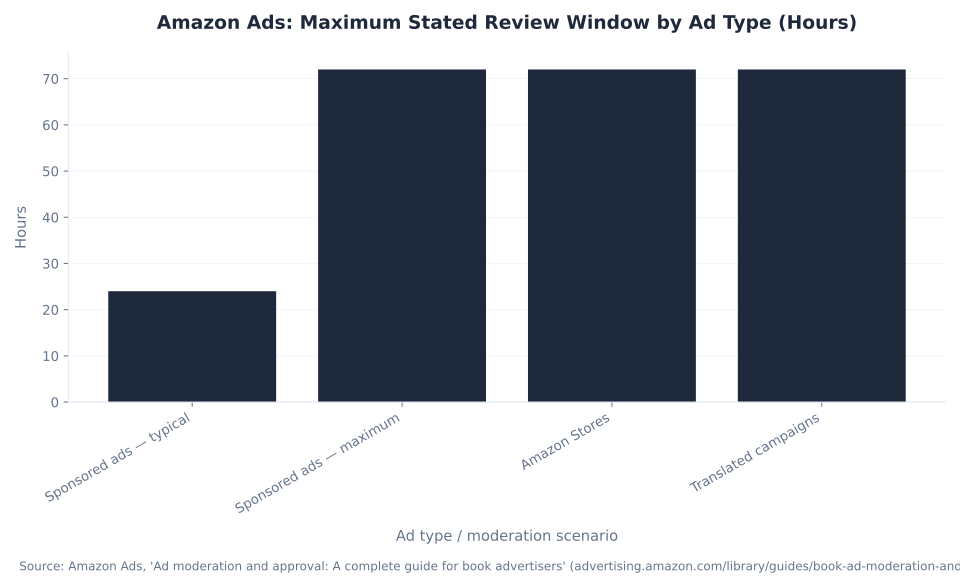
Amazon Ads: Maximum Stated Review Window by Ad Type (Hours)
Why Amazon Ads Get Disapproved — and How to Fix and Resubmit
When Amazon moderates an ad and rejects it, two things happen simultaneously: an email notification and a dashboard alert, both stating the specific reason for the disapproval. The workflow from there is: read the stated reason, make that specific edit to the existing ad, and resubmit — not a new ad, the same one. The moderation process combines automated checks and human review (Gourmet Ads characterization of Amazon’s process; Amazon Ads moderation guides describe “a team trained to uphold highest standards”). Re-moderation after resubmission reflects in about 24–48 hours — an operational estimate from Gourmet Ads, not a published Amazon SLA.
| Disapproval reason | Why it triggers | How to fix & resubmit |
|---|---|---|
| Headline / custom-text issue | Grammar or capitalization errors, obscured profanity, or unsubstantiated claims in the copy | Edit the copy, remove unprovable claims, fix casing / grammar, resubmit |
| Price inside the ad creative | Price or savings shown inside the creative itself (not on the product detail page) | Remove the price from the creative; keep any savings consistent with the detail page |
| Low-quality / non-compliant image | Blurry, pixelated, low-resolution, or a custom image that’s a product on a solid background | Replace with a sharp, in-context image at the required resolution; resubmit |
| Claim does not match the product detail page | Ad claim is not supported by or does not match the product detail page | Align the ad claim with the detail page (or update the detail page first); ensure the evidence supports it |
| Landing page mismatch | The ad destination does not accurately reflect the advertised product | Point the ad at a relevant, accurate landing page that matches the creative |
| Restricted or prohibited category | Product or claim falls in a restricted (needs approval) or prohibited (barred) category | If restricted: remove non-compliant elements / complete verification. If prohibited (e.g., CBD): not fixable — the category is barred. |
Sources: Amazon Ads — Sponsored Brands & display ads moderation; Amazon Ads — Ad moderation and approval (book advertisers); Gourmet Ads — Amazon Sponsored Ads Guidelines & Acceptance Policies. On disapproval, Amazon emails the specific reason; revise that element and resubmit the same ad. Re-moderation after resubmission reflects in about 24–48 hours (Gourmet Ads operational estimate, not a published Amazon SLA).
The most consequential distinction in the last table row: restricted and prohibited categories call for completely different responses. A supplements ad disapproved for an unsubstantiated health claim has a fix — remove or qualify the claim, resubmit. A CBD ad disapproved has no fix — the product category is the disqualifier, not the creative. Sellers who spend time seeking an appeal path on a prohibited-category disapproval work a dead end. Knowing the tier from Table 1 is the check that clarifies which row of Table 2 applies.
A disapproval is a creative edit request, not an account penalty. Amazon emails the specific reason; revise that element and resubmit the same ad. Other active campaigns are unaffected. Account health and listing suppression are separate processes entirely.
MB Adv Agency’s framing for a disapproval-recovery seller: a rejection notification is a copyedit request. Ad moderation operates at the creative level — a disapproved ad does not affect other active campaigns, does not reduce account health, and does not require starting over. Read the reason code, fix that one element, resubmit. For campaign-level management once setup is complete, see Amazon Ads optimization and automation. Electronics and home goods brands with large catalogs face the most disapprovals at volume — a creative quality checklist run before upload eliminates the most common triggers before they reach moderation.

Get Set Up on Amazon Ads
From Brand Registry to Live Campaigns
MB Adv Agency helps e-commerce brands navigate the Brand Registry gate, resolve ad disapprovals, and build Amazon Ads campaigns that compound over time — not just get live. Talk to us about your catalog, category, and trademark status.
Get Amazon Ads advice →How Long Does Amazon Ad Approval Take?
Amazon’s published moderation timelines for self-serve advertising are specific: most ads are reviewed usually within 24 hours but up to 3 business days. Stores moderation takes up to 72 hours, and translated campaigns also carry a stated maximum of 72 hours. Amazon’s own advice is to submit ads at least one week before any launch date — to allow for review and a possible resubmission cycle. Sources: Amazon Ads — Ad moderation and approval (24h typical; 3 business day maximum); Amazon Ads Stores moderation (72h maximum); Amazon Ads — Sponsored Brands and display ads moderation (translated campaigns 72h; submit at least one week before launch).
The chart reflects Amazon’s stated maximum SLA by moderation scenario. The 24-hour typical window is Amazon’s stated norm for self-serve sponsored formats — sourced from the book-advertiser moderation guide and broadly consistent with the Sponsored Brands and display ads moderation guide. An ad showing “pending” in the first 24 hours is in the normal queue, not signaling a problem. The moderation system combines automated checks with human review; peak periods (Prime Day, Q4) extend timelines beyond the stated typical window.
One distinction worth clarifying for brands familiar with managed-service creative production: the review timelines above are moderation windows, not production timelines. For DSP managed-service creative — custom image ads, animated Fire device lockscreens, audio spots — Amazon publishes separate creative delivery lead times measured in business days: custom image ads 7–8 days, animated lockscreens 10–11 days, audio spots 15–17 days, each revision adding 24 hours (Amazon Ads Creative Delivery Lead Times). These are production timelines, not moderation windows — conflating the two is the most common source of the “Amazon ad approval takes weeks” misread.
The MB Adv Agency operational rule: never tie an Amazon campaign’s go-live to a same-day promotional deadline. Submit the creative at least one week ahead. For pet supply and supplements brands running category-restricted creative, build in an extra resubmission buffer — the additional moderation scrutiny in those categories means a first-submission rejection is more likely, and resubmission adds another 24–48 hours.
Seller Central, Vendor Central, and the Ads Console: The Actual Setup Map
The most persistent confusion in Amazon Ads onboarding is the belief that “integrating Amazon Ads with Seller Central” requires wiring up a connector, navigating between two separate portals, or configuring a data sync. It does not. Amazon merged its separate seller and vendor advertising portals into one unified Amazon Ads console in 2020, replacing the old Amazon Marketing Services (AMS) and Amazon Advertising Platform (AAP) portals. Source: RoiRevolution — Amazon to Merge Sellers and Vendors Under Amazon Advertising Console. There is one console — advertising.amazon.com — that serves both 3P sellers (Seller Central) and 1P vendors (Vendor Central).
For a seller on Seller Central: the Ads console is reachable directly from the Advertising / Stores menu inside Seller Central → Campaign Manager, which opens advertising.amazon.com. Alternatively, register or sign in at advertising.amazon.com using the same email and password as the Seller Central account. The one credential rule that prevents access gaps: use the same email and password across Seller Central, Brand Registry, Amazon Ads, and (if applicable) Vendor Central. When credentials match across all four, access syncs automatically. Source: Amazon Ads — Link a Vendor Central account to your advertising account; Amazon sell.amazon.com registration guide.
Vendor Central — for 1P sellers who sell inventory directly to Amazon — has a distinct account linking step: connecting the Vendor Central account to the Amazon Ads console. This is a discrete action, not because the console is a different portal, but because vendor accounts and seller accounts are provisioned separately. Once linked, both flow into the same unified console with the same campaign management interface.
MB Adv Agency’s reframe for a seller anxious about integration: there is no fragile connection to maintain. A Professional selling account (Individual selling plans cannot run ads) plus matching credentials equals immediate access to Sponsored Products. The setup complexity that trips up brands in home goods, electronics, and similar DTC verticals is almost never the console linking — it is the trademark and Brand Registry documentation. The console is the easy part. Once setup is confirmed, see what Amazon Ads is for the full platform map and then talk to the MB Adv Agency team about building a campaign structure from there.
Frequently Asked Questions: Amazon Ads Policies and Setup
Next in the Amazon Ads series
Sponsored Products, Brands & Display — In Depth
The Amazon Sponsored Ads guide covers Sponsored Products auto and manual targeting, Sponsored Brands video formats, and Sponsored Display audience targeting — the three formats that follow once Brand Registry is in place.
Read the Sponsored Ads guide →Methodology & Sources
This pillar consolidates three absorbed URLs from the mbadv.agency Amazon Ads cluster: understanding-amazon-ads-content-guidelines, how-to-resolve-ad-disapprovals-on-amazon, and how-to-integrate-amazon-ads-with-seller-central. Moderation timelines (24h typical, 3 business day maximum, 72h for Stores and translated campaigns) are sourced directly from Amazon Ads’ published moderation guides. Brand Registry eligibility is from Amazon’s Brand Registry requirements page and Seller Labs’ 2026 guide. The prohibited and restricted category map is synthesized from Amazon’s prohibited-products page, quick reference guide, and ecomclips’ policy summary. CBD prohibition confirmed via Amazon’s prohibited-products list and Calm by Wellness (2025). Console unification (2020) sourced from RoiRevolution. No mbadv client metrics appear in this article. Last updated: June 2026. Reviewed by MB Adv Agency, June 2026.

As a Google Ads expert, I bring proven expertise in optimizing advertising campaigns to maximize ROI.
I specialize in sharing advanced strategies and targeted tips to refine Google Ads campaign management.
Committed to staying ahead of the latest trends and algorithms, I ensure that my clients receive cutting-edge solutions.
My passion for digital marketing and my ability to interpret data for strategic insights enable me to offer high-level consulting that aims to exceed expectations.
Google Partner Agency
We're a certified Google Partner Agency, which means we don’t guess — we optimize withGoogle’s full toolkit and insider support.
Your campaigns get pro-level execution, backed by real expertise (not theory).

4.9 out of 5 from 670+ reviews on Fiverr.
That’s not luck, that’s performance.
Highly recommend Matteo to set up your server side tracking. He has a deep understanding of e-commerce tracking and will go above and beyond to make sure everything is set up correctly and working 100%. If you are scaling your store this set up is non-negotiable in my opinion and there isn't many people who have this much knowledge or put the effort in to get it right. Thanks again!

avorodesign.com
I can only recommend Matteo! He was very patient, professional and very knowledgeable about GA4, Consent Mode v2, and GDPR compliance. Communication was clear, and the setup was done professionally and efficiently. Highly recommend him for anyone needing reliable tracking implementation.

www.natureiki.life
Matteo shines in the realm of online professionals. His work is not only deep in data but also complemented by his proactive communication and cooperation, setting a new standard for freelancers. If you want someone who truly exceeds expectations, look no further. Highly recommended!

www.omanbeverlysmyth.com
Exceptional Service Beyond Expectations - Outstanding Service Impeccable depth, flawless delivery, and exceptional language fluency—this service exceeded all expectations. Highly recommended. Matteo truly ROCKS!!!

ium-paris.com
Top-notch, always highly value working with Matteo. An absolute Google Ads Genius. This is approximately the 8th time I have hired him and he's helped us get 6-7 ROAS. We are excited in continuing to improve our lead flow. Hire this guy if you need Google Ads help. Thanks Matteo!

www.dleeventgroup.com
I finally found the guy who can setup server side tracking and all the ecosystem properly. I definitely recommend Matteo. He is very responsive, kind and wants to dig into things. He configured GA4, Meta, Google Ads, Outbrain and google consent v2 with Cookiebot. Thanks Matteo.

inomega.fr
MB Adv delivered exceptional work with outstanding professionalism and lots of patience, taking time to see effects of changes made and not just do the work and submit it. The proactive communication and video summaries of the work completed made working with Matteo a pleasure, as he consistently went above and beyond. Highly recommended for web analytics projects! We are already working on another project.

www.withnellsensors.co.uk
Working with Matteo on my Google Ads was a game-changer. He's not just a strategist, he's a true partner. He understood my goals and tailored a campaign that perfectly reached my target audience. I'm grateful for his expertise and dedication.

dccargo.com
Click-driven mind
with plastic-brick obsession.
We build Google Ads campaigns with the same mindset we use to build tiny brick worlds: strategy, patience, and zero tolerance for wasted pieces.
Data is our blueprint. Growth is the only acceptable outcome.