What Is an Amazon Store? Brand Stores Guide 2026

+71.3%
higher average order value for Brand Store visitors vs non-visitors
Source: Amazon Ads, “Brand Stores” product page — Amazon’s own reported statistics, data stamped August 2024. Not mbadv client data.
What Is an Amazon Store?
An Amazon Store — officially branded by Amazon as a Brand Store — is a free, multi-page brand storefront at amazon.com/{brand} that a registered brand builds, designs, and controls inside Amazon’s ecosystem. It is not a product listing, not a paid ad unit, and not a seasonal promotional page: it is your brand’s permanent, owned destination on Amazon, accessible at a custom URL, built with a drag-and-drop tile editor, and fully instrumented with its own analytics dashboard.
The defining characteristic is scope: a Brand Store spans multiple pages — a home page plus organized sub-pages by product category, collection, or product line. Each page is assembled from content tiles (product tiles, image tiles, text tiles, video tiles, featured deal tiles) in Amazon’s self-service Store Builder. Three pre-built templates accelerate setup: Marquee, Product Highlight, and Product Grid. A Blank template is available for full custom layouts. No coding or design expertise is required. The Store URL is permanent — amazon.com/stores/{brand} or the shortened amazon.com/{brand} — and it renders across desktop, mobile web, and the Amazon app.
The eligibility gate is Amazon Brand Registry: an active registered trademark is the prerequisite. Third-party sellers enrolled in Brand Registry, vendors on Vendor Central, and authorized agencies all qualify. See what Amazon Ads is for how Brand Stores sit alongside the platform’s paid products (Sponsored Brands, Sponsored Products, DSP).
The Store is the prerequisite for Store Spotlight. Sponsored Brands campaigns route clicks to a Store page, and the Store Spotlight format surfaces up to three Store sub-pages directly in Amazon search results. Store Spotlight requires a live, published Store with at least three sub-pages, each containing at least one product. The Store is not optional infrastructure — it is the asset the most capable Sponsored Brands format is designed to deliver traffic into. See Amazon Sponsored Ads for the Sponsored Brands and Store Spotlight system.
| Attribute | Detail |
|---|---|
| What it is | A free, multi-page brand storefront at amazon.com/{brand} — your owned, brand-controlled destination inside Amazon |
| Cost | Free to build and maintain; no advertising spend required (professional selling account or Vendor Central access required) |
| Eligibility | Sellers enrolled in Amazon Brand Registry (active registered trademark), Vendor Central vendors, authorized agencies |
| How it’s built | Self-service Store Builder — drag-and-drop content tiles + templates (Marquee, Product Highlight, Product Grid, Blank); no coding required |
| Structure | Home page + sub-pages by category, collection, or product line; each page from tiles; optimized for desktop, mobile web, and Amazon app |
| Analytics | Sales, visits, page views, traffic sources, daily visitors, custom source tags — plus section-level renders, viewable impressions, clicks, and CTR since January 10, 2026 |
| Visitor lift (Amazon Ads, Aug 2024) | +71.3% AOV · +53.9% purchase frequency · +52.1% cart addition rate · +62.7% NTB purchase likelihood · +72.3% NTB post-purchase spending · +42.4% avg selling price |
Sources: Amazon Ads, “Brand Stores” (free; Brand Registry/vendor/agency eligibility; visitor lift — Amazon’s own statistics, data stamped Aug 2024; re-confirm at publish); Amazon Ads, “Stores Best Practices Guide” (Store Builder, templates, tiles, structure).
What Every Brand Should Know Before Building an Amazon Store
- The Store costs nothing to own. An Amazon Brand Store is free to build and maintain. Brand Registry enrollment (active registered trademark) is the only gate. Advertising drives traffic to the Store but is not required to have one.
- It is a multi-page destination, not a single landing page. A Brand Store has a home page and structured sub-pages by category or collection, built from drag-and-drop tiles. It is entirely distinct from product detail pages and from A+ Content modules.
- Store Spotlight requires a live Store with at least three sub-pages. The Store Spotlight Sponsored Brands format — which surfaces sub-pages directly in Amazon search results — activates only when a published Store has ≥3 sub-pages, each with ≥1 product. Without that structure, Store Spotlight is unavailable.
- The Store became an instrumented optimization surface in January 2026. As of January 10, 2026, Amazon’s Sectional Performance tab reports renders, viewable impressions (MRC standard), clicks, and CTR for every individual Store section — across 27 countries. The Brand Stores API reached general availability on February 22, 2026.
- The Store anchors Amazon’s entire owned brand-building system. Amazon Posts, Amazon Live, and Brand Follow — all free, all Brand Registry-gated — connect back to the Store. Posts appear on the brand’s Store feed; Live embeds in the Store; the Follow button appears across all three surfaces. A well-built Store with these features active turns a single visit into a repeatable brand relationship.
What Brand Store Visitors Actually Do Differently
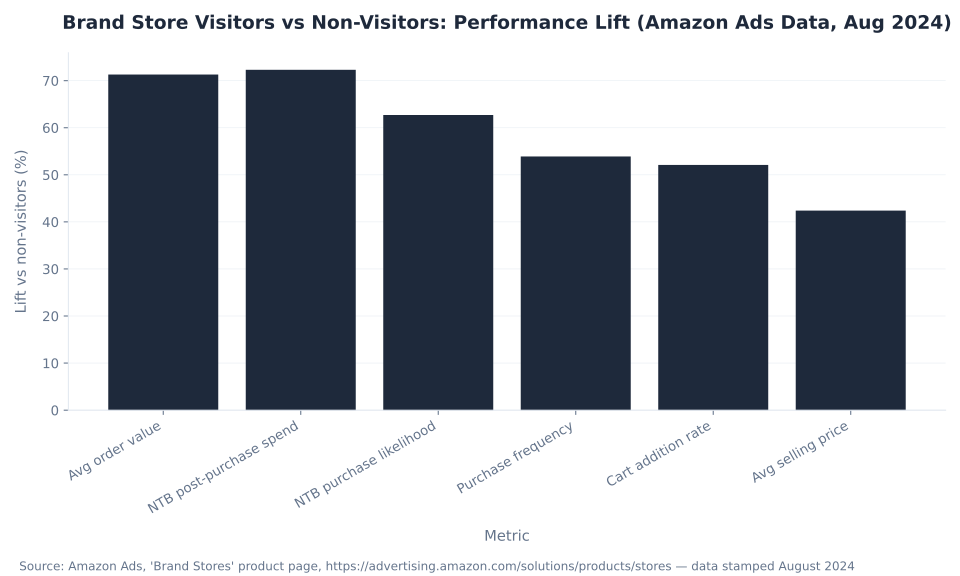
Amazon Ads’ own data — reported on the Brand Stores product page, stamped August 2024 — shows six performance lifts for shoppers who visit a Brand Store vs those who don’t. Every figure below is Amazon-attributed; none is mbadv client data.
| Metric | Lift vs non-Store visitors | Buyer segment |
|---|---|---|
| Average order value (AOV) | +71.3% | All Store visitors |
| NTB post-purchase spending | +72.3% | New-to-brand Store visitors |
| NTB likelihood to purchase | +62.7% | New-to-brand Store visitors |
| Purchase frequency | +53.9% | All Store visitors |
| Cart addition rate | +52.1% | All Store visitors |
| Average selling price | +42.4% | All Store visitors |
Source: Amazon Ads, “Brand Stores” product page. All six figures are Amazon Ads’ own reported statistics — not mbadv client data. NTB = new-to-brand (first purchase in trailing 12 months). Data stamped August 2024 — re-confirm live figures at publish.
These figures describe a difference in shopper behavior, not a guarantee of campaign performance. Shoppers who actively navigate to a brand’s Store are already expressing higher brand intent than shoppers who land on a single product page. The Store captures and rewards that intent — and the Sponsored Brands system exists to route more shoppers there from search. For home goods brands, furniture brands, and home decor brands with broad catalogs, the multi-page Store structure is where cross-sell and upsell happen at scale.
Amazon Store vs Product Detail Page vs Your Own DTC Site
The most common misconception about Amazon Stores is that they are a fancier version of a product detail page. They are not. A Brand Store is a multi-page, brand-controlled destination with its own URL, its own analytics, and its own content hierarchy — a fundamentally different surface from the fixed, Amazon-template-governed PDP.
| Dimension | Amazon Store (Brand Store) | Product Detail Page (PDP) | Your own DTC site |
|---|---|---|---|
| Scope | Multi-page brand destination (whole catalog + story) | A single product listing | Full-site brand + commerce |
| Layout control | You (tiles and templates within Amazon’s builder) | Amazon (fixed PDP template; A+ Content adds modules) | You (fully) |
| Cost | Free (Brand Registry required) | Free (part of the listing) | Hosting + platform + maintenance cost |
| Checkout trust | Amazon (high-trust, 1-click for Prime members) | Amazon (high-trust, 1-click) | Your own checkout |
| Analytics access | Aggregated Store insights (sales, visits, section engagement) — no shopper PII | Limited (Amazon-mediated Brand Analytics) | Full first-party analytics + customer list |
| Ad landing target | Yes — Sponsored Brands and Store Spotlight route clicks here | Yes — Sponsored Products route here | Yes — off-Amazon ads (measured via Amazon Attribution) |
| Best for | Brand story, cross-sell, loyalty, Brand Follow capture | Converting high-intent, single-product demand | Owning the full customer relationship and first-party data |
Sources: Amazon Ads, “Brand Stores” (multi-page, brand-controlled, free, ad landing target); Frooition, “Amazon Brand Store Design: 2026 Strategic Guide” (Store vs PDP control and structure comparison).
For DTC brands evaluating Amazon as a brand channel — not just a sales channel — the Store reframes the platform entirely. The checkout trust is Amazon’s; the storefront and the story are yours. Pet brand, baby product, and skincare brands in particular use the Store to establish brand identity at Amazon-scale volume without building a separate DTC acquisition funnel.
How to Build an Amazon Store: Steps, Templates, and Tiles
Building an Amazon Brand Store follows a fixed sequence inside the Store Builder, accessed from the Amazon Ads console (Seller Central or Vendor Central → Advertising → Stores). Brand Registry enrollment must be confirmed before the Builder opens. The full process — from first page to published URL — typically takes one to three business days including Amazon's moderation review.
Step 1: Confirm Brand Registry enrollment. An active registered trademark tied to the selling account is the prerequisite. If Brand Registry is already active (confirmed in Seller Central → Brands → Brand Registry), proceed. Agencies need to be authorized on the brand's account before Store Builder access is granted.
Step 2: Open Store Builder and create a Store. In the Amazon Ads console, navigate to Brand Content → Stores → Create Store. Select the brand, then choose a template: Marquee (hero image plus product highlights), Product Highlight (feature plus grid), Product Grid (dense catalog view), or Blank (full custom). The template determines the home page layout only — sub-pages are built independently.
Step 3: Set brand identity. Upload a brand logo (minimum 400×400 px, PNG or JPG), add the brand display name, and optionally set a background color or hero image for the home page banner.
Build at least three sub-pages before publishing. Store Spotlight — the Sponsored Brands format that shows your sub-pages directly in search results — requires a live Store with at least three sub-pages, each containing at least one product. Build sub-pages first; publish everything together. See Amazon Ads optimization and automation for scaling Store management via the Brand Stores API (GA February 22, 2026).
Steps 4–7: Pages, tiles, ASINs, and content. Add sub-pages organized by category or product line (e.g., “Women's Collection,” “New Arrivals,” “Bestsellers”). On each page, add content tiles: product tiles (linked to ASINs), image tiles (lifestyle or campaign images), text tiles (brand copy), video tiles (embedded brand video), and featured deal tiles. Every tile is drag-and-drop within the page grid. No coding required at any point.
Step 8: Submit for moderation. Amazon reviews every Store before it goes live — typically 1–3 business days. The review checks brand safety and policy compliance. Stores must not contain pricing, promotional language (“Free shipping”), or external links. After approval, the Store publishes to its permanent URL automatically.
Steps 9–11: Go live and connect ads. After publishing, connect Sponsored Brands campaigns to route ad clicks to specific Store sub-pages. If the Store has ≥3 sub-pages with ≥1 product each, Store Spotlight becomes available — one of the highest-value Sponsored Brands formats for brand-building. Open Store Insights (Brand Analytics → Brand Stores) to monitor visits, page views, traffic sources, and — since January 10, 2026 — section-level renders, viewable impressions, clicks, and CTR per tile. MB Adv Agency consistently recommends building the full Store structure including ≥3 sub-pages before activating Sponsored Brands campaigns, so Store Spotlight is available from day one rather than retrofitted after launch. For jewelry brands and footwear brands with multiple product lines, sub-pages map naturally to category pages that also improve Sponsored Brands targeting precision. See Amazon Ads targeting for how keyword and audience targeting integrates with Store-destination Sponsored Brands campaigns.
Amazon Store Analytics: Section-Level Insights (Jan 2026) and the Brand Stores API
Until January 2026, Amazon Store analytics reported Store-level aggregates: total visits, page views, sales, and traffic sources. On January 10, 2026, Amazon introduced the Sectional Performance tab — four metrics for every individual content section inside a Store, filterable by traffic source, available in 27 countries across six regions.
| Feature | Detail |
|---|---|
| Sectional Performance tab | Four metrics per individual Store section: renders, viewable impressions (MRC standard), clicks, and click-through rate (CTR) |
| Data available from | January 10, 2026 (announced January 16, 2026) |
| Viewability standard | Media Rating Council (MRC) — counts only sections visible in the browser or app viewport for the required duration |
| Traffic source filtering | Yes — segment section metrics by traffic source (Sponsored Brands, organic, DSP, external) |
| Countries at launch | 27 countries across six regions: 3 North America, 1 South America, 11 Europe, 3 Middle East, 4 Asia-Pacific, 1 Africa |
| Stores Analytics API (section-level) | New endpoints for section-level performance data added simultaneously with the Sectional Performance tab |
| Brand Stores API GA | General availability: February 22, 2026 (beta introduced June 2025). Endpoint: /v2/stores. Retrieve Store info and product content; update product content and selection programmatically; submit Store updates for moderation. Data range: up to 100 days per request. |
Sources: Amazon Ads, “Section-level shopper engagement insights on Brand Store (Beta)” (data from Jan 10 2026; 27 countries; four metrics; MRC viewability); PPC.land, “Amazon's new section-level insights reshape Brand Store optimization” (metric definitions; traffic-source filtering); PPC.land, “Amazon Brand Stores API exits beta” (GA Feb 22 2026; /v2/stores; 100-day range).
The section-level data answers a question Store analytics never answered before: which tiles on which pages are actually capturing attention and driving clicks. Renders count how many times a section appeared in a viewport. Viewable impressions count the subset that met the MRC visibility threshold. Clicks and CTR show which sections convert that visibility into action. Traffic-source filtering separates organic Store visitors from Sponsored Brands arrivals — the same tile's performance measured against different traffic quality inputs.
MB Adv Agency uses section-level data to decide which tiles earn their position above the fold and which should be moved, replaced, or cut — a structured optimization loop the Store analytics tab now makes possible. For brands managing large catalogs across multiple sub-pages, the Brand Stores API (GA February 22, 2026) enables programmatic content updates and Store-level performance pulls at scale. See Amazon Ads optimization and automation for how the API fits into a broader automation workflow.
Brand Store Visitors vs Non-Visitors: Performance Lift (Amazon Ads Data, Aug 2024)
The Owned Brand System: Amazon Store, Posts, Live, and Brand Follow
Amazon Brand Stores do not stand alone. Amazon has built four distinct owned surfaces — all free, all Brand Registry-gated — that work as one system: the Store as the hub, Amazon Posts as the feed, Amazon Live as the motion layer, and Brand Follow as the loyalty graph. A brand that builds only the Store is using one quarter of the available surface area.
| Surface | What it is | Cost / gate | Key 2026 facts |
|---|---|---|---|
| Amazon Store | Multi-page brand storefront — the permanent hub at amazon.com/{brand} | Free · Brand Registry | Section-level insights live Jan 10, 2026 (27 countries); Brand Stores API GA Feb 22, 2026 |
| Amazon Posts | Image-based shoppable brand feed with tagged ASINs | Free · Brand Registry | 1 image / 2,200-char caption / up to 5 ASINs; appears on brand feed, category feeds, competitor PDPs; feeds Alexa for Shopping brand entity signals |
| Amazon Live | Shoppable livestream — real-time video with product carousel and live chat | Free · Brand Registry or Amazon Live creators | Active in 2026; placements: Brand Stores, amazon.com/live (US and India), PDPs, Prime Video and Fire TV FAST channel, search |
| Brand Follow | A Follow button across Stores, Posts, and Live — the loyalty layer | Free · Brand Registry | 20M+ follow relationships reported by Amazon Ads (Oct 2021 announcement — re-verify at publish); followers get Live notifications and access to brand deals on Amazon homepage |
Sources: Amazon Ads, “New ways for shoppers to follow brands” (20M+ follow relationships, Oct 2021); EvolveAMZ, “Amazon Posts Strategy 2026” (Posts specs; Alexa for Shopping signal); Amazon Ads, “Amazon Live” (placement surfaces 2026); PPC.land, Brand Stores API GA.
The Brand Follow layer is the system's most underused component. The Follow button appears on the Store, on Posts, and during Amazon Live sessions. Amazon reports more than 20 million follow relationships between shoppers and brands (from the October 2021 Brand Follow announcement — re-verify the current figure at publish). Followers receive mobile notifications when a brand goes live and access to brand deals on their Amazon homepage. A Follow is a permission-based marketing channel inside Amazon — and the Store is where most Follows are first initiated. For brands with deep product catalogs — supplement brands, kitchen appliance brands, and electronics brands — the Store plus Follow combination converts first-time Amazon visitors into repeat customers without requiring off-Amazon retargeting. See Amazon DSP and Streaming TV for extending brand video beyond the Store into streaming inventory and upper-funnel display.
Amazon Brand Surfaces: Engagement Rate Comparison (2026 Vendor Estimates)
Amazon Posts: The Free Shoppable Feed Still Worth Building in 2026
Amazon Posts is an active, free, image-based shoppable content feed for Brand Registry brands. Posts appear on the brand's own Store feed, category feeds, and — in a strategically important placement — on competitor product detail pages. As of 2026, Posts content also feeds brand entity signals into Alexa for Shopping, which replaced Rufus in May 2026.
| Spec / metric | Confirmed value | Source |
|---|---|---|
| Images per post | 1 image per post | EvolveAMZ, 2026 |
| Caption length | Up to 2,200 characters | EvolveAMZ, 2026 |
| ASINs per post | Up to 5 tagged ASINs | EvolveAMZ, 2026 |
| Cost | Free (Brand Registry required) | Amazon |
| Placements | Brand feed, category feeds, competitor PDPs, Brand Store feed | EvolveAMZ, 2026 |
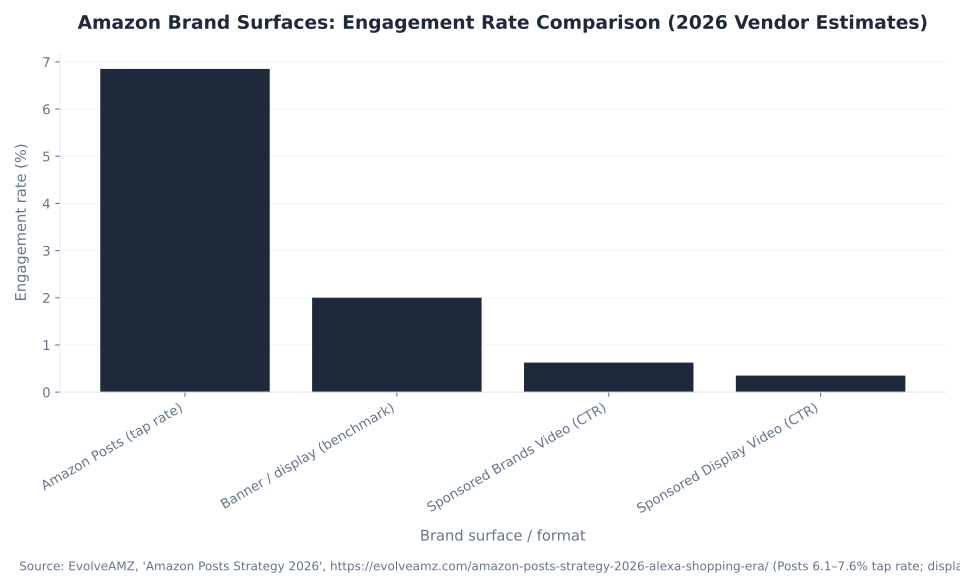
| Posts tap rate (Q1 2026, real brand data) | 6.1%–7.6% (midpoint ~6.85%) vs 1%–3% for display banner benchmarks | EvolveAMZ — vendor figure from real Q1 2026 brand data (not mbadv data) |
| Alexa for Shopping signal | Active Posts feeds contribute to brand entity signals used by Alexa for Shopping (Rufus folded into Alexa+, May 2026) | EvolveAMZ, 2026 |
Source: EvolveAMZ, “Amazon Posts in 2026: Still Worth It in the Alexa for Shopping Era?” (Posts active; specs confirmed; Q1 2026 tap rate 6.1–7.6%; display benchmark 1–3%; Alexa for Shopping brand entity signal). Tap rate figures are EvolveAMZ vendor-reported real brand data — not mbadv data. Re-verify caption and ASIN limits against live posts.amazon.com at publish.
The 6.1%–7.6% Posts tap rate measures a different interaction than search-ad CTR — a Posts tap sends a shopper to the brand feed or directly to a product listing, not to a search results page. The comparison to 1%–3% display CTR benchmarks shows relative engagement intensity, not an apples-to-apples metric equivalence. What it confirms: Posts on competitor PDPs intercept category shoppers who are already in-purchase mode. For beauty brands and sports equipment brands, competitor-PDP Posts placement is the most efficient free-traffic channel available outside of Sponsored Brands.
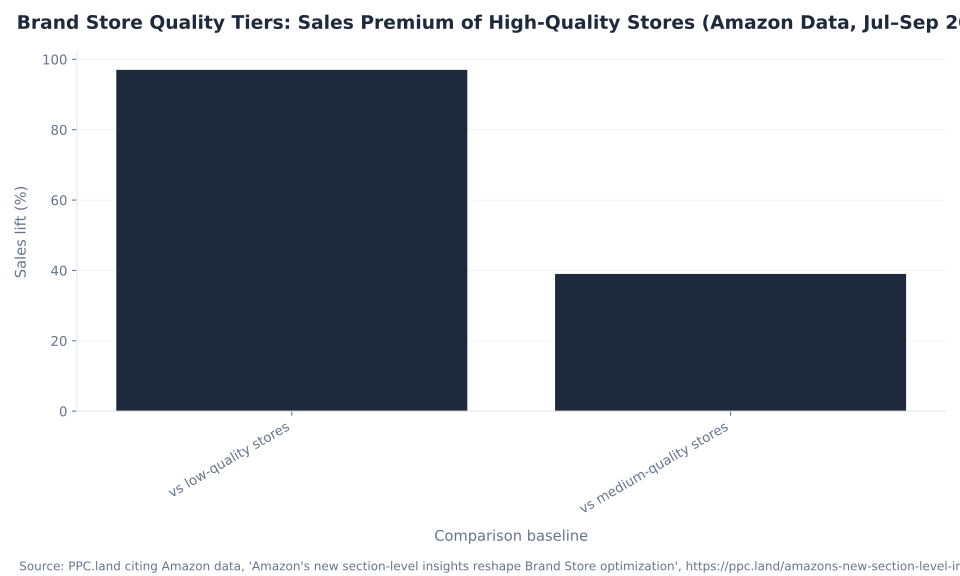
Brand Store Quality Tiers: Sales Premium of High-Quality Stores (Amazon Data, Jul–Sep 2025)
Amazon Live in 2026: Active, Shoppable, and Embedded in the Store
Amazon Live is an active shoppable livestream platform in 2026 — confirmed by Amazon's own product page and multiple 2026 coverage sources. Brands stream live via the Amazon Live Creator app; shoppers interact in real-time with a product carousel and live chat. Live sessions embed directly in Brand Stores, run on amazon.com/live, appear on product detail pages, and reach Prime Video and Fire TV (US).
| Signal / surface | Figure / status | Note |
|---|---|---|
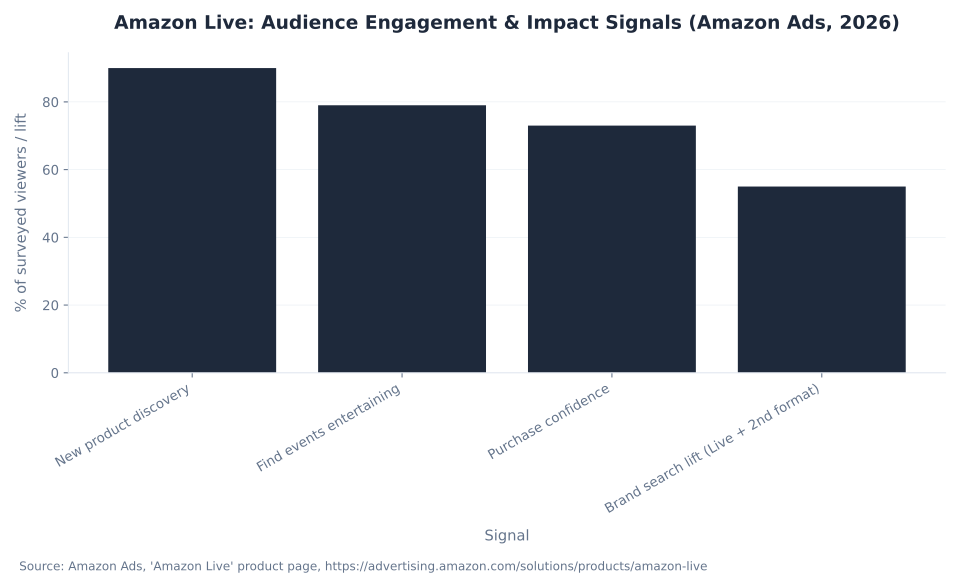
| New product discovery | 90% of surveyed Amazon Live shoppers discovered a new product | Amazon Ads; survey n not disclosed |
| Entertainment rating | 79% of shoppers say Live shopping events are entertaining | Amazon Ads; self-reported shopper survey |
| Purchase confidence | 73% of Amazon Live shoppers feel confident about purchases | Amazon Ads; self-reported shopper survey |
| Brand search lift | +55% — multi-format exposure effect (Amazon Live + at least one additional ad format vs unexposed) | NOT a standalone Amazon Live result — attribute as multi-format |
| Purchase rate lift | 17× higher — multi-format exposure effect (Amazon Live + second ad format vs unexposed) | NOT a standalone Amazon Live figure — requires the second format |
| Brand Store placement | Active — Live sessions embed in Brand Stores | Amazon Ads; Marknology 2026 |
| amazon.com/live | Active (US and India) | Logie AI, 2026 |
| Prime Video + Fire TV | Active FAST channel (US only) | Logie AI, 2026 |
Sources: Amazon Ads, “Amazon Live” product page (90%/79%/73% shopper survey figures; +55% and 17× multi-format exposure lifts; survey n not disclosed); Marknology, “Amazon Live and Shoppable Content: 2026 Strategy”; Logie AI, “Amazon Live in 2026”. All Amazon-attributed — not mbadv data.
The +55% brand search lift and 17× purchase rate lift are multi-format exposure effects — they measure audiences exposed to Amazon Live combined with at least one additional ad format vs unexposed audiences. Neither figure is a standalone Amazon Live performance guarantee. The correct framing: Amazon Live reinforces paid media when a brand is already running Sponsored Brands or DSP, not when it is the only Amazon touchpoint. MB Adv Agency treats Amazon Live as a brand-building reinforcement layer — most effective when the Store is already structured and the brand has product content worth demonstrating, not as a first move for brands without an established Amazon presence. For brands in home decor and furniture, where purchase decisions are visual and deliberate, embedding a Live session inside the Store is one of the lowest-cost ways to add motion and context to a product that a shopper cannot hold in their hands.
Driving Traffic to the Store: Store Spotlight and Sponsored Brands Video
The two paid surfaces most directly tied to the Brand Store are Store Spotlight (the Sponsored Brands format that surfaces Store sub-pages in search results) and Sponsored Brands Video (the auto-play video ad that routes traffic to the Store or a PDP). Both require Brand Registry; Store Spotlight also requires a specific Store structure.
| Format | What it does | Requirements / confirmed specs |
|---|---|---|
| Store Spotlight | Surfaces up to 3 Store sub-pages in Amazon search; tile click → that sub-page; logo/headline click → Store home | Brand Registry required · Live published Store with ≥3 sub-pages, each containing ≥1 product · Per-tile title + image · Headline ~50 chars · Top-of-search placement, desktop + mobile |
| Sponsored Brands Video | Auto-play video ad in Amazon search results; click routes to Store page or PDP | Duration: 6–45 seconds (≤20s recommended) · 16:9 aspect ratio (square pixels) · MP4 or MOV · Max 500 MB · Accepted resolutions: 1280×720, 1920×1080, 3840×2160 · Autoplay: muted, triggers at 50% pixels on-screen · ~65% of views are sound-off (captions strongly recommended) |
| Sponsored Brands (to Store) | Product Collection or logo ads that land on a Store page instead of a PDP | Brand Registry required · Set the Store as the click destination in campaign setup |
| In-Store video tile | Video embedded inside the Store via the Store Builder's video tile | Added in Store Builder · No media cost · Brings motion into the owned storefront without paid video inventory |
Sources: Perpetua, “Sponsored Brands — Store Spotlight Goal” (up to 3 sub-pages; tile vs logo click behavior); SellerApp, “Amazon Sponsored Brand Ads” (≥3 sub-pages with ≥1 product; ~50-char headline); Amazon Ads, “Sponsored Brands video — ad specs” (6–45s; ≤20s recommended; 16:9; MP4/MOV; 500 MB; muted autoplay at 50% pixels); EvolveAMZ, “Amazon SBV: Complete 2026 Guide” (~65% views sound-off; CTR 0.40–0.85% vendor estimate). Confirm SBV specs against live Amazon Ads ad-specs page at publish.
The official Sponsored Brands Video duration range is 6–45 seconds (≤20 seconds recommended) per the Amazon Ads ad-specs page — not the “15–30 second” range cited in third-party SBV guides, which reflects editorial best-practice framing rather than Amazon's spec bounds. SBV CTR runs 0.40%–0.85% in EvolveAMZ's 2026 vendor estimates with keyword-targeting CPC of $0.75–$3.50 — vendor estimates, not mbadv data. Since about 65% of SBV views play with sound off, captions are not optional for performance. See Amazon Sponsored Ads for Sponsored Brands campaign structures, bidding, and targeting alongside Store Spotlight.
Sponsored Brands Video: The Motion Layer Between Search and the Store
Sponsored Brands Video occupies in-search real estate with a 16:9 auto-playing video that intercepts shoppers between keyword intent and product selection. Because it routes to a Store page or PDP depending on campaign setup, it serves two distinct functions: brand-building (route to Store, tell the brand story, build follow intent) and direct-response (route to a PDP, convert immediate purchase intent). For pet supply brands and baby product brands, where shopper trust in the brand matters as much as the product specification, routing SBV clicks to the Store rather than a single PDP increases cross-sell opportunity and captures brand affinity earlier in the session.
How Store Quality Affects Sales: High-Quality vs Low-Quality Brand Stores
Amazon's own data from a July–September 2025 analysis shows that Store quality — defined by content richness and engagement signals, not ad spend — produces measurable sales differences. The gap between high-quality and low-quality stores is not marginal.
| Comparison | Sales premium |
|---|---|
| High-quality stores vs low-quality stores | +97% more sales |
| High-quality stores vs medium-quality stores | +39% more sales |
Source: PPC.land citing Amazon data — dataset July 5–September 6, 2025. Amazon defines quality tiers by Store content richness and engagement signals; exact methodology not publicly disclosed. Amazon-attributed — not mbadv data. Re-verify tier definitions against live Amazon Ads Store optimization guidance at publish.
Amazon does not publish its exact quality-tier methodology, but the criteria align directly with what the Sectional Performance tab now measures: renders, viewable impressions, clicks, and CTR per section. A Store with structured sub-pages, strong lifestyle imagery, video tiles, and ASINs loaded across all sections will systematically score higher on engagement signals than a half-finished Store with one flat product-grid page and no video.
MB Adv Agency has found that brands with the largest quality gaps in their Stores are typically those that built the Store once at launch, connected a Sponsored Brands campaign, and never returned to it. The Store Insights tab was limited to Store-level aggregates until January 2026 — there was no section-level data to act on. With section-level CTR now available per tile, Store optimization is structured rather than speculative: the tile with the lowest CTR relative to its render count is the first candidate to test — swap the image, change the copy, reorder the product selection, and re-measure. For home goods brands and baby product brands with seasonal catalog changes, monthly Store audits against section-level CTR replace annual Store refreshes as the cadence. See Amazon Ads optimization and automation for integrating section-level data into a broader optimization workflow.
Amazon Live: Audience Engagement & Impact Signals (Amazon Ads, 2026)
Build a Brand Store that earns its section-level engagement
MB Adv Agency designs and optimizes Amazon Brand Stores for DTC and consumer brands — from Store structure and tile strategy to Sponsored Brands campaigns that feed the Store the right traffic.
Explore home goods PPC →Amazon Brand Stores in 2026: What Changed and What It Means
Three significant changes to the Amazon Brand Store landscape took effect in the first quarter of 2026: section-level analytics became available (January 10), the Brand Stores API reached general availability (February 22), and Amazon's AI shopping assistant transitioned from Rufus to Alexa for Shopping (May 2026). Each change reshapes how brands should build and operate their Stores.
Section-level analytics (Jan 10, 2026). The Sectional Performance tab turns the Store from a campaign destination into an optimization surface. Before this launch, Store insights showed what happened at the Store level — visits, sales, traffic source — but not which specific tiles drove or blocked progression through the Store. Now, renders and viewable impressions show reach; clicks and CTR show what converts. A tile with high renders but low CTR is visible but not compelling. A tile with low renders but high CTR is compelling but buried. Both are actionable data points that didn't exist before January 2026. The section metrics are filterable by traffic source, so a brand can compare how Sponsored Brands traffic interacts with the Store vs organic visitors — often revealing that paid traffic converts to clicks on different sections than organic discovery traffic.
The Brand Stores API is now production-ready for multi-brand operators. GA on February 22, 2026 means agencies managing multiple brands can programmatically retrieve Store content, update product selection, and submit Stores for moderation review via the /v2/stores endpoint — with up to 100 days of performance data per API call. What previously required manual Store Builder sessions for each brand can now be automated at scale.
Alexa for Shopping replacing Rufus (May 2026). Rufus — Amazon's conversational AI shopping assistant — was folded into Alexa for Shopping in May 2026. The implication for Stores and Posts: the AI shopping surface that surfaces brand recommendations and responds to product queries is now Alexa for Shopping, not Rufus. Amazon Posts content feeds brand entity signals that inform Alexa for Shopping responses — an active Posts feed with consistent product use-case content improves the brand's discoverability in AI-mediated shopping queries. Brands that reference “Rufus” in their strategy documentation should update accordingly; any third-party CTR benchmarks that reference “Rufus-era” data can predate the May 2026 migration and need re-verification. See Amazon Ads targeting for how Alexa for Shopping integrates with audience targeting in the current platform.
For brands in skincare and home decor — two verticals where brand perception directly influences conversion — the combination of Store structure optimization (section-level CTR), Posts consistency (Alexa for Shopping signals), and Amazon Live presence (Brand Follow capture) now constitutes a complete Amazon brand-building stack that existed only partially before 2026.
Three Misconceptions About Amazon Stores That Cost Brands Real Opportunity
The three most common Amazon Store misconceptions each result in a specific, measurable mistake: either not building the Store at all, building it once and ignoring it, or skipping the brand-building surfaces (Posts, Live, Brand Follow) that make the Store perform as a system rather than a page.
Misconception 1: “An Amazon Store is just a fancier product detail page.” This is false. A product detail page is a fixed, Amazon-template-governed single-ASIN listing. A Brand Store is a multi-page, drag-and-drop-built destination with its own URL, its own page hierarchy, and — since January 2026 — section-by-section engagement reporting across 27 countries. A PDP has no sub-pages, no brand-controlled layout, no Store analytics, and no connection to Store Spotlight. A Store has all of these. Amazon's own data shows Store visitors buy 71.3% more per order and are 62.7% more likely to purchase as new-to-brand customers than non-Store visitors — figures that describe the difference between sending a shopper to a PDP vs a structured Store. Treating the Store as a brochure leaves the entire optimization surface, and the conversion lift, on the table.
The highest-quality stores generate 97% more sales than low-quality stores (Amazon data, Jul–Sep 2025). That gap is not built by ad spend — it is built by Store content richness and engagement signals, both of which are now measurable at the section level.
Misconception 2: “You need to pay Amazon to have a Store, or the Store is itself an ad.” This is false. Amazon Brand Stores are free to build and maintain. The Store itself carries no media cost and no per-visit fee. Amazon Brand Registry enrollment — which requires an active registered trademark — is the only requirement, and Brand Registry is free. What costs money is the advertising that drives traffic to the Store (Sponsored Brands campaigns, Store Spotlight ads). The Store is a free owned asset; advertising is how you fill it with traffic. Conflating “building a Store” with “buying ads” causes brands to either skip the Store entirely (missing the free asset) or to treat the Store as an ad cost center when it is not one. The Store is permanent and continues working whether or not a Sponsored Brands campaign is active. See Amazon Ads policies and setup for Brand Registry eligibility details.
Misconception 3: “Amazon Live and Amazon Posts are dead or deprecated in 2026.” Both are active. Amazon Live is an active shoppable livestream platform in 2026, confirmed by Amazon's own product page and third-party 2026 reporting — with placements across Brand Stores, amazon.com/live (US and India), product detail pages, and Prime Video and Fire TV FAST channels. Amazon Posts is also active and Amazon has invested in it continuously since 2019; its Posts tap rate of 6.1%–7.6% (EvolveAMZ, Q1 2026 real brand data) outperforms display banner CTR benchmarks (1%–3%) by a material margin. Both surfaces also feed brand entity signals into Alexa for Shopping (Rufus replacement, May 2026). Writing them off means abandoning two free Brand Registry-gated surfaces that directly reinforce the Store and grow the Brand Follow graph.
Frequently Asked Questions: Amazon Brand Stores
Turn your Store, Posts, and Amazon Live into one owned brand system
MB Adv Agency builds Amazon brand strategies that integrate the Store, Posts, Live, and Brand Follow as one acquisition and retention system — not four disconnected features. Get in touch to discuss what that looks like for your catalog.
Get in touch →Methodology and Sources
This pillar draws on three source categories: (1) Amazon Ads' own product pages and what's-new announcements (visitor lift figures, section-level insights beta, Brand Follow announcement, Amazon Live product page, SBV ad-specs page, Brand Stores best-practices guide); (2) PPC.land's January and February 2026 reporting on the Sectional Performance launch and Brand Stores API GA, based on Amazon's own data releases; (3) vendor-reported 2026 benchmarks from EvolveAMZ (Amazon Posts tap rate Q1 2026, SBV CTR estimates), Marknology (Amazon Live 2026 strategy), Logie AI (Amazon Live placement surfaces), SellerApp and Perpetua (Store Spotlight eligibility and click behavior), and Frooition (Store vs PDP design comparison). All visitor lift figures (+53.9% to +72.3%) are Amazon Ads' own reported statistics and are not mbadv client data. Reviewed by MB Adv Agency, June 2026. Last updated: 2026-06-27.
In today's e-commerce landscape, Amazon has carved out a niche that is unparalleled in scale and innovation. One of the unique features available to sellers on this platform is the concept of Amazon Stores. These bespoke storefronts offer brands the opportunity to create a dedicated space on Amazon to showcase their products. This article will provide insights into what Amazon Stores are, their definition and benefits, steps to set one up, and examples of well-designed Stores.
What are Amazon Stores?
Amazon Stores are custom-branded, multi-page storefronts that enable sellers and brands to present a curated selection of their products directly within the Amazon ecosystem. Unlike seller profiles with basic information, Amazon Stores allow for a more personalized and engaging shopping experience. This innovative feature is particularly beneficial for brands looking to differentiate themselves in a crowded marketplace, as it provides a dedicated space to showcase their unique offerings.
These Stores help companies showcase their unique brand story, fully utilize multimedia elements like images and videos, and engage customers through a well-structured layout. With an Amazon Store, brands have the power to establish their identity amid a sea of products and improve their chances of converting visitors into loyal customers. By integrating storytelling elements and visually appealing designs, brands can create an immersive shopping journey that resonates with their target audience, ultimately fostering a deeper emotional connection with consumers.
Features of Amazon Stores
Amazon Stores allow sellers to implement various engaging features, including:
- Customization: Brands can tailor the layout, colors, and imagery to fit their branding.
- Product Highlighting: Specific products can be featured prominently to attract visitors’ attention.
- Multiple Pages: Sellers can create multiple pages within the Store to categorize products effectively.
These features collectively enhance user experience and retention, making it easier for potential buyers to navigate and discover products. Additionally, Amazon Stores support the integration of promotional banners and call-to-action buttons, which can drive traffic to special offers or new arrivals. This strategic placement not only boosts visibility for key products but also encourages impulse purchases, making it a powerful tool for increasing sales.
Moreover, Amazon Stores come equipped with analytics tools that allow sellers to track visitor behavior, engagement rates, and conversion metrics. This data-driven approach enables brands to refine their marketing strategies and optimize their storefronts based on real-time feedback. By understanding which products resonate most with customers and how they interact with the Store, sellers can make informed decisions that enhance their overall performance on the platform.
Definition and benefits
The definition of an Amazon Store goes beyond just being a simple collection of products. It serves as a complete branding tool for businesses, providing them a space to create a narrative around their products while offering a seamless shopping experience. Understanding the benefits of incorporating an Amazon Store into your selling strategy can provide immense value.

Enhanced Brand Visibility
One of the primary benefits of setting up an Amazon Store is the enhanced visibility it affords brands. By having a dedicated page, sellers can stand out from the competition. The layout can feature storytelling elements that convey the brand’s values and quality, which greatly contributes to customer loyalty. This dedicated space allows brands to showcase their unique selling propositions, such as sustainability practices or artisanal craftsmanship, which can resonate deeply with consumers who prioritize these attributes in their purchasing decisions. Additionally, the visually appealing design options available for Amazon Stores enable brands to create an immersive experience that captivates visitors and encourages them to explore further.
Increased Traffic and Sales
Amazon Stores drive traffic because they are linked to Amazon’s various advertisement strategies. When visitors engage with ads or related products, they can be redirected to the Store, resulting in increased footfall and potential sales. Furthermore, shoppers are more likely to purchase from a brand they can connect with emotionally. This emotional connection is often fostered through engaging content, such as videos and customer testimonials, that can be integrated into the Store. By showcasing real-life applications of products and highlighting customer satisfaction, brands can significantly enhance their credibility and appeal, ultimately leading to higher conversion rates and repeat purchases.
Analytics and Insights
Another significant benefit includes access to analytical tools that Amazon provides. Sellers can track how their Store is performing in terms of traffic, sales, and customer engagement. This data is invaluable in refining marketing strategies and enhancing product offerings. By analyzing customer behavior metrics, such as time spent on the Store and click-through rates, brands can identify which products resonate most with their audience. Additionally, these insights can inform inventory management and promotional strategies, allowing sellers to optimize their operations based on real-time feedback. The ability to adapt quickly to market trends and consumer preferences can be a game-changer in the highly competitive e-commerce landscape.
Steps to set up an Amazon Store
Setting up an Amazon Store is straightforward, but it requires careful planning and execution. Below are summarized steps to help guide sellers through the process:
Step 1: Register as a Seller
The first step to creating an Amazon Store is registering as a seller on Amazon. This involves setting up an Amazon Seller Central account, which provides the necessary tools for selling products. During registration, you will need to provide essential information, such as your business name, address, and tax identification details. It's crucial to ensure that all information is accurate, as this will help avoid any potential issues later on with account verification or payment processing.
Step 2: Access Amazon Stores Dashboard
Once registered, navigate to the Stores tab in the Amazon Seller Central dashboard. This is where you will begin the setup process for your Store. Familiarizing yourself with the dashboard is important, as it contains various features that allow you to manage your inventory, track sales, and analyze customer behavior. Take some time to explore the different sections, as understanding the tools available will empower you to make informed decisions as you build your Store.
Step 3: Create Your Storefront
Designing the Store is the next step. Sellers can choose templates and start customizing their storefront layout. Consider incorporating elements that reflect your brand identity and ensure your products are easily discoverable. Think about the user experience; a well-organized Store can significantly enhance customer engagement. You might want to include banners, promotional images, and even videos that showcase your products in action. This not only captures attention but also conveys your brand's story and values, making a lasting impression on potential buyers.
Step 4: Add Products and Content
After establishing the Store's structure, it's time to populate it with products. Ensure that product listings are clear, don’t forget to include high-quality images, and add descriptions that resonate with your target audience. Additionally, consider using keywords strategically in your product descriptions to improve search visibility. Engaging content, such as customer reviews and FAQs, can also enhance credibility and encourage conversions. It's beneficial to regularly update your listings and add new products to keep your Store fresh and appealing to returning customers.
Step 5: Launch and Promote Your Store
After reviewing all elements and ensuring everything is working seamlessly, launch your Amazon Store. Use social media, email marketing, and consider running targeted Amazon ads to promote your Store effectively and drive traffic. Collaborating with influencers or bloggers in your niche can also amplify your reach and attract a broader audience. Remember, the launch is just the beginning; continuous promotion and engagement with your customers are key to building a loyal customer base and achieving long-term success on the platform.
Examples of well-designed Stores
To illustrate the potential of Amazon Stores, examining some examples can provide inspiration and best practices.
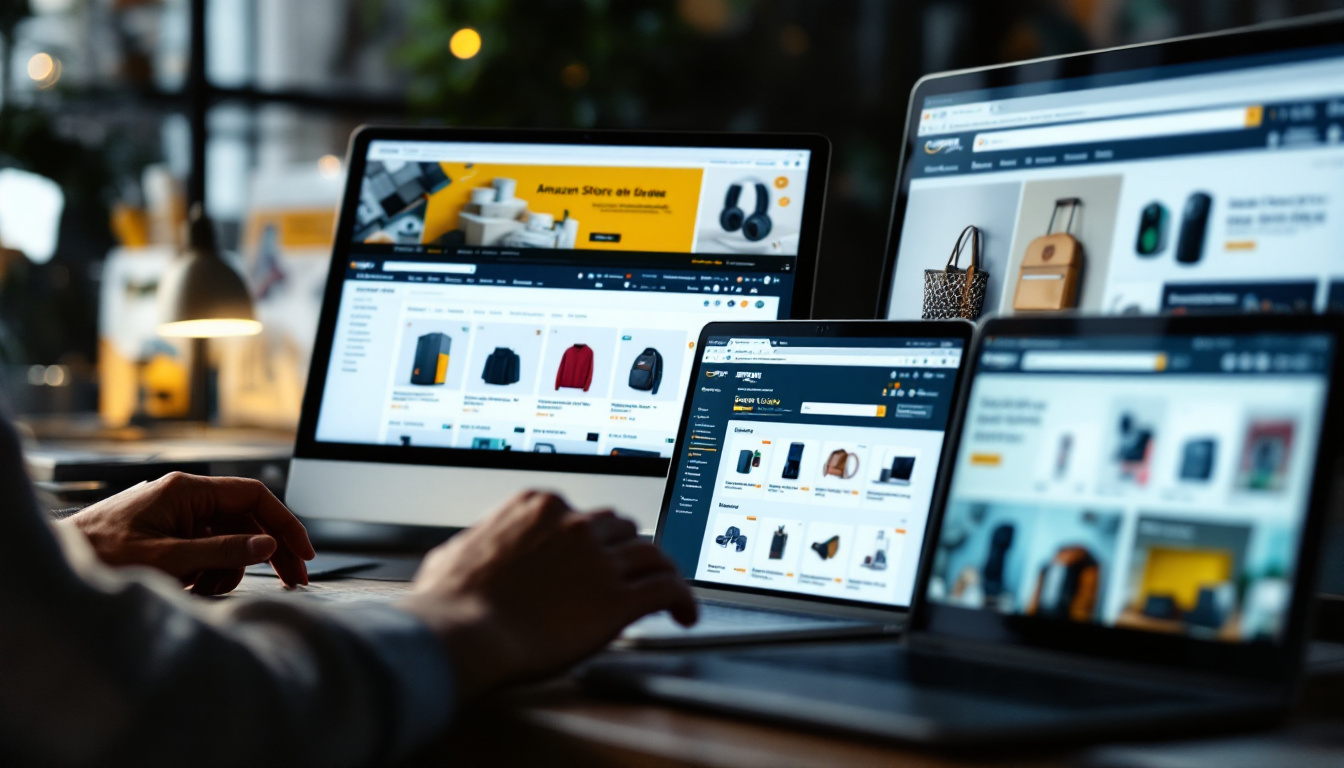
Example 1: Anker
Anker, known for its high-quality electronic accessories, maintains an aesthetically pleasing Amazon Store. It features a minimalist design that emphasizes its products beautifully, with well-organized sections for each type of accessory. The use of high-resolution images and concise product descriptions allows customers to quickly grasp the benefits of each item, while the clean layout ensures that the focus remains on the products themselves. Additionally, Anker effectively utilizes customer reviews and ratings, showcasing social proof that enhances trust and encourages purchases.
Moreover, Anker incorporates a dedicated section for promotions and new releases, which not only keeps the store fresh but also drives repeat visits from loyal customers. The strategic placement of call-to-action buttons further guides users through the shopping journey, making the experience both intuitive and enjoyable.
Example 2: Adidas
The Adidas Amazon Store is another excellent example, showcasing a diverse range of products with engaging visuals. The Store design tells the brand's story while highlighting its commitment to quality and innovation in sportswear. Bold imagery captures the essence of athleticism and lifestyle, appealing to a broad audience of fitness enthusiasts and casual wearers alike. Each product category is thoughtfully curated, allowing customers to easily navigate through footwear, apparel, and accessories.
In addition to its stunning visuals, Adidas employs interactive elements such as videos featuring athletes and influencers, which not only demonstrate product functionality but also resonate with the brand's target demographic. Seasonal campaigns and exclusive collections are prominently displayed, creating a sense of urgency and excitement that encourages shoppers to explore and make purchases.
Example 3: Kindle
Amazon's own Kindle Store stands out due to its seamless integration of multimedia content along with product promotions. The Store effectively utilizes videos and images to explain product features, resulting in high conversion rates. By providing detailed comparisons between different Kindle models, customers can make informed decisions based on their reading habits and preferences. The layout is designed to guide users through the various Kindle offerings, including accessories, subscriptions, and exclusive content.
Furthermore, the Kindle Store enhances user engagement by featuring customer testimonials and curated reading lists, which not only inspire potential buyers but also foster a community of readers. The incorporation of user-generated content, such as reviews and ratings, adds authenticity and encourages a sense of belonging among Kindle users, making it more than just a shopping destination but a hub for book lovers.
In conclusion, Amazon Stores offer brands a powerful avenue to elevate their presence on the platform. With a blend of creativity and strategic planning, sellers can greatly enhance their chances of success while offering consumers a unique and engaging shopping experience.

As a Google Ads expert, I bring proven expertise in optimizing advertising campaigns to maximize ROI.
I specialize in sharing advanced strategies and targeted tips to refine Google Ads campaign management.
Committed to staying ahead of the latest trends and algorithms, I ensure that my clients receive cutting-edge solutions.
My passion for digital marketing and my ability to interpret data for strategic insights enable me to offer high-level consulting that aims to exceed expectations.
Google Partner Agency
We're a certified Google Partner Agency, which means we don’t guess — we optimize withGoogle’s full toolkit and insider support.
Your campaigns get pro-level execution, backed by real expertise (not theory).
4.9 out of 5 from 670+ reviews on Fiverr.
That’s not luck, that’s performance.
Highly recommend Matteo to set up your server side tracking. He has a deep understanding of e-commerce tracking and will go above and beyond to make sure everything is set up correctly and working 100%. If you are scaling your store this set up is non-negotiable in my opinion and there isn't many people who have this much knowledge or put the effort in to get it right. Thanks again!
avorodesign.com
I can only recommend Matteo! He was very patient, professional and very knowledgeable about GA4, Consent Mode v2, and GDPR compliance. Communication was clear, and the setup was done professionally and efficiently. Highly recommend him for anyone needing reliable tracking implementation.
www.natureiki.life
Matteo shines in the realm of online professionals. His work is not only deep in data but also complemented by his proactive communication and cooperation, setting a new standard for freelancers. If you want someone who truly exceeds expectations, look no further. Highly recommended!

www.omanbeverlysmyth.com
Exceptional Service Beyond Expectations - Outstanding Service Impeccable depth, flawless delivery, and exceptional language fluency—this service exceeded all expectations. Highly recommended. Matteo truly ROCKS!!!
ium-paris.com
Top-notch, always highly value working with Matteo. An absolute Google Ads Genius. This is approximately the 8th time I have hired him and he's helped us get 6-7 ROAS. We are excited in continuing to improve our lead flow. Hire this guy if you need Google Ads help. Thanks Matteo!

www.dleeventgroup.com
I finally found the guy who can setup server side tracking and all the ecosystem properly. I definitely recommend Matteo. He is very responsive, kind and wants to dig into things. He configured GA4, Meta, Google Ads, Outbrain and google consent v2 with Cookiebot. Thanks Matteo.

inomega.fr
MB Adv delivered exceptional work with outstanding professionalism and lots of patience, taking time to see effects of changes made and not just do the work and submit it. The proactive communication and video summaries of the work completed made working with Matteo a pleasure, as he consistently went above and beyond. Highly recommended for web analytics projects! We are already working on another project.

www.withnellsensors.co.uk
Working with Matteo on my Google Ads was a game-changer. He's not just a strategist, he's a true partner. He understood my goals and tailored a campaign that perfectly reached my target audience. I'm grateful for his expertise and dedication.
dccargo.com
Click-driven mind
with plastic-brick obsession.
We build Google Ads campaigns with the same mindset we use to build tiny brick worlds: strategy, patience, and zero tolerance for wasted pieces.
Data is our blueprint. Growth is the only acceptable outcome.