Google ads moves “all campaigns” to a top-left dropdown: what the ui change really means for large accounts and ppc workflows
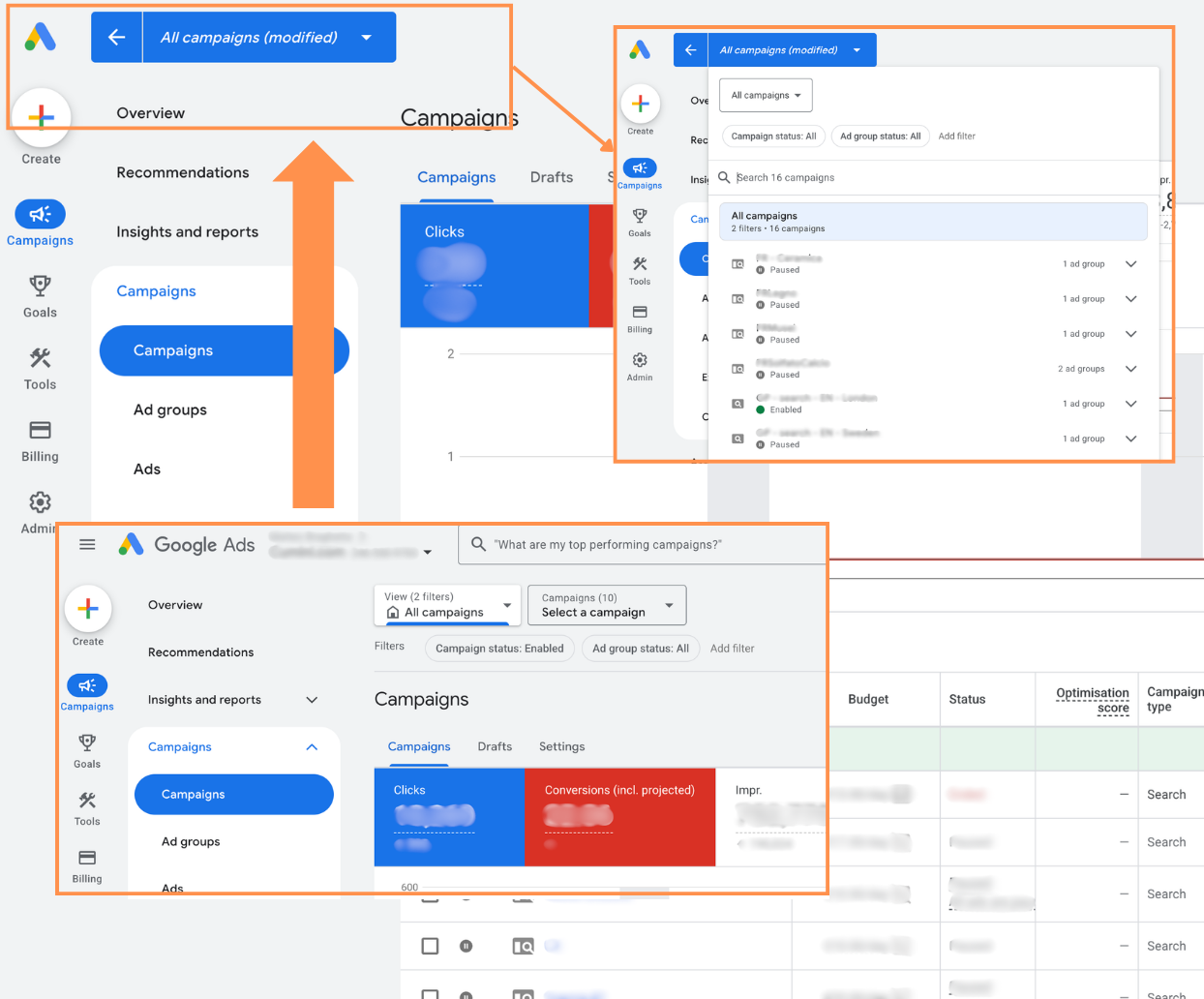
Google Ads has quietly shifted one of the most fundamental pieces of its interface: the “All campaigns” selector. What used to sit in the middle-left navigation panel now lives in a top-left dropdown. Structurally, nothing about your account has changed. Functionally, the way you move through it just got nudged closer to how large, complex accounts already think.
This is the kind of UI change that looks trivial in a screenshot and meaningful in a live account with 50+ campaigns, mixed formats, and multiple people working in parallel. It’s less about “where did Google move my button?” and more about how Google wants us to conceptualize the hierarchy of account → views → campaigns.
From side panel to top-level control
In the previous layout, “All campaigns” lived in the left-hand panel, visually competing with campaign names, campaign types, and various sub-views. It worked, but it blurred a line: was that panel about account-level context, or campaign-level navigation?
By moving “All campaigns” to a top-left dropdown, Google Ads turns that control into a primary context switcher. You open the interface, go to the top-left corner, and choose whether you’re looking at:
- All campaigns across the account
- A specific campaign type (e.g., Search, Performance Max, Video)
- Custom views, where they exist (for example, filtered or saved views your team uses regularly)
Only after you’ve set that top-level context do you use the left-hand navigation to drill down into campaigns, ad groups, assets, and so on.
Conceptually, this aligns Google Ads more closely with other Google products that use a top bar to define scope (think GA4 property/view selection, or even the way Google Tag Manager handles containers and workspaces). The top bar defines “where” you are; the side nav defines “what” you’re looking at within that space.
Why this matters more in large, messy accounts
If you’re running a small account with a handful of Search and maybe one Performance Max campaign, the move will feel cosmetic after a day or two. You’ll re-learn the click path and carry on.
The impact becomes more tangible in accounts that meet at least one of these conditions:
- 50+ campaigns
- Multiple formats (Search, PMax, Video, Discovery, Shopping)
- Several managers or agencies touching the same account
- Heavy use of saved views or filters
In those environments, the old middle-left “All campaigns” control could become a source of friction. You’d be auditing a subset of campaigns, then jump back to “All campaigns,” then accidentally click into a single campaign, then back out. The mental model was: “I’m somewhere in this long list, and I need to re-orient myself.”
The new top-level selector makes the hierarchy more explicit. You first decide: “Am I in an account-wide view, a campaign-type view, or a custom filtered view?” Only then do you choose which campaign to open. That reduces the number of context shifts when you’re, for example, doing a Performance Max-only review or a Video-only audit.
Navigation speed vs. operational speed
There’s a subtle but important distinction between navigation speed and operational speed.
Navigation speed is how quickly you can move to the right place in the interface. Operational speed is how quickly you can make good decisions and changes once you’re there.
The top-left dropdown materially improves navigation speed in some workflows. For instance, if you’re auditing by campaign type:
- You set the dropdown to “Search campaigns” and work through naming, budgets, and queries.
- Then you switch to “Performance Max campaigns” and look at asset groups, listing groups, and conversions.
- Then you move to “Video campaigns” and review placements, audiences, and creative.
That’s one click at the top each time you change the lens through which you’re viewing the account. You’re not scrolling a long mixed list of campaigns trying to visually isolate the type you care about.
However, once you’re inside a given view, the change has almost no impact on operational speed. If your naming conventions are solid and your structure is logical, the number of clicks to reach a specific campaign or ad group is essentially unchanged. You still depend on:
- Consistent naming that encodes intent (network, geo, funnel stage, or product line)
- Predictable use of labels and filters
- A clear separation between evergreen, experimental, and seasonal efforts
In other words, this UI update can’t compensate for poor account hygiene. It just makes a well-structured account easier to navigate at scale.
Clearer separation between “account view” and “campaign work”
One of the more useful aspects of this change is conceptual, not mechanical: it clarifies the difference between looking at the account as a whole and working inside specific campaigns.
With the selector in the top-left, there is a stronger visual and mental separation between:
- Account-level views: cross-campaign performance, budget allocation, conversion trends, and policy issues.
- Campaign-level work: query analysis, asset optimization, bid strategy tuning, audience layering.
For PPC specialists and marketing managers, this helps reinforce better workflows. You can deliberately spend time in an “account review” mode (top-level view set to All campaigns, using overview and reports), then switch into “campaign execution” mode (select a campaign type or subset and drill down).
This may sound abstract, but in practice it reduces misclicks and rework. You’re less likely to think you’re changing something across a group of campaigns when you’re actually in a single campaign view, or vice versa.
Implications for teams and process
For teams managing multiple accounts or working in shared environments, the move also has some process implications.
First, it standardizes orientation. When onboarding a new team member, you can now anchor the initial explanation around the top-left: “Start here to choose your view, then use the left nav to go deeper.” It’s a small cognitive anchor, but it makes cross-account training easier.
Second, it makes saved views and custom filters more discoverable as strategic tools, not just ad hoc conveniences. When a saved view appears in the same dropdown as “All campaigns” and “Search campaigns,” it signals that this is a legitimate, repeatable way to look at the account. That encourages teams to codify workflows like:
- “Brand Search only” views
- “High-ROAS Shopping” views
- “Testing campaigns” views
Those views become part of the shared navigation language of the account, not just one person’s filter sitting in their browser session.
The broader pattern in the Google Ads ecosystem
This update fits a broader pattern in the Google Ads ecosystem: more emphasis on top-level structuring and less on micro-management.
We’ve seen this in the rise of Performance Max, automated bidding strategies, and audience signals. Google keeps nudging advertisers to think in terms of “what universe of traffic and outcomes do you want?” rather than “what exact query and placement do you want to show on?”
Repositioning the “All campaigns” selector doesn’t change any underlying mechanics, but it does subtly reinforce that shift in thinking. The interface is more clearly layered:
- Choose the strategic lens (account-wide, by type, by view)
- Then manage the elements inside that lens (campaigns, assets, audiences, budgets)
For practitioners comfortable with that abstraction, the UI becomes more coherent. For those still trying to control everything at the most granular level, the direction of travel is clear: Google wants us operating more from the top down.
A small change that rewards good structure
On its own, the move of “All campaigns” to a top-left dropdown won’t transform your results. In a well-structured account with consistent naming and clear campaign roles, it will reduce friction and make audits—especially by campaign type—slightly more efficient. In a chaotic account, it will mostly make the chaos more visible.
The practical takeaway is simple: treat this UI change as a prompt to revisit how you structure and navigate your accounts. If your campaigns are logically grouped, your views are intentional, and your team shares a consistent navigation language, this small interface adjustment will feel like a natural evolution rather than an interruption.

As a Google Ads expert, I bring proven expertise in optimizing advertising campaigns to maximize ROI.
I specialize in sharing advanced strategies and targeted tips to refine Google Ads campaign management.
Committed to staying ahead of the latest trends and algorithms, I ensure that my clients receive cutting-edge solutions.
My passion for digital marketing and my ability to interpret data for strategic insights enable me to offer high-level consulting that aims to exceed expectations.
Google Partner Agency
We're a certified Google Partner Agency, which means we don’t guess — we optimize withGoogle’s full toolkit and insider support.
Your campaigns get pro-level execution, backed by real expertise (not theory).

4.9 out of 5 from 670+ reviews on Fiverr.
That’s not luck, that’s performance.
Highly recommend Matteo to set up your server side tracking. He has a deep understanding of e-commerce tracking and will go above and beyond to make sure everything is set up correctly and working 100%. If you are scaling your store this set up is non-negotiable in my opinion and there isn't many people who have this much knowledge or put the effort in to get it right. Thanks again!

avorodesign.com
I can only recommend Matteo! He was very patient, professional and very knowledgeable about GA4, Consent Mode v2, and GDPR compliance. Communication was clear, and the setup was done professionally and efficiently. Highly recommend him for anyone needing reliable tracking implementation.

www.natureiki.life
Matteo shines in the realm of online professionals. His work is not only deep in data but also complemented by his proactive communication and cooperation, setting a new standard for freelancers. If you want someone who truly exceeds expectations, look no further. Highly recommended!

www.omanbeverlysmyth.com
Exceptional Service Beyond Expectations - Outstanding Service Impeccable depth, flawless delivery, and exceptional language fluency—this service exceeded all expectations. Highly recommended. Matteo truly ROCKS!!!

ium-paris.com
Top-notch, always highly value working with Matteo. An absolute Google Ads Genius. This is approximately the 8th time I have hired him and he's helped us get 6-7 ROAS. We are excited in continuing to improve our lead flow. Hire this guy if you need Google Ads help. Thanks Matteo!

www.dleeventgroup.com
I finally found the guy who can setup server side tracking and all the ecosystem properly. I definitely recommend Matteo. He is very responsive, kind and wants to dig into things. He configured GA4, Meta, Google Ads, Outbrain and google consent v2 with Cookiebot. Thanks Matteo.

inomega.fr
MB Adv delivered exceptional work with outstanding professionalism and lots of patience, taking time to see effects of changes made and not just do the work and submit it. The proactive communication and video summaries of the work completed made working with Matteo a pleasure, as he consistently went above and beyond. Highly recommended for web analytics projects! We are already working on another project.

www.withnellsensors.co.uk
Working with Matteo on my Google Ads was a game-changer. He's not just a strategist, he's a true partner. He understood my goals and tailored a campaign that perfectly reached my target audience. I'm grateful for his expertise and dedication.

dccargo.com
Click-driven mind
with plastic-brick obsession.
We build Google Ads campaigns with the same mindset we use to build tiny brick worlds: strategy, patience, and zero tolerance for wasted pieces.
Data is our blueprint. Growth is the only acceptable outcome.