how to optimize performance max landing page images: turn your website into a high-performing creative engine
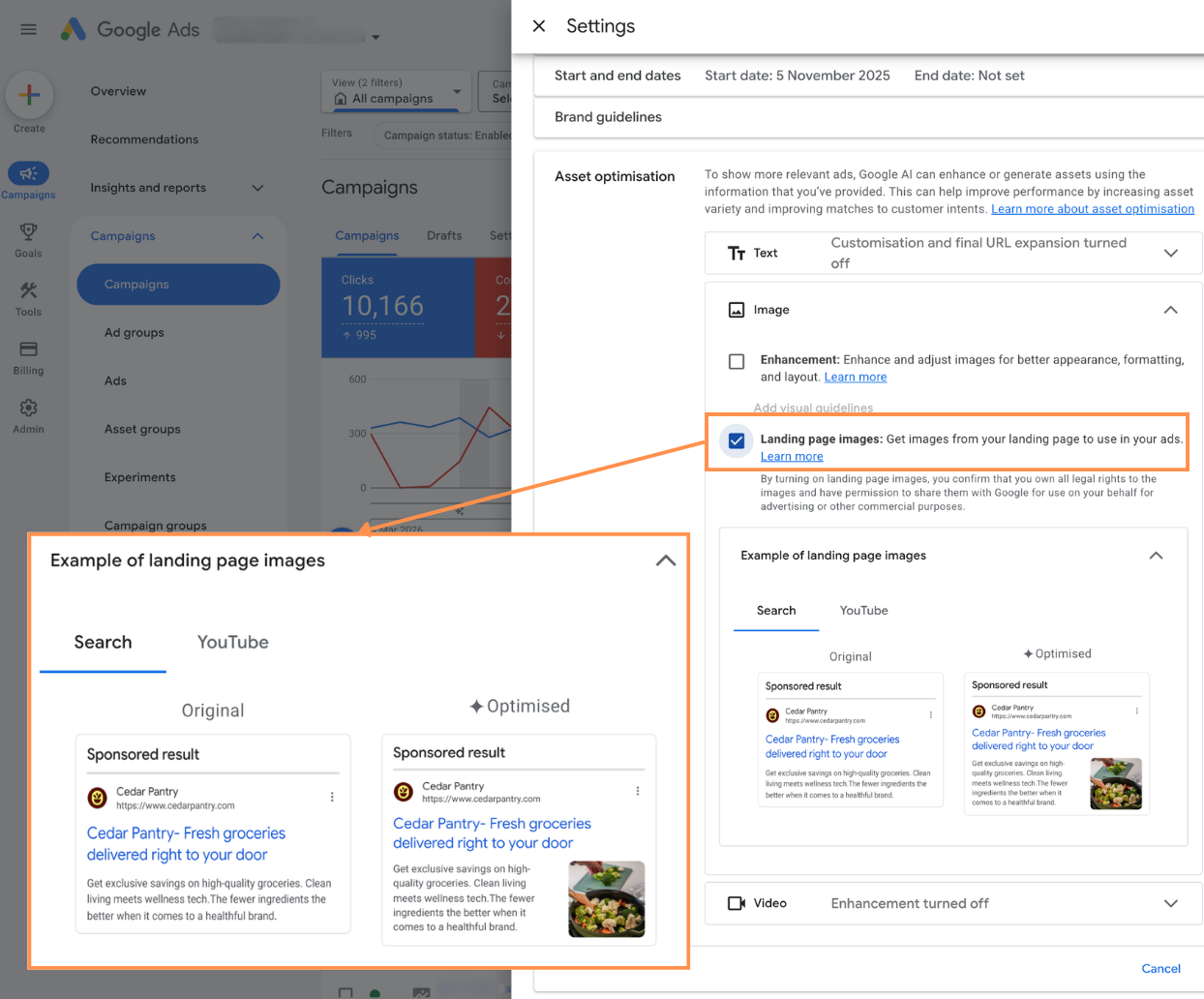
Google Ads’ Performance Max updates tend to fall into two categories: features that change reporting, and features that quietly change how your ads are actually assembled and served. The new visibility into how Landing Page Images are used in PMax sits firmly in the second camp—and it matters more than it might look at first glance.
This isn’t just a UI tweak. It’s another step in Google turning your website into a primary creative source, and giving you just enough visibility to make that relationship usable instead of opaque.
From “black box” to semi-transparent creative engine
Until now, “Automatically created assets” in Performance Max have been a bit of a black box. You could enable auto-generated images and know, in theory, that Google was using your site content to fill creative gaps. But you couldn’t really see how landing page images were being interpreted and repurposed as ad creatives.
With the updated Landing Page Images feature, that changes. When you opt in to automatically created image assets in your PMax settings, Google will:
- Crawl your landing pages and identify eligible images.
- Transform those images into ad-ready creatives in various formats.
- Surface those creatives in the asset view, alongside your manually uploaded images, with clearer examples of the source and usage.
The key shift is not just that Google is pulling images from your pages—that’s been happening already—but that you now get a clearer line of sight between “this visual on my site” and “this asset in my Performance Max campaign.”
For practitioners who care about brand control, creative strategy, and performance diagnostics, that visibility is the real feature.
Performance Max as a creative system, not just a campaign type
To make sense of this change, it helps to think of Performance Max less as a campaign type and more as a creative and bidding system that happens to sit on top of all Google inventory.
That system needs raw material. Historically, you fed it with:
- Manually uploaded image assets
- Headlines, descriptions, and extensions
- Product feeds (for retail)
- Audience signals and data feeds
Landing pages have always been another implicit source of truth, but they were treated more as relevance signals than as structured creative input. The updated Landing Page Images view pushes your site one step closer to being a first-class creative feed.
In practice, this means your website visuals now sit alongside your asset groups as a strategic lever. If your site is cluttered with outdated banners, low-res images, or off-brand photography, that’s no longer just a UX or CRO issue—it’s a media issue, because those visuals can now become ads.
Filling creative gaps without drowning in production work
Most performance teams are under-creatived relative to the surfaces PMax can reach. You might have a solid library of hero images and a few variants, but PMax is trying to assemble ads for Search, Display, YouTube, Discover, Gmail, and more. Each of those surfaces has different format and layout expectations.
The updated Landing Page Images feature is essentially Google saying: if you don’t have a complete creative matrix, we’ll help fill the gaps using what’s already on your site—and now we’ll show you what that looks like.
The operational implications are significant:
- You no longer need to manually create image variants for every product, every landing page, and every possible placement just to avoid empty inventory.
- You can rely on automatically created assets to extend coverage, while reserving your manual uploads for the images that truly need intentional art direction.
- You can see which of these auto-generated creatives are actually pulling their weight, instead of guessing whether they’re helping or hurting.
This isn’t a replacement for a strong creative strategy; it’s a pressure valve. It lets you avoid over-investing in production just to maintain eligibility, while still giving you a way to audit and refine what the system is doing on your behalf.
Control, curation, and brand safety
The obvious concern with any automated creative feature is brand safety. If Google is free to turn your site into ads, what happens to that oddly specific promo banner you forgot to take down, or that test image that doesn’t quite match your brand guidelines?
The new visibility into Landing Page Images doesn’t fully solve brand safety, but it does give you a workable control loop:
1. You can see which images from your landing pages have been turned into PMax creatives.
2. You can evaluate their performance next to your manually uploaded assets.
3. You can decide to keep, replace, or suppress specific creatives that don’t meet your standards.
The practical takeaway is that your key landing pages now function as a creative source of truth. Before enabling automatically created image assets at scale, it’s worth treating your site like you would an asset library:
- Remove or update outdated promotional banners that shouldn’t be scaled as evergreen ads.
- Retire low-quality or heavily compressed images that might look acceptable on-page but poor in ad placements.
- Align photography and visual style on high-traffic and high-intent pages with the brand you’re comfortable amplifying across Google’s inventory.
In other words, you’re not just optimizing for conversion rate and UX anymore; you’re optimizing for creative reusability.
Strategic layering: manual vs automatically created assets
A reasonable concern is whether automatically created assets will cannibalize or dilute the impact of your best-performing creatives. The answer depends on how you structure your campaigns and how you think about asset roles.
A practical approach is to treat manual and auto-generated assets as complementary layers:
- Use your manually uploaded images for your most important narratives: hero visuals, key value props, and brand-defining concepts. These are the images you want to guarantee show up across placements.
- Allow automatically created assets to expand coverage at the margins: long-tail products, secondary categories, or landing pages where you’d never justify dedicated creative production.
- Monitor performance at the asset level, not just the campaign level. If certain auto-generated images consistently drive conversions or assist valuable paths, consider promoting those concepts into your manual creative roadmap.
Over time, this creates a feedback loop where PMax’s automatic image generation surfaces what resonates, and your creative team formalizes and scales those directions with higher-quality, intentionally designed assets.
Where this fits in the broader Google Ads evolution
Stepping back, this update is part of a broader pattern in Google Ads:
- More automation in bidding, targeting, and creative assembly.
- More dependence on first-party assets: feeds, landing pages, and structured data.
- Gradual increases in transparency, but always framed around helping the machine learn better rather than giving you full control.
The Landing Page Images enhancement is a small but telling move. Google is acknowledging that if PMax is going to mine your site for creatives, you need to see what it’s doing, if only so you’ll feel comfortable giving it more to work with.
For practitioners, the shift is subtle but important: your website is not just where you send traffic; it’s part of your media stack. The images you publish are no longer just for users—they’re also raw material for Google’s creative systems.
Looking ahead
As Performance Max continues to mature, expect this direction to deepen: more features that treat your site, your feeds, and your content as a living creative graph that the system can remix. The updated Landing Page Images view is an early, relatively conservative example of that.
The teams that will benefit most are those that treat this not as a convenience feature, but as a signal. If your landing pages are going to double as a creative source, then design, brand, and performance can’t sit in separate silos. The better aligned your on-site visuals are with your advertising goals, the more useful PMax’s automation becomes—and the less time you’ll spend fighting the system instead of using it.

As a Google Ads expert, I bring proven expertise in optimizing advertising campaigns to maximize ROI.
I specialize in sharing advanced strategies and targeted tips to refine Google Ads campaign management.
Committed to staying ahead of the latest trends and algorithms, I ensure that my clients receive cutting-edge solutions.
My passion for digital marketing and my ability to interpret data for strategic insights enable me to offer high-level consulting that aims to exceed expectations.
Google Partner Agency
We're a certified Google Partner Agency, which means we don’t guess — we optimize withGoogle’s full toolkit and insider support.
Your campaigns get pro-level execution, backed by real expertise (not theory).

4.9 out of 5 from 670+ reviews on Fiverr.
That’s not luck, that’s performance.
Highly recommend Matteo to set up your server side tracking. He has a deep understanding of e-commerce tracking and will go above and beyond to make sure everything is set up correctly and working 100%. If you are scaling your store this set up is non-negotiable in my opinion and there isn't many people who have this much knowledge or put the effort in to get it right. Thanks again!

avorodesign.com
I can only recommend Matteo! He was very patient, professional and very knowledgeable about GA4, Consent Mode v2, and GDPR compliance. Communication was clear, and the setup was done professionally and efficiently. Highly recommend him for anyone needing reliable tracking implementation.

www.natureiki.life
Matteo shines in the realm of online professionals. His work is not only deep in data but also complemented by his proactive communication and cooperation, setting a new standard for freelancers. If you want someone who truly exceeds expectations, look no further. Highly recommended!

www.omanbeverlysmyth.com
Exceptional Service Beyond Expectations - Outstanding Service Impeccable depth, flawless delivery, and exceptional language fluency—this service exceeded all expectations. Highly recommended. Matteo truly ROCKS!!!

ium-paris.com
Top-notch, always highly value working with Matteo. An absolute Google Ads Genius. This is approximately the 8th time I have hired him and he's helped us get 6-7 ROAS. We are excited in continuing to improve our lead flow. Hire this guy if you need Google Ads help. Thanks Matteo!

www.dleeventgroup.com
I finally found the guy who can setup server side tracking and all the ecosystem properly. I definitely recommend Matteo. He is very responsive, kind and wants to dig into things. He configured GA4, Meta, Google Ads, Outbrain and google consent v2 with Cookiebot. Thanks Matteo.

inomega.fr
MB Adv delivered exceptional work with outstanding professionalism and lots of patience, taking time to see effects of changes made and not just do the work and submit it. The proactive communication and video summaries of the work completed made working with Matteo a pleasure, as he consistently went above and beyond. Highly recommended for web analytics projects! We are already working on another project.

www.withnellsensors.co.uk
Working with Matteo on my Google Ads was a game-changer. He's not just a strategist, he's a true partner. He understood my goals and tailored a campaign that perfectly reached my target audience. I'm grateful for his expertise and dedication.

dccargo.com
Click-driven mind
with plastic-brick obsession.
We build Google Ads campaigns with the same mindset we use to build tiny brick worlds: strategy, patience, and zero tolerance for wasted pieces.
Data is our blueprint. Growth is the only acceptable outcome.