Google ads demand gen: how granular asset optimization controls give you more power over ai-generated creatives
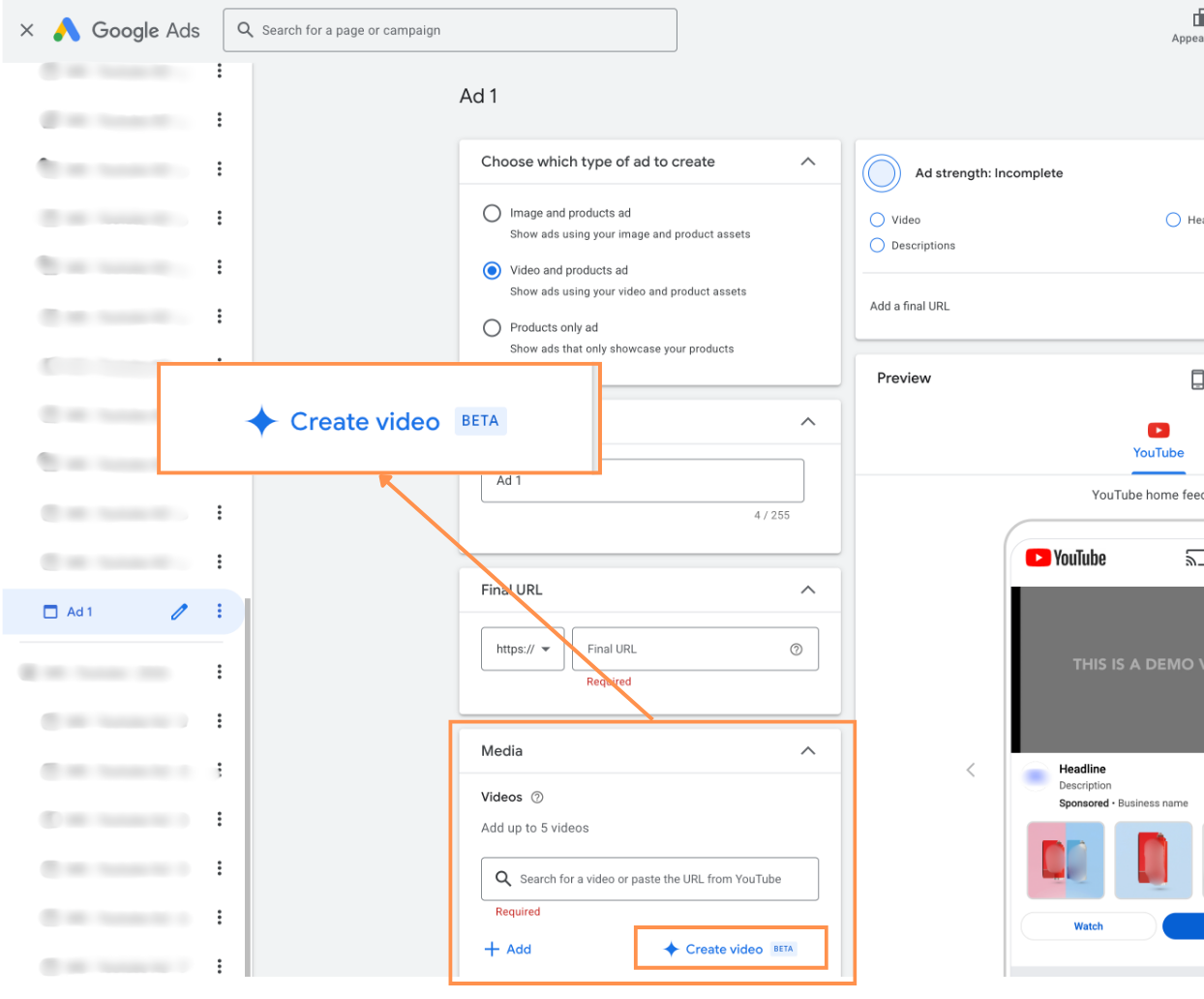
Google quietly rolled out a meaningful update to Demand Gen campaigns: a refreshed Asset Optimization interface with much more granular control over AI-generated variants and landing page–derived assets. On paper it looks like a small UX tweak. In practice, it shifts where creative decisions are made and who controls how far Google’s automation can go with your assets.
For anyone already deep into Google Ads, this is less about “new features” and more about tightening the feedback loop between creative, automation, and inventory coverage.
A more mature layer between creative and automation
Until now, a recurring tension in Demand Gen (and other automated campaign types) has been: how much creative freedom do you give the system, and how much do you keep under human review?
Google has been steadily moving toward “just give us your assets and we’ll do the rest.” That works well at scale, but it’s uncomfortable when you:
- Have strict brand guidelines or compliance constraints
- Work with limited video production capacity
- Need to understand what, exactly, is serving in your name
The new “Manage” section inside Asset Optimization is essentially a control panel for that middle layer. You can now explicitly enable or disable:
- Shorter video variants auto-generated from your existing videos
- Resized video variants in additional aspect ratios
- Landing page previews that pull images directly from your URL
Crucially, all of this is visible and controllable directly in the asset panel, with “View example” available before you allow anything to run. That changes the dynamic from “Google might generate extra stuff behind the scenes” to “you choose which automated variants are allowed into the rotation.”
Why this matters in the context of Demand Gen
Demand Gen sits in an awkward but powerful space between classic Display/Discovery and YouTube campaigns. It leans heavily on creative to drive performance, but it also leans heavily on automation to expand reach across placements.
The usual bottleneck is creative bandwidth, especially for video. Most accounts fall into one of three patterns:
1. Strong video production, but limited time to adapt to every format and placement.
2. Strong static and landing page creative, but minimal video resources.
3. Mixed, with some video but not enough to cover all surfaces properly.
In all three cases, the ability to auto-generate short and resized video variants, and to leverage landing page imagery, addresses a real operational gap: coverage. You get more eligible placements and formats without manually editing a dozen versions of every asset.
Where this update is different from previous automation pushes is the explicit approval layer. Instead of Google silently spinning up variants or pulling in page images, you decide, asset by asset category, what’s allowed. That is a more realistic model for how professional teams actually work.
Practical implications for video strategy
The most obvious win is for accounts that have a few good videos but not a full suite of creative tailored to each placement.
Shorter video variants help you test different attention windows without committing extra production time. A 30-second hero video can be cut down automatically into shorter versions that are better suited to certain placements or audiences with lower tolerance for longer creative. You still need a solid base video, but you no longer need a motion designer to produce every duration variant.
Resized video variants tackle the format problem. In practice, many advertisers upload a single 16:9 asset and accept that it will be imperfectly fitted into vertical or square placements. Auto-resizing with explicit approval allows you to see what those adaptations look like before they go live, and to decide whether the trade-off (more inventory vs. possible cropping or layout compromises) is acceptable for your brand.
From a performance standpoint, this is less about “AI will make better creatives” and more about “you can participate in more auctions with acceptable variants.” In competitive verticals, that extra coverage can be the difference between plateauing and finding incremental volume at similar or better CPAs.
Landing page–derived assets: useful, but not neutral
Pulling images from your landing page to create previews is conceptually simple but strategically interesting. It effectively turns your landing page into a lightweight asset library for Demand Gen.
This is particularly useful when:
- Your brand and product imagery are already well curated on-site
- Your design team is stretched and can’t keep feeding bespoke Display/Video assets
- You want to quickly test Demand Gen with minimal upfront creative work
However, this is not a “set and forget” feature. There are several trade-offs:
- Not every image on a landing page is meant to be an ad. UI screenshots, badges, or contextual imagery might make sense on-page but feel weak or confusing as standalone creatives.
- Compliance and rights become more visible. Google now explicitly asks you to confirm you hold rights to all images on the page. For brands using stock, UGC, or partner assets with specific usage terms, this is a real consideration.
- Visual hierarchy changes when you remove copy and layout. An image that works perfectly in the context of a headline and CTA might be ambiguous when isolated in an ad slot.
The “View example” option is essential here. It lets you evaluate not just whether the image is technically fine, but whether it communicates anything useful once it’s detached from the page structure.
For many accounts, the best approach will be selective enablement: allow landing page previews on well-designed, campaign-specific pages, and avoid enabling it on generic or utility pages where imagery is more functional than persuasive.
More control, but also more decisions
Greater control sounds universally positive, but it comes with a cost: someone has to make the decisions. For lean teams, every new toggle can feel like another thing to manage.
The key is to treat these controls as strategic levers, not micro-settings to be agonized over weekly. A pragmatic workflow might look like:
- At campaign (or quarterly) planning, decide globally whether you’re comfortable with shortened and resized video variants, and under what brand constraints.
- For landing page–derived assets, set clear internal rules: which page types are eligible, who approves them, and when to review.
- Periodically audit what’s actually serving. Use reporting and previews to confirm that the variants you’ve enabled still align with your brand and current messaging.
In other words, you use the panel to define the boundaries of automation, then let the system operate within those boundaries rather than micromanaging every variant.
Where this fits in the evolution of Google Ads
This update is consistent with a broader trend in Google Ads: automation is non-negotiable, but the platform is gradually reintroducing control surfaces where practitioners have pushed back.
We’ve seen this with more transparent asset-level reporting, better brand safety controls, and now more explicit asset optimization management. Demand Gen, being a heavily automated format, is a natural testbed for these refinements.
For experienced marketers, the opportunity is to treat these features not as optional add-ons, but as part of the core creative strategy. The question shifts from “Should we let Google auto-generate stuff?” to “Where can automation extend our creative without diluting our brand or message?”
Looking ahead
In its current form, granular Asset Optimization in Demand Gen is most valuable for advertisers with limited video production but solid static or landing page creative. It lets them expand into more placements and formats with a controlled approval layer, rather than a blind handoff to automation.
As Google continues to push AI-generated assets and creative remixing, this kind of interface will likely become the norm across more campaign types. The teams that benefit most will be those that define clear internal rules for what automation is allowed to do, and then actively use these controls to enforce those rules.
Demand Gen has always been about the interplay between reach, creative, and automation. These new controls don’t change that equation, but they do give professionals a more precise way to calibrate it.

As a Google Ads expert, I bring proven expertise in optimizing advertising campaigns to maximize ROI.
I specialize in sharing advanced strategies and targeted tips to refine Google Ads campaign management.
Committed to staying ahead of the latest trends and algorithms, I ensure that my clients receive cutting-edge solutions.
My passion for digital marketing and my ability to interpret data for strategic insights enable me to offer high-level consulting that aims to exceed expectations.
Google Partner Agency
We're a certified Google Partner Agency, which means we don’t guess — we optimize withGoogle’s full toolkit and insider support.
Your campaigns get pro-level execution, backed by real expertise (not theory).

4.9 out of 5 from 670+ reviews on Fiverr.
That’s not luck, that’s performance.
Highly recommend Matteo to set up your server side tracking. He has a deep understanding of e-commerce tracking and will go above and beyond to make sure everything is set up correctly and working 100%. If you are scaling your store this set up is non-negotiable in my opinion and there isn't many people who have this much knowledge or put the effort in to get it right. Thanks again!

avorodesign.com
I can only recommend Matteo! He was very patient, professional and very knowledgeable about GA4, Consent Mode v2, and GDPR compliance. Communication was clear, and the setup was done professionally and efficiently. Highly recommend him for anyone needing reliable tracking implementation.

www.natureiki.life
Matteo shines in the realm of online professionals. His work is not only deep in data but also complemented by his proactive communication and cooperation, setting a new standard for freelancers. If you want someone who truly exceeds expectations, look no further. Highly recommended!

www.omanbeverlysmyth.com
Exceptional Service Beyond Expectations - Outstanding Service Impeccable depth, flawless delivery, and exceptional language fluency—this service exceeded all expectations. Highly recommended. Matteo truly ROCKS!!!

ium-paris.com
Top-notch, always highly value working with Matteo. An absolute Google Ads Genius. This is approximately the 8th time I have hired him and he's helped us get 6-7 ROAS. We are excited in continuing to improve our lead flow. Hire this guy if you need Google Ads help. Thanks Matteo!

www.dleeventgroup.com
I finally found the guy who can setup server side tracking and all the ecosystem properly. I definitely recommend Matteo. He is very responsive, kind and wants to dig into things. He configured GA4, Meta, Google Ads, Outbrain and google consent v2 with Cookiebot. Thanks Matteo.

inomega.fr
MB Adv delivered exceptional work with outstanding professionalism and lots of patience, taking time to see effects of changes made and not just do the work and submit it. The proactive communication and video summaries of the work completed made working with Matteo a pleasure, as he consistently went above and beyond. Highly recommended for web analytics projects! We are already working on another project.

www.withnellsensors.co.uk
Working with Matteo on my Google Ads was a game-changer. He's not just a strategist, he's a true partner. He understood my goals and tailored a campaign that perfectly reached my target audience. I'm grateful for his expertise and dedication.

dccargo.com
Click-driven mind
with plastic-brick obsession.
We build Google Ads campaigns with the same mindset we use to build tiny brick worlds: strategy, patience, and zero tolerance for wasted pieces.
Data is our blueprint. Growth is the only acceptable outcome.