Microsoft Ads Conversion Tracking & UET: 2026 Guide

32
markets where UET Consent Mode is mandatory since May 5, 2025 — EEA (30 states), UK, and Switzerland
Source: Usercentrics, Microsoft UET Is Not Optional; CookieInformation, Microsoft UET Consent Mode is now mandatory
Microsoft Advertising Conversion Tracking: One Tag, Then Everything
Microsoft Advertising (formerly Bing Ads, rebranded April 2019) runs all conversion tracking on a single JavaScript tag: Universal Event Tracking (UET). Placed site-wide, UET records every page visit and custom event. Microsoft’s own documentation states it plainly: “UET is a prerequisite for conversion tracking and remarketing in paid search.” One tag. The rest of the account’s measurement architecture — conversion goals, audience lists, and smart bidding — is downstream of it. Source: Microsoft Learn, Universal Event Tracking.
UET tags are created at the account level and placed in the <head> or <body> of a site-wide layout template so the tag loads once on every page. One tag serves all conversion goals and remarketing lists for the account, and can be shared across accounts in a manager hierarchy. From that single tag, three capabilities flow: conversion goals (which designate which recorded actions count as conversions), remarketing and custom audience lists (built from the visit and event data UET records), and smart bidding signal — Maximize Conversions and Maximize Conversion Value both require the conversion data UET feeds them. Without UET, automated bidding has no outcome to optimize toward and defaults to click-volume behavior. See Microsoft Ads bidding and budget for how automated strategies consume that conversion signal, and Microsoft Ads audience targeting for how UET data builds remarketing lists across the Microsoft Search Network and Microsoft Audience Network (MSAN) — two distinct inventory pools.
MB Adv Agency has found that accounts inherited from prior management frequently show zero conversions not because of poor campaign performance but because UET was never installed — or the tag fires but no conversion goal was ever created. The Conversions column stays at zero on a spending account, and the fix is a tag install and a goal configuration, not a campaign rebuild.
The load-bearing dependency: UET is not a tracking enhancement added after the account is running. It is the prerequisite the rest of the account is built on. No UET means no conversions, no remarketing, and no automated bidding that optimizes toward real outcomes.
UET Fires; Conversion Goals Count — Two Separate Steps
UET records everything. A conversion goal counts something specific. The Conversions column in Microsoft Advertising only increments when a conversion goal is satisfied — not when UET fires. The goal is the rule that says “this page visit” or “this button click” is a conversion. Without a goal, all UET does is populate audience lists. For legal PPC and financial services PPC advertisers where every contact form is a high-value lead, an unconfigured goal is the difference between counting every lead and counting none.
Once UET is recording and goals are counting, those conversions drive the performance metrics tracked in Microsoft Ads reporting and metrics — CPA, ROAS, and attribution. The account structure for UET tags and shared assets across manager hierarchies is covered in Microsoft Ads account structure.
Key Takeaways
- UET is the single prerequisite. Universal Event Tracking is required for conversion tracking, remarketing lists, and automated bidding. No UET means no working measurement on Microsoft Advertising.
- UET fires; conversion goals count. UET records all site activity. A conversion goal designates which action counts. An account without a goal sees the tag fire while the Conversions column reads zero.
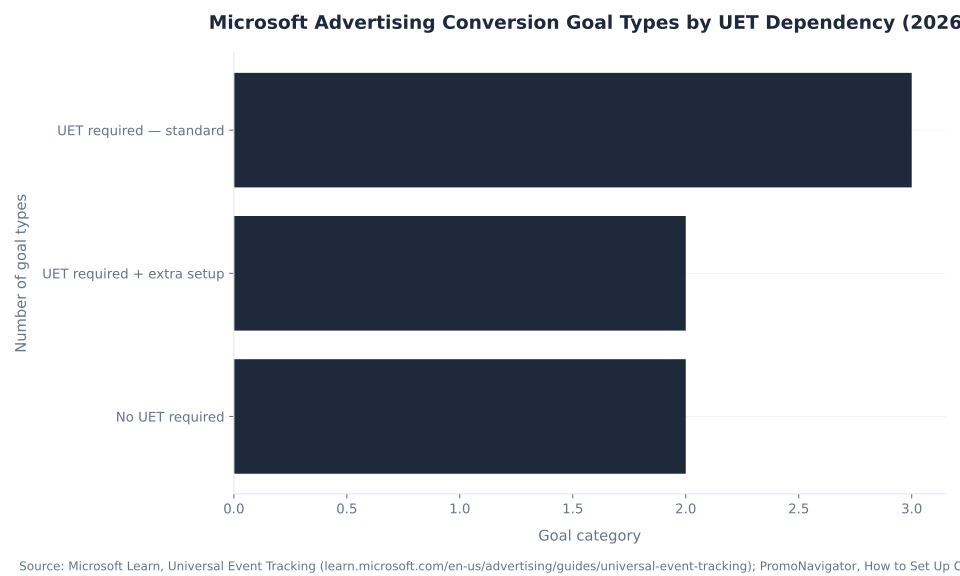
- Seven conversion goal types, five requiring UET. Destination URL, Event, Duration, Pages viewed, and Product/In-store all require UET. App Install (partner SDK) and Offline Conversion (MSCLKID file import) do not.
- UET Consent Mode mandatory since May 5, 2025. Covers any campaign reaching EEA (30 states), UK, or Switzerland users — based on where the user is located, not where the business is registered. 32 markets total.
- Denied consent is unrecoverable data loss by default. Basic Consent Mode does not model un-consented conversions. Advanced Consent Mode (ACM, February 19, 2026) is the opt-in path to conversion modeling.
- GTM is the clean install path. Microsoft maintains an official UET Tag template in the GTM community gallery. Advertisers with Google Consent Mode in GTM inherit it for UET — no separate banner integration required, but the consent toggle must be explicitly enabled.
- No native GA4-to-Microsoft conversion sync exists. GA4 attributes Microsoft traffic only via UTM tags on ad URLs. Conversion tracking for Microsoft runs on UET. Analytics integration provides reporting context, not conversion source.
1
UET tag — the single dependency for conversions, remarketing, and smart bidding
7
conversion goal types (5 require UET; 2 do not)
32
markets with mandatory UET Consent Mode (EEA + UK + Switzerland)
24h
maximum delay before a new UET tag or goal appears in Tracking status reporting
Microsoft Advertising vs. Google Ads: Consent Mode and Conversion Tracking Compared
Advertisers who run Google Ads alongside Microsoft Advertising commonly carry Google’s mental model into Microsoft’s setup. The architectures share the same objective — tag fires, goal counts, smart bidding optimizes — but differ sharply in consent mechanics and conversion signal modeling. The table below states the 2026 differences precisely.
| Dimension | Microsoft Advertising | Google Ads |
|---|---|---|
| Tracking tag | UET (Universal Event Tracking) | Google tag (gtag.js) |
| Consent Mode parameters | 1 signal: ad_storage (granted/denied) | 4 signals: ad_storage, analytics_storage, ad_user_data, ad_personalization |
| Un-consented conversion modeling | Not modeled by default. ACM (opt-in, Feb 19, 2026) enables modeling. | Modeled by default in standard Consent Mode |
| Consent Mode mandate | Mandatory since May 5, 2025 for EEA/UK/CH | Consent Mode v2 required since March 2024 for EEA/UK/CH |
| GA4 native sync | None — no native conversion pipeline in either direction | Native — Google Ads and GA4 share the same tag infrastructure |
| GTM template | Official Microsoft Advertising UET Tag template in GTM gallery | Google tag is native to GTM |
The single most consequential difference: Google Consent Mode models the un-consented conversion gap by default — estimated conversions flow into reporting automatically. Microsoft’s basic Consent Mode does not model anything. Denied consent on Microsoft is unrecoverable data loss, not an estimated approximation. A misconfigured Consent Mode setup on Microsoft is structurally more damaging than the equivalent misconfiguration on Google, because there is no fallback estimation layer. Sources: Usercentrics, Microsoft UET Is Not Optional; Analytics Mania, Microsoft Consent Mode.
Advanced Consent Mode (ACM), introduced February 19, 2026, is Microsoft’s opt-in answer to this gap. Where Google’s modeling is automatic, Microsoft’s requires implementing ACM explicitly. ACM “applies intelligent modeling using aggregate trends from existing data to estimate conversions that would otherwise be lost.” The opt-in step does not activate by default — an advertiser who has not implemented ACM still loses denied conversions entirely. Source: Microsoft Advertising blog, Advanced Consent Mode, February 2026.
Microsoft Advertising Conversion Goal Types: The Full Reference
A conversion goal designates which UET-recorded action counts as a conversion. Microsoft Advertising has seven goal types, each suited to a different business outcome. Five require UET; two — App Install and Offline Conversion — work without it. Source: Microsoft Learn, Universal Event Tracking; PromoNavigator, How to Set Up Conversion Tracking in Microsoft Advertising.
| Goal type | What it counts | UET required? | Typical use |
|---|---|---|---|
| Destination URL | Visit to a specific page (thank-you / confirmation URL) | Yes | Lead-form completion, checkout confirmation |
| Event | Custom action fired as a UET event (click, download, video play) | Yes + custom event code | Button clicks, file downloads, newsletter signup |
| Duration | Visitor stays longer than a set time (from 1 second) | Yes | Engagement proxy for content / resource pages |
| Pages viewed per visit | Visitor views more than N pages in one session | Yes | Content / catalog depth engagement |
| Product / In-store transaction | Purchases tied to products; in-store transactions | Yes + product/catalog data | Retail / Shopping / Performance Max |
| App install | App installations | No — partner SDK + measurement URL | App-promotion campaigns |
| Offline conversion | Conversions completed offline, matched on the Microsoft Click ID (MSCLKID) | No — imported by file, schedule, or API | Phone- or CRM-closed leads |
All seven goal types are created at Tools → Conversions → Conversion goals → Create. Set the revenue value and count settings (one conversion per visit vs. every conversion) when creating the goal, then attach it to the UET tag. Goals are created once and serve all campaigns in the account; no per-campaign goal configuration is needed. Source: Microsoft Learn.
For lead-gen advertisers running dental PPC, insurance PPC, and plumbing PPC, Destination URL is the default starting point: the form confirmation page is the simplest, most reliable signal. Event goals are the upgrade path, capturing button clicks, phone-number reveals, and chat initiations that never land on a distinct URL. For SaaS and software PPC and IT and managed services PPC, Duration and Pages viewed goals add a soft engagement layer that improves audience quality for remarketing without inflating hard-conversion counts.
Offline Conversion goals are the underused tool in high-CPL verticals: personal injury law PPC and HVAC PPC advertisers regularly close leads over the phone, days after the click. Importing those offline-closed leads against the Microsoft Click ID (MSCLKID) — captured from the landing page URL at click time and stored in the CRM — feeds real revenue signal back into smart bidding rather than optimizing on form fills that never convert.
UET Consent Mode: The May 2025 Mandate and How the Signal Works
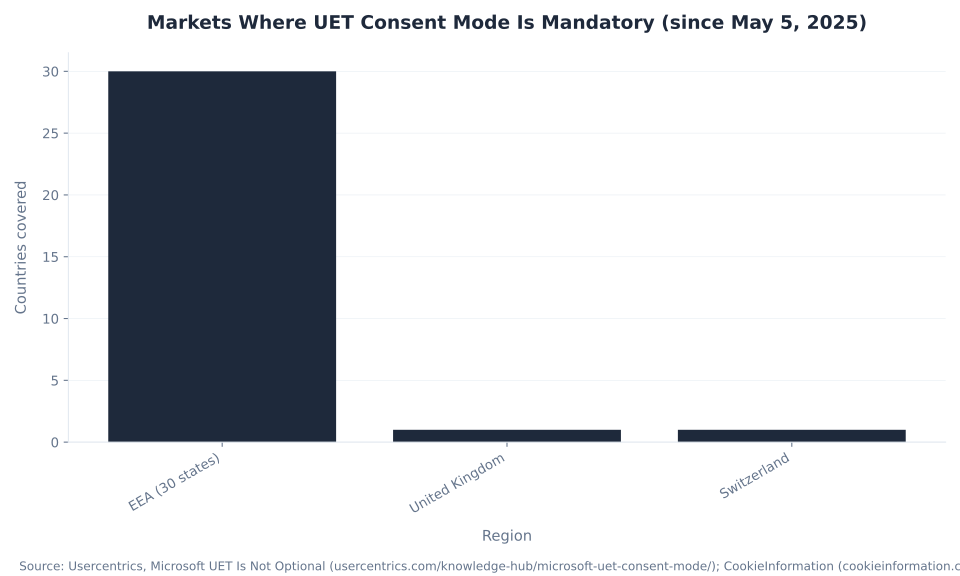
UET Consent Mode became mandatory on May 5, 2025 for any advertiser whose campaigns reach users in the European Economic Area (EEA), United Kingdom, or Switzerland. The obligation applies based on where the user is located — not where the business is registered. A US-based advertiser serving any EEA user is covered. The scope is 32 markets: 30 EEA member states (27 EU + Iceland, Liechtenstein, Norway), the UK, and Switzerland. Sources: Microsoft Advertising blog, May 2025 Consent Mandate; CookieInformation, Microsoft UET Consent Mode is now mandatory.
| Element | Detail |
|---|---|
| Mandatory since | May 5, 2025 — for any campaign reaching EEA / UK / Switzerland users (based on the user’s location, not the business’s) |
| Single consent signal | ad_storage = granted or denied (vs. Google’s 4 parameters) |
ad_storage = granted | UET reads and writes first- and third-party cookies normally |
ad_storage = denied | No advertising cookies; third-party cookies readable only for fraud/spam prevention, not advertising |
| Per-event consent flag | asc parameter on each event — “G” (granted) / “D” (denied) |
| Basic Consent Mode | UET does not fire until consent is granted — nothing is sent before consent |
| Un-consented conversions | NOT modeled in basic mode. Unlike Google Consent Mode, Microsoft does not estimate or recover the gap by default — denied = data lost |
| Reuse Google Consent Mode | Yes — enable “Consent settings” in the UET tag; the official GTM UET template inherits Google Consent Mode |
The geographic scope calculation: EEA = 27 EU member states + Iceland, Liechtenstein, Norway = 30 countries. Add the UK (left EEA in 2020 but independently covered by the mandate) and Switzerland = 32 markets total. Sources: Usercentrics; WebToffee, Microsoft UET Consent Mode: A Complete Guide.
The load-bearing insight for EEA/UK/CH advertisers: A denied ad_storage event is gone — there is no baseline modeling layer that estimates it back in basic Consent Mode. That is the structural difference from Google Consent Mode, where modeling runs by default. Misconfigured consent on Microsoft is not “slightly under-reported” — it is real, unrecoverable data loss that starves smart bidding of the signal it needs. Source: Analytics Mania, Microsoft Consent Mode.
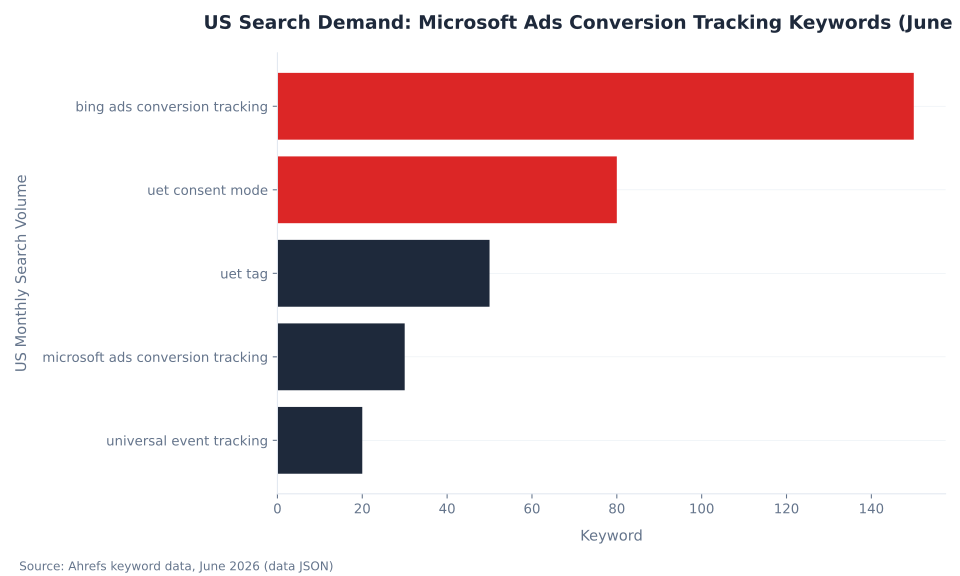
US Search Demand: Microsoft Ads Conversion Tracking Keywords (June 2026)
Deploying UET Through Google Tag Manager
Google Tag Manager is the recommended deployment path for UET on sites already running GTM for other tracking. Microsoft maintains an official Microsoft Advertising UET Tag template in the GTM community template gallery — no custom HTML tag required. Source: Analytics Mania, Microsoft Ads conversion tracking with Google Tag Manager.
The GTM path has one significant advantage over a direct site-tag install: if Google Consent Mode is already implemented in GTM, the UET tag inherits it. In the UET page-view tag settings, enabling “Consent settings” causes the tag to read and respect the existing Google ad_storage consent state rather than requiring a separate consent banner integration. An advertiser who completed the Google Consent Mode setup for Google Ads does not rebuild the consent architecture for Microsoft — they enable one toggle in the UET tag configuration. The toggle is not on by default; it must be explicitly switched on.
For Advanced Consent Mode (ACM), load order is the critical implementation requirement: UET must load before the consent banner or CMP script executes. If the CMP fires first and sets consent state, UET misses the pre-consent window ACM requires to send anonymized data and later backfill. Source: Microsoft Advertising blog, Advanced Consent Mode, February 2026.
The GTM deployment also supports custom UET events as GTM triggers — the same event-based approach used for Google Ads conversion actions maps cleanly to UET Event goals. This means an existing GTM trigger (button_click, form_submit) is reused rather than rebuilt. MB Adv Agency deploys UET via GTM by default for all new Microsoft accounts, treating it as the same container that already manages Google tracking — a two-tag GTM edit rather than a site deployment request to engineering.
Once UET is live via GTM, Event goals for PPC management in Austin and PPC management in Chicago client accounts are configured in the same GTM workspace. The same container manages Google and Microsoft event tracking without duplicating the trigger logic.
Microsoft Advertising Conversion Goal Types by UET Dependency (2026)
Microsoft Advertising and Google Analytics 4: What Actually Connects
There is no native pipeline that syncs GA4 conversions into Microsoft Advertising, or Microsoft conversions into GA4. GA4 attributes Microsoft traffic only when the ad URLs carry UTM parameters — without UTM tagging, Microsoft clicks land in GA4 as direct or unattributed traffic. Cost data from Microsoft Advertising does not flow into GA4 automatically; it requires manual import or a third-party connector. Source: OwoX, Import Microsoft Ads Data into Google Analytics 4.
| Connection | What is possible | What is NOT possible |
|---|---|---|
| GA4 → Microsoft | None natively | No automatic conversion goal import from GA4 to Microsoft |
| Microsoft → GA4 | GA4 attributes Microsoft traffic via UTM tags on ad URLs | No automatic conversion data push from Microsoft to GA4 |
| Cost data in GA4 | Manual import or third-party connector | No native cost-data API from Microsoft to GA4 |
| Microsoft’s Google Ads import | Pulls conversion goals from a linked Google Ads account (not GA4) | Does not bridge GA4 and Microsoft; does not import GA4 goals |
Microsoft does have a Google Ads import feature — distinct from GA4 — that pulls conversion goals from a linked Google Ads account. Because the underlying tags differ (UET fires for Microsoft; the Google tag fires for Google Ads), practitioners caution against importing Google Ads goals into Microsoft without verifying that UET is independently recording the same action on Microsoft’s network. Source: Search Engine Land, Microsoft Ads to allow Google conversion goal imports.
The correct current-state setup for an advertiser running both platforms: UTM-tag all Microsoft ad URLs so GA4 reports Microsoft traffic as microsoft / cpc; import Microsoft cost data into GA4 manually or via a connector if cross-platform cost reporting matters; and keep Microsoft conversion tracking entirely on UET. GA4 has no visibility into whether the UET tag is firing or recording correctly — that diagnosis happens in UET Tag Helper and the Tracking status column, not in GA4.
Markets Where UET Consent Mode Is Mandatory (since May 5, 2025)
Debugging Microsoft Ads Conversion Tracking: The Diagnostic Tools
When the Conversions column reads zero or “Unverified,” three tools diagnose the problem in order of speed: the UET Tag Helper browser extension for live-page validation, the Tracking status column for in-platform goal status, and the 2026 Conversion Tracking Diagnostics AI tool. Sources: Microsoft Advertising Help, Test conversion goals with UET Tag Helper; ALMCorp, New Copilot Diagnostics; ALMCorp, Activate 2026 Recap.
| Tool / signal | What it is | What it checks |
|---|---|---|
| UET Tag Helper | Free browser extension (Microsoft Edge + Google Chrome) | Validates the UET tag fires and conversion goals record on the live page in real time; reports the exact issue and fix instead of waiting 24 hours |
| Tracking status column | In-platform goal status (Tools → Conversions → Conversion goals) | First in-platform signal something is wrong: “Recording conversions” vs. “Unverified” / “Tag inactive” / “Inactive” |
| Conversion Tracking Diagnostics | Copilot-era AI diagnostic (surfaced at Microsoft Advertising Activate 2026) | Automatically checks that UET tags and conversion goals are configured correctly; detects setup issues before they distort campaign results |
| Performance Shift Root Cause Analysis | Paired Copilot diagnostic | Explains why conversions or performance changed (adjacent to tracking, not a tag validator) |
| 24-hour data delay | Platform behavior (not a tool) | A new UET tag or goal takes up to 24 hours to report — rule this out before assuming the tag is broken |
The 24-hour data delay is the most commonly overlooked non-issue in Microsoft Ads debugging. UET Tag Helper bypasses this delay entirely: it reports live tag status on the page within seconds, regardless of in-platform reporting lag. The correct debugging sequence is UET Tag Helper first (real-time), Tracking status column second (in-platform status), Conversion Tracking Diagnostics third (AI-assisted setup review). Source: Microsoft Advertising Help, UET Tag Helper.
Advanced Consent Mode: Microsoft’s Opt-In Modeling Layer
Advanced Consent Mode (ACM) is Microsoft’s opt-in tier that adds conversion modeling for the un-consented gap. Announced February 19, 2026 by Dr. Paul Farrow, Principal Product Manager at Microsoft Advertising, ACM “applies intelligent modeling using aggregate trends from existing data to estimate conversions that would otherwise be lost” when a user denies consent. ACM is opt-in: it does not activate by default, and an advertiser on basic Consent Mode still loses denied conversions entirely. Source: Microsoft Advertising blog, Advanced Consent Mode, February 2026.
| Mode | When UET fires | Pre-consent data sent | Modeling for denied events? |
|---|---|---|---|
| Basic Consent Mode | Only after consent is granted | Nothing — tag does not fire | No — denied events are lost entirely |
| Advanced Consent Mode (ACM) | Immediately, before consent decision | Anonymized/limited data; Click ID NOT stored until consent granted | Yes — intelligent modeling using aggregate trends |
ACM is “strongly recommended, but isn’t strictly required to receive modeled conversions” — the opt-in framing matters. An advertiser on basic Consent Mode who has not implemented ACM still loses denied conversions entirely. The modeling accuracy and gap-fill rate are not published by Microsoft; no direct comparison figure to Google’s modeling is available from public sources. Source: Microsoft Advertising blog, February 2026.
The load-order requirement is ACM’s single most common implementation failure: UET must load before the CMP or consent banner script fires. If the CMP fires first and sets consent state, UET misses the pre-consent window ACM needs to operate. Confirm GTM tag firing order: UET page-view tag must have sequencing priority over the CMP tag.
For high-CPL verticals where every denied conversion is a lost bidding signal — legal PPC, personal injury law PPC, legal PPC in Missoula, and HVAC PPC in Flagstaff — ACM implementation is a direct impact on smart bidding signal quality and the CPL targets automated strategies reach. MB Adv Agency treats ACM configuration as a mandatory step for any EEA/UK/CH Microsoft account, not an optional enhancement.
Bing Ads Conversion Tracking: Search Demand and Setup Priority
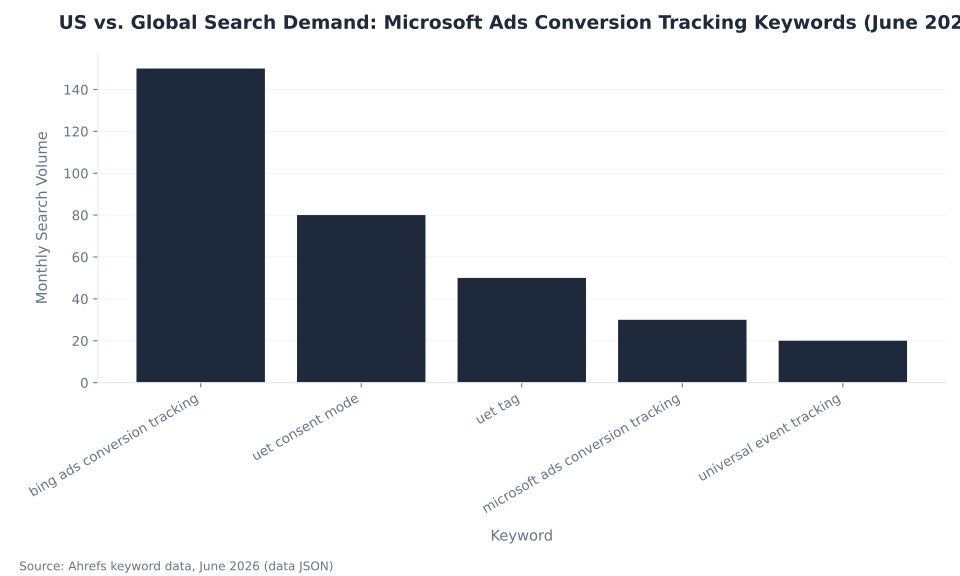
“Bing ads conversion tracking” (150 US monthly searches, KD 4) remains the highest-volume entry point to this topic despite the rebrand to Microsoft Advertising in April 2019. “UET consent mode” (80/month) is the sharpest time-sensitive query in the cluster — the May 2025 mandate created direct search demand from advertisers whose tracking dropped. “UET tag” carries disproportionate global demand: 200 global vs. 50 US (4× the US volume), signaling broad international readership. Source: Ahrefs keyword data, June 2026.
| Keyword | US Monthly Volume | Global Monthly Volume | KD | Intent |
|---|---|---|---|---|
| bing ads conversion tracking | 150 | 250 | 4 | Informational/setup — legacy name still dominates |
| uet consent mode | 80 | 150 | n/a | Time-sensitive fix — mandate-driven demand |
| uet tag | 50 | 200 | 7 | Informational/setup — strong international signal |
| microsoft ads conversion tracking | 30 | 90 | 0 | Informational/setup — current platform name |
| universal event tracking | 20 | 30 | 11 | Informational — formal name variant |
The keyword distribution maps directly to the three reader profiles this pillar addresses. Advertisers searching “bing ads conversion tracking” are new to Microsoft and need end-to-end setup guidance. Advertisers on “uet consent mode” have an urgent problem — their tracking dropped after the May 2025 mandate, and they need the specific fix. The 4× global-to-US ratio on “uet tag” reflects the mandate’s EEA/UK/CH geographic scope: international advertisers hit this content because their consent setup is the immediate crisis. Source: Ahrefs keyword data, June 2026.
US vs. Global Search Demand: Microsoft Ads Conversion Tracking Keywords (June 2026)
UET not recording? Consent Mode not configured?
MB Adv Agency sets up and audits Microsoft Advertising conversion tracking for legal, dental, financial services, and other high-intent verticals. UET install, Consent Mode configuration, and full account management.
Request a Microsoft Ads Audit →How to Set Up Microsoft Advertising Conversion Tracking: 6 Steps
Setting up Microsoft Advertising conversion tracking requires six sequential steps. Steps 1–3 establish the tag and consent infrastructure; steps 4–6 configure the goal and verify it is recording. None of the steps is optional for an account that needs conversion data for smart bidding. Sources: Microsoft Learn, Universal Event Tracking; Microsoft Advertising Help, UET Tag Helper.
Create the UET tag. In Microsoft Advertising, navigate to Tools → Conversions → UET tag → Create UET tag. Name the tag and copy the generated tracking script. One tag serves all conversion goals and remarketing lists for the account — confirm you need a second tag before creating one (Microsoft publishes specific reasons for creating more than one UET tag; most accounts need only one). Source: Microsoft Learn, Universal Event Tracking.
Install the tag site-wide. Paste the script into the
<head>or<body>of every page — ideally a site-wide layout template so the tag loads once everywhere — or deploy via Google Tag Manager using the official Microsoft Advertising UET Tag community template. GTM is the preferred method for sites already running GTM for other tracking. Sources: Microsoft Learn; Analytics Mania, UET via GTM.Enable Consent Mode (mandatory for EEA/UK/CH traffic). If campaigns reach users in the EEA, UK, or Switzerland, enable “Consent settings” in the UET tag to honor the
ad_storagesignal. If Google Consent Mode is already implemented in GTM, the UET tag inherits it — enable the consent toggle in the UET page-view tag. For Advanced Consent Mode (ACM, the opt-in modeling tier), UET must load before the CMP script to function correctly. Sources: CookieInformation; Microsoft Advertising blog, February 2026.Create a conversion goal. Navigate to Tools → Conversions → Conversion goals → Create. Choose the goal type (Destination URL, Event, Duration, Pages viewed, Product, App install, or Offline). Set the revenue value, count settings (one conversion per visit vs. every conversion), and attach it to the UET tag. Source: PromoNavigator, How to Set Up Conversion Tracking in Microsoft Advertising.
Verify with UET Tag Helper. Install the free UET Tag Helper browser extension (available for Microsoft Edge and Google Chrome). Browse the conversion path — form submit, thank-you page, or event trigger — and confirm the tag fires and the goal records. The extension reports the exact issue and fix if something is wrong, without waiting 24 hours for in-platform status to update. Source: Microsoft Advertising Help, UET Tag Helper.
Wait, then confirm Tracking status. A new UET tag or conversion goal takes up to 24 hours to appear in reporting. After 24 hours, check the goal’s Tracking status column at Tools → Conversions → Conversion goals: “Recording conversions” means setup is working; “Unverified,” “Tag inactive,” or “Inactive” means the tag is not firing correctly on the designated URL or event. Source: Microsoft Learn, Universal Event Tracking.
Three Persistent Misconceptions About Microsoft Ads Conversion Tracking
The most consequential errors in Microsoft Advertising conversion tracking trace to three sources: assuming UET alone is enough (it isn’t — goals are required), carrying Google’s consent modeling assumptions into Microsoft’s setup (the defaults are different), and believing GA4 and Microsoft share conversion data natively (they do not). All three are correctable with direct platform documentation.
Misconception 1: “I installed UET, so I’m tracking conversions.”
UET records raw site activity — page visits, custom events — but nothing is counted as a conversion until a conversion goal designates which recorded action to count. An advertiser who installs the tag and never creates a goal sees UET Tag Helper confirm the tag fires while the Conversions column stays at zero. The fix: create a conversion goal at Tools → Conversions → Conversion goals → Create, select the goal type that matches the target action, and attach it to the UET tag. Source: Microsoft Learn, Universal Event Tracking.
Misconception 2: “Microsoft models the consent gap like Google does.”
Many advertisers carry Google’s mental model into Microsoft’s setup and assume modeled conversions backfill the un-consented portion. They do not in basic Consent Mode. Unlike Google Consent Mode, which models the un-consented gap by default, Microsoft’s basic implementation loses denied conversions entirely — no recording, no estimation, no recovery. Advanced Consent Mode (ACM), introduced February 19, 2026, is Microsoft’s opt-in modeling path. Without implementing ACM, a broken or missing Consent Mode setup on EEA/UK/CH traffic is not “slightly under-reported” — it is unrecoverable data loss. Sources: Usercentrics; Analytics Mania.
Misconception 3: “Integrating Google Analytics gives Microsoft my conversions.”
There is no native pipeline that syncs GA4 conversions into Microsoft Advertising, or Microsoft conversions into GA4. GA4 attributes Microsoft traffic only when the ad URLs carry UTM parameters; GA4 has no visibility into UET tag status or conversion goal configuration. Microsoft does have a Google Ads import feature — which pulls conversion goals from a linked Google Ads account, not GA4 — but because UET and the Google tag are different scripts tracking with different identifiers, importing Google Ads goals blindly does not mean Microsoft’s UET is recording the same actions. Conversion tracking for Microsoft still runs on UET. Source: OwoX, Import Microsoft Ads Data into GA4.
Frequently Asked Questions About Microsoft Advertising Conversion Tracking and UET
What is the UET tag and why does Microsoft Advertising require it?
Universal Event Tracking (UET) is a JavaScript snippet created in Microsoft Advertising that records every page visit and custom event on the website. Microsoft requires UET because it is the prerequisite for all three core measurement capabilities: conversion tracking, remarketing and custom audience list building, and smart bidding signal for Maximize Conversions and Maximize Conversion Value. Without UET, none of these capabilities work — automated bidding has no outcome to optimize toward and defaults to click-volume behavior, remarketing lists cannot be built, and the Conversions column stays at zero. One tag is created at Tools → Conversions → UET tag → Create UET tag and placed in the head or body of every page on the site, ideally via a site-wide template or Google Tag Manager. The tag can be shared across accounts in a manager hierarchy. UET records raw activity; a conversion goal is then the separate rule that designates which recorded action counts as a conversion. Source: Microsoft Learn, Universal Event Tracking.
What are the seven Microsoft Advertising conversion goal types?
Microsoft Advertising has seven conversion goal types. Destination URL counts a visit to a specific page — typically a thank-you or order-confirmation URL — and requires UET. Event counts a custom action fired as a UET event such as a button click, file download, or video play; it requires UET plus custom event code added to the action. Duration counts a visitor who stays longer than a set time (from 1 second) and requires UET; it is used as an engagement proxy for content sites. Pages viewed per visit counts a visitor who views more than N pages in one session and requires UET. Product/In-store counts purchases tied to products and in-store transactions; it requires UET plus product and catalog data. App Install counts app installations via a certified partner SDK and measurement URL — no UET required. Offline Conversion counts conversions completed offline, matched on the Microsoft Click ID (MSCLKID) captured from the ad URL at click time and imported by file, schedule, or API — no UET required. Sources: Microsoft Learn, Universal Event Tracking; PromoNavigator.
What changed on May 5, 2025 for UET Consent Mode?
On May 5, 2025, Microsoft made UET Consent Mode mandatory for any advertiser whose campaigns reach users in the European Economic Area (EEA), United Kingdom, or Switzerland. The obligation applies based on where the user is located — not where the business is registered. A US-based advertiser running campaigns that serve any EEA user is covered. The scope is 32 markets: 30 EEA member states (27 EU member states plus Iceland, Liechtenstein, and Norway), the UK, and Switzerland. UET Consent Mode operates on a single consent signal: ad_storage = granted or denied. Every UET event carries an asc (ad storage consent) parameter — “G” for granted, “D” for denied. When ad_storage is denied in basic Consent Mode, no advertising cookies are set and the conversion data for that user is not recorded or estimated — it is gone entirely. Advanced Consent Mode (ACM), introduced February 19, 2026, is the opt-in path to modeling denied conversions. Sources: Microsoft Advertising blog, March 2025; Usercentrics; CookieInformation.
Does Microsoft model conversions for users who deny consent?
By default, Microsoft does not model conversions for users who deny consent. Basic Consent Mode — the original implementation — sends no data when a user’s ad_storage is denied. That denied conversion is gone entirely: no recording, no estimation, no recovery. This is the structural difference from Google Consent Mode, which models the un-consented gap by default in its standard implementation. Advanced Consent Mode (ACM), introduced February 19, 2026, is Microsoft’s opt-in path to modeling. ACM fires UET immediately with limited, anonymized data when a user has not yet consented and backfills the full data including the Click ID if the user later grants consent. For users who deny throughout the session, ACM applies intelligent modeling using aggregate trends from existing data to estimate conversions that would otherwise be lost. ACM is strongly recommended but requires explicit implementation — it does not activate by default. An advertiser on basic Consent Mode still loses denied conversions entirely. Source: Microsoft Advertising blog, Advanced Consent Mode, February 2026.
How do I deploy UET through Google Tag Manager?
Microsoft maintains an official Microsoft Advertising UET Tag template in the Google Tag Manager community template gallery. In GTM, open Templates, search for “Microsoft Advertising,” and add the template. In the tag configuration, enter the UET tag ID found under Tools → Conversions → UET tag in Microsoft Advertising and set the trigger to fire on all pages. If Google Consent Mode is already implemented in GTM, enable “Consent settings” in the UET page-view tag to inherit the existing ad_storage consent state — no separate banner integration is needed. For Advanced Consent Mode (ACM), UET must load before the CMP or consent banner script fires; confirm the GTM tag firing order to ensure UET has priority. Custom UET events for Event goals — button clicks, form submits, phone reveals — are implemented as additional GTM tags that fire on the specific GTM trigger for each action, reusing existing trigger logic. Source: Analytics Mania, Microsoft Ads conversion tracking with Google Tag Manager.
Why is my Microsoft Ads conversion tracking not working?
The most common causes of Microsoft Advertising conversion tracking not recording, in order of frequency: first, the UET tag is installed but no conversion goal was created — UET records activity but nothing counts until a goal designates what to count; use UET Tag Helper to confirm the tag fires, then check Tools → Conversions → Conversion goals for a configured goal with Tracking status “Recording conversions.” Second, the goal’s Destination URL or event condition does not match what the page actually delivers — a redirect or URL parameter mismatch stops the goal from firing. Third, the goal shows “Unverified” — a new goal takes up to 24 hours to move to “Recording conversions” after first firing; rule out the 24-hour delay before assuming a setup error. Fourth, UET Consent Mode is not configured for EEA/UK/CH traffic — a missing or broken Consent Mode setup blocks UET from recording for denied-consent users. Source: Microsoft Advertising Help, UET Tag Helper.
Evaluating Microsoft Advertising for your industry?
MB Adv Agency manages Microsoft Advertising accounts for HVAC, plumbing, SaaS and software, dental, and other verticals. Talk to us about whether the channel fits your acquisition economics.
Talk to MB Adv →Methodology
UET mechanics and conversion goal types draw from Microsoft Learn, Universal Event Tracking (ms.date 2026-03-11, updated 2026-06-05) and PromoNavigator. Consent Mode mechanics from Usercentrics, CookieInformation, and Analytics Mania. Advanced Consent Mode from the official Microsoft Advertising blog, February 19, 2026. GTM deployment from Analytics Mania. GA4 integration from OwoX. Debugging tools from ALMCorp, Activate 2026 Recap. Keyword data from Ahrefs, June 2026. Reviewed by MB Adv Agency, June 2026.

As a Google Ads expert, I bring proven expertise in optimizing advertising campaigns to maximize ROI.
I specialize in sharing advanced strategies and targeted tips to refine Google Ads campaign management.
Committed to staying ahead of the latest trends and algorithms, I ensure that my clients receive cutting-edge solutions.
My passion for digital marketing and my ability to interpret data for strategic insights enable me to offer high-level consulting that aims to exceed expectations.
Google Partner Agency
We're a certified Google Partner Agency, which means we don’t guess — we optimize withGoogle’s full toolkit and insider support.
Your campaigns get pro-level execution, backed by real expertise (not theory).

4.9 out of 5 from 670+ reviews on Fiverr.
That’s not luck, that’s performance.
Highly recommend Matteo to set up your server side tracking. He has a deep understanding of e-commerce tracking and will go above and beyond to make sure everything is set up correctly and working 100%. If you are scaling your store this set up is non-negotiable in my opinion and there isn't many people who have this much knowledge or put the effort in to get it right. Thanks again!

avorodesign.com
I can only recommend Matteo! He was very patient, professional and very knowledgeable about GA4, Consent Mode v2, and GDPR compliance. Communication was clear, and the setup was done professionally and efficiently. Highly recommend him for anyone needing reliable tracking implementation.

www.natureiki.life
Matteo shines in the realm of online professionals. His work is not only deep in data but also complemented by his proactive communication and cooperation, setting a new standard for freelancers. If you want someone who truly exceeds expectations, look no further. Highly recommended!

www.omanbeverlysmyth.com
Exceptional Service Beyond Expectations - Outstanding Service Impeccable depth, flawless delivery, and exceptional language fluency—this service exceeded all expectations. Highly recommended. Matteo truly ROCKS!!!

ium-paris.com
Top-notch, always highly value working with Matteo. An absolute Google Ads Genius. This is approximately the 8th time I have hired him and he's helped us get 6-7 ROAS. We are excited in continuing to improve our lead flow. Hire this guy if you need Google Ads help. Thanks Matteo!

www.dleeventgroup.com
I finally found the guy who can setup server side tracking and all the ecosystem properly. I definitely recommend Matteo. He is very responsive, kind and wants to dig into things. He configured GA4, Meta, Google Ads, Outbrain and google consent v2 with Cookiebot. Thanks Matteo.

inomega.fr
MB Adv delivered exceptional work with outstanding professionalism and lots of patience, taking time to see effects of changes made and not just do the work and submit it. The proactive communication and video summaries of the work completed made working with Matteo a pleasure, as he consistently went above and beyond. Highly recommended for web analytics projects! We are already working on another project.

www.withnellsensors.co.uk
Working with Matteo on my Google Ads was a game-changer. He's not just a strategist, he's a true partner. He understood my goals and tailored a campaign that perfectly reached my target audience. I'm grateful for his expertise and dedication.

dccargo.com
Click-driven mind
with plastic-brick obsession.
We build Google Ads campaigns with the same mindset we use to build tiny brick worlds: strategy, patience, and zero tolerance for wasted pieces.
Data is our blueprint. Growth is the only acceptable outcome.