Microsoft Ads Reporting & Metrics: KPIs That Matter

Microsoft Advertising Report Types
41
distinct report types across 9 categories in Microsoft Advertising as of April 2026, per the official bingads-13 API documentation. The Performance category alone — which includes Search Query, Share of Voice, Conversion Performance, and Goals & Funnels — accounts for 18 of those 41 types. This is where nearly every diagnostic question a PPC manager asks gets answered.
Source: Microsoft Learn, Report Types (bingads-13), April 2026, updated June 15, 2026
Microsoft Advertising Reporting & Metrics: What the Numbers Mean and Which Ones Are the Scorecard
Microsoft Advertising reporting organizes into three metric families: efficiency (CTR, CPC, CPA, ROAS), quality and competitive (Quality Score and its three components, the impression-share family), and the conversion layer (Conversions, All Conversions, view-through conversions, assists). Before any KPI conversation is meaningful, that conversion layer must exist — and it exists only when Universal Event Tracking is firing and, for EEA/UK/Swiss traffic, consent signals are passing.
Most Microsoft Advertising accounts plateau because the default column set sits at the top of the funnel. Impressions, clicks, and CTR are always populated — they require no tracking. Conversions, cost per conversion, revenue, and ROAS are the columns that decide whether spend pays back, and they are blank without a working UET tag. An impressions-and-clicks report is not a performance report. MB Adv Agency finds this to be the single most common reporting gap across new Microsoft Advertising accounts: the conversion layer was never wired up, so the account has been optimizing for clicks against no outcome signal.
This reference covers the complete reporting vocabulary: thirteen core KPIs and when each is the primary scorecard, the three Quality Score components and how to read them per-component, the six impression-share metrics and the diagnostic IS-lost-to-budget vs. IS-lost-to-rank pair, the four conversion columns and how they differ, and Microsoft’s three attribution models. On that last point: Microsoft Advertising offers three attribution models — LastClick, LastTouch, and Data-Driven. The Google-style first-click, linear, and time-decay models do not exist in Microsoft Advertising; the bingads-13 API specification (updated February 2026) confirms this. Any guide claiming five models for this platform is wrong.
The reporting interface itself is covered in the second half: 41 report types across 9 categories, the in-platform Report Builder, scheduled and emailed exports (CSV, TSV, XML), and the 2026 diagnostic additions — data-driven attribution rollout, Copilot Performance Shift Root Cause Analysis, and Conversion Tracking Diagnostics. Industry context for metric prioritization links out to Legal PPC, Financial services PPC, SaaS software PPC, Dental PPC, and Real estate PPC — each vertical has a different primary KPI, and the goal-to-metric mapping is in the KPI selection table below.
Key Takeaways
- Conversion layer first. Conversions, conversion rate, CPA, revenue, and ROAS are blank without a working UET tag. Confirm that layer before reading any other column. Microsoft does not model un-consented conversions — EEA/UK/CH traffic with a missing consent signal is simply absent from the report.
- Quality Score is a three-part diagnostic. The 1–10 score combines expected CTR, ad relevance, and landing page experience (each 1–3, updated daily). A score dragged down by landing-page experience is a different fix than one dragged down by expected CTR.
- IS Lost to Budget vs. IS Lost to Rank is the most actionable pair in the account. The first means raise budget; the second means raise bid or Quality Score. On January 15, 2026, Microsoft extended these Share-of-Voice metrics to Performance Max campaigns.
- Conversions ≠ All Conversions. "Conversions" counts click-based goals flagged “include in conversions.” "All Conversions" adds cross-device and view-through (impression-based). Reporting one as the other over- or under-states results.
- Microsoft Advertising has three attribution models, not five. LastClick (default, all campaigns), LastTouch (Audience Workflow campaigns only), Data-Driven (eligible auto-bidding strategies, rolled out to all advertisers by end of May 2026). First-click, linear, and time-decay do not exist here.
- 41 report types across 9 categories. The Report Builder supports custom column sets; scheduled reports run automatically and email to recipients; exports are CSV (default), TSV, or XML.
Quality Score scale
1–10
Keyword-level, 10 = best, updated daily. Three sub-components each rated 1–3: expected CTR, ad relevance, landing page experience. Source: Microsoft Learn.
Attribution models
3
LastClick (default, all campaigns), LastTouch (AWF only), Data-Driven (auto-bidding, May 2026 rollout). NOT 5 — first-click, linear, time-decay do not exist on this platform. Source: bingads-13 API.
Report types
41
Across 9 categories per bingads-13 API, April 2026. Performance category: 18 types including Search Query, Share of Voice, Conversion Performance, Goals & Funnels. Source: Microsoft Learn.
PMax SoV metrics extended
Jan 15, 2026
Impression share, click share, IS lost to budget/rank extended to Performance Max campaigns, history back to Nov 10, 2025. Covers Search + Shopping; excludes Audience Network. Source: Search Engine Roundtable / Adsroid.
Key Metrics to Monitor in Microsoft Ads: The Complete KPI Reference
The thirteen core Microsoft Advertising KPIs form a funnel: spend buys impressions, impressions earn clicks (CTR → average CPC), clicks earn conversions (conversion rate → cost per conversion), and conversions earn revenue (ROAS). The metric that matters is the one tied to the campaign goal — and the first prerequisite is confirming the conversion columns are populated, which requires UET tracking to be in place.
The table below covers every core KPI by formula, what it measures, and when it becomes the primary scorecard. The "head term" query this section exists to answer — "what are the key metrics to monitor in microsoft ads campaigns" — maps to a cluster winner holding position ~1.94 in Google Search Console, making this the single most important anchor in the pillar.
| Metric | Formula / scale | What it measures | When it is the primary KPI |
|---|---|---|---|
| Impressions | Count of times ads served | Exposure and delivery reach | Brand awareness campaigns |
| Clicks | Count of ad clicks | Top-of-funnel interest | Traffic campaigns |
| CTR | Clicks ÷ Impressions × 100 | Ad and keyword relevance | Creative and keyword diagnostic |
| Avg. CPC | Spend ÷ Clicks | Cost efficiency per click | Budget pacing; bid efficiency |
| Spend | Total cost for the period | Money deployed | Pacing and finance reconciliation |
| Conversions | Goals flagged “include in conversions,” click-based, by attribution model | Desired actions completed (lead-gen primary) | Lead generation |
| Conversion rate | Conversions ÷ Clicks × 100 | Landing-page and offer effectiveness | Mid-funnel health diagnostic |
| Cost per conversion (CPA) | Spend ÷ Conversions | Cost of one acquired lead or action | Lead-gen efficiency KPI |
| Revenue | Conversion value reported via UET | Sales value driven by ads | E-commerce |
| ROAS | Revenue ÷ Spend | Revenue efficiency of ad spend | E-commerce primary KPI |
| All Conversions | Conversions + cross-device + view-through | Fuller conversion picture across all paths | Cross-device and display analysis |
| View-through conversions | Impression-based; excludes anyone who clicked any Microsoft Advertising ad | Influence of ads seen but not clicked | Audience Network / upper-funnel analysis |
| Assists | Path touchpoints without last-click credit | Contribution of mid-path keywords | Attribution analysis |
The conversion layer is the prerequisite. Every row in Table 1 from "Conversions" downward is blank or undercounted without a working Universal Event Tracking tag. And unlike Google Ads, Microsoft does not fill the gap with modeled data: un-consented conversions from EEA/UK/Swiss traffic are absent from the report, not estimated. Before reading cost per conversion or ROAS as the campaign scorecard, confirm UET is firing — see Microsoft Ads conversion tracking with UET for the setup the metrics depend on.
The funnel structure within Table 1 is the order of operations for diagnosing a campaign. Start at the bottom (is ROAS or CPA at target?), then move up (is conversion rate within range?), then ask whether clicks are quality (CTR and CPC), then ask whether the account is capturing enough of the available market (impression share — covered in the competitive metrics section below). Clicks are not results; an impression-and-click report without the conversion layer attached is not a performance report.
For e-commerce advertisers, revenue and ROAS are the primary scorecards; view-through conversions and All Conversions matter for brands running display alongside search. For lead-gen businesses — legal firms, dental practices, HVAC contractors, plumbing services — conversions, conversion rate, and cost per conversion are the primary scorecards. The goal-to-KPI mapping is in the selection table later in this article.
Microsoft Advertising Quality Score: Three Components, One Diagnostic
Quality Score is a 1–10 keyword-level rating (10 best) that measures how competitive an ad is relative to other ads targeting the same traffic. It is updated daily and built from three component sub-scores, each rated on a 1–3 scale. A higher Quality Score lowers average CPC and improves ad position — making it one of the few reported metrics that is also a lever. Source: Microsoft Learn, Quality Score and Quality Impact in Depth.
The correct way to read Quality Score is per-component, not as a headline number to chase. A keyword scoring 6 due to weak landing-page experience and a keyword scoring 6 due to weak expected CTR are different problems with different fixes. Treating the headline number as the optimization target is how advertisers spend months “working on Quality Score” with nothing to show. Read the components first.
| Component | Sub-score | What it measures | Fix-first signal when low |
|---|---|---|---|
| Expected click-through rate | 1–3 | How likely the keyword is to earn a click vs. competing ads targeting the same traffic. Excludes the effect of ad position. | Tighten keyword–ad message match; test headline variations and ad extensions |
| Ad relevance | 1–3 | How closely the ad copy matches the search query intent for that keyword. | Mirror query intent in headlines; split ad groups that mix disparate intents into tighter clusters |
| Landing page experience | 1–3 | How useful and relevant the destination page is after the click — based on content relevance, page speed, and user experience signals. | Improve page speed, strengthen message match between ad and landing page, deepen topical relevance of the destination |
The misconception that Quality Score is a vanity badge to push from 6 to 8 understates its diagnostic value. The three sub-components are independent signals: expected CTR tells you about the keyword-ad relationship; ad relevance tells you about the ad-query relationship; landing page experience tells you about the post-click experience. Each can be high while the others are low. A keyword with 3/3 expected CTR and 1/3 landing page experience needs a landing page fix, not a copy test. Reading which component is dragging the score down is the correct diagnostic sequence — and that sequence applies equally to lead-gen accounts in financial services and SaaS as to local service businesses in Flagstaff HVAC or Missoula legal services.
MB Adv Agency’s diagnostic framework for Quality Score: sort keywords by Quality Score ascending, then segment by which sub-component is lowest. Keywords with low landing-page-experience scores go to a page-improvement sprint; keywords with low ad-relevance scores go to ad-group restructuring; keywords with low expected-CTR scores go to copy testing and ad-extension review. The Microsoft Ads keywords and ad copy pillar covers the copy side of this in depth.
Impression Share and the Competitive Metrics: Reading the Share-of-Voice Family
The impression-share family is the competitive scoreboard for Microsoft Advertising. Impression share (impressions ÷ eligible impressions) measures how much of the available auction the account is capturing. The six metrics in this family divide into gauges (IS, top IS, absolute top IS, click share) and diagnostics (IS lost to budget, IS lost to rank). The diagnostic pair is the most actionable: it tells you whether to spend more money or improve the account. Source: Microsoft Advertising Help, Share of Voice report.
On January 15, 2026, Microsoft extended Share-of-Voice metrics — impression share, click share, IS lost to budget, and IS lost to rank — to Performance Max campaigns, with historical data back to November 10, 2025. These metrics aggregate Search and Shopping placements; Audience Network placements are excluded. This closed a significant blind spot: before the update, Performance Max campaigns had no competitive visibility data. Source: Adsroid, Microsoft Advertising 2026 Updates.
| Metric | Formula / definition | What it tells you | How to act |
|---|---|---|---|
| Impression Share (IS) | Impressions ÷ eligible impressions | Share of the available auction captured | Headline competitive gauge — read alongside IS Lost metrics |
| Top Impression Share | % of impressions in the mainline (above organic results) | How often ads reach the top ad block | Raise bid or Quality Score to climb |
| Absolute Top Impression Share | % of impressions in the very first ad position | How often the ad is the #1 result | Highest-competition gauge; use for brand terms and priority keywords |
| Click Share | Clicks ÷ estimated eligible clicks | Click-side analog of Impression Share | Use alongside IS to triangulate ad-rank vs. delivery gaps |
| IS Lost to Budget | % of eligible impressions missed due to budget | Budget is the constraint — account is competitive but out of money | Raise budget — the fix is straightforward; see Microsoft Ads bidding & budget |
| IS Lost to Rank | % of eligible impressions missed due to ad rank | Ad rank (bid × Quality Score) is the constraint — account is being outranked | Raise bid or Quality Score — two distinct levers; read Quality Score components first |
IS Lost to Budget and IS Lost to Rank are the most actionable pair in the account because they replace guesswork with a diagnosis. An account with 42% impression share, 35% lost to budget, and 23% lost to rank has a clear split: most of the gap is a budget problem, some is a rank problem. Budget allocation and bid strategy changes are different conversations — Microsoft Ads bidding and budget covers the bid-strategy side. IS Lost to Rank pointing at Quality Score loops back to the Quality Score section above.
The Share-of-Voice report in Microsoft Advertising’s reporting interface surfaces these metrics at campaign, ad group, and keyword level. For accounts running both standard Search campaigns and Performance Max, the January 2026 extension means the competitive visibility is now comparable across campaign types — a gap that had made it impossible to assess PMax auction penetration alongside Search on the same terms.
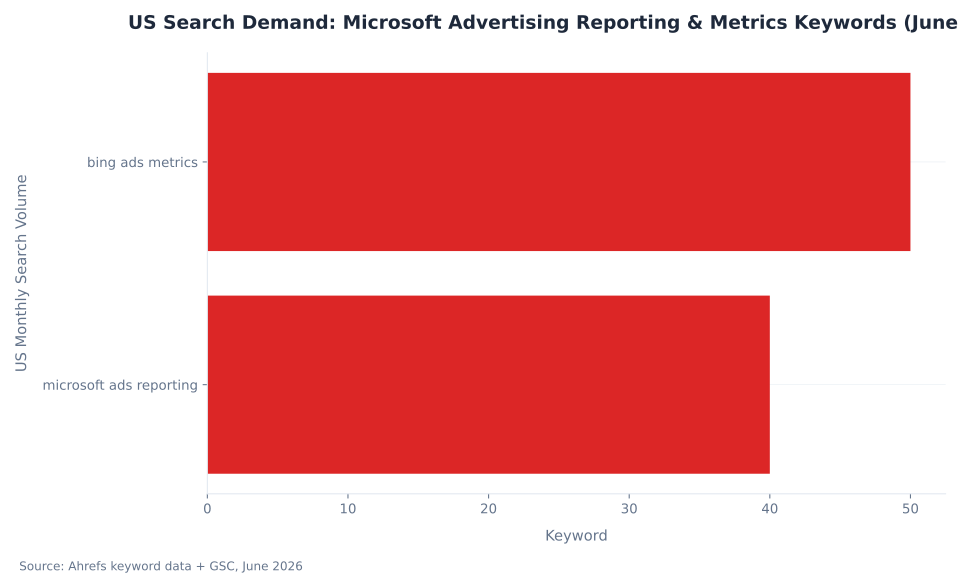
US Search Demand: Microsoft Advertising Reporting & Metrics Keywords (June 2026)
Conversions vs. All Conversions vs. View-Through vs. Assists: The Four Conversion Columns
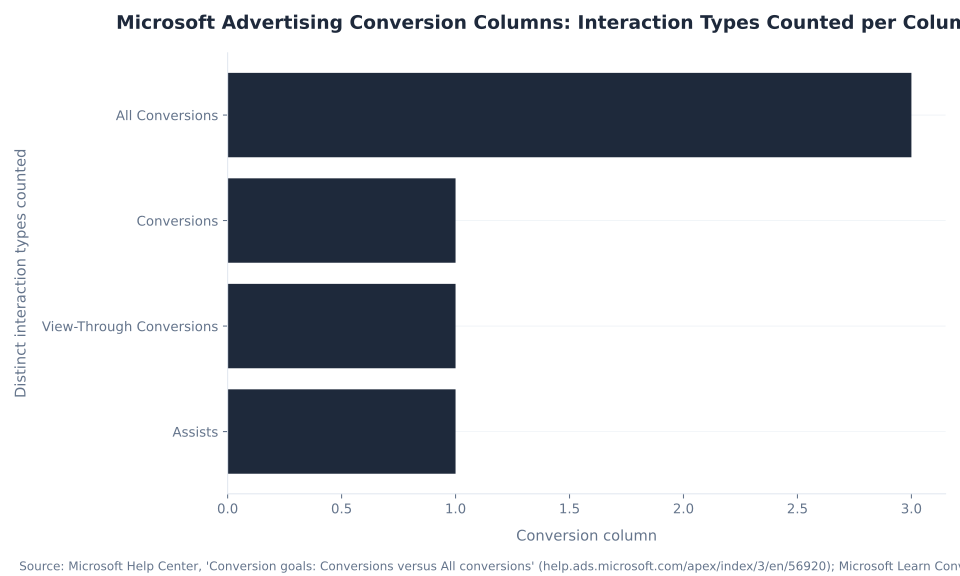
Microsoft Advertising surfaces four distinct conversion columns, each counting a materially different set of interactions. Reporting one as another over- or understates campaign performance. The default “Conversions” column is the narrowest definition; “All Conversions” is the broadest. All four depend on Universal Event Tracking. Source: Search Engine Land; Adobe Advertising, Microsoft Advertising conversion data.
| Column | What it counts | Attribution basis | Critical caveat |
|---|---|---|---|
| Conversions | Goals flagged “Include in Conversions,” click-based only, attributed by selected model | Click-based; default = LastClick | Blank without UET; does not model un-consented conversions |
| All Conversions | All conversion goals regardless of “Include” flag + cross-device + view-through | Click-based, cross-device, and impression-based combined | Broader than Conversions; use for full-picture analysis, not as the bidding input column |
| View-Through Conversions | Impression-based conversions: user saw an ad but did not click any Microsoft Advertising ad | Impression-based only; excludes anyone who clicked any Microsoft ad | Not additive with click-based conversions — the exclusion prevents double-counting; use for Audience Network / display analysis |
| Assists | Ad touchpoints on the conversion path that did not receive last-click credit | Path-based; excluded from primary conversion credit | Attribution analysis only — identifies mid-funnel keywords that contribute but don’t close |
The distinction between Conversions and All Conversions is load-bearing for how you set up bidding and reporting. “Conversions” is the column smart bidding strategies use as their optimization signal. “All Conversions” is the broader analysis view — it includes view-through and cross-device touchpoints, which are real attribution signals for upper-funnel campaigns but are too broad to use as a bid target for lead-gen accounts. An account where “All Conversions” is 3× the “Conversions” figure is not tripling its lead count; it is capturing impression-based and cross-device paths that are analytically interesting but not the same signal as a click-based form submission.
The UET dependency is non-negotiable. Unlike Google Ads, which fills un-consented conversion gaps with modeled data for EEA/UK/Swiss traffic, Microsoft Advertising does not model the gap. A missing UET consent signal (mandatory from May 5, 2025 for EEA/UK/CH traffic) means those conversions are absent from all four columns. An account serving European traffic without a consent management platform integrated with UET has undercounted conversions with no recovery path. The Microsoft Ads conversion tracking and UET pillar covers the setup in full.
MB Adv Agency’s observation: The most common conversion-reporting error is using All Conversions as the primary KPI for a lead-gen account. View-through conversions from Audience Network placements inflate the number in ways that don’t reflect actual lead volume. The correct column for lead-gen reporting is “Conversions” — click-based, goals flagged include-in-conversions, attributed by the selected model. All Conversions is for analysis, not for reporting to stakeholders.
Microsoft Advertising Report Types by Category (April 2026, 41 Total)

Microsoft Advertising Attribution Models: Exactly Three, Not Five
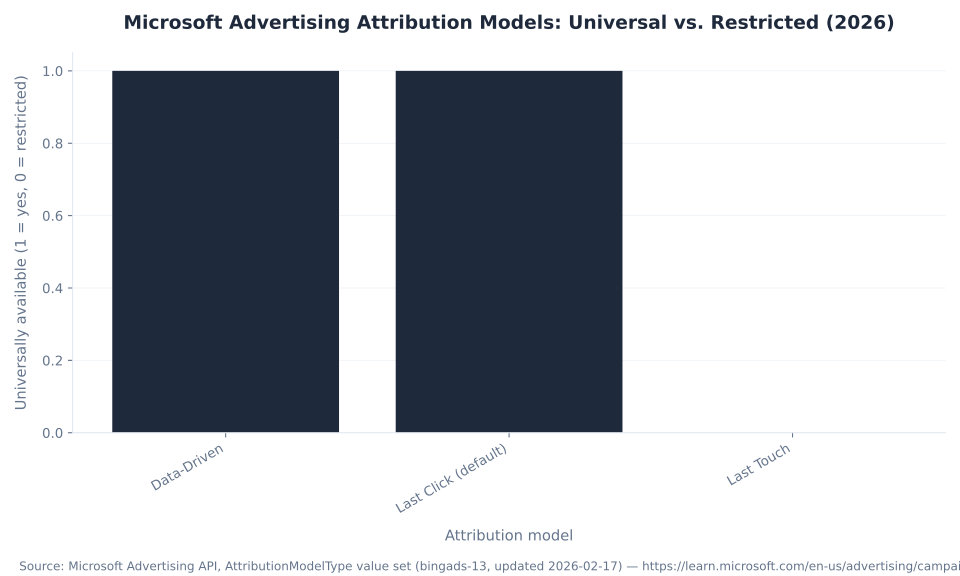
Microsoft Advertising offers three attribution models: LastClick, LastTouch, and Data-Driven. The Google-style models — first-click, linear, and time-decay — do not exist on this platform. Google itself deprecated first-click, linear, and time-decay in October 2023. Any guide claiming Microsoft Advertising offers five attribution models is citing Google’s old feature set. Source: Microsoft Learn, AttributionModelType Value Set (bingads-13, updated February 2026).
| Model | How credit is assigned | Availability | Default? |
|---|---|---|---|
| LastClick | 100% conversion credit to the final ad click before conversion. View-through conversions are excluded from the “Conversions” column under this model. | All campaign types | ✓ Default |
| LastTouch | 100% credit to the last click — or, if no click occurred in the attribution window, the last impression within the view-through window. View-through conversions are included in the “Conversions” column under this model. | Audience Workflow (AWF) campaigns only | No |
| Data-Driven (DDA) | Machine learning distributes conversion credit across all contributing ad interactions on the path — assigning fractional credit based on actual impact, not position. | Campaigns using Maximize Conversions (+ optional Target CPA), Maximize Conversion Value (+ optional Target ROAS), or Enhanced CPC | No (opt-in) |
Data-Driven Attribution (DDA) rolled out to all eligible advertisers by end of May 2026, announced April 26, 2026. The rollout matters for reporting because DDA redistributes conversion credit away from the last click — which changes which keywords and campaigns “look” efficient in the platform. An account switching from LastClick to DDA will see the Conversions column redistribute credit across the conversion path, surfacing keywords that were contributing but receiving no credit under the last-click default. Source: ppcnewsfeed.com, Microsoft Advertising Introduces Data-Driven Attribution; ALM Corp, DDA explainer.
Attribution model selection is a reporting decision, not just a settings default. Switching models changes what the Conversions column reports without changing the underlying conversions — and it changes the optimization signal smart bidding uses. The practical implication: compare performance before and after a model switch using a consistent lookback window; the change in reported conversions reflects the attribution redistribution, not a change in actual lead or sale volume. MB Adv Agency treats attribution model selection as a prerequisite conversation before any performance review that involves conversion columns — because two accounts running the same campaigns report different conversion counts if one uses LastClick and the other uses DDA.
Microsoft Advertising Conversion Columns: Interaction Types Counted per Column (2026)
Report Types in Microsoft Advertising: The Complete Reference
Microsoft Advertising’s reporting service supports 41 distinct report types across 9 categories as of the April 2026 bingads-13 API documentation, last updated June 15, 2026. Every report is available through the in-platform Report Builder for custom column sets, as an instant one-click download, or as a scheduled report that runs automatically and emails to recipients. Export formats are CSV (default), TSV, and XML. Source: Microsoft Learn, Report Types (bingads-13); Microsoft Learn, Reports; Microsoft Advertising Help, Understanding the Report Builder.
| Category | Count | Key report types included |
|---|---|---|
| Performance | 18 | Account, Campaign, Ad Group, Ad, Keyword, Search Query, Share of Voice, Conversion Performance, Goals & Funnels, Destination URL, Audience, Asset, Asset Group, Combination, Publisher Usage, Search Insight, Ad Dynamic Text, MS Click ID |
| Product Ads (Shopping) | 5 | Product Dimension, Product Partition, Product Partition Unit, Product Match Count, Product Search Query |
| Targeting | 5 | Age & Gender, Geographic, User Location, Professional Demographics, Negative Keyword Conflict |
| Ad Extensions | 4 | Ad Extension by Ad, Ad Extension by Keyword, Ad Extension Detail, Call Detail |
| Dynamic Search Ads (DSA) | 3 | DSA Auto Target, DSA Category, DSA Search Query |
| Hotel Ads | 2 | Hotel Dimension, Hotel Group |
| Billing & Budget | 2 | Bid Strategy, Budget Summary |
| App Ads | 1 | Apps Performance |
| Change History | 1 | Search Campaign Change History |
| TOTAL | 41 | — |
The Performance category is where the diagnostic work happens. The Search Query report shows what actual queries triggered ads — the foundation of negative keyword management and match-type refinement. The Share of Voice report surfaces impression share, top IS, absolute top IS, click share, and the IS-lost diagnostic pair. The Conversion Performance report covers conversions, assists, revenue, and cost-per-conversion columns. The Goals and Funnels report shows conversion goal paths. The Professional Demographics report gives company size, industry, and job function breakdowns — the B2B signal that has no equivalent in Google Ads and matters specifically for SaaS software and financial services advertisers targeting by professional profile.
The Geographic and User Location reports are distinct: Geographic reports where the search query came from based on search intent signals; User Location reports where the user is physically located. For local service advertisers — Austin PPC management, Chicago PPC management — running both reports together reveals whether the account is capturing searchers outside the target service area, which is a common budget-waste source.
KPI Selection by Campaign Goal: Which Metric Is the Scorecard
The right primary KPI depends on the campaign goal. Impressions are the lead KPI for brand awareness; conversions and CPA are the lead KPIs for lead generation; revenue and ROAS lead for e-commerce. The metrics in the left column of Table 1 are always visible — the correct decision is choosing which of them is the scorecard for the goal at hand, and confirming the conversion layer makes that measurement possible.
| Campaign goal | Primary KPI(s) | Secondary / diagnostic metrics | Watch-out |
|---|---|---|---|
| Brand awareness | Impressions, impression share, top & absolute-top IS | CTR, view-through conversions, reach | Don’t judge awareness by CPA — the conversion layer lags the impression by design |
| Traffic | Clicks, CTR, avg. CPC | Quality Score, landing page experience, bounce rate | High CTR ≠ profitable; clicks are not results — confirm the conversion layer exists |
| Lead generation | Conversions, conversion rate, cost per conversion (CPA) | Assisted conversions, IS lost to budget/rank, Quality Score | Every conversion column requires UET; do not report All Conversions as lead count |
| E-commerce / sales | Revenue, ROAS, conversion value | All Conversions, view-through, avg. order value, click share | Reconcile UET-reported conversions against platform analytics before reporting ROAS to stakeholders |
| B2B (professional-profile targeting) | Conversions, cost per conversion | Professional Demographics report (company size, industry, job function), assisted conversions | Lower volume than B2C — use longer attribution windows; lean on assisted conversions to assess keyword contribution |
The B2B row is the Microsoft-specific differentiator: the Professional Demographics report surfaces company size, industry, and job function for Microsoft Audience Network placements — a signal that has no equivalent in Google Ads and that matters for advertisers in SaaS software, consulting, and financial services targeting by buyer persona. For e-commerce accounts in categories like fashion or furniture, ROAS is the primary scorecard but All Conversions and view-through matter for Audience Network campaign evaluation.
Reporting Misconceptions: Three Wrong Assumptions That Corrupt the Numbers
Three persistent misconceptions lead advertisers to misread their Microsoft Advertising reports. Each is worth treating as a checklist item when onboarding a new account or interpreting a monthly report for the first time.
| Misconception | Why it is wrong | Correct behavior |
|---|---|---|
| “Microsoft Advertising has the same five attribution models as Google.” | False. Microsoft offers exactly three models: LastClick, LastTouch, and Data-Driven. First-click, linear, and time-decay do not exist in Microsoft Advertising. Google deprecated those models in October 2023. Source: bingads-13 API, February 2026. | Select from LastClick (default), LastTouch (AWF campaigns only), or Data-Driven (eligible auto-bidding strategies, rolled out May 2026). |
| “Conversions and All Conversions are the same metric.” | False. “Conversions” counts click-based goals flagged “Include in Conversions” only. “All Conversions” adds cross-device and view-through (impression-based) conversions. The numbers are materially different. Source: Search Engine Land; Adobe Advertising. | Use “Conversions” as the lead-gen or e-commerce primary KPI. Use “All Conversions” for full-path analysis and Audience Network evaluation. |
| “Conversions show up in the report without UET.” | False. Every conversion column — Conversions, All Conversions, view-through, assists — requires a working UET tag. Unlike Google, Microsoft does not model un-consented conversions. Missing consent = missing data, not estimated data. Source: Usercentrics; CookieInformation. | Verify UET is firing on all conversion pages. For EEA/UK/CH traffic, integrate a CMP with UET Consent Mode (mandatory from May 5, 2025). |
2026 Reporting Additions: The Platform Is Shifting from “Pull a Report” to “Ask Why”
Three new diagnostic features surfaced at Microsoft Advertising Activate 2026 (May 19, 2026). Each represents the platform adding an interpretation layer on top of raw report data. Source: ALM Corp, Activate 2026 Recap; Microsoft Advertising, Activate 2026 Key Takeaways.
Data-Driven Attribution — rolled out to all eligible advertisers by end of May 2026 — changes which keywords and campaigns appear efficient by distributing credit across the conversion path rather than assigning it entirely to the last click. Its primary reporting implication: comparing performance before and after a switch requires using a consistent lookback window, because the change in reported conversions reflects the attribution redistribution, not a change in actual conversion volume.
Copilot Performance Shift Root Cause Analysis explains why a metric moved, categorizing the cause as delivery, bidding, or competitive pressure. This surfaces inside the campaign management workflow and is designed to reduce the analytical work required to diagnose a week-over-week performance swing. Conversion Tracking Diagnostics checks that UET tags and conversion goals are configured correctly, identifying tracking gaps before they become reporting gaps. Both features extend the platform’s diagnostic posture — the raw report data is the same, but the platform now adds a layer that contextualizes metric changes without requiring the analyst to cross-reference multiple report types manually.
Microsoft Advertising Attribution Models: Universal vs. Restricted (2026)
Microsoft Advertising reporting setup or performance review?
MB Adv Agency configures UET, selects the right attribution model, and builds reporting structures that connect the KPIs that matter to the goals that count — for legal, dental, real estate, HVAC, and B2B accounts.
Get a reporting audit →How to Create and Schedule Reports in Microsoft Advertising
The Microsoft Advertising reporting interface has three entry points: the Report Builder for custom column sets, instant one-click campaign downloads, and scheduled reports that run automatically and email to recipients. Export formats are CSV (default), TSV, and XML. The Report Builder is the workhorse for any report that requires a non-default column set or a date range other than the past 30 days. Source: Microsoft Advertising Help, Understanding the Report Builder.
To run a custom report: navigate to Reports in the left-rail navigation → select Report Builder → choose the report type (Keyword Performance, Search Query, Share of Voice, Conversion Performance, or any of the 41 types in the reference table above) → select columns → choose date range and granularity → run or schedule. Scheduled reports accept a recurrence (daily, weekly, monthly) and an email address list. The format defaults to CSV; select TSV or XML in the format dropdown if downstream processing requires it.
For the absorbed intent around "how to create and interpret reports," the most common first-report sequence is: (1) Keyword Performance report with columns for Quality Score, impression share, IS lost to budget, and IS lost to rank — this surfaces the account’s competitive position and Quality Score diagnostic in one download; (2) Conversion Performance report with Conversions, All Conversions, view-through, assists, and cost per conversion — this shows whether the conversion layer is configured correctly and which goals are producing; (3) Search Query report to identify irrelevant queries and negative keyword opportunities.
The Conversion Performance report is the fastest way to verify that UET is working correctly: if the Conversions column is zero for a campaign that has been running for more than a week with a conversion-tagged landing page, the UET tag is almost certainly not firing. That diagnosis takes 30 seconds and prevents weeks of optimizing toward a blank outcome column.
Advanced Reporting: Spreadsheet Analysis and Reconciliation Workflows
Exported CSV and TSV reports from Microsoft Advertising feed directly into pivot-table and dashboard workflows. The practical patterns that generate the most insight from raw exports:
Period-over-period delta tables. Export Keyword Performance for the current period and the prior period, join on keyword ID or keyword text, and calculate deltas for CTR, CPC, impressions, conversions, and IS. A keyword where CTR dropped 30% period-over-period but impression share held flat points at a creative problem; a keyword where impression share dropped 20% alongside stable CTR points at a budget or bid problem. The IS-lost split completes the diagnosis.
Conversions vs. All Conversions reconciliation. In a pivot table, segment Conversions and All Conversions by campaign or ad group. The gap between the two columns represents cross-device and view-through interactions. For Search campaigns where the gap is large, the account is capturing intent on one device and converting on another — which informs match-type and device bid-adjustment decisions. For Audience Network campaigns, a large gap is expected and correct; the view-through column is the primary measurement signal for those placements.
GA4 reconciliation. Export Conversions from Microsoft Advertising and compare against the equivalent conversion event in GA4 — filtered to Microsoft Ads / CPC source/medium. Discrepancies above 10–15% indicate either UET tag misfires (double-firing or under-firing), attribution window mismatches (Microsoft’s default lookback vs. GA4’s session model), or cross-device conversions that GA4 attributes to a different session. The Microsoft Ads platform conversion count and the GA4 count serve different purposes — neither is wrong, but using them interchangeably produces incorrect CPA and ROAS figures. For accounts at Austin or Chicago scale, this reconciliation is a monthly reporting step, not an optional audit. The Microsoft Ads vs. Google Ads comparison pillar covers how this cross-platform attribution complexity differs from Google’s approach.
Performance report types
18 of 41
The Performance category alone — including Search Query, Share of Voice, Conversion Performance, and Goals & Funnels — accounts for 44% of all report types. Source: Microsoft Learn, June 2026.
DDA rollout completed
May 2026
Data-Driven Attribution rolled out to all eligible advertisers by end of May 2026. Works with Maximize Conversions, Maximize Conversion Value, and Enhanced CPC. Source: ppcnewsfeed.com.
IS sub-components per component
1–3
Each Quality Score component (expected CTR, ad relevance, landing page experience) rates 1–3: 1 = Below Average, 2 = Average, 3 = Above Average. Source: Microsoft Learn.
UET consent deadline (EEA)
May 5, 2025
UET Consent Mode became mandatory for EEA/UK/CH traffic. Microsoft does not model un-consented conversions — missing consent = missing data. Source: Usercentrics.
Frequently Asked Questions
What are the key metrics to monitor in Microsoft Ads campaigns?
The thirteen core Microsoft Advertising KPIs organize into a funnel: spend buys impressions; impressions produce clicks (measured by CTR and average CPC); clicks produce conversions (conversion rate, cost per conversion); conversions produce revenue (ROAS). The primary KPI depends on the goal: for lead generation, conversions and cost per conversion are the scorecard. For e-commerce, revenue and ROAS lead. For brand awareness, impression share and top impression share lead. The prerequisite for any of this is confirming the conversion layer is populated — which requires Universal Event Tracking to be firing on all conversion pages. Without UET, every column from Conversions downward is blank, and CTR and CPC become the default scorecards by default rather than by design. MB Adv Agency finds that confirming UET fires correctly is the first diagnostic step on any Microsoft Advertising account review. Source: Microsoft Learn, Report Types (bingads-13).
What is Microsoft Advertising Quality Score and how is it calculated?
Quality Score is a 1–10 keyword-level rating (10 = best) that measures how competitive an ad is compared to other ads targeting the same traffic. It is updated daily and composed of three component sub-scores, each rated 1–3: expected click-through rate (how likely the keyword is to earn a click vs. competing keywords), ad relevance (how closely the ad matches the query intent), and landing page experience (how useful the destination is after the click). A higher Quality Score lowers average CPC and improves ad position — making it one of the few reported metrics that is also a lever. The correct way to use it: read the sub-components, not the headline number. A keyword scoring 6 because of a weak landing-page-experience score is a different problem than a keyword scoring 6 because of a weak expected-CTR score. The fix for the first is the landing page; the fix for the second is ad copy and keyword match tightening. Source: Microsoft Learn, Quality Score and Quality Impact in Depth; Microsoft Advertising Help.
What is the difference between Conversions and All Conversions in Microsoft Advertising?
“Conversions” counts only click-based conversions for goals flagged “Include in Conversions,” attributed by the selected model (LastClick by default). “All Conversions” counts everything in “Conversions” plus cross-device conversions and view-through conversions — impression-based conversions where the user saw an ad but did not click any Microsoft Advertising ad. The two numbers are materially different. For a lead-gen account, “Conversions” is the correct primary KPI and the signal smart bidding uses. “All Conversions” is the correct full-path analysis metric and the better measure for Audience Network campaigns. An important caveat on view-through: anyone who clicked any Microsoft Advertising ad is excluded from view-through conversions, which prevents double-counting but also means view-through is not simply additive with click-based conversions. Both columns require UET. Microsoft does not model un-consented conversions — EEA/UK/CH traffic with missing consent is absent, not estimated. Source: Search Engine Land; Adobe Advertising; Microsoft Learn.
What does impression share lost to budget vs. impression share lost to rank mean?
Impression share lost to budget is the percentage of eligible auction impressions missed because the campaign budget ran out before the day ended. Impression share lost to rank is the percentage missed because the ad rank — the product of bid and Quality Score — was insufficient to enter or win the auction. These two metrics are the most actionable pair in Microsoft Advertising reporting because they isolate the cause. IS lost to budget: raise the daily budget to recover those impressions; see the bidding and budget pillar for how to set a budget that does not constrain delivery. IS lost to rank: raise the bid, improve Quality Score (read the three components to determine which), or both — the bid and Quality Score are independent inputs to ad rank. On January 15, 2026, Microsoft extended both metrics to Performance Max campaigns (Search and Shopping placements, Audience Network excluded), with history back to November 10, 2025. Source: Microsoft Advertising Help, Share of Voice report; Adsroid.
How many attribution models does Microsoft Advertising offer, and how do they differ?
Microsoft Advertising offers exactly three attribution models. LastClick assigns 100% of conversion credit to the final ad click before conversion; it is the default for all campaign types and the model smart bidding uses unless overridden. LastTouch assigns 100% credit to the last click or — if no click occurred within the attribution window — the last impression; it is available only for Audience Workflow (AWF) campaigns and includes view-through conversions in the “Conversions” column. Data-Driven Attribution uses machine learning to distribute credit across all contributing ad interactions based on their actual impact; it is available for campaigns using Maximize Conversions (with or without Target CPA), Maximize Conversion Value (with or without Target ROAS), or Enhanced CPC, and rolled out to all eligible advertisers by end of May 2026. The Google-style models — first-click, linear, and time-decay — do not exist in Microsoft Advertising. Switching from LastClick to Data-Driven changes which keywords report conversions, not the actual volume; compare on a consistent lookback window. Source: Microsoft Learn, AttributionModelType (bingads-13, February 2026); ppcnewsfeed.com.
How do I create and schedule reports in Microsoft Advertising?
Navigate to Reports in the Microsoft Advertising left-rail navigation and select Report Builder. Choose a report type from the 41 available across 9 categories — Keyword Performance, Search Query, Share of Voice, Conversion Performance, and Goals & Funnels cover most recurring analysis needs. Select the columns relevant to your goal: for a competitive review, add impression share, IS lost to budget, IS lost to rank, and top impression share; for a conversion review, add Conversions, All Conversions, view-through, assists, and cost per conversion. Set the date range and granularity (daily, weekly, monthly). Run immediately as a CSV download or schedule it — scheduled reports accept a recurrence (daily, weekly, monthly) and email the output to a list of recipients. Export format defaults to CSV; TSV and XML are available in the format dropdown. The in-UI Report Builder exposes a subset of the full 41 API report types — verify the exact available list against a live account. Source: Microsoft Advertising Help, Understanding the Report Builder; Microsoft Learn, Reports.
What are view-through conversions in Microsoft Advertising and when do they matter?
View-through conversions are impression-based conversions: the user saw a Microsoft Advertising ad but did not click it, then converted later within the view-through attribution window. A critical caveat: anyone who clicked any Microsoft Advertising ad — not just the specific campaign — is excluded from view-through conversions to prevent double-counting with click-based conversions. This means view-through is not simply additive with the “Conversions” column; the populations are mutually exclusive. View-through conversions appear in the “All Conversions” column and are the primary measurement signal for Audience Network and display placements, where click-through rates are structurally low and impression influence is the intended mechanism. For Search campaigns, view-through conversions are a small share of total conversions and the “Conversions” click-based column is the correct scorecard. View-through conversions require UET and, for EEA/UK/CH traffic, a working consent integration. Source: Search Engine Land; Adobe Advertising; Microsoft Learn, ConversionPerformanceReportColumn.
MB Adv Agency
Need a Microsoft Ads reporting structure built from scratch, or a current setup audited?
MB Adv Agency handles UET setup, attribution model selection, and reporting template builds for Microsoft Advertising accounts across lead-gen and e-commerce verticals — plumbing, HVAC, financial services, SaaS, and more. If the conversion columns in your account are blank or the attribution model has never been reviewed, reach out. For the full Microsoft Advertising picture, browse the sibling pillars: conversion tracking with UET, bidding and budget, and Microsoft Ads vs. Google Ads.
Talk to us →Data and methodology: Keyword volume from Ahrefs, June 2026; GSC position data from Mbadv property (90-day window, March–June 2026). Quality Score component definitions from Microsoft Learn, Quality Score and Quality Impact in Depth (learn.microsoft.com/en-us/advertising/msa-help/hlp_ba_conc_aboutqualityscore). Attribution model definitions from Microsoft Learn, AttributionModelType Value Set (bingads-13, updated February 2026). Report type counts from Microsoft Learn, Report Types (bingads-13, April 2026, updated June 15, 2026). Conversion column definitions from Microsoft Help Center, Search Engine Land, and Adobe Advertising. Impression share / Share-of-Voice metrics and PMax extension (January 15, 2026) from Microsoft Advertising Help and Adsroid. Data-Driven Attribution rollout (end of May 2026) from ppcnewsfeed.com and ALM Corp. Activate 2026 announcements (May 19, 2026) from ALM Corp recap and Microsoft Advertising official blog. UET consent mode mandatory deadline (May 5, 2025) from Usercentrics and CookieInformation. No Microsoft-specific CPC/CTR/CPA-by-industry benchmark figures exist; none are cited. Reviewed by MB Adv Agency, June 2026.

As a Google Ads expert, I bring proven expertise in optimizing advertising campaigns to maximize ROI.
I specialize in sharing advanced strategies and targeted tips to refine Google Ads campaign management.
Committed to staying ahead of the latest trends and algorithms, I ensure that my clients receive cutting-edge solutions.
My passion for digital marketing and my ability to interpret data for strategic insights enable me to offer high-level consulting that aims to exceed expectations.
Google Partner Agency
We're a certified Google Partner Agency, which means we don’t guess — we optimize withGoogle’s full toolkit and insider support.
Your campaigns get pro-level execution, backed by real expertise (not theory).

4.9 out of 5 from 670+ reviews on Fiverr.
That’s not luck, that’s performance.
Highly recommend Matteo to set up your server side tracking. He has a deep understanding of e-commerce tracking and will go above and beyond to make sure everything is set up correctly and working 100%. If you are scaling your store this set up is non-negotiable in my opinion and there isn't many people who have this much knowledge or put the effort in to get it right. Thanks again!

avorodesign.com
I can only recommend Matteo! He was very patient, professional and very knowledgeable about GA4, Consent Mode v2, and GDPR compliance. Communication was clear, and the setup was done professionally and efficiently. Highly recommend him for anyone needing reliable tracking implementation.

www.natureiki.life
Matteo shines in the realm of online professionals. His work is not only deep in data but also complemented by his proactive communication and cooperation, setting a new standard for freelancers. If you want someone who truly exceeds expectations, look no further. Highly recommended!

www.omanbeverlysmyth.com
Exceptional Service Beyond Expectations - Outstanding Service Impeccable depth, flawless delivery, and exceptional language fluency—this service exceeded all expectations. Highly recommended. Matteo truly ROCKS!!!

ium-paris.com
Top-notch, always highly value working with Matteo. An absolute Google Ads Genius. This is approximately the 8th time I have hired him and he's helped us get 6-7 ROAS. We are excited in continuing to improve our lead flow. Hire this guy if you need Google Ads help. Thanks Matteo!

www.dleeventgroup.com
I finally found the guy who can setup server side tracking and all the ecosystem properly. I definitely recommend Matteo. He is very responsive, kind and wants to dig into things. He configured GA4, Meta, Google Ads, Outbrain and google consent v2 with Cookiebot. Thanks Matteo.

inomega.fr
MB Adv delivered exceptional work with outstanding professionalism and lots of patience, taking time to see effects of changes made and not just do the work and submit it. The proactive communication and video summaries of the work completed made working with Matteo a pleasure, as he consistently went above and beyond. Highly recommended for web analytics projects! We are already working on another project.

www.withnellsensors.co.uk
Working with Matteo on my Google Ads was a game-changer. He's not just a strategist, he's a true partner. He understood my goals and tailored a campaign that perfectly reached my target audience. I'm grateful for his expertise and dedication.

dccargo.com
Click-driven mind
with plastic-brick obsession.
We build Google Ads campaigns with the same mindset we use to build tiny brick worlds: strategy, patience, and zero tolerance for wasted pieces.
Data is our blueprint. Growth is the only acceptable outcome.