Microsoft Advertising Account Structure Guide
5
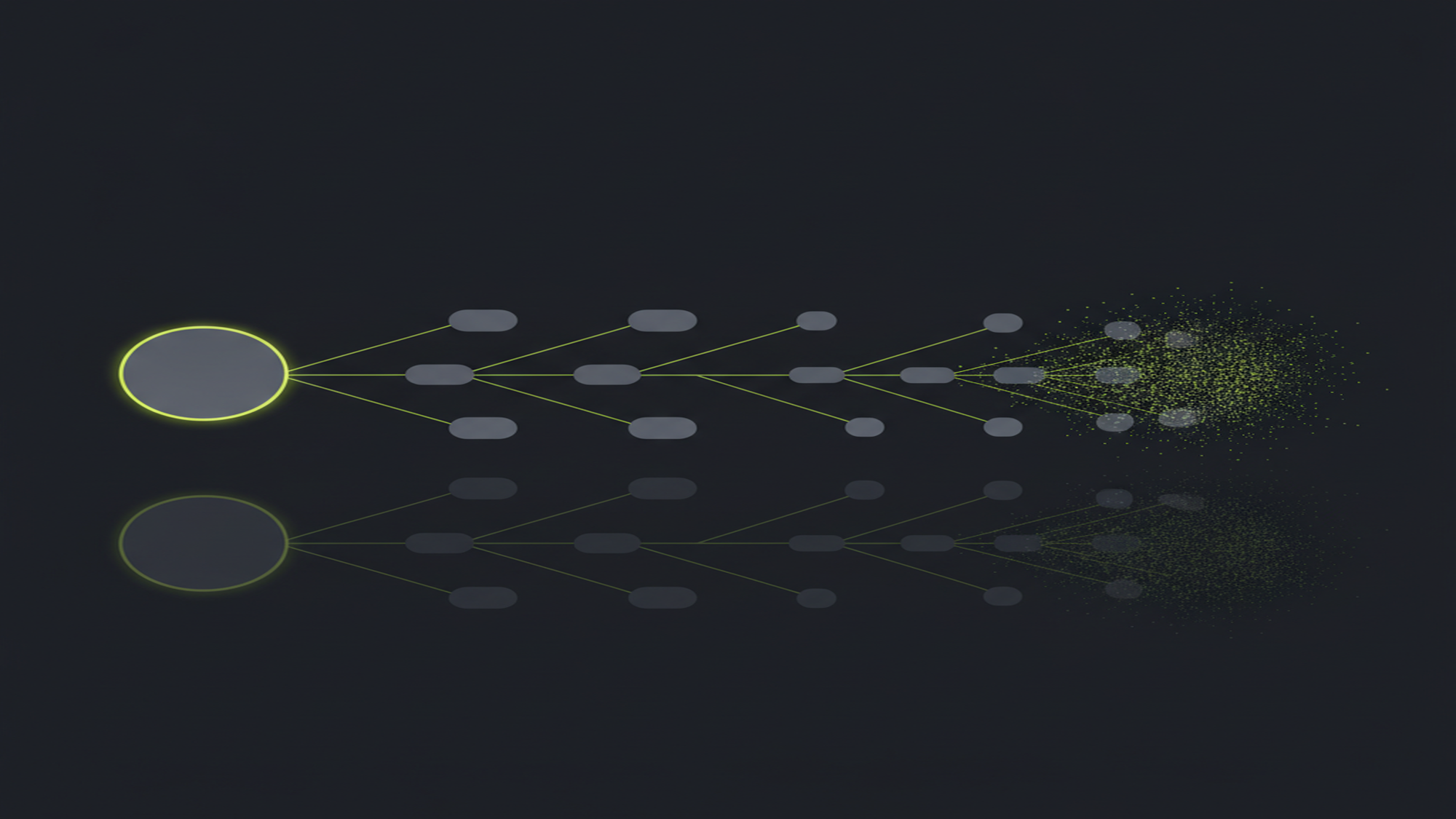
Microsoft Advertising runs a strict five-level tree — Customer → Account → Campaign → Ad Group → Keywords/Ads — that deliberately mirrors Google Ads entity-for-entity. That parallel is the architecture that makes the Google Ads import map campaigns to campaigns and keywords to keywords in one authenticated pass.
Source: Microsoft Learn, Entity Limits & Account Hierarchy (updated 2026-06-05)
What Is Microsoft Advertising Account Structure?
Microsoft Advertising (formerly Bing Ads — rebranded April 2019) organizes paid campaigns in a five-level hierarchy: Customer → Account → Campaign → Ad Group → Keywords and Ads. Budget lives at the campaign, keyword themes at the ad group, and creative at the ad. The hierarchy mirrors Google Ads entity-for-entity — the architecture that makes a one-pass Google Ads import possible.
The mirroring is not incidental. Microsoft designed its account model to match Google's so that advertisers already running Google Ads can expand to the Microsoft Search Network without rebuilding from scratch. The Google Ads import maps campaigns to campaigns, ad groups to ad groups, keywords to keywords, and ads to ads in a single credential-authenticated pass. Understanding the hierarchy is the prerequisite for understanding the import: they are the same structure viewed from two platforms.
This pillar covers the full account architecture: what is configured at each of the five levels, the entity limits that bound each container, the Google-parallel design that enables 1-click import, Microsoft Advertising Editor (the free desktop bulk tool), and the integration stack connecting the account to conversion tracking, product feeds, and the May 2026 Import Center. It absorbs three former cluster pages — Understanding Microsoft Ads Account Structure, Mastering Microsoft Advertising Editor, and Integrating Microsoft Ads with Other Marketing Tools — because structure, the tool that edits structure, and the integrations around structure belong on one page.
New to the platform? Start with what Microsoft Advertising is before structuring an account. The first structural decision at the campaign level is campaign type — see Microsoft Ads campaign types for Search, Shopping, Audience, DSA, and Performance Max. Budget and bid strategy are also campaign-level settings — see Microsoft Ads bidding and budget for shared budgets and the 2025 automated-bidding changes.
Key Takeaways
- Five levels, five jobs. Customer holds the manager account; Account holds billing and shared assets; Campaign holds budget and bid strategy; Ad Group holds keyword themes and default bids; Keywords/Ads hold the query trigger and creative. Each level controls settings the levels below inherit or override.
- The hierarchy mirrors Google Ads — that is the point. Microsoft designed the structure as a near-mirror of Google's so the Google Ads import maps entity-for-entity: campaign to campaign, ad group to ad group, keyword to keyword, ad to ad. The import produces a structural copy, not a finished account.
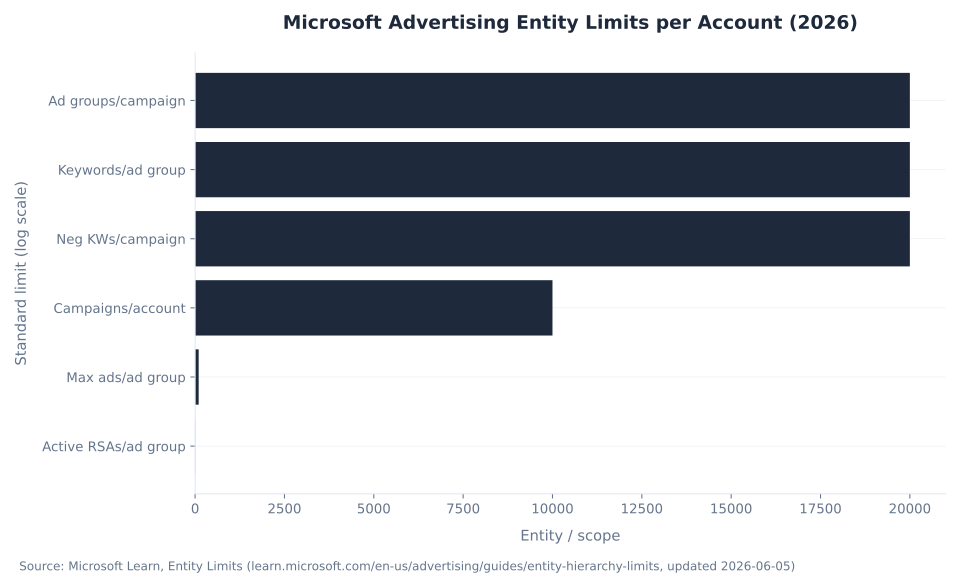
- Entity limits are generous. 10,000 campaigns per account, 20,000 ad groups per campaign, 20,000 keywords per ad group, up to 100 ads per ad group (3 active RSAs). No SMB operation reaches these ceilings — account chaos arrives from poor organizational discipline, not from platform limits.
- Microsoft Advertising Editor is the bulk layer. The free desktop application (Windows and Mac) downloads the account, enables offline editing at scale, and uploads with one click. Multi-account and multi-client edits that take hours in the browser UI take minutes in the Editor.
- Integration is the other half of account structure. Microsoft Merchant Center feeds Shopping and Performance Max. The UET tag via Google Tag Manager copies Google/GA4 tag configuration to scaffold matching UET tags — it is a tag-copying path, not a GA4 conversion-data pipeline. The May 2026 Import Center adds Google and Meta as synchronized import sources.
- Three misconceptions to discard. The import does not produce a finished account — Microsoft's own documentation says “not all information will be imported.” GA4 does not sync conversions to Microsoft natively. Budget and bidding live at the campaign level, not the keyword or ad level.
10,000
Campaigns per account
Microsoft Learn, Entity Limits (2026-06-05)
20,000
Keywords per ad group
Microsoft Learn, Entity Limits (2026-06-05)
5M
Keywords per account
Microsoft Learn, Entity Limits (2026-06-05)
Source: Microsoft Learn, Entity Limits (ms.date 2026-03-05, updated 2026-06-05). Microsoft labels these standard limits subject to change; account teams can grant exceptions.
Microsoft Advertising Account Structure: The Five-Level Hierarchy
A Microsoft Advertising account is a strict five-level tree: Customer → Account → Campaign → Ad Group → Keywords and Ads. The hierarchy is not just organizational convention — Microsoft designed it as a deliberate near-mirror of Google Ads, which is exactly why the Google Ads import maps campaigns to campaigns, ad groups to ad groups, keywords to keywords, and ads to ads in a single authenticated pass. Structure and portability are the same design decision.
Customer is the manager-level container — equivalent to a Google Ads Manager Account (MCC). One customer holds 1–6 ad accounts and up to 15 users. The term “customer” appears throughout Microsoft's API and reporting documentation and refers to the top-level billing and account-management entity. Agencies running multiple clients operate at the customer level. Microsoft's account hierarchy documentation defines the full customer-to-account permission model.
Account is the billing and shared-asset container. It holds the payment instrument (up to 3 accounts per credit card), UET tags, shared remarketing and audience lists (up to 1,000 per account, 5,000 per customer), shared budgets (up to 11,000 per account, each assignable to up to 10,000 campaigns), shared negative-keyword lists (up to 20 per account, each holding up to 5,000 negative keywords), and user permissions. Conversion goals and ad extensions are managed at the account level and shared across all campaigns in that account. Budget does not live at the account level — it lives at the campaign.
Campaign is where budget and reach scope are configured. Campaign type (Search, Shopping, Dynamic Search Ads, Audience/MSAN, Smart Campaign, Performance Max) is set on creation and determines the asset model. Budget is set as a daily amount or as a pointer to a shared budget. Bid strategy — Manual CPC, Enhanced CPC, Maximize Conversions with optional Target CPA, or Maximize Conversion Value with optional Target ROAS — is set at the campaign level. Note: standalone Target CPA and Target ROAS for new campaigns were sunset August 4, 2025; portfolio bid strategies retain this capability. Network selection (Microsoft Search Network vs. Microsoft Audience Network — not the same product), geographic targeting, language, ad scheduling, and campaign-level negative keywords (up to 20,000) are all campaign-level decisions. Up to 10,000 campaigns per account. See Microsoft Ads bidding and budget for the full bid-strategy comparison.
Budget and bid strategy are campaign-level settings. There is no budget field at the keyword level or the ad level. The keyword level holds only a bid override of the ad-group default — not an independent budget.
Ad Group is the keyword-theme container. The default bid per match type, the full keyword list (up to 20,000 keywords per ad group), and the ads (up to 100 per ad group, maximum 3 active responsive search ads) all live here. Ad-group-level audiences — in-market segments, remarketing lists, customer lists, and LinkedIn profile targeting (Company, Industry, Job Function, Job Seniority) — are applied as observation or targeting layers. Keywords and ads at the ad group level map directly to their Google Ads counterparts during import. Match types, keyword strategy, and RSA copy are covered in depth in Microsoft Ads keywords and ad copy.
Keyword is the query trigger. Each keyword carries a phrase, a match type (broad, phrase, or exact), an optional bid override of the ad-group default, and an optional final URL overriding the ad-level destination. Ad (Responsive Search Ad) holds the creative: 3–15 headlines (30 characters each after substitution), 2–4 descriptions (90 characters each), up to 2 display-path segments (15 characters each), and the final URL. The technical limit is 100 ads per ad group across all types combined, with a maximum of 3 active RSAs at any time.
MB Adv Agency has found that accounts descend into organizational chaos — duplicate keywords competing against each other, orphaned ad groups with no active ads, untracked imported campaigns running without UET — long before they approach the numeric limits. 10,000 campaigns per account and 20,000 ad groups per campaign are ceilings that no SMB operation reaches. The failure is always naming convention, campaign-theme isolation, and post-import hygiene — never a platform constraint.
Account Hierarchy Reference: What Is Configured at Each Level
The table below maps each hierarchy level to its configuration scope, shows the 1:1 Google Ads parity that enables the import, and states the standard platform limit. Source: Microsoft Learn, Entity Limits (updated 2026-06-05); Microsoft Learn, Google Ads Import.
| Level | Controls | Configured here | Maps to Google Ads | Standard limit |
|---|---|---|---|---|
| Customer | Manager account | Accounts under management; user permissions (up to 15 users) | Manager Account (MCC) | 1–6 accounts |
| Account | Billing & shared assets | Payment; UET tags; shared remarketing lists; shared budgets; shared negative-keyword lists; ad extensions | Account ↔ Account | 3 per credit card |
| Campaign | Budget & reach | Campaign type; daily or shared budget; bid strategy; network; language; location; ad schedule; campaign-level negative keywords | Campaign ↔ Campaign | 10,000 per account |
| Ad Group | Theme & default bids | Default bid per match type; keywords; ads; ad-group audiences (incl. LinkedIn profile targeting) | Ad Group ↔ Ad Group | 20,000 per campaign |
| Keyword | Query trigger | Keyword phrase; match type; optional bid override; optional final URL | Keyword ↔ Keyword | 20,000 per ad group |
| Ad (RSA) | Creative | 3–15 headlines (30 chars each); 2–4 descriptions (90 chars each); 2 display-path segments; final URL | Ad ↔ Ad | 1–100 per ad group (3 active RSAs) |
Sources: Microsoft Learn, Entity Limits; Microsoft Advertising Help, Hierarchies in Microsoft Advertising. Performance Max campaigns use asset groups instead of ad groups and ads — the five-level model applies to standard Search, Shopping, DSA, and Audience campaigns.
Account Entity Limits
Microsoft Advertising entity limits are set by the platform but labeled “standard limits subject to change” — account teams can grant exceptions for high-volume operations. The limits below are from the live Microsoft Learn Entity Limits page (ms.date 2026-03-05, updated 2026-06-05). Re-verify at publish time.
| Entity / scope | Standard limit |
|---|---|
| Accounts per customer (manager account) | 1–6 |
| Accounts per credit card | 3 |
| Users per customer | 15 |
| Campaigns per account | 10,000 |
| Ad groups per campaign | 20,000 |
| Keywords per ad group | 20,000 |
| Ads per ad group (all types, active + paused) | 1–100 |
| Active responsive search ads per ad group | 3 |
| Negative keywords per campaign | 20,000 |
| Negative keywords per ad group | 20,000 |
| Keywords per account | 5,000,000 |
| Keywords per customer | 50,000,000 |
| Ads per account | 4,000,000 |
| Ads per customer | 20,000,000 |
| Asset groups per Performance Max campaign | 100 |
| Shared budgets per account | 11,000 (each assignable to up to 10,000 campaigns) |
| Shared negative-keyword lists per account | 20 (up to 5,000 negative keywords per list) |
Source: Microsoft Learn, Entity Limits (updated 2026-06-05). Standard limits subject to change; account teams can grant exceptions.
No SMB operation approaches these ceilings. An account running SaaS PPC with 15 campaigns and 120 ad groups is operating at a fraction of the structural capacity. For IT and managed-IT services PPC with multiple service lines and geographic targets, 10,000 campaigns is an asymptotic ceiling that provides architectural freedom, not a box to fill.
Microsoft Advertising Entity Limits per Account (2026)
Google Ads Import: Entity Mapping and What Doesn’t Transfer
The Google Ads import maps Microsoft hierarchy levels to Google hierarchy levels entity-for-entity. Campaigns become campaigns, ad groups become ad groups, keywords become keywords, ads become ads. The import is one of the most structurally complete cross-platform migrations in paid search — and Microsoft's own documentation still says “not all information will be imported.” Source: Microsoft Learn, Google Ads Import.
| Google Ads entity | Microsoft entity | Transfer completeness |
|---|---|---|
| Account | Account | Billing and tracking reconfigured manually — not transferred |
| Campaign | Campaign | Transferred; budget scaling configurable on import (e.g., +25%) |
| Ad group | Ad group | Transferred |
| Keyword | Keyword | Transferred |
| Ad | Ad | Transferred |
| Conversion tracking | UET conversion goals | NOT transferred — UET must be deployed and goals created independently |
| LinkedIn profile targeting, Audience Network settings | LinkedIn profile dimensions (Company, Industry, Job Function, Job Seniority) | NOT transferred — no Google equivalent; must be added manually |
Source: Microsoft Learn, Google Ads Import; Microsoft Advertising Help, Import campaigns directly from Google Ads.
A completed import is a structural starting point, not a finished account. Microsoft's documentation instructs advertisers to “add the missing information back” after every import. The post-import checklist: (1) confirm UET conversion tracking is live on the site before the account goes active; (2) review and adjust imported budgets — the import applies any scaling percentage you set, and the resulting figure needs a human check; (3) add LinkedIn profile targeting to any ad group where B2B audience refinement is the goal — the import imports nothing from Google here because Google has no equivalent; (4) review ad extensions and assets, as not all extension types transfer cleanly. For advertisers in regulated or high-CPL sectors like cybersecurity PPC, running with untracked conversions post-import is the fastest path to wasted budget.
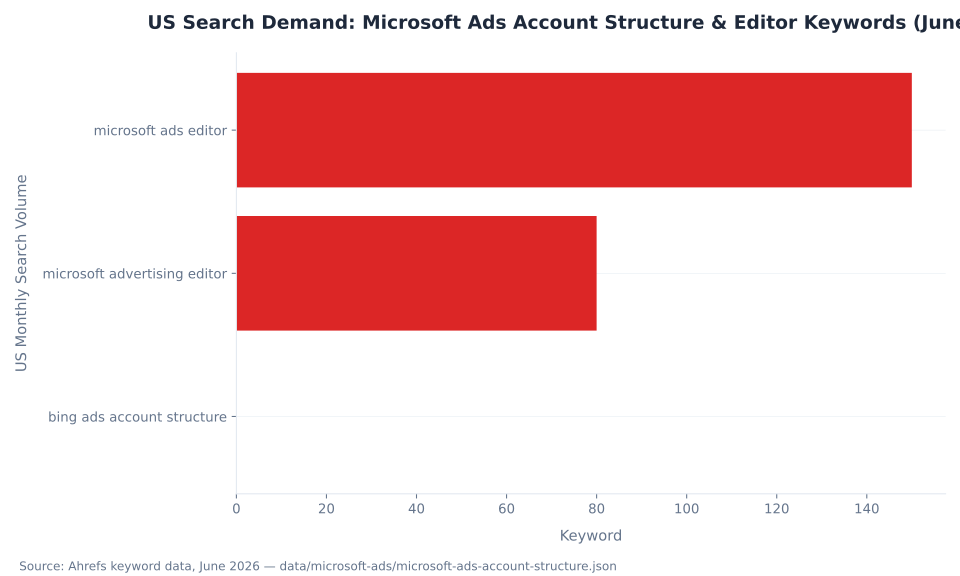
US Search Demand: Microsoft Ads Account Structure & Editor Keywords (June 2026)
Negative Keyword Capacity: The Layered Model
Microsoft Advertising's negative keyword system is layered — direct per ad group, direct per campaign, and via shared lists. The effective ceiling for a single campaign is 120,000 negative keywords, far more than any account needs. The practical challenge is not capacity; it is maintenance discipline as the shared-list library grows. Source: Microsoft Learn, Entity Limits.
| Capacity layer | Negative keywords |
|---|---|
| Direct per ad group | 20,000 |
| Direct per campaign | 20,000 |
| Via shared negative-keyword lists (20 lists × 5,000) | 100,000 |
| Effective maximum (campaign direct + all shared lists) | 120,000 |
Source: Microsoft Learn, Entity Limits (updated 2026-06-05). Ad-group-level and campaign-level negative keywords are counted separately. Account-wide negative keyword ceiling is 5,000,000.
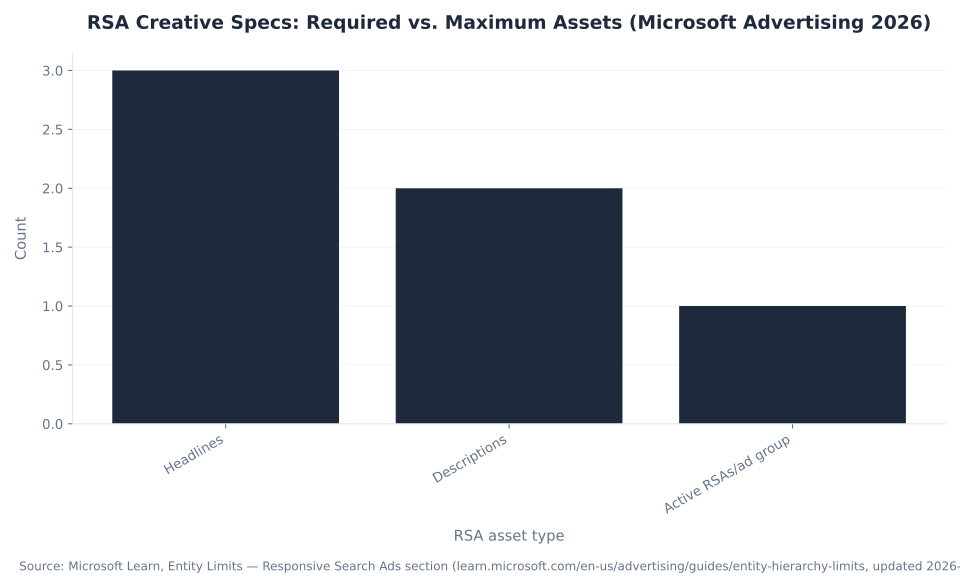
RSA Creative Specs: Required vs. Maximum Assets (Microsoft Advertising 2026)
Microsoft Search Network vs. Microsoft Audience Network
Microsoft Advertising runs two distinct inventory systems configured separately at the campaign level: the Microsoft Search Network (MSN), which captures active search intent, and the Microsoft Audience Network (MSAN), which delivers native and display placements. They are different campaign types, different auction mechanics, and different audience models. Never conflate them in account structure or in reporting.
| Dimension | Microsoft Search Network (MSN) | Microsoft Audience Network (MSAN) |
|---|---|---|
| Placements | Bing, Yahoo, AOL, DuckDuckGo, Ecosia, syndication partners | MSN.com, Microsoft News, Microsoft Edge, Outlook, partner properties |
| Targeting signal | Active search query (keyword + match type) | Audience (in-market, remarketing, LinkedIn profile dimensions) |
| Campaign type | Search (or DSA, Shopping) | Audience campaign (separate campaign type) |
| LinkedIn profile targeting | Available as bid-adjustment layer on Search campaigns | Full targeting dimension in Audience campaigns |
| Pricing model | CPC (cost per click) | CPC or CPM depending on ad format |
Source: Microsoft Advertising; Microsoft Learn, Account Hierarchy. Configure each network in separate campaign types — do not mix Search and Audience inventory in one campaign.
The network distinction matters most for local-service advertisers expanding from Google. For HVAC PPC and plumbing PPC accounts, the Microsoft Search Network is the primary vehicle — it captures the same high-intent service queries that Bing processes at higher conversion rates than typical display networks. MSAN adds a retargeting and awareness layer for the same audience but in a native/display context.
Responsive Search Ad Specifications
Responsive Search Ads (RSAs) are the standard ad format for Microsoft Advertising Search campaigns. The platform requires a minimum of 3 headlines and 2 descriptions per RSA; loading toward the maximum (15 headlines, 4 descriptions) gives the system more asset combinations to test and learn from. RSA specifications at the ad level are nearly identical to Google Ads RSAs. Source: Microsoft Learn, Entity Limits.
| Asset type | Minimum required | Maximum allowed | Character limit |
|---|---|---|---|
| Headlines | 3 | 15 | 30 characters each (after dynamic text substitution) |
| Descriptions | 2 | 4 | 90 characters each (after dynamic text substitution) |
| Display path segments | 0 | 2 | 15 characters each |
| Active RSAs per ad group | 1 | 3 | N/A |
| Total RSAs per ad group (active + paused) | 1 | 100 (shared with all ad types) | N/A |
Source: Microsoft Learn, Entity Limits; Adobe Experience League, Microsoft Advertising campaign settings.
Most advertisers submit the minimum 3 headlines — the one scenario where less is genuinely worse. The RSA rotation system needs asset variety to learn which combinations outperform in each auction context. Load 10–15 headlines at setup. If the headline pool is thin, the system rotates the same combinations and stops learning.
Integration Stack: Merchant Center, UET, Import Center, and CMS Plugins
Account structure is the hierarchy; integration is what makes the hierarchy functional. A Microsoft Advertising account without live UET conversion tracking, a connected Merchant Center (for Shopping), and a working import path is structurally sound and operationally blind. The table below covers the six tools that wire the account to measurement, product data, and external campaign sources.
| Tool / integration | What it is | What it does for account structure |
|---|---|---|
| Microsoft Advertising Editor | Free desktop app (Windows + Mac) | Sync the account, edit offline in bulk, upload with one click; the only surface for simultaneous multi-account edits |
| Import Center (May 2026) | Centralized import hub in Microsoft Advertising | Import from Google Ads and Meta; step-by-step error resolution; post-import performance tips; import management dashboard |
| Google Ads import | Credential-authenticated campaign sync | Maps Google entities to Microsoft entities (campaigns/ad groups/keywords/ads); run once or on a recurring schedule; budget scaling configurable on import |
| Microsoft Merchant Center | Product catalog store | Feeds Shopping campaigns and Performance Max listing groups; no direct sync with Google Merchant Center |
| UET tag + Google Tag Manager | Universal Event Tracking via GTM | GTM direct integration references existing Google/GA4 tag configuration to scaffold matching UET tags — a tag-copying path, NOT a GA4 conversion-data pipeline |
| CMS plugins (Shopify, WordPress) | Tag deployment paths | UET deployable via Shopify Custom Pixels or WordPress plugins; no native Microsoft Advertising sales channel in Shopify |
Sources: Microsoft Advertising Editor; Microsoft Advertising, New Import Center (May 2026); Set up UET tags using Google Tag Manager; Set up UET with GTM using direct integration.
Negative Keyword Capacity: Layers per Campaign (Microsoft Advertising 2026)

Microsoft Advertising structure right from day one.
MB Adv Agency builds and manages Microsoft Advertising accounts for B2B and high-value lead-gen clients — correct hierarchy, disciplined post-import setup, and the Editor leverage that solo operators skip. See legal PPC, financial services PPC, and dental PPC.
See Legal PPC services →Microsoft Advertising Editor: The Bulk and Offline Layer
Microsoft Advertising Editor is a free desktop application for Windows and Mac that downloads your account, lets you edit all settings offline including in bulk, and uploads changes in one click when you are ready. It is the bulk and offline layer that sits beside the browser interface — not a replacement for it. The web UI handles in-session building and reporting; the Editor handles anything that would take hours in the browser done row-by-row. Source: Microsoft Advertising Editor.
The Editor's practical capability list covers the operations that define structural maintenance at scale. Re-bidding at scale: update hundreds of keyword bids without touching the web UI row-by-row. URL swaps across campaigns: update final URLs across all ads in one or more campaigns in a single bulk pass. Ad group restructuring: split ad groups that have drifted too broad, merge under-populated groups, copy keyword sets between campaigns. Campaign duplication: copy an entire campaign structure — ad groups, keywords, ads, targeting — and paste it into a different account with a different budget. And critically: simultaneous multi-account editing, which the web UI does not support at all. The Editor is the only surface from which an operator edits multiple accounts in one session.
The Editor is not a “power user” tool — it is the correct tool for any structural change that touches more than 20 entities. An account manager who only uses the web UI is doing in an afternoon what the Editor handles in 20 minutes.
For an agency managing multiple Microsoft Advertising accounts, the Editor's multi-account capability is the operational foundation. Switch between accounts in the same session, apply one naming-convention fix across all, and upload the changes account-by-account without logging out. This is the workflow pattern for any agency running PPC management in Austin or PPC management in Chicago across a roster of local-service clients.
MB Adv Agency uses Microsoft Advertising Editor for every structural change across client accounts — from campaign launches to quarterly keyword audits — because the time savings scale linearly with the number of accounts under management. An account manager working across five client accounts in the web UI loses an hour to interface switching and pagination that the Editor eliminates entirely. The ROI on learning the Editor is not marginal; it is the difference between a workflow that scales and one that caps the number of accounts a practitioner handles competently.
Three Structural Misconceptions, Corrected
Three wrong beliefs about Microsoft Advertising account structure recur consistently in practitioner forums, agency onboarding calls, and post-import support tickets. Each one costs money or time when acted on. The corrections below are drawn from Microsoft's own documentation — not opinion.
Misconception 1: “The Google Ads import produces a finished, running Microsoft Advertising account.” It produces a structural copy that still needs finishing. Microsoft's Google Ads Import documentation states plainly: “not all information will be imported” and instructs advertisers to review and “add the missing information back.” Source: Microsoft Learn, Google Ads Import. The three things an importer must do that the import never does: (1) deploy and verify UET conversion tracking independently — the import brings campaign structure, not measurement; (2) recalibrate imported budgets — the scaling factor the importer sets during the import is not verified against actual Microsoft CPC benchmarks; (3) add LinkedIn profile targeting dimensions (Company, Industry, Job Function, Job Seniority) — Google has no equivalent and the import imports nothing here. Running a freshly imported account as if it is fully configured is how spend goes live against untracked conversions.
Misconception 2: “GA4 syncs conversions to Microsoft Advertising natively.” It does not. GA4 sees Microsoft Advertising traffic only through UTM tagging — add UTM parameters to your Microsoft Ads final URLs, and GA4 picks up the session as a paid channel in source/medium reporting. The UET tag's Google Tag Manager integration copies your existing Google/GA4 tag configuration to scaffold a matching UET tag (a tag-copying path) — it is not a conversion-data pipeline from GA4 to Microsoft. Microsoft does not model un-consented conversions, unlike Google Ads. The Google Ads import uses your Google Ads conversion tag as a reference point, not GA4. For accurate Microsoft conversion measurement, deploy UET independently. Source: Microsoft Advertising Help, Set up UET tags using Google Tag Manager.
Misconception 3: “The Microsoft Advertising structure is different from Google Ads, so I have to rebuild.” The structures are near-identical. Account → Campaign → Ad Group → Keywords/Ads maps directly to Google's model. Budget at the campaign, keyword themes at the ad group, creative at the ad — same in both platforms. The import exploits this parity to copy entities one-for-one. The rebuild instinct is real but unfounded; the structure transfers, the post-import checklist does not. MB Adv Agency consistently finds that newly imported Microsoft Advertising accounts need three actions before they run correctly: live UET verification, budget recalibration, and LinkedIn profile targeting setup. None of these are rebuild tasks — they are configuration layers that Google has no equivalent for. Source: Microsoft Learn, Google Ads Import.
For market-specific structuring context, see HVAC PPC in Flagstaff, AZ, legal PPC in Missoula, MT, and roofing PPC in Flagstaff, AZ — each covers how Microsoft Advertising account structure applies in a specific local-service market where the platform's higher-income audience profile aligns with high-value service verticals.
Frequently Asked Questions
What is Microsoft Advertising account structure?
Microsoft Advertising (formerly Bing Ads) organizes paid campaigns in a five-level hierarchy: Customer → Account → Campaign → Ad Group → Keywords and Ads. The Customer is the manager-level container — equivalent to a Google Ads Manager Account — and holds 1–6 ad accounts with up to 15 users. The Account is the billing and shared-asset container; it holds UET tags, shared remarketing lists, shared budgets, and shared negative-keyword lists. The Campaign sets budget, bid strategy, campaign type, network, language, and geographic targeting. The Ad Group defines keyword themes and default bids per match type. Keywords are the query triggers; Ads hold the creative. Entity limits are generous: up to 10,000 campaigns per account, 20,000 ad groups per campaign, 20,000 keywords per ad group, and up to 100 ads per ad group with a ceiling of 3 active responsive search ads. Source: Microsoft Learn, Entity Limits (updated 2026-06-05).
How does the Google Ads import work in Microsoft Advertising?
The Google Ads import in Microsoft Advertising maps campaigns to campaigns, ad groups to ad groups, keywords to keywords, and ads to ads in a single credential-authenticated pass. The import is available in the May 2026 Import Center, which also supports Meta Ads imports. Budget scaling is configurable on import — advertisers set a percentage increase so Microsoft budgets reflect different auction dynamics. Microsoft's own documentation states plainly that “not all information will be imported” and instructs advertisers to review and “add the missing information back.” Items that do not transfer include UET conversion tracking (must be configured independently), LinkedIn profile targeting dimensions (Company, Industry, Job Function, Job Seniority — no Google equivalent), Microsoft Audience Network settings, and some ad extension types. A successful import is a structural starting point, not a finished running account. Verify UET is live before the account goes active. Source: Microsoft Learn, Google Ads Import.
What settings are configured at the campaign level versus the ad group level?
Campaign level holds budget (daily or shared), bid strategy (Manual CPC, Enhanced CPC, Maximize Conversions with optional Target CPA, Maximize Conversion Value with optional Target ROAS), campaign type, network selection (Microsoft Search Network vs. Microsoft Audience Network, configured separately), geographic targeting, language, ad schedule, and campaign-level negative keywords (up to 20,000). Ad group level holds keyword themes — the actual keywords (up to 20,000 per group), the ads (up to 100 per group, 3 active RSAs), default bids per match type, and ad-group-level audience targeting including LinkedIn profile segments (Company, Industry, Job Function, Job Seniority). The keyword level holds only a bid override of the ad-group default and an optional final URL — there is no budget at the keyword level. Budget lives at the campaign, period. Source: Microsoft Learn, Entity Limits; Account Hierarchy and User Permissions (updated 2026-06-05).
What is Microsoft Advertising Editor and what does it do?
Microsoft Advertising Editor is a free desktop application available for Windows and Mac. It downloads the full account, lets you edit all settings offline — keywords, bids, URLs, ads, campaign structure — and uploads changes in a single click when ready. The Editor handles bulk operations that consume hours in the browser UI: re-bidding hundreds of keywords, swapping final URLs across campaigns, copying ad groups between campaigns, splitting keyword themes, and simultaneously editing multiple client accounts. Switching between and editing multiple accounts in one session is Editor-only functionality — the browser UI handles one account at a time. The Editor is the offline and bulk layer that sits beside the web interface, not a replacement for it. Routine in-session tasks (reviewing performance metrics, creating a single campaign) belong in the browser. Any structural change touching more than 20 entities belongs in the Editor. Source: Microsoft Advertising, Microsoft Advertising Editor page.
Does Microsoft Advertising integrate with Google Analytics 4 (GA4)?
There is no native GA4 conversion import in Microsoft Advertising. GA4 sees Microsoft Advertising traffic only through UTM tagging — add UTM parameters to Microsoft Ads final URLs and GA4 captures the session as a paid channel in source/medium reporting. The UET tag's Google Tag Manager integration references existing Google or GA4 tag configuration to scaffold a matching Universal Event Tracking tag — this is a tag-copying workflow, not a conversion-data pipeline from GA4 to Microsoft. Microsoft does not model un-consented conversions, unlike Google Ads. A Google Ads import brings campaign structure from Google, not conversion data from GA4. The import uses your Google Ads conversion tag as a reference, and conversion measurement on the Microsoft side still requires a separately deployed UET tag. Deploy UET independently via GTM, Shopify Custom Pixels, or a WordPress plugin. Source: Microsoft Advertising Help, Set up UET tags using Google Tag Manager.
What is the difference between the Microsoft Search Network and the Microsoft Audience Network?
The Microsoft Search Network (MSN) delivers ads on search results pages across Bing, Yahoo, AOL, DuckDuckGo, Ecosia, and syndication partners. It captures active search intent — users typing queries see ads aligned to keyword match. The Microsoft Audience Network (MSAN) is a separate native and display network showing ads on MSN.com, Microsoft News, Microsoft Edge, and partner properties. MSAN targets audiences — including LinkedIn profile dimensions like Company, Industry, and Job Seniority — rather than query intent. The two networks are configured separately at the campaign level; a Search campaign and an Audience campaign are different campaign types with different auction mechanics. For B2B advertisers in verticals like SaaS, financial services, and legal, MSAN's LinkedIn profile targeting adds a targeting layer available nowhere else at search-intent scale. CPC and CPM pricing models differ between the two networks. Source: Microsoft Advertising; Microsoft Learn, Account Hierarchy.
Ready to structure your Microsoft Advertising account correctly?
MB Adv Agency sets up and manages Microsoft Advertising accounts for B2B and lead-gen clients — post-import checklist, UET verification, and Editor-driven hygiene included.
Talk to MB Adv →Methodology
All entity limits and hierarchy specifications in this pillar are from Microsoft Learn, Entity Limits (ms.date 2026-03-05, updated 2026-06-05), live-verified 2026-06-26. Import behavior and entity mapping are from Microsoft Learn, Google Ads Import. Editor capabilities from the Microsoft Advertising Editor page. Import Center capabilities from the May 2026 product announcement. UET + GTM integration from Microsoft Advertising Help articles 56894 and 60132. Search demand data from Ahrefs, June 2026. MB Adv Agency commentary is qualitative — no fabricated client metrics. Last updated June 2026. Reviewed by MB Adv Agency, June 2026.

As a Google Ads expert, I bring proven expertise in optimizing advertising campaigns to maximize ROI.
I specialize in sharing advanced strategies and targeted tips to refine Google Ads campaign management.
Committed to staying ahead of the latest trends and algorithms, I ensure that my clients receive cutting-edge solutions.
My passion for digital marketing and my ability to interpret data for strategic insights enable me to offer high-level consulting that aims to exceed expectations.
Google Partner Agency
We're a certified Google Partner Agency, which means we don’t guess — we optimize withGoogle’s full toolkit and insider support.
Your campaigns get pro-level execution, backed by real expertise (not theory).

4.9 out of 5 from 670+ reviews on Fiverr.
That’s not luck, that’s performance.
Highly recommend Matteo to set up your server side tracking. He has a deep understanding of e-commerce tracking and will go above and beyond to make sure everything is set up correctly and working 100%. If you are scaling your store this set up is non-negotiable in my opinion and there isn't many people who have this much knowledge or put the effort in to get it right. Thanks again!

avorodesign.com
I can only recommend Matteo! He was very patient, professional and very knowledgeable about GA4, Consent Mode v2, and GDPR compliance. Communication was clear, and the setup was done professionally and efficiently. Highly recommend him for anyone needing reliable tracking implementation.

www.natureiki.life
Matteo shines in the realm of online professionals. His work is not only deep in data but also complemented by his proactive communication and cooperation, setting a new standard for freelancers. If you want someone who truly exceeds expectations, look no further. Highly recommended!

www.omanbeverlysmyth.com
Exceptional Service Beyond Expectations - Outstanding Service Impeccable depth, flawless delivery, and exceptional language fluency—this service exceeded all expectations. Highly recommended. Matteo truly ROCKS!!!

ium-paris.com
Top-notch, always highly value working with Matteo. An absolute Google Ads Genius. This is approximately the 8th time I have hired him and he's helped us get 6-7 ROAS. We are excited in continuing to improve our lead flow. Hire this guy if you need Google Ads help. Thanks Matteo!

www.dleeventgroup.com
I finally found the guy who can setup server side tracking and all the ecosystem properly. I definitely recommend Matteo. He is very responsive, kind and wants to dig into things. He configured GA4, Meta, Google Ads, Outbrain and google consent v2 with Cookiebot. Thanks Matteo.

inomega.fr
MB Adv delivered exceptional work with outstanding professionalism and lots of patience, taking time to see effects of changes made and not just do the work and submit it. The proactive communication and video summaries of the work completed made working with Matteo a pleasure, as he consistently went above and beyond. Highly recommended for web analytics projects! We are already working on another project.

www.withnellsensors.co.uk
Working with Matteo on my Google Ads was a game-changer. He's not just a strategist, he's a true partner. He understood my goals and tailored a campaign that perfectly reached my target audience. I'm grateful for his expertise and dedication.

dccargo.com
Click-driven mind
with plastic-brick obsession.
We build Google Ads campaigns with the same mindset we use to build tiny brick worlds: strategy, patience, and zero tolerance for wasted pieces.
Data is our blueprint. Growth is the only acceptable outcome.