Microsoft Ads Audience Targeting: LinkedIn, Geo & More

LinkedIn-Powered B2B Targeting
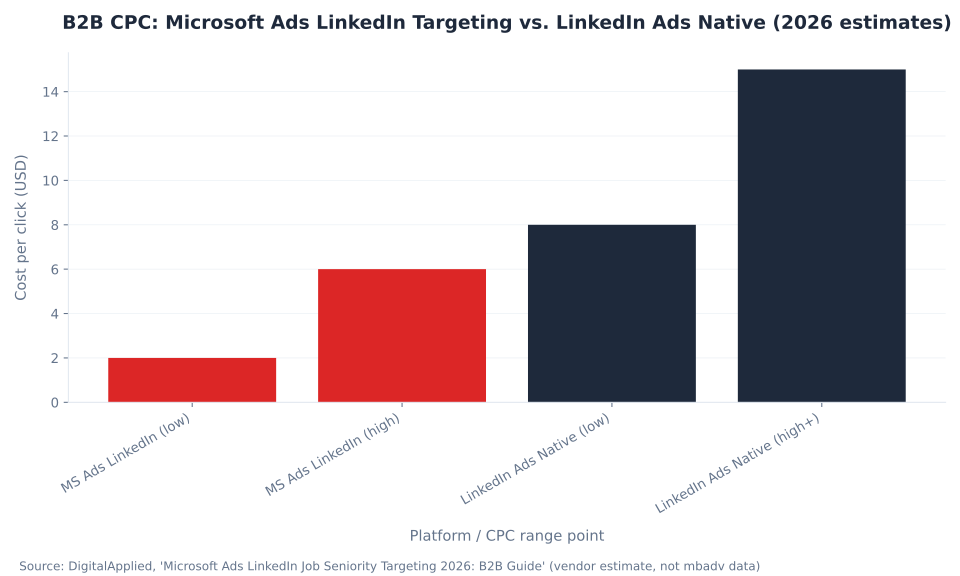
$2–$6
Estimated B2B CPC on Microsoft Ads LinkedIn targeting vs. $8–$15+ on LinkedIn Ads native (vendor estimate, DigitalApplied 2026)
Microsoft Advertising is the only ad platform with declared LinkedIn firmographic targeting — company, industry, job function, and (since June 2026) job seniority — applied directly to search and native inventory.
Mastering Audience Targeting in Microsoft Advertising
Microsoft Advertising reaches 724 million unique monthly searchers and offers one capability no other search platform can replicate: targeting by declared LinkedIn profile data — company, industry, job function, and job seniority — because Microsoft owns LinkedIn. That structural moat, combined with in-market audiences, remarketing lists, demographic controls, granular geographic targeting, and dayparting, makes Microsoft Advertising the B2B search targeting stack of record in 2026.
The full targeting stack spans five dimensions. LinkedIn profile targeting lets advertisers bias bids toward — or, on Audience campaigns, filter and exclude — users matching firmographic criteria sourced directly from LinkedIn's declared-data graph. Audience lists (in-market, remarketing, Customer Match, similar, and combined) layer intent signals and first-party data on top of keyword targeting. Demographic targeting applies age and gender bid adjustments, subject to vertical restrictions. Geographic targeting operates at country, state, metro, city, postal code, or radius granularity, controlled by a location-intent setting that determines whether physical presence or search intent qualifies a user. Dayparting (the DayTime criterion) adjusts bids by day and hour — targeting the searcher's local time zone.
| Dimension | What it does | Unique to Microsoft? | Key requirement |
|---|---|---|---|
| LinkedIn profile targeting | Bid modifier (Search) or filter/exclusion (Audience) by company, industry, job function, seniority | Yes — declared LinkedIn data, no inference | Audience campaign for hard filter or exclusion |
| Audience lists | Bid modifier or filter using in-market, remarketing, Customer Match, similar, or combined lists | No (Google has equivalents) | UET tag for remarketing and similar audiences |
| Demographics | Age and gender bid adjustments or exclusions | No | Not available in restricted verticals (financial, insurance, housing, education, employment) |
| Geographic targeting | Country, state, metro, city, postal, or radius — with a location-intent qualifier | No (location-intent setting is platform-specific) | Configure location intent correctly (default is too broad for local services) |
| Dayparting (DayTime) | Bid adjustments by day and hour, targeting the searcher's local time zone | No (searcher-local timezone behavior is notable) | None |
Source: Microsoft Learn, "Show Ads to Your Target Audience" (bingads-13, updated 2026-06-05)
For advertisers running SaaS and software PPC, consulting PPC, or financial services PPC campaigns, the LinkedIn profile targeting layer is the primary commercial differentiator. The rest of this pillar maps every lever in the stack — with explicit attention to the nuances that separate accounts that leverage Microsoft's LinkedIn integration correctly from those that file support tickets wondering why the targeting "isn't working."
Key Takeaways
Six facts every Microsoft Advertising practitioner needs before configuring a single audience criterion.
- LinkedIn targeting is bid-only on Search. On Search, Shopping, and DSA campaigns, LinkedIn profile criteria are bid modifiers — not delivery filters. Non-matching users still see the ad. Hard filtering and exclusion exist only on Audience (MSAN) campaigns.
- Job seniority launched June 16, 2026. Microsoft added 10 standardized LinkedIn seniority levels (CXO through Volunteer) across Search and Audience campaigns. Initial rollout: 29 markets including the US, Canada, Australia, India, and Brazil — not UK, Germany, France, or the Netherlands.
- Location intent controls who qualifies, not just where. The default setting —
PeopleInOrSearchingForOrViewingPages— delivers ads to users searching about a location, not just physically in it. SetPeopleInfor local-services advertisers who need physical-presence qualification. - Dayparting fires in the searcher's local time zone. A 6–11 p.m. bid boost applies 6–11 p.m. Eastern for New York searchers and 6–11 p.m. Pacific for Seattle searchers simultaneously. Account-timezone assumptions break this.
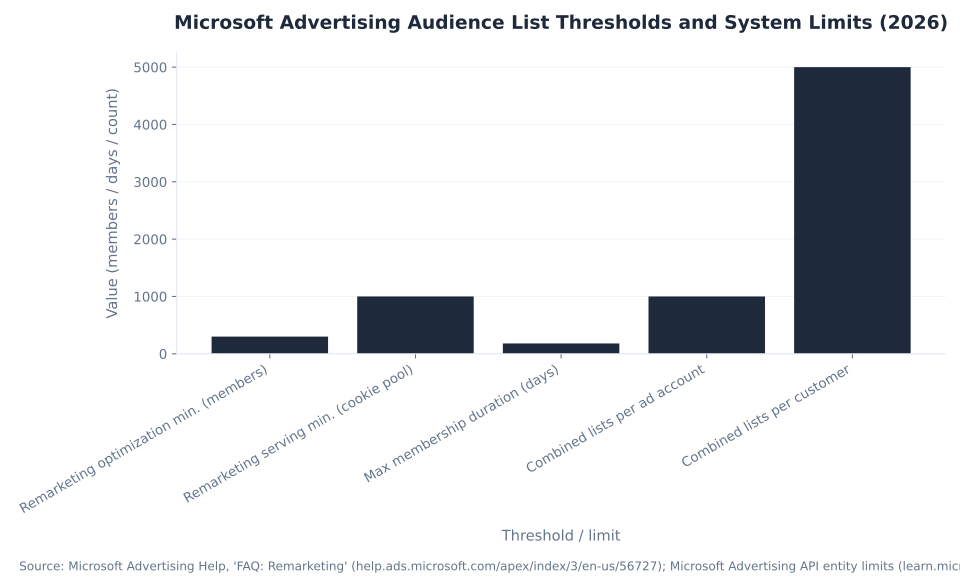
- Remarketing lists need ~300 members to optimize, ~1,000 to deliver. Two distinct thresholds: 300 for optimization signals to become effective, 1,000 for actual ad delivery on the Bing Network. Both require UET tagging.
- Demographics are restricted in five verticals. Financial services, insurance, education, employment, and housing advertisers cannot use age, gender, or location to personalize or segment customers. LinkedIn firmographic and intent targeting remain fully available in those categories.
4
LinkedIn profile targeting dimensions (company, industry, function, seniority)
10
LinkedIn seniority levels added June 2026 (CXO through Volunteer)
$2–$6
Estimated B2B CPC on MS Ads LinkedIn targeting vs. $8–$15+ on LinkedIn native (vendor est.)
10,000
Max combined location + negative-location criteria per campaign or ad group
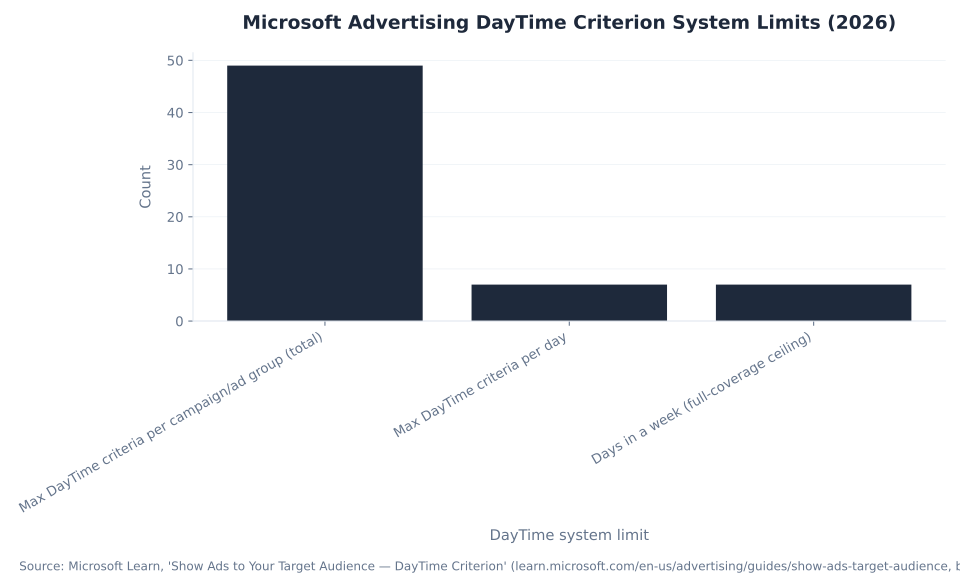
49
Max DayTime criteria per entity (7 days × 7 windows/day)
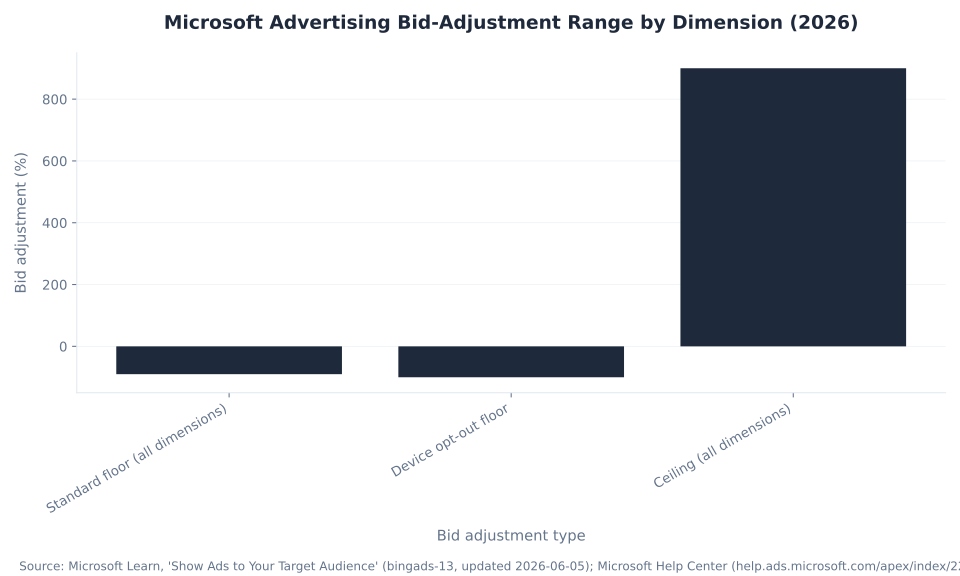
+900%
Maximum bid adjustment across all targeting dimensions (–90% floor; –100% device opt-out)
Sources: Microsoft Learn, "Show Ads to Your Target Audience" (2026-06-05); Search Engine Land, "Microsoft Ads expands LinkedIn targeting with job seniority filters" (Jun 2026); DigitalApplied 2026 (B2B CPC — vendor estimate, not mbadv data).
LinkedIn Profile Targeting: The Structural Moat
Microsoft owns LinkedIn. That ownership means Microsoft Advertising is the only ad platform in the world with access to declared LinkedIn profile data — not inferred professional attributes derived from behavioral signals, but the company, industry, job function, and seniority a user has entered on their own LinkedIn profile. Applied to search and native inventory, this targeting capability is a structural moat no competitor can replicate without acquiring LinkedIn.
Four dimensions are available as of June 2026. Company: the employer named on the LinkedIn profile, with a maximum of 1,000 company-name criteria per campaign or ad group. Industry: one of 150+ LinkedIn industry categories, from finance and law enforcement to broadcast media and environmental services. Job function: the functional role — sales, accounting, engineering, IT, legal, marketing, and others. Job seniority: 10 standardized levels added June 16, 2026 — CXO, VP, Director, Manager, Senior, Entry, Owner, Partner, Training, Volunteer. Sources: Microsoft Learn, "Show Ads to Your Target Audience"; Search Engine Land, "Microsoft Ads expands LinkedIn targeting with job seniority filters," June 2026.
For advertisers in IT and managed IT services PPC, cybersecurity PPC, or staffing and recruitment PPC, the LinkedIn dimensions let an advertiser put a search ad in front of a Director of IT at a 200-person financial-services firm actively querying for managed security solutions. That specificity is impossible on Google or Meta using declared data — only Microsoft Advertising provides it.
| Dimension | What it targets | Search mode | Audience mode | Key limit |
|---|---|---|---|---|
| Company | Named employer on LinkedIn profile | Bid-only (modifier) | Bid + exclusion | 1,000 company-name criteria per entity |
| Industry | LinkedIn industry category (150+ available) | Bid-only (modifier) | Bid + exclusion | — |
| Job function | Functional role (sales, IT, legal, finance, marketing…) | Bid-only (modifier) | Bid + exclusion | — |
| Job seniority (NEW — Jun 2026) | 10 levels: CXO, VP, Director, Manager, Senior, Entry, Owner, Partner, Training, Volunteer | Bid modifier framework | Bid + exclusion | Select markets at launch — not UK/DE/FR/NL |
Sources: Microsoft Learn, "Profile Criterion" (1,000 company-name cap; negative on Audience only); Search Engine Land, "Microsoft Ads expands LinkedIn targeting with job seniority filters" (Jun 2026); PPC.land corroboration.
The commercial case for running these dimensions is cost arbitrage. LinkedIn Ads Sponsored Content costs $8–$15+ per click for the same firmographic audience. Microsoft Advertising delivers the same declared-profile targeting on high-intent search queries at an estimated $2–$6 CPC — a vendor estimate from DigitalApplied 2026, not mbadv client data; actual CPCs vary by vertical, quality score, and bid competition. The gap between the Microsoft Ads ceiling ($6) and the LinkedIn native floor ($8) is the B2B cost-arbitrage window, and it is why financial services PPC and legal PPC advertisers running both platforms typically bias prospecting volume toward Microsoft. Sources: DigitalApplied, "Microsoft Ads LinkedIn Job Seniority Targeting 2026: B2B Guide"; Optmyzr, "How to Use LinkedIn Targeting in Microsoft Ads (Without Paying LinkedIn CPCs)".
LinkedIn profile targeting is available on Search, Shopping, DSA, and Audience campaigns at campaign and ad group level. The critical distinction: on Search it is a bid modifier only; on Audience campaigns it is both a targeting filter and an exclusion. They share a data source but operate as two different tools.
The Bid-Only Mechanic: Why LinkedIn Targeting Works Differently on Search
On Microsoft Search campaigns, LinkedIn profile targeting — including the new job seniority dimension — is bid-only. It does not filter who sees the ads; it adjusts the bid Microsoft submits for matching users. Reach is preserved. Non-matching users remain eligible. The LinkedIn criterion is a modifier, not a gate.
What "bid-only" means in practice: when Microsoft can match a searcher's account to a LinkedIn profile meeting the criterion (e.g. job function = IT, industry = financial services), the bid is multiplied by the adjustment factor. When no match is found, the base bid applies and the ad remains eligible to show. This design is intentional — search campaigns optimize for intent signals first; LinkedIn data enriches the bid without narrowing the auction pool.
Hard targeting — showing ads only to users matching a LinkedIn criterion — and exclusion — blocking users matching a criterion — are available exclusively on Audience (MSAN) campaigns. Negative profile criteria (blocking a specific company, industry, function, or seniority) are supported only at the ad group level on Audience campaigns. Sources: Microsoft Learn, "Profile Criterion"; Search Engine Land, "How to use LinkedIn targeting in Microsoft Advertising"; Microsoft Q&A, "Can I use Target & Bid for LinkedIn demographic targeting in search ads?"
| Criterion level | Supported campaign types | Mode | Exclusion supported? |
|---|---|---|---|
| Campaign biddable | Search, Dynamic Search Ads, Shopping | Bid-only (observe) | No |
| Ad group biddable | Audience, Search, Dynamic Search Ads, Shopping | Bid-only (observe) | No |
| Ad group negative (exclusion) | Audience campaigns only | Hard exclusion | Yes |
Source: Microsoft Learn, "Show Ads to Your Target Audience — Profile Criterion" (supported-campaign-types table). The Microsoft Audience Network (MSAN) is the native/display inventory where Audience campaigns run — see the Microsoft Audience Network pillar for how Audience campaigns differ from Search in targeting mechanics.
MB Adv Agency structures LinkedIn bid modifiers on Search campaigns as layered enrichment, not replacement filters: a +25–50% modifier for the primary firmographic target (e.g. IT job function + financial-services industry), with a –20% modifier for clearly non-relevant seniority levels once the June 2026 feature is live in the target market. The distinction between observation and restriction is what separates accounts that leverage Microsoft's LinkedIn integration correctly from those that treat expected Search-campaign behavior as a targeting bug. See also Microsoft Ads campaign types for the full Search-vs-Audience taxonomy and how campaign choice governs targeting mode.
Job Seniority Targeting: What the June 2026 Addition Unlocks
Until June 16, 2026, advertisers could target where someone works (company), which sector (industry), and what function — but not how senior they are. Microsoft closed that gap with 10 standardized LinkedIn seniority levels available at campaign and ad group level on both Search and Audience campaigns.
The 10 levels — CXO, VP, Director, Manager, Senior, Entry, Owner, Partner, Training, and Volunteer — map to LinkedIn's own taxonomy. A SaaS advertiser selling enterprise software can now apply a +50% bid modifier for CXO/VP/Director while running a separate ad group at standard bids for Manager/Senior, segmenting creative and landing-page offers by decision-making authority. Sources: Search Engine Land, "Microsoft Ads expands LinkedIn targeting with job seniority filters," Jun 16, 2026; PPC.land, "Microsoft Advertising adds job seniority to LinkedIn profile targeting".
| Region | Markets included at launch | Count |
|---|---|---|
| Americas | Argentina, Brazil, Canada, Chile, Colombia, Ecuador, Mexico, Peru, United States | 9 |
| EMEA | Egypt, Nigeria, Saudi Arabia, South Africa | 4 |
| APAC | Australia, India, Indonesia, Japan, Malaysia, Philippines, Singapore, Taiwan, Thailand, Vietnam | 10 |
| Not included at launch | United Kingdom, Germany, France, Netherlands — verify expansion before publish | — |
Source: Search Engine Land, "Microsoft Ads expands LinkedIn targeting with job seniority filters" (Jun 2026); PPC.land corroboration. [Operator review — confirm UK/DE/FR/NL availability before publish.]
For consulting PPC and SaaS software PPC advertisers, seniority targeting closes the last major firmographic gap in the Microsoft Advertising stack. A campaign targeting Director-and-above in the IT function at financial-services companies — previously requiring three separate dimensions and a modifier workaround — is now structured as a single layered criterion: industry (financial services) + job function (IT) + job seniority (Director, VP, CXO). Source: DigitalApplied, "Microsoft Ads LinkedIn Job Seniority Targeting 2026: B2B Guide". For how bid multipliers stack once the criteria are in place, see Microsoft Ads bidding and budget.
B2B CPC: Microsoft Ads LinkedIn Targeting vs. LinkedIn Ads Native (2026 estimates)
The Audience List Stack: Intent, First-Party, and Lookalike
Beyond LinkedIn profile targeting, Microsoft Advertising offers six audience list types that layer purchase intent and first-party data onto search and native campaigns. The sophisticated play combines LinkedIn firmographic modifiers with remarketing or in-market lists: a UET-based remarketing list filters to users who have visited a pricing page, and a LinkedIn seniority modifier biases bids toward senior decision-makers within that warm pool.
In-market audiences require no UET tag — Microsoft builds them from Microsoft Graph signals (Bing searches, MSN page views, Microsoft services activity) packaged as predefined category segments. Remarketing lists require a UET tag; the tag fires on site visits and actions and populates lists with a membership window of 1–180 days (impression-based lists cap at 30 days). Source: Microsoft Advertising Help, "What are my options for audiences?"; Microsoft Advertising Help, "FAQ: Remarketing". For UET tag setup, see conversion tracking with UET.
| Audience type | Data basis | UET required? | Key limit / threshold |
|---|---|---|---|
| In-market audiences | Microsoft Graph purchase-intent signals (Bing searches, MSN page views) | No | Predefined segments; no custom segment creation |
| Remarketing lists | Site visits and actions via UET tag | Yes | ~300 members for optimization; ~1,000 for Bing Network delivery; membership 1–180 days (impression-based: 1–30 days) |
| Customer Match | Uploaded CRM email list matched to known users | No (list upload) | — |
| Custom audiences | First-party data via data-management provider (DMP) | DMP integration | — |
| Similar audiences | Users resembling a seed remarketing list | Yes (seed list needs UET) | — |
| Combined lists | Existing lists merged with AND / OR / NOT logic | Depends on source lists | Max 1,000 per ad account; max 5,000 per customer; cannot include other combined lists or in-market audiences |
Sources: Microsoft Advertising Help, "What are my options for audiences?"; Microsoft Help, "FAQ: Remarketing" (~300-member optimization threshold; 1–180 day membership); Microsoft Learn, "Entity Limits" (1,000/5,000 combined list caps); Microsoft Q&A, "Bing Ads Remarketing List Size" (~1,000 Bing Network delivery floor). [Operator review: verify 300 vs. 1,000 thresholds against live help center before publish.]
Two thresholds govern remarketing list readiness: the optimization minimum (~300 members, below which Microsoft's optimization signals lack statistical weight) and the delivery minimum (~1,000 members in the cookie pool, below which the list does not serve on the Bing Network). A list at 400 members enters optimization but does not deliver until it reaches 1,000. Building lists against high-volume UET events — homepage visit or category page rather than thank-you page — accelerates both thresholds. Source: Microsoft Q&A, "Bing Ads Remarketing List Size".
MB Adv Agency layers audience lists with LinkedIn criteria for B2B accounts: the standard structure is a remarketing list of pricing-page visitors (warm intent) combined with an in-market segment (active category research) at the ad group level, with a LinkedIn seniority modifier applied at the campaign level. The layered approach narrows to decision-makers who are already in-market and have demonstrated purchase intent — the highest-value combination the platform offers.
Microsoft Advertising Bid-Adjustment Range by Dimension (2026)
Demographic Targeting: Age, Gender, and Vertical Restrictions
Microsoft Advertising supports age and gender bid adjustments and exclusions across Search and Audience campaigns, with one critical constraint: advertisers in financial services, insurance, education, career/employment, or housing cannot use demographics to personalize or segment customers. For those verticals — several of which are core to this pillar's B2B audience — LinkedIn firmographic levers and intent targeting remain fully available; demographic personalization does not.
Age targeting covers five brackets on Search, Shopping, and DSA campaigns (18–24, 25–34, 35–49, 50–64, 65+) and adds an "Unknown" category on Audience campaigns. Gender covers Male and Female on Search/Shopping/DSA, with Unknown added for Audience campaigns. Negative age (excluding an age group entirely) is supported at ad group level. Gender exclusion requires Audience campaigns. Source: Microsoft Learn, "Show Ads to Your Target Audience".
Restricted verticals: financial services, insurance, education, career/employment, and housing. Microsoft Advertising policy prohibits advertisers in these categories from using age, gender, or location to personalize advertising or to segment and profile customers. LinkedIn firmographic targeting, in-market audiences, and remarketing lists are not restricted. Source: Microsoft Learn, "Show Ads to Your Target Audience" — restricted-category compliance note.
The restriction matters most for financial services PPC and insurance PPC advertisers. In those verticals, the full LinkedIn firmographic stack — industry, job function, and seniority — is the primary audience lever. An insurance advertiser cannot show different ads to 18–24-year-olds vs. 50–64-year-olds; they can segment by LinkedIn industry (financial services, law enforcement) and seniority (Owner, CXO) to reach decision-making profiles. Demographic personalization is off-limits; firmographic and intent targeting are not.
Microsoft Advertising Audience List Thresholds and System Limits (2026)
Geographic Targeting: Location Intent and Granular Controls
Microsoft Advertising supports geographic targeting at six granularity levels — country/region, state/province, metro area (Microsoft Market Area in the US), city, postal code, and radius — with a location-intent qualifier that controls which type of geographic connection qualifies a user. Most advertisers configure granularity correctly and never configure intent, which is why many local campaigns pay for out-of-market clicks at full bid.
The location-intent setting is the control most advertisers miss. The default — PeopleInOrSearchingForOrViewingPages — delivers ads to users who are physically in the location, or searching for it, or reading content about it. A local plumber in Austin targeting the Austin metro on this default setting pays for clicks from users in Boston researching Austin plumbing. Setting PeopleIn restricts delivery to users physically present in the target geography — for local services advertisers, this is the highest-ROI configuration change in geographic targeting. Source: Microsoft Learn, "Location Intent Criterion".
The third option — PeopleSearchingForOrViewingPages (users researching a location without being present) — was deprecated in April 2024. Campaigns with this setting auto-convert to PeopleInOrSearchingForOrViewingPages. Source: Microsoft Learn, "Show Ads to Your Target Audience".
| Setting | Options / levels | Bid adjustment? | System limit |
|---|---|---|---|
| Location granularity | Country/region, state/province, metro area (MS Market Area in US), city, postal code | Yes (per location) | Max 10,000 combined location + negative-location per entity |
| Radius targeting | Radius around zip code, coordinates, or landmark | Yes (per radius) | Max 2,000 radius criteria per entity |
| Location intent | PeopleIn | PeopleInOrSearchingForOrViewingPages (default) | PeopleSearchingForOrViewingPages | No | Max 1 per entity |
| Negative location (exclusion) | Any location granularity level | — | Counted within the 10,000 combined limit |
| Geo bid compounding | Only the most refined geo level applies — city overrides metro, metro overrides state | Non-compounding | — |
Source: Microsoft Learn, "Show Ads to Your Target Audience" (location / location-intent / radius / negative-location limits; PeopleSearchingForOrViewingPages deprecation April 2024; geo bid adjustments non-compounding across granularity levels).
For multi-location service businesses — home services franchises, regional law firms, dental groups — the practical playbook is: set PeopleIn for physical-service areas, add postal-code-level granularity in dense metros, and apply per-location bid adjustments to weight spend toward higher-converting areas. MB Adv Agency uses location-level bid adjustments for clients with nonuniform service-area conversion rates, weighting metro areas by historical close rate rather than population. See HVAC PPC in Flagstaff, AZ and legal PPC in Missoula, MT for local geo-bid structuring examples. For PPC management in major US metros, see PPC management in Austin, TX and PPC management in Chicago, IL.
Dayparting in Microsoft Advertising: The Searcher's Local Time Zone
Microsoft Advertising's DayTime criterion targets the searcher's local time zone, not the account time zone. A +10% bid adjustment set for 6:00–11:00 p.m. fires at 6–11 p.m. Eastern for a New York searcher and at 6–11 p.m. Pacific for a Seattle searcher — simultaneously, from the same campaign. Advertisers porting schedules from account-timezone systems routinely misalign their boosts by failing to account for this distinction.
The DayTime criterion allows up to 49 total time windows per campaign or ad group, with a maximum of 7 windows per day and no overlapping ranges. The 49-slot ceiling is exactly 7 days × 7 windows/day — full-week coverage at maximum resolution requires precisely engineered non-overlapping windows within each day. Source: Microsoft Learn, "DayTime Criterion".
| Limit | Value | Practical implication |
|---|---|---|
| Max DayTime criteria per entity (total) | 49 | 7 days × 7 windows/day = 49. Full-week coverage is achievable within this limit with careful window design. |
| Max DayTime criteria per day | 7 | 7 non-overlapping windows per calendar day; range collisions invalidate the criterion. |
| Overlapping ranges | Not allowed | A Monday 3:00–5:00 a.m. and Monday 4:00–6:00 a.m. range on the same entity is invalid. |
| Time zone reference | Searcher's local time | Not the account time zone. A 6–11 p.m. window fires at 6–11 p.m. in every searcher's local zone simultaneously. |
Source: Microsoft Learn, "Show Ads to Your Target Audience — DayTime Criterion".
For B2B advertisers targeting business hours, the searcher-local design is an advantage: a 9:00 a.m.–5:00 p.m. Monday–Friday daypart covers business hours for searchers in every US time zone without needing separate campaigns by region. The bid adjustment fires at the local equivalent of business hours — East Coast and West Coast prime time in their respective windows, all from one set of DayTime criteria. For consumer campaigns with evening peaks, the same logic applies: a +15% 6–9 p.m. adjustment reaches East Coast and West Coast prime-time users in their respective local hours.
Bid Adjustments: How the Targeting Dimensions Stack
Every targeting dimension in Microsoft Advertising operates through a bid adjustment multiplied against the base keyword bid. The standard range across all dimensions is –90% to +900%. Device targeting adds a –100% opt-out value for smartphones and tablets only — computers cannot be opted out. Adjustments compound multiplicatively across dimension types, with one exception: geographic adjustments do not compound across granularity levels.
Compounding example: a +20% dayparting adjustment for 9 a.m.–5 p.m. combined with a +30% location adjustment for a target metro and a +25% LinkedIn job-function modifier produces a net effective adjustment of 1.20 × 1.30 × 1.25 = 1.95, or +95% above the base keyword bid. Geographic adjustments are the exception: for a searcher in a city that is also in a targeted metro and state, only the most refined geo level's adjustment applies — the city adjustment. Sources: Microsoft Advertising Help, "Increase bids based on customer age, gender, location, and more"; Microsoft Learn, "Show Ads to Your Target Audience".
Note on Performance Max: PMax campaigns support only location, location intent, radius, and DayTime criteria at campaign level — age, gender, and LinkedIn profile criteria are not available. For automated bidding and how tROAS/tCPA interacts with manual bid modifiers, see Microsoft Ads bidding and budget.
Microsoft Advertising DayTime Criterion System Limits (2026)
B2B PPC — Microsoft Advertising
Run LinkedIn Targeting at Search CPCs
MB Adv Agency builds Microsoft Advertising campaigns for SaaS, IT services, consulting, financial services, and legal advertisers — using LinkedIn profile targeting, audience layering, and geographic precision to reach decision-makers at search-class CPCs.
SaaS & Software PPC Services →Three Misconceptions About Microsoft Advertising Audience Targeting
Three errors account for most "targeting isn't working" support tickets and post-launch disappointments on Microsoft Advertising. Each stems from a correct fact applied to the wrong campaign type or configuration context.
1. "My LinkedIn targeting on Search is restricting who sees the ads."
It is not. On Search, Shopping, and Dynamic Search Ads campaigns, LinkedIn profile targeting — company, industry, job function, and seniority — is bid-only. Microsoft applies a bid modifier when it can match the searcher's account to a LinkedIn profile meeting the criterion; it does not restrict auction eligibility. Non-matching users remain eligible, and reach is not narrowed. The platform operates this way by design — search campaigns optimize for query intent, and restricting by firmographic criteria would sacrifice volume. Hard targeting and exclusion exist only on Audience (MSAN) campaigns. When advertisers set a Search LinkedIn criterion, see normal delivery patterns, and conclude the targeting is broken, the targeting is working exactly as Microsoft documented. Source: Microsoft Learn, "Profile Criterion" (negative supported on Audience campaigns only); StackMatix, "Microsoft Advertising Audience Targeting: LinkedIn Integration and Beyond".
2. "Dayparting fires at my account's time zone, so 6 p.m. means 6 p.m. in my location."
It does not. The DayTime criterion targets the searcher's local time zone. A 6:00–11:00 p.m. bid increase applies at 6–11 p.m. Eastern for a New York searcher and at 6–11 p.m. Pacific for a Seattle searcher simultaneously, from the same campaign. Advertisers migrating from platforms that use a single account time zone for all dayparting will mistime boosts if they assume the same behavior on Microsoft. For a B2B advertiser wanting to boost bids during East Coast business hours only, the correct approach is to accept that a 9 a.m.–5 p.m. window fires at business hours for each searcher's local zone — which, for a national campaign, is actually the desired behavior. For region-specific schedules, separate campaigns by geographic target. Source: Microsoft Learn, "DayTime Criterion".
3. "Age, gender, and location targeting work the same in any vertical."
They do not, in five verticals. Microsoft Advertising policy prohibits using age, gender, and location to personalize advertising or to segment and profile customers in financial services, insurance, education, career/employment, and housing. Several core B2B verticals — financial services, insurance — sit inside this restriction. The full LinkedIn firmographic stack and intent-based targeting (in-market audiences, remarketing, keyword) remain available; demographic personalization is the specific capability that is off-limits. Advertisers who attempt age or gender targeting in these verticals and find those options unavailable or disabled are not encountering a platform bug — they are hitting a policy compliance gate. Source: Microsoft Learn, "Show Ads to Your Target Audience" — restricted-category compliance note. See financial services PPC for vertical-specific campaign structuring that works within these constraints.
Quick Reference: Microsoft Advertising Audience Targeting Limits (2026)
LinkedIn company-name criteria
Max 1,000 per campaign or ad group
LinkedIn profile exclusion (negative)
Audience campaigns only — not available on Search
Remarketing optimization floor
~300 members
Remarketing delivery floor (Bing Network)
~1,000 members (cookie pool)
Combined audience lists per ad account
Max 1,000
Combined audience lists per customer
Max 5,000
Location + negative location criteria
Max 10,000 combined per entity
Bid adjustment range (standard / device opt-out)
–90% to +900% / –100% device opt-out only
Frequently Asked Questions
Answers to the most common questions on Microsoft Advertising audience targeting — from LinkedIn bid-only mechanics to remarketing thresholds and demographic restrictions.
Does LinkedIn targeting on Microsoft Ads restrict who sees my search ads?
No. On Search, Shopping, and Dynamic Search Ads campaigns, LinkedIn profile targeting — company, industry, job function, and job seniority — is a bid modifier, not a delivery filter. When Microsoft matches a searcher's account to a LinkedIn profile meeting your criterion, the bid adjusts up or down by the specified percentage. When no match is found, the base bid applies and the ad remains eligible to show. Non-matching users see the ad at the unadjusted bid. The ads are not restricted to LinkedIn-qualifying users only. Hard targeting — showing ads exclusively to matching users — and exclusion — blocking specific LinkedIn segments — are supported only on Audience campaigns running on the Microsoft Audience Network (MSAN). Applying a LinkedIn company criterion to a Search campaign and observing non-matching users converting is not a targeting failure; it is the expected behavior of a bid modifier in observation mode. Source: Microsoft Learn, "Show Ads to Your Target Audience — Profile Criterion."
What is the minimum audience list size for remarketing on Microsoft Advertising?
Two distinct thresholds apply, measuring different lifecycle phases. The optimization minimum is about 300 members — below this size, Microsoft's bidding and optimization algorithms lack the statistical data volume to make meaningful bid adjustments based on the list; the list is "live" but optimization is ineffective. The delivery minimum is about 1,000 members in the cookie pool — below this threshold, the list does not serve ads on the Bing Network at all. A list at 400 members enters optimization but does not deliver until it reaches 1,000. Standard remarketing membership windows run from 1 to 180 days; impression-based remarketing lists cap at 30 days. Build remarketing lists against high-volume UET events — homepage visits, category page views — rather than low-volume conversion events to reach both thresholds faster. Source: Microsoft Advertising Help, "FAQ: Remarketing"; Microsoft Q&A, "Bing Ads Remarketing List Size."
How does job seniority targeting work in Microsoft Advertising?
Microsoft Advertising added 10 standardized LinkedIn seniority levels on June 16, 2026: CXO, VP, Director, Manager, Senior, Entry, Owner, Partner, Training, and Volunteer. These levels are available as bid modifiers at campaign and ad group level on both Search and Audience campaigns. On Search, seniority operates in bid-only (observation) mode — the same framework as the other LinkedIn profile dimensions; reach is not restricted. On Audience campaigns, exclusion of specific seniority levels is supported via negative profile criteria. The initial launch covered 29 markets: nine in the Americas (including the US, Canada, Brazil, and Mexico), four in EMEA (Egypt, Nigeria, Saudi Arabia, South Africa), and ten in APAC (including Australia, India, Japan, and Singapore). UK, Germany, France, and the Netherlands were not included at the initial rollout — confirm availability for Western European markets before applying seniority criteria to those geographies. Source: Search Engine Land, "Microsoft Ads expands LinkedIn targeting with job seniority filters," June 2026; PPC.land.
What is the difference between PeopleIn and PeopleInOrSearchingForOrViewingPages location intent?
PeopleIn delivers ads only to users physically present in the target location. PeopleInOrSearchingForOrViewingPages — the default — delivers to users who are in the location, actively searching for it, or reading content about it; this is a significantly broader audience that includes out-of-market users. For local services advertisers, PeopleIn is the correct setting; the default delivers ads to users researching the location from anywhere, paying for out-of-market clicks at full bid. A third option — PeopleSearchingForOrViewingPages, which targeted users researching a location without being present — was deprecated in April 2024; campaigns with this setting auto-convert to the default. Location intent is set at campaign or ad group level with a maximum of one location-intent criterion per entity. No bid adjustment is available for location intent; it is a qualification filter, not a modifier. Source: Microsoft Learn, "Show Ads to Your Target Audience — Location Intent Criterion."
Can financial services advertisers use age and gender targeting on Microsoft Advertising?
No. Microsoft Advertising policy prohibits advertisers in financial services, insurance, education, career/employment, and housing from using demographics — age, gender, and location — to personalize advertising or to segment and profile customers. This restriction applies to demographic personalization specifically, not to all targeting. LinkedIn firmographic targeting (company, industry, job function, seniority), in-market audiences, remarketing lists, Customer Match, and keyword targeting remain fully available in these verticals without restriction. For B2B financial services advertisers, the LinkedIn profile stack provides the firmographic specificity that demographic targeting would otherwise offer, without the compliance restriction: targeting IT directors at financial-services companies is a LinkedIn industry + job function criterion, not an age or gender criterion. Source: Microsoft Learn, "Show Ads to Your Target Audience" — restricted-category compliance note. See also financial services PPC.
How do bid adjustments compound when stacking location, LinkedIn, and dayparting targeting?
Bid adjustments compound multiplicatively across most dimension types. A +20% dayparting modifier, a +30% location modifier, and a +25% LinkedIn job-function modifier combine as 1.20 × 1.30 × 1.25 = 1.95, or +95% above the base keyword bid — all three criteria met in a single auction. Geographic adjustments are the exception: when a searcher's location matches city, metro, and state targets simultaneously, only the most refined level's adjustment applies — the city bid adjustment, not a compounded product of city + metro + state. The standard adjustment range across all dimensions is –90% to +900%. Device targeting adds a special –100% opt-out value for smartphones and tablets (not available for computers). The compounded result across multiple non-geo dimensions has no separately documented ceiling — it is the product of each active modifier. Source: Microsoft Learn, "Show Ads to Your Target Audience"; Microsoft Advertising Help, "Increase bids based on customer age, gender, location, and more."
Work With MB Adv Agency
Need a Microsoft Advertising Expert?
Whether you are building your first Microsoft Ads account or restructuring an existing one for B2B audience layering and LinkedIn targeting, MB Adv Agency handles campaign architecture, criterion setup, and ongoing management.
Talk to MB Adv Agency →Methodology
Data for this pillar was drawn from Microsoft Learn API documentation (bingads-13, last updated 2026-06-05), Microsoft Advertising Help Center, and named practitioner and industry sources — Search Engine Land, PPC.land, DigitalApplied, Optmyzr, and StackMatix — all verified June 2026. Ahrefs keyword data and Google Search Console impression data are from June 2026 (US, 90-day window to 2026-06-26). The LinkedIn B2B CPC ranges ($2–$6 / $8–$15+) are vendor estimates from DigitalApplied and Optmyzr, not mbadv client benchmarks. Remarketing thresholds (~300 optimization, ~1,000 delivery) are sourced from Microsoft Help and Microsoft Q&A and flagged for operator verification before publish. Reviewed by MB Adv Agency, June 2026.

As a Google Ads expert, I bring proven expertise in optimizing advertising campaigns to maximize ROI.
I specialize in sharing advanced strategies and targeted tips to refine Google Ads campaign management.
Committed to staying ahead of the latest trends and algorithms, I ensure that my clients receive cutting-edge solutions.
My passion for digital marketing and my ability to interpret data for strategic insights enable me to offer high-level consulting that aims to exceed expectations.
Google Partner Agency
We're a certified Google Partner Agency, which means we don’t guess — we optimize withGoogle’s full toolkit and insider support.
Your campaigns get pro-level execution, backed by real expertise (not theory).

4.9 out of 5 from 670+ reviews on Fiverr.
That’s not luck, that’s performance.
Highly recommend Matteo to set up your server side tracking. He has a deep understanding of e-commerce tracking and will go above and beyond to make sure everything is set up correctly and working 100%. If you are scaling your store this set up is non-negotiable in my opinion and there isn't many people who have this much knowledge or put the effort in to get it right. Thanks again!

avorodesign.com
I can only recommend Matteo! He was very patient, professional and very knowledgeable about GA4, Consent Mode v2, and GDPR compliance. Communication was clear, and the setup was done professionally and efficiently. Highly recommend him for anyone needing reliable tracking implementation.

www.natureiki.life
Matteo shines in the realm of online professionals. His work is not only deep in data but also complemented by his proactive communication and cooperation, setting a new standard for freelancers. If you want someone who truly exceeds expectations, look no further. Highly recommended!

www.omanbeverlysmyth.com
Exceptional Service Beyond Expectations - Outstanding Service Impeccable depth, flawless delivery, and exceptional language fluency—this service exceeded all expectations. Highly recommended. Matteo truly ROCKS!!!

ium-paris.com
Top-notch, always highly value working with Matteo. An absolute Google Ads Genius. This is approximately the 8th time I have hired him and he's helped us get 6-7 ROAS. We are excited in continuing to improve our lead flow. Hire this guy if you need Google Ads help. Thanks Matteo!

www.dleeventgroup.com
I finally found the guy who can setup server side tracking and all the ecosystem properly. I definitely recommend Matteo. He is very responsive, kind and wants to dig into things. He configured GA4, Meta, Google Ads, Outbrain and google consent v2 with Cookiebot. Thanks Matteo.

inomega.fr
MB Adv delivered exceptional work with outstanding professionalism and lots of patience, taking time to see effects of changes made and not just do the work and submit it. The proactive communication and video summaries of the work completed made working with Matteo a pleasure, as he consistently went above and beyond. Highly recommended for web analytics projects! We are already working on another project.

www.withnellsensors.co.uk
Working with Matteo on my Google Ads was a game-changer. He's not just a strategist, he's a true partner. He understood my goals and tailored a campaign that perfectly reached my target audience. I'm grateful for his expertise and dedication.

dccargo.com
Click-driven mind
with plastic-brick obsession.
We build Google Ads campaigns with the same mindset we use to build tiny brick worlds: strategy, patience, and zero tolerance for wasted pieces.
Data is our blueprint. Growth is the only acceptable outcome.