Apple Ads Creative & Ad Policies Guide (2026)

Apple Ads 2026 — Creative & Ad Policies
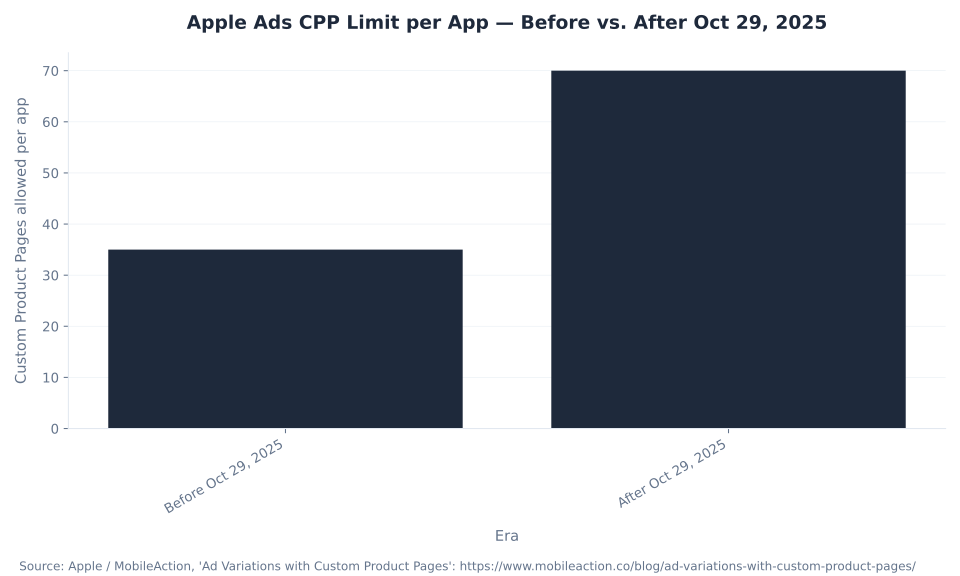
70
Custom Product Pages per app power your Apple Ads creative
Custom Product Pages & ad variations — the current system · Creative Sets retired (“Unsupported”) · Apple Advertising Policies last updated Feb 26, 2025 · Prohibited vs. restricted content · New creative held as “Ad in review” — no appeal button, fix and auto re-review
Custom Product Pages & Ad Variations: The Apple Ads Creative System
Apple Ads creative runs on two ideas: the Custom Product Page (CPP) and the ad variation. A CPP is a full additional version of your App Store product page — its own screenshots, app previews, promotional text, deep links, and a unique URL — built in App Store Connect. An ad variation is the Search-results ad that selects which CPP supplies its creative and lands the tap on that page. There is no separate “ad designer”: you build the page, then point an ad at it.
Three 2026 facts define how far this system reaches. First, Apple raised the per-app CPP limit from 35 to 70 on October 29, 2025 — it literally doubled how many tailored pages one app can run, which changes the math on building one CPP per keyword theme. Second, since late July 2025 CPPs can also appear in organic App Store search (keyword-assigned), so the creative you build to power a paid ad also works for unpaid discovery. Third, the structural constraint people miss: only one active custom ad runs per ad group at a time, alongside the always-on default product page. New here? Start with what Apple Ads are — the rebrand and the four placements — then come back to creative; and for what each surface accepts, see Apple Ads placements and ad types.
The payoff is Apple-measured. Apple reports CPP ad variations lift conversion by an average of +2.5 percentage points (about 156% over a 1.6% default), and AppTweak’s dataset puts the average lift around 6.6% across roughly 3,500 apps. The MB Adv Agency framing for app clients: a CPP is not “a nicer screenshot” — it is the mechanism that lets one campaign speak to many search intents at once, and the 35-to-70 change is permission to use it that way. Apps are software businesses, so the discipline is the same one SaaS advertisers run — see our SaaS and software PPC services.
| Fact | Detail | Source / date |
|---|---|---|
| Per-app CPP limit | Up to 70 Custom Product Pages per app (doubled from 35) | Apple / MobileAction — Oct 29, 2025 |
| Built where | App Store Connect — its own previews, screenshots, promotional text, and deep links; each gets a unique URL | Apple Developer |
| How they serve in ads | A CPP supplies the creative for a Search-results ad variation; the tap lands on that CPP | Apple Ads Help (0077) |
| Active custom ads per ad group | One active custom ad at a time, alongside the always-on default product page | Apple Ads Help |
| Organic search eligibility | CPPs can also appear in organic App Store search (keyword-assigned) | Apple / MobileAction — ~late July 2025 |
| Deep links | Supported on ad variations; require iOS/iPadOS 18+ | Apple Ads Help |
| Conversion lift | +2.5 percentage points on average (about 156% over a 1.6% default) — Apple; ~6.6% average — AppTweak | Apple / AppTweak |
Sources: Apple Developer, “Custom Product Pages,” developer.apple.com/app-store/custom-product-pages; Apple Ads Help, “Create Ad Variations” (0077), ads.apple.com/…/0077-create-ad-variations; 35→70 cap (Oct 29, 2025) and organic-search eligibility (~late July 2025): MobileAction; lift figures — Apple (+2.5pp / 156%) and AppTweak (~6.6%). The +2.5pp figure is Apple-published; the ~6.6% is AppTweak — neither is mbadv client data.
Creative Sets Are Retired: The Legacy-Term Decoder
The most common stale claim about Apple Ads creative is that you “design Creative Sets.” You do not, not anymore. Creative Sets are retired. Apple’s own help is unambiguous: “Creative Sets ad variations are no longer supported by Apple Ads in search results campaigns.” Existing Creative Sets now show the status “Unsupported,” cannot be edited or reactivated, and can only be removed — and Custom Product Pages replaced them.
The shift was not cosmetic. A Creative Set only let you swap the images shown in an ad. A Custom Product Page is a full additional version of your App Store product page — its own screenshots, app previews, promotional text, deep links, and a unique URL — that an ad variation then points at. So the useful correction for a reader arriving on “creative sets apple search ads” is not “here is how Creative Sets work” but “the thing you are reading about was retired — here is what replaced it, and why the replacement is more powerful.” If a guide tells you to build a Creative Set, it predates the change; the current workflow is to build a Custom Product Page in App Store Connect, then create an ad variation that uses it.
| Legacy term (in old guides) | Current 2026 name / status | What changed |
|---|---|---|
| Creative Sets | Retired — “Unsupported” | Apple: “Creative Sets ad variations are no longer supported by Apple Ads in search results campaigns.” Existing sets show status “Unsupported,” cannot be edited or reactivated, and can only be removed |
| Creative Set (swap the images) | Custom Product Page (CPP) | A CPP is a full alternate version of your App Store product page — its own screenshots, app previews, promotional text, deep links, unique URL — not just swapped images. Built in App Store Connect |
| The ad creative | Ad variation (powered by a CPP) | An ad variation selects which CPP supplies the creative for a Search-results ad; the tap lands on that CPP. One active custom ad per ad group at a time |
| (implicit default ad) | Default product page | The always-on default creative, auto-built from your standard product page. Serves ad groups with no variation, devices on iOS earlier than 15.2, and as the fallback when a custom ad is paused or on hold |
| “35 custom product pages max” | Up to 70 per app | The per-app CPP limit was doubled from 35 to 70 on October 29, 2025 |
Sources: Apple Ads Help, “Ad Variations Troubleshooting” (Creative Sets “Unsupported,” no longer supported, can only be removed), ads.apple.com/…/0079-ad-variations-troubleshooting; Apple Ads Help, “Manage Ad Variations” (0078), ads.apple.com/…/0078-manage-ad-variations; Apple Developer, “Custom Product Pages,” developer.apple.com/app-store/custom-product-pages. This is the highest-citation-value correction on the page — the “Unsupported” wording and the Oct 29, 2025 date are exact. Re-confirm against the live Apple Ads help at publish; Apple revises creative features frequently.
Creative & Policy Search Demand and the Absorbed Footprint
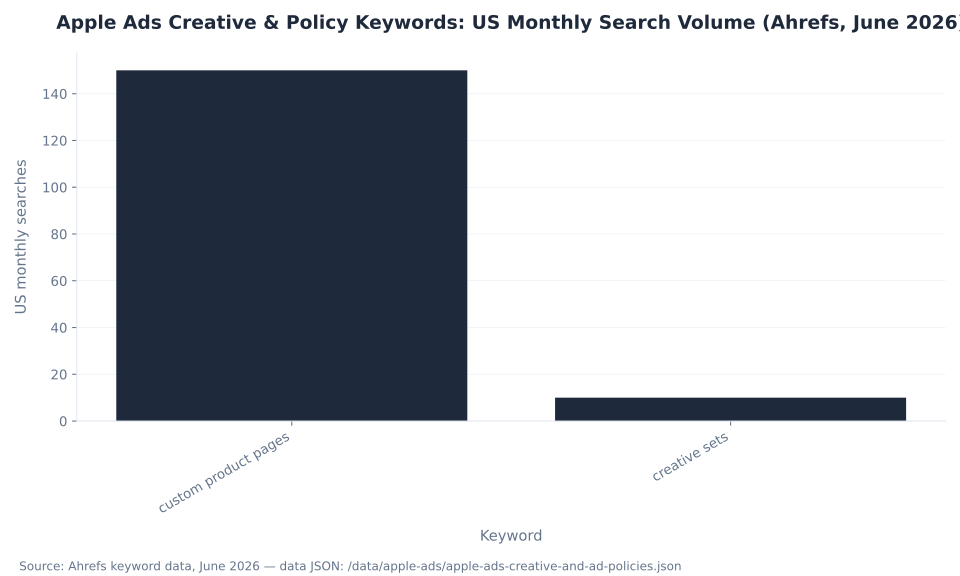
Apple Ads creative is a narrow, high-value search cluster. The measurable Ahrefs head term is “custom product pages” at 150/mo US (difficulty 7, a $35.00 CPC that signals strong advertiser-decision value), with “creative sets” trailing at 10/mo — low volume because the term is retired, high citation value because readers arrive carrying stale vocabulary. The third data-JSON keyword, “apple search ads policies,” registers 0 US volume in the window.
| Keyword | US monthly volume | Global volume | KD / CPC |
|---|---|---|---|
| custom product pages | 150 | 500 | KD 7 / $35.00 |
| creative sets | 10 | 50 | KD — / CPC — |
| apple search ads policies | 0 | 0 | KD — / CPC — |
Source: Ahrefs keyword data, June 2026 (US monthly volume, 12-month average) — data JSON. “Custom product pages” is the primary ranking target; “creative sets” is the legacy-term citation magnet; “apple search ads policies” carries 0 US volume and is excluded from the chart below.
Apple Ads Creative & Policy Keywords: US Monthly Search Volume (Ahrefs, June 2026)
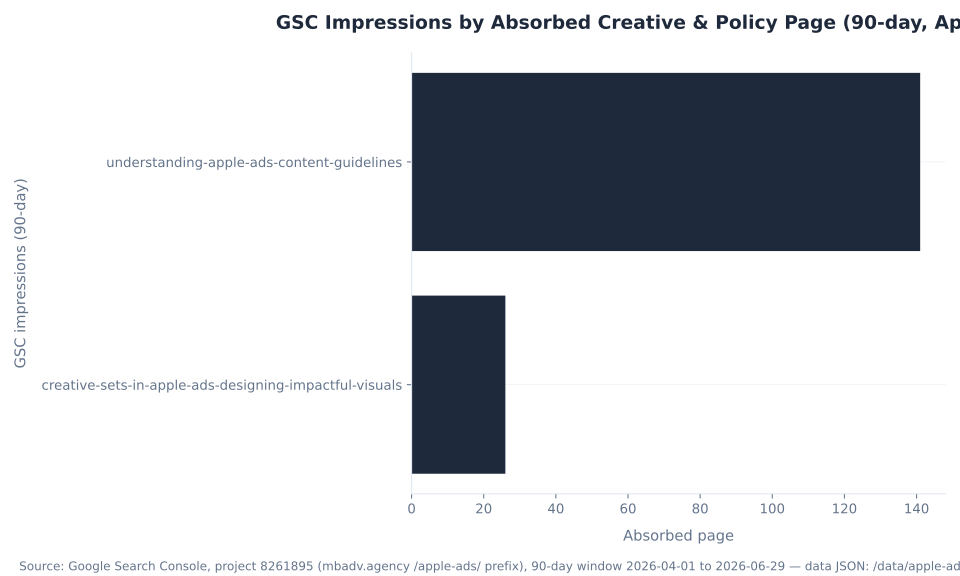
This pillar consolidates five absorbed creative and policy pages, but the organic equity is concentrated in two of them. The understanding-apple-ads-content-guidelines page is the cluster’s toehold: 141 impressions across 18 keywords over the 90-day window (April 1 to June 29, 2026, average position 13.21, top query “what policies apply to advertising on the app store?”). The creative-sets-in-apple-ads-designing-impactful-visuals page adds 26 impressions across 2 keywords (average position 6.73, top query “creative sets apple search ads”). The other three absorbed pages registered zero impressions. The cluster total is 167 impressions and 0 clicks.
GSC Impressions by Absorbed Creative & Policy Page (90-day, Apr–Jun 2026)
That footprint is the asset this pillar exists to preserve, and it transfers through two H2 anchors below: id="content-guidelines", where the policy page 301s in, and id="creative-sets" above, where the Creative Sets page 301s in. Policy demand is captured through that long-tail GSC toehold rather than a head term, which is consistent with policy content indexing through conversational questions rather than short keywords. For where reporting and variation-level performance live, see Apple Ads performance metrics and reporting.
The Default Product Page and One Active Custom Ad per Ad Group
The piece most advertisers miss is structural: within a single ad group, only one active custom ad runs at a time, alongside the always-on default product page. You can build up to 70 Custom Product Pages per app and prepare many ad variations, but the lever for reaching many search intents is not stacking custom ads in one ad group — it is structure: a tight ad group per keyword theme, each with its own intent-matched CPP and its single active custom ad.
The default product page is the safety net. It is auto-built from your standard App Store product page, and it serves in three situations: ad groups that have no variation, devices running iOS earlier than 15.2, and as the fallback whenever a custom ad is paused or on hold. That last case is the one that quietly explains a “why did my creative change” question: when a custom ad goes on hold for review, the default page keeps the ad group serving rather than stopping it. Mapping ad variations to keyword themes and keeping that structure clean is ongoing work — see our PPC campaign management, and for how the keyword structure underneath it works (broad vs. exact, Search Match) see Apple Ads targeting and keywords.
| Creative | What it is | When it serves |
|---|---|---|
| Custom ad (ad variation) | A Search-results ad powered by a Custom Product Page tuned to a keyword theme | When the ad group has one active custom ad and the device runs iOS 15.2 or later |
| Default product page | The default ad, auto-built from your standard App Store product page | Ad groups with no variation; devices on iOS earlier than 15.2; and as the fallback when a custom ad is paused or on hold |
| Deep link on a variation | Lands the tap on a specific in-app destination instead of the page top | On ad variations where the device runs iOS/iPadOS 18+ |
Source: Apple Ads Help, “Create Ad Variations” (0077) — one active custom ad per ad group, default product page role, iOS < 15.2 default behavior, and the iOS/iPadOS 18+ deep-link floor, ads.apple.com/…/0077-create-ad-variations. Re-confirm the OS thresholds against the live help page at publish.
The Best Apple Ads Creative Is Matched to Search Intent, Not a Demographic
The instinct carried over from social is to tailor creative to who the person is — age, gender, interests. Apple’s own creative guidance points the other way: the search terms people enter, not the audience profiles they fit, are the strongest signals of intent. On the App Store the query is the intent, so the highest-leverage move is to build a CPP whose screenshots, messaging, and app preview line up with the keyword theme of the ad group it serves.
Apple’s published proof points make the case concrete. Apple reports that HelloFresh saw 42% higher tap-through rate, 9% higher conversion rate, and 24% lower cost-per-install versus its default ad, and that Facetune saw 45% higher tap-through rate and 8% higher conversion rate — both the result of intent-matched creative. These figures are Apple-published and attributed to Apple, not to mbadv. The MB Adv Agency view we give app clients: stop asking “who is this person” and start asking “what did they just type” — a generic hero page that ignores the keyword theme leaves the easiest gains on the table. For a commerce app tuning a CPP to a purchase intent — a storefront, an in-app offer, a subscription — see ecommerce PPC management.
| App / dataset | Result vs. default | Attribution |
|---|---|---|
| HelloFresh | 42% higher tap-through rate, 9% higher conversion rate, 24% lower cost-per-install | Apple-published (attribute to Apple) |
| Facetune | 45% higher tap-through rate, 8% higher conversion rate | Apple-published (attribute to Apple) |
| Apple aggregate | +2.5 percentage points average conversion lift (about 156% over a 1.6% default) | Apple |
| AppTweak dataset (~3,500 apps) | ~6.6% average CPP conversion lift | AppTweak (named vendor) |
| SoundCloud | 24% lower cost-per-install was HelloFresh; SoundCloud reported 39% lower cost-per-install and 58% more conversions with intent-matched CPPs | AppTweak |
Sources: Apple Ads, “Ad Variations Best Practices” (HelloFresh and Facetune case figures; match creative to search intent, not demographics), ads.apple.com/app-store/best-practices/ad-variations; +2.5pp aggregate — Apple Ads Help (0077); ~6.6% average and the SoundCloud case — AppTweak. HelloFresh and Facetune are Apple-published — attribute to Apple, never to mbadv; the ~6.6% and SoundCloud figures are AppTweak. mbadv has no Apple Ads client benchmark dataset. Re-confirm the case figures against the live Apple best-practices page at publish; the SoundCloud case is flagged for re-verification.
CPP Ad Variation Performance Lift vs. Default Ad (Apple-Published)
The 35-to-70 cap change is what makes intent-matched creative practical at scale. With 70 Custom Product Pages available, building one CPP per tight keyword theme is a real strategy rather than a luxury — and because CPPs now surface in organic App Store search too, that investment compounds beyond paid. The chart below shows the doubling.
Apple Ads CPP Limit per App — Before vs. After Oct 29, 2025
Apple Ads Content Guidelines: Prohibited vs. Restricted — and Where It Can Run
On policy, the distinction that decides everything is prohibited vs. restricted, and the non-obvious second axis is the placement. The Apple Advertising Policies (last updated February 26, 2025) split into two tiers. Prohibited content is a wall — no creative edit opens that door. Restricted content is allowed with constraints, and often only on some placements.
Prohibited content covers hate, violence, harassment, and racism; defamatory content; profanity and obscenity; adult and sexual content; controlled substances; weapons, ammunition, and explosives; counterfeit and replica goods; falsified documents and review manipulation; false, deceptive, or misleading claims (get-rich-quick schemes, fake “free” offers, misleading pricing); unlawful or unlicensed advertising; political content; and any unauthorized use of Apple’s own name, logo, or brand — the last one is especially relevant on a creative page. Restricted content — alcohol, real-money gambling, pharmaceutical and medical, dating, and controversial or sensitive content — runs only within the rules, and the placement gates the category.
| Category | Tier | Constraint / placement availability |
|---|---|---|
| Hate / violence / harassment / racism, defamatory, profane/obscene, adult/sexual | Prohibited | Banned outright on every placement — no creative fix |
| Controlled substances, weapons / ammunition / explosives, counterfeit / replica goods | Prohibited | Banned outright on every placement |
| False / deceptive / misleading claims, falsified docs & review manipulation, political content | Prohibited | Banned outright (includes get-rich-quick, fake “free” offers, misleading pricing) |
| Unauthorized use of Apple’s name / logo / brand | Prohibited | Banned outright — do not imply Apple endorsement or misuse the brand |
| Alcohol | Restricted | Allowed with age, geo, and local-law limits; prohibited in some countries. Permitted in Search results; mostly prohibited on Search tab, Today tab, and product pages |
| Real-money gambling | Restricted (license required) | Needs proper licensing plus age and location targeting. Permitted in Search results with limits; mostly prohibited on other placements |
| Pharmaceutical / medical | Restricted | Must comply with applicable law; cross-border sale limits apply. Search results with limits; restricted or prohibited on other placements |
| Dating | Restricted | Allowed with constraints. Permitted in Search results; mostly prohibited on other placements |
| Controversial / sensitive content | Restricted | Requires additional review and approval. Search results permits some sensitive content; other placements restrict most |
Source: Apple Advertising Policies (last updated February 26, 2025) — prohibited content, restricted content, and placement eligibility, ads.apple.com/policies. Placement rule: Search results permits some restricted categories (alcohol, sensitive, gambling, dating) with limitations, while the Search tab, Today tab, and product-page placements prohibit most restricted content. Restricted-category rules are country-specific and change often — re-confirm each row and the placement detail against the live Apple Advertising Policies at publish. Representative map, not legal advice. This is the section the 141-impression understanding-apple-ads-content-guidelines page 301s into.
The non-obvious takeaway for a regulated app is that eligibility has two answers, not one. A gambling app that is eligible in Search results can still be blocked from a Today-tab buy, because the Search tab, Today tab, and product-page placements prohibit most restricted content. The rule MB Adv Agency gives every regulated app: find your tier and your placement first, before you build the creative — and for what each of the four surfaces accepts, see Apple Ads placements and ad types.

Decoding the Ad Statuses (Including “Unsupported”)
Every Apple Ads creative carries a status, and the label tells you whether the ad serves and what to do next. Seven states cover the lifecycle: Active, Paused, Incompatible, Disabled, On Hold, Unsupported, and Deleted. The status worth recognizing first is “Unsupported” — it is the label that retired Creative Sets now carry, and it cannot be reactivated.
| Status | What it means | Does the ad serve? |
|---|---|---|
| Active | The ad cleared review and is running | Yes |
| Paused | You stopped the ad; the default product page covers the ad group while it is paused | No (default serves) |
| Incompatible | The creative does not fit the placement or device (for example, an iPad-only page where iPhone is required) | No |
| Disabled | The Custom Product Page the variation points at was disabled in App Store Connect | No |
| On Hold / Ad in review | New or changed creative is held for review before it serves; the default product page covers the ad group meanwhile | Not yet (default serves) |
| Unsupported | The status retired Creative Sets carry — cannot be edited or reactivated, can only be removed | No |
| Deleted | The ad was removed from the ad group | No |
Source: Apple Ads Help / Apple Developer ad-status reference — creative statuses (Active, Paused, Incompatible, Disabled, On Hold, Unsupported, Deleted), ads.apple.com/…/0079-ad-variations-troubleshooting. The “Unsupported” status ties back to the Creative Sets retirement in Table 2. Re-confirm the status list against the live Apple Ads help at publish.
Reading the status saves a panic. An ad that shows On Hold is not broken — it is in review, and the default product page keeps the ad group serving until the custom ad clears. An Incompatible or Disabled status points at a specific, fixable cause (the wrong device assets, or a CPP someone disabled in App Store Connect). Only Unsupported is terminal, and that is by design — it is the marker of the retired Creative Sets system, not a failure of your current creative.
Ad Review and Disapprovals: There Is No Appeal Button
When you submit new or changed creative, Apple holds it as “Ad in review” before it serves — Today-tab ads especially — and if something is wrong it comes back rejected. The reflex is to look for an “appeal” button. There is not one, and that is the key mental-model fix: you do not argue a rejection, you fix the underlying creative, and the ad is automatically re-reviewed.
Apple tells you exactly what tripped through “View Reasons” in the Status column. The reasons are broken out per country and region and are downloadable for a single ad or a whole ad group, so you read the specific cause rather than guess. The save is the resubmission: editing the flagged asset re-enters the creative into review automatically. The one nuance worth flagging is that some fixes are app-level, not ad-level — an app icon, name, or subtitle rejection requires submitting a new app version in App Store Connect, because those are app-level assets, and an icon rejection applies to all countries and regions at once, since the icon is not localizable.
A rejection in Apple Ads is a checklist with the answer attached. There is no free-form appeal — read “View Reasons” in the Status column, fix the one flagged item (revise the asset, or ship a new app version for an icon, name, or subtitle issue), and the creative re-enters review automatically. The genuinely prohibited-category element is the exception: that one has to be removed, not edited.
The framing MB Adv Agency uses for an anxious advertiser is that review is fast and the loop is short: read the reason, fix the cause, save, and the ad re-reviews. The discipline is to treat a hold as routine rather than an emergency, because the default product page keeps the ad group serving while the custom ad is in review.
Common Rejection Reasons — and the Fix for Each
Apple ad rejections cluster into a short, predictable list, and each one has a concrete fix. The most useful distinction is app-level versus ad-level: an icon, name, or subtitle problem needs a new app version, while a Custom Product Page asset, a device incompatibility, a language mismatch, a disabled CPP, or a mainland-China authorization gap is fixed in the relevant asset or setting.
| Rejection reason | Why it triggers | How to resolve |
|---|---|---|
| App icon / name / subtitle issue | The icon, name, or subtitle does not meet Today-tab guidelines or comply with Apple Advertising Policies | App-level fix: submit a new app version in App Store Connect with a revised icon, name, or subtitle, then it auto-re-reviews. An icon rejection applies to all countries and regions at once (not localizable) |
| Custom product page asset problem | CPP screenshots, previews, or text do not meet guidelines or policy | Revise the offending CPP assets in App Store Connect; the change re-enters review automatically |
| iPad-only page incompatible with placement | A CPP with iPad-only assets cannot serve where iPhone is required (Today-tab ads run on iPhone only) | Provide iPhone-compatible assets, or use a CPP compatible with the placement and device |
| Language / localization mismatch | The CPP or ad language does not match the ad group’s targeted country or region | Match the CPP localization to the ad group’s region; saving resubmits it |
| Custom product page disabled | The CPP the ad variation points at was disabled in App Store Connect | Re-enable the CPP in App Store Connect, or point the variation at an active CPP |
| Mainland-China authorization missing | Required creative authorization for mainland China is missing | Provide the required China creative authorization; then it re-reviews |
| “No appeal button” — read the reasons instead | There is no free-form appeal; rejections are resolved by fixing the creative | Click “View Reasons” in the Status column (per country and region, downloadable for one ad or a whole ad group), fix the flagged item, and the ad is automatically re-reviewed |
Sources: Apple Ads Help, “Today Tab Ads Troubleshooting” (0087) — “Ad in review” and the ad-content, asset, iPad-only, region, disabled-CPP, and China hold reasons, ads.apple.com/…/0087-today-tab-ads-troubleshooting; Apple Developer, “Ad Rejection Reasons” and the “View Reasons” flow (per country/region, downloadable; icon rejection applies to all regions), developer.apple.com/documentation/apple_ads/ad-rejection-reasons; Apple Advertising Policies, ads.apple.com/policies. A genuinely prohibited-category element is not fixable — remove it. Re-confirm the hold-reason list and the View Reasons flow at publish.
The single most useful row is the last one. Because there is no appeal button, the workflow is mechanical rather than adversarial: open “View Reasons,” identify which asset is flagged, fix that one thing, and let the edit re-enter review. The one place this breaks is a prohibited-category element — if the creative trips the prohibited tier in Table 6, editing copy will not clear it, and the element has to be removed.
The Two Policy Traps Creative Teams Hit: Apple’s Brand and Unsubstantiated Claims
Two prohibited-content rules catch creative teams more than any other, precisely because they feel harmless. The first is unauthorized use of Apple’s name, logo, or brand — which is prohibited outright, and is the rule that surprises designers most on a page that is literally about Apple’s platform. Putting the Apple logo in a screenshot, implying Apple endorsement, or dressing the creative up to look like an Apple property is a hard stop, not a style choice.
The second is the claims rule. Apple requires advertisers to substantiate every claim and bans false, deceptive, or misleading content — get-rich-quick promises, fake “free” offers, and misleading pricing all fall under prohibited content. A CPP that overstates what the app does, or a promotional line the app cannot back up, is a policy problem, not just a conversion-rate problem. The line MB Adv Agency draws for clients is simple: if a claim would need a footnote you cannot write, it does not belong in the creative.
Two rules trip up creative teams most: do not misuse Apple’s name, logo, or brand (prohibited — no creative fix), and substantiate every claim you make (false, deceptive, and misleading content is prohibited). Both sit in the prohibited tier, so the fix is removal, not an edit. Catch them in the brief, not in review.
A Rejection Is Per-Creative, Not an Account Verdict
The mental model that keeps a live Apple Ads account calm is that a rejection is a per-creative, fixable event — not a verdict on the account. A hold stops one ad while the default product page keeps the ad group serving; reading the reason and fixing the flagged asset re-enters that one creative into review. The day-to-day job is reading rejection reasons and fixing them quickly, not treating a single hold as a crisis.
For a regulated app, the discipline shifts earlier in the process. Because the prohibited-vs-restricted tier and the placement together decide eligibility, the smart move is to settle both before building creative: confirm your category is restricted (not prohibited), and confirm the placement you want actually permits it. That is the difference between a campaign that ships and one that stalls in review — and keeping that cadence across a live account is the operational core of PPC campaign management.
Find your tier and your placement first. A restricted category that is eligible in Search results can still be blocked on the Today tab — so the go/no-go decision belongs before the creative brief, not after a rejection. A prohibited category is a hard stop on every placement: the right move is to not build the campaign.
App Store Creative, Reviewed
Stuck on a rejection, or unsure your Custom Product Pages are pulling their weight?
Our team helps advertisers map ad variations to keyword themes, decode “View Reasons” rejections, and keep creative compliant with Apple’s Advertising Policies — the same message-match discipline we run across paid search.
Talk to our team →What’s Next: “Greater Creative Freedom” (June 8, 2026)
The creative system is still moving. On June 8, 2026, Apple announced “Greater creative freedom” — uploadable Creative Assets (rich images and videos in the product-page header and in search results, beyond the standard screenshots and previews) plus an Asset Library in App Store Connect. This is distinct from, and later than, the 35-to-70 CPP-cap change of October 29, 2025.
Name it as the direction of travel, but keep the center of gravity on the live system: Custom Product Pages and ad variations are what you build today. As Creative Assets roll out, the match-to-search-intent principle does not change — richer assets are another lever for lining creative up with the keyword theme, not a replacement for the structure. Creative refresh is an ongoing optimization loop, not a one-time build, so fold new asset types into the same cadence — see optimizing Apple Ads campaigns for how creative testing fits the wider optimization rhythm.
How to Set Up Apple Ads Creative with Custom Product Pages
Building Apple Ads creative is the same flow every time: build the page, point an ad at it, match the language and device, submit, and fix anything that comes back. Working it in order is what turns a blank ad group into a serving, intent-matched ad.
- Build a Custom Product Page in App Store Connect. Create a CPP for a specific keyword theme — its own screenshots, app preview, and promotional text tuned to that search intent, not a demographic. MB Adv Agency has found that lining the page up with what the user just typed is the single highest-leverage creative decision on the App Store.
- Add deep links (optional). Add deep links so the CPP lands the tap on the exact in-app destination rather than the page top. Deep links on ad variations require iOS/iPadOS 18+.
- Create an ad variation that uses the CPP. In the Apple Ads console, in the relevant Search-results ad group, create an ad variation pointed at that CPP — remembering that one active custom ad runs per ad group, alongside the always-on default product page.
- Match language, region, and device. Make sure the CPP’s language and region match the ad group’s targeted country or region, and that the assets are device-compatible with the placement (iPhone for Today-tab ads).
- Submit for review. Submit the ad — Apple holds new creative as “Ad in review” before it serves, while the default product page covers the ad group.
- Fix any rejection — there is no appeal. If it is rejected, click “View Reasons,” fix the flagged creative (revise the asset, or ship a new app version for an icon, name, or subtitle issue), and let it auto-re-review. There is no appeal button.
- Measure and refresh. Compare tap-through rate and conversion rate by variation, then refresh the CPP on a new look, feature, or promo. For how variation-level reporting works, see Apple Ads performance metrics and reporting.
The whole flow rests on step one: the page matched to the search wins, and a generic page that ignores the keyword theme does not. Get the CPP right, keep one tight ad group per theme, and the review loop becomes a short, mechanical step rather than a blocker. Unsure whether your category clears policy on the placement you want? Get in touch and we will map it before you build.
Apple Ads Creative & Policy FAQ
Apps Are Software Businesses
The App Store creative discipline is the same message-match we run for SaaS
Matching a Custom Product Page to a keyword theme is the same landing-page-to-ad message match SaaS and software advertisers live by — and many app advertisers also run Google App campaigns. Our team works that discipline every day.
SaaS & Software PPC →Get in touchMethodology
This pillar consolidates five absorbed Apple Ads creative and policy pages (what-are-custom-product-pages-in-apple-ads, creative-sets-in-apple-ads-designing-impactful-visuals, creative-optimization-tips-for-apple-ads, understanding-apple-ads-content-guidelines, and how-to-resolve-ad-disapprovals-on-apple-ads). Every creative and policy fact is sourced from Apple’s own published pages, web-verified June 30, 2026: Custom Product Pages from Apple Developer, “Custom Product Pages”; ad variations, the one-active-custom-ad rule, the default product page, and the iOS thresholds from Apple Ads Help, “Create Ad Variations”; the Creative Sets “Unsupported” retirement from “Ad Variations Troubleshooting” and “Manage Ad Variations”; the match-to-search-intent guidance and the HelloFresh and Facetune proof points from “Ad Variations Best Practices”; the prohibited-vs-restricted tiers and placement eligibility from the Apple Advertising Policies (last updated February 26, 2025); and the ad-review and rejection flow from “Today Tab Ads Troubleshooting” and Apple Developer, “Ad Rejection Reasons.” The 35-to-70 CPP-cap change (October 29, 2025) and the organic-search eligibility (late July 2025) are from MobileAction; the ~6.6% average lift and the SoundCloud case are from AppTweak (the SoundCloud case is flagged for re-verification at publish). HelloFresh and Facetune figures are Apple-published and attributed to Apple; mbadv has no Apple Ads client benchmark dataset, so all agency POV is qualitative. Search-volume data is Ahrefs, June 2026; GSC figures are from Google Search Console, project 8261895, 90-day window April 1 to June 29, 2026. Apple revises creative features and the Advertising Policies frequently, so the rules here are representative and should be confirmed against the live ads.apple.com and developer.apple.com pages at publish, and this page is not legal advice. For the platform overview, see what Apple Ads are. Reviewed by MB Adv Agency, June 2026.

As a Google Ads expert, I bring proven expertise in optimizing advertising campaigns to maximize ROI.
I specialize in sharing advanced strategies and targeted tips to refine Google Ads campaign management.
Committed to staying ahead of the latest trends and algorithms, I ensure that my clients receive cutting-edge solutions.
My passion for digital marketing and my ability to interpret data for strategic insights enable me to offer high-level consulting that aims to exceed expectations.
Google Partner Agency
We're a certified Google Partner Agency, which means we don’t guess — we optimize withGoogle’s full toolkit and insider support.
Your campaigns get pro-level execution, backed by real expertise (not theory).

4.9 out of 5 from 670+ reviews on Fiverr.
That’s not luck, that’s performance.
Highly recommend Matteo to set up your server side tracking. He has a deep understanding of e-commerce tracking and will go above and beyond to make sure everything is set up correctly and working 100%. If you are scaling your store this set up is non-negotiable in my opinion and there isn't many people who have this much knowledge or put the effort in to get it right. Thanks again!

avorodesign.com
I can only recommend Matteo! He was very patient, professional and very knowledgeable about GA4, Consent Mode v2, and GDPR compliance. Communication was clear, and the setup was done professionally and efficiently. Highly recommend him for anyone needing reliable tracking implementation.

www.natureiki.life
Matteo shines in the realm of online professionals. His work is not only deep in data but also complemented by his proactive communication and cooperation, setting a new standard for freelancers. If you want someone who truly exceeds expectations, look no further. Highly recommended!

www.omanbeverlysmyth.com
Exceptional Service Beyond Expectations - Outstanding Service Impeccable depth, flawless delivery, and exceptional language fluency—this service exceeded all expectations. Highly recommended. Matteo truly ROCKS!!!

ium-paris.com
Top-notch, always highly value working with Matteo. An absolute Google Ads Genius. This is approximately the 8th time I have hired him and he's helped us get 6-7 ROAS. We are excited in continuing to improve our lead flow. Hire this guy if you need Google Ads help. Thanks Matteo!

www.dleeventgroup.com
I finally found the guy who can setup server side tracking and all the ecosystem properly. I definitely recommend Matteo. He is very responsive, kind and wants to dig into things. He configured GA4, Meta, Google Ads, Outbrain and google consent v2 with Cookiebot. Thanks Matteo.

inomega.fr
MB Adv delivered exceptional work with outstanding professionalism and lots of patience, taking time to see effects of changes made and not just do the work and submit it. The proactive communication and video summaries of the work completed made working with Matteo a pleasure, as he consistently went above and beyond. Highly recommended for web analytics projects! We are already working on another project.

www.withnellsensors.co.uk
Working with Matteo on my Google Ads was a game-changer. He's not just a strategist, he's a true partner. He understood my goals and tailored a campaign that perfectly reached my target audience. I'm grateful for his expertise and dedication.

dccargo.com
Click-driven mind
with plastic-brick obsession.
We build Google Ads campaigns with the same mindset we use to build tiny brick worlds: strategy, patience, and zero tolerance for wasted pieces.
Data is our blueprint. Growth is the only acceptable outcome.