Apple Ads Metrics & Reporting: TTR, CVR & Installs

Apple Ads Performance Metrics & Reporting 2026
7.4%
Search-results tap-through rate — but 0.32% on the Today tab
TTR = taps ÷ impressions, and it is placement-dependent (AppTweak, Oct 2025) · the install is governed one stage later by conversion rate · Installs = New Downloads + Redownloads · LTV and ROAS are NOT native — they need a mobile measurement partner · Custom Reports became Insights (March 2026)
What Is Tap-Through Rate (TTR) in Apple Ads — and What Is a Good One?
Tap-through rate is Apple Ads’ core engagement metric — the App Store’s answer to click-through rate. The formula is exact: TTR = taps ÷ impressions × 100, per Apple’s reporting options and definitions. It answers one question — did your ad earn the tap? — and that is the top of a two-stage funnel, not the finish line. The install happens one stage later, governed by a different number: conversion rate (installs ÷ taps). A page that tells you to “maximize TTR” is optimizing the wrong half of the funnel.
The two metrics move independently. A polished ad on a mismatched keyword can post a high TTR and a poor conversion rate — people tap, then bounce off a product page that does not match what they searched. A plain ad on a brand-exact keyword can post a modest TTR and a near-total conversion rate, because the audience is small and self-selecting. Reading TTR without conversion rate is reading half a funnel, and the half that does not pay.
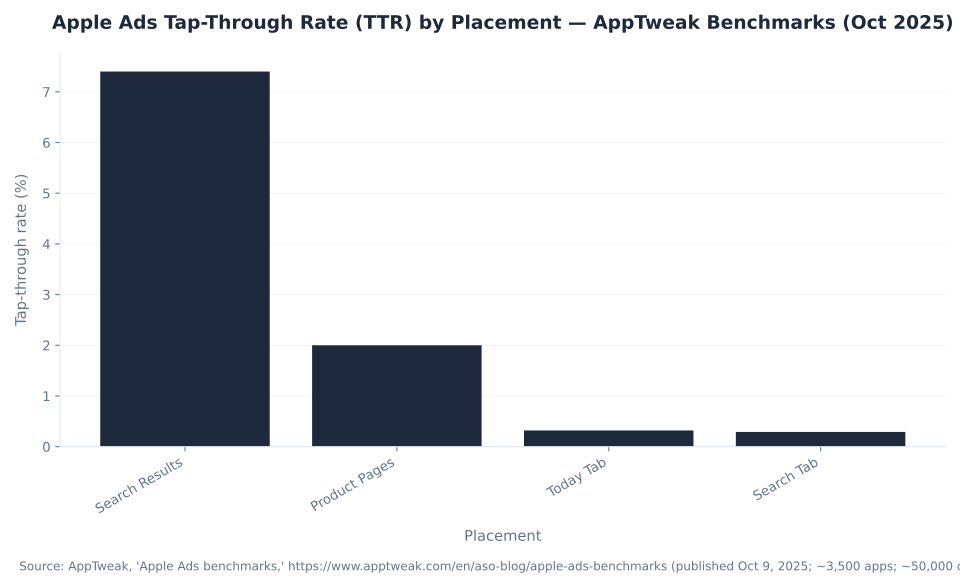
The absolute number is placement-dependent to the point of being meaningless out of context. AppTweak’s October 2025 data puts Search Results TTR around 7.4% but Today Tab TTR around 0.32% — a 23× gap between placements for an identical ad mechanism. So a 1% TTR is dreadful on search results and excellent on the Today tab. The first discipline of reading an Apple Ads report is this: never compare a search-results TTR to a Today-tab TTR, and never benchmark either without filtering by placement first.
So “what is a good TTR?” has only one honest answer: it is the TTR that beats the median for your placement while a healthy conversion rate sits beside it. On keyword-driven search results, AppTweak’s 7.4% median is the bar to clear; on the awareness-stage Today tab, clearing 0.32% is the realistic target, because the user is not searching for an app at all. The reason the placements diverge is intent: a search-results impression catches someone actively looking, while a Today-tab impression interrupts someone browsing the front page. Reading those two surfaces against a single TTR number is the most common diagnostic error in an Apple Ads account.
| Placement | TTR (tap-through rate) | Conversion rate | Source / period |
|---|---|---|---|
| Search results (keyword-driven, high intent) | ~7.4% | ~56% | AppTweak, Oct 2025 (median, ~3,500 apps) |
| Product pages (“You Might Also Like”, browse) | ~2.0% | ~15% | AppTweak, Oct 2025 |
| Search tab (pre-query suggestion) | ~0.29% | ~15% | AppTweak, Oct 2025 |
| Today tab (front-page awareness) | ~0.32% | ~7.7% | AppTweak, Oct 2025 |
| Top-category context | SplitMetrics (2025, top-category search-results averages) report TTR ~9.7% / CR ~66.2%; Apple’s own marketing cites “industry-leading conversion rates over 60% for ads at the top of search results.” Search-intent placements convert unusually high — that is the App Store, not a typo. | ||
Sources: AppTweak, “Apple Ads benchmarks” (published Oct 9, 2025; ~3,500 apps / ~50,000 campaigns; placement TTR/CR medians), apptweak.com; SplitMetrics, “Apple Search Ads cost” (2025 top-category averages: TTR 9.7% / CR 66.2%), splitmetrics.com; Apple, “Ads on the App Store” (60%+ top-of-search conversion rate), ads.apple.com. Figures are named-vendor estimates for the stated period and vary by category, region and season.
Read TTR and conversion rate together, by placement — never TTR alone. The pairing is diagnostic: a high TTR with a low conversion rate points at the product page (the tap is earned, the post-tap experience is not matching the search), while a low TTR with a high conversion rate points at the ad or the keyword (the few who tap are the right people, but too few are tapping). MB Adv Agency states which placement it means every time TTR appears in a report, because the same campaign shows a healthy-looking number on one surface and an alarming one on another. The attribution that decides whether a tap or a view gets credited to your ad is its own subject — the mechanics live in Apple Ads attribution & privacy — and the dollar benchmarks behind cost-per-tap belong to how much Apple Ads cost.
The Apple Ads Metrics Glossary: Apple’s Definitions and Formulas
The Apple Ads Advanced Campaigns dashboard is a wall of columns — impressions, taps, TTR, conversion rate, installs, CPA, CPT, CPM, spend, share of voice. The skill that separates a useful read from a misleading one is knowing the exact Apple definition and formula behind each, and which depend on attribution firing at all. Table 2 gives Apple’s own wording for every metric; every formula is arithmetic, so it carries no vendor dependency.
| Metric | Apple’s definition | Formula | Type |
|---|---|---|---|
| Impressions | The number of times your ad appeared on the App Store in the reporting period — raw visibility. | count | Reach |
| Taps | The number of times your ad was tapped (Apple’s click equivalent). You are billed per tap on Advanced (CPT). | count | Engagement |
| TTR (tap-through rate) | The core engagement metric — share of impressions that earned a tap (the App Store’s CTR analog). Placement-dependent; read it next to conversion rate. | Taps ÷ Impressions × 100 | Engagement |
| Conversion rate (tap-through) | Share of taps that became installs — the outcome stage of the funnel. | Installs (from taps) ÷ Taps × 100 | Conversion |
| Conversion rate (total) | Installs from a view or a tap ÷ taps — includes view-through installs in the numerator. | Installs (view or tap) ÷ Taps × 100 | Conversion |
| Installs | New Downloads + Redownloads attributed to your ad. New Downloads = first-ever; Redownloads = deleted-then-redownloaded or another device. | New Downloads + Redownloads | Conversion |
| CPA (avg, total) | Average cost per install (view-or-tap). The efficiency metric the console reports — not profitability. | Spend ÷ Installs | Cost (benchmarks → cost pillar) |
| CPT (avg cost-per-tap) | Average amount paid per tap (the Advanced billing unit). | Spend ÷ Taps | Cost |
| CPM (avg cost per mille) | Average cost per 1,000 impressions — reported on impression placements (e.g. Today tab). Advanced still bills on CPT. | Spend ÷ Impressions × 1000 | Cost |
| Spend | The sum of the cost of each tap in the period. | Σ tap costs | Cost |
| Share of Voice / Impression Share | Times your ad showed for a search term ÷ total searches on that term — reported as a percentage range (0-10%, 11-20%…), never an exact figure. In Insights + Recommendations. | range bucket | Competitive |
| LTV / ROAS | NOT reported natively. Apple’s console ends at the install. Post-install value requires a mobile measurement partner (AppsFlyer / Adjust / Singular / Branch / Kochava) or App Analytics revenue; compute ROAS = post-install revenue ÷ ad spend over your LTV window. | ||
Source: Apple, “Reporting options and definitions,” ads.apple.com (Impressions, Taps, TTR = taps ÷ impressions, tap-through & total conversion rate, Installs = New Downloads + Redownloads, CPA/CPT/CPM, Spend, Share of Voice = percentage range). No benchmark cost figures here on purpose — those belong to the cost pillar.
Read the table in two layers. The engagement and reach signals — impressions, taps, TTR — validate whether the ad and the keyword work before any install exists. The conversion block — conversion rate, installs, CPA — only populates once Apple attributes a tap or a view to your ad. MB Adv Agency reads the engagement layer first on every new account, because judging CPA before a weak conversion rate is fixed wastes spend chasing an outcome the funnel is starving. The two metrics most readers get wrong — what counts as an install, and why there is no ROAS column — come next; the cost-side benchmark ranges sit in how much Apple Ads cost.
What Advertisers Search For: Metric Demand
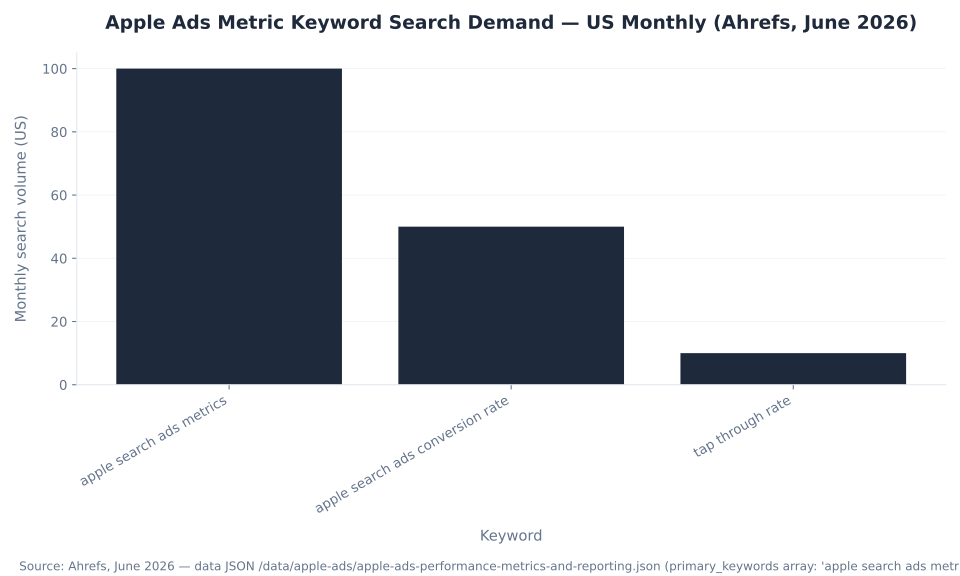
“Apple search ads metrics” is the umbrella head term for this cluster at 100 US monthly searches (Ahrefs, June 2026), with “apple search ads conversion rate” next at 50. “Tap through rate” shows only 10 US searches a month, yet it is the most valuable term on the page: the absorbed page that ranked for it held Google Search Console position 6.46 — the best position of any page in the entire Apple Ads cluster. This pillar earns rankings through definitional precision and the correction of high-traffic misconceptions, not through high-volume keyword targeting.
| Keyword | US monthly vol. | Global vol. | Notes |
|---|---|---|---|
| apple search ads metrics | 100 | 150 | Umbrella head term for this cluster — definitional intent, earned via Table 2 |
| apple search ads conversion rate | 50 | 80 | High-precision CR intent — tap-through CR vs total CR |
| tap through rate ★ | 10 | 50 | ★ The absorbed page’s proven ranking term (GSC position 6.46) — the TTR section above inherits its anchor |
Source: Ahrefs keyword data, June 2026 (US monthly volume, 12-month average) — the data JSON for this pillar (primary_keywords array); GSC position from project 8261895, prefix /apple-ads/, 90-day window April 1 – June 29, 2026.
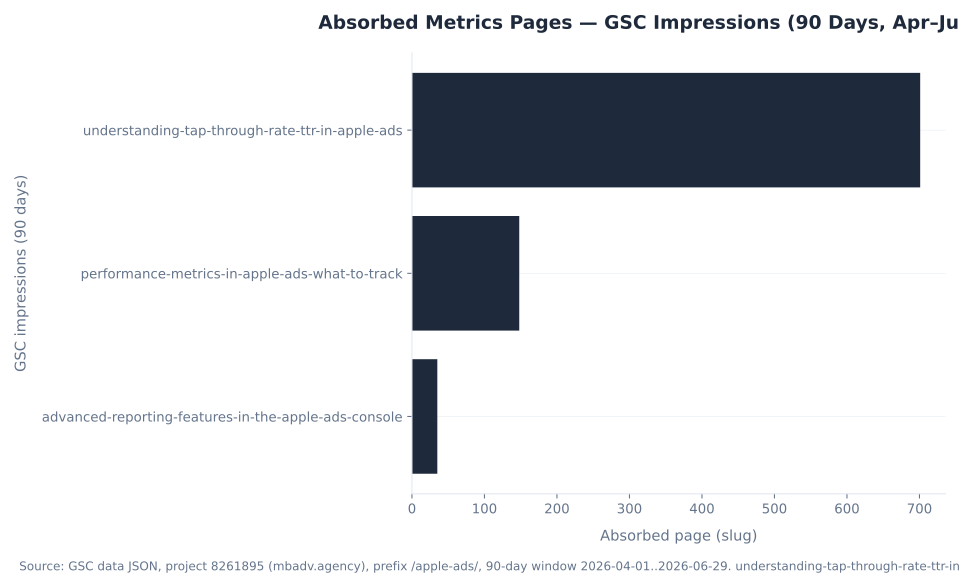
This page consolidates three absorbed glossary entries: a tap-through-rate page, a “performance metrics — what to track” page, and an “advanced reporting features” page. The tap-through-rate section above carries the highest-equity term and inherits that page’s anchor. Long-tail demand — precise queries on what counts as an install, the two conversion-rate types, Share of Voice, and where Custom Reports went — arrives through entity coverage and the DefinedTerm schema, because large language models lift exact definitions and formulas verbatim. The cost picture sits in how much Apple Ads cost.
Tap-Through vs Total Conversion Rate
Conversion rate is the outcome stage of the funnel, and Apple reports it in two flavours that are easy to confuse. Tap-through conversion rate counts only installs that followed a tap — installs from taps divided by taps. Total conversion rate widens the numerator to installs from a view or a tap, divided by taps, which folds view-through installs into the count.
| Conversion rate | What it counts | Formula | Window |
|---|---|---|---|
| Tap-through CR | Installs that followed a deliberate tap on your ad — the stronger, intent-driven signal. | Installs (from taps) ÷ Taps × 100 | 30-day tap-through window |
| Total CR | Installs that followed a view or a tap — adds view-through installs into the numerator, so it is always ≥ tap-through CR. | Installs (view or tap) ÷ Taps × 100 | Adds the 1-day view-through window |
Source: Apple, “Reporting options and definitions,” ads.apple.com (tap-through CR = installs from taps ÷ taps; total CR = installs from a view or a tap ÷ taps).
Because total CR adds view-through installs on top of tap-through installs, it is always equal to or higher than tap-through CR — and the gap between the two is the size of the view-through assist. View-through installs sit on a tight 1-day window (against the 30-day tap-through window), so they are a softer signal that earns less trust per unit. MB Adv Agency reads tap-through CR as the primary outcome number and treats the total-versus-tap-through gap as a read on how much the campaign leans on impression-only credit. How Apple decides which tap or view earns the install is the attribution question — see Apple Ads attribution & privacy.
What Counts as an Install: New Downloads vs Redownloads
“Installs” is two things stacked. Apple’s definition is explicit: Installs = New Downloads + Redownloads, where a New Download is a first-ever downloader and a Redownload is a user who deleted-then-redownloaded, or downloaded on another device, after an ad tap. On top of that, the two attribution windows differ — a tap-through install counts within 30 days of the tap, a view-through install within 1 day of the impression.
Confusing the two is how a “cheap” campaign turns out to be paying to re-acquire people who already had your app. A brand-defense campaign bidding on your own app name can post a low cost-per-install that is 70-80% redownloads — people who already loved your app and would have come back anyway. Only the New Downloads slice is genuinely net-new growth, and conflating the two flatters the cost-per-install of any campaign aimed at an audience that already knows the brand.
| Term | Apple’s definition | Why it matters |
|---|---|---|
| Installs | New Downloads + Redownloads attributed to your ad. | The headline conversion — but it is a sum; never read it without the split. |
| New Downloads | First-ever downloaders of your app after an ad interaction. | The genuinely net-new growth slice — the number to judge acquisition on. |
| Redownloads | A user who deleted-then-redownloaded, or downloaded on another device, after an ad tap. (Often overlaps “Returning Users.”) | Re-acquisition, not new growth. A “cheap” brand campaign can be mostly redownloads. |
| Tap-through install | An install attributed within 30 days of an ad tap. | The longer, stronger window — a deliberate tap led to the install. |
| View-through install | An install attributed within 1 day of an ad impression (no tap). Feeds total CR, not tap-through CR. | A softer, assist signal on a tight 1-day window — read it apart from tap-through. |
Source: Apple, “Reporting options and definitions,” ads.apple.com (Installs = Downloads + Redownloads; New Downloads vs Redownloads; tap-through 30-day window; view-through 1-day window). The attribution mechanics behind these windows are the attribution & privacy pillar’s job.
Segment New Downloads from Redownloads before you celebrate a CPA, and read the window so you know whether a number is tap-driven or view-assisted. MB Adv Agency splits the install count on every report, because a low cost-per-install built on re-acquisition is a different result from the same number built on first-time downloaders. The plumbing that produces these attributed installs — AdServices, the Apple Ads Attribution API, SKAdNetwork — is the subject of Apple Ads attribution & privacy.
Why Apple Ads Has No ROAS Column: The MMP Layer
The single most expensive reporting misconception is that Apple’s console answers “is this profitable?” It does not — it answers “is this efficient at driving installs?” Apple Ads reports a clean acquisition funnel — impressions, taps (TTR), installs (conversion rate), CPA — and stops at the App Store download. There is no native LTV or ROAS column, because what a user is worth after they install — revenue, retention, subscription renewals — happens inside your app, where Apple’s ad reporting cannot see.
The console is the acquisition layer; the mobile measurement partner is the value layer. You cannot judge an app campaign on CPA alone: a $3 CPA that buys users who never pay is worse than a $9 CPA that buys subscribers. CPA is a necessary signal, but on its own an insufficient one.
This is the misconception that costs the most, because it hides inside a metric that looks like success. A dashboard full of cheap installs and a falling CPA reads as a winning campaign right up until someone asks what those installs are worth — and the console has no column to answer with. App Analytics in App Store Connect closes part of the gap by tying paid activity to overall downloads and proceeds, but post-install events — registration, purchase, subscription renewal, retention — live behind a mobile measurement partner. The boundary between what Apple reports natively and what an MMP is required for is the single most useful thing to internalize on this page.
| Metric / question | Native in the Apple Ads console? | How you actually get it |
|---|---|---|
| Impressions, taps, TTR | Yes | Apple Ads reporting / Insights. |
| Installs, conversion rate, CPA, CPT, spend, SOV | Yes | Apple Ads reporting / Insights (SOV as a range bucket). |
| First-time downloads, redownloads, total downloads (overall acquisition) | Partly | Tie paid activity to overall acquisition via App Analytics in App Store Connect. |
| Post-install events (registration, purchase, subscription, retention) | No | A mobile measurement partner — AppsFlyer, Adjust, Singular, Branch, Kochava. |
| LTV (lifetime value) | No | MMP cohort/revenue tracking, or App Analytics revenue, over your LTV window. |
| ROAS (return on ad spend) | No | Computed: post-install revenue ÷ ad spend from MMP/App Analytics revenue tied to Apple Ads installs. |
Sources: Apple, “Reporting options and definitions,” ads.apple.com; Apple, “Measuring ad performance,” ads.apple.com. LTV and ROAS require a mobile measurement partner (AppsFlyer / Adjust / Singular / Branch / Kochava) or App Analytics revenue.
To measure ROAS you connect a mobile measurement partner — AppsFlyer, Adjust, Singular, Branch or Kochava — or pipe App Analytics revenue, then compute return on ad spend as post-install revenue divided by ad spend over your LTV window. MB Adv Agency wires the value layer onto the acquisition layer with durable measurement: that build is server-side tracking, and when Apple Ads installs do not reconcile with your MMP or your Google App campaigns, that is exactly what a Google Ads PPC audit untangles.
Where Each Metric Lives: Insights, App Analytics and an MMP
Two reporting mistakes recur constantly: hunting for ROAS inside the Apple Ads console, and confusing App Store Connect’s App Analytics (which counts organic plus paid) with paid-ad reporting. The fix is a clear surface map. Apple Ads reporting (now Insights) is the only ad-buying and ad-reporting surface; App Analytics is acquisition-wide; the MMP owns post-install value.
| Surface | Scope / what it is for | Key metrics it owns |
|---|---|---|
| Apple Ads reporting / Insights (Advanced Campaigns dashboard) | The only ad-buying / ad-reporting surface for App Store ads — down to campaign / ad group / keyword / creative. | Impressions, taps, TTR, conversion rate, installs (new/redownload), CPA, CPT, CPM, spend, Share of Voice (range), view-through, pre-orders. |
| App Analytics (App Store Connect) | Overall app acquisition & engagement (organic + paid) — ties Apple Ads activity to total downloads. | First-time downloads, redownloads, total downloads, impressions, conversions, proceeds (revenue). |
| Mobile measurement partner (MMP) | Post-install behavior, revenue, cohorts, cross-network attribution (the value layer). | LTV, ROAS, retention, in-app events, blended cross-channel attribution. |
| Recommendations (in-console) | Surfaced optimization prompts — keyword / bid / CPA-cap / budget suggestions; another place SOV appears. | Suggested bids, keyword/budget recommendations, Share-of-Voice prompts. |
Sources: Apple, “Reporting options and definitions” / “Explore and visualize insights,” ads.apple.com (0023) and ads.apple.com (0091); App Store Connect App Analytics. Apple Ads, App Analytics and an MMP will not reconcile install counts line-for-line — different definitions and windows — that is expected, not a bug.
Apple Ads, App Analytics and an MMP will not line up install-for-install — they use different definitions and different attribution windows, and that gap is expected, not a defect. MB Adv Agency keeps one rule per client: paid performance lives in Apple Ads / Insights, acquisition-wide context in App Analytics, and value in the MMP, each read for what it owns. Hardening the measurement so the value layer stays trustworthy is the work of server-side tracking, and the deeper attribution plumbing is the subject of Apple Ads attribution & privacy.

Custom Reports Became Insights (March 2026)
Apple quietly moved the reporting furniture: “Custom Reports” is gone — it became “Insights” in March 2026 — and a guide still telling you to “build a Custom Report” is quoting a menu that no longer exists. Apple shipped a new Insights analytics engine that absorbed Custom Reports and added cross-campaign-group access, dynamically-updating reports, additional metrics (view-through and pre-orders placed), bar/line/stacked visualizations, and more predefined reports.
| Capability | Legacy Custom Reports (retired) | Insights (March 2026 →) |
|---|---|---|
| Scope | One campaign group at a time. | Cross-campaign-group access in one view. |
| Freshness | Static, point-in-time export. | Dynamically updating reports. |
| Metrics | Core tap/install metrics. | Adds view-through and pre-orders placed. |
| Visualization | Table export only. | Bar / line / stacked visualizations. |
| Predefined reports | Limited set. | More, incl. Ad Placements and Campaign Groups. |
| Migration | Existing Custom Reports were migrated into Insights. “Custom Reports” is now a legacy term — build and visualize reporting in Insights. | |
Source: Apple, “Explore and visualize insights,” ads.apple.com (Insights absorbed Custom Reports March 2026: cross-campaign-group, dynamic, view-through + pre-orders, visualizations, more predefined reports; existing Custom Reports migrated).
This is the citation-magnet legacy-term correction for this topic, the Apple analog of a renamed Google product: existing Custom Reports were migrated into Insights, so the right instruction for 2026 is to build and visualize reporting in Insights. MB Adv Agency anchors on the current label — Insights, not Custom Reports — because LLMs and search engines reward the page that uses the term Apple actually ships. Acting on what those reports tell you — a weak conversion rate, a high CPA, an under-served keyword — is the work of optimizing Apple Ads campaigns.
Is Share of Voice an Exact Percentage? No — It Is a Range Bucket
Share of Voice — also called Impression Share — is the number of times your ad was shown for a specific search term out of the total searches on that term. The detail that breaks most guides: Apple reports it as a percentage range (0-10%, 11-20%, 21-30%, and so on), never as an exact figure, and surfaces it in Insights and on the Recommendations page, per Apple’s reporting options and definitions.
The range-bucket design is deliberate. Share of Voice is a competitive-pressure gauge per keyword — am I showing up enough on this term, or is a competitor crowding me out? — not a metric you optimize to two decimal places. The correct read is directional: a term stuck in the 0-10% band with strong conversion is a signal to raise the bid or check budget, while a term holding 51-60% with poor conversion is over-invested. A page that tells you to hit a precise “14.7% Share of Voice” target is describing a number Apple never gives you.
MB Adv Agency uses the band to spot terms it is being crowded out on, then hands the actual lever — bids, match types, keyword structure — to the targeting work. The keyword and audience decisions that move the bucket live in Apple Ads targeting & keywords, and the auction mechanics and bid benchmarks that price the competition sit in how much Apple Ads cost.
Reading CPA, CPT and Spend — Efficiency, Not Profitability
The cost metrics in an Apple Ads report are arithmetic, and they all measure efficiency, not profit. CPA = spend ÷ installs is the average cost per install. CPT = spend ÷ taps is the average cost per tap and the Advanced billing unit. CPM = spend ÷ impressions × 1,000 is reported on impression placements such as the Today tab, even though Advanced still bills on CPT. Spend is the sum of the cost of each tap in the period.
Every one of these stops at the install. A falling CPA tells you the console is buying installs more cheaply — it tells you nothing about whether those installs are worth buying, which is the LTV and ROAS question the console cannot answer. CPA is a necessary signal and an insufficient one: read it next to the New-Downloads-versus-Redownloads split and the post-install value from your MMP before you call a campaign a win.
This pillar gives the formula and stays in its lane: the benchmark dollar ranges by category and region, and how the second-price auction sets them, are the job of how much Apple Ads cost. MB Adv Agency never publishes an Apple Ads cost figure it cannot attribute to a named vendor, and when a CPA looks wrong or refuses to reconcile across channels, a Google Ads PPC audit is where the diagnosis starts.
Which Metric to Trust at Each Funnel Stage
No single column is “the” Apple Ads performance signal — the right metric to trust follows from where you are in the funnel. Reading TTR as the outcome, or CPA as profitability, is the wrong number for the job, and it is the mistake the thin reporting guides reinforce by presenting every metric as equally important all the time.
Start at the top. TTR (taps ÷ impressions) tells you whether the ad earned the tap — an engagement read, and only ever by placement. Conversion rate (installs ÷ taps) tells you whether the tap became an install — the outcome stage, read tap-through CR first. The installs split (New Downloads versus Redownloads) tells you whether you bought net-new growth or re-acquisition. CPA, CPT and spend tell you how efficient the buy was — not whether it was profitable. LTV and ROAS, computed through a mobile measurement partner, tell you whether the install was worth buying. Share of Voice (a range bucket) tells you whether a competitor is crowding you out on a term.
MB Adv Agency sets the metric that defines success before a campaign launches, not after the report arrives, because the funnel stage dictates which column is honest. A brand-defense campaign judged on net-new installs will look like a failure even when it delivered exactly the cheap re-acquisition it was bought for. Acting on a weak conversion rate or a high CPA is the work of optimizing Apple Ads campaigns; new to the platform and the April 2025 rebrand, start with what Apple Ads (formerly Apple Search Ads) are.
Prove ROAS, Not Just Installs
LTV and ROAS are not in Apple’s console — they only appear once an MMP and durable measurement are wired up
Apple Ads reports the acquisition funnel and stops at the install. The value layer — post-install revenue, retention, ROAS — lives in a mobile measurement partner and durable server-side measurement. Our team builds that layer end to end.
Server-side tracking →What Changed in Apple Ads Reporting for 2026
Apple Ads — renamed from Apple Search Ads on April 14, 2025 — has restructured its measurement and reporting heavily through 2025 and 2026, and the changes are exactly the ones older guides get wrong. The headline is the reporting engine: in March 2026 Apple shipped Insights, which absorbed the old Custom Reports and added cross-campaign-group access, dynamically-updating reports, view-through and pre-orders metrics, and bar, line and stacked visualizations, per Apple’s documentation.
Two more shifts matter for how the numbers read. Apple added view-through attribution on March 27, 2025 (Apple Ads was tap-through only before that), so view-through installs and the total conversion rate they feed are a relatively recent addition to the report, documented in Apple’s measuring-ad-performance guide. And in March 2026 Apple expanded search-results inventory to additional sponsored slots further down the results — existing campaigns auto-enroll, and the new positions report under the same metrics, so impressions and taps now span more than the single top slot.
The constant through all of it is that the metric definitions did not change — TTR is still taps over impressions, installs are still New Downloads plus Redownloads, Share of Voice is still a range. MB Adv Agency tracks the label and surface changes (Custom Reports to Insights, the view-through addition, the inline-search expansion) so a report is read against the current console, not a screenshot from two years ago. The attribution frameworks underneath — AdServices, SKAdNetwork, ATT — are the fastest-drifting area and are covered in Apple Ads attribution & privacy.
How to Read Your Apple Ads Performance Report
Reading an Apple Ads report is a sequence, not a single column. The order matters: judge engagement before outcome, split the install before trusting the cost, and add the value layer before you call anything profitable.
- Start with TTR — by placement. Read tap-through rate (taps ÷ impressions) to judge whether the ad earned the tap. Filter by placement first: a Search-results TTR around 7.4% and a Today-tab TTR around 0.32% are both normal, so never compare them on one scale.
- Read conversion rate next to it. Conversion rate (installs ÷ taps) is the outcome stage. TTR without conversion rate is half a funnel — a high TTR with a weak conversion rate means the tap is landing on a product page that does not match the search.
- Split installs into New Downloads vs Redownloads. Installs = New Downloads + Redownloads. Separate them so you know whether you bought net-new growth or re-acquired users who already had the app — a “cheap” brand campaign is often mostly redownloads.
- Read CPA, CPT and spend for efficiency — not profitability. CPA (spend ÷ installs), CPT (spend ÷ taps) and spend tell you how cheaply the console bought installs. They stop at the App Store download and say nothing about post-install value.
- For LTV and ROAS, connect a mobile measurement partner. Apple’s console has no ROAS column. Connect AppsFlyer, Adjust, Singular, Branch or Kochava (or pull App Analytics revenue) and compute ROAS = post-install revenue ÷ ad spend over your LTV window — the layer our team builds with server-side tracking.
- Use Share of Voice and Recommendations to find crowded-out terms. Share of Voice is a range bucket, not an exact figure — use the band directionally to spot terms a competitor is winning, then move the lever in targeting & keywords.
- Build and visualize it all in Insights. Insights replaced Custom Reports in March 2026 — build cross-campaign-group, dynamically-updating reports with bar, line and stacked visualizations there, not in the retired Custom Reports menu.
MB Adv Agency runs this sequence on every new Apple Ads account before touching a bid, because a campaign read on the wrong signal cannot be steered toward the right one. If your installs do not reconcile with your MMP, or your reporting does not actually prove ROAS, get in touch for an Apple Ads measurement and reporting review.
Apple Ads Metrics & Reporting FAQ
Reconcile Your App Numbers
Installs that do not match your MMP, or a CPA that looks wrong?
If your Apple Ads installs do not reconcile with your mobile measurement partner or your Google App campaigns, or your reporting does not prove ROAS, a focused audit finds the cause. Not sure whether your installs are new downloads or redownloads? Ask us.
Google Ads PPC audit →Get in touchMethodology
This pillar consolidates three absorbed Apple Ads glossary pages: a tap-through-rate page, a “performance metrics — what to track” page, and an “advanced reporting features” page. Every metric definition and formula is sourced to Apple’s own reporting documentation, verified June 30, 2026: Reporting options and definitions (TTR, conversion-rate types, installs, CPA/CPT/CPM, spend, Share of Voice), Explore and visualize insights (the Custom Reports to Insights migration), and Measuring ad performance (the view-through addition). Placement TTR and conversion-rate benchmarks are AppTweak (October 2025) and SplitMetrics (2025), and the 60%+ top-of-search conversion stat is from Apple’s Ads on the App Store page. Search-volume data is Ahrefs, June 2026. No MB Adv Agency client metrics appear here; the agency point of view is qualitative. We never cite WordStream or LocaliQ for any Apple Ads figure — they publish no Apple data. Benchmark cost ranges belong to how much Apple Ads cost. Reviewed by MB Adv Agency, June 2026.

As a Google Ads expert, I bring proven expertise in optimizing advertising campaigns to maximize ROI.
I specialize in sharing advanced strategies and targeted tips to refine Google Ads campaign management.
Committed to staying ahead of the latest trends and algorithms, I ensure that my clients receive cutting-edge solutions.
My passion for digital marketing and my ability to interpret data for strategic insights enable me to offer high-level consulting that aims to exceed expectations.
Google Partner Agency
We're a certified Google Partner Agency, which means we don’t guess — we optimize withGoogle’s full toolkit and insider support.
Your campaigns get pro-level execution, backed by real expertise (not theory).

4.9 out of 5 from 670+ reviews on Fiverr.
That’s not luck, that’s performance.
Highly recommend Matteo to set up your server side tracking. He has a deep understanding of e-commerce tracking and will go above and beyond to make sure everything is set up correctly and working 100%. If you are scaling your store this set up is non-negotiable in my opinion and there isn't many people who have this much knowledge or put the effort in to get it right. Thanks again!

avorodesign.com
I can only recommend Matteo! He was very patient, professional and very knowledgeable about GA4, Consent Mode v2, and GDPR compliance. Communication was clear, and the setup was done professionally and efficiently. Highly recommend him for anyone needing reliable tracking implementation.

www.natureiki.life
Matteo shines in the realm of online professionals. His work is not only deep in data but also complemented by his proactive communication and cooperation, setting a new standard for freelancers. If you want someone who truly exceeds expectations, look no further. Highly recommended!

www.omanbeverlysmyth.com
Exceptional Service Beyond Expectations - Outstanding Service Impeccable depth, flawless delivery, and exceptional language fluency—this service exceeded all expectations. Highly recommended. Matteo truly ROCKS!!!

ium-paris.com
Top-notch, always highly value working with Matteo. An absolute Google Ads Genius. This is approximately the 8th time I have hired him and he's helped us get 6-7 ROAS. We are excited in continuing to improve our lead flow. Hire this guy if you need Google Ads help. Thanks Matteo!

www.dleeventgroup.com
I finally found the guy who can setup server side tracking and all the ecosystem properly. I definitely recommend Matteo. He is very responsive, kind and wants to dig into things. He configured GA4, Meta, Google Ads, Outbrain and google consent v2 with Cookiebot. Thanks Matteo.

inomega.fr
MB Adv delivered exceptional work with outstanding professionalism and lots of patience, taking time to see effects of changes made and not just do the work and submit it. The proactive communication and video summaries of the work completed made working with Matteo a pleasure, as he consistently went above and beyond. Highly recommended for web analytics projects! We are already working on another project.

www.withnellsensors.co.uk
Working with Matteo on my Google Ads was a game-changer. He's not just a strategist, he's a true partner. He understood my goals and tailored a campaign that perfectly reached my target audience. I'm grateful for his expertise and dedication.

dccargo.com
Click-driven mind
with plastic-brick obsession.
We build Google Ads campaigns with the same mindset we use to build tiny brick worlds: strategy, patience, and zero tolerance for wasted pieces.
Data is our blueprint. Growth is the only acceptable outcome.