Apple Ads Targeting & Keywords: Match Types 2026

Apple Ads Targeting 2026 — The Two-Layer System
WHICH SEARCH × WHICH PERSON
Keyword targeting decides which searches trigger your ad; audience refinements decide which person is eligible — and only Search results campaigns play this game
Two match types only — broad + exact, NO phrase match · Search Match is a setting, not a match type · age/gender refinements exclude about 78% of search volume · Maximize Conversions went GA February 2026
Apple Ads Targeting in 2026: The WHICH SEARCH and the WHICH PERSON
Apple Ads (formerly Apple Search Ads, rebranded April 14, 2025) targeting answers two different questions, and the clearest mental model keeps them apart. Keyword targeting decides which search queries can trigger your ad — broad match, exact match, Search Match, and negative keywords. Audience refinements decide which people are eligible once a query matches — customer type, age, gender, device, and location. The first is the WHICH SEARCH; the second is the WHICH PERSON. Every thin glossary page lists “targeting options” in a flat menu; the WHICH SEARCH × WHICH PERSON split is the structure those pages never gave, and it is the spine of this pillar.
The first correction a new Apple advertiser needs is structural: of the four App Store placements, only Search results campaigns use this keyword and ad-group machinery. The Search tab is a single bid with no keywords, product-page ads are category-targeted with no keywords, and the Today tab is a creative buy. So the whole of this pillar lives inside one placement. New to the platform? Start with what Apple Ads are — the rebrand, the four App Store surfaces, and how the system fits together — then see Apple Ads placements and ad types for which surfaces do and do not take keywords. Source: Apple Ads Help, “Ad Placement Options.”
Table 1 maps the two halves — what each layer decides, the controls it exposes, and where it lives. Read the rest of this guide as a walk through the WHICH SEARCH controls first (match types, then Search Match, then negatives), then the WHICH PERSON refinements, then the recommended ad-group structure and the bidding modes that sit on top of both.
| Layer | What it decides | Controls | Where it lives |
|---|---|---|---|
| WHICH SEARCH — keyword targeting | Which search queries can trigger your ad | Broad match, exact match, Search Match, negative keywords | Ad-group level — Search results campaigns only |
| WHICH PERSON — audience refinements | Which people are eligible once a query matches | Customer types, age, gender, device, location | Ad-group level — Search results campaigns only |
Layering note: a served ad is the intersection of a matched search AND an eligible person — stacking refinements on top of keywords narrows reach, never widens it. Sources: Apple Ads Help, “Ad Placement Options” (only Search results campaigns use the keyword/ad-group structure); “Understand Match Types”.
The Keyword-Targeting Decoder: Match Types, Search Match & Negatives
Apple Ads has exactly two keyword match types: broad match (the default) and exact match, written [keyword] in brackets. There is no phrase match — that is a Google Ads concept that does not exist on the App Store. The trap inside that trap is that “exact match” is not literal: Apple’s exact match still serves on plurals, misspellings, word rearrangements, and translations deemed close by Apple’s systems. Broad match (the default) stays thematically tighter than the wide-open broad a Google advertiser expects — it serves on closely related terms, synonyms, and trending queries within the theme.
Two of the four rows in Table 2 are actual match types. The other two are different kinds of control entirely: Search Match is an automated setting (covered in full in its own section below), and negative keywords are a filter that defaults to exact, supports broad, and runs up to 5,000 per ad group. Because exact match is not a literal-string filter, negative keywords still matter even on an all-exact ad group — treating exact as literal is what leads advertisers to skip negatives and then wonder why irrelevant variants are spending. Source: Apple Ads Help, “Use Negative Keywords.”
At MB Adv Agency, we structure Apple Ads keyword targeting by naming the live-versus-dead vocabulary boundary first: a brief that asks for “phrase match” or “smart bidding on exact” is reaching for controls Apple never built, and that precision — two match types, exact is not literal, the [keyword] bracket syntax — is what earns trust with platform-literate readers. The same discipline anchors the work of PPC campaign management, where keeping the Apple-not-Google rules straight is half the setup.
| Control | What it is | Syntax / default | Reach behavior |
|---|---|---|---|
| Broad match (match type — the default) | Matches your keyword to a wide-but-thematic set of related searches | Plain keyword, no brackets — the default | Widest: plurals, misspellings, synonyms, related and trending terms in the theme |
| Exact match (match type) | Matches the specific term plus close variants (not literal) | [keyword] in brackets | Tighter, but still serves on plurals, misspellings, word order, translations |
| ★ Search Match (SETTING, not a match type) | Automated matching with no keywords; uses three resources (your metadata, similar apps, other search data) | A toggle — default-on (Manage Bids); locked-on (Maximize Conversions) | Apple-decided; mines terms you did not bid on. Search results campaigns only |
| Negative keywords (filter, not a match type) | Block specific searches; set at campaign or ad-group level | Default exact; broad supported; up to 5,000 per ad group | Negative exact blocks the term only; negative broad blocks any search containing all the words |
★ Apple ≠ Google: there is NO phrase match in Apple Ads (only broad + exact), and exact match is not literal. Sources: Apple Ads Help, “Understand Match Types”; “Use Negative Keywords”; “Understand Search Match.”
What Apple Ads Advertisers Actually Search For
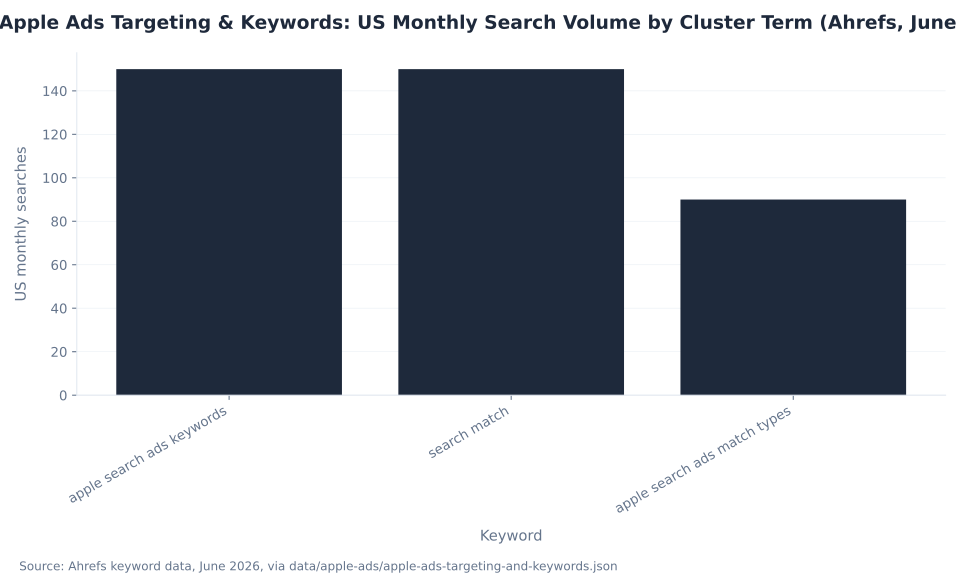
Two terms tie at the top of this cluster at 150 US monthly searches each (Ahrefs, June 2026): “apple search ads keywords” (KD 7, $6.00 CPC) and “search match” (KD 29, $1.20 CPC). There is no single dominant head term. The match-type decoder query, “apple search ads match types,” runs 90/mo. Combined US volume is modest at 390 a month, but the composition is the point — the cluster spans practical keyword research, the most misunderstood control on the platform, and the Google-to-Apple vocabulary correction.
“search match” carries the hardest difficulty in the cluster (KD 29) for a reason: the absorbed page this pillar is built to preserve already ranks in the high single digits for it, and that position has to transfer to this pillar through the redirect and the id="search-match" anchor below. The $6.00 CPC on “apple search ads keywords” signals app developers willing to pay for the answer — the commercially serious end of the cluster, the natural fit for an audience of SaaS and software advertisers. Both head terms show an exact 2-to-1 global-to-US ratio, consistent with Apple Ads operating across 91 countries, so the page is written for a US advertiser without losing international relevance.
Apple Ads Targeting & Keywords: US Monthly Search Volume by Cluster Term (Ahrefs, June 2026)
The chart sorts the three cluster terms by US monthly volume. The strategic read is to serve all three entry points — the keyword researcher, the Search Match learner, and the match-type decoder — while routing every reader toward the WHICH SEARCH × WHICH PERSON framework and the Apple-not-Google corrections that the thin absorbed pages never made.
| Keyword | US Monthly Vol. | Global Vol. | KD | CPC (USD) | Searcher intent |
|---|---|---|---|---|---|
| apple search ads keywords | 150 | 300 | 7 | $6.00 | Practical keyword-research entry point; KD 7 (low competition); $6.00 CPC signals commercial intent |
| search match ★ | 150 | 300 | 29 | $1.20 | ★ The cluster’s most-clicked ranking asset; the most misunderstood Apple Ads control; KD 29 (hardest in the cluster) |
| apple search ads match types | 90 | 150 | — | — | Match-type decoder intent; KD and CPC not returned (low-volume / new data) |
Source: Ahrefs keyword data, June 2026 (US monthly volume), via data/apple-ads/apple-ads-targeting-and-keywords.json. The two head terms tie at 150/mo — the cluster has no single dominant term. The 90-day GSC footprint of the five absorbed pages is 5 clicks across 1,443 impressions (Apr 1–Jun 29, 2026). These are keyword-auction figures, not mbadv performance data.
Search Match: The Automated Setting That Is Not a Match Type
Search Match is the most misunderstood control in Apple Ads, and getting it exactly right is the whole credibility play. Advertisers routinely list “Search Match” alongside broad and exact as if it were a third match type. It is not. Search Match is an automated matching setting that runs with no keywords at all, matching your ad to relevant searches using three resources: your App Store listing metadata, similar apps in your genre, and other search data. It is the engine that finds searches you would never have thought to bid on.
Three facts decide how to use it. First, it runs in Search results campaigns only — not the Search tab, Today tab, or product pages. Second, it is default-on in Manage Bids (manual) campaigns, a toggle you can switch off, and always-on and locked in the Maximize Conversions automated ad group, where you cannot disable it. Third, the disciplined move is to isolate it in a dedicated discovery ad group — broad match plus Search Match on, no manual keywords — let it mine search terms, then graduate the winners into your exact-match Brand, Category, and Competitor ad groups. Source: Apple Ads Help, “Understand Search Match.”
At MB Adv Agency, we structure Apple Ads keyword targeting by treating Search Match as a discovery engine, not a match type: it belongs in its own ad group doing the job it is built for — surfacing intent the keyword list missed — while the manual exact ad groups carry the high-intent terms it graduates. Calling it a “match type” misses both what it is and where you do and do not control it. For how to read the discovery output, set graduation cadence, and tune for international markets and seasonality, see optimizing Apple Ads campaigns.
| Fact | Value |
|---|---|
| What it is | An automated matching setting — NOT a match type |
| Three resources | Your App Store listing metadata, similar apps in your genre, and other search data |
| Campaign scope | Search results campaigns only (not Search tab, Today tab, or product pages) |
| Default state (Manage Bids) | Default-on — a toggle you can switch off |
| State in Maximize Conversions | Always-on / locked in the Automated Ad Group — you cannot disable it there |
| Best-practice workflow | Isolate in a dedicated discovery ad group (broad match + Search Match on, no manual keywords) → let it mine search terms → graduate winners into exact-match Brand / Category / Competitor ad groups |
Sources: Apple Ads Help, “Understand Search Match” (automated setting; three resources; Search-results-only; default-on in Manage Bids, locked-on in the Maximize Conversions automated ad group; isolate in a discovery ad group + graduate winners); “Structure Campaigns”.
GSC Impressions by Absorbed Targeting Page (90-Day Window: Apr 1 – Jun 29 2026)
The impressions chart shows why this section is the spine. Among the absorbed pages, the Search Match page carried the most search-engine visibility (739 impressions over 90 days, the cluster’s most-clicked asset), the audience page held a 640-impression toehold, and the conquest page a smaller footprint. This pillar consolidates all three, so the Search Match treatment is built to be a real, standalone answer to “what is Search Match” — precisely correct on “setting, not match type” — not a one-liner.
Audience Refinements: The WHICH-PERSON Layer
Audience refinements decide who is eligible once a query matches, and they look like free reach. The demographic ones are the opposite. Applying any age or gender refinement automatically excludes every customer who has Personalized Ads turned off — and a Search Engine Land estimate puts that at about 78% of iOS 17+ App Store search volume. So a demographic filter can cut your eligible reach by roughly three-quarters before it narrows anything useful. Attribute that 78% to Search Engine Land, not Apple.
The refinements that are genuinely cheap to apply are the structural ones: customer type (All Users, New Users, Returning Users, and Users of My Other Apps), device (all, iPhone-only, or iPad-only, with per-device bids), and location (within about 30 supported countries), plus the hard floor that any audience must exceed 5,000 customers to serve. A critical naming point: Apple has no custom segments, custom audiences, or lookalikes — the audience model is customer types plus demographics plus device plus location. Do not import that Google or Meta vocabulary. Sources: Apple Ads Help, “Modify Audience Settings” and Search Engine Land.
Apple Ads Age/Gender Targeting: Reach Impact of Personalized Ads Opt-Out (Search Engine Land estimate)
Apple’s own guidance points the other way: match creative to search intent, not audience profiles — the search terms people enter are the strongest signals of intent. At MB Adv Agency, we reach for customer-type and device refinements freely, reach for age and gender almost never, and let the keyword and Search Match layers do the targeting. This is the audience-refinement discipline behind a clean B2B PPC build, where tightly-themed exact-match keyword sets — not demographic filters — carry the prospecting weight.
| Refinement | Options | What it does | Reach caveat |
|---|---|---|---|
| Customer types | All Users (default) · New Users · Returning Users (redownloads) · Users of My Other Apps | Targets by relationship to your app or portfolio | Low-cost to apply — the structural refinement to reach for |
| Age | Age bands (minimum targetable age varies by region — 18 in the US, EU, and Latin America, and 21 in certain markets) | Narrows by age | Excludes all Personalized-Ads-off users (about 78% of search volume — SEL estimate) |
| Gender | Male / Female | Narrows by gender | Same about-78% exclusion — demographic filtering can gut reach |
| Device | All / iPhone-only / iPad-only (per-device bids) | Splits serving and bids by device | Low-cost; no Personalized-Ads exclusion |
| Location | Refine within about 30 supported countries | Geo-narrows within a campaign’s countries | Cannot be set within a multi-country campaign |
| Audience minimum | — | Hard floor for an audience to serve | Must exceed 5,000 customers or it will not serve |
Sources: Apple Ads Help, “Modify Audience Settings” (the four customer types; age + gender; device; location; the more-than-5,000-customer minimum; the Personalized-Ads-off exclusion on age/gender). The about-78% Personalized-Ads-off figure is attributed to Search Engine Land, “Apple Ads: what to know in 2026” — NOT Apple.
Negative Keywords: Negative Exact vs Negative Broad
Negative keywords are the filter half of the WHICH SEARCH layer, and Apple’s model is not Google’s three-way one. Negatives default to exact match, broad is supported, you set them at the campaign or ad-group level, and you can add up to 5,000 per ad group. The behavior difference between the two negative types is where advertisers leak budget.
A negative exact keyword blocks only that specific term and its close variants — so negative exact “photo editor” does not block “best photo editor.” A negative broad keyword blocks any search that contains all of its words — so negative broad “photo editor” blocks “best photo editor app.” That is the lever for excluding a whole theme versus surgically removing one query. And because exact match is not literal, negatives still matter on an all-exact ad group: the close variants exact match serves on are exactly what a tight negative list keeps clean. Source: Apple Ads Help, “Use Negative Keywords.”
The everyday work of building and pruning these negative lists — campaign-level negatives for cross-ad-group exclusions, ad-group-level negatives for theme separation, and a steady graduation of wasted search terms into negatives — is the core of PPC campaign management, and it is the part of an Apple Ads build that pays for itself fastest.
| Behavior | Negative exact (default) | Negative broad |
|---|---|---|
| What it blocks | Only that term and its close variants | Any search containing all the words |
| Worked example | Negative exact “photo editor” does NOT block “best photo editor” | Negative broad “photo editor” blocks “best photo editor app” |
| Level | Campaign or ad-group | Campaign or ad-group |
| Per-ad-group cap | Up to 5,000 negatives per ad group | Up to 5,000 negatives per ad group |
Source: Apple Ads Help, “Use Negative Keywords” (negatives default to exact; broad supported; campaign or ad-group level; up to 5,000 per ad group; negative-exact vs negative-broad behavior).
The Four Keyword-Theme Ad Groups: Brand, Category, Competitor, Discovery
Apple recommends organizing Search results campaigns into four ad-group types by keyword theme, and the structure is the backbone of a disciplined account. Brand holds your own app and company terms on exact match to defend your name at the cheapest, highest-intent cost. Category holds the non-brand genre terms that describe what your app does, also exact, to capture in-market demand. Competitor holds one rival per ad group on exact match. Discovery holds no manual keywords at all — broad match plus Search Match on — to mine new terms.
The three intent-driven groups (Brand, Category, Competitor) run exact match with Search Match off, because their job is to serve known, high-value terms cleanly. The Discovery group runs the opposite configuration — broad match with Search Match on — because its job is to find terms the keyword list missed. The loop that ties them together is graduation: the high-intent searches Discovery surfaces move into the exact Brand, Category, and Competitor groups, and the wasted ones become negatives. Sources: Apple Ads Help, “Structure Campaigns” and “Campaign Structure” best practices.
| Ad-group type | Keywords | Match type | Search Match | The job |
|---|---|---|---|---|
| Brand | Your app / company terms | Exact | Off | Defend your name; cheapest, highest-intent installs |
| Category | Non-brand genre / “what your app does” terms | Exact | Off | Capture in-market demand for the category |
| Competitor | Rival app / brand terms (one competitor per ad group) | Exact | Off | Conquest — allowed but structurally pricey; pair with an “alternative” CPP |
| Discovery | None bid manually — let Apple find them | Broad | On | Mine new terms via Search Match + broad; graduate winners to Brand/Category/Competitor |
Sources: Apple Ads Help, “Structure Campaigns” and “Campaign Structure” best practices (the four recommended ad-group types by keyword theme); “Understand Search Match” (isolate in a discovery ad group; graduate winners). Conquest economics: RocketShip HQ.
This structure is the natural starting point for an app business, which is to say a software business — the closest service fit for an App Store advertiser. The cost consequence of the choices in this table (exact and competitor keywords command higher bids than broad or Search Match) belongs to the cost pillar; for the cost-per-tap mechanics, the second-price auction, and the CPA cap, see how much do Apple Ads cost.

Manage Bids vs Maximize Conversions: Manual and Automated Bidding
Since February 2026, Search results campaigns choose between two strategies at setup: Manage Bids (manual) and Maximize Conversions (automated). The correction that matters most here is that Maximize Conversions is bidding automation, not a new audience capability. It combines Search Match, an auto-bidder, and a target CPA in a locked Automated Ad Group — it does not unlock any targeting you could not otherwise reach.
With Manage Bids, you set max CPT bids, add broad and exact keywords plus negatives, keep full audience control per ad group, and Search Match is default-on but switchable. With Maximize Conversions, the auto-bidder works to a weekly target CPA, the Automated Ad Group takes no manual keywords and has Search Match locked on, and Apple’s guidance is to leave that ad group unrestricted — every audience restriction slows the learning — with a budget that allows at least five conversions a day. Sources: Apple Ads Help, “Maximize Conversions” best practices and PPC Land for the February 25–26, 2026 general-availability rollout.
| Dimension | Manage Bids (manual) | Maximize Conversions (automated) |
|---|---|---|
| Bidding | You set max CPT bids (optional CPA cap as a ceiling) | Auto-bidder sets bids to a target CPA you set (weekly basis) |
| Search Match | Default-on; you can switch it off | Always-on / locked in the Automated Ad Group |
| Keywords | You add broad/exact keywords + negatives | Automated ad group takes no manual keywords (optional manual ad group can) |
| Audience refinement | Full control per ad group | Best practice: leave the Automated Ad Group unrestricted (every restriction slows learning) |
| Best for | Hands-on control; brand/competitor defense; mature accounts | Scale + discovery; simpler management; weekly target-CPA goals |
| Availability | Search results campaigns | Search results campaigns only (GA Feb 25–26, 2026) |
★ Key correction: Maximize Conversions is bidding automation (Search Match + auto-bidder + target CPA), not a new audience capability — it automates how you bid and discover, not who you can reach. Sources: Apple Ads Help, “Maximize Conversions” best practices (auto-bidder + Search Match + target CPA; leave the Automated Ad Group unrestricted; budget for at least 5 conversions/day); “Understand Search Match” (locked-on in the automated ad group); rollout: PPC Land.
The practical read: Manage Bids is for hands-on control, brand and competitor defense, and mature accounts; Maximize Conversions is for scale, discovery, and simpler management against a target-CPA goal. For how to read the Recommendations surface, tune the automated ad group, and decide when to graduate an account from manual to automated, see optimizing Apple Ads campaigns.

Keyword Discovery: Suggestions, Recommendations, and the Popularity Index
Finding the right keywords on Apple Ads draws on four sources, and the platform does much of the work. The in-console keyword suggestion tool proposes terms (and a relative popularity signal) as you build an ad group. The Recommendations surface serves keyword, bid, target-CPA, and budget recommendations at the account level. Search Match mines searches you did not bid on. And the keyword popularity index gives a relative read on demand.
One precision point on popularity: Apple’s own pages describe it only as a signal “based on App Store searches.” Third parties describe a 1–5 in-tool scale, and an older 0–100 score is deprecated — so any specific numeric scale belongs to a third party, not to Apple. The honest framing is that popularity is a relative demand index, useful for ranking candidate terms against each other, not an absolute search-volume figure. Source: Apple Ads Help, keyword best practices.
| Source | What it surfaces | Notes |
|---|---|---|
| In-console keyword suggestion tool | Suggested keywords plus a relative popularity signal as you build an ad group | Apple’s primary in-dashboard discovery surface |
| Recommendations surface | Keyword, bid, target-CPA, and budget recommendations | Account-level optimization prompts |
| Search Match | Search terms you did not bid on | Feeds the Discovery ad group; graduate winners to exact |
| Keyword popularity index | A relative demand signal for a term | Third parties describe a 1–5 scale; the older 0–100 score is deprecated — attribute any numeric scale to third parties, not Apple |
Sources: Apple Ads Help, keyword best practices (the in-console keyword suggestion tool; the Recommendations surface; keyword popularity as a relative demand index); “Understand Search Match” (Search Match as a discovery source).
Discovery is a loop, not a one-time research task: the suggestion tool and Search Match feed candidate terms in, the Recommendations surface flags bid and budget moves, and the winners graduate into the exact Brand, Category, and Competitor ad groups. The cadence of that loop — how often to mine, when to graduate, and how to read the Recommendations — is the optimization playbook covered in optimizing Apple Ads campaigns.
Competitive Conquest: Bidding on Rival App Keywords Is Allowed
A persistent myth is that you cannot bid on a competitor’s app name on the App Store. You can. Apple permits bidding on competitor brand keywords. The trademark restriction is on your own app’s metadata and creative — under App Store Review Guideline 2.3.7 you cannot put a competitor’s trademark in your app name, your keyword field, or your ad copy — not on your bids. A competitor can in rare cases file a claim with Apple to block bids on their term, but the default is that conquest is allowed.
“Allowed” is not “easy money,” though. Competitor keywords carry structurally worse unit economics: a higher cost-per-tap (you are bidding against the brand owner), a lower tap-through rate (the user searched for them, not you), and a lower tap-to-install rate (they want the other app). At MB Adv Agency, we structure Apple Ads keyword targeting so that conquest is a deliberate, contested play, not a default: isolate each competitor in its own exact-match ad group paired with a Custom Product Page that frames you as the alternative. Sources: RocketShip HQ and Apple App Store Review Guideline 2.3.7.
| Fact | What’s true |
|---|---|
| Bidding on competitor keywords | Allowed — Apple permits bidding on rival brand terms |
| Trademark restriction | Your own app name, keyword field, and ad copy cannot contain a competitor’s trademark (Guideline 2.3.7) — the limit is on your metadata, not on bidding |
| Competitive filing | A competitor can file a claim with Apple to block bids on their term |
| Unit economics | Structurally worse than brand or category: higher CPT, lower tap-through, lower install rate |
| Best-practice structure | Isolate each competitor in its own exact-match ad group with an “alternative” Custom Product Page |
Sources: RocketShip HQ, “Bidding on competitor keywords in Apple Search Ads” (conquest is allowed; the trademark restriction is on your metadata; the structurally-worse unit economics; isolate each competitor + an alternative CPP); Apple App Store Review Guideline 2.3.7 (no competitor trademark in your app name, keyword field, or ad copy).
Conquest sits at the intersection of three pillars, so this page names it and points outward. The Custom Product Page that makes a conquest ad group work — and the trademark and creative-policy detail — live in Apple Ads creative and ad policies. The cost consequence of bidding against a brand owner belongs to how much do Apple Ads cost. And for B2B, productivity, and developer-tool apps, competitor-conquest ad groups paired with tight exact-match sets are the core of an App Store prospecting build — the work of a B2B PPC agency.
Layering the Two Layers: How Keyword Targeting and Refinements Combine
Layering is the whole point of the system, and it narrows by intersection: a served ad needs a matched search AND an eligible person. Keyword targeting decides the search; audience refinements decide the person. Add a refinement to an ad group and you shrink the eligible audience — which is why the order of operations matters and why the demographic refinements are the ones to leave alone.
- Pick the keyword layer first. Decide which searches should trigger the ad — exact for known high-value terms, broad plus Search Match for discovery — before touching any audience refinement.
- Reach for the cheap refinements freely. Customer type and device narrow the person at no reach cost; use them where they sharpen the build.
- Reach for age and gender almost never. Each one excludes every Personalized-Ads-off user — about 78% of search volume by a Search Engine Land estimate — so a demographic filter can gut reach before it focuses anything.
- Respect the 5,000-customer floor. An audience must exceed 5,000 customers to serve; a tighter refinement that drops below the floor delivers nothing.
- Let the keyword and Search Match layers do the targeting. The searches people type are stronger signals than the profiles they fit — match creative to search intent, not demographics.
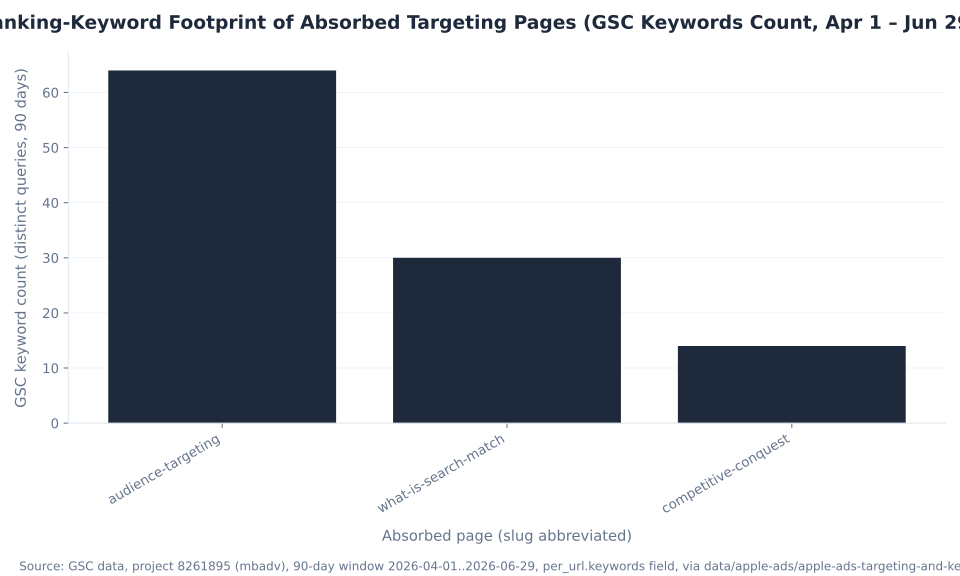
Ranking-Keyword Footprint of Absorbed Targeting Pages (GSC Keywords Count, Apr 1 – Jun 29 2026)
The footprint chart shows the query diversity each absorbed page brings into this pillar: the audience page contributed the widest range of refinement queries (64 keywords), the Search Match page a tighter but higher-intent set (30 keywords), and the conquest page a narrow one (14 keywords). Serving all three footprints — through the search-match, audience-targeting, and conquest sections — is how the consolidated page retains the combined ranking surface. At MB Adv Agency, turning the match-type, Search Match, negative, refinement, and conquest controls into one disciplined Brand / Category / Competitor / Discovery structure is exactly the work of PPC campaign management; for cross-channel app advertisers also running Google App campaigns, the same rigor extends across our wider PPC services.
Apple Ads Targeting, Built and Run
The right searches, the right people, and the right automation on top
Layering keyword match types, Search Match, negatives, and audience refinements into a clean Brand / Category / Competitor / Discovery structure — and keeping the Apple-not-Google rules straight — is the everyday work of campaign management. Our team builds and runs these structures for advertisers.
PPC campaign management →What Changed in 2026: Maximize Conversions, Inline Search, and Rising Automation
Apple restructures its ad product constantly, and three 2026 changes reshape how targeting behaves — each worth auditing because the platform can shift delivery without an advertiser touching a setting. The pace is the reason naming precision matters: training-data drift on Apple’s ad product is measured in months, so the durable skill is checking the live dashboard rather than trusting a year-old guide.
Three changes to audit: (1) Maximize Conversions reached general availability for all App Store advertisers on February 25–26, 2026 — a locked Automated Ad Group with Search Match always on; (2) the inline-search expansion (March 3, 2026) added sponsored slots further down search results, with existing campaigns auto-enrolled and positions decided algorithmically; (3) automation is steadily absorbing manual keyword work, from Search Match discovery to target-CPA bidding.
The Maximize Conversions rollout is the headline targeting change: it puts Search Match, an auto-bidder, and a target CPA into one locked ad group, which reframes the whole manual-keyword workflow for advertisers who opt into it. The inline-search expansion is the quiet one — more sponsored positions appear further down the results, existing campaigns auto-enroll, advertisers cannot pick or separately bid for the new slots, and billing is unchanged. Because that change is about where ads serve, the full placement detail lives in Apple Ads placements and ad types. Source: PPC Land and Apple Ads Help, “Maximize Conversions” best practices.
The throughline across all three is that automation is absorbing manual targeting controls. The advertiser’s job shifts from setting every bid and keyword to seeding clean structure, accurate conversion signals, and disciplined negatives, then auditing the automated layers — the optimization posture covered in optimizing Apple Ads campaigns.
How to Structure Apple Ads Keyword Targeting
A reliable Apple Ads Search-results build follows a fixed order: defend the brand, capture the category, contest competitors, mine for discovery, filter with negatives, refine the audience sparingly, and graduate the winners. Building in that sequence keeps the WHICH SEARCH and WHICH PERSON layers from colliding and stops the two most common failures — a demographic filter that quietly guts reach and a Discovery group whose winners never graduate.
- Build a Brand ad group. Your app and company terms on exact match, to defend your name at the cheapest, highest-intent cost.
- Build a Category ad group. Non-brand genre terms that describe what your app does, on exact match, to capture in-market demand.
- Build a Competitor ad group. Rival terms on exact match, one competitor per group, paired with an “alternative” Custom Product Page. Bidding is allowed — just keep your metadata clean of their trademark.
- Build a Discovery ad group. Broad match plus Search Match on, no manual keywords, to mine searches you did not bid on.
- Add negative keywords. Default exact, broad where you need to block a phrase — even on exact ad groups, because exact is not literal.
- Set audience refinements sparingly. Customer type and device freely; age and gender almost never, because each excludes about 78% of search volume.
- Graduate the winners. Move the high-intent terms Search Match and broad surface into your exact Brand, Category, and Competitor groups, and feed the losers into negatives.
At MB Adv Agency, we run this sequence as a checklist on every Apple Ads build, because the order is what prevents the silent failures. For B2B and developer-tool apps, the Competitor and Category groups carry most of the weight — the core of our B2B PPC work — and the place to start is a quick consult about the right searches, the right people, and the right automation for your account.
Apple Ads Targeting & Keywords FAQ
App Store Advertisers Are Software Businesses
Match types, Search Match, and conquest, turned into one disciplined structure
Most App Store advertisers are software businesses. For how we approach paid acquisition for SaaS and app products — the closest service fit for an app-developer audience — see our SaaS and software PPC work, or get in touch about your account.
SaaS & software PPC →Get in touchMethodology
This pillar consolidates five absorbed Apple Ads glossary pages (mastering-keyword-targeting-in-apple-ads, audience-targeting-in-apple-ads-what-you-need-to-know, what-is-search-match-in-apple-ads, leveraging-search-match-automation-in-apple-ads, running-competitive-conquest-campaigns-on-apple-ads). Every match type, setting, refinement, ad-group type, bidding mode, and conquest rule is sourced from Apple’s own help documentation, verified June 30, 2026: Understand Match Types, Use Negative Keywords, Understand Search Match, Modify Audience Settings, Structure Campaigns, and Maximize Conversions best practices. The about-78% Personalized-Ads-off figure is a Search Engine Land estimate, attributed to Search Engine Land and never to Apple; the competitive-conquest economics are from RocketShip HQ; the Maximize Conversions rollout date is from PPC Land. Search volume and CPC data: Ahrefs, June 2026. GSC data: Google Search Console, project 8261895, 90-day window April 1 to June 29, 2026. No mbadv client metrics are used — mbadv has no Apple Ads client benchmark dataset, so the agency point of view stays qualitative. Reviewed by MB Adv Agency, June 2026.

As a Google Ads expert, I bring proven expertise in optimizing advertising campaigns to maximize ROI.
I specialize in sharing advanced strategies and targeted tips to refine Google Ads campaign management.
Committed to staying ahead of the latest trends and algorithms, I ensure that my clients receive cutting-edge solutions.
My passion for digital marketing and my ability to interpret data for strategic insights enable me to offer high-level consulting that aims to exceed expectations.
Google Partner Agency
We're a certified Google Partner Agency, which means we don’t guess — we optimize withGoogle’s full toolkit and insider support.
Your campaigns get pro-level execution, backed by real expertise (not theory).

4.9 out of 5 from 670+ reviews on Fiverr.
That’s not luck, that’s performance.
Highly recommend Matteo to set up your server side tracking. He has a deep understanding of e-commerce tracking and will go above and beyond to make sure everything is set up correctly and working 100%. If you are scaling your store this set up is non-negotiable in my opinion and there isn't many people who have this much knowledge or put the effort in to get it right. Thanks again!

avorodesign.com
I can only recommend Matteo! He was very patient, professional and very knowledgeable about GA4, Consent Mode v2, and GDPR compliance. Communication was clear, and the setup was done professionally and efficiently. Highly recommend him for anyone needing reliable tracking implementation.

www.natureiki.life
Matteo shines in the realm of online professionals. His work is not only deep in data but also complemented by his proactive communication and cooperation, setting a new standard for freelancers. If you want someone who truly exceeds expectations, look no further. Highly recommended!

www.omanbeverlysmyth.com
Exceptional Service Beyond Expectations - Outstanding Service Impeccable depth, flawless delivery, and exceptional language fluency—this service exceeded all expectations. Highly recommended. Matteo truly ROCKS!!!

ium-paris.com
Top-notch, always highly value working with Matteo. An absolute Google Ads Genius. This is approximately the 8th time I have hired him and he's helped us get 6-7 ROAS. We are excited in continuing to improve our lead flow. Hire this guy if you need Google Ads help. Thanks Matteo!

www.dleeventgroup.com
I finally found the guy who can setup server side tracking and all the ecosystem properly. I definitely recommend Matteo. He is very responsive, kind and wants to dig into things. He configured GA4, Meta, Google Ads, Outbrain and google consent v2 with Cookiebot. Thanks Matteo.

inomega.fr
MB Adv delivered exceptional work with outstanding professionalism and lots of patience, taking time to see effects of changes made and not just do the work and submit it. The proactive communication and video summaries of the work completed made working with Matteo a pleasure, as he consistently went above and beyond. Highly recommended for web analytics projects! We are already working on another project.

www.withnellsensors.co.uk
Working with Matteo on my Google Ads was a game-changer. He's not just a strategist, he's a true partner. He understood my goals and tailored a campaign that perfectly reached my target audience. I'm grateful for his expertise and dedication.

dccargo.com
Click-driven mind
with plastic-brick obsession.
We build Google Ads campaigns with the same mindset we use to build tiny brick worlds: strategy, patience, and zero tolerance for wasted pieces.
Data is our blueprint. Growth is the only acceptable outcome.