Apple Ads Console & Campaign Setup: ads.apple.com

Where Apple Ads Are Built — 2026
850M+ /week
People visit the App Store every week, and 70% of them use search to discover apps (Apple). The console where you set up every campaign that reaches them is the Apple Ads Advanced Campaigns dashboard at ads.apple.com — there is no separate “Apple Ads console.”
Source: Apple, Ads on the App Store
The Apple Ads Console Is the Advanced Campaigns Dashboard at ads.apple.com
The “Apple Ads console” is not a mystery — it is a renamed one. The self-serve console is the Apple Ads Advanced Campaigns dashboard, and you sign in at ads.apple.com. When the product rebranded from Apple Search Ads to Apple Ads on April 14, 2025, the console kept its job and shed its old name, the “Search Ads Advanced console.” The legacy searchads.apple.com URL still routes, so old bookmarks and tutorials open the same place (source: Apple Ads Help, Understand Dashboards and Settings).
One fork is worth naming up front: there are two dashboards because there are two live tiers. Apple Ads Advanced is the keyword and auction product this page describes — full control, cost-per-tap bidding, the campaign dashboard most guides picture. Apple Ads Basic is the automated, low-effort tier — a monthly budget cap, Apple handles targeting and bidding, pay-per-install — with a much simpler dashboard. Both are live in 2026; the “Basic was discontinued” rumor is false (source: Apple Ads Help, Compare Apple Ads Solutions). So the first thing to settle is which dashboard you are in.
The MB Adv Agency framing we give every new advertiser is one sentence: stop hunting for a “Search Ads console,” open ads.apple.com, and confirm you are in the Advanced dashboard if you want keyword-level control. Half the confusion on this topic is a naming problem, and naming it correctly is the fastest way to unblock someone. New to the platform entirely? Start with what Apple Ads are — the rebrand, the two tiers, and how the App Store auction works before you open the console.
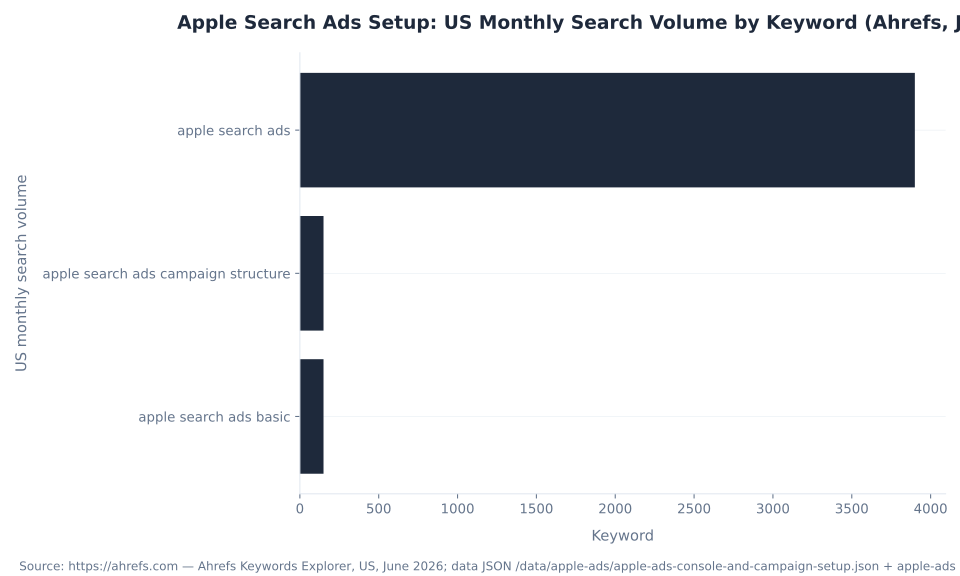
Search demand confirms the pattern. Most people reach this page through setup and structure queries, not a direct “console” query: “apple search ads campaign structure” registers 150 monthly US searches (Ahrefs, June 2026), while “apple ads console” itself shows zero — advertisers do not know the dashboard has a named console until they find it.
Apple Search Ads Setup: US Monthly Search Volume by Keyword (Ahrefs, June 2026)
Key Takeaways
- The console is the Apple Ads Advanced Campaigns dashboard at ads.apple.com (formerly the “Search Ads Advanced console”). Two tiers are live — Advanced for keyword control and Basic for automated promotion; Basic was not discontinued.
- Only Search results campaigns use Campaign → Ad group → Keywords. The Search tab runs on a single bid, product-page ads are category-targeted, and the Today tab runs a custom product page — none use keywords. Decide the placement first.
- Apple recommends four Search-results campaign types by intent theme — Brand, Category, Competitor, Discovery — because those four kinds of traffic behave nothing alike.
- One setup fork decides how bids are set: Manage Bids (manual cost-per-tap) versus Maximize Conversions (automated, general availability February 25–26, 2026). It is a bidding-automation choice, not a targeting one.
- The daily budget is the only budget type — lifetime and campaign budgets were discontinued (paused June 2026). A new app should start narrow: brand defense first, Discovery plus Search Match to mine terms, and the Today tab reserved for the launch moment.
How an Apple Ads Account Is Built: Campaign, Ad Group, Keywords
The account is built three levels deep, but only one placement actually uses that structure — and assuming all four do is the most common setup mistake. For a Search results campaign, the hierarchy is the thing every guide pictures.
At the campaign level you set the budget and the countries or regions you run in. At the ad-group level you set keywords, max cost-per-tap bids, ad variations, audience refinements, and negative keywords. The keywords are the queries you bid on. Budget and geography live at the top; everything operational lives in the ad group (source: Apple Ads Help, Campaign structure).
| Placement | Targeting | Keyword / ad-group structure? |
|---|---|---|
| Search results | Keyword-targeted + Search Match | Yes — full Campaign → Ad group → Keywords |
| Search tab | Shown before a query is typed | No — a single bid, no keywords |
| Product pages (“You Might Also Like”) | Category-targeted (all or specific categories) | No keywords |
| Today tab | Awareness; requires a custom product page | No keywords — bought at the impression level |
Source: Apple Ads Help, Ad Placement Options. Only Search results campaigns use the keyword and ad-group structure.
So “set up your ad groups and keywords” is implicitly a Search results instruction. The MB Adv Agency rule: decide the placement first, because the placement decides whether you are even building keywords — a reader who tries to add keywords to a Today-tab campaign is fighting the tool, not configuring it. The four placements get a dedicated treatment in Apple Ads placements and ad types; the keyword and audience mechanics live in Apple Ads targeting and keywords.
Structure Your Search-Results Account by Intent: the Four Campaign Types
Apple’s own campaign-structure best practice splits a Search-results account into four campaign and ad-group types by keyword theme — Brand, Category, Competitor, and Discovery — and the reason they exist is that those four kinds of traffic behave nothing alike (source: Apple Ads Help, Structure Campaigns).
| Type | Keyword scope | Match type | What it does |
|---|---|---|---|
| Brand | Your own app and company terms | Exact | Defend searches already looking for you — the highest-intent traffic |
| Category | Non-brand genre terms (“task manager app”) | Exact | Capture intent from people searching your app’s function |
| Competitor | Rival app names | Exact, isolated per rival | Reach people searching for an alternative; isolate for clean reads |
| Discovery | Broad match + Search Match | Broad / Search Match (auto) | Mine queries you did not think to bid on, then graduate winners into the other three |
Sources: Apple Ads Help, Structure Campaigns; Understand Search Match.
The non-obvious part — and where MB Adv Agency sees new advertisers waste budget — is that lumping all four into one campaign means one daily budget and one set of bids has to serve four completely different intent levels, and the highest-ROAS theme (brand defense) ends up competing for budget with the most speculative one (discovery). Separating them lets you fund each by its actual value and read its performance cleanly.
Discovery earns a word of its own. Search Match is an automated matching setting, not a match type, that pairs your ad with relevant App Store searches using your listing metadata, similar apps in your genre, and other search data, with no keywords required (source: Apple Ads Help, Understand Search Match). Isolate it in a dedicated Discovery ad group, then graduate winning terms into exact-match Brand, Category, and Competitor ad groups. We structure by intent from day one, not because it is tidy, but because it is the only way the reporting tells you anything useful. Match types, Search Match depth, audience refinements, and competitor-conquest rules are covered in Apple Ads targeting and keywords.
The One Setup Fork That Decides How Your Campaign Bids
When you create a Search-results campaign, Apple asks you one question that quietly decides how the whole campaign runs — Manage Bids or Maximize Conversions — and in 2026 that choice changed.
Manage Bids is the manual model: you set the max cost-per-tap you are willing to pay on each keyword, with full keyword-level control. Maximize Conversions — which reached general availability on February 25–26, 2026 — is Apple’s automated alternative. It combines Search Match, an auto-bidder, and a target CPA in a locked “Automated Ad Group,” setting the bid for each query in real time instead of asking you to manage per-keyword bids (source: Apple Ads Help, Maximize Conversions). An optional manual ad group can run alongside the Automated Ad Group, and Maximize Conversions runs on Search results campaigns only.
The setup-stage takeaway — and this is the part MB Adv Agency flags so people choose deliberately — is that this is a bidding-automation choice, not a targeting one, and the right answer follows the data you have. A brand-new app with no conversion history wants Manage Bids first: the automated bidder needs conversions to learn from, and you want granular control while you find your footing. An established app scaling past the point where manual bid management is practical is the natural fit for Maximize Conversions. Both run on a daily budget; neither changes who sees your ad, only how the bid is set. We pick the bidding mode to match the data we have, not the one that sounds most automated. The cost-per-tap math, the CPA cap, the second-price auction, and budget strategy are covered in how much Apple Ads cost, and running paid acquisition with that discipline for software businesses is what our SaaS and software PPC practice brings to app advertisers.

App Store & Apple Ads
Want a Second Set of Eyes on the Structure?
Standing up your first Apple Ads campaigns and want help with the account structure, the bidding fork, and the schedule? MB Adv Agency helps advertisers wire the build and run paid acquisition with the same discipline as the rest of their media — talk to us before you spend your first dollar.
Talk to our team →Scheduling and Budgets: Daily-Only, and Simpler Than You Expect
Scheduling in Apple Ads is simpler than people expect — start now or pick a date, set a daily budget, done — and the one thing that genuinely changed is that the lifetime budget older guides still describe is gone.
Setting a schedule is a campaign-level decision, and Apple keeps it light. You can start the campaign immediately or set a future start date and time, and you can optionally set an end date and time. By default a new campaign starts today with no end date, so it runs continuously until you stop it (source: Apple Ads Help, Schedule campaigns). Scheduling is most useful for seasonal pushes, time-sensitive promotions, and events, and there is one cascade rule to remember — an ad group cannot start before its campaign’s start date or run past its end date, so the campaign window is the outer boundary.
On budget, the change that breaks older tutorials: the daily budget is the only budget type now. Lifetime and campaign (total) budgets were discontinued — Apple paused all lifetime-budget campaigns in June 2026 — so any guide telling you to “set a total campaign budget” describes a control that no longer exists (source: Apple Ads Help, Manage Budgets). Apple caps monthly spend at roughly the daily budget times 30.4, and can spend slightly above the daily figure on high-opportunity days within that cap.
The MB Adv Agency guidance: think in daily terms, set a start date you can actually monitor, and only add an end date when there is a real reason to stop. If you are working to a fixed monthly total, control it with the daily amount plus a campaign end date — there is no “stop at $X” field anymore. How to size and optimize budgets across campaigns is the cost sibling’s job; this page covers the scheduling mechanics and the daily-only reality, and how much Apple Ads cost carries the budget-strategy depth.
Launching a Brand-New App: Start Narrow, Let Data Earn the Expansion
Launching a brand-new app is the one setup scenario with a wrong default. A new app has no installs, no conversion history, and no keyword data, so the instinct to build the full Brand/Category/Competitor/Discovery structure on day one is exactly backwards — there is nothing for it to optimize against yet.
| Priority | What to run | Why |
|---|---|---|
| 1 — Brand defense | A Brand campaign bidding your own app and company name, exact match | The highest-intent, highest-ROAS traffic you have on day one; stops a competitor intercepting users searching for you |
| 2 — Discovery + Search Match | A Discovery ad group with Search Match on, broad match | Surfaces relevant queries you did not think to bid on, using your listing metadata and genre comps — the source for terms to graduate |
| 3 — Today tab for launch | A Today-tab campaign backed by a custom product page | The App Store front-page surface is built for launch and major-release moments; it requires a custom product page, so it is a deliberate beat, not a day-one default |
| Later | Competitor and Category exact-match campaigns | Add these as Discovery data shows which terms convert — not from guesswork |
Source: Apple Ads Help, Campaign structure (brand defense first; Discovery + Search Match to mine; Today tab for the launch moment).
Start with Manage Bids until you have accumulated enough conversions for an automated bidder to learn from. The MB Adv Agency read: a new app should start narrow and let data earn the expansion — one or two tight ad groups, brand protected, Search Match mining in the background — not a sprawling structure you cannot yet read. Once the campaigns are live, the work shifts to tuning them: optimizing Apple Ads campaigns covers graduating Discovery keywords, automation, and scaling, and the custom product page the Today tab needs is detailed in Apple Ads creative and ad policies. If you would rather a team own the build and the day-to-day, our PPC campaign management does exactly that, run with the discipline of our full PPC services.
Frequently Asked Questions: Apple Ads Console & Setup
Next in the Apple Ads series
Placements & Ad Types
Your setup starts with a placement choice, and only Search results uses keywords. The placements and ad types guide maps what the Today tab, Search tab, Search results, and product-page slots each do — and which one fits your goal.
Read the placements guide →Methodology & Sources
This pillar consolidates three absorbed URLs from the mbadv.agency Apple Ads cluster into one console-and-setup guide. Console and dashboard facts are from Apple Ads Help, Understand Dashboards and Settings, and the Compare Apple Ads Solutions page. Campaign structure, the four campaign types, and the new-app launch sequence are from Apple’s Campaign structure and Structure Campaigns best practices; Search Match mechanics are from Understand Search Match. The Manage Bids versus Maximize Conversions fork and its February 25–26, 2026 general-availability date are from the Maximize Conversions best practice. Scheduling rules are from Schedule campaigns; the daily-only budget and the June 2026 lifetime-budget discontinuation are from Manage Budgets. App Store reach figures are Apple’s own; search-demand figures are Ahrefs, June 2026. No mbadv client metrics appear in this article. Reviewed by MB Adv Agency, June 2026.

As a Google Ads expert, I bring proven expertise in optimizing advertising campaigns to maximize ROI.
I specialize in sharing advanced strategies and targeted tips to refine Google Ads campaign management.
Committed to staying ahead of the latest trends and algorithms, I ensure that my clients receive cutting-edge solutions.
My passion for digital marketing and my ability to interpret data for strategic insights enable me to offer high-level consulting that aims to exceed expectations.
Google Partner Agency
We're a certified Google Partner Agency, which means we don’t guess — we optimize withGoogle’s full toolkit and insider support.
Your campaigns get pro-level execution, backed by real expertise (not theory).

4.9 out of 5 from 670+ reviews on Fiverr.
That’s not luck, that’s performance.
Highly recommend Matteo to set up your server side tracking. He has a deep understanding of e-commerce tracking and will go above and beyond to make sure everything is set up correctly and working 100%. If you are scaling your store this set up is non-negotiable in my opinion and there isn't many people who have this much knowledge or put the effort in to get it right. Thanks again!

avorodesign.com
I can only recommend Matteo! He was very patient, professional and very knowledgeable about GA4, Consent Mode v2, and GDPR compliance. Communication was clear, and the setup was done professionally and efficiently. Highly recommend him for anyone needing reliable tracking implementation.

www.natureiki.life
Matteo shines in the realm of online professionals. His work is not only deep in data but also complemented by his proactive communication and cooperation, setting a new standard for freelancers. If you want someone who truly exceeds expectations, look no further. Highly recommended!

www.omanbeverlysmyth.com
Exceptional Service Beyond Expectations - Outstanding Service Impeccable depth, flawless delivery, and exceptional language fluency—this service exceeded all expectations. Highly recommended. Matteo truly ROCKS!!!

ium-paris.com
Top-notch, always highly value working with Matteo. An absolute Google Ads Genius. This is approximately the 8th time I have hired him and he's helped us get 6-7 ROAS. We are excited in continuing to improve our lead flow. Hire this guy if you need Google Ads help. Thanks Matteo!

www.dleeventgroup.com
I finally found the guy who can setup server side tracking and all the ecosystem properly. I definitely recommend Matteo. He is very responsive, kind and wants to dig into things. He configured GA4, Meta, Google Ads, Outbrain and google consent v2 with Cookiebot. Thanks Matteo.

inomega.fr
MB Adv delivered exceptional work with outstanding professionalism and lots of patience, taking time to see effects of changes made and not just do the work and submit it. The proactive communication and video summaries of the work completed made working with Matteo a pleasure, as he consistently went above and beyond. Highly recommended for web analytics projects! We are already working on another project.

www.withnellsensors.co.uk
Working with Matteo on my Google Ads was a game-changer. He's not just a strategist, he's a true partner. He understood my goals and tailored a campaign that perfectly reached my target audience. I'm grateful for his expertise and dedication.

dccargo.com
Click-driven mind
with plastic-brick obsession.
We build Google Ads campaigns with the same mindset we use to build tiny brick worlds: strategy, patience, and zero tolerance for wasted pieces.
Data is our blueprint. Growth is the only acceptable outcome.