Apple Ads Placements & Ad Types: 4 App Store Surfaces

Apple Ads Placements 2026 — The App Store Lineup
FOUR, not three
Today tab, Search tab, Search results, and Product pages — all auction-based, self-serve, and cost-per-tap billed on Apple Ads Advanced
Only Search results uses keywords · the April 14, 2025 rebrand turned “Apple Search Ads” into “Apple Ads” · the 2026 inline-search expansion added more sponsored slots further down · Apple cites “conversion rates over 60% for ads at the top of search results”
Apple Ads Placements and Ad Types in 2026: The Four App Store Surfaces
Apple Ads has four App Store placements in 2026, and the single most common error in placement content is listing three or fewer. The current, correct lineup is Today tab, Search tab, Search results, and Product pages (officially “Product pages — while browsing,” the unit that shows in the “You Might Also Like” list at the bottom of other apps’ product pages). Every one of the four is auction-based, self-serve, and cost-per-tap (CPT) billed on the Apple Ads Advanced tier. A reader who arrives with a stale three-placement model needs the full lineup first, then a map from each surface to the goal it serves.
The reason older lists undercount is the rebrand. The product was called “Apple Search Ads” precisely because it started as a single top-of-search slot; the rename to Apple Ads on April 14, 2025 marks its expansion across these four surfaces plus inventory beyond the store. So “search ads” and “search results” now name one placement type under the Apple Ads umbrella, not the product itself. New to the platform? Start with what Apple Ads are — the rebrand decoder and how the whole system fits together — before you pick a surface. Source: Apple, “Ad Placement Options.”
Table 1 is the orientation map — each placement, where it shows, how it is targeted, what creative it needs, and where it is available. Read it as the at-a-glance answer to “which placements exist?” The sections below then walk each surface in turn, draw the load-bearing Search-results-vs-Product-pages distinction, and close on the live-versus-announced boundary beyond the App Store. The keyword and bidding mechanics that sit under each surface live in the siblings: Apple Ads targeting and keywords owns match types and Search Match, while how much Apple Ads cost owns the CPT auction.
| Placement | What it is / where it shows | Targeting | Creative | Availability |
|---|---|---|---|---|
| Today tab | Front page of the App Store (its most-visited surface) — an awareness placement | Broad awareness (no keywords) | Requires a Custom Product Page | 91 countries |
| Search tab | Top of the suggested-apps list, shown before the user types a query | No keywords — single bid | Default ad OR Custom Product Page | 91 countries |
| Search results | Within search results after a query (top, and — since March 2026 — further down too) | Keyword-targeted (+ Search Match) | Default ad + optional ad variations (from a CPP) | 91 countries |
| Product pages (“You Might Also Like”) |
Top of the “You Might Also Like” list at the bottom of other apps’ product pages (browse stage) | Category-targeted (all or specific), no keywords | Default product-page assets only | 90 countries — NOT mainland China |
Source: Apple, “Ad Placement Options”, plus the per-placement help pages (Today tab 0083, Search tab 0071, Search results 0082, Product pages 0084). All four are auction-based, self-serve, and CPT-billed on Apple Ads Advanced. Apple Maps is not a fifth App Store placement — it is rolling out summer 2026 (see Table 4).
The structural read of Table 1 is that the placement decides the machine. Search results is the keyword surface; Search tab is a single pre-query bid; Product pages is category-targeted; Today tab is broad awareness that demands a Custom Product Page. That ordering — placement first, then targeting model, then creative — is the spine of every section that follows.
Four App Store Placements, Not Three — and Why the Old Lists Are Wrong
The fastest way to spot content written before the rebrand is the placement count. A list that shows three surfaces (or just “the search ad”) is describing a product Apple expanded years ago. There are four: Today tab, Search tab, Search results, and Product pages. Counting them correctly is the first job of this page, because the whole “which surface fits my goal?” decision falls apart if a quarter of the menu is missing.
The rebrand is the reason the lists drifted. “Apple Search Ads” was a literal name when the product was a single top-of-search slot. The April 14, 2025 rename to Apple Ads marks the moment that single slot became a portfolio of App Store surfaces plus inventory in Apple News and Stocks. Search Engine Land put it bluntly: if you are still calling it Apple Search Ads, you are already behind. The practical correction for a reader carrying a half-remembered list is not “here is how the search ad works” — it is “here are the four surfaces, here is what each one is for, and here is why your old list is short.” Source: Apple, “Ad Placement Options.”
MB Adv Agency treats the four-placement count as the credibility anchor for the whole topic. When an app advertiser opens the conversation asking about “Apple Search Ads,” the first move is to set the vocabulary straight: the product is Apple Ads, “search results” is one placement of four, and only that one placement uses keywords. Getting the lineup and the names right up front is what separates a current brief from a 2024-era one, and it is the difference that earns trust from a reader who already runs the platform.
The second correction rides on the first: even Search results is no longer the “one slot at the top” from older guides. The 2026 inline-search expansion added more sponsored positions further down the results page. So a page that describes Apple Ads as a single top-of-search position is two product generations behind — wrong on the count and wrong on the depth. The sections below take the four surfaces one at a time, starting with the one most people misjudge, the Search tab.
What Advertisers Search For: A Near-Total Zombie Cluster
The placement-orientation cluster has unusually thin US keyword demand. The Ahrefs pull (June 2026) shows only one meaningful-volume term — “app store ads” at 400 US searches a month (KD 31, CPC $10.00) — with the more specific placement query “apple search ads placements” trailing at 80 a month. Placement-specific terms like “today tab ads” and “product page ads” register zero US monthly volume. The $10.00 CPC on “app store ads” signals high commercial intent per visitor even at modest volume.
| Keyword | US Monthly Vol. | Global Vol. | KD | CPC (USD) | Note |
|---|---|---|---|---|---|
| app store ads | 400 | 1,700 | 31 | $10.00 | Broadest cluster term; high CPC signals commercial intent |
| apple search ads placements ★ | 80 | 150 | — | — | ★ Pillar head term — placement-orientation intent |
| today tab ads | 0 | 0 | — | — | Absorbed-zombie intent; zero recorded US volume |
| product page ads | 0 | 0 | — | — | Absorbed-zombie intent; zero recorded US volume |
Source: Ahrefs keyword data + Google Search Console, June 2026, via data/apple-ads/apple-ads-placements-and-ad-types.json. These are keyword-auction figures, not Apple Ads performance data, and the CPC shown is generic web-search CPC — it has no bearing on Apple Ads CPT. GSC footprint of the five absorbed pages: 22 impressions, 0 clicks across the 90-day window (Apr 1 – Jun 29, 2026).
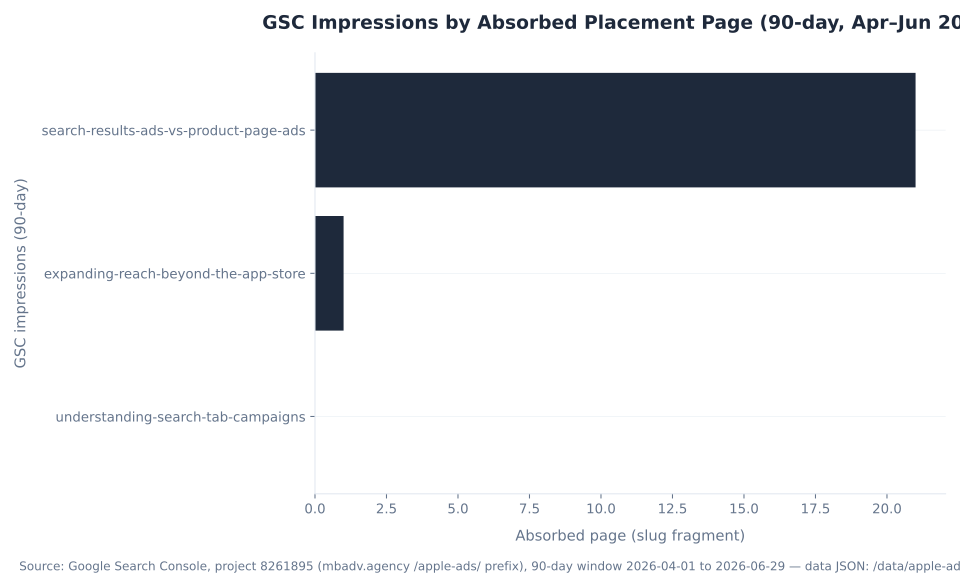
The chart below shows the organic footprint this pillar consolidates. Only two of the five absorbed pages registered any impressions at all: “search-results-ads-vs-product-page-ads” at 21 (position 10.48, two keywords) and “expanding-reach-beyond-the-app-store” at 1. The other three sat at zero. This is a near-total zombie cluster — which is exactly why the page is built to win on orientation completeness and citation authority rather than on inherited ranking equity. The audience here is app developers, the closest fit for which on the agency side is SaaS and software PPC management.
GSC Impressions by Absorbed Placement Page (90-day, Apr–Jun 2026)
The disambiguation query — “what is the difference between search results ads and product page ads” — is the cluster’s sharpest single intent, and the comparison section below carries the matching anchor so that footprint transfers cleanly. With 22 total impressions and zero clicks across all five URLs, there is no high-stakes ranking risk attached to consolidating them; the value is in answering the orientation question better than any single thin page ever did.
Search Tab Campaigns: The Ad That Runs Before the Query
The Search tab placement shows your ad at the top of the suggested-apps list, before the user types anything. It is the surface most advertisers misjudge, because it sits next to Search results in the console but works on the opposite logic. There are no keywords here at all — the Search tab is a single bid, not a keyword/ad-group structure. You are buying a position on the discovery screen a user sees the moment they tap into Search, ahead of any query.
Because there is no query to read intent from, the Search tab is a pre-intent, awareness-leaning placement. Its creative can run on your default ad or, if you want a tailored landing experience, on a Custom Product Page — a CPP is optional here, not required. That is the clean contrast with the Today tab, which mandates a CPP. The Search tab’s job is to put your app in front of someone who has signaled they are about to search but has not narrowed to a term, which makes it a reach-and-priming surface rather than a demand-capture one. The CPP creative system itself — how to build one and when it pays off — lives in Apple Ads creative and ad policies.
The benchmark picture matches the placement’s position in the funnel. AppTweak’s October 2025 medians put the Search tab’s tap-through rate at 0.29% — the lowest of the four surfaces — while its conversion rate on the taps it does earn lands at a respectable 15%. That pattern is exactly what a pre-query placement should look like: most impressions do not draw a tap because intent has not formed yet, but the users who do tap convert at a reasonable clip. Reading the Search tab as “underperforming” on TTR alone misses the point — its benchmark is reach and priming, not the high-intent capture that Search results is built for. The Search tab runs in 91 countries, the same footprint as Today tab and Search results. Source: Apple, “Ad Placement Options” (Search tab 0071).
Search Results Campaigns: The Only Keyword-Driven Placement
Search results is the placement that runs after a user types a query, and it is the only one of the four that uses keywords. This is the high-intent surface of the platform: the user has named what they want, and your ad answers it. Search results campaigns are built on the Campaign → Ad group → Keywords structure, they support optional Search Match (Apple’s automated matching setting), and they can run ad variations drawn from Custom Product Pages so the creative matches the keyword theme.
Apple attributes the surface’s standout economics to search intent: it cites “industry-leading conversion rates over 60% for ads at the top of search results.” AppTweak’s independent October 2025 median lands at roughly 56% — directionally consistent, with the small gap reflecting that Apple cites top-of-results positions while AppTweak reports a broader campaign median. Either way, Search results converts far above the other three placements because it intercepts a user at the moment of active demand. This is the surface to spend on when the goal is measurable installs you can read keyword by keyword. Source: Apple, “Ads on the App Store.”
Table 3 makes the campaign-structure difference concrete. Search results is the only placement that exposes a keyword/ad-group layer and the only one where Search Match runs; the other three are deliberately different machines. The match types (broad and exact — there is no phrase match in Apple Ads), Search Match mechanics, and audience refinements are owned by Apple Ads targeting and keywords; this page maps which placement uses which model and points there for the build. To launch one end to end — the campaign hierarchy, scheduling, and going live — see the Apple Ads console and campaign setup.
| Placement | Campaign structure | Bid unit | Uses keywords? | Search Match? |
|---|---|---|---|---|
| Search results | Campaign → Ad group → Keywords | Bid per keyword / ad group | Yes — the only one | Yes (Search results only) |
| Search tab | Campaign-level (no ad-group keyword layer) | Single bid | No | No |
| Product pages | Campaign with category targeting | Bid per category | No | No |
| Today tab | Campaign (awareness) | Awareness bid | No | No |
Source: Apple, “Understand Search Match” + “Ad Placement Options” (0081). Search Match is an automated matching setting available in Search results campaigns only — not a match type, and not available on the other three surfaces.
The takeaway from Table 3 is the misconception it kills at a glance: Apple Ads is not “keyword ads” across the board. Trying to attach a keyword list to a Search tab, Product pages, or Today tab campaign is a setup error, because those surfaces have no keyword layer to attach it to. Pick the placement first; the targeting model follows from it.
Today Tab and Product Page Ads: Front-Page Awareness and Browse-Stage Discovery
The two remaining placements sit at opposite edges of the App Store journey, and grouping them together makes the contrast clear. Today tab is the front-page awareness surface; Product pages is the browse-stage discovery surface. Neither uses keywords, and each carries a hard requirement that decides whether it is even a fit for a given campaign.
The Today tab places your ad on the App Store’s front page — its most-visited surface — as a broad awareness unit. Its defining constraint is creative: Today tab requires a Custom Product Page. You cannot run it on the default ad, so a campaign that lacks a CPP cannot use this placement at all. AppTweak’s October 2025 median puts Today tab’s tap-through rate at 0.32% and its conversion rate at 7.7% — numbers that read as low only if you benchmark a front-page awareness placement against a demand-capture one. The correct comparison for Today tab is reach and brand exposure, not conversion rate. It runs in 91 countries. Source: Apple, “Ad Placement Options” (Today tab 0083).
Product pages ads — officially “Product pages — while browsing” — appear at the top of the “You Might Also Like” list at the bottom of other apps’ product pages. This is the discovery moment: a user is already looking at one app and your ad offers an alternative or an adjacent option. Product pages is category-targeted (all categories or specific ones), uses no keywords, and runs on default product-page assets only — no ad variations. Its availability carries the one exception in the lineup: it is live in 90 countries, not mainland China, while the other three reach 91. AppTweak puts its TTR at 2.0% and CR at 15% — browse-stage momentum drives a higher tap rate than the pre-query placements, and a solid conversion rate on those taps. Source: Apple, “Ad Placement Options” (Product pages 0084).
MB Adv Agency frames these two as different spending jobs. Today tab is where you pay to be seen broadly on the front page; Product pages is where you pay to catch a browser on a competitor’s or an adjacent app’s page. Both are discovery plays rather than demand capture, which is why an advertiser who measures them against Search results’ conversion rate walks away disappointed for the wrong reason. The right expectation is incremental reach and discovery, set before the campaign launches.

Search Results Ads vs Product Page Ads: The Load-Bearing Distinction
This is the comparison the cluster’s sharpest query asks for, and the two surfaces are opposite ends of the same journey. Search results ads are keyword-driven and high-intent; they appear after a user types a query, support ad variations from Custom Product Pages, and carry the platform’s highest conversion rate. Product page ads are category-driven and browse-stage; they appear on someone else’s product page, use no keywords, and run on default assets only. Most advertisers blur them, and conflating the two is the most common confusion this pillar exists to clear.
| Attribute | Search results ads | Product page ads (“You Might Also Like”) |
|---|---|---|
| Where it appears | In search results after a query (top + further-down slots since Mar 2026) | In the “You Might Also Like” list at the bottom of other apps’ product pages |
| Journey stage | Active search — high intent | Browse / discovery — lower intent |
| Targeting | Keyword-targeted (broad / exact) + Search Match | Category-targeted (all categories or specific ones) |
| Keywords? | Yes — the only placement that does | No keywords |
| Creative | Default ad + optional ad variations (from Custom Product Pages) | Default product-page assets only |
| Conversion rate (AppTweak, Oct 2025) | ~56% (global median) | ~15% |
| Availability | 91 countries | 90 countries — NOT mainland China |
| Best for | Capturing measurable, high-intent demand keyword by keyword | Incremental discovery against competitors & adjacent apps |
Source: Apple, “Ad Placement Options” (Search results 0082 + Product pages 0084); Apple, “Ads on the App Store” for the “over 60% top-of-search conversion” figure (attribute to Apple). Placement benchmarks: AppTweak, Oct 2025 (attribute to AppTweak). Re-confirm the 90-vs-91-country split at publish.
The practical consequence MB Adv Agency leans on with new advertisers: Search results is where you spend to capture demand you can read keyword by keyword, and Product pages is where you spend to create incremental discovery against competitors and adjacent apps. Different jobs, different bids, different expectations. The question “why is my Product pages campaign not converting like search?” answers itself once the two surfaces are kept apart — one intercepts a stated need, the other interrupts a browse. For what each tap costs in the auction, see how much Apple Ads cost.

Targeting and Creative Model by Placement
The placement decides the targeting model and the creative requirement — not the other way around. Table 5 is the practical matrix: for each surface, does it use keywords, does Search Match run, is it a single bid, is it category-targeted, and does it need a Custom Product Page? This grid is the one-look answer to “what does this surface actually require?” and the fastest way to kill the “all Apple Ads use keywords” assumption.
| Placement | Keywords? | Search Match? | Single bid? | Category targeting? | Custom Product Page? |
|---|---|---|---|---|---|
| Today tab | No | No | Awareness bid | No | Required |
| Search tab | No | No | Yes — single bid | No | Optional |
| Search results | Yes | Yes (Search results only) | No — bid per keyword/ad group | No | Optional (powers ad variations) |
| Product pages | No | No | Bid per category | Yes (all or specific) | Default assets only |
Source: Apple, “Understand Search Match” + “Ad Placement Options” (0081) + per-placement help pages. The keyword match types (broad / exact — there is no phrase match in Apple Ads), Search Match mechanics, and audience refinements are owned by the sibling Apple Ads targeting and keywords; the Custom Product Page system is owned by Apple Ads creative and ad policies. Re-confirm against the live help pages at publish.
Read the matrix as a router. Today tab is the only surface that requires a Custom Product Page; Search results is the only one with a keyword layer and the only one where Search Match runs; Search tab is the lone single-bid surface; Product pages is the lone category-targeted one. The order of operations runs placement → targeting model → creative requirement, and reading the row before you build the campaign prevents the most common setup error: planning a keyword list for a surface that has no place to put it.
Placement Benchmarks: Conversion Rate and Tap-Through Rate by Surface
Two metrics separate the four placements once they are live: tap-through rate (TTR = taps ÷ impressions, Apple’s analog of CTR) and conversion rate (CR). AppTweak’s October 2025 report — global medians across roughly 3,500 apps, 50,000 campaigns, and about $1B in spend — is the cleanest third-party read on how the surfaces behave, and it must be attributed to AppTweak. WordStream and LocaliQ publish zero Apple Ads data; their figures cover Google and Microsoft Search only and have no bearing on any Apple metric.
| Placement | TTR (Tap-Through Rate) | Conversion Rate (CR) | What the numbers say |
|---|---|---|---|
| Search results | 7.4% | ~56% | Dominates both dimensions — intercepts users at peak intent |
| Product pages | 2.0% | 15% | Browse-stage momentum lifts the tap rate |
| Today tab | 0.32% | 7.7% | Broad awareness — benchmark on reach, not CR |
| Search tab | 0.29% | 15% | Pre-query: low TTR, solid CR on the taps it earns |
Source: AppTweak, “Apple Ads Benchmarks,” October 9, 2025 (global medians; ~3,500 apps / ~50,000 campaigns / ~$1B spend). Apple’s own published figure for Search results: “industry-leading conversion rates over 60% for ads at the top of search results” (attribute to Apple). Never cite WordStream/LocaliQ for any Apple Ads benchmark — they publish no Apple data. Re-confirm at publish; AppTweak updates its report periodically.
The chart below sorts conversion rate highest to lowest. Search results sits far ahead at roughly 56%, then Search tab and Product pages share a 15% CR despite opposite targeting models, and Today tab lands at 7.7%. The shared 15% is the instructive point: a pre-query single-bid surface and a category browse-stage surface arrive at the same conversion rate by very different routes.
Apple Ads Conversion Rate by Placement (AppTweak, Oct 2025)
The second chart sorts tap-through rate. Search results leads at 7.4% because it intercepts a stated query; Product pages follows at 2.0% on browse-stage momentum; and Today tab (0.32%) and Search tab (0.29%) sit near-equal at the bottom because both are pre-intent placements where most impressions correctly do not draw a tap. MB Adv Agency reads TTR and CR together rather than apart: the Search tab converts at 15% on the taps it does earn, and Product pages reaches the same 15% with a roughly 7× higher TTR — two different machines arriving at one conversion outcome. Running these surfaces as a coordinated set, with the right expectation on each, is the everyday work of PPC campaign management.
Apple Ads TTR by Placement (AppTweak, Oct 2025)
The 2026 Inline-Search Expansion: More Slots Under Advertisers’ Feet
The biggest live shift since the old placement pages were written is the inline-search expansion. As of March 3, 2026 (UK first, then Japan, then all Apple Ads markets by the end of March), Apple began showing additional sponsored slots further down in search results — not just the single slot at the top — for users on iOS and iPadOS 26.2 and later. Apple’s stated rationale was its own funnel data: “almost 65% of downloads happen directly after a search.” So it opened more of the results page to ads.
Three operational facts follow, and each one matters for planning. First, existing campaigns auto-enroll — advertisers did not opt in; every active Search results campaign became eligible for the new positions automatically. Second, advertisers cannot pick or separately bid for the new positions — placement within results is algorithmic, with no separate “inline” or “further-down” bid. Third, CPT and CPI billing are unchanged — the new slots use the same auction mechanics and billing model as the top position. Announced December 17, 2025; live in all markets by the end of March 2026. Source: 9to5Mac, December 17, 2025, corroborating Apple Ads News.
The right read for 2026 is that Search results is now a deeper surface than the “one slot at the top” mental model from 2024 — more inventory, the same buying motion. A placements page that still describes the search ad as a single top-of-results position is already out of date. MB Adv Agency treats this as a planning correction rather than a new lever: there is nothing to opt into and no new bid to set, so the change shows up as more available impressions on existing Search results campaigns, not as a new placement to manage. How those extra impressions price in the second-price auction is covered in how much Apple Ads cost.
Expanding Reach Beyond the App Store: Apple News, Stocks, and Maps
Apple Ads has expanded past the store, and a current page earns its citations by being precise about what you can actually buy today. The boundary has three states — live, rolling out, and speculative — and conflating them is the single most common error in “beyond the App Store” content. Table 7 states the boundary cleanly, dated and status-tagged.
| Surface | Availability | Recent / 2026 change | Status |
|---|---|---|---|
| Today tab | 91 countries | — | Live |
| Search tab | 91 countries | — | Live |
| Search results | 91 countries | Inline-search expansion — more sponsored slots further down (live ~Mar 3, 2026, iOS/iPadOS 26.2+; existing campaigns auto-enroll; CPT/CPI unchanged) | Live |
| Product pages | 90 countries — NOT mainland China | — | Live |
| Apple News + Stocks ads | Separate console; company-level insertion orders (display / video / native) | News premium sponsorships expanded Apr 14, 2026 | Live (off-App-Store) |
| Apple Maps ads | US + Canada first | Announced — rolling out summer 2026 | Not yet live |
| Apple TV+ ads | — | Speculative — not confirmed | Do not present as live |
Sources: Apple Ads News (more search slots 2025-12-17; News + App Store expansion 2026-04-14; Maps ads rollout); 9to5Mac (2025-12-17); Apple, “Ad Placement Options.” The four App Store placements are auction self-serve; Apple News/Stocks use company-level insertion orders — a separate motion. Never list Apple Maps or Apple TV+ as a buyable placement today.
Live now beyond the App Store: Apple News and Stocks ads (display, video, and native), bought through a separate console at the company level via insertion orders — a different motion from the four auction self-serve App Store placements — with News premium sponsorships expanded April 14, 2026. Announced but not live: Apple Maps ads, which Apple says are rolling out in summer 2026, US and Canada first; describe them as “rolling out,” never as a live placement. Speculative: Apple TV+ ads — do not state them as live at all.
There is also a structural footnote worth stating plainly: on the App Store itself there are no reserved or managed buys — both Apple Ads tiers (Basic on CPI, Advanced on CPT) are auction self-serve. The insertion-order motion belongs to the company-level News and Stocks product, not the App Store placements. Stating the live set, the rolling-out set, and the speculative set cleanly — and refusing to list Maps or TV+ as buyable today — is exactly the kind of current, declarative boundary that competing 2024-era guides blur. Not sure which surface fits your app? Get in touch and our team will map your goal to the right placement.
Apple Ads App Store Placement Availability by Country (2026)
The availability chart shows the one gap in the lineup. Three placements run in 91 countries; Product pages is the exception at 90, because it is not available in mainland China. If mainland China is a priority market, Search results, Search tab, and Today tab remain available there — only Product pages is excluded. Re-confirm the 91/90 split against the live help page at publish, because Apple restructures placement availability periodically.

Apple Ads Placements, Mapped to Your Goal
Search results for capture, Today tab for reach, Product pages for discovery
All four App Store placements are auction self-serve and CPT-billed. Our team picks and structures the right surfaces for what your app is trying to do, then runs them end to end alongside any Google App campaigns.
PPC campaign management →What Is Changing in 2026: Inline Search, Maps, and the New API
Apple restructures its ad product on a months-not-years cadence, and three 2026 changes shape the placement picture. Each one is worth tracking because each can shift what is buyable or how much inventory exists without an advertiser touching a setting.
Three changes to track: (1) the inline-search expansion went live ~March 3, 2026, adding more sponsored slots further down in search results on iOS/iPadOS 26.2+, with existing campaigns auto-enrolled; (2) Apple Maps ads are rolling out summer 2026 (US and Canada first) — announced, not yet buyable; (3) the Campaign Management API v5 sunsets January 26, 2027, replaced by the new Apple Ads Platform API that unifies App Store and Apple Maps ads, with a preview in summer 2026.
The throughline is that the surface set is widening while the buying motion stays the same. The inline-search expansion is more Search results inventory, not a new placement. Apple Maps is genuinely new inventory, but it is not live, so it belongs in a roadmap line rather than a media plan. And the API change is structural plumbing — the new Apple Ads Platform API folds App Store and Maps buying into one interface, which matters for anyone managing campaigns programmatically. Source: 9to5Mac, April 2, 2026.
For an advertiser, the practical posture is to treat every number, name, and date on this page as re-verify-at-publish. The highest-drift items are the country counts, the inline-search rollout status, and the Apple Maps timing — the last of which should never be flipped to “live” until Apple publishes a go-live announcement. The campaign hierarchy and scheduling that sit beneath all of this are covered in the Apple Ads console and campaign setup.
How to Choose the Right Apple Ads Placement
Choosing a placement follows a fixed order: start from the goal, check creative readiness, match the targeting model, confirm availability, set bids and budgets, then sequence the surfaces. Working in that order keeps the four machines straight and prevents the classic mistakes — planning keywords for a surface that has none, or launching Today tab without the Custom Product Page it requires.
- Start from the goal. High-intent capture points to Search results; reaching a searcher before they type points to Search tab; front-page awareness points to Today tab; browse-stage discovery on related or competitor pages points to Product pages.
- Check creative readiness. Today tab requires a Custom Product Page; Search results can run ad variations from CPPs but works on the default ad; Search tab and Product pages run on default assets (a CPP is optional on Search tab). The CPP build itself lives in Apple Ads creative and ad policies.
- Match the targeting model. Only Search results uses keywords plus Search Match; Search tab is a single bid; Product pages is category-targeted; Today tab is broad awareness (Table 5). The keyword layer is built in Apple Ads targeting and keywords.
- Confirm availability. All four run in 91 countries except Product pages (90 — not mainland China). Verify your target markets before you commit budget (Table 7).
- Set bids and budgets. All four are CPT auction on a daily budget. The full cost treatment — second-price auction, daily budgets, the levers — is in how much Apple Ads cost.
- Start with Search results, then layer. Begin on Search results for measurable, high-intent installs, then add Today tab, Search tab, and Product pages for reach and discovery once the high-intent surface is performing.
- Look beyond the App Store last. Apple News and Stocks ads are live (separate console, company-level insertion orders); Apple Maps ads are rolling out summer 2026 and are not buyable today; Apple TV+ is speculative.
MB Adv Agency runs this sequence as a checklist on every Apple Ads build, because the order is what prevents the silent errors — a Today tab campaign blocked for want of a CPP, or a keyword list with nowhere to live on a single-bid surface. Apps are software businesses, so for developers running App Store and Google App campaigns side by side, the closest fit on the service side is SaaS and software PPC management; the place to start is a quick consult on which surface matches your goal.
Apple Ads Placements FAQ
App Developer Running App Store + Google Ads?
Pick the right surface, then run it alongside your Google App campaigns
Apps are software businesses. For developers buying App Store ads and Google App campaigns side by side, our team maps each goal to the right placement and runs the whole program end to end.
SaaS & software PPC →Get in touchMethodology
This pillar consolidates five absorbed Apple Ads glossary pages (understanding-search-tab-campaigns-on-apple-ads, what-are-search-results-campaigns, what-are-today-tab-and-product-pages-ads, whats-the-difference-between-search-results-ads-and-product-page-ads, expanding-reach-with-apple-ads-beyond-the-app-store) — a near-total zombie cluster with 22 total impressions and 0 clicks across the 90-day window. Every placement, targeting model, creative requirement, availability count, and billing fact is sourced from Apple’s “Ad Placement Options” and the per-placement help pages, verified June 30, 2026. Placement benchmarks (TTR and CR by surface) are AppTweak global medians, October 2025; reach and conversion stats are Apple’s own published figures. Search volume is Ahrefs (June 2026) and GSC data is Google Search Console, project 8261895, 90-day window April 1 to June 29, 2026. No mbadv client metrics are used; agency POV stays qualitative. WordStream and LocaliQ are excluded from every Apple figure — they publish no Apple Ads data. Reviewed by MB Adv Agency, June 2026.

As a Google Ads expert, I bring proven expertise in optimizing advertising campaigns to maximize ROI.
I specialize in sharing advanced strategies and targeted tips to refine Google Ads campaign management.
Committed to staying ahead of the latest trends and algorithms, I ensure that my clients receive cutting-edge solutions.
My passion for digital marketing and my ability to interpret data for strategic insights enable me to offer high-level consulting that aims to exceed expectations.
Google Partner Agency
We're a certified Google Partner Agency, which means we don’t guess — we optimize withGoogle’s full toolkit and insider support.
Your campaigns get pro-level execution, backed by real expertise (not theory).

4.9 out of 5 from 670+ reviews on Fiverr.
That’s not luck, that’s performance.
Highly recommend Matteo to set up your server side tracking. He has a deep understanding of e-commerce tracking and will go above and beyond to make sure everything is set up correctly and working 100%. If you are scaling your store this set up is non-negotiable in my opinion and there isn't many people who have this much knowledge or put the effort in to get it right. Thanks again!

avorodesign.com
I can only recommend Matteo! He was very patient, professional and very knowledgeable about GA4, Consent Mode v2, and GDPR compliance. Communication was clear, and the setup was done professionally and efficiently. Highly recommend him for anyone needing reliable tracking implementation.

www.natureiki.life
Matteo shines in the realm of online professionals. His work is not only deep in data but also complemented by his proactive communication and cooperation, setting a new standard for freelancers. If you want someone who truly exceeds expectations, look no further. Highly recommended!

www.omanbeverlysmyth.com
Exceptional Service Beyond Expectations - Outstanding Service Impeccable depth, flawless delivery, and exceptional language fluency—this service exceeded all expectations. Highly recommended. Matteo truly ROCKS!!!

ium-paris.com
Top-notch, always highly value working with Matteo. An absolute Google Ads Genius. This is approximately the 8th time I have hired him and he's helped us get 6-7 ROAS. We are excited in continuing to improve our lead flow. Hire this guy if you need Google Ads help. Thanks Matteo!

www.dleeventgroup.com
I finally found the guy who can setup server side tracking and all the ecosystem properly. I definitely recommend Matteo. He is very responsive, kind and wants to dig into things. He configured GA4, Meta, Google Ads, Outbrain and google consent v2 with Cookiebot. Thanks Matteo.

inomega.fr
MB Adv delivered exceptional work with outstanding professionalism and lots of patience, taking time to see effects of changes made and not just do the work and submit it. The proactive communication and video summaries of the work completed made working with Matteo a pleasure, as he consistently went above and beyond. Highly recommended for web analytics projects! We are already working on another project.

www.withnellsensors.co.uk
Working with Matteo on my Google Ads was a game-changer. He's not just a strategist, he's a true partner. He understood my goals and tailored a campaign that perfectly reached my target audience. I'm grateful for his expertise and dedication.

dccargo.com
Click-driven mind
with plastic-brick obsession.
We build Google Ads campaigns with the same mindset we use to build tiny brick worlds: strategy, patience, and zero tolerance for wasted pieces.
Data is our blueprint. Growth is the only acceptable outcome.