GA4 Data Collection & Privacy: Streams, Retention, and Consent Mode v2

Consent Mode v2 — Global Monthly Searches
3,400
global monthly searches for “consent mode v2” (Ahrefs KD 24) — the single highest-demand keyword in the GA4 data collection and privacy cluster. The March 2024 enforcement deadline for EEA and UK traffic has made this a live operational question for every site running GA4 alongside Google Ads. Source: Ahrefs Keywords Explorer, June 2026.
Source: Ahrefs Keywords Explorer, June 2026
GA4 Data Collection and Privacy: One Architecture, Seven Controls
GA4 is not Universal Analytics with a new name. It is a different data architecture — one built around event streams rather than sessions, and around privacy controls that are structural rather than toggled. Data streams, data retention, Consent Mode v2, Google Signals, IP address handling, cross-domain tracking, and server-side tagging are the seven layers of that architecture. Each layer determines what data GA4 collects, how long it persists, who can access it, and what signal reaches Google Ads from users who have not consented.
Misconfiguring any one layer creates a gap that the others cannot compensate for. A property on the default 2-month data retention setting loses Exploration data permanently on a rolling basis — the change is not retroactive. A site without Consent Mode v2 running EEA/UK traffic has operated with a measurable gap in Google Ads conversion and audience data since early March 2024. These are not theoretical risks; they are documented consequences with measurable costs. This pillar consolidates five absorbed zombie pages on data streams, privacy, retention, cross-domain tracking, and server-side tagging into one coherent reference. For the full overview of what GA4 is and how its data model works, start there. For the event and parameter schema that flows through GA4 data streams, see that pillar. The Google Analytics 4 glossary hub covers platform terminology across the full cluster.
Two reader profiles will find this most relevant: marketing managers and in-house analysts at businesses with EU or UK traffic who need the concrete mechanics before a CMP rollout; and analytics specialists or agency implementers auditing or rebuilding a GA4 property from scratch. The data streams and retention sections serve the first profile first. Consent Mode v2, Google Signals, cross-domain tracking, and server-side tagging serve the second.
Key Takeaways
- GA4 organizes collection across three stream types: Web, iOS app, and Android app. All events from all streams land in one property, enabling cross-surface analysis without stitching separate UA properties.
- Enhanced Measurement auto-tracks scroll depth, outbound clicks, file downloads, YouTube video interactions, site search, and form events — but only on web streams. App streams have their own automatically collected events via the Firebase SDK.
- The data retention setting governs event-level data available in Explorations (custom reports) only. Standard built-in reports use aggregated data with a separate, longer storage horizon. The default is 2 months; change to 14 months on day one of any new property.
- Consent Mode v2 added two signals beyond v1:
ad_user_dataandad_personalization. Both are required for EEA and UK traffic since early March 2024. A site running only v1 signals is not compliant. - GA4 does not log or store IP addresses. The IP is used to derive geographic metadata (City, Country, Region) at the point of collection and is immediately discarded. There is no IP anonymization setting in GA4.
- Cross-domain tracking requires no code. Admin → Data Streams → Configure tag settings → Configure your domains covers the vast majority of setups.
GA4 Data Streams: Web, iOS, and Android
A GA4 property collects data through data streams — discrete surfaces that each feed event data into the same property. There are exactly three stream types: Web, iOS app, and Android app. A single property supports multiple streams simultaneously, so a business with a website and a mobile app holds both in one property and analyzes the full user journey across surfaces without managing separate UA properties.
Web streams collect via a gtag.js snippet or a Google Tag Manager container. They are the only stream type that supports Enhanced Measurement — a collection of auto-tracking behaviors configurable in Admin without code changes. When enabled, Enhanced Measurement fires events for scroll depth (90% page depth), outbound link clicks, file downloads, site search queries (based on URL parameter detection), YouTube embedded video interactions, and form start and submit events. page_view is always on and cannot be disabled; every other Enhanced Measurement event is individually toggleable in Admin → Data Streams → [stream] → Enhanced Measurement. Google’s Enhanced Measurement documentation is the canonical source for the current full event list.
iOS app streams use the Firebase SDK for iOS; Android app streams use the Firebase SDK for Android. Enhanced Measurement is not available on either. App streams have their own set of automatically collected events — first_open, in_app_purchase, screen_view, session_start, app_update, and others — plus any custom events instrumented via the Firebase SDK. All stream types feed the same event schema, and events from any stream are accessible in GA4’s event and parameter structure. Source: Analytics Help, Set up Analytics (answer/9304153).
| Stream type | Collection method | Enhanced Measurement | Auto-collected events (selected) |
|---|---|---|---|
| Web | gtag.js snippet or Google Tag Manager container on the page | Yes — 7 individually toggleable event types in Admin | page_view (always on), session_start, user_engagement, first_visit |
| iOS app | Firebase SDK for iOS | No — web streams only | first_open, in_app_purchase, screen_view, session_start, app_update |
| Android app | Firebase SDK for Android | No — web streams only | first_open, in_app_purchase, screen_view, session_start, app_update, app_store_subscription_cancel |
MB Adv Agency recommendation: On single-page applications and sites with dynamically rendered forms, disable the form_start and form_submit Enhanced Measurement events from day one. Auto-detected form events misfire frequently on SPA architectures, producing unreliable signals. Verify Enhanced Measurement behavior in GA4 DebugView before using those events for key event configuration.
Consent Mode v2: Four Signals and the March 2024 Enforcement
Consent Mode v2 is Google’s framework for operating GA4 and Google Ads tags in a consent-state-aware way when users have declined — or partially declined — data collection. Since early March 2024, it is a hard requirement for EEA and UK traffic on any site using GA4 data with Google Ads audiences or conversion measurement. The enforcement is tied to the EU’s Digital Markets Act gatekeeper obligations. Non-compliant sites did not lose access to GA4 — they lost the ability to build and maintain Google Ads audiences from EEA/UK users who declined consent, as stated in Google’s Consent Mode enforcement documentation.
Consent Mode v2 added two signals beyond v1. The v1 signals — ad_storage and analytics_storage — are upstream signals: they control whether cookies and identifiers are stored and sent from the browser. The v2-new signals — ad_user_data and ad_personalization, introduced in November 2023 — are downstream signals: processing instructions sent to Google telling it what to do with whatever data arrives. A site can send ad_user_data: denied alongside a full ping; Google receives the data but is bound not to use it for advertising. Simo Ahava’s November 2023 analysis of Consent Mode v2 is the definitive practitioner reference for this upstream/downstream distinction; the Google Tag Platform consent mode concepts documentation covers the full signal architecture. A site running only v1 signals is not v2-compliant — the two downstream signals must be passed through a CMP integration or updated GTM Consent Mode configuration.
The cost of non-compliance is concrete. In GDPR-regulated markets, consent decline rates on CMPs configured with default-off settings run in the range of 30–50% of sessions — an industry-observed range, not an mbadv client figure. That percentage of EEA/UK users generates zero audience signal for Google Ads from the March 2024 enforcement date onward. Consent Mode v2 directly shapes which conversion events are attributable and how GA4 key event measurement interacts with consent state. Framing v2 implementation as a future project after the March 2024 deadline means accepting a material, measurable gap in conversion data and audience reach as permanent operating state.
| Signal | GA4 version | Type | Controls | When denied, Google receives… |
|---|---|---|---|---|
ad_storage |
v1 | Upstream | Whether advertising cookies and device identifiers are stored and sent | Cookieless ping — no cookie ID; anonymized location, page, and event type only |
analytics_storage |
v1 | Upstream | Whether analytics cookies or identifiers are stored and sent | Cookieless ping — session stitching and user-level attribution not possible |
ad_user_data |
v2 (Nov 2023) | Downstream | Whether the user consents to personal data being used for advertising purposes | Signal forwarded as “denied”; Google does not use the data for advertising |
ad_personalization |
v2 (Nov 2023) | Downstream | Whether the user consents to data being used for remarketing and personalized ads | Signal forwarded as “denied”; user excluded from remarketing audiences |
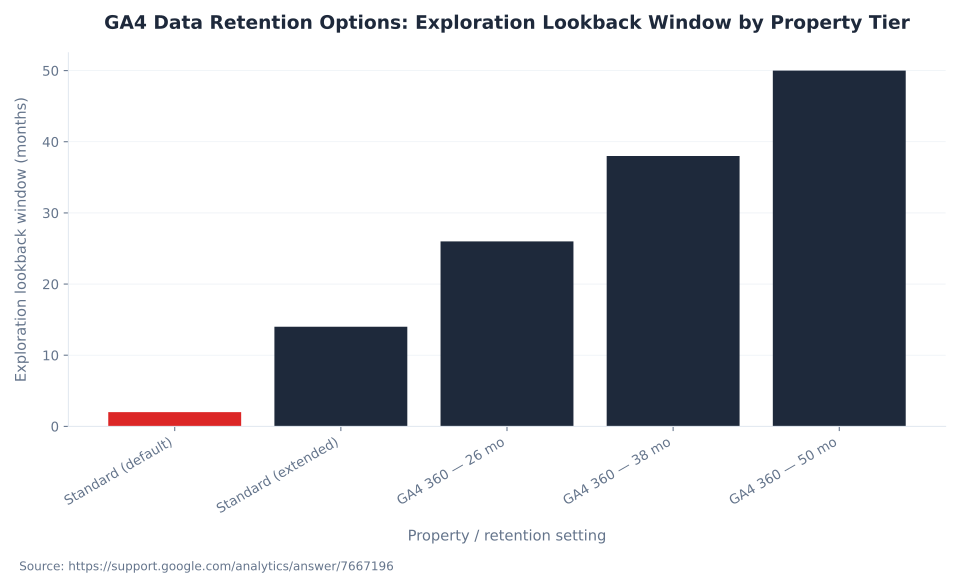
GA4 Data Retention Options: Exploration Lookback Window by Property Tier
GA4 Data Retention: What the Setting Controls and What It Does Not
GA4’s data retention setting (Admin → Data Settings → Data Retention) controls the window of event-level and user-level data available in Explorations — GA4’s custom reporting module for funnels, path analysis, segment overlap, and cohort analysis. Google’s data retention help page states this scope explicitly. Standard reports — the built-in Acquisition, Engagement, Monetization, and Retention overviews under the Reports tab — use aggregated data with a separate, longer storage horizon that the retention setting does not affect. A property on the 2-month default can still view 12+ months of trend data in standard reports.
This is the source of the most persistent retention misconception: a user who sees long historical data in standard reports assumes the retention setting is already at 14 months — then discovers they can only select 2 months when building a custom Exploration. By that point, the event-level data is gone permanently. The retention change is not retroactive. A property switched from 2 months to 14 months on day 30 does not recover the first 29 days of Exploration data — that data was deleted on a rolling basis. Standard properties have exactly two options: 2 months (the default) or 14 months. GA4 360 extends to 14, 26, 38, or 50 months, or “Do not expire.” For any property running segment comparisons, funnel Explorations, or path analysis, setting retention to 14 months is a day-one action. See GA4 reports and Explorations for how the window interacts with Exploration date-range selection. For properties that need event-level data beyond any retention window, GA4’s BigQuery integration exports all events with no sampling or retention limit.
| Property tier | Available retention options | Default | What it controls |
|---|---|---|---|
| Standard GA4 (free) | 2 months or 14 months — only two choices available | 2 months | Event-level and user-level data in Explorations; not standard built-in reports |
| GA4 360 | 14, 26, 38, or 50 months; or “Do not expire” | Configuration-dependent | Same as standard — Explorations only; not standard reports |
| Standard — Large property (auto-classified) | 2 months (enforced when size threshold reached) | 2 months | Event-level data older than 2 months is permanently deleted when the property is reclassified |

Running GA4 with EU or UK traffic?
MB Adv Agency audits GA4 data collection configuration: Consent Mode v2 signal coverage, data retention, cross-domain setup, and server-side tagging readiness. We identify gaps before they become permanent data losses.
Book a GA4 privacy audit →Google Signals: Cross-Device Data and the February 2024 Thresholding Change
Google Signals links session data to users signed into their Google accounts who have enabled Ads Personalization. Enabling it in Admin → Data Collection unlocks three capabilities: cross-device user stitching (events from the same signed-in user on different devices merged into one user journey), demographics and interests dimensions in GA4 reports, and Google Ads remarketing audience membership for signed-in users. Source: Activate Google Signals documentation.
Before February 2024, enabling Google Signals caused data thresholding to apply broadly across most GA4 report types — GA4 suppressed rows where sample sizes were too small to prevent re-identification of signed-in users, even in reports not using demographic dimensions. On February 12, 2024, Google removed Signals from GA4’s reporting identity. Thresholding now applies only when age, gender, or interest dimensions are actively included in a specific report — the three dimension types that carry re-identification risk from Signals data. Reports without those dimensions are no longer thresholded simply because Signals is enabled. Google still collects Signals data for demographics reporting and remarketing audiences; the change affected reporting identity and thresholding scope, not Signals collection itself.
GA4 and IP Addresses: No Storage, No Anonymization Setting
GA4 does not log or store individual IP addresses. Google’s EU-focused data and privacy documentation states this explicitly: IP-address data is used solely to derive geographic metadata — City, Country, Region — at the point of data collection, and is then immediately discarded. No IP address is written to any log or storage layer.
This is architecturally different from Universal Analytics, where IP anonymization was an opt-in setting requiring explicit configuration (anonymizeIp: true in the tracking tag). Many UA implementations ran for years with full IP addresses stored because anonymization was never enabled. GA4 changed this at the architectural level — there is no IP anonymization toggle in GA4 because the concept as UA practitioners knew it does not apply. GA4 never writes IPs to storage at all. Content that says “GA4 enables IP anonymization by default” is applying UA-era framing to an architecture that removed IP storage entirely. GA4 does offer granular location data controls (Admin → Data Collection → Granular location and device data) for operators who want to prevent city-level geographic resolution — that is a separate, distinct setting.
Cross-Domain Tracking: No Code Required
Universal Analytics cross-domain tracking required code: allowLinker, linkerParam, and explicit autoLink configuration. GA4 handles cross-domain setup entirely in the Admin UI. Navigate to Admin → Data Streams → [your web stream] → Configure tag settings → Configure your domains, list all domains that participate in the user journey, and save. GA4 automatically appends a _gl linker parameter to outbound links pointing to any listed domain and reads that parameter on arrival to maintain session and user identity continuity across the domain boundary. Source: GA4 cross-domain measurement documentation (answer/10071811).
This prevents session fragmentation — where a user clicking from one domain to another appears in GA4 as a new session from a self-referral. The Admin configuration covers standard anchor-tag link clicks between listed domains. It does not automatically handle form submissions that redirect to another domain, server-side 301/302 redirects, or JavaScript-based navigation that bypasses standard <a> elements. For the overwhelming majority of cross-domain setups — main site plus booking platform, main site plus separate ecommerce domain, career site plus application tracking system — the Admin approach resolves session stitching without developer involvement. One hard requirement: the same GA4 measurement ID must be firing on all pages across all linked domains. Different measurement IDs on different domains will not stitch sessions across the _gl parameter.
Server-Side Tagging: First-Party Infrastructure, Not a Consent Bypass
Client-side GA4 tags fire from the visitor’s browser. This exposes them to three interception surfaces: ad blockers that target known analytics and advertising domains, ITP on Safari that shortens JavaScript-set first-party cookie lifespans to 7 days, and Consent Mode v2 denials that under “basic mode” block the tag from firing at all. Server-side tagging via a GTM server container addresses the first two by moving the collection endpoint to a domain your organization controls. Source: Google Tag Platform server-side tagging introduction.
The architecture: the browser sends one request to a first-party endpoint (for example, metrics.yourdomain.com). Your GTM server container receives it, processes it, and forwards events to GA4, Google Ads, and any configured destinations. Ad blockers targeting google-analytics.com or googletagmanager.com do not intercept the request. Cookies set by the server container on your domain are treated as first-party by the browser, avoiding ITP shortening. Server-side tagging does not bypass consent requirements. Consent Mode signals must travel with the event from the browser to the server container, and from the server container to each downstream destination. What it provides: a first-party collection endpoint outside the browser-side intercept surface, a processing layer where PII can be stripped before forwarding to third-party vendors, and first-party cookies with longer browser-enforced lifespans. The Google Tag Manager glossary covers GTM architecture and the client-side vs. server-side container distinction in detail.
The infrastructure overhead is real. A GTM server container requires a dedicated endpoint — Cloud Run on Google Cloud Platform is the standard provisioning path — with ongoing infrastructure cost, tag migration from the client-side container, and consent state propagation complexity. For properties with substantial EEA/UK traffic, high-value conversion events, or compliance requirements around data minimization before third-party forwarding, the investment is well-justified. For smaller properties with modest EU traffic, correct Consent Mode v2 implementation combined with Enhanced Measurement on a properly configured web stream closes the majority of the data quality gap without the infrastructure commitment. MB Adv Agency evaluates server-side tagging readiness as part of every full GA4 configuration audit; the decision is almost always a function of traffic volume and conversion event value rather than technical preference.
Highest-value keyword
KD 24
Keyword difficulty for “consent mode v2” — 3,400 global monthly searches, the most-demanded term in this cluster. Source: Ahrefs, June 2026.
Google Signals KD
1
Keyword difficulty for “google signals” (200/month US, 1,200 global). The February 2024 thresholding change makes this a high-value informational capture. Source: Ahrefs, June 2026.
Default data retention
2 months
The GA4 default for standard properties. Every day on this default is Exploration event-level data permanently lost — the change to 14 months is not retroactive. Source: Google Analytics Help, answer/7667196.
v2 enforcement date
Mar 2024
Early March 2024: Consent Mode v2 became a hard requirement for EEA and UK traffic for sites using GA4 data with Google Ads audiences. Source: Google Ads Help, answer/13695607.
Frequently Asked Questions
Does GA4 store IP addresses?
GA4 does not log or store individual IP addresses. This is architecturally different from Universal Analytics, where IP anonymization was an opt-in setting requiring explicit configuration — many UA implementations ran for years with full IP addresses stored because anonymization was never enabled. In GA4, the IP address is used to derive geographic metadata — City, Country, and Region — at the moment of data collection and is then immediately discarded. No IP address is written to any log or storage layer. Google states this explicitly in its EU-focused data and privacy documentation (support.google.com/analytics/answer/12017362). There is no IP anonymization toggle in GA4’s Admin panel because the concept as UA practitioners understood it does not apply. GA4 never writes IPs to storage. Separately, GA4 offers granular location data controls (Admin → Data Collection → Granular location and device data) for operators who want to suppress city-level geographic resolution — but that is a distinct setting from IP anonymization, which is a UA construct that does not exist in GA4’s architecture.
What does the GA4 data retention setting actually control?
GA4’s data retention setting (Admin → Data Settings → Data Retention) controls the window of event-level and user-level data available in Explorations — GA4’s custom reporting module for funnels, path analysis, segment overlap, and cohort analysis. It does not affect standard built-in reports, which use aggregated data with a separate, longer storage horizon. Standard properties have exactly two options: 2 months (the default) and 14 months. GA4 360 extends to 14, 26, 38, or 50 months, or “Do not expire.” The critical operational consequence: the retention change is not retroactive. A property switched from 2 months to 14 months on day 30 does not recover the preceding 29 days of event-level Exploration data — that data was deleted on a rolling basis. Every day a property runs on the 2-month default is Exploration data permanently lost. MB Adv Agency has found that this is the most common day-one misconfiguration in new GA4 properties — set retention to 14 months immediately on any new property. See GA4 reports and Explorations for how the window affects Exploration date-range selection in practice.
When was Consent Mode v2 required, and what are the v2-only signals?
Consent Mode v2 became a hard requirement for EEA and UK traffic in early March 2024, tied to the EU’s Digital Markets Act gatekeeper obligations. The enforcement affects any site using GA4 data with Google Ads audiences, or running any form of Google ad personalization or remarketing for EEA/UK users. Google’s enforcement documentation (support.google.com/google-ads/answer/13695607) states: “only end users outside the EEA will be included in audiences used by your linked advertising products starting early March, 2024” for non-compliant properties. The v2-only signals are ad_user_data and ad_personalization, both announced by Simo Ahava in November 2023. They are downstream signals — processing instructions sent to Google, not cookie or identifier controls. A site running only the v1 signals (ad_storage and analytics_storage) is not v2-compliant. Both downstream signals must be passed explicitly through a CMP integration or updated GTM Consent Mode configuration. Without them, EEA/UK users who decline consent generate zero audience signal for Google Ads from the March 2024 enforcement date onward.
Does GA4 cross-domain tracking require code changes?
GA4 cross-domain tracking requires no code. The entire configuration lives in Admin. Navigate to Admin → Data Streams → [your web stream] → Configure tag settings → Configure your domains, list all domains participating in the user journey, and save. GA4 automatically appends a _gl linker parameter to outbound links pointing to any listed domain and reads that parameter when the user arrives on a listed domain, maintaining session and user identity continuity across the domain boundary. This covers standard anchor-tag link clicks — the vast majority of cross-domain setups. What it does not cover automatically: form submissions that redirect to another domain, server-side 301/302 redirects between domains, and JavaScript-based navigation without standard anchor elements. One hard requirement: the same GA4 measurement ID must be firing on all pages across all linked domains. Different measurement IDs on different domains do not stitch sessions across the _gl parameter. Source: support.google.com/analytics/answer/10071811.
MB Adv Agency
Need a GA4 data collection and privacy audit?
Consent Mode v2 gaps, data retention misconfiguration, and missing cross-domain setup are the three most common causes of permanent data loss in GA4 properties. We audit all layers — streams, retention, consent, cross-domain, and server-side readiness — and fix what’s missing before the losses compound. Contact MB Adv Agency to discuss a GA4 audit. For the broader platform overview, browse the GA4 glossary hub or explore what Google Search Console shows alongside GA4.
Talk to us →Data and methodology: Search volume and keyword difficulty figures from Ahrefs Keywords Explorer, June 2026 (operator-supplied). Data stream types and Enhanced Measurement event list from Google Analytics Help (answer/9304153; answer/9216061), fetched June 2026. Data retention options, default, and Explorations-only scope from Google Analytics Help (answer/7667196) and the Google Analytics Admin API DataRetentionSettings reference. Consent Mode v2 signals, enforcement date from Google Ads Help (answer/13695607) and Simo Ahava’s November 2023 write-up (simoahava.com). Signal architecture from Google Tag Platform (developers.google.com/tag-platform/security/concepts/consent-mode). IP address architecture from Google Analytics Help (answer/12017362). Cross-domain configuration from Analytics Help (answer/10071811). Server-side tagging from Google Tag Platform developer documentation. February 2024 Signals thresholding change from Google Analytics Help (answer/9383630). Reviewed by MB Adv Agency, June 2026.

As a Google Ads expert, I bring proven expertise in optimizing advertising campaigns to maximize ROI.
I specialize in sharing advanced strategies and targeted tips to refine Google Ads campaign management.
Committed to staying ahead of the latest trends and algorithms, I ensure that my clients receive cutting-edge solutions.
My passion for digital marketing and my ability to interpret data for strategic insights enable me to offer high-level consulting that aims to exceed expectations.
Google Partner Agency
We're a certified Google Partner Agency, which means we don’t guess — we optimize withGoogle’s full toolkit and insider support.
Your campaigns get pro-level execution, backed by real expertise (not theory).

4.9 out of 5 from 670+ reviews on Fiverr.
That’s not luck, that’s performance.
Highly recommend Matteo to set up your server side tracking. He has a deep understanding of e-commerce tracking and will go above and beyond to make sure everything is set up correctly and working 100%. If you are scaling your store this set up is non-negotiable in my opinion and there isn't many people who have this much knowledge or put the effort in to get it right. Thanks again!

avorodesign.com
I can only recommend Matteo! He was very patient, professional and very knowledgeable about GA4, Consent Mode v2, and GDPR compliance. Communication was clear, and the setup was done professionally and efficiently. Highly recommend him for anyone needing reliable tracking implementation.

www.natureiki.life
Matteo shines in the realm of online professionals. His work is not only deep in data but also complemented by his proactive communication and cooperation, setting a new standard for freelancers. If you want someone who truly exceeds expectations, look no further. Highly recommended!

www.omanbeverlysmyth.com
Exceptional Service Beyond Expectations - Outstanding Service Impeccable depth, flawless delivery, and exceptional language fluency—this service exceeded all expectations. Highly recommended. Matteo truly ROCKS!!!

ium-paris.com
Top-notch, always highly value working with Matteo. An absolute Google Ads Genius. This is approximately the 8th time I have hired him and he's helped us get 6-7 ROAS. We are excited in continuing to improve our lead flow. Hire this guy if you need Google Ads help. Thanks Matteo!

www.dleeventgroup.com
I finally found the guy who can setup server side tracking and all the ecosystem properly. I definitely recommend Matteo. He is very responsive, kind and wants to dig into things. He configured GA4, Meta, Google Ads, Outbrain and google consent v2 with Cookiebot. Thanks Matteo.

inomega.fr
MB Adv delivered exceptional work with outstanding professionalism and lots of patience, taking time to see effects of changes made and not just do the work and submit it. The proactive communication and video summaries of the work completed made working with Matteo a pleasure, as he consistently went above and beyond. Highly recommended for web analytics projects! We are already working on another project.

www.withnellsensors.co.uk
Working with Matteo on my Google Ads was a game-changer. He's not just a strategist, he's a true partner. He understood my goals and tailored a campaign that perfectly reached my target audience. I'm grateful for his expertise and dedication.

dccargo.com
Click-driven mind
with plastic-brick obsession.
We build Google Ads campaigns with the same mindset we use to build tiny brick worlds: strategy, patience, and zero tolerance for wasted pieces.
Data is our blueprint. Growth is the only acceptable outcome.