GA4 Events and Parameters: Complete Implementation Reference
GA4 Events and Parameters: The Complete Model
In Google Analytics 4, every interaction is an event. A page load fires page_view. A purchase fires purchase. A form submission fires form_submit. Universal Analytics used separate hit types — pageviews, events with category/action/label, ecommerce hits — each with its own rigid field set. GA4 collapses that hierarchy: one data model, one collection format, every interaction named as an event, every contextual detail attached as a parameter. The structural shift sounds simple. The operational implications are not.
GA4's official documentation defines four types of events: automatically collected events, enhanced measurement events, recommended events, and custom events (Google Analytics Help). Each tier has a different setup requirement and a different reporting behavior. For a full orientation to the GA4 property structure, see What is Google Analytics 4. This pillar covers the event-based data model in full operational detail — the four event categories, how parameters work, the registration requirement for custom dimensions, and the step-by-step workflow for creating and validating custom events.
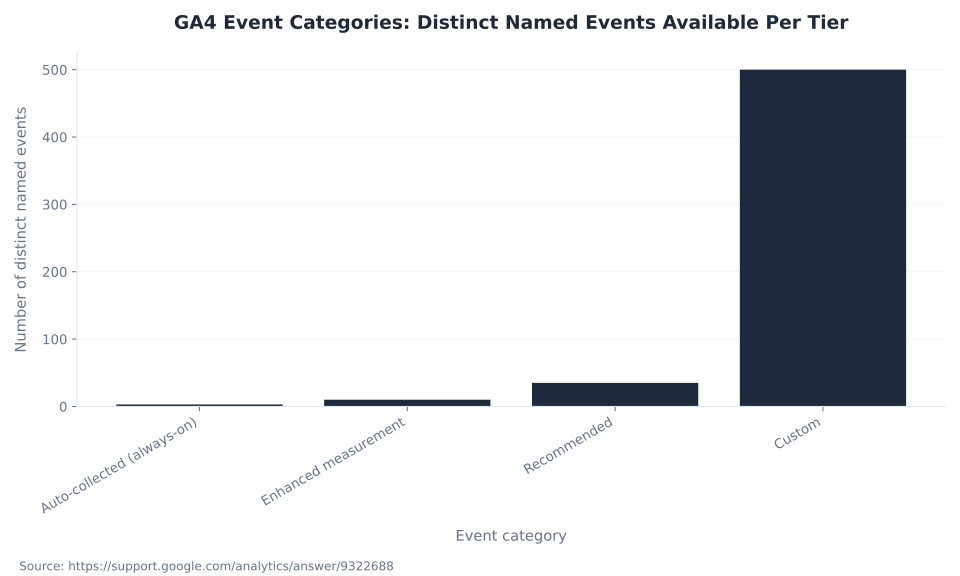
The practical starting point: a GA4 property with only the base tag installed — no enhanced measurement enabled, no recommended events implemented, no custom events configured — records three always-on events: first_visit, session_start, and user_engagement (Google Analytics Help). Three events capturing session boundaries and engagement time. Nothing about what users do between those boundaries. Enhanced measurement adds 10 more event names — but only when explicitly toggled on in Admin. Recommended and custom events require implementation code, always.
Parameters are the other half of the model. Every event carries key-value pairs — parameters — that describe the context of the interaction. The purchase event carries transaction_id, currency, value, and an items[] array. The file_download event carries file_name, file_extension, and link_url. Parameters are where measurement value lives — but they are invisible in standard reports and Explorations until you register them as custom dimensions in Admin. That registration is not retroactive and takes 24–48 hours to propagate after setup (Google Analytics Help).
Once events are tracking correctly, the next step is marking the right ones as key events — see GA4 conversions and key events for the complete conversion setup guide. For how events are filtered and modeled under Consent Mode and server-side configurations, see GA4 data collection and privacy. Browse all GA4 concepts at the Google Analytics 4 glossary hub.
Key Takeaways
- GA4 has four event tiers: automatically collected (3 always-on events), enhanced measurement (10 event names, zero code required), recommended (35+ named events that unlock built-in reports), and custom (unlimited names, but parameters require custom dimension registration before they appear in reports).
- Event parameters are invisible in standard reports and Explorations until registered as custom dimensions. Registration applies to data collected after the definition is created — it is not retroactive.
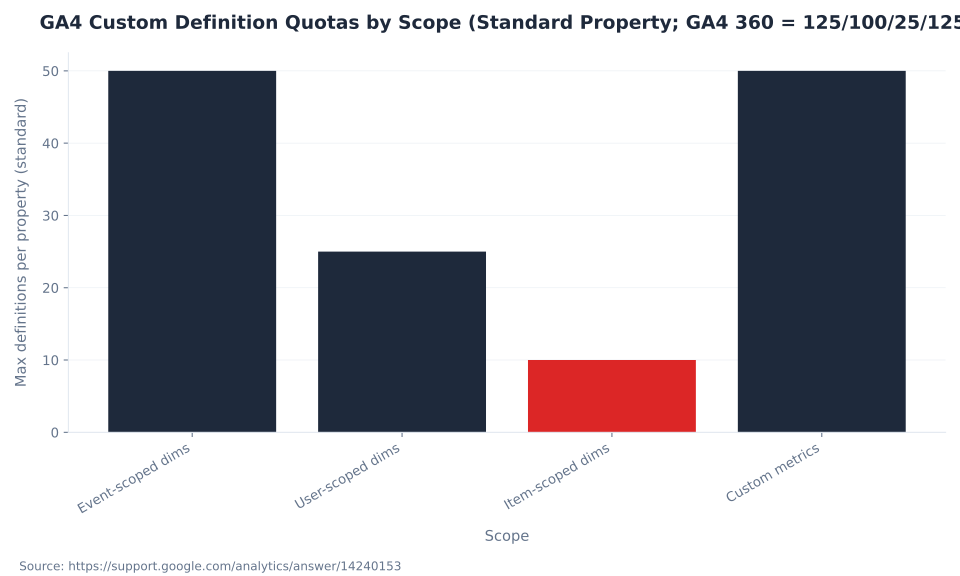
- Standard GA4 properties allow 50 event-scoped, 25 user-scoped, and 10 item-scoped custom dimensions, plus 50 custom metrics — all per property, not per account or data stream.
- Parameter values are silently truncated at 100 characters for most parameters. Named exceptions:
page_location(1,000 chars),page_referrer(420 chars),page_title(300 chars). GA4 360 does not increase these character limits. - Custom events appear in DebugView immediately and in Explorations after custom dimension registration, but not in most standard GA4 reports regardless of setup.
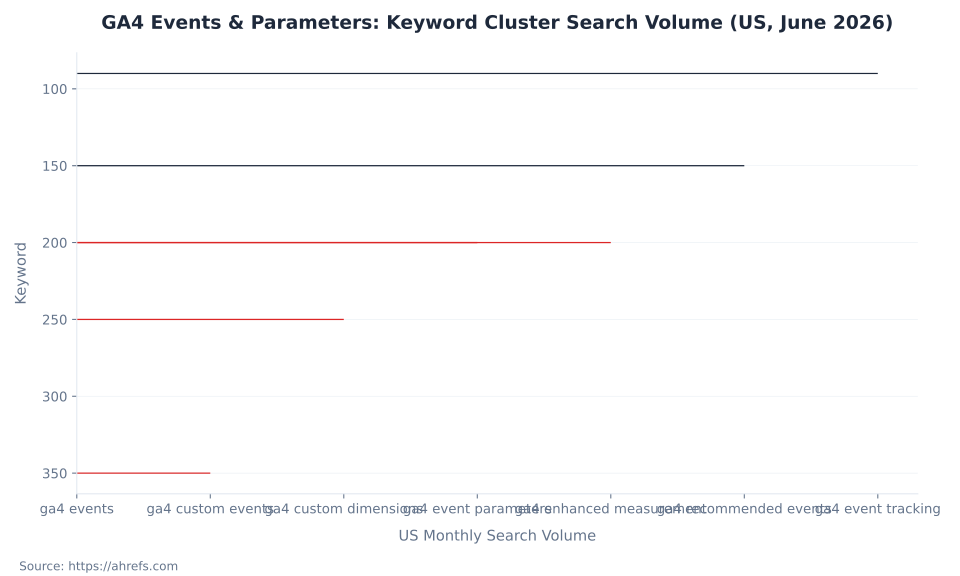
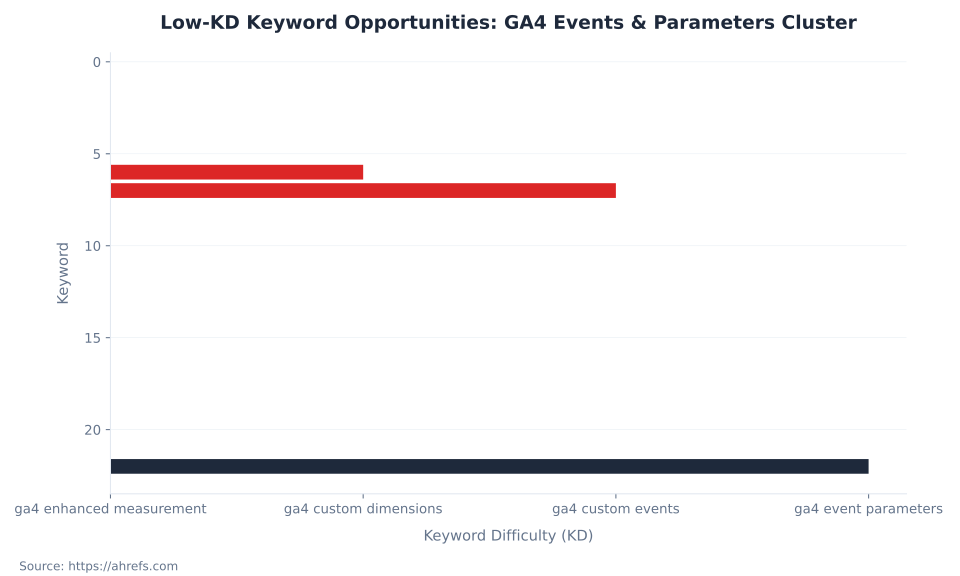
- Primary low-KD targets for this topic cluster: "ga4 enhanced measurement" (KD 1), "ga4 custom dimensions" (KD 6), "ga4 custom events" (KD 7), "ga4 event parameters" (KD 22) — sourced from Ahrefs, June 2026.
first_visit, session_start, user_engagementThe Four GA4 Event Categories: A Taxonomy That Determines Your Reports
The tier an event belongs to determines whether it appears in reports automatically, whether it requires code, and whether it unlocks native GA4 reporting features. Placing an interaction in the wrong tier — naming a conversion event order_completed instead of the recommended purchase — produces an event that fires correctly and produces nothing useful in GA4's Ecommerce reports.
The most damaging misconception: GA4 automatically tracks all user interactions once the tag is installed. It tracks three. Enhanced measurement adds 10 more — but only when explicitly enabled in Admin. Recommended and custom events require implementation code, always (Google Analytics Help).
| Category | Examples | Requires code? | In standard reports without setup? | Notes |
|---|---|---|---|---|
| Automatically collected | first_visit, session_start, user_engagement | No | Yes | 3 always-on events fire regardless of enhanced measurement. Cannot be disabled. |
| Enhanced measurement | scroll, click, view_search_results, video_start, file_download, form_start, form_submit | No — toggle in Admin | Yes, once enabled | 10 distinct event names across 7 interaction categories. Enabled per web data stream. Individual events can be toggled on or off. |
| Recommended | purchase, add_to_cart, generate_lead, sign_up, login, search | Yes | Only when event name + required parameters match GA4's schema | 35+ unique named events. Unlock built-in GA4 reports. Wrong event name or missing required parameters breaks reporting silently. |
| Custom | chatbot_opened, pdf_generated, tier_upgrade | Yes | No — Explorations only; parameters require custom dimension registration | Do not use reserved prefixes: ga_, firebase_, google_, gtag., or a leading underscore. Appear in DebugView and real-time only until custom dimensions are registered. |
The "recommended events unlock existing and future reporting capabilities" framing from Google's documentation is load-bearing: the recommended event taxonomy is GA4's reporting API contract. Send purchase without transaction_id, currency, and value and the Ecommerce purchases report stays empty. Rename purchase to order_completed and the report stays empty regardless of how cleanly the event fires. The report depends on the exact event name and required parameter set, not just a correctly-firing tag. Recommended ecommerce events follow a stricter parameter contract — see GA4 ecommerce tracking for the full item parameter schema.
Custom events are a last resort, not a first choice. Google's documentation states directly: "Make sure you only create custom events when no other events work for your use case." The reporting cost: custom events do not appear in most standard GA4 reports, their parameters are invisible until registered as custom dimensions, and that registration is not retroactive.
GA4 Enhanced Measurement Events: All 10, Fully Annotated
Enabling enhanced measurement in the web data stream admin requires zero code changes and fires 10 distinct event names across 7 interaction categories: Page Views, Scrolls, Outbound Clicks, Site Search, Video Engagement (3 events), File Downloads, and Form Interactions (2 events). That coverage sounds comprehensive. In production, each event type comes with caveats that matter (Google Analytics Help; Analytics Mania).
| Event name | When it fires | Key parameters auto-collected | Production caveats |
|---|---|---|---|
page_view | On each page load or browser history state change (SPA support via pushState/popState) | page_location, page_referrer, page_title | Cannot be disabled when enhanced measurement is on. Fires on virtual pageviews for SPAs. |
scroll | When 90% vertical depth becomes visible — once per page per session | percent_scrolled (value: 90) | 90% threshold only. No 25%, 50%, or 75% milestones. GTM required for additional thresholds. |
click | When user clicks a link leading to a different domain (outbound only) | link_classes, link_domain, link_id, link_text, link_url, outbound: true | Outbound only. Clicks within the same domain do not fire. Business domains must be registered in Tagging Settings to avoid false outbound classifications. |
view_search_results | When a search results page URL contains a recognized query parameter | search_term | Default tracked parameters: q, s, search, query, keyword. Custom query parameters must be added in enhanced measurement settings. |
video_start | When YouTube embedded video begins playing | video_current_time, video_duration, video_percent, video_provider, video_title, video_url, visible | YouTube iframes only, with JS API enabled (?enablejsapi=1). Does not fire for self-hosted video or Vimeo without custom implementation. |
video_progress | At 10%, 25%, 50%, and 75% of video watch time | Same as video_start + current video_percent | Fires at each milestone independently. Requires video_start to have fired first. |
video_complete | When video reaches 100% of watch time | Same as video_start | Does not fire if user closes the tab before the video ends. |
file_download | When user clicks a link to a file with a qualifying extension | file_extension, file_name, link_classes, link_id, link_text, link_url | Default monitored extensions include pdf, xlsx, docx, csv, zip, mp4, mov, mp3, wav, and others. Configurable in enhanced measurement settings. |
form_start | First user interaction with a form element in a session | form_id, form_name, form_destination | Unreliable in production. Does not detect AJAX submissions. Analytics Mania advises against relying on enhanced measurement form tracking in production environments. |
form_submit | When user submits a form | form_id, form_name, form_submit_text | Same AJAX limitation as form_start. Fires on native form submit events only. Validate in DebugView before relying on it. |
MB Adv Agency treats enhanced measurement as the measurement floor, not the ceiling. GTM-based custom triggers cover the edge cases that enhanced measurement's form and video events miss in production — AJAX form submissions, self-hosted video players, and scroll depth beyond the fixed 90% threshold. The value of enhanced measurement is the zero-code baseline it creates: a competent implementation builds on top of it, not instead of it. Most custom events in a well-structured GA4 property complement enhanced measurement rather than replace it.
Enhanced measurement events fire on the web data stream level. They are distinct from app data streams, where the Firebase SDK collects a different set of automatically collected events. This pillar covers web data streams. For how GA4 measurement intersects with paid campaign attribution, see GA4 for PPC and lead generation.
GA4 Recommended Events: The Reporting Contract
Google publishes 35+ unique named events across four business-type groups — online sales, lead generation, gaming, and general use cases — with specific required parameter sets for each. These events are not sent automatically. You implement them. What makes them "recommended" rather than merely "custom" is that they unlock built-in GA4 reports: the Ecommerce purchases report, the Lead acquisition report, and the Monetization overview all populate only when the expected recommended event names arrive with the correct parameter structure (Google Analytics Help; Google for Developers).
| Business type | Event name | Required parameters | What it unlocks |
|---|---|---|---|
| All sites / apps | search | search_term | Site search report |
| All sites / apps | login | method | Login method dimension |
| All sites / apps | sign_up | method | Sign-up funnel |
| Online sales | view_item | currency, value, items[] | Product detail views in Ecommerce report |
| Online sales | add_to_cart | currency, value, items[] | Cart addition data in Ecommerce funnel |
| Online sales | begin_checkout | currency, value, items[] | Checkout funnel entry |
| Online sales | purchase | transaction_id, currency, value, items[] | Ecommerce purchases report — will not populate without all four required parameters |
| Lead generation | generate_lead | currency (conditional), value (conditional) | Lead acquisition report |
| Lead generation | qualify_lead | None required | Lead qualification funnel |
| Education / general | tutorial_complete | None required | Onboarding completion rate |
The items[] array has its own parameter schema (item_id, item_name, price, quantity, item_category, and others). For the full item parameter list, see GA4 ecommerce tracking. The lead-generation group has expanded in recent GA4 updates — Google has added qualify_lead, disqualify_lead, working_lead, close_convert_lead, and close_unconvert_lead to the taxonomy. The exact count of recommended events exceeds 35 unique names across all business types and will continue to grow as Google extends the reporting infrastructure.
The practical implementation order for any interaction: (1) check automatically collected events, (2) check enhanced measurement events, (3) check recommended events with required parameters, (4) only if none of the above cover the use case, create a custom event. Skipping steps 1–3 and jumping to custom events costs reports that Google's recommended taxonomy would have given for free. Custom dimensions you register here unlock slicing in Explorations — see GA4 reports and Explorations for the full Exploration setup guide.
GA4 Events & Parameters: Keyword Cluster Search Volume (US, June 2026)
Custom Events in GA4: When to Use Them and What They Cost
Custom events — events whose names appear nowhere in GA4's automatically collected, enhanced measurement, or recommended taxonomies — exist to cover interactions that none of the 50+ named events in those tiers address. A chatbot_opened event, a tier_upgrade event, a configurator_completed event. The reporting behavior is different from every other tier: custom events appear in DebugView immediately, in real-time reporting immediately, in Explorations after custom dimension registration — and in most standard GA4 reports, not at all, regardless of how correctly they fire (Google Analytics Help).
The naming rules for custom events are strict and applied silently — a naming error does not produce a visible error; the event simply does not appear in reports or is dropped:
| Rule | Specification | What happens on violation |
|---|---|---|
| Max length | 40 characters | Silently truncated or event dropped |
| Allowed characters | Letters, numbers, underscores only. Must start with a letter. Non-English letters are supported. | Event does not appear in reports |
| Case sensitivity | Case-sensitive: my_event and My_Event are distinct events | Split data across two event names |
| Reserved prefixes | ga_, firebase_, google_, gtag., leading underscore _ | Silently dropped or causes errors |
| Reserved event names | Cannot re-use GA4's built-in event names (e.g., do not create a custom event called purchase — use the recommended event instead) | Conflicts with GA4's built-in processing |
The practical workflow for any custom event: (a) verify no recommended event covers the use case; (b) name the event in snake_case following GA4's conventions; (c) create custom dimension definitions for every parameter that needs to appear in reports — before activating the tags; (d) implement in GTM and validate in DebugView; (e) allow 24–48 hours for dimensions to populate in standard reports. Most custom events on lead-generation sites are implementable via Google Tag Manager without touching site code — GTM is the primary implementation path on web.
Create custom dimension definitions in Admin before activating the tags that fire their parameters — or accept a permanent gap in reporting history for that dimension. The not-retroactive rule applies the moment the first event fires without a registered dimension.
GA4 Custom Definition Quotas by Scope (Standard Property; GA4 360 = 125/100/25/125)
GA4 Event Parameters: Concepts and Character Limits
Parameters are the context that makes events meaningful. An event named file_download tells you a download happened. The parameter file_name: "Q2-pricing.pdf" tells you which file. The parameter file_extension: "pdf" tells you the format. Without parameters — or without registered custom dimensions to surface them — events are counters, not insights. The conceptual hierarchy matters for implementation planning: events surface automatically in GA4 reports by name; parameters do not surface at all until registered (Google Analytics Help; Google for Developers).
| Concept | What it is | Where it appears without registration | Requires registration? |
|---|---|---|---|
| Event | A named action or interaction | Event count in standard reports, real-time, DebugView | No — event names surface automatically |
| Event parameter | A key-value pair sent with an event, providing context | DebugView and BigQuery raw export only | Yes — must be registered as a custom dimension to appear in standard reports or Explorations |
| User property | A persistent attribute describing the user across sessions | DebugView only | Yes — must be registered as a user-scoped custom dimension |
| Custom dimension (event-scoped) | A registered dimension backed by an event parameter | Standard reports and Explorations after registration (24–48 hr delay) | Yes — Admin → Custom definitions → Create |
| Custom dimension (user-scoped) | A registered dimension backed by a user property | Standard reports and Explorations after registration | Yes |
| Custom dimension (item-scoped) | A registered dimension backed by a parameter inside the items[] array | Ecommerce reports after registration | Yes |
| Custom metric | A registered numeric metric backed by a numeric event parameter | Reports and Explorations after registration | Yes — always event-scoped |
Technical limits on parameters are set per property type and are applied silently. The most commonly hit limit in production is the 100-character parameter value ceiling. Long page URLs, UTM strings encoded in custom parameters, and any attempt to send JSON blobs as parameter values all exceed this limit and are truncated without error or warning in DebugView (Google Analytics Help). Named exceptions exist for three built-in parameters: page_location accepts up to 1,000 characters; page_referrer accepts up to 420 characters; page_title accepts up to 300 characters. GA4 360 does not increase character limits — this is verified against Google's official collection limits page. Only volumetric caps increase with 360.
The 25-parameter-per-event limit includes automatically collected parameters (e.g., page_location, page_referrer, language, screen_resolution). In practice, each custom event has 20–22 slots available for custom parameters. For ecommerce events, the items[] array has a separate quota of 27 custom item-scoped parameters. The user_engagement event that drives engagement time reporting — see GA4 engagement and user metrics — carries engagement_time_msec as its primary parameter.
GA4 Event Categories: Distinct Named Events Available Per Tier
Custom Dimensions and Metrics: Registration, Scopes, and the 24-Hour Delay
Parameters sent with events are stored in GA4's raw data and visible in DebugView. They are invisible in standard reports and most Explorations until you register them as custom dimensions or custom metrics in Admin → Property → Custom definitions. Registration takes 24–48 hours to propagate — after that, the dimension appears in standard reports and Explorations for data collected after the registration date (Google Analytics Help).
Three scopes cover the three data contexts in GA4: event-scoped dimensions (backed by event parameters, apply to individual event occurrences), user-scoped dimensions (backed by user properties, persist across sessions and apply to the user), and item-scoped dimensions (backed by parameters inside the items[] array, apply to ecommerce item data). Custom metrics are always event-scoped and accept only numeric values — integer, currency, distance, or a numeric type you define.
The registration workflow: Admin → Property → Custom definitions → Create custom dimension. Enter a human-readable display name (what appears in GA4's report interface), select the scope (Event, User, or Item), and enter the exact parameter name — case-sensitive, matching what the tag sends. For event-scoped dimensions, GA4 asks you to select the event type the parameter is associated with (optional but recommended for organization). The parameter name must match exactly: file_name and File_Name are treated as different parameters.
MB Adv Agency consistently audits custom definition quotas quarterly for clients on standard properties. The 50-event-scoped ceiling is tighter than most teams expect once a property serves multiple brands, campaign types, or has accumulated parameter definitions from previous implementations without cleanup. An audit of Admin → Custom definitions → Quota information once per quarter is the right operating cadence for any property with a complex implementation. Archiving an unused definition frees the slot — but does not restore historical data for that parameter.
Automatically collected events (no setup required)
These events fire as soon as the GA4 tag or Firebase SDK is installed, with no additional code, and populate core reports out of the box.
| Event name | When it fires | Key parameters | Notes |
|---|---|---|---|
first_visit | First time a user visits the site (web) | page_location, traffic_type | Based on the _ga cookie; does not fire on return visits. |
session_start | Beginning of each new session | ga_session_id, ga_session_number | A new session starts after 30 minutes of inactivity (default) or at midnight. |
user_engagement | When a page is in focus for at least one second | engagement_time_msec | Drives the engaged-session metric; fires to summarize engagement duration. |
page_view | Each page load or browser history state change | page_location, page_referrer | Also an enhanced measurement event — the categories overlap here. |
click | Outbound link clicks | link_url, link_domain, outbound | Also an enhanced measurement event. |
Custom Dimension Quota: Standard Property vs. GA4 360
All custom definition limits are per property, not per account or per data stream. A standard GA4 property has 135 total custom definition slots across all scopes. GA4 360 raises that to 375 (Google Analytics Help; Google Analytics Help).
| Scope | Standard property limit | GA4 360 limit | Backed by |
|---|---|---|---|
| Event-scoped custom dimensions | 50 | 125 | Event parameters |
| User-scoped custom dimensions | 25 | 100 | User properties |
| Item-scoped custom dimensions | 10 | 25 | Parameters inside items[] array |
| Custom metrics (event-scoped) | 50 | 125 | Numeric event parameters |
| Calculated metrics | 5 | 50 | Formula-based combinations of existing metrics |
| Total (dimensions + metrics) | 135 | 375 | — |
When a property approaches the 50-event-scoped ceiling on a standard property, the correct remedy is an audit of Admin → Custom definitions → Quota information, not an automatic upgrade to GA4 360. Archiving an unused definition frees the slot. Re-creating an archived definition does not restore historical data for the parameter during the archived period — the data existed in raw storage, but the interface gap is permanent unless the property exports to BigQuery. The BigQuery integration — see GA4 integrations and BigQuery — provides access to the raw event data regardless of custom dimension registration status.
User-scoped custom dimensions (user properties) have a 25-per-property limit on standard properties that differs from event-scoped dimensions in one important way: archiving user-scoped dimensions does not free the slot. The 25-property limit is fixed. Plan your user property definitions carefully before implementation — reducing user properties later requires archiving without slot recovery.
How to Create a Custom Event in GA4: Seven-Step Process
Creating a custom event correctly requires completing all seven steps in order. Skipping step 4 (custom dimension registration) before step 5 (tag activation) produces an event that fires silently and delivers no usable data in reports for weeks. Estimated time for a standard web implementation via GTM: 45 minutes. Steps verified against the GA4 interface and Google's developer documentation, June 2026.
Step 1: Verify no existing event covers the use case. Check the automatically collected events list (Google Analytics Help), the enhanced measurement events (Google Analytics Help), and the recommended events taxonomy (Google Analytics Help). Custom events only when none of the 50+ existing named events cover the interaction. If a recommended event name fits, use it — the reporting benefits are significant and irreplaceable.
Step 2: Name the event following GA4 naming rules. Event names must be 40 characters or fewer, start with a letter, contain only alphanumeric characters and underscores (e.g., chatbot_opened, pdf_downloaded, tier_upgrade). Do not use reserved prefixes: ga_, firebase_, google_, gtag., or a leading underscore. Do not use existing GA4 event names. Names are case-sensitive — establish a naming convention and apply it consistently across all tags.
Step 3: Define the parameters the event will carry. Determine which contextual data the event needs (e.g., document_type, form_name, user_segment). Parameter names follow the same 40-character, alphanumeric-underscore rules. Plan string values to stay within 100 characters — values exceeding this are truncated silently. Each event can carry a maximum of 25 parameters total including auto-collected parameters, leaving 20–22 slots for custom parameters.
Step 4: Register custom dimensions before the event fires. In GA4 Admin → Property → Custom definitions → Create custom dimension: enter a human-readable dimension name, select "Event" scope, and enter the exact parameter name — case-sensitive. Repeat for each parameter that needs to surface in reports. This step must happen before data is collected. Data sent before registration does not retroactively appear in reports through that dimension.
Step 5: Implement the event tag in Google Tag Manager. In GTM: create a new GA4 Event tag, select the GA4 configuration tag, enter the event name matching Step 2 exactly, add parameters and their dynamic values as Key/Value pairs in the event parameters table. Set an appropriate trigger (click trigger, form trigger, custom event trigger, timer trigger). The Google Tag Manager glossary covers the GTM workspace fundamentals. Preview and validate in GTM Preview mode before publishing.
Step 6: Validate in GA4 DebugView. Activate GTM Preview mode with your browser pointed at the page containing the trigger. Open GA4 → Admin → DebugView. Confirm the custom event name appears, verify each parameter is present with the correct value, and check for truncation on long string values. DebugView confirms the event reached GA4 — it does not confirm parameter visibility in standard reports. That requires step 4 to be complete.
Step 7: Publish the GTM container and allow 24–48 hours for report population. Publish the GTM container. Custom dimensions appear in standard reports and Explorations after 24–48 hours from first data collection with the registered parameter. Check Admin → Custom definitions → Quota information to confirm available slots. Once populated, the custom dimension is available for use in all standard reports, Explorations, and audience definitions. See GA4 reports and Explorations for how to build Explorations using custom dimensions.
Low-KD Keyword Opportunities: GA4 Events & Parameters Cluster
Get Your GA4 Event Taxonomy Audited
A GA4 property with unmapped parameters, exhausted custom dimension quotas, or custom events firing where recommended events belong produces unreliable reports. MB Adv Agency audits event taxonomies, fixes custom dimension gaps, and validates enhanced measurement coverage before campaign launches.
Request an Audit →The Not-Retroactive Rule: What It Means for Your Reporting History
Custom dimensions in GA4 apply only to data collected after they are registered in the Admin interface. An event parameter sent to GA4 for six months before a custom dimension is created for it will show dimension values starting from the day of registration — not from the day the parameter first fired. The preceding six months of parameter data are permanently invisible in standard reports and Explorations (Google Analytics Help; Analytics Mania).
Custom dimensions are not retroactive. Data sent before you register a custom dimension will not appear through that dimension in any GA4 report. Create your custom dimension definitions in Admin before activating the tags that send their parameters — or accept a permanent gap in your reporting history for that dimension. This rule applies to all three scopes: event-scoped, user-scoped, and item-scoped.
The not-retroactive rule has one exception: BigQuery. If a GA4 property exports raw event data to BigQuery — see GA4 integrations and BigQuery for the integration setup — raw parameter values exist in the BigQuery tables regardless of custom dimension registration status. Historical parameter data for any period covered by the BigQuery export is queryable in BigQuery SQL, even for parameters that were never registered as custom dimensions in the GA4 interface. The retroactivity limitation applies only to GA4's reporting interface — standard reports, Explorations, and audience definitions.
The practical implication for implementations: create all custom dimension definitions in Admin before activating any tag that fires their parameters. The correct workflow is: Admin first, GTM publish second. For implementations already live with unregistered parameters, the fix is: (1) register the custom dimension immediately, (2) accept the data gap for the period before registration, (3) if the raw data is needed for the gap period, establish a BigQuery export and query the raw event tables. The Core Web Vitals and page experience pillar covers another common GA4-adjacent measurement gap — page-level performance data that GA4 does not natively surface.
For implementations where the property has been live for months and parameters have been firing without registered dimensions: the data from those months is in GA4's raw storage. The interface gap is permanent for standard reports. BigQuery export is the recovery path — query events_* tables, filter by event_name, and extract the parameter values from event_params. If a BigQuery export was not running during the gap period, the raw data is not recoverable through any interface.
Frequently Asked Questions: GA4 Events and Parameters
If your GA4 event taxonomy needs an audit before a campaign launch — or your custom dimension quota is running low — contact MB Adv for a measurement review.
Browse the GSC Glossary →Data and methodology: Keyword volume and difficulty data from Ahrefs, operator-supplied June 2026 (US monthly search volume). All event specifications, parameter limits, quota counts, and character limits verified against live Google Analytics Help and Google for Developers documentation, June 2026. Two corrections applied against an earlier brief draft: (1) parameter value limit for GA4 360 is the same 100 characters as standard properties — character limits are not increased by 360 upgrades; (2) the 100,000-events-per-user-per-day figure is the total event volume cap — the "500" figure cited elsewhere refers specifically to distinctly named events per mobile app user per day, a different and narrower limit. No mbadv client metrics are cited — all MB Adv attributions are qualitative agency-practice observations. Enhanced measurement production caveats verified against Analytics Mania (analyticsmania.com), June 2026. Reviewed by MB Adv Agency, June 2026.

As a Google Ads expert, I bring proven expertise in optimizing advertising campaigns to maximize ROI.
I specialize in sharing advanced strategies and targeted tips to refine Google Ads campaign management.
Committed to staying ahead of the latest trends and algorithms, I ensure that my clients receive cutting-edge solutions.
My passion for digital marketing and my ability to interpret data for strategic insights enable me to offer high-level consulting that aims to exceed expectations.
Google Partner Agency
We're a certified Google Partner Agency, which means we don’t guess — we optimize withGoogle’s full toolkit and insider support.
Your campaigns get pro-level execution, backed by real expertise (not theory).

4.9 out of 5 from 670+ reviews on Fiverr.
That’s not luck, that’s performance.
Highly recommend Matteo to set up your server side tracking. He has a deep understanding of e-commerce tracking and will go above and beyond to make sure everything is set up correctly and working 100%. If you are scaling your store this set up is non-negotiable in my opinion and there isn't many people who have this much knowledge or put the effort in to get it right. Thanks again!

avorodesign.com
I can only recommend Matteo! He was very patient, professional and very knowledgeable about GA4, Consent Mode v2, and GDPR compliance. Communication was clear, and the setup was done professionally and efficiently. Highly recommend him for anyone needing reliable tracking implementation.

www.natureiki.life
Matteo shines in the realm of online professionals. His work is not only deep in data but also complemented by his proactive communication and cooperation, setting a new standard for freelancers. If you want someone who truly exceeds expectations, look no further. Highly recommended!

www.omanbeverlysmyth.com
Exceptional Service Beyond Expectations - Outstanding Service Impeccable depth, flawless delivery, and exceptional language fluency—this service exceeded all expectations. Highly recommended. Matteo truly ROCKS!!!

ium-paris.com
Top-notch, always highly value working with Matteo. An absolute Google Ads Genius. This is approximately the 8th time I have hired him and he's helped us get 6-7 ROAS. We are excited in continuing to improve our lead flow. Hire this guy if you need Google Ads help. Thanks Matteo!

www.dleeventgroup.com
I finally found the guy who can setup server side tracking and all the ecosystem properly. I definitely recommend Matteo. He is very responsive, kind and wants to dig into things. He configured GA4, Meta, Google Ads, Outbrain and google consent v2 with Cookiebot. Thanks Matteo.

inomega.fr
MB Adv delivered exceptional work with outstanding professionalism and lots of patience, taking time to see effects of changes made and not just do the work and submit it. The proactive communication and video summaries of the work completed made working with Matteo a pleasure, as he consistently went above and beyond. Highly recommended for web analytics projects! We are already working on another project.

www.withnellsensors.co.uk
Working with Matteo on my Google Ads was a game-changer. He's not just a strategist, he's a true partner. He understood my goals and tailored a campaign that perfectly reached my target audience. I'm grateful for his expertise and dedication.

dccargo.com
Click-driven mind
with plastic-brick obsession.
We build Google Ads campaigns with the same mindset we use to build tiny brick worlds: strategy, patience, and zero tolerance for wasted pieces.
Data is our blueprint. Growth is the only acceptable outcome.