What Is Google Analytics 4 (GA4): The Complete Guide
GA4 Default Data Retention
2 months
The out-of-the-box retention limit for user-level and event-level data in GA4 Explorations. The maximum for free properties is 14 months — but it must be manually set in Admin → Data settings → Data retention on day one. The change is not retroactive: data older than the prior setting is already gone. Source: Google Analytics Help (answer/7667196), June 2026
What Is Google Analytics 4?
Google Analytics 4 (GA4) is Google’s current-generation web and app analytics platform, replacing Universal Analytics (UA), which permanently stopped processing data on July 1, 2023 for standard properties and July 1, 2024 for UA 360. Every new property created today is a GA4 property. Universal Analytics is fully decommissioned.
The defining shift in GA4 is its data model. Universal Analytics built its collection layer around session containers and distinct hit types: a pageview hit, an event hit, a transaction hit. GA4 replaces all hit types with a single primitive: the event. A pageview is an event named page_view. A session start is an event named session_start. A purchase is an event named purchase. Every event carries up to 25 custom parameters — key-value pairs providing dimensional context. This flat, extensible schema powers cross-platform reporting and a BigQuery export structure that is far easier to query than UA’s session-scoped schema. For the full breakdown of event types and parameters, see GA4 events and parameters.
GA4 launched officially on October 14, 2020. The UA sunset was announced in March 2022. Since July 1, 2023, any property still running on UA has been collecting no new data. Teams that did not export historical UA data before the read window closed have a clean break in their time-series. There is no automated path to port UA data into GA4 — the data models are incompatible. For anyone setting up analytics today, GA4 is the starting and ending point, not a migration target. The Google Analytics 4 glossary hub covers the broader vocabulary; this pillar covers the foundational model, setup, and the distinctions that cause the most operational confusion.
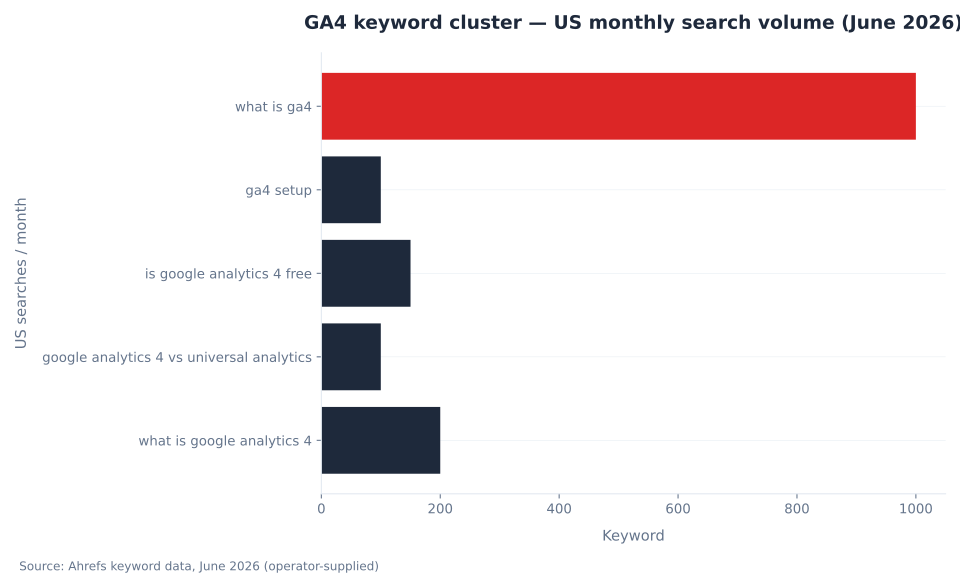
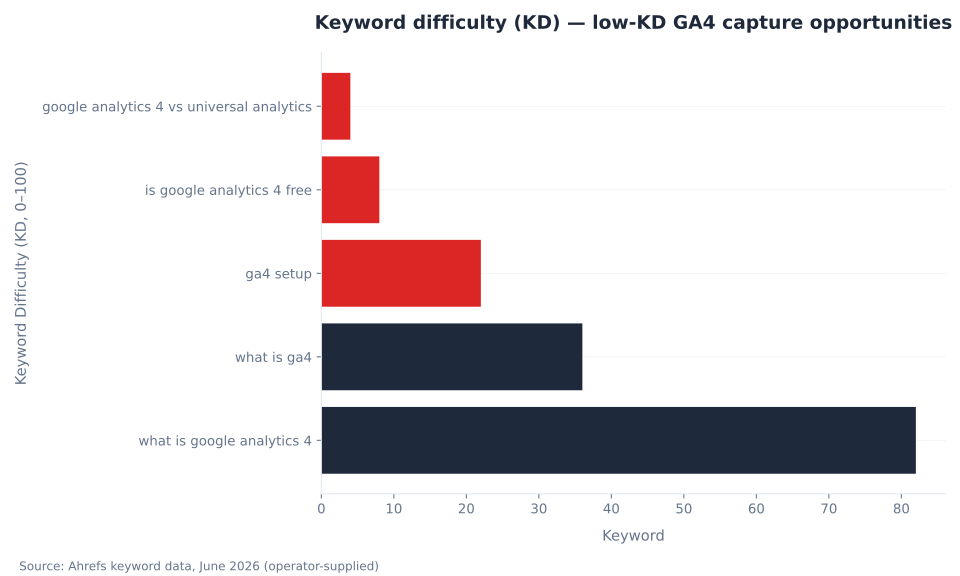
Target keyword cluster: “what is ga4” (1,000/month US, KD 36), “ga4 setup” (KD 22), “is google analytics 4 free” (KD 8), “google analytics 4 vs universal analytics” (KD 4). The head terms — “google analytics” (KD 94), “ga4” (KD 89) — are dominated by Google’s own properties. Source: Ahrefs, June 2026.
GA4 Key Terminology Reference
GA4 introduced new terms and redefined existing ones. The definitions below use GA4’s current vocabulary as of June 2026, including the 2024 rename of “Conversions” to “Key events” in the Analytics interface. Anyone referencing instructional content from before mid-2024 will encounter “Conversions” where the current interface shows “Key events.”
| Term | GA4 definition | UA equivalent |
|---|---|---|
| Event | The atomic unit of GA4 data collection; any interaction recorded by the tracking tag. A pageview, a click, a purchase — all are events with the same structure: a name + up to 25 parameters. | Hit type (pageview, event, transaction, timing) — distinct in UA; unified in GA4 |
| Parameter | A key-value attribute attached to an event (e.g., page_title, item_name, currency). Up to 25 custom parameters per event. | Custom Dimensions / Custom Metrics; Category / Action / Label / Value (UA events) |
| Session | A group of user interactions within a 30-minute inactivity window. In GA4, session_start is itself an event. Sessions end at midnight or after 30 minutes of inactivity. | Session — same 30-minute default |
| Engaged session | A session lasting 10+ seconds, OR containing 1+ key events, OR containing 2+ page_views/screen_views. The primary session quality signal in GA4. | No direct equivalent; Avg. Session Duration was the closest proxy |
| Engagement rate | Engaged sessions ÷ total sessions. The headline session-quality metric in GA4; replaces bounce rate as the default KPI. | No direct equivalent |
| Bounce rate (GA4) | Sessions that are NOT engaged sessions ÷ total sessions. Inverse of engagement rate. A site with thorough single-page content shows a very different GA4 bounce rate than its UA bounce rate for the same traffic. | Single-page sessions ÷ total sessions — fundamentally different |
| Key event | An event marked as business-critical in the GA4 interface (renamed from “Conversion” in 2024). Appears in GA4 reports; feeds audience building and predictive models. | Goal completion |
| Data stream | A single data source (web, iOS app, or Android app) connected to a GA4 property. Each web stream has a Measurement ID in format G-XXXXXXXX. | Property — UA required one property per data source; GA4 unifies them in one |
| Measurement ID | The unique identifier for a GA4 web data stream; format G-XXXXXXXX. Replaces UA’s Tracking ID (UA-XXXXXXXX). | Tracking ID (UA-XXXXXXXX) |
| Reporting identity | The method GA4 uses to stitch cross-device user journeys: Blended (User ID + Device ID + behavioral modeling), Observed, or Device-based. | No equivalent — UA 360 + User ID were required for cross-device stitching |
Key Takeaways
- GA4’s event-based model replaces UA’s session-and-hit-type model. Every interaction — including pageviews — is now an event with parameters. The data schema is flat, extensible, and BigQuery-native.
- Universal Analytics is fully decommissioned: standard properties shut down July 1, 2023; UA 360 shut down July 1, 2024. Historical data does not migrate automatically. Any new analytics implementation starts in GA4.
- Change data retention to 14 months on day one. The default is 2 months. The change is not retroactive. This is the single highest-impact day-one configuration step.
- In 2024, Google renamed GA4 “Conversions” to “Key events.” The word “Conversion” in the GA4 interface now refers exclusively to a Google Ads conversion action — a different object, counted differently.
- GA4 and Google Search Console measure different things. GA4 measures post-landing on-site behavior across all channels. GSC measures pre-landing search appearance for organic Google results only. Discrepancies between the two are expected and structurally inevitable.
- Consent Mode v2 is required for any new Google Ads audience or conversion connection on properties serving EEA users (enforced from March 2024). New properties must implement it before linking to Google Ads.
GA4 Free — Daily BigQuery Limit
1M events/day
Daily batch BigQuery export limit for standard (free) GA4 properties. Analytics 360 removes this limit. Source: BigQuery export help.
GA4 Launch Date
Oct 14, 2020
Official GA4 launch date. The precursor “App + Web” property type entered beta July 31, 2019. UA standard shutdown followed on July 1, 2023.
Free Tier — Max Data Retention
14 months
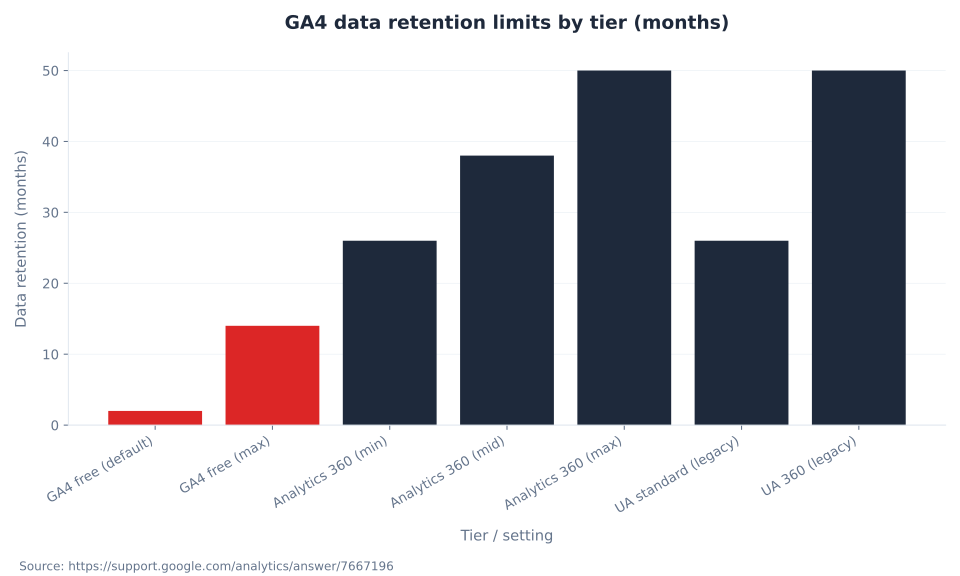
Maximum retention for user/event-level Explorations data on free properties, vs. 2-month default. Must be manually set. Analytics 360 extends to 26/38/50 months.
Max Data Streams / Property
50
Total data streams per GA4 property (max 30 app streams within that limit). A single property handles web + iOS + Android unified — a capability that required UA 360 + custom stitching.
GA4 vs. Universal Analytics: Core Differences
Universal Analytics and Google Analytics 4 share a brand name and a measurement intent. The data models, session definitions, metric calculations, and storage schemas are fundamentally different. The table below covers the dimensions that cause the most operational confusion for teams migrating from UA documentation, UA goals, or UA-era reporting templates.
| Dimension | Universal Analytics (legacy) | Google Analytics 4 (current) |
|---|---|---|
| Status | Shut down. Standard: July 1, 2023. UA 360: July 1, 2024. | Active. The only option for new properties. |
| Data model | Session-based. Hit types: pageview, event, transaction, social, timing. | Event-based. Everything is an event with parameters. |
| Pageview | Dedicated hit type (pageview). | Standard event: page_view. |
| Event structure | Category / Action / Label / Value (4 fixed fields). | Event name + up to 25 custom key-value parameters (extensible). |
| Bounce rate | Single-page sessions ÷ total sessions. | Inverse of engagement rate: sessions that do NOT meet the engagement threshold (10s+ OR key event OR 2+ page_views). |
| Engaged session | Does not exist. | Session lasting 10+ seconds, or containing 1+ key events, or containing 2+ page_views. |
| Conversion concept | Goal completion (once per session per goal). | Key event (GA4 side, renamed 2024) / Conversion (Google Ads side). Counted differently. |
| Cross-device stitching | Separate Firebase / UA properties required; cross-device needed UA 360 + User ID. | Built in via Blended reporting identity: User ID → Device ID → behavioral modeling. |
| App + web in one property | Separate Firebase / UA properties required. | Single property with multiple data streams (web + iOS + Android). |
| BigQuery export | GA 360 (paid) only. | Free tier: 1 million events/day daily export. 360: higher limits + streaming export. |
| Data retention (Explorations) | Up to 26 months (standard), up to 50 months (360). | 2 months default; max 14 months (free). Change on day one. |
| AI / predictive features | None. | Predictive audiences, predictive metrics, Ask Advisor (Gemini-powered, beta 2025+). |
The bounce rate divergence is the most operationally significant metric change. In UA, a reader who arrives on a blog post, reads it completely, and leaves is a bounce. In GA4, that same session is an engaged session if it lasts 10+ seconds — and the engagement rate for quality content will be higher than UA’s non-bounce rate for the same traffic. Neither metric is wrong; they measure different things. Reporting templates that compare UA bounce rate directly to GA4 bounce rate are comparing incompatible metrics. For engagement metric depth, see GA4 engagement and user metrics.
The conversion counting divergence matters for paid media. UA goals counted once per session per goal. GA4 key events count multiple times per session if the event fires multiple times. When a GA4 key event is imported to Google Ads as a conversion, Ads counts per-click — which differs again from GA4’s per-event count. These differences appear as discrepancies in cross-platform reporting and are not data errors; they are counting-model differences. See GA4 conversions and key events for the full breakdown.
The GA4 Event-Based Model: Four Tiers of Data Collection
GA4 organizes all events into four tiers based on how they are collected and what setup they require. The tier determines whether an event fires with zero code, with a toggle, with developer work, or with developer work plus explicit parameter registration in the GA4 Admin.
| Event tier | How it’s collected | Examples | Setup required |
|---|---|---|---|
| Automatically collected | Fires the moment the Google tag or Firebase SDK is installed. No configuration. | session_start, first_visit, user_engagement | None — always on. |
| Enhanced measurement | Toggle on/off in data stream settings. No code required. | page_view, scroll (90% depth), click (outbound), file_download, video_start, video_progress, video_complete, form_interaction, form_submit | Admin → Data streams → Enhanced measurement toggle. |
| Recommended events | Google-defined naming conventions. Require implementation but power standard reports automatically when the exact name is matched. | purchase, add_to_cart, sign_up, login, search, generate_lead, begin_checkout | Developer or GTM implementation. Must use exact event name for automatic ecommerce/lead reports. |
| Custom events | Fully custom name and parameters. Do not appear in standard reports without additional configuration. | Any business-specific interaction not covered by the tiers above. | Developer or GTM implementation + parameter registration in Admin → Custom definitions. |
The enhanced measurement tier deserves emphasis: scroll tracking (firing at the 90% scroll depth threshold), outbound click tracking, file download tracking, video engagement events for YouTube embeds, and form submission tracking all fire with zero code once the toggle is on. In Universal Analytics, every one of these required manual implementation. The Google Tag Manager integration makes recommended and custom event implementation accessible without direct code changes; GTM is the recommended implementation path for most sites that already use it for other tags.
For e-commerce implementations, recommended events follow a prescribed schema: purchase requires an items array with specific sub-parameters, and the currency parameter is required on all purchase events. Missing currency causes revenue to display as $0 in monetization reports even when purchase events fire correctly. For the complete e-commerce implementation reference, see GA4 ecommerce tracking.
GA4 Account, Property, and Data Stream Hierarchy
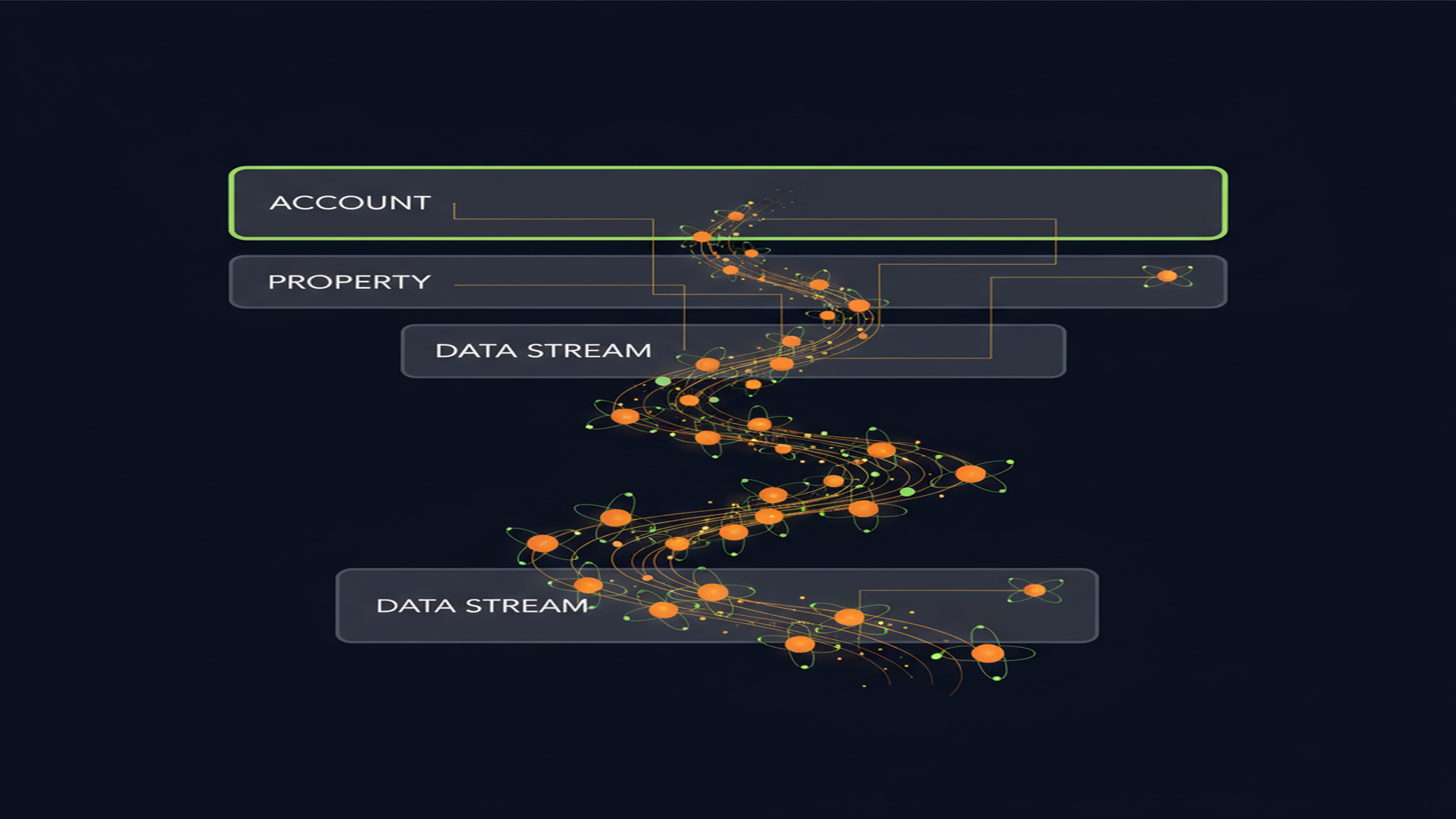
A GA4 property receives data from one or more data streams. One property handles an entire product — website, iOS app, Android app — in a single unified view. The table below covers the hierarchy from account to data stream, including the 360-only tiers that replace UA Views.
| Level | What it is | Free tier limit | Notes |
|---|---|---|---|
| Account | Administrative container; owns properties and access controls. | Up to 100 per Google account | Houses data-sharing settings and user permissions. |
| Property | The analytics entity; holds all data streams, reports, and settings. | Up to 2,000 per account | One property per logical product or brand is standard. GA4 unifies web + app here. |
| Data stream — Web | Website sending data via the Google tag or GTM. Identified by Measurement ID (G-XXXXXXXX). | Up to 50 streams total per property | One Measurement ID per web stream. |
| Data stream — iOS app | iOS app sending data via the Firebase SDK. | Counts toward 50-stream limit; max 30 app streams | Requires Firebase SDK integration. |
| Data stream — Android app | Android app sending data via the Firebase SDK. | Counts toward 50-stream limit; max 30 app streams | Requires Firebase SDK integration. |
| Subproperty (360 only) | A filtered view of a parent property; replaces UA Views for access segmentation. | Analytics 360 only | Up to 400 subproperties per source property. |
| Roll-up property (360 only) | Aggregates data from multiple source properties for multi-brand or multi-region consolidated reporting. | Analytics 360 only | For cross-brand or cross-region unified views. |
The property structure change from UA represents a significant architectural shift. In UA, a “View” was the primary access-control primitive — teams got filtered views so QA staff could see unfiltered data while analysts worked in filtered views. GA4 removes Views entirely for free properties. The replacement for access segmentation is the 360-only Subproperty. For free-tier properties, the recommended access-control pattern is a single property with carefully managed user permissions and data filters at the Admin level.
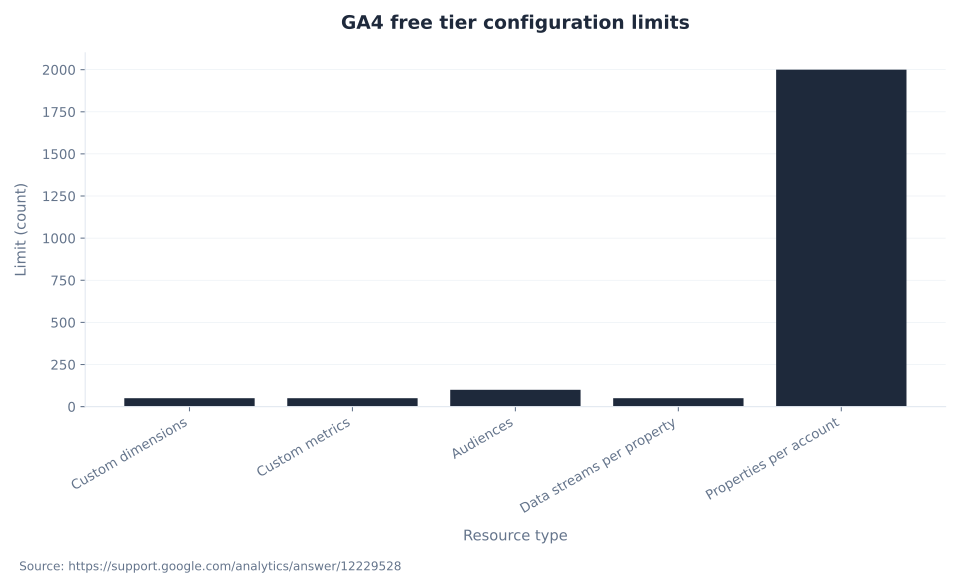
The additional configuration limits for free properties: 50 custom dimensions, 50 custom metrics, 100 audiences, 50 data streams per property, 2,000 properties per account. These limits are defined in Google’s configuration limits documentation. For BigQuery-heavy implementations and larger data architectures, see GA4 integrations and BigQuery.
GA4 keyword cluster — US monthly search volume (June 2026)
Is Google Analytics 4 Free? Free Tier vs. Analytics 360
GA4 is free for the vast majority of use cases. The free tier includes the full standard reporting interface, Explorations, Google Ads integration, BigQuery export (up to 1 million events per day), predictive audiences, and predictive metrics. Analytics 360 — the paid enterprise tier, sold through Google Marketing Platform resellers — adds subproperties, roll-up properties, longer data retention, streaming BigQuery export, and elevated configuration limits.
| Feature | GA4 free | Analytics 360 (paid) |
|---|---|---|
| Cost | Free | Starts at $50,000/year (up to ~25M monthly events); scales toward $150,000–$200,000+/year. Custom pricing through GMP resellers only. |
| Data retention — Explorations | 2 months default; max 14 months (must be manually changed) | Up to 50 months (tiered: 26, 38, or 50 months) |
| BigQuery daily export limit | 1 million events/day (batch/daily export) | No practical limit; streaming export also available |
| Subproperties | Not available | Up to 400 per source property |
| Roll-up properties | Not available | Available — for multi-brand or multi-region consolidation |
| Custom dimensions | 50 per property | Higher limits |
| Audiences | Max 100 per property | Higher limits |
| SLA / data freshness | Best-effort; no SLA | Formal SLA; fresher daily BigQuery export |
The 2-month default data retention is the most consequential out-of-the-box limitation. Explorations — GA4’s custom analysis workspace — are subject to the retention limit. Any exploration spanning a date range older than the retention setting returns no data. For year-over-year analysis in Explorations, the 14-month maximum is the only option on the free tier, and it must be set on the first day the property is active. The change is not retroactive: data already outside the window is gone. Standard reports (the preset reports in the Reports section) are not subject to the same retention limit and retain aggregated data longer — but Explorations, which are the primary workspace for custom analysis and funnel building, are.
For most SMB and mid-market properties, the free tier is entirely sufficient. The threshold where Analytics 360 becomes cost-justified is typically above 25 million monthly events, or where the regulatory and SLA requirements of the enterprise tier are explicitly required by compliance. The correct action for any new property: change data retention to 14 months immediately, then evaluate 360 only if event volume or retention needs exceed the free tier.
GA4 data retention limits by tier (months)
GA4 Key Events vs. Google Ads Conversions: The 2024 Rename
In 2024, Google renamed what GA4 previously called “Conversions” — the in-Analytics concept of marking an event as business-critical — to Key events. Simultaneously, the word “Conversion” in the GA4 interface was reserved strictly for a Google Ads concept: a Google Ads conversion action, created from a GA4 key event but counted by Ads attribution rules, not GA4 rules.
The reason for the vocabulary split: before the rename, “conversions” appeared in both GA4 and Google Ads reports but counted differently. GA4 counted once per session per event (or multiple times if the event fired multiple times in a session); Google Ads counted per click. Cross-platform reviews routinely surfaced discrepancy that was not an error — it was a counting-model difference. The 2024 rename makes the distinction explicit in the interface: key event = the GA4-side concept; conversion = the Ads-side concept. The workflow is: (1) mark a business-critical event as a key event in GA4 → it appears in GA4 reports as a key event; (2) create a conversion in Google Ads from that key event → it appears in Ads reports, counted by Ads rules.
MB Adv Agency configures key events before connecting them to Google Ads bidding. Key event data accumulates history in GA4 before it can power Smart Bidding signal — and that history window cannot be backdated. A new key event has no history the day it is created; connecting it to Google Ads bidding on day one means bidding on zero historical signal until the event accumulates sufficient volume. For the full attribution and bidding implications, see GA4 conversions and key events.
Any instructional content, screenshot, or walkthrough from before mid-2024 will show “Conversions” in the GA4 interface where current accounts show “Key events.” The underlying mechanic is identical; only the label changed. Marketers running GA4 properties set up before the rename will have seen the label change automatically in their interface — no data was affected. For paid media managers connecting GA4 to campaigns, see GA4 for PPC and lead generation.
How to Set Up a GA4 Property: Configuration Checklist
The 12-step sequence below covers creating a GA4 property from scratch and connecting it to the Google ecosystem. Steps 1–5 are the minimum for functional data collection. Steps 6–12 are required before running paid media or making data-driven decisions.
| # | Action | Notes |
|---|---|---|
| 1 | Create GA4 property. Admin → Create property. Accept the Setup Assistant. | One property per logical product/brand. GA4 unifies web + app in one property. |
| 2 | Install Google tag or GTM container. Add the GA4 Configuration tag (Measurement ID: G-XXXXXXXX) in GTM, or place the Google tag directly in <head>. | If GTM is already in use for UA, add a GA4 Configuration tag — no new container needed. |
| 3 | Enable enhanced measurement. Admin → Data streams → select web stream → Enhanced measurement toggle. | Captures scroll, outbound clicks, file downloads, form submits, video engagement with no code. |
| 4 | Extend data retention to 14 months. Admin → Data settings → Data retention → set to 14 months. | Do this on day one. The change is not retroactive. |
| 5 | Configure key events. Admin → Events → toggle “Mark as key event” for business-critical events (e.g., purchase, generate_lead, sign_up). | These replace UA Goals. Mark only events representing genuine business outcomes. |
| 6 | Implement Consent Mode v2. Via CMP integration or GTM Consent Initialization tag. | Required for Google Ads integration on EEA-serving properties from March 2024. Enables behavioral modeling for non-consenting users. |
| 7 | Link Google Ads. Admin → Google Ads links. | Enables audience import, conversion import, and auto-tagging verification. |
| 8 | Link Google Search Console. Admin → Search Console links. | Surfaces the Queries report in GA4, joining GSC query data with on-site behavior. |
| 9 | Verify cross-domain tracking if the site spans multiple domains (e.g., main site + separate checkout domain). | Admin → Data streams → Configure tag settings → Configure your domains. Failure inflates new-user and session counts. |
| 10 | Set up internal traffic filter. Admin → Data streams → Define internal traffic → add office/VPN IP ranges. | Add an Ignore internal traffic data filter. IP-based filters from UA do not carry over. |
| 11 | Register custom event parameters used in implementation. | Admin → Custom definitions → register each parameter after sending at least one event with it. |
| 12 | Run Setup Assistant final check. Admin → Setup Assistant → review all checkboxes. | Google’s own guided checklist surfaces common gaps: missing key events, unlinked products, missing GSC link. |
Steps 3 and 4 have outsized impact relative to their effort: enhanced measurement captures scroll, outbound, and form data immediately with one toggle; the 14-month retention change prevents a future data gap that would otherwise be permanent. MB Adv Agency runs these two steps as the first post-creation actions on any new property, before adding any custom implementation.
GA4 free tier configuration limits
GA4 Reporting Identity: Blended, Observed, and Device-Based
Reporting identity controls how GA4 stitches cross-device user journeys in reports. The setting does not affect data collection — all events still fire regardless of the identity setting. It determines how the collected data is attributed to users across devices and sessions in reports and Explorations.
| Identity option | Data used (in priority order) | Behavioral modeling? | When to use |
|---|---|---|---|
| Blended (recommended) | User ID → Device ID → behavioral modeling | Yes — models behavior of consent-declined users using similar consenting users (requires Consent Mode v2) | Default for all new properties. Best user-count accuracy. EU/EEA properties with high consent-decline rates benefit most. |
| Observed | User ID → Device ID | No | When behavioral modeling is not acceptable for legal, audit, or institutional reasons. |
| Device-based | Device ID only (browser cookie or app instance ID) | No | Legacy fallback. Systematically under-counts cross-device users. Not recommended for new properties. |
The modeling component in Blended identity is meaningful in EU/EEA markets. Consent decline rates in those markets range from 30–70% depending on implementation quality and jurisdiction. Without behavioral modeling, user counts in those markets are systematically deflated — not because users aren’t there, but because their data is excluded rather than estimated. Properties using Consent Mode v2 (required for new Google Ads connections from March 2024) enable the modeling layer automatically when Blended identity is selected. Privacy-safe data collection and Consent Mode v2 implementation are covered in depth in GA4 data collection and privacy.
MB Adv Agency sets new properties to Blended reporting identity as standard. The modeled user counts are closer to true user counts in consent-regulated markets than device-only counts, and the modeling methodology uses similar-user behavior from consenting users — not fabricated data. The reporting identity setting is in Admin → Reporting identity and can be changed at any time without affecting historical data collection.
GA4 vs. Google Search Console: Two Tools, Two Jobs
Google Analytics 4 and Google Search Console are not competing tools and are not redundant. They measure different things at different points in the user journey. The persistent confusion — that they should show the same organic traffic numbers — comes from the fact that both involve Google and both measure traffic. The measurement points are structurally different.
| Dimension | Google Analytics 4 | Google Search Console |
|---|---|---|
| Primary question answered | What do users do on my site? | How does my site appear in Google Search? |
| Measurement point | After the user lands on the site (GA4 tag fires on page load). | Before the user lands (Google’s servers log the impression or click). |
| Traffic channels covered | All channels: organic, paid, social, email, direct, referral. | Google organic search only. |
| Core metrics | Sessions, engaged sessions, users, events, key events. | Impressions, clicks, average position, CTR. |
| Keyword data | Limited — queries report available only via GSC property link; not natively in GA4. | Full query data for every query triggering your URLs. |
| Consent impact | Data gaps when users decline tracking; modeled with Consent Mode v2. | No consent dependency — Google logs the impression server-side. |
| Data delay | Near real-time (1–2 hours). | 2–3 day lag typical for most reports. |
| Timezone | Configurable per property. | Fixed: Pacific Daylight Time (UTC–08:00). |
| Ideal for | Conversion analysis, audience behavior, PPC measurement, cross-channel attribution. | SEO ranking, indexing issues, click-through optimization, query discovery. |
The numbers from these two tools will never match exactly, and that is expected. GSC records a click when a user clicks a Google Search result. GA4 records a session when its tracking tag fires on the landing page. Users who click a result but leave before the GA4 tag fires (fast bounces, ad blockers, page errors), users excluded by consent rules, and sessions where UTM parameters override the organic referrer all contribute to the divergence. The structural explanation: GSC measures Google-side behavior; GA4 measures website-side behavior. These are different events by definition.
The two tools combine most powerfully when linked. Linking GSC to GA4 (Admin → Property Settings → Search Console links) surfaces a Queries report inside GA4 that joins GSC query data with on-site behavior: you see which query drove the session AND what the user did after arriving. For the GSC side of this pairing, see what is Google Search Console, the GSC Performance report and search analytics, and the Google Search Console glossary hub. For Core Web Vitals data that crosses both tools, see Core Web Vitals and page experience.
Common GA4 Setup Mistakes and How to Fix Them
These are the configuration errors MB Adv Agency encounters most frequently in GA4 audits. Each has a specific, verifiable fix. Most are silent: they produce no error message in the interface and no warning in reports — the data simply degrades until someone runs an audit.
| Mistake | Consequence | Fix |
|---|---|---|
| Leaving data retention at 2-month default | Explorations break for any date range older than 2 months. Year-over-year analysis in the Explore workspace becomes impossible. | Admin → Data settings → Data retention → set to 14 months. Do it on day one. Not retroactive. |
| Not implementing Consent Mode v2 | Google Ads conversion modeling gaps on EEA-serving properties. New Ads audience/conversion connections fail the March 2024 requirement. | Implement via CMP integration or GTM Consent Initialization tag before linking to Google Ads. |
| Marking too many events as key events | Key event counts inflate. Smart Bidding audiences become diluted. Google Ads conversion import becomes noisy. | Reserve key event status for events that represent genuine business outcomes: leads, purchases, sign-ups. Not scroll events, not time-on-page proxies. |
Missing currency parameter on purchase events | Purchase events fire correctly but revenue shows as $0 or blank in monetization reports. | Add currency (ISO 4217 code, e.g., “USD”) as a required parameter on every purchase event. Required even for single-currency stores. |
| Cross-domain tracking not configured | Sessions split across domains inflate new-user and session counts. Conversions detach from originating channel. | Admin → Data streams → Configure tag settings → Configure your domains. Add all domains in the same user journey. |
| Internal traffic not filtered | Employee and agency traffic contaminates engagement and conversion data. | Admin → Data streams → Define internal traffic → add office/VPN IP ranges + Ignore internal traffic data filter. |
| UTM parameters on internal links | Overrides external attribution. A paid-search visitor who clicks an internally-tagged link gets re-attributed to that internal UTM. | Remove UTM parameters from all internal navigation links. Use them only for external campaign URLs. |
| Not registering custom parameters | Custom event parameters are absent from standard reports and not labeled in BigQuery export schema. | Admin → Custom definitions → register each custom parameter after sending at least one event with it. |
| Accepting “Observed” or “Device-based” reporting identity | Under-counts cross-device users. EU/EEA properties with high consent-decline rates show artificially deflated user counts. | Admin → Reporting identity → switch to Blended to enable behavioral modeling for consent-declined users. |
| Not linking to Google Search Console | Misses the Queries report that joins search query data with on-site behavior — the only place to answer “which query drove this session, and what did they do?” | Admin → Property settings → Search Console links. Also see GSC API and automation for programmatic access. |
Keyword difficulty (KD) — low-KD GA4 capture opportunities
Setting up GA4 or auditing an existing property?
MB Adv Agency configures GA4 as a precondition to every PPC engagement — correct event tracking, key event configuration, Consent Mode v2, and cross-platform linking before any paid media goes live.
Get an analytics audit →GA4 Report Surfaces: Standard Reports, Explorations, and BigQuery
GA4’s reporting interface organizes into four primary surfaces. Understanding which surface answers which question — and which limitations apply to each — is prerequisite to trusting the numbers.
| Surface | Where to find it | What it’s for | Key limitation |
|---|---|---|---|
| Reports → Overview | Reports (left nav) | High-level KPI snapshot: users, sessions, engagement, revenue. | Preset dimensions only; no custom breakdowns here. |
| Reports → Real-time | Reports → Real-time | Live last-30-minute view of active users, events, pages. | Not subject to data retention settings. |
| Reports → Life cycle | Reports → Life cycle | Standard funnel stages: Acquisition / Engagement / Monetization / Retention. | Limited to GA4’s preset dimensions within the standard report grid. |
| Explorations | Explore (left nav) | Custom ad hoc analysis: free form, funnel, path, segment overlap, cohort, user lifetime. | Subject to data retention limit (2 months default; 14 months if changed). Not exportable to dashboards natively. |
| Advertising → Attribution | Advertising (left nav) | Multi-touch attribution model comparison: data-driven, last click, etc. | Requires active key events; data-driven model requires minimum event volume thresholds. |
| BigQuery Export | Admin → BigQuery links | Raw event-level data export for warehouse analysis. Free tier: 1M events/day daily export. | Streaming export incurs BigQuery costs (~$0.05/GB). Free tier batch export is daily, not real-time. |
| Ask Advisor (beta) | Home (Gemini chat interface) | Conversational AI-powered insights: “Why did sessions drop last week?” | Beta as of June 2026. English-language accounts. Reliability depends on property configuration maturity. |
Explorations and BigQuery serve different purposes. Explorations provide a no-code custom analysis workspace within the GA4 interface; they are the right tool for funnel analysis, path analysis, and user segment comparison. BigQuery export is the right tool for queries that join GA4 data with other data sources, that span more than 14 months, or that require SQL-level flexibility the Explorations UI does not provide. For the complete Explorations reference, see GA4 reports and explorations.
GA4 in 2025–2026: AI Assistant Channel, Ask Advisor, and Cost Data Import
Three platform additions in 2025–2026 are relevant to any current GA4 implementation. None require action to activate; all affect how data is classified and analyzed.
AI Assistant default channel group (May 13, 2026). Google added a dedicated “AI Assistant” channel to GA4’s Default Channel Group. Traffic from recognized AI chatbot referrers — ChatGPT, Gemini, and Claude are confirmed; Microsoft Copilot and Perplexity were added in August 2025 via custom regex guidance — is automatically classified under medium=ai-assistant. The limitation: AI assistant traffic arriving without a referrer header (in-app browsers, copy-paste navigation) still lands in Direct. Source: Search Engine Journal, May 2026.
Ask Advisor (Gemini-powered, beta). Announced at Google Marketing Live, May 2025. An agentic conversational interface in GA4 that answers natural-language queries against your property data: “Why did sessions drop last week?”, “Which pages have the highest key event rate?” As of June 2026, the feature remains in beta. It is available for English-language accounts with eligible configurations. Response quality is directly dependent on property configuration maturity — properties with poorly defined events or large data gaps produce less reliable Advisor answers.
Non-Google cost data import (2024–2025). GA4 added native automated integrations for cost, clicks, and impressions from Meta (Facebook + Instagram), TikTok, Pinterest (added September 26, 2025), Snapchat (September 17, 2025), and Reddit (July 21, 2025). This enables cross-channel CPA/ROAS comparison within GA4 without a third-party data connector. Only cost, clicks, and impressions are imported — not audience, creative, or placement data. For the full integrations reference, see GA4 integrations and BigQuery.
Low-KD capture term (US)
KD 4
“Google analytics 4 vs universal analytics” — 100/month US, 600/month global. The lowest-difficulty term in this cluster with meaningful comparison intent. Source: Ahrefs, June 2026.
UA Standard Shutdown
July 1, 2023
Date standard Universal Analytics properties stopped collecting new data. UA 360 extended to July 1, 2024. Neither interface is accessible as of 2024. Source: Google Analytics Help.
AI Assistant Channel Added
May 13, 2026
Date Google added the “AI Assistant” default channel group to GA4, classifying ChatGPT, Gemini, and Claude referrer traffic under medium=ai-assistant.
Consent Mode v2 Mandate
March 2024
Date Consent Mode v2 became required for new Google Ads audience and conversion connections on EEA-serving properties. New properties must implement before linking to Ads.
Frequently Asked Questions: Google Analytics 4
What is Google Analytics 4 and how does it differ from Universal Analytics?
Google Analytics 4 is Google’s current-generation analytics platform, replacing Universal Analytics, which stopped collecting data on July 1, 2023 (standard) and July 1, 2024 (UA 360). The core difference is the data model: UA organized data around sessions and distinct hit types (pageview hit, event hit, transaction hit). GA4 replaces all hit types with a single primitive — the event — where every interaction, including a pageview, is an event with up to 25 custom parameters. The practical consequences are significant: bounce rate means different things in the two platforms (UA: single-page sessions ÷ total sessions; GA4: inverse of engagement rate), conversion counting works differently (UA counted once per session per goal; GA4 counts key events per occurrence), and the BigQuery export schema is fundamentally different. Historical UA data does not migrate to GA4. There is no automated path. Teams that wanted historical continuity had to export UA data to BigQuery or Google Sheets before the read window closed. For any property created after July 2023, this is entirely irrelevant: GA4 is the only option.
Is Google Analytics 4 free?
GA4 is free for the vast majority of use cases. The free tier includes the full standard reporting interface, Explorations, Google Ads integration, BigQuery export (up to 1 million events per day daily batch), predictive audiences, predictive metrics, and AI features including Ask Advisor (beta). The free tier has real limitations at scale: data retention for Explorations caps at 14 months (2-month default — you must change it manually on day one), BigQuery export is daily batch only and capped at 1 million events per day, and there are no subproperties or roll-up properties. Analytics 360 — the paid enterprise tier sold through Google Marketing Platform resellers — starts at $50,000/year, scales with event volume, and adds longer data retention (up to 50 months), streaming BigQuery export, subproperties, roll-up properties, and formal SLAs. For almost every SMB and mid-market property, the free tier is sufficient. The 14-month retention change is the single highest-impact day-one configuration step.
What is a key event in GA4?
A key event in GA4 is an event you have marked as business-critical in the Analytics interface. As of 2024, Google renamed what was previously called a “Conversion” in GA4 to “Key event” — the word “Conversion” in the GA4 interface is now reserved exclusively for a Google Ads conversion action. The workflow is two steps: (1) mark an event as a key event in GA4 → it appears in GA4 reports as a key event; (2) create a conversion in Google Ads from that key event → it appears in Ads reports, counted by Ads rules (per-click), not GA4’s rules (per-event per session). Key events feed audience building, predictive models, and Smart Bidding signals. The standard guidance: mark only events representing genuine business outcomes — purchases, lead form submissions, sign-ups. Marking every scroll event or every outbound click as a key event dilutes the signal. Any instructional content from before mid-2024 will show “Conversions” where current GA4 accounts show “Key events.”
Why are my GA4 and Google Search Console numbers different?
The numbers are always different because GA4 and GSC measure different events at different points. GSC records a click when a user clicks a Google Search result linking to your domain. GA4 records a session when its tracking tag fires on the landing page. These are two separate events: a click at the Google search results page, and a tag fire on your website. Five structural reasons they diverge: (1) users who click but leave before the GA4 tag fires (fast bounces, page errors, ad blockers) are counted by GSC but not GA4; (2) GA4 respects consent choices and excludes or models users that GSC counts as clicks (GSC is server-side, unaffected by browser consent); (3) GA4 attribution overrides to a different channel when UTM parameters are present on the landing URL; (4) timezone differences — GA4 uses your property timezone, GSC uses fixed Pacific Time, causing daily boundary differences; (5) GSC counts any SERP click, including back-and-forth navigation, whereas GA4 counts one session per continuous visit. These are not errors. They are structurally inevitable. Link GSC to GA4 (Admin → Search Console links) to get the Queries report, which joins query data with on-site behavior and provides the closest cross-tool view of the user journey.
What is GA4’s Blended reporting identity and why does it matter?
Reporting identity controls how GA4 stitches cross-device user journeys. The three options are Blended, Observed, and Device-based. Blended uses User ID first, then Device ID, then behavioral modeling for users who declined cookies or consent. Observed uses User ID and Device ID but excludes behavioral modeling. Device-based uses only the device cookie, ignoring User ID entirely. Blended is the recommended default. The behavioral modeling in Blended is significant for EU/EEA properties where consent decline rates range from 30–70%: without modeling, user counts in those markets are systematically deflated. The modeling does not fabricate data — it uses the behavior of similar consenting users to estimate the behavior of non-consenting users who share observable characteristics. This requires Consent Mode v2, which became required for new Google Ads connections from March 2024. Set Blended identity in Admin → Reporting identity. The change can be made at any time and does not affect historical data collection, only how that data is attributed to users in reports.
What are GA4’s data retention limits and how do I change them?
GA4’s data retention setting controls how long user-level and event-level data is retained for use in Explorations (GA4’s custom analysis workspace). The default is 2 months. The maximum for free, standard GA4 properties is 14 months. Analytics 360 extends to 26, 38, or 50 months depending on tier. The retention setting does not apply to standard aggregated reports (the preset reports in the Reports section) — those retain data longer. It applies specifically to Explorations: any free-form analysis, funnel, path, or cohort exploration using a date range older than the retention setting returns no user-level data. To change it: Admin → Data settings → Data retention → set the user-data retention dropdown to 14 months → Save. The change is not retroactive: data already outside the prior setting is gone and cannot be recovered. Change it on the first day the property is active. If a property has been running for more than 2 months on the default setting, any exploration spanning beyond that 2-month window already has a data gap.
MB Adv Agency
Need a GA4 property audit or a clean setup from scratch?
GA4 configuration errors are silent — they produce no warnings, just degraded data. MB Adv Agency audits key event configuration, data retention settings, Consent Mode v2 status, cross-domain tracking, and BigQuery export setup as part of every analytics engagement. If you’re running paid media without verifying your measurement layer, you’re bidding on unreliable signal. To discuss an audit or a new property setup, reach out. For sibling topics, browse GA4 data collection and privacy, reports and explorations, or the SEO glossary.
Talk to us →Data and methodology: Keyword volume and difficulty figures from Ahrefs, June 2026 (operator-supplied). UA shutdown dates from Google Analytics Help (support.google.com/analytics/answer/11583528). Event model and metric definitions from Google Analytics Help (answer/9322688, answer/11091422, answer/11986666, answer/12195621). Account structure and configuration limits from Google Analytics Help (answer/9679158, answer/12229528). Data retention from Google Analytics Help (answer/7667196). Analytics 360 features from Google Analytics Help (answer/11202874). BigQuery export limits from Google Analytics Help (answer/9823238). Reporting identity from Google Analytics Help (answer/10976610). Key events rename and conversions from Google Analytics Help (answer/13965727). Consent Mode v2 from Google Analytics Help (answer/14275483). Common mistakes from Analytics Mania (analyticsmania.com) and Search Engine Journal. AI Assistant channel from Search Engine Journal, May 2026. Ask Advisor from Google Analytics Help (answer/16675569). Cost data import dates from Mercado Global Media, 2025. Reviewed by MB Adv Agency, June 2026.

As a Google Ads expert, I bring proven expertise in optimizing advertising campaigns to maximize ROI.
I specialize in sharing advanced strategies and targeted tips to refine Google Ads campaign management.
Committed to staying ahead of the latest trends and algorithms, I ensure that my clients receive cutting-edge solutions.
My passion for digital marketing and my ability to interpret data for strategic insights enable me to offer high-level consulting that aims to exceed expectations.
Google Partner Agency
We're a certified Google Partner Agency, which means we don’t guess — we optimize withGoogle’s full toolkit and insider support.
Your campaigns get pro-level execution, backed by real expertise (not theory).

4.9 out of 5 from 670+ reviews on Fiverr.
That’s not luck, that’s performance.
Highly recommend Matteo to set up your server side tracking. He has a deep understanding of e-commerce tracking and will go above and beyond to make sure everything is set up correctly and working 100%. If you are scaling your store this set up is non-negotiable in my opinion and there isn't many people who have this much knowledge or put the effort in to get it right. Thanks again!

avorodesign.com
I can only recommend Matteo! He was very patient, professional and very knowledgeable about GA4, Consent Mode v2, and GDPR compliance. Communication was clear, and the setup was done professionally and efficiently. Highly recommend him for anyone needing reliable tracking implementation.

www.natureiki.life
Matteo shines in the realm of online professionals. His work is not only deep in data but also complemented by his proactive communication and cooperation, setting a new standard for freelancers. If you want someone who truly exceeds expectations, look no further. Highly recommended!

www.omanbeverlysmyth.com
Exceptional Service Beyond Expectations - Outstanding Service Impeccable depth, flawless delivery, and exceptional language fluency—this service exceeded all expectations. Highly recommended. Matteo truly ROCKS!!!

ium-paris.com
Top-notch, always highly value working with Matteo. An absolute Google Ads Genius. This is approximately the 8th time I have hired him and he's helped us get 6-7 ROAS. We are excited in continuing to improve our lead flow. Hire this guy if you need Google Ads help. Thanks Matteo!

www.dleeventgroup.com
I finally found the guy who can setup server side tracking and all the ecosystem properly. I definitely recommend Matteo. He is very responsive, kind and wants to dig into things. He configured GA4, Meta, Google Ads, Outbrain and google consent v2 with Cookiebot. Thanks Matteo.

inomega.fr
MB Adv delivered exceptional work with outstanding professionalism and lots of patience, taking time to see effects of changes made and not just do the work and submit it. The proactive communication and video summaries of the work completed made working with Matteo a pleasure, as he consistently went above and beyond. Highly recommended for web analytics projects! We are already working on another project.

www.withnellsensors.co.uk
Working with Matteo on my Google Ads was a game-changer. He's not just a strategist, he's a true partner. He understood my goals and tailored a campaign that perfectly reached my target audience. I'm grateful for his expertise and dedication.

dccargo.com
Click-driven mind
with plastic-brick obsession.
We build Google Ads campaigns with the same mindset we use to build tiny brick worlds: strategy, patience, and zero tolerance for wasted pieces.
Data is our blueprint. Growth is the only acceptable outcome.