GA4 for PPC & Lead Generation: Key Events and Enhanced Conversions

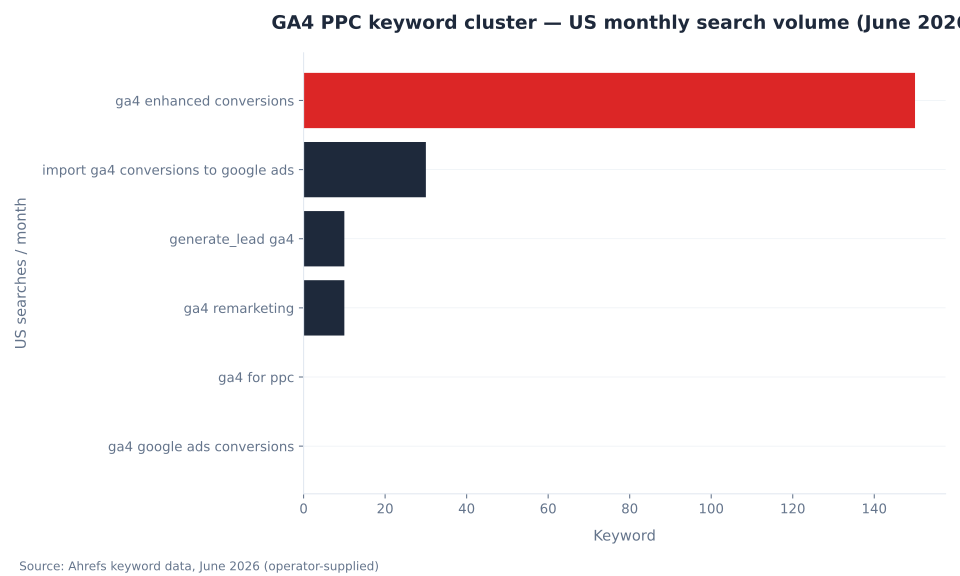
ga4 enhanced conversions — US Monthly Searches
150
US monthly searches for “ga4 enhanced conversions” at KD 0 (Ahrefs, June 2026) — the single addressable head term in the GA4 PPC keyword cluster. “Import ga4 conversions to google ads” adds 30/month; “generate_lead ga4” adds 10/month. Volume is thin by design: practitioners searching these terms have a specific configuration task in front of them. The cross-sell value to Google Ads measurement services is the primary editorial purpose of this pillar.
Source: Ahrefs Keywords Explorer, June 2026 (operator-supplied)
GA4 for PPC and Lead Generation: Two Systems, Five Configuration Decisions
GA4 is the measurement system. Google Ads is the bidding system. This is not a metaphor — it is a description of where configuration controls live. Key events are defined and marked in GA4 Admin. Conversion actions are imported into Google Ads from those key events. Bid strategies are set in Google Ads campaign settings. Enhanced conversions are toggled in Google Ads at the conversion-action level. GA4 audiences are published from GA4 Admin and received by Google Ads. None of these steps belong to the same interface, and confusing which system owns which setting produces the most common configuration errors in paid-search measurement. This pillar covers the five decisions that connect the two platforms: key event import and its Secondary-status default, generate_lead for lead capture, enhanced conversions for GCLID gap recovery, GA4 audiences for remarketing, and GCLID via auto-tagging as the session-level link.
The two absorbed entries — setting-up-ga4-for-ppc-campaigns and optimizing-ga4-for-lead-generation-campaigns — were procedural lists without the conceptual architecture. Neither explained why imported GA4 key events default to Secondary status in Google Ads, why GA4 and Google Ads conversion columns structurally cannot match, or what enhanced conversions actually recover versus what they cannot. Readers new to GA4 should start with what is Google Analytics 4. The conversions and key events pillar covers the 2024 rename from “Conversions” to “Key events” in GA4’s interface — terminology that appears throughout this article. The Google Ads side of this measurement relationship is covered in conversion tracking and attribution. The Google Analytics 4 glossary hub indexes the full platform cluster.
Key Takeaways
- GA4 measures; Google Ads bids. Every configuration decision in this stack divides on that line. GA4 has no bid strategies. Bidding — tCPA, tROAS, Maximize Conversions, Maximize Conversion Value — lives entirely in Google Ads campaign settings.
- Imported GA4 key events default to Secondary status in Google Ads. Smart Bidding does not optimize for Secondary actions. Promotion to Primary is a manual step in Google Ads only: Goals → Conversions → [action] → Edit → Action optimization → Primary. This setting does not exist in GA4.
generate_leadis the recommended event for lead capture. Using it rather than a custom event name unlocks the Lead acquisition report in GA4 and ensures the event is automatically recognized by Google Ads on import. Custom event names require manual configuration in every downstream system.- Enhanced conversions supplement GCLID with SHA-256-hashed first-party data. They recover conversion credit lost to cookie blocking, ITP, and multi-session journeys where GCLID does not persist — using email address, phone, name, and home address collected at the conversion point.
- GA4 audiences for EEA remarketing require Consent Mode v2. EEA and UK users are excluded from GA4-sourced remarketing audiences without
ad_personalization: granted— a requirement enforced from early March 2024 under the EU’s Digital Markets Act.
The Measurement vs. Bidding Split: Key Event Import and the Secondary-Status Default
When a GA4 property is linked to a Google Ads account, two import paths create a Google Ads conversion action from a GA4 key event. The GA4-side path: Advertising → Conversion management → New conversion → select Google Ads account → choose key event. The Google Ads-side path: Goals → New conversion action → Import → Google Analytics properties → select key event. Both produce the same outcome — a conversion action in Google Ads. They do not create a unified measurement system. GA4 and Google Ads retain separate attribution models, separate lookback windows, and separate counting logic. Discrepancies between their conversion columns are expected and structural. Source: Analytics Help, Create Google Ads conversions based on Google Analytics key events; Google Ads Help, Measure web key events from GA4 properties.
The most consequential default practitioners encounter immediately after import: the new conversion action is set to Secondary status. Google’s documentation is unambiguous — “Conversion actions created through the Google Analytics interface will be set as secondary.” Secondary actions appear in the “All conversions” column in Google Ads reports. They do not appear in the “Conversions” column. Smart Bidding strategies — tCPA, tROAS, Maximize Conversions, Maximize Conversion Value — optimize only for Primary actions. An account that imports GA4 key events without changing this setting has Smart Bidding operating against zero primary conversion signals: the Conversions column shows zero, no error fires, and bid strategies run blind. The fix lives in Google Ads only: Goals → Conversions → [conversion action] → Edit → Action optimization → Primary action. GA4 has no equivalent setting.
MB Adv Agency’s observation: The Secondary-to-Primary promotion is the single most common configuration error in GA4/Google Ads integration. It produces a silent failure — the Conversions column shows zero, Smart Bidding continues running, and no diagnostic surfaces the problem. Checking action optimization status takes thirty seconds and is the first step after every key event import.
GA4 and Google Ads conversion tracking are complementary, not interchangeable. GA4 measures key events across all traffic and channels. Google Ads measures ad-attributed actions and powers Smart Bidding. Removing native Google Ads conversion actions and relying solely on GA4 imports breaks bidding unless every imported action is promoted to Primary — and even then, the two systems’ columns diverge because attribution models differ. The metrics and KPIs pillar covers where imported GA4 conversions appear in Google Ads reporting and why the numbers structurally cannot match. Source: Analytics Help, Conversions vs. key events.
| Dimension | GA4 (measurement system) | Google Ads (bidding system) |
|---|---|---|
| Defines what to measure | Key events (Admin → Data display → Events → mark as key event) | — |
| Imports events for campaigns | — | Conversion actions (Goals → + New conversion → Import from GA4) |
| Attribution model | Property-level — data-driven attribution (DDA) is the default; set in Admin → Attribution settings | Per-conversion-action model — set in Google Ads conversion action settings (independent of GA4) |
| Default status after import | — | Secondary — must be manually promoted to Primary for Smart Bidding |
| Bid strategy configuration | No bid strategies — GA4 has no auction logic or bid settings | Campaign settings: tCPA, tROAS, Maximize Conversions, Maximize Conversion Value |
| Conversion column | Key event count / rate in Engagement and Advertising reports | “Conversions” column (Primary only); “All conversions” (Primary + Secondary) |
| Lookback window (default) | 90 days (most key events); 30 days (acquisition events) | 30-day click conversion window (configurable per conversion action in Google Ads) |
The generate_lead Event: GA4’s Recommended Event for Lead Capture
generate_lead is GA4’s recommended event for lead capture — form submissions, demo requests, quote enquiries, contact forms. Using the recommended event name rather than a custom name (such as form_submission or contact_complete) activates the Lead acquisition report in GA4, which surfaces source/medium breakdowns for lead events without requiring a custom Exploration. Custom event names work technically but require manual configuration in every downstream system, including Google Ads on import. Source: Analytics Help, Recommended events; Google Developers, GA4 recommended events reference.
Two parameters are conditionally required: currency (string, ISO 4217 format — e.g., “USD”) and value (number — the estimated monetary value of the lead). Both are required for revenue and conversion-value metrics to populate correctly. Sending generate_lead without value does not break the event — it still fires and appears in the Lead acquisition report — but it prevents value-based Smart Bidding strategies (tROAS, Maximize Conversion Value) from receiving a conversion value signal. Lead-gen accounts importing this event into Google Ads with the intent to use value-based bidding must send consistent value data on every fire. The optional lead_source parameter carries attribution context (e.g., “PPC”, “Organic”) for GA4 Exploration segmentation. Implementation runs through Google Tag Manager on the form confirmation page or via the gtag() function directly. Source: Stape, GA4 new recommended events for lead generation.
In 2024, Google expanded GA4’s recommended event taxonomy for lead generation from the single generate_lead event to a six-event pipeline: generate_lead, qualify_lead, disqualify_lead, working_lead, close_convert_lead, close_unconvert_lead. For most B2B paid-media accounts, generate_lead is the event that matters — it maps to the bottom of the paid funnel, where a completed form or enquiry constitutes the conversion. The full pipeline becomes relevant for accounts with longer sales cycles that also pass offline conversion data back into Google Ads. Implementing generate_lead first is the correct starting point. The underlying events and parameters model covers GA4’s full event schema.
| Event | When to fire | Required parameters | Optional parameters | Notes |
|---|---|---|---|---|
generate_lead |
Form submitted / lead captured (contact form, demo request, quote request) | currency (ISO 4217), value (estimated lead value) — both conditionally required for revenue metrics |
lead_source |
Recommended event; populates Lead acquisition report automatically |
form_start |
User begins interacting with a lead form (first field focus) | — | form_id, form_name, form_destination |
Useful for start-to-submit funnel drop-off analysis; not a key event by default |
form_submit |
Generic form submission (all form types) | — | form_id, form_name, form_length |
Less semantically specific than generate_lead; auto-collected in some GTM configurations |
qualify_lead / close_convert_lead |
Lead meets qualification criteria / lead converts to customer | — | — | Part of 2024 six-event pipeline; relevant for long-cycle B2B accounts passing offline data back to Google Ads |
GA4 PPC keyword cluster — US monthly search volume (June 2026)
Enhanced Conversions: SHA-256 Hashing and What GCLID Cannot Recover
Enhanced conversions for web supplement standard GCLID-based conversion tracking by collecting consented first-party data at the point of conversion, hashing it with SHA-256, and sending the hashed values to Google. Google attempts to match the hashed data against signed-in Google accounts to recover conversion credit that GCLID alone cannot claim. The four first-party fields collected: email address, name, home address, phone number. Google’s documentation states explicitly: “a secure one-way hashing algorithm called SHA256” is applied before transmission; Google never receives unhashed personal information.
Standard GCLID tracking fails in four documented scenarios. The user navigates across subdomains without cross-domain configuration — GCLID does not persist across subdomain boundaries automatically. The user’s browser strips URL parameters — iOS Intelligent Tracking Prevention and certain privacy-focused browsers discard the GCLID before GA4 reads it. The user completes the conversion in a second session after the GCLID cookie has expired. The user denied ad_user_data consent in a Consent Mode v2 implementation — GCLID-based conversion tracking does not fire for that user. Enhanced conversions provides a recovery path in all four cases by matching on the hashed identifier rather than the GCLID. The practical case for lead-gen is strong: lead-gen forms require an email address at submission, so the first-party data is always available at the conversion event. Source: Google Ads Help, About enhanced conversions; Analytics Help, Enhanced conversions in Google Analytics.
Configuration lives entirely in Google Ads: Goals → Conversions → [conversion action] → Edit settings → Enhanced conversions for web. GA4 has a related “User-provided data collection” setting in Admin — this operates at the property level and is separate from the conversion-action-level toggle in Google Ads. For EEA markets, enhanced conversions data is only transmitted when ad_user_data is passed as granted; without that signal, the hashed data is not sent regardless of the Google Ads toggle. The full Consent Mode v2 signal architecture — including ad_user_data and ad_personalization — is covered in the data collection and privacy pillar. For accounts that need offline conversion matching beyond the session window, the integrations and BigQuery export provides event-level data without retention limits.

Is your GA4 measurement configuration feeding Smart Bidding correctly?
MB Adv Agency audits the full GA4 → Google Ads measurement stack: key event import, action optimization status, enhanced conversions, audience publishing, and Consent Mode v2 coverage. We identify the gaps before they compound into bidding errors.
Request a GA4 measurement audit →GA4 Audiences for Remarketing: Google Signals, Consent Mode v2, and Audience Quality
GA4 audiences publish to a linked Google Ads account for RLSA (Remarketing Lists for Search Ads), Display remarketing, and Performance Max audience signals. Three prerequisites must be in place simultaneously: a live GA4 → Google Ads account link with “Enable Personalized Advertising” selected at link creation; Google Signals activated on the GA4 property (Admin → Data Collection → Google signals data collection); and Consent Mode v2 signals passed for EEA and UK users. After publishing an audience from GA4 Admin, it becomes available in Google Ads within 48 hours. Source: Analytics Help, Enable remarketing with Google Analytics data; Analytics Help, Activate Google Signals.
From early March 2024, Google enforced Consent Mode v2 requirements for EEA audiences. GA4’s enforcement documentation states the consequence: “only end users outside the EEA will be included in audiences used by your linked advertising products starting early March, 2024.” Two consent parameters control remarketing: ad_user_data (consent to send user data to Google for advertising measurement) and ad_personalization (consent for personalized advertising and remarketing). Both must be passed as granted for an EEA user to appear in GA4-sourced remarketing audiences. A site running only Consent Mode v1 signals — ad_storage and analytics_storage — is not v2-compliant, and EEA users are excluded from all GA4-sourced audiences from that enforcement date forward. The EU’s Digital Markets Act gatekeeper obligations drove the March 2024 deadline. Source: Search Engine Journal, Consent Mode V2 — key details for advertisers.
MB Adv Agency prioritizes audience definition over audience size in lead-gen remarketing setups. A GA4 audience built on generate_lead completers — users who submitted a lead form — is a qualified signal for a high-bid RLSA modifier on branded search or a Performance Max audience segment. A generic “all users” audience is a weaker input for the same audience targeting campaigns. The configuration effort is identical; the strategic value is in the audience rule, not the mechanics.
GCLID and Auto-Tagging: The Session-Level Link Between GA4 and Google Ads
GCLID — Google Click Identifier — is the URL parameter that auto-tagging appends to destination URLs when a user clicks a Google Ads ad. GA4 reads the GCLID on landing to attribute the session and any key events to the correct campaign, ad group, keyword, and match type. Without auto-tagging: GA4 loses campaign-level attribution, key event import into Google Ads is blocked, and traffic falls back to manual UTM parameters (if present) or (direct) / (none). Auto-tagging is on by default for new Google Ads accounts — Google’s documentation confirms this. Check: Google Ads → Settings → Account settings → Auto-tagging → “Tag the URL that people click through from my ad.”
When both GCLID and manual UTM parameters appear on a URL, GA4 uses the GCLID values for traffic-source dimensions. GA4’s documentation states explicitly: “auto-tagged values” take priority over UTM parameters. This differs from Universal Analytics, which had an “override auto-tagging” option. In GA4, appending UTM parameters to Google Ads destination URLs alongside GCLID has no effect on channel attribution — GCLID controls. When GCLID cannot persist — single-page applications that strip URL parameters before GA4 reads them, cross-subdomain navigation without cross-domain configuration, or browsers that block URL tracking parameters — GA4 uses aggregate identifiers to attribute paid traffic. Enhanced conversions provides the parallel conversion-recovery path for those same scenarios by matching on hashed first-party data rather than the GCLID parameter.
GA4 → Google Ads Data Flow: Attribution and the Complete Integration Map
Head term keyword difficulty
KD 0
“ga4 enhanced conversions” — 150 US searches/month at zero keyword difficulty. Zero-competition capture across the entire cluster. Source: Ahrefs, June 2026.
Default import status
Secondary
Every GA4 key event imported into Google Ads defaults to Secondary — invisible in the Conversions column and excluded from Smart Bidding. Source: Google Ads Help, answer/9520128.
EEA audience enforcement
Mar 2024
Early March 2024: Consent Mode v2 became a hard requirement for EEA remarketing audiences from GA4. Non-compliant sites exclude all EEA users. Source: Analytics Help, answer/14275483.
DDA data thresholds
400 / 20k
Minimum conversions for data-driven attribution to run: 400 for the specific key event and 20,000 total across all key events. Lead-gen accounts below these thresholds fall back to last-click — silently. Source: Analytics Help, answer/10596866.
MB Adv Agency’s observation: Most lead-gen accounts with fewer than 400 monthly conversions for a specific key event are effectively operating on last-click attribution for that event, regardless of the data-driven attribution setting showing in GA4 Admin. The fallback is silent — no UI indicator surfaces which model is actually running for a given key event. The DDA threshold is one more reason to keep native Google Ads conversion actions alongside GA4 imports: Ads conversion tracking has its own DDA model with separate thresholds, providing redundancy when GA4’s key event volume is below the floor.
| Data type | Direction | Setup location | Prerequisites | Used in Google Ads for |
|---|---|---|---|---|
| Key event → Conversion action | GA4 → Google Ads | GA4 Admin (Advertising → Conversion management) OR Google Ads (Goals → + New → Import) | GA4 → Ads account link; Marketer access on GA4 property | Conversion reporting; Smart Bidding (if changed to Primary) |
| GA4 Audience → Remarketing list | GA4 → Google Ads | GA4 Admin → Audiences → publish to Google Ads | GA4 → Ads link; Google Signals activated; Consent Mode v2 (EEA) | RLSA bid modifiers; Display remarketing; PMax audience signals |
| Enhanced conversions (hashed data) | Website → Google Ads | Google Ads → Goals → Conversions → [action] → Enhanced conversions for web | Existing Ads conversion action; SHA-256 hashing of email/phone/name; ad_user_data consent (EEA) |
Recover conversions lost to cookie blocking, ITP, multi-session journeys |
| GCLID via auto-tagging | Google Ads click → GA4 | Google Ads → Settings → Auto-tagging (on by default for new accounts) | Auto-tagging enabled in Google Ads; GA4 reads GCLID on landing page | Campaign / ad group / keyword / match type attribution in GA4 reports |
Frequently Asked Questions
How do I import a GA4 key event into Google Ads as a conversion?
Two paths achieve the same outcome. GA4-side: Advertising → Conversion management → New conversion → select Google Ads account → choose key event. Google Ads-side: Goals → + New conversion action → Import → Google Analytics properties → select key event. Prerequisites: a live GA4 → Google Ads account link; Marketer or Administrator access on the GA4 property; auto-tagging enabled in Google Ads. After import, the conversion action defaults to Secondary status — it appears in the “All conversions” column but not the “Conversions” column, and Smart Bidding (tCPA, tROAS, Maximize Conversions) does not optimize for it. To use it for Smart Bidding, navigate in Google Ads to Goals → Conversions → [conversion action] → Edit → Action optimization → Primary action. This setting does not exist in GA4. Changing it to Primary is a manual step that must be completed after every key event import. Source: conversion tracking and attribution covers the Google Ads side of this configuration in full.
What is the difference between a GA4 key event and a Google Ads conversion?
A GA4 key event is an on-site action marked as business-critical in GA4 Admin — a completed lead form, a phone click, a page visit of high intent. Since the 2024 rename, “Conversions” in GA4 are called “Key events.” A Google Ads conversion is a key event that has been imported into Google Ads and is counted under Google Ads’ own attribution model and conversion window settings. The same underlying user action, measured by two separate systems with separate logic. GA4’s attribution model is set at the property level (Admin → Attribution settings); Google Ads’ model is set per conversion action. GA4’s default lookback window is 90 days for most key events; Google Ads’ default click conversion window is 30 days. These differences — plus the Primary/Secondary status distinction — are why GA4 and Google Ads conversion columns will never match. Source: Analytics Help, Conversions vs. key events.
What is the generate_lead event in GA4 and when do I use it?
generate_lead is a recommended event in GA4’s event taxonomy, intended for lead-capture moments: form submissions, demo requests, quote requests, contact enquiries. Using it rather than a custom event name (such as form_submission or contact_complete) unlocks the Lead acquisition report in GA4, which shows source/medium breakdowns for lead events without a custom Exploration. The event has two conditionally required parameters: currency (ISO 4217 string, e.g. “USD”) and value (number — the estimated monetary value of the lead). Both are required for revenue metrics and value-based Smart Bidding strategies to receive the correct signal. An optional lead_source parameter carries attribution context. Always fire on the form confirmation page, not the form page itself, to avoid counting incomplete submissions. Source: Analytics Help, Recommended events.
What are enhanced conversions and when do lead-gen accounts need them?
Enhanced conversions for web collect consented first-party data at the conversion point — email address, name, home address, phone number — hash it with SHA-256, and send the hashed values to Google. Google matches against signed-in accounts to recover conversion credit lost in four scenarios: subdomain navigation without cross-domain configuration, browsers that strip GCLID parameters (iOS ITP), multi-session journeys where the GCLID cookie has expired, and ad_user_data consent denied in Consent Mode v2. Lead-gen accounts are strong candidates because a lead form always captures an email address at submission — the first-party data is available every time. Configuration is in Google Ads (Goals → Conversions → [action] → Enhanced conversions for web), not GA4. For EEA markets, ad_user_data: granted must be present or the hashed data is not transmitted. Source: Google Ads Help, About enhanced conversions.
Why do GA4 conversion numbers differ from Google Ads conversion numbers?
The difference is expected and structural. GA4 and Google Ads use separate attribution models — both default to data-driven attribution, but each runs its own model independently, and if the Google Ads conversion action predates DDA as the default, the models differ. The lookback windows differ: GA4 defaults to 90 days for most key events; Google Ads defaults to a 30-day click conversion window. Counting logic differs: GA4 counts key events per session by default; Google Ads counts per conversion action with its own deduplication rules. And imported GA4 key events that remain on Secondary status do not appear in Google Ads’ “Conversions” column at all — only in “All conversions.” Attempting to reconcile the two columns exactly is the wrong goal. Use GA4 for cross-channel measurement and audience building; use Google Ads conversion columns for bidding performance. Source: metrics and KPIs covers Google Ads column definitions in detail.
MB Adv Agency
Need a GA4 measurement audit for paid campaigns?
Secondary-status conversion actions, missing enhanced conversions, and incomplete Consent Mode v2 coverage are the three most common causes of Smart Bidding degradation in GA4-linked accounts. MB Adv Agency audits the full measurement stack and fixes what is missing. Contact MB Adv Agency to discuss a paid-measurement audit. Browse the GA4 glossary hub for full platform coverage, or go deeper on the Google Ads side with conversion tracking and attribution.
Talk to us →Data and methodology: Search volume and keyword difficulty figures from Ahrefs Keywords Explorer, June 2026 (operator-supplied). Key event import workflow, Secondary-status default, and action optimization documentation from Google Ads Help (answer/9520128) and Analytics Help (answer/10632359), fetched June 2026. Conversions vs. key events terminology from Analytics Help (answer/13965727). Recommended events and Lead acquisition report from Analytics Help (answer/9267735) and Google Developers recommended events reference. generate_lead six-event pipeline and parameter spec from Stape (stape.io/news/ga4-new-recommended-events-lead-generation). Enhanced conversions SHA-256 hashing from Google Ads Help (answer/9888656); GA4-side configuration from Analytics Help (answer/14252663). Remarketing prerequisites from Analytics Help (answer/9313634; answer/9445345). Consent Mode v2 EEA enforcement from Analytics Help (answer/14275483) and Search Engine Journal (searchenginejournal.com/consent-mode-v2). Auto-tagging and GCLID from Google Ads Help (answer/3095550) and Analytics Help (answer/11242870). DDA thresholds from Analytics Help (answer/10596866). Reviewed by MB Adv Agency, June 2026.

As a Google Ads expert, I bring proven expertise in optimizing advertising campaigns to maximize ROI.
I specialize in sharing advanced strategies and targeted tips to refine Google Ads campaign management.
Committed to staying ahead of the latest trends and algorithms, I ensure that my clients receive cutting-edge solutions.
My passion for digital marketing and my ability to interpret data for strategic insights enable me to offer high-level consulting that aims to exceed expectations.
Google Partner Agency
We're a certified Google Partner Agency, which means we don’t guess — we optimize withGoogle’s full toolkit and insider support.
Your campaigns get pro-level execution, backed by real expertise (not theory).

4.9 out of 5 from 670+ reviews on Fiverr.
That’s not luck, that’s performance.
Highly recommend Matteo to set up your server side tracking. He has a deep understanding of e-commerce tracking and will go above and beyond to make sure everything is set up correctly and working 100%. If you are scaling your store this set up is non-negotiable in my opinion and there isn't many people who have this much knowledge or put the effort in to get it right. Thanks again!

avorodesign.com
I can only recommend Matteo! He was very patient, professional and very knowledgeable about GA4, Consent Mode v2, and GDPR compliance. Communication was clear, and the setup was done professionally and efficiently. Highly recommend him for anyone needing reliable tracking implementation.

www.natureiki.life
Matteo shines in the realm of online professionals. His work is not only deep in data but also complemented by his proactive communication and cooperation, setting a new standard for freelancers. If you want someone who truly exceeds expectations, look no further. Highly recommended!

www.omanbeverlysmyth.com
Exceptional Service Beyond Expectations - Outstanding Service Impeccable depth, flawless delivery, and exceptional language fluency—this service exceeded all expectations. Highly recommended. Matteo truly ROCKS!!!

ium-paris.com
Top-notch, always highly value working with Matteo. An absolute Google Ads Genius. This is approximately the 8th time I have hired him and he's helped us get 6-7 ROAS. We are excited in continuing to improve our lead flow. Hire this guy if you need Google Ads help. Thanks Matteo!

www.dleeventgroup.com
I finally found the guy who can setup server side tracking and all the ecosystem properly. I definitely recommend Matteo. He is very responsive, kind and wants to dig into things. He configured GA4, Meta, Google Ads, Outbrain and google consent v2 with Cookiebot. Thanks Matteo.

inomega.fr
MB Adv delivered exceptional work with outstanding professionalism and lots of patience, taking time to see effects of changes made and not just do the work and submit it. The proactive communication and video summaries of the work completed made working with Matteo a pleasure, as he consistently went above and beyond. Highly recommended for web analytics projects! We are already working on another project.

www.withnellsensors.co.uk
Working with Matteo on my Google Ads was a game-changer. He's not just a strategist, he's a true partner. He understood my goals and tailored a campaign that perfectly reached my target audience. I'm grateful for his expertise and dedication.

dccargo.com
Click-driven mind
with plastic-brick obsession.
We build Google Ads campaigns with the same mindset we use to build tiny brick worlds: strategy, patience, and zero tolerance for wasted pieces.
Data is our blueprint. Growth is the only acceptable outcome.