Microsoft Advertising Campaign Types: 2026 Guide

$1.37
Average search CPC on Microsoft Advertising — 33% lower than Google Ads' $2.06 — across 724 million unique monthly searchers on Bing, Yahoo, AOL, DuckDuckGo, and Ecosia. The question is not whether the platform is worth running. The question is which of six campaign types executes the right job.
Source: Searchlab, Microsoft Ads Statistics 2026 · NaMedia Experts 2026
What Are Microsoft Advertising Campaign Types?
Microsoft Advertising's 2026 campaign builder offers six types: Search, Shopping, Audience, Smart Campaigns, Performance Max, and Dynamic Search Ads — a keyword-free mode inside Search, not a standalone builder. Each type maps to a specific network, targeting mechanism, and automation level. The correct selection is a job-first decision: demand capture, catalog sales, or brand discovery — not familiarity with the type's name.
The real decision framework is two questions stacked. First: what job does the campaign do? Search and DSA capture declared intent on the Microsoft Search Network. Shopping and Performance Max drive catalog-based product sales. Audience campaigns place native and display ads on the Microsoft Audience Network. Smart Campaigns handle fully automated non-retail lead-gen. Second: how much control does the advertiser retain? A standard Search campaign with manual CPC sits at one extreme; Performance Max with a Merchant Center catalog sits at the other. These are not the same kind of automation, and conflating them is where campaign-type selection errors compound into structural budget waste.
Each campaign type lives inside the account hierarchy of campaigns, ad groups, and ads — see Microsoft Ads account structure for what is configured at each level. The campaign type sets the outer container; everything downstream (bidding strategy, targeting, assets) is constrained by that container. Selecting the campaign type is the first decision in every new campaign build, and it cannot be changed after the campaign is created — a wrong choice requires building a new campaign, not editing the existing one.
| Campaign Type | Network | Keywords? | Key Prerequisite | Best For |
|---|---|---|---|---|
| Search | Microsoft Search Network (Bing, Yahoo, AOL, DuckDuckGo, Ecosia + syndication) | Yes — keyword lists | Keywords + ad copy | Capturing existing search demand with full keyword control |
| Dynamic Search Ads (DSA) | Microsoft Search Network (runs inside a Search campaign) | No — site/page-feed based | Crawlable website or page feed; negative keywords as steering | Long-tail coverage for large or fast-changing sites |
| Shopping | Search Network (product ads in search results) | No — catalog feed-driven | Microsoft Merchant Center store + product catalog feed, refreshed ≥ every 30 days | Retail / e-commerce promoting specific products |
| Audience | Microsoft Audience Network (MSN, Outlook, Edge, partner sites) | No — audience-based | Creative assets + audience signals | Discovery, prospecting, and retargeting on native inventory |
| Smart Campaigns | All Microsoft properties (automated placement) | No — fully automated | Assets + a conversion goal; UET tracking recommended | Non-retail SMBs and lead-gen advertisers wanting hands-off automation |
| Performance Max | Search + Audience Network + Shopping + Copilot (cross-property) | No — fully automated | Merchant Center catalog (retail use) + conversion tracking | Retail / cross-property automation chasing conversions across all Microsoft inventory |
Sources: Campaign-type names and definitions — Adobe Advertising, Microsoft Advertising campaign settings; DSA mechanics — Microsoft Learn, Dynamic Search Ads; Shopping prerequisite — Microsoft Learn, Smart Shopping Campaigns; Smart vs. PMax scope — StackMatix, Microsoft Performance Max Equivalent (2026).
Key Takeaways
- Six campaign types, not a flat menu. Search, DSA (keyword-free inside Search), Shopping, Audience, Smart Campaigns (non-retail full automation), and Performance Max (retail cross-property full automation) form a grid of job × automation level — not a ranked list.
- Smart Campaigns and Performance Max automate different things. Smart Campaigns = fully automated non-retail lead-gen. Performance Max = fully automated retail and cross-property catalog advertising. They are distinct products; Google Ads migrators who treat them as one product choose the wrong automation layer. Source: StackMatix 2026.
- Shopping is a catalog you feed, not a campaign you write. Shopping and Performance Max (retail) require a Microsoft Merchant Center store with a product feed refreshed at least every 30 days. Without the feed, neither campaign type serves ads. Source: Microsoft Learn.
- Smart Shopping campaigns are deprecating and auto-upgrading to Performance Max. Microsoft's documentation states "Starting in August" — the year is not stated in the document body. Do not assume 2026 without re-verifying the live Microsoft Learn page. The transition direction and error code
SmartShoppingCampaignCreationNotSupportedare confirmed. Source: Microsoft Learn. - AI Max for Search entered open pilot in May 2026. It extends Search ad delivery into Copilot Search and Copilot Answers and adds broader query matching, asset personalization, and intelligent URL routing — as an add-on layer on existing Search campaigns, not a new campaign type. Source: Microsoft Advertising Activate 2026.
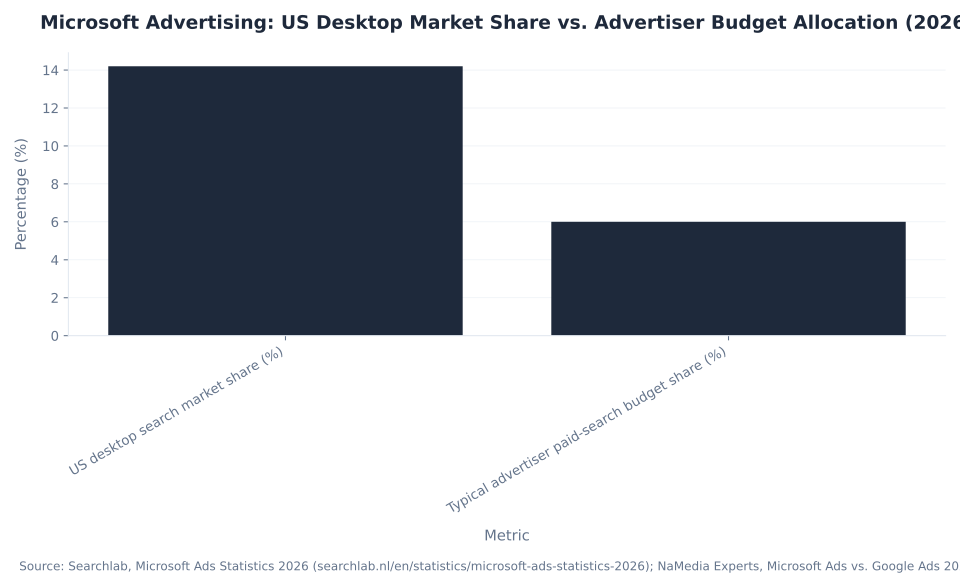
- Microsoft Advertising reaches 724 million monthly users at $1.37 average CPC — 33% lower than Google Ads' $2.06 — but receives only 6% of typical advertiser paid-search budgets despite holding 14.2% of US desktop search share. Sources: Searchlab 2026; NaMedia Experts 2026.
724M
unique monthly users on the Microsoft Search Network
Searchlab 2026
$1.37
avg search CPC — 33% lower than Google Ads' $2.06 average
Searchlab 2026
+8%
average incremental conversion lift from Performance Max vs. Search alone
Microsoft internal data, Sep 2024–Sep 2025
The Three Automation Layers: How Much Do You Hand to Microsoft?
Microsoft Advertising's campaign types form three distinct automation tiers, not a gradient. Tier one: smart bidding layered onto a manual Search or DSA structure — the advertiser controls keywords, ad copy, and ad groups; Microsoft automates only the bids. Tier two: Smart Campaigns — full non-retail automation where Microsoft controls targeting, bidding, and placement. Tier three: Performance Max — full retail and cross-property automation using a Merchant Center catalog and running across all Microsoft inventory including Copilot.
The automation level determines what the advertiser controls, what data the account generates, and which conversion signals Microsoft needs to function as designed. Standard Search with Manual CPC generates search terms, auction insights, and keyword-level performance data that inform every other decision in the account. Smart Campaigns and Performance Max abstract those layers away — the trade is management overhead for reporting granularity. The right tier depends on the account's conversion volume, the advertiser's tolerance for opacity, and whether the campaign is retail or non-retail.
| Automation Layer | What Microsoft Controls | What the Advertiser Controls | Retail or Non-Retail? | When to Use |
|---|---|---|---|---|
| Smart bidding on Search / DSA | Bids only (Enhanced CPC, Maximize Conversions, Maximize Conversion Value) | Keywords, ad copy, ad groups, audiences, schedule, budget | Either | Full structure control with conversion-optimized bidding |
| Smart Campaigns (full automation, non-retail) | Targeting, bidding, placement, and delivery end-to-end | Assets + conversion goal only | Non-retail | Non-retail lead-gen / SMBs wanting minimal setup and hands-off management |
| Performance Max (full automation, retail / cross-property) | Targeting, bidding, placement across all Microsoft inventory | Assets + Merchant Center catalog + goal / ROAS target | Retail / cross-property | Retail / e-commerce chasing conversions across Search, MSAN, Shopping, and Copilot |
Sources: Layer framing and retail/non-retail split — StackMatix, Microsoft Performance Max Equivalent (2026); bid-strategy names — Microsoft Advertising (Manual CPC, Enhanced CPC, Maximize Conversions ± Target CPA, Maximize Conversion Value ± Target ROAS; standalone tCPA/tROAS consolidated August 2025); PMax cross-property — Microsoft Advertising, Performance Max.
The automation-layer decision is also a bidding decision — the campaign type sets which bid strategies are available. See Microsoft Ads bidding and budget for the full strategy map, including the March 2026 tCPA and tROAS consolidation that affected Smart Campaign and PMax bid configurations.
Search Campaigns: Intent Capture on the Microsoft Search Network
Search campaigns run on the Microsoft Search Network — Bing, Yahoo, AOL, DuckDuckGo, Ecosia, and syndication partners — reaching 724 million unique monthly users at an average $1.37 CPC and 4.1% CTR. Keyword lists are the targeting mechanism. Search is the intent-capture campaign type: advertisers bid on specific queries and control ad copy for each ad group.
The Microsoft Search Network holds 14.2% of US desktop search market share and 9.6% globally (Searchlab 2026). For advertisers already running Google Ads Search campaigns, Microsoft Search is the closest structural parallel: same keyword match types, same ad copy fields, same impression-share metrics. The difference is in the inventory composition — Bing's demographic skews older and higher-income, which narrows audience pools in some categories and improves conversion quality in others (legal, financial services, home services, B2B SaaS).
| Metric | Microsoft Advertising | Google Ads | Source |
|---|---|---|---|
| Average search CPC | $1.37 | $2.06 | Searchlab 2026 |
| Average search CTR | 4.1% | 3.8% | Searchlab 2026 |
| US desktop search market share | 14.2% | ~85% | Searchlab 2026 |
| Global desktop search market share | 9.6% | — | Searchlab 2026 |
| Unique monthly users (Search Network) | 724 million | — | Searchlab 2026 |
Source: Searchlab, Microsoft Ads Statistics 2026. CPC figures are third-party aggregated estimates; individual account CPCs vary by vertical, match type, and audience.
The 33% CPC discount versus Google does not translate into an equivalent CPA advantage — it translates into room to test. Accounts that open Microsoft Search campaigns with a copy of their best-performing Google Search ad groups frequently underperform on the first attempt because the audience composition differs. The keyword universe that works on Google Ads Search carries over structurally; the bid levels and audience overlays require separate calibration for the Microsoft Search Network.
For legal PPC, SaaS/software PPC, and dental PPC, the Bing audience demographic — older, higher-income, higher educational attainment — produces structurally higher-quality lead pools than the all-ages Google Search average. Search campaigns on Microsoft are often the second-highest ROAS channel in accounts that test them consistently.
Microsoft Advertising Search campaigns support all standard bid strategies: Manual CPC, Enhanced CPC, Maximize Conversions (with optional Target CPA), and Maximize Conversion Value (with optional Target ROAS). Dynamic Search Ads, discussed in its own section below, is a keyword-free mode configured inside the same Search campaign builder — it is not a distinct campaign type.
Shopping Campaigns: Feed-Driven, Merchant-Center-Dependent
Shopping campaigns in Microsoft Advertising are not campaigns you write — they are catalogs you feed. Product ads are generated from a Microsoft Merchant Center store's product feed: titles, images, and prices form the ad automatically. No ad copy is drafted manually. The feed is the campaign. Average Shopping CPC on Microsoft is $0.41 versus $0.73 on Google — a 44% cost difference on the same product inventory.
The Microsoft Merchant Center prerequisite is the hard wall that thin Shopping guides skip. Microsoft Learn is explicit: advertisers should send updated catalog data at least every 30 days to keep ads accurate. In practice, retailers with dynamic pricing or rotating inventory refresh feeds daily or weekly — the feed cadence controls ad accuracy, not the bidding strategy. The Merchant Center account links to the Microsoft Advertising account by store ID. Campaigns do not serve until the catalog passes feed validation. Advertisers without a Merchant Center store encounter a hard stop in the campaign builder — there is no Shopping campaign without the feed.
MB Adv Agency has found that Shopping campaign performance on Microsoft lives or dies in the feed — product title structure, GTIN coverage, and image quality determine which queries trigger the ad, long before bidding enters the picture. An optimized feed with descriptive titles (brand + product type + key attributes) outperforms a high-bid campaign running off a thin feed consistently. For fashion PPC, furniture PPC, beauty products PPC, supplements PPC, and jewelry PPC, feed quality is the primary lever for Shopping campaign efficiency.
| Segment | Microsoft Advertising (USD) | Google Ads (USD) | Delta |
|---|---|---|---|
| Average search CPC | $1.37 | $2.06 | ~33% lower on Microsoft |
| Average Shopping CPC | $0.41 | $0.73 | ~44% lower on Microsoft |
Source: Searchlab, Microsoft Ads Statistics 2026; NaMedia Experts, Microsoft Ads vs. Google Ads 2026 Benchmarks. Third-party aggregated estimates; individual account CPCs vary by vertical, feed quality, and competition level. WordStream/LocaliQ publish no Microsoft-specific CPC data.
For retailers already running Google Merchant Center, Microsoft Merchant Center is a separate account requiring its own feed submission. The feed format overlaps significantly with Google's product data spec — most exporters support both in a single pipeline — but the accounts are independent. Connecting Google Merchant Center to Microsoft Merchant Center is not automatic; it requires explicit import or re-upload. Standard Shopping campaigns support Maximize Conversion Value and Maximize Conversions bid strategies. Smart Shopping campaigns are deprecating — see the 2026 AI and automation section for the Smart Shopping → Performance Max transition.
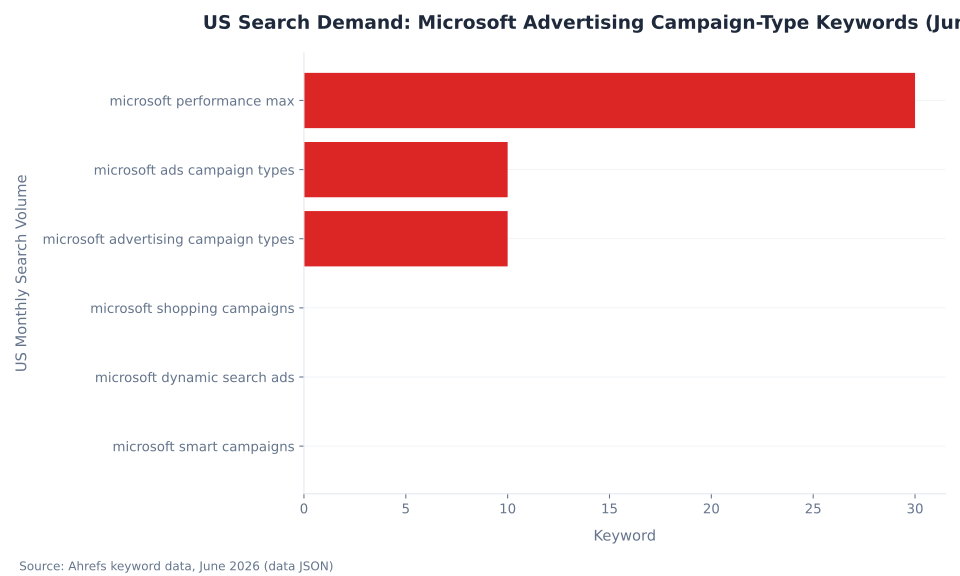
US Search Demand: Microsoft Advertising Campaign-Type Keywords (June 2026)
Dynamic Search Ads: Keyword-Free Coverage Inside Search
Dynamic Search Ads (DSA) is not a separate campaign type in Microsoft Advertising. It is a keyword-free targeting capability configured inside a standard Search campaign. Instead of keyword lists, Microsoft reads website content or a page feed, matches relevant queries to landing pages, and dynamically generates the ad headline and final URL. The advertiser writes description lines; Microsoft writes the headline and selects the destination page.
To enable DSA inside a Search campaign, advertisers set dynamic search ad settings at the campaign level: domain, website language, and targeting source (website content or a structured page feed). No keyword lists are created. Microsoft crawls the specified domain or page feed and builds query-to-page matches automatically. Negative keywords replace the keyword list as the steering control — without a strong negative keyword set, DSA matches queries that are adjacent to the site's content but irrelevant to the advertiser's offer. Site structure is the other lever: a well-organized site with clear page titles produces better DSA matches than a flat site with generic descriptions.
| Attribute | Standard Search | Dynamic Search Ads (DSA) |
|---|---|---|
| Targeting mechanism | Keyword lists (exact, phrase, broad) | Website content crawl or structured page feed |
| Ad headline | Advertiser-written (up to 15 RSA headlines) | Dynamically generated from page content |
| Final URL | Advertiser-specified per ad | Dynamically selected from the matched page |
| Primary steering control | Match types + negative keywords | Negative keywords + site structure |
| Builder location | Campaign type: Search | Setting inside a Search campaign — not a separate campaign type |
Source: Microsoft Learn, Dynamic Search Ads.
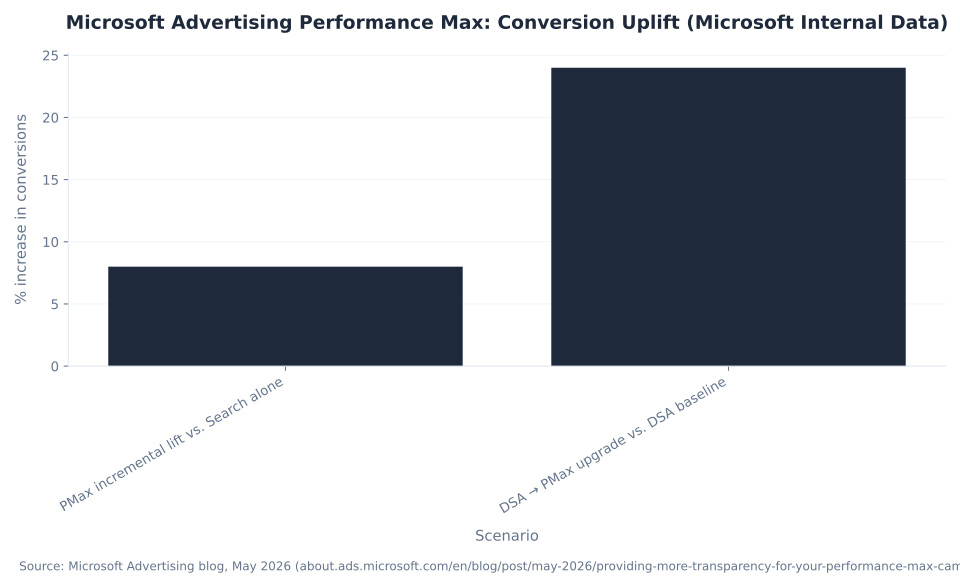
The use case for DSA is long-tail coverage: finding queries that hand-built keyword lists structurally miss because advertisers only bid on terms they think to include. For sites with large or rapidly changing page inventories — retailers with hundreds of product pages, legal practices with multiple service areas, SaaS products with deep feature documentation — DSA fills the query-coverage gap without maintaining an ever-expanding keyword list. The structural trade is precision for breadth: keyword control is replaced by automated query-to-page matching. DSA runs alongside keyword-based Search campaigns in the same account; queries matched by both use the standard ad auction to determine which serves. Microsoft's data shows that upgrading eligible DSA campaigns to Performance Max delivers an average 24% increase in conversions at a similar CPA or ROAS — see the Performance Max section for that transition discussion.
Microsoft Advertising vs. Google Ads: Average CPC by Segment (2026)

Audience Campaigns on the Microsoft Audience Network
Audience campaigns run on the Microsoft Audience Network (MSAN) — native and display placements across MSN, Outlook, Edge, and partner publisher sites. The targeting mechanism is audience signals (in-market audiences, remarketing lists, customer match, LinkedIn profile data) rather than keywords or product feeds. Audience campaigns are the discovery and prospecting campaign type in the Microsoft Advertising builder.
The Microsoft Audience Network is distinct from the Microsoft Search Network. Search and DSA campaigns run on the Search Network (Bing + partners); Audience campaigns run on MSAN (native/display). Performance Max spans both. This distinction matters for budget planning: Audience campaign CPCs and CTRs reflect native/display inventory behavior, not search intent behavior — the two should not be benchmarked against each other. See the Microsoft Audience Network for inventory details, placement types, and MSAN-specific performance benchmarks.
Audience campaigns support image ads (auto-generated from a URL or manually uploaded), responsive ads, and video ads on supported MSAN placements. The LinkedIn profile targeting dimension — available on Audience campaigns through Microsoft's LinkedIn integration — allows B2B advertisers to layer company, industry, and job-function targeting onto MSAN placements. No other ad platform outside LinkedIn itself offers this data. For B2B lead-gen accounts, the LinkedIn dimension makes Audience campaigns a distinct prospecting layer that Google Ads Display cannot replicate. See Microsoft Ads audience targeting for the full targeting dimension map, including LinkedIn profile data, in-market segments, and custom audiences.
Microsoft Advertising Performance Max: Conversion Uplift (Microsoft Internal Data)
Smart Campaigns vs. Performance Max: The Automation Split
Smart Campaigns and Performance Max are both fully automated Microsoft Advertising campaign types — but they automate different scopes of work for different advertiser types. Smart Campaigns are the non-retail full-automation product. Performance Max is the retail and cross-property full-automation product. They are distinct tools. Choosing between them is not a preference question; it is a structural one determined by the advertiser's catalog and objective.
MB Adv Agency has found that Google Ads advertisers migrating to Microsoft routinely reach for Performance Max to run non-retail lead-gen accounts — because on Google Ads, a single Performance Max product covers both retail and lead-gen. In Microsoft Advertising, that mapping breaks: Smart Campaigns is the non-retail automation product, and building a Performance Max campaign without a Merchant Center catalog for retail use wastes the campaign type's primary advantage. The single most common Microsoft Advertising naming error among experienced Google Ads practitioners is treating Smart Campaigns and Performance Max as equivalent. They are not.
Non-retail full automation = Smart Campaigns. Retail / cross-property full automation = Performance Max. These are not aliases — they are separate products optimizing against different signals with different prerequisites.
Smart Campaigns work best for non-retail local businesses and service advertisers: a plumber, a dental practice, a law firm, a SaaS startup running lead-gen. The advertiser supplies business description, goals, and creative assets; Microsoft's automation handles everything else — where ads appear, who sees them, how much to bid. UET conversion tracking is recommended for Smart Campaigns to enable goal optimization. For PPC management in Austin and PPC management in Chicago, Smart Campaigns are the starting point for service-business clients who want a hands-off Microsoft Advertising presence without the structure investment of a full Search campaign build.
How to Choose the Right Automation Level for Your Account
- Define your objective first. Demand capture (keyword search intent) → Search or DSA. Product catalog sales → Shopping or Performance Max. Brand discovery on native inventory → Audience. Hands-off lead-gen without a catalog → Smart Campaigns.
- Check for a Microsoft Merchant Center catalog. Shopping and Performance Max (retail use) require one. Smart Campaigns do not. If no catalog exists, Performance Max is not the right automation layer.
- Choose your automation level. Manual structure with smart bidding → standard Search. Full non-retail automation → Smart Campaigns. Full retail and cross-property automation → Performance Max.
- Verify conversion tracking before scaling automation. Smart Campaigns recommend Universal Event Tracking (UET). Performance Max requires conversion events — a commonly cited practitioner threshold is 30–50 conversions per month before scaling, per StackMatix (2026). This is a practitioner rule of thumb, not a Microsoft-published floor.
- Add negative keywords before enabling automated coverage. For DSA, AI Max for Search, and Performance Max, negative keywords are the primary steering control. Build the exclusion list before enabling broader matching or full automation.
Performance Max: Retail and Cross-Property Automation
Performance Max is Microsoft Advertising's retail and cross-property full-automation campaign type. It runs across Search, the Microsoft Audience Network, and Shopping inventory — including Copilot placements — from a single campaign. For retail use, it requires a Microsoft Merchant Center catalog and conversion tracking. Microsoft's own data shows an average 8% increase in incremental conversions for advertisers using Performance Max versus Search alone (Microsoft internal data, Global, September 2024–September 2025).
The 8% incremental lift figure measures conversions attributable to PMax that would not have occurred on Search alone — it is not a ROAS figure, and it is a global average across all verticals. Individual account results depend on catalog quality, conversion volume, and how well the campaign's asset groups and audience signals are configured. Microsoft's data also shows that upgrading eligible Dynamic Search Ads campaigns to Performance Max delivers an average 24% increase in conversions at a similar CPA or ROAS (Microsoft Advertising, February 2025). That is a conversion-volume increase, not a cost-efficiency increase — the CPA holds while conversion volume grows.
MB Adv Agency applies campaign-level negative keywords and audience signal lists to every Performance Max campaign from day one. Without them, PMax's automation absorbs queries and placements that a well-structured Search campaign handles more efficiently — especially branded queries, which PMax serves at market CPC rates without the impression share data that flags competitor bid activity on brand terms. Audience signals (customer match lists, remarketing audiences from Search) compress the learning period by giving PMax a starting point for targeting rather than building signals from scratch.
| Scenario | Conversion Impact | What It Measures | Source |
|---|---|---|---|
| PMax incremental lift vs. Search alone | +8% | Incremental conversions attributable to PMax beyond what Search alone delivers (Global avg, Sep 2024–Sep 2025) | Microsoft Advertising, May 2026 |
| DSA → PMax upgrade vs. DSA baseline | +24% | Total conversion volume increase at similar CPA or ROAS (not a cost-efficiency figure) | Microsoft Advertising, February 2025 |
Vendor-reported Microsoft internal data. Sources: Microsoft Advertising, Providing more transparency for your Performance Max campaigns (May 2026); Microsoft Advertising, New Performance Max tools (February 2025). Do not add these figures together — they measure different conversions scenarios. Self-reported platform data; treat as directional.
Performance Max transparency improved substantially through early-to-mid 2026. Microsoft added search-term reporting, landing-page and URL reporting, placement insight, self-serve negative keywords, and auction share-of-voice to the campaign type (Microsoft Advertising, May 2026). These reports are the equivalent of the search terms report in standard Search — audit where PMax is spending before scaling budget into it. For retailers running furniture PPC or beauty products PPC on Microsoft's cross-property inventory, the new placement reports surface the MSAN versus Search spend split that was previously opaque.
The 2026 AI Layer: AI Max for Search, Copilot, and Smart Shopping Deprecation
Microsoft Advertising launched three AI additions in 2026 that change how existing campaign types function. AI Max for Search entered open pilot in May 2026 — available to all accounts, not invitation-only — extending Search ad delivery into Copilot Search and Copilot Answers alongside standard Bing results. Copilot in Microsoft Advertising is a live in-platform assistant for account diagnostics and ad-copy generation. Smart Shopping campaigns are deprecating and auto-upgrading to Performance Max.
| Change | What It Is | Status / Timing | What to Do |
|---|---|---|---|
| Smart Shopping → Performance Max | Smart Shopping campaigns deprecate and auto-upgrade to Performance Max; new creation returns SmartShoppingCampaignCreationNotSupported | "Starting in August" per Microsoft Learn — year not stated in document body; verify at publish | Stop creating new Smart Shopping; build Performance Max; existing campaigns convert automatically with no performance-report change |
| AI Max for Search | AI layer on Search campaigns: broader query matching, asset personalization, intelligent URL routing; extends delivery into Copilot Search + Copilot Answers | Open pilot — all accounts as of May 2026 (not invitation-only) | Pilot on a contained Search campaign with experiment measurement; keep negative keywords tight (broader matching widens query scope) |
| Copilot in Microsoft Advertising | In-platform AI assistant: account diagnostics, ad-copy generation, Offer Highlights placement in Copilot / Edge / Bing | Live — surfaced at Activate 2026 | Use for diagnostics and copy drafts; treat output as a starting point, not a final structure decision |
| Performance Max transparency | Added search-term reporting, landing-page / URL reporting, placement insight, self-serve negative keywords, auction share-of-voice | Rolling out through early–mid 2026 | Use the new reports to audit where PMax spends before scaling budget |
Sources: Smart Shopping deprecation — Microsoft Learn, Smart Shopping Campaigns (ms.date 2025-06-26, updated 2026-06-05); AI Max pilot timing — MarketingTechNews 2026; ALM Corp, Activate 2026 Recap; PMax transparency — Microsoft Advertising, May 2026; Microsoft Advertising, Activate 2026 Key Takeaways.
AI Max for Search is not a new campaign type — it is an add-on layer toggled on within an existing Search campaign structure. It adds three capabilities standard Search does not have: broader query matching that reaches queries beyond the explicit keyword list, asset personalization that rewrites ad copy to match each query's specific intent, and intelligent URL routing that directs users to the most relevant page on the site rather than the designated landing page. Because AI Max broadens query matching, negative keywords become more important, not less. Advertisers piloting AI Max should use campaign experiments to isolate incremental impact before applying the feature account-wide. Re-verify AI Max product names and features against about.ads.microsoft.com at publish — these features were shipping monthly as of June 2026.
The Smart Shopping deprecation timing carries a specific uncertainty: Microsoft Learn states "Starting in August" without a year in the document body. The deprecation direction is certain — Smart Shopping auto-upgrades to Performance Max, and SmartShoppingCampaignCreationNotSupported is returned when attempting to create a new Smart Shopping campaign after the cutoff. The year of the August cutoff requires verification against the live learn.microsoft.com documentation before any client communication. For HVAC, plumbing, and roofing advertisers — see Flagstaff HVAC PPC, Missoula plumbing PPC, and Flagstaff roofing PPC — this deprecation is not relevant (Shopping and PMax are catalog-based products); Smart Campaigns or Search remain the applicable campaign types for service-business lead-gen.
Microsoft Advertising: US Desktop Market Share vs. Advertiser Budget Allocation (2026)
Running Shopping or Performance Max on Microsoft Advertising?
MB Adv Agency manages product-feed PPC campaigns for DTC and e-commerce brands — feed optimization, campaign architecture, and Merchant Center integration included.
View beauty products PPC services →Three Misconceptions About Microsoft Advertising Campaign Types
The three misconceptions below appear consistently in account builds and strategy documents. Each one maps to a campaign type the market misunderstands — and each produces a predictable structural error that wastes budget or blocks campaigns from serving at all.
Misconception 1: Smart Campaigns and Performance Max are the same product. False. This is the single most consequential naming error in Microsoft Advertising, and it is especially common among advertisers migrating from Google Ads, where one Performance Max product covers both retail and non-retail goals. In Microsoft Advertising, Smart Campaigns are the fully automated non-retail option — supply assets and a conversion goal, and Microsoft controls targeting, bidding, and placement end-to-end, no Merchant Center catalog required. Performance Max is the retail and cross-property automation product — it uses a Merchant Center product catalog as its primary signal for retail use and spans Search, the Audience Network, Shopping inventory, and Copilot placements. Reaching for PMax to run a non-retail lead-gen account produces a campaign that either fails feed validation (if no catalog exists) or uses automation without the signal that drives it. Expecting Smart Campaigns to drive product catalog sales is the opposite error. Sources: StackMatix 2026; Microsoft Advertising, Performance Max.
Non-retail full automation → Smart Campaigns. Retail / cross-property full automation → Performance Max. These are not aliases — they are separate products with separate prerequisites and separate data outputs.
Misconception 2: Smart Shopping is a current, buildable campaign type. False. Microsoft's own documentation states: "Starting in August, Smart shopping campaigns will deprecate and automatically upgrade to Performance Max campaigns." Attempting to create a new Smart Shopping campaign after the deprecation cutoff returns the error code SmartShoppingCampaignCreationNotSupported. Existing Smart Shopping campaigns convert automatically to Performance Max with no change to performance reports. The only uncertainty is the year of the August cutoff — the document body states the month but not the year. Any tutorial or setup guide that instructs a 2026 advertiser to create a new Smart Shopping campaign is stale. Build Performance Max instead. Source: Microsoft Learn, Smart Shopping Campaigns.
Misconception 3: Dynamic Search Ads is a separate campaign type with its own builder entry. False. DSA is a keyword-free targeting capability configured inside a standard Search campaign — not a standalone campaign type. In the Microsoft Advertising campaign builder, DSA is set via dynamic search ad settings at the campaign or ad group level: domain, website language, and targeting source (website content or page feed). There are no keyword lists in DSA. Microsoft reads the specified website content, matches relevant search queries to landing pages, and generates headlines and final URLs dynamically. Treating DSA as a separate campaign type — or assuming it requires keyword setup like standard Search — misreads how it works. It is a coverage layer that runs off your website, with negative keywords and site structure as the only steering controls. Source: Microsoft Learn, Dynamic Search Ads.
Campaign Type by Industry
DTC & E-Commerce (Shopping / PMax)
Fashion PPC, furniture PPC, beauty products PPC, supplements PPC, jewelry PPC
High-Value Lead-Gen (Search / Smart Campaigns)
Local Services (Search / Smart Campaigns)
Flagstaff HVAC PPC, Missoula plumbing PPC, Flagstaff roofing PPC
Managed PPC
Frequently Asked Questions: Microsoft Advertising Campaign Types
Need help choosing the right Microsoft Advertising campaign structure?
MB Adv Agency works with mid-market brands and agencies managing $10K–$100K/month in paid search spend. Campaign-type selection and Merchant Center integration are standard components of every Microsoft Advertising engagement.
Contact MB Adv Agency →Methodology
Campaign type definitions and feature details draw from Microsoft Learn and official Microsoft Advertising documentation (learn.microsoft.com, about.ads.microsoft.com). Cost benchmarks draw from Searchlab, Microsoft Ads Statistics 2026, and NaMedia Experts, Microsoft Ads vs. Google Ads 2026 Benchmarks — both third-party aggregated estimates. Performance Max conversion lift figures (8% incremental, 24% DSA-to-PMax upgrade) are Microsoft internal data, attributed and labeled accordingly. The 30–50 conversions/month automation threshold is a practitioner rule of thumb from StackMatix (2026), not a Microsoft-published floor. AI Max and Copilot features were verified against Microsoft Advertising Activate 2026 announcements (June 2026) and MarketingTechNews; feature names and pilot/GA status change monthly — verify against about.ads.microsoft.com at publish. MB Adv Agency attribution reflects qualitative operational experience; no client performance data or proprietary benchmarks are cited. Last updated: June 2026. Reviewed by MB Adv Agency, June 2026.

As a Google Ads expert, I bring proven expertise in optimizing advertising campaigns to maximize ROI.
I specialize in sharing advanced strategies and targeted tips to refine Google Ads campaign management.
Committed to staying ahead of the latest trends and algorithms, I ensure that my clients receive cutting-edge solutions.
My passion for digital marketing and my ability to interpret data for strategic insights enable me to offer high-level consulting that aims to exceed expectations.
Google Partner Agency
We're a certified Google Partner Agency, which means we don’t guess — we optimize withGoogle’s full toolkit and insider support.
Your campaigns get pro-level execution, backed by real expertise (not theory).

4.9 out of 5 from 670+ reviews on Fiverr.
That’s not luck, that’s performance.
Highly recommend Matteo to set up your server side tracking. He has a deep understanding of e-commerce tracking and will go above and beyond to make sure everything is set up correctly and working 100%. If you are scaling your store this set up is non-negotiable in my opinion and there isn't many people who have this much knowledge or put the effort in to get it right. Thanks again!

avorodesign.com
I can only recommend Matteo! He was very patient, professional and very knowledgeable about GA4, Consent Mode v2, and GDPR compliance. Communication was clear, and the setup was done professionally and efficiently. Highly recommend him for anyone needing reliable tracking implementation.

www.natureiki.life
Matteo shines in the realm of online professionals. His work is not only deep in data but also complemented by his proactive communication and cooperation, setting a new standard for freelancers. If you want someone who truly exceeds expectations, look no further. Highly recommended!

www.omanbeverlysmyth.com
Exceptional Service Beyond Expectations - Outstanding Service Impeccable depth, flawless delivery, and exceptional language fluency—this service exceeded all expectations. Highly recommended. Matteo truly ROCKS!!!

ium-paris.com
Top-notch, always highly value working with Matteo. An absolute Google Ads Genius. This is approximately the 8th time I have hired him and he's helped us get 6-7 ROAS. We are excited in continuing to improve our lead flow. Hire this guy if you need Google Ads help. Thanks Matteo!

www.dleeventgroup.com
I finally found the guy who can setup server side tracking and all the ecosystem properly. I definitely recommend Matteo. He is very responsive, kind and wants to dig into things. He configured GA4, Meta, Google Ads, Outbrain and google consent v2 with Cookiebot. Thanks Matteo.

inomega.fr
MB Adv delivered exceptional work with outstanding professionalism and lots of patience, taking time to see effects of changes made and not just do the work and submit it. The proactive communication and video summaries of the work completed made working with Matteo a pleasure, as he consistently went above and beyond. Highly recommended for web analytics projects! We are already working on another project.

www.withnellsensors.co.uk
Working with Matteo on my Google Ads was a game-changer. He's not just a strategist, he's a true partner. He understood my goals and tailored a campaign that perfectly reached my target audience. I'm grateful for his expertise and dedication.

dccargo.com
Click-driven mind
with plastic-brick obsession.
We build Google Ads campaigns with the same mindset we use to build tiny brick worlds: strategy, patience, and zero tolerance for wasted pieces.
Data is our blueprint. Growth is the only acceptable outcome.