Microsoft Ads Keywords & Ad Copy: 2026 Guide
3
Active keyword match types in Microsoft Advertising (broad, phrase, exact). Broad Match Modifier was removed in August 2021 — any guide still teaching +modified broad is stale.
Source: Microsoft Advertising Help, What are keyword match types? (help.ads.microsoft.com)
Keywords and Ad Copy in Microsoft Advertising: What This Guide Covers
Microsoft Advertising's keyword and ad-copy layer is structurally identical to Google Ads on almost every dimension — which is precisely the point for the majority of advertisers who arrive via the Import from Google Ads tool. Three positive match types (broad, phrase, exact), two negative types (phrase, exact), Responsive Search Ads as the only buildable search format, and 14 ad extensions that attach at the account, campaign, or ad-group level. The differences are narrow but load-bearing: Broad Match Modifier is gone, Expanded Text Ads are non-editable, and Microsoft still calls the extension feature "ad extensions" rather than adopting Google's 2022 "assets" rename.
This pillar covers the complete keyword and creative layer for standard Microsoft Advertising Search campaigns: the three current match types and the full history of the Broad Match Modifier removal, negative keywords and shared negative-keyword lists with their exact limits, Responsive Search Ad specifications and the ad-strength system that grades creative quality, and the 14 ad-extension types with their attachment levels. The Microsoft Audience Network runs separate ad formats and is out of scope here.
Three advertiser profiles use this reference. Google Ads importers need a precise delta map — what carries over cleanly (match types, RSA structure, ad extensions) and what does not (BMM keywords, ETA edits). In-house marketers building Microsoft Search from scratch need the plain specifications and best-practice thresholds. Founders evaluating whether to manage Microsoft Advertising in-house or hire need the vocabulary to brief a team or interrogate a vendor. All three terminate at the same reference content, so this guide is written for the overlap.
For legal advertisers, financial services firms, and SaaS and software companies, Microsoft Advertising's search network — which spans Bing, Yahoo, AOL, DuckDuckGo, and Ecosia — delivers intent-matched search traffic at lower CPCs than Google. The keyword and creative mechanics that govern that traffic are what this guide maps. See Microsoft Ads account structure for where keywords, negatives, ads, and extensions each live in the campaign hierarchy.
Key Takeaways
- Three positive match types, not four. Broad Match Modifier (+keyword syntax) was removed in August 2021; its behavior was absorbed into an expanded phrase match. The current lineup — broad, phrase, exact — is identical to Google Ads.
- Two negative match types, no negative broad. Microsoft supports negative phrase (the default) and negative exact. Negative broad match does not exist in Microsoft Advertising.
- Shared negative lists: 20 per account, 5,000 keywords each. Lists attach at the campaign level only; they cannot be applied to a single ad group. Self-serve negative lists for Performance Max became available in 2026.
- RSAs are the only buildable search ad since February 1, 2023. Expanded Text Ads can no longer be created or edited; legacy ETAs still serve. An RSA takes 3–15 headlines (30 characters each) and 2–4 descriptions (90 characters each); Microsoft assembles up to 3 headlines and 2 descriptions per impression.
- Ad strength: target at least 8 distinct headlines. Microsoft's guidance for a strong ad-strength score is 8–10 distinct headlines and 2+ distinct descriptions. Most advertisers supply 3 and leave the algorithm's testing surface empty.
- 14 ad extension types — still called extensions, not assets. Google renamed ad extensions to "assets" in 2022; Microsoft did not. Microsoft's live documentation (updated 2026-06-05) still labels the feature "ad extensions." The 14 types: sitelink, callout, structured snippet, image, call, action, price, promotion, review, location, app, filter link, flyer, and logo.
3
Active positive match types
30
Max chars per RSA headline
14
Ad extension types available
5K
Keywords per shared negative list
Microsoft Advertising vs. Google Ads: Keywords and Ad Copy Compared
For advertisers importing from Google Ads, the keyword and creative layer in Microsoft Advertising is intentionally parallel. Match types, RSA structure, character limits, and extension categories all map cleanly. Two differences matter: Broad Match Modifier was removed from Microsoft four months after Google (Google: March 2021; Microsoft: August 2021), and Microsoft never adopted Google's 2022 decision to rename ad extensions to "assets."
The table below maps each layer. Google Ads importers should pay attention to the "Action needed?" column: a clean import is possible, but any BMM keywords in the Google account import as phrase-match equivalents — they do not re-create a BMM keyword type that no longer exists.
| Feature | Google Ads (2026) | Microsoft Advertising (2026) | Action needed on import? |
|---|---|---|---|
| Positive match types | 3 (broad, phrase, exact) | 3 (broad, phrase, exact) | No |
| Broad Match Modifier | Removed March 2021 | Removed August 2021 | BMM keywords import as phrase match — verify coverage |
| Negative match types | Negative phrase, negative exact | Negative phrase, negative exact | No |
| Search ad format | RSA only (ETAs discontinued Aug 2021) | RSA only (ETAs discontinued Feb 1, 2023) | RSAs import cleanly; legacy ETAs import as read-only |
| RSA headline limit / chars | 15 headlines / 30 chars | 15 headlines / 30 chars | No |
| RSA description limit / chars | 4 descriptions / 90 chars | 4 descriptions / 90 chars | No |
| Extensions / assets terminology | “Assets” (renamed 2022) | “Ad extensions” (kept original name) | UI label differs — find in “Ad extensions” menu |
| Shared negative lists | Supported (no stated account cap) | 20 lists / account; 5,000 keywords / list | Lists do not import — recreate manually |
Source: Microsoft Advertising Help, What are keyword match types?; Microsoft Learn, Ad Extensions (updated 2026-06-05); Microsoft Learn, Responsive Search Ads.
Keyword Match Types in Microsoft Advertising (2026)
Microsoft Advertising's current keyword match type lineup is broad, phrase, and exact — three active positive types and two active negative types (phrase and exact). Broad Match Modifier, the +keyword syntax, is not a fourth option: it was retired in August 2021, and any keyword built with the +prefix now behaves as phrase match. No new BMM keywords can be created. This is not a niche edge case; it is the single most common stale-knowledge error in Microsoft Advertising guidance.
The removal timeline: Microsoft announced in May 2021 that phrase match would be expanded to absorb BMM behavior, beginning in the US and Canada — the identical sequence Google followed four months earlier. From August 2021, the creation of new BMM keywords was blocked. Existing BMM keywords were transitioned to operate under the expanded phrase match definition. The platform has had three positive match types since that date. Source: Search Engine Land, Microsoft Advertising to treat phrase match the same way Google Ads does (May 2021); Search Engine Land, Advertisers will lose the ability to create new BMM keywords (2021).
Drift trap: Any tool, template, or guide still instructing you to build +modified +broad keywords in Microsoft Advertising is describing a feature that was removed in August 2021. The three-type lineup — broad, phrase, exact — has been unchanged since that date.
| Match type | Syntax | How it triggers (or blocks) an ad | Example keyword → triggering query | 2026 status |
|---|---|---|---|---|
| Broad | women's hats | Shows for related searches — synonyms, variations, and intent matches; widest reach | women's hats → "buy ladies caps" | Active |
| Phrase | "women's hats" | Shows when the query contains the phrase (or a close variant) with words allowed before/after; now also covers former BMM behavior | "women's hats" → "buy women's hats online" | Active — absorbed BMM behavior in 2021 |
| Exact | [women's hats] | Shows only on the exact term or a close variant (plurals, misspellings, same-intent reorderings) | [women's hats] → "womens hats" | Active |
| Broad Match Modifier (BMM) | +women's +hats | Formerly required each +marked word to appear; folded into expanded phrase match | N/A — no new BMM keywords can be created | Removed — no new BMM since August 2021 |
| Negative phrase (default) | −"free hats" | Blocks the ad if the phrase appears anywhere in the query, in order | −"free hats" blocks "free hats near me" | Active |
| Negative exact | −[hats] | Blocks the ad only when the query exactly matches the negative term | −[hats] blocks "hats" only, not "women's hats" | Active (no negative broad exists) |
Source: Microsoft Advertising Help, What are keyword match types, and how do I use them?; Microsoft Learn, Negative Keywords (updated 2026-06-05).
For Google Ads importers: phrase match in Microsoft now does the work that +modified broad did. Any BMM keywords in the Google export arrive as phrase-match equivalents — the keyword text carries over but the BMM match type does not. Reviewing the search-terms report in the first two weeks after import confirms that phrase-match expansion is covering the intended queries. See Microsoft Ads reporting and metrics for search-terms report guidance. Match types also interact with bid strategy: broader match types behave differently under automated bidding than under manual CPC; see Microsoft Ads bidding and budget for the interaction map.
Negative Keywords and Shared Negative-Keyword Lists
Negative keywords in Microsoft Advertising block ad serving when a query matches a negative term. Microsoft supports two negative match types — negative phrase (the default) and negative exact — and provides a shared negative-keyword list system with defined per-account limits: 20 lists per account, 5,000 keywords per list, attached at the campaign level.
The absence of negative broad match is intentional: Microsoft Advertising has never offered negative broad. When adding a bare negative keyword without match-type syntax, the platform applies negative phrase by default. To restrict blocking to only the verbatim query, wrap the negative term in brackets to apply negative exact.
| Item | Rule / limit | Notes |
|---|---|---|
| Negative match types available | Negative phrase (default) + negative exact | No negative broad match exists |
| Direct negative keywords per campaign | 20,000 | Campaign-level negatives apply to all ad groups within the campaign |
| Direct negative keywords per ad group | 20,000 | Ad-group-level negatives are additive to campaign-level negatives |
| Shared negative-keyword lists per account | 20 lists | Reusable across campaigns; edit once, applies everywhere the list is attached |
| Negative keywords per shared list | 5,000 | 20 lists × 5,000 = 100,000 shared negative keyword slots per account |
| Shared list attachment level | Campaign only — one list per campaign | Lists cannot attach to a single ad group |
| Self-serve negative lists for Performance Max | Available (2026 rollout) | PMax negative management now in-platform; no support ticket required |
Source: Microsoft Learn, Negative Keywords (updated 2026-06-05); Microsoft Learn, Entity Limits (updated 2026-06-05); Search Engine Land, Microsoft Ads launches self-serve negative keyword lists (2026).
MB Adv Agency treats a shared negative-keyword list as account hygiene that ships on day one of any Microsoft Advertising engagement — not a cleanup task addressed once wasted spend becomes visible. On the Microsoft Search Network, which includes syndication partners beyond Bing, query exposure from broad and phrase match is wide from the start. A shared list of 50–200 universal negatives (competitor brand names, irrelevant modifiers, non-converting intent terms) attached to every campaign is the structural foundation that keeps the search-terms report actionable rather than noisy. Use the Microsoft Ads reporting and metrics negative-keyword-conflict report to catch any negatives that accidentally block your own keywords.
For HVAC advertisers, plumbing companies, and roofing contractors running tight geo-targeted exact and phrase keyword sets, the negative-keyword list is the primary lever for keeping intent signals clean in a network that includes broad query syndication. The 2026 self-serve negative list coverage for Performance Max extends this structured negative management to automated campaigns. See also HVAC PPC in Flagstaff and plumbing PPC in Missoula for market-specific context on intent filtering in local campaigns.
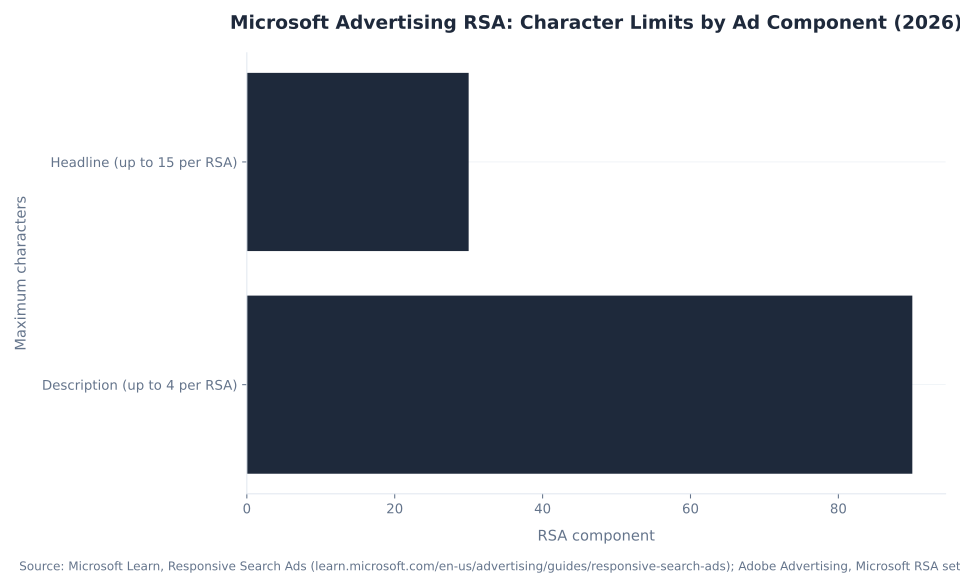
Microsoft Advertising RSA: Character Limits by Ad Component (2026)
Responsive Search Ads: The Only Creatable Search Format Since February 2023
Since February 1, 2023, Responsive Search Ads are the only search ad type that can be created or edited in standard Microsoft Advertising Search campaigns. Expanded Text Ads can no longer be created or edited; legacy ETAs continue to serve and report but attempting to create or edit one via the API returns a CampaignServiceAdTypeInvalid error. Any advertiser planning around a two-headline structure is planning around a discontinued format.
An RSA supplies a pool of headline and description assets; Microsoft's AI assembles up to 3 headlines and 2 descriptions per impression from that pool. The character limits are 30 characters per headline and 90 characters per description — the same as Google Ads — and these limits include any dynamic text substitutions (ad customizers, keyword insertion).
| RSA component | Minimum required | Maximum allowed | Character limit | Shown per impression |
|---|---|---|---|---|
| Headlines | 3 | 15 | 30 characters | Up to 3 |
| Descriptions | 2 | 4 | 90 characters | Up to 2 |
| Display URL paths | 0 | 2 (path 1 + path 2) | 15 characters per path | Both shown |
| Active RSAs per ad group | 1 recommended | 3 active (100 total ads per ad group) | N/A | N/A |
Source: Microsoft Learn, Responsive Search Ads; Microsoft Learn, Entity Limits (updated 2026-06-05); Adobe Advertising, Microsoft Advertising RSA settings; Microsoft Learn, Expanded Text Ads (ETA discontinuation confirmed).
The character limits include dynamic text substitutions. An ad customizer that inserts a city name counts against the 30-character headline limit, not separately. Test every headline variant with the longest expected substitution before building out a full RSA asset set.
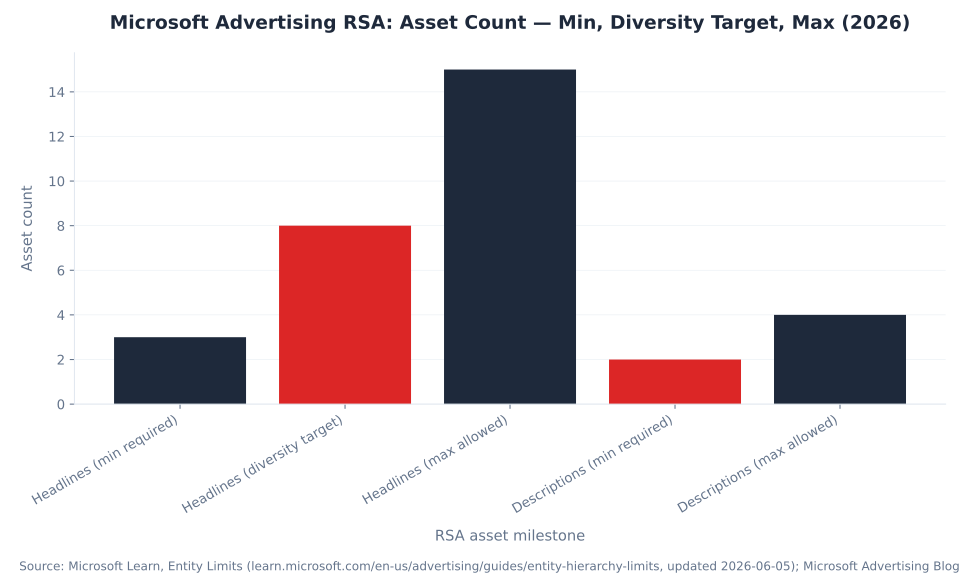
Microsoft Advertising RSA: Asset Count — Min, Diversity Target, Max (2026)
Ad Strength, Asset Diversity, and the Pinning Trade-off
Microsoft Advertising surfaces an ad-strength estimate on every RSA, grading creative quality across five labels: Incomplete, Poor, Average, Good, and Excellent. The primary driver of the rating is asset variety — the number of semantically distinct headlines and descriptions the algorithm has to work with. Microsoft's guidance for reaching a strong score is to supply at least 8–10 distinct headlines and at least 2 distinct descriptions.
| Ad strength label | Primary lever to improve |
|---|---|
| Incomplete | Add more headlines (minimum 3 required to serve) |
| Poor | Increase headline variety; avoid duplication across headlines |
| Average | Add unique, semantically distinct headlines — target 8–10 |
| Good | Minor diversification; unpin any pinned headlines to restore combinatorial variety |
| Excellent | Asset variety is high; maintain and monitor per-asset performance ratings |
Source: Microsoft Advertising Blog, Asset performance ratings & Responsive Search Ads (August 2020); Microsoft Learn, Responsive Search Ads.
Pinning is a mechanism that locks a specific headline or description to a fixed display position — for example, anchoring a legal disclaimer to Description 2. It is the correct tool when a brand or compliance rule demands a fixed slot. Outside that scenario, pinning collapses the combinatorial testing that makes an RSA work: a pinned asset always occupies its slot, preventing the algorithm from testing alternatives there. Pinning multiple distinct assets to the same slot restores some variety without sacrificing position control, but still reduces the total number of combinations the algorithm evaluates.
MB Adv Agency's default RSA posture: chase asset diversity and a strong ad-strength signal, not a perfectly pinned ad. The exception is any headline or description carrying a mandatory brand, legal, or compliance string — those get pinned to the appropriate position on day one, and everything else is left to the algorithm.
Microsoft Advertising Ad Extensions: Types Available per Attachment Level (2026)
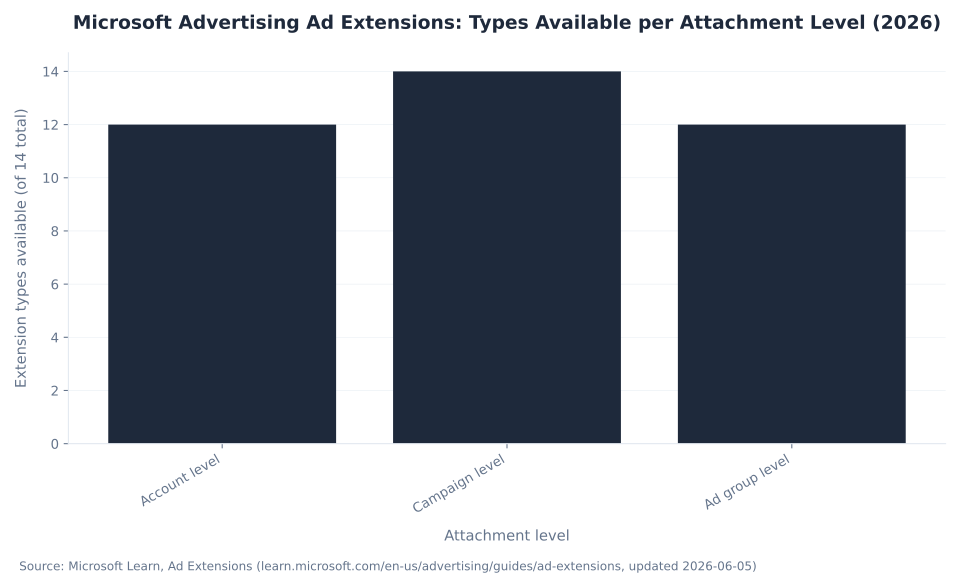
Ad Extensions in Microsoft Advertising: 14 Types, Not “Assets”
Microsoft Advertising provides 14 ad extension types that add structured information to a search ad. Google renamed this feature category to "assets" in 2022; Microsoft did not follow. Microsoft's live documentation (updated 2026-06-05) still labels the feature "ad extensions." The word "assets" appears in Microsoft only in narrower contexts: auto-generated RSA assets and the Campaigns → Assets sub-tab. The primary navigation for adding and managing these features is still "Ad extensions."
| Ad extension | What it adds to the ad | Attaches at |
|---|---|---|
| Sitelink | Up to 10 extra links to specific pages | Campaign, ad group |
| Callout | Non-clickable highlight snippets (2–4 shown; up to 20 stored) | Account, campaign, ad group |
| Structured Snippet | A header + 3–10 values (e.g. "Brands: …") | Account, campaign, ad group |
| Image | An image or alt text displayed alongside the ad | Account, campaign, ad group |
| Call | A clickable phone number | Campaign only |
| Action | A call-to-action button displayed with the ad | Account, campaign, ad group |
| Price | Product or service prices (top-of-page only) | Account, campaign, ad group |
| Promotion | Sale or offer callout (AU, CA, DE, FR, US, UK) | Account, campaign, ad group |
| Review | One third-party review per impression | Account, campaign, ad group |
| Location | Business address and local phone number | Account, campaign |
| App | A link to install a mobile app | Account, campaign, ad group |
| Filter Link | A header + 3–10 clickable values | Account, campaign, ad group |
| Flyer | Product or store catalog distribution | Account, campaign, ad group |
| Logo | Brand logo displayed alongside the text ad | Account, campaign, ad group |
Source: Microsoft Learn, Ad Extensions (updated 2026-06-05). Call extension attaches at campaign level only; Location extension attaches at account and campaign level only (not ad group).
For dental practices and law firms, call and sitelink extensions are the highest-priority extensions to build on day one. IT services and managed IT providers and SaaS companies benefit most from structured snippets (product features) and callout extensions (support SLAs, uptime guarantees). For PPC management in Austin or PPC management in Chicago, location extensions are relevant for any business with a physical presence or service area. Contact MB Adv Agency at the contact page to discuss extension strategy for a specific vertical.
The Broad Match Modifier Removal: What Changed and Why It Matters in 2026
Broad Match Modifier was not a minor or temporary change — it was the defining keyword match type that distinguished Microsoft Advertising from Google Ads for several years. Its removal in August 2021 brought the two platforms' positive match type lineups into alignment for the first time. Understanding the timeline matters because a significant volume of older guides and AI-generated advice still describes BMM as a live Microsoft feature.
| Period | Active positive match types | Active negative match types | Notes |
|---|---|---|---|
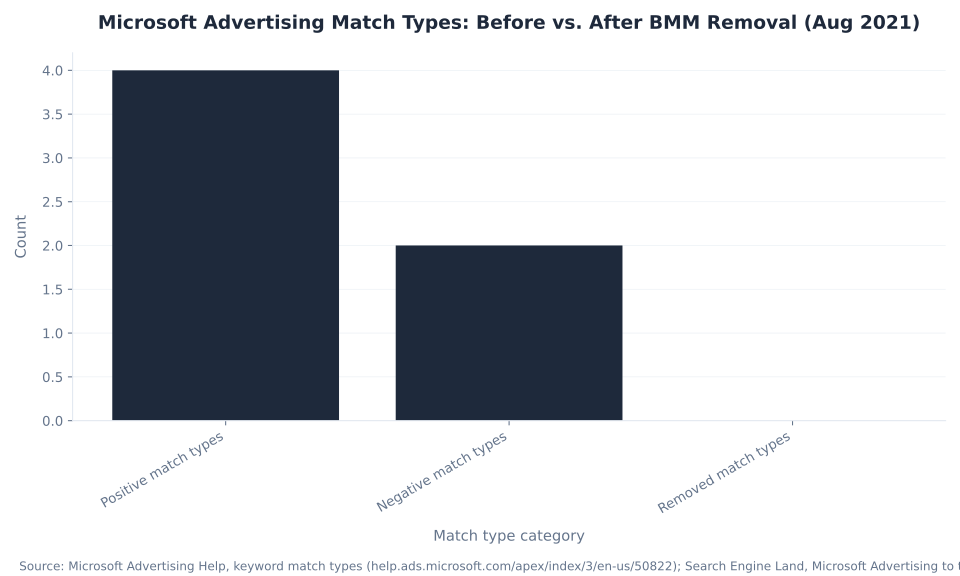
| Pre-May 2021 | 4 (broad, BMM, phrase, exact) | 2 (phrase, exact) | BMM was the feature that distinguished Microsoft from Google at the time |
| May 2021 (transition start) | 4 → 3 (phrase absorbs BMM behavior) | 2 (phrase, exact) | Expanded phrase match began in US and Canada; existing BMM keywords transitioned |
| August 2021 | 3 (broad, phrase, exact) | 2 (phrase, exact) | No new BMM keywords creatable from this date forward |
| 2026 (current) | 3 (broad, phrase, exact) | 2 (phrase, exact) | Identical lineup to Google Ads; "same-as-Google" framing is accurate for importers |
Source: Search Engine Land, Microsoft Advertising to treat phrase match the same way Google Ads does; Search Engine Land, Advertisers will lose the ability to create new BMM keywords; Microsoft Learn, Negative Keywords.
The no-negative-broad rule is a separate and older constraint: Microsoft Advertising has never supported negative broad match. Negative phrase is the default negative match type. Negative exact is the more surgical option: it blocks only the verbatim query, which is useful when a term is a valid keyword in one context but a valid negative in another. For legal PPC campaigns and local legal advertising in Missoula, this distinction is operationally important.
RSA Best Practices: Asset Counts, Headlines, and Pinning Strategy
The gap between the minimum RSA asset count (3 headlines, 2 descriptions) and the maximum (15 headlines, 4 descriptions) is the algorithm's testing surface. Advertisers who stop at the minimum give the system a single possible combination per position; advertisers who supply 15 distinct headlines give it 3,003 possible three-headline combinations per impression. Microsoft's guidance is to target at least 8 distinct headlines for a strong ad-strength score.
| RSA milestone | Headlines | Descriptions | Notes |
|---|---|---|---|
| Minimum to serve | 3 | 2 | Ad serves but ad strength is likely Incomplete or Poor |
| Diversity target (strong ad strength) | 8–10 | 2+ | Microsoft's guidance for reaching “Good” or “Excellent” ad strength |
| Maximum allowed | 15 | 4 | Full testing surface; 3,003 possible three-headline combinations available |
Source: Microsoft Advertising Blog, Asset performance ratings & Responsive Search Ads; Microsoft Learn, Entity Limits (updated 2026-06-05).
The 30-character headline limit demands economical language. Headlines that work at 30 characters are a different craft from display copy: every word earns its place, and the three selected for any given impression are assembled in any order (unless pinned), so each headline needs to make sense in isolation. Useful frames for building a diverse headline set: product or service name variants, location and geo qualifiers, offer and urgency statements, trust signals (certifications, years in business), and the specific pain point the ad solves. A set built from five frames with two or three variants per frame reaches the 10–15-headline target without filler.
MB Adv Agency's RSA build sequence for new accounts: write 15 headlines from five frames, write 4 descriptions (2 functional, 2 with a trust element or specific offer), pin nothing except mandatory compliance text, and confirm ad strength at “Good” or better before the campaign goes live. After two weeks, pull the asset performance report and retire any headline rated “Poor” to make room for new variants. For financial services advertisers and dental practices with compliance requirements on ad copy, pin the compliant disclaimer to the relevant slot and build diversity around the remaining positions.
Microsoft Advertising Match Types: Before vs. After BMM Removal (Aug 2021)
Running Microsoft Advertising for High-Value Lead Generation?
MB Adv Agency builds and manages Microsoft Search campaigns for legal, financial services, dental, and SaaS advertisers — keyword architecture, negative-list hygiene, RSA builds, and extension setup from day one.
Get a free Microsoft Ads audit →AI Max for Search and Where Microsoft Advertising Is Headed in 2026
AI Max for Search entered open pilot in about May 2026. It is not a new match type — it is an automation layer that sits above the standard keyword → RSA → extension mechanics described in this guide. AI Max applies AI-powered query matching beyond the advertiser's keyword list, extending reach to informational-to-commercial intent queries that the keyword set does not explicitly cover. It also enables asset personalization: the system dynamically assembles RSA headlines and descriptions tailored to landing-page context, generating assets beyond the advertiser's 15-headline pool.
RSAs and AI Max ads now serve in Copilot Search results and Copilot Answers, not only traditional Bing SERPs. This placement is separate from the standard Search Network auction and is an emerging channel for intent-adjacent discovery. Source: ALMCorp, Microsoft Advertising Activate 2026 Recap.
The keyword / RSA / extension mechanics described in this guide are what advertisers configure in standard Search campaigns today. AI Max is a separate, opt-in toggle for advertisers who want to extend coverage beyond their keyword list. Do not conflate AI Max's expanded query matching with the standard broad/phrase/exact match types — they operate at different layers of the account. Keep both levers visible to each other in Microsoft Ads reporting so you can distinguish match-type-driven impressions from AI Max-driven ones.
Three Misconceptions That Cost Budget on Microsoft Advertising
These are the three most common stale-knowledge errors in Microsoft Advertising guidance as of 2026. Each leads to a concrete operational mistake: building a keyword type that does not exist, planning around an ad format that cannot be edited, or looking for a UI menu under the wrong name.
1. "Broad Match Modifier still works in Microsoft." It does not, and has not since August 2021. The +keyword syntax was the defining feature that distinguished Microsoft Advertising from Google Ads for several years. Microsoft retired it in August 2021 — no new BMM keywords have been creatable since that date — following Google's removal in March 2021. Today the platform has three positive match types: broad, phrase, and exact. Any keyword built with +modified +broad syntax, whether imported from Google Ads or typed directly, is treated as phrase match. Any guide still teaching BMM as a live Microsoft match type is describing a feature that no longer exists in the platform.
2. "Expanded Text Ads can still be written in Microsoft." They cannot. Since February 1, 2023, ETAs are non-creatable and non-editable in standard Search campaigns. Legacy ETAs created before that date still serve and report, but attempting to create or edit one returns a CampaignServiceAdTypeInvalid error. An advertiser planning around two-headline ETA structures is planning around a discontinued format. The current standard is RSAs: 3–15 headlines at 30 characters each, 2–4 descriptions at 90 characters each.
3. "Ad extensions were renamed to 'assets' in Microsoft, same as Google." Google renamed its ad extensions to "assets" in 2022; Microsoft did not follow. Microsoft's live documentation (updated 2026-06-05) still labels the feature "ad extensions." The word "assets" appears in Microsoft only in narrow contexts: auto-generated RSA assets and the Campaigns → Assets sub-tab. An advertiser trained on Google Ads who looks for an "Assets" section in the Microsoft UI to add sitelinks will not find one — the feature is still under "Ad extensions." MB Adv Agency uses "ad extensions" as the primary term in all Microsoft Advertising work, noting the "assets" label only when disambiguating the RSA auto-generation layer.
Frequently Asked Questions: Microsoft Advertising Keywords and Ad Copy
Need help with keyword strategy or ad-copy builds on Microsoft Advertising?
MB Adv Agency handles match-type architecture, shared negative-list setup, RSA builds, and full extension coverage for search campaigns across roofing, financial services, and other high-value verticals.
Talk to the team →Methodology
Keyword match type definitions and limits draw from Microsoft Advertising Help (help.ads.microsoft.com) and Microsoft Learn developer documentation (learn.microsoft.com/en-us/advertising/guides/), updated 2026-06-05. BMM removal timeline sourced from Search Engine Land reporting, May–August 2021. RSA character limits corroborated via Adobe Advertising's Microsoft RSA settings documentation. Ad-strength guidance sourced from the Microsoft Advertising Blog (August 2020); verify against current Microsoft guidance at publish time as this is the foundational document from ad-strength launch. Ad extension count and attachment levels from Microsoft Learn, Ad Extensions (updated 2026-06-05). AI Max for Search context from ALMCorp, Microsoft Advertising Activate 2026 Recap. Search demand data from Ahrefs and Google Search Console, June 2026. Reviewed by MB Adv Agency, June 2026.

As a Google Ads expert, I bring proven expertise in optimizing advertising campaigns to maximize ROI.
I specialize in sharing advanced strategies and targeted tips to refine Google Ads campaign management.
Committed to staying ahead of the latest trends and algorithms, I ensure that my clients receive cutting-edge solutions.
My passion for digital marketing and my ability to interpret data for strategic insights enable me to offer high-level consulting that aims to exceed expectations.
Google Partner Agency
We're a certified Google Partner Agency, which means we don’t guess — we optimize withGoogle’s full toolkit and insider support.
Your campaigns get pro-level execution, backed by real expertise (not theory).

4.9 out of 5 from 670+ reviews on Fiverr.
That’s not luck, that’s performance.
Highly recommend Matteo to set up your server side tracking. He has a deep understanding of e-commerce tracking and will go above and beyond to make sure everything is set up correctly and working 100%. If you are scaling your store this set up is non-negotiable in my opinion and there isn't many people who have this much knowledge or put the effort in to get it right. Thanks again!

avorodesign.com
I can only recommend Matteo! He was very patient, professional and very knowledgeable about GA4, Consent Mode v2, and GDPR compliance. Communication was clear, and the setup was done professionally and efficiently. Highly recommend him for anyone needing reliable tracking implementation.

www.natureiki.life
Matteo shines in the realm of online professionals. His work is not only deep in data but also complemented by his proactive communication and cooperation, setting a new standard for freelancers. If you want someone who truly exceeds expectations, look no further. Highly recommended!

www.omanbeverlysmyth.com
Exceptional Service Beyond Expectations - Outstanding Service Impeccable depth, flawless delivery, and exceptional language fluency—this service exceeded all expectations. Highly recommended. Matteo truly ROCKS!!!

ium-paris.com
Top-notch, always highly value working with Matteo. An absolute Google Ads Genius. This is approximately the 8th time I have hired him and he's helped us get 6-7 ROAS. We are excited in continuing to improve our lead flow. Hire this guy if you need Google Ads help. Thanks Matteo!

www.dleeventgroup.com
I finally found the guy who can setup server side tracking and all the ecosystem properly. I definitely recommend Matteo. He is very responsive, kind and wants to dig into things. He configured GA4, Meta, Google Ads, Outbrain and google consent v2 with Cookiebot. Thanks Matteo.

inomega.fr
MB Adv delivered exceptional work with outstanding professionalism and lots of patience, taking time to see effects of changes made and not just do the work and submit it. The proactive communication and video summaries of the work completed made working with Matteo a pleasure, as he consistently went above and beyond. Highly recommended for web analytics projects! We are already working on another project.

www.withnellsensors.co.uk
Working with Matteo on my Google Ads was a game-changer. He's not just a strategist, he's a true partner. He understood my goals and tailored a campaign that perfectly reached my target audience. I'm grateful for his expertise and dedication.

dccargo.com
Click-driven mind
with plastic-brick obsession.
We build Google Ads campaigns with the same mindset we use to build tiny brick worlds: strategy, patience, and zero tolerance for wasted pieces.
Data is our blueprint. Growth is the only acceptable outcome.