YouTube Ads Targeting 2026: Audiences & Content
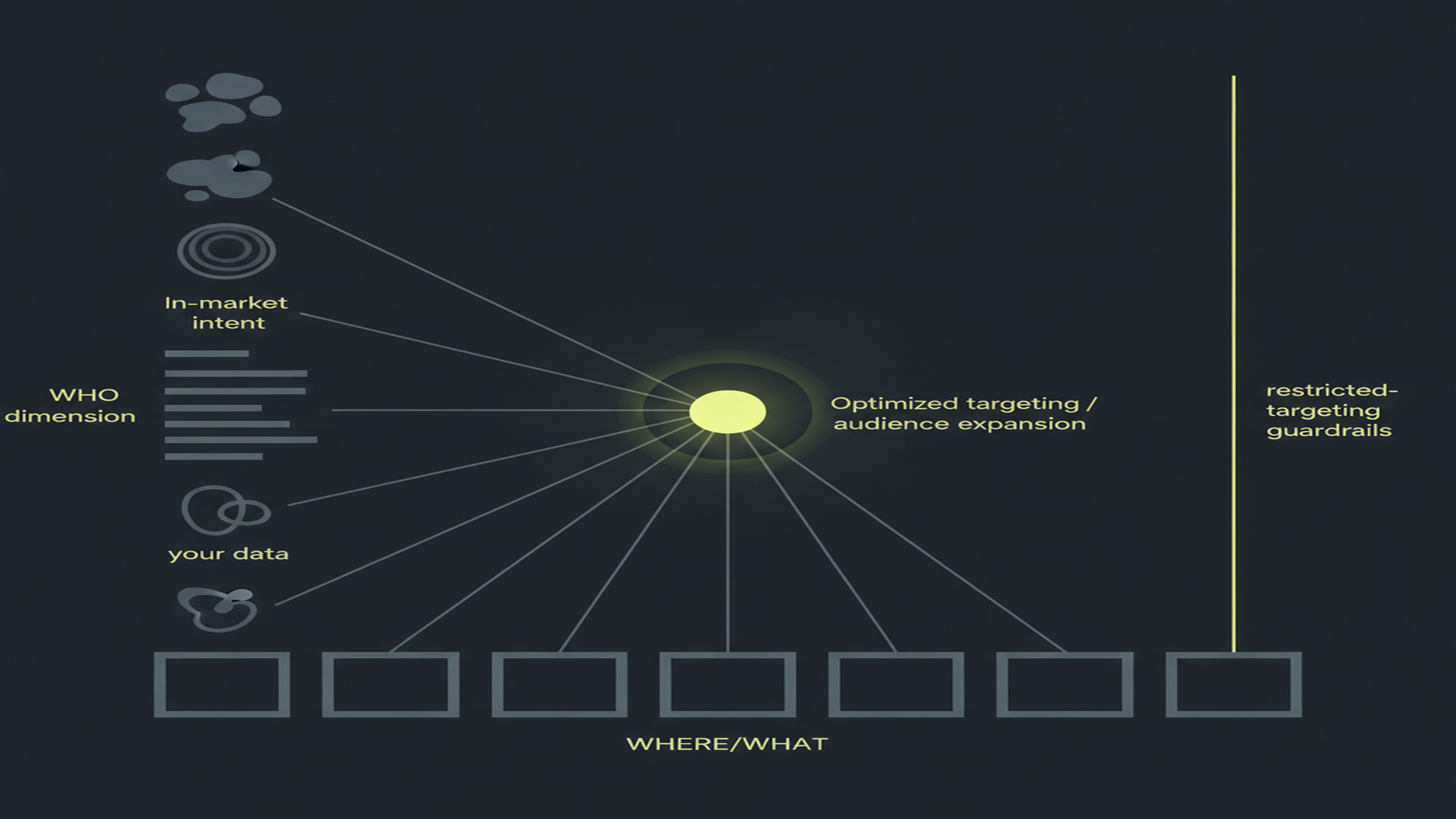
YouTube Ads Targeting 2026 — The Two-Axis System
WHO × WHERE
Audience segments decide the person; content targeting decides the context — and layering the two narrows by intersection
Custom affinity + custom intent merged into custom segments (2021) · "remarketing" is now "your data" · similar audiences removed Aug 2023 · channel-engagement your-data segments need a linked channel, ≥100 active users, and last up to 540 days
YouTube Ads Targeting in 2026: The WHO and the WHERE
YouTube targeting answers two different questions, and the clearest mental model keeps them apart. Audience segments describe the person — affinity, in-market, life events, detailed demographics, custom segments, and your data. Content / contextual targeting describes the context the ad runs in — placements, topics, keywords, and exclusions. The first is the WHO; the second is the WHERE. Every other guide lists targeting types in a flat menu; the WHO × WHERE split is the structure the thin pages never gave, and it is the spine of this pillar.
The two halves combine by intersection. When you add more than one targeting type to the same ad group, Google narrows: it is an AND across types (a person must match both an audience segment and a placement or topic) and an OR within a type (any one affinity segment in the list qualifies). Stacking a WHO layer with a WHERE layer shrinks reach fast, so the useful first move for a new YouTube advertiser is to pick the WHO, decide whether a WHERE is even needed, and remember that two layers multiply the constraint. YouTube ads are bought inside Google Ads, so the entire audience-and-content toolkit below lives in the Google Ads campaign builder, not a separate console. Source: Google Ads Help, “About audience segments” and “About content targeting for Video campaigns”.
Table 1 maps the audience half — every current segment type, the intent group Google files it under, and where it serves. Each term uses the 2026 name: audience segments, custom segments, your data. The objective decides which slice of this toolkit a campaign exposes; conversion video campaigns strip out content targeting and route audience work to Demand Gen, while reach and views campaigns expose the full content-targeting set. For that routing, see the YouTube ads campaign types and objectives pillar, and for where each format physically runs, the YouTube ad formats pillar.
| Segment type | What it is | Intent group (Google framework) | Where it serves |
|---|---|---|---|
| Affinity segments | Google-predefined groups by long-term interests, lifestyle & habits | Interests & habits | Video/YouTube, Display, Demand Gen (PMax = signal) |
| Custom segments (was custom affinity + custom intent) | Your own segment built from keywords, URLs, apps; AI blends interest + intent | Interests & habits / researching | Display, Gmail, Demand Gen, Video (PMax = signal) |
| In-market segments | People actively researching / comparing to buy a category now | Researching or planning | Video/YouTube, Display, Demand Gen |
| Life events | Milestones — moving, graduating, marrying, starting a business | Who they are / researching | Video/YouTube, Display, Gmail, Demand Gen |
| Detailed demographics | Long-term facts: parental status, marital status, education, homeownership, employment | Who they are | Video/Demand Gen (Employment = Search-only) |
| Your data — visitors + Customer Match (was "remarketing") | Your website/app visitors + uploaded Customer Match lists (hashed first-party data) | How they interacted | Video/YouTube, Demand Gen, PMax (needs Google tag) |
| Your data — YouTube-channel engagement | Viewed any/specific video, viewed as an ad, subscribed, visited channel, liked, added to playlist | How they interacted | Channel must be linked to the Ads account; ≥100 users; ≤540 days |
Layering note: combining types narrows by intersection (AND across types, OR within a type). Sources: Google Ads Help, “About audience segments” (the four intent groups: who they are / interests & habits / researching or planning / how they interacted); “About custom segments” (keywords/URLs/apps; merged custom affinity + custom intent, 2021); “Detailed demographics” (five categories; Employment Search-only); “Reach people who interacted with your YouTube channel” (channel link required; ≥100 active users; up to 540-day membership).
Read the table as two columns of meaning. The "intent group" column is Google's own 2026 framework — who they are (detailed demographics, life events), interests & habits (affinity, custom segments), researching or planning (in-market, life events), and how they interacted (your data). The rest of this guide walks each row, then crosses to the WHERE half and the AI expansion layer that sits on top of both.
The Rename Map: Why Half the Targeting Advice Online Is Written in a Dead Vocabulary
Google has renamed nearly the entire audience system, and using the wrong word is the fastest way to look like you do not run the platform. "Audiences" became audience segments (the hub is now Audience manager). "Remarketing" became your data / your data segments. And the one that catches the most people: "custom affinity" and "custom intent" were merged into a single type, custom segments, built from keywords, URLs, and apps. A page that still teaches "custom intent vs custom affinity" or "build a remarketing list" is teaching a 2020 product.
| Old term (in stale guides) | Current 2026 term | When it changed | What it means now |
|---|---|---|---|
| "audiences" | audience segments | Ongoing rollout | The hub is now Audience manager, not a flat "audiences" menu |
| "remarketing" / "remarketing lists" | your data / your data segments | Ongoing rollout | Website/app visitors, Customer Match, and YouTube-channel engagement |
| "custom affinity" + "custom intent" (two types) | custom segments (one merged type) | 2021 | One type built from keywords, URLs, and apps; AI blends interest + intent |
| "similar audiences" / "similar segments" | Removed | Aug 2023 | Use optimized targeting / audience expansion / Demand Gen Lookalike segments |
| "Expanded inventory" | Maximum (inventory mode) | 2025–2026 | Widest reach; least content filtering |
| "Standard inventory" | Moderate (recommended default) | 2025–2026 | Balanced; excludes the most sensitive content |
Sources: Google Ads Help, “About audience segments”; “About custom segments”; “About your data segments”; “About inventory modes”. Affinity segments and in-market segments kept their names — use the current term for each type consistently.
MB Adv Agency has found that the live-versus-dead vocabulary boundary is where most YouTube targeting briefs go wrong. A brief that asks for a "similar audience" or a "custom intent audience" is asking for products Google deleted or merged, and that stalls the setup conversation before any creative is discussed. Affinity segments and in-market segments kept their names, so the discipline is simple: use the current term for every type consistently, and name the old term exactly once as a "formerly known as" flag. That precision is the credibility anchor for platform-literate readers.
The "similar audiences" line in Table 2 is the load-bearing correction. Google announced the deprecation on November 3, 2022, stopped generating new similar segments in May 2023, and removed them from all campaigns in August 2023; only historical reporting was retained. The replacement is not one feature but three — optimized targeting, audience expansion, and Demand Gen Lookalike segments — each for a different job, covered in full below. Sources: Google Ads Help, “About custom segments” and “About your data segments”.
What Advertisers Actually Search For
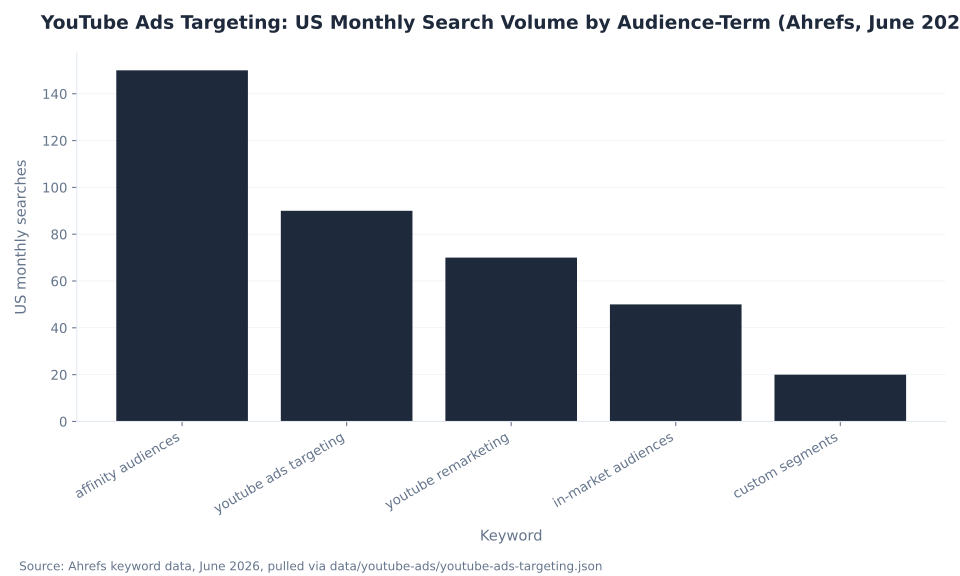
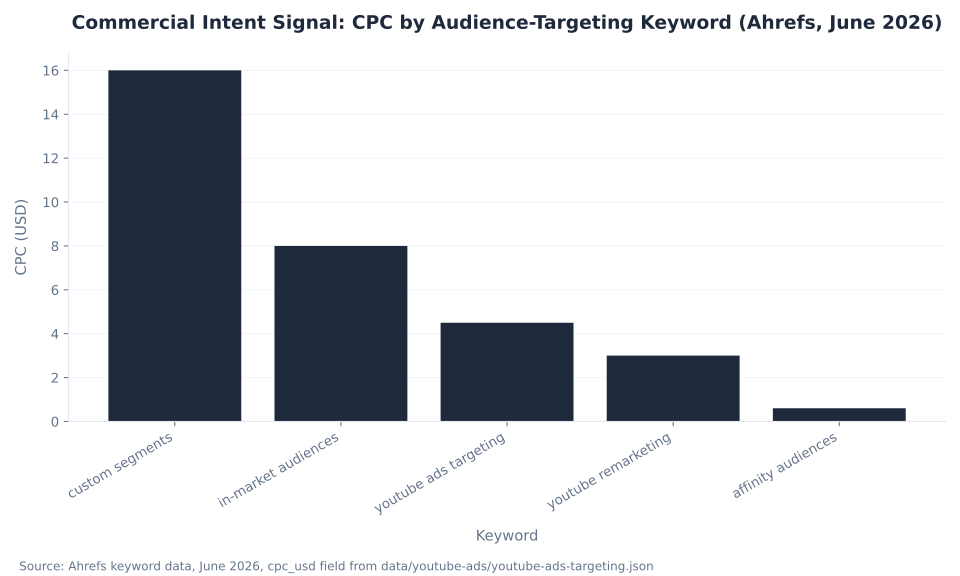
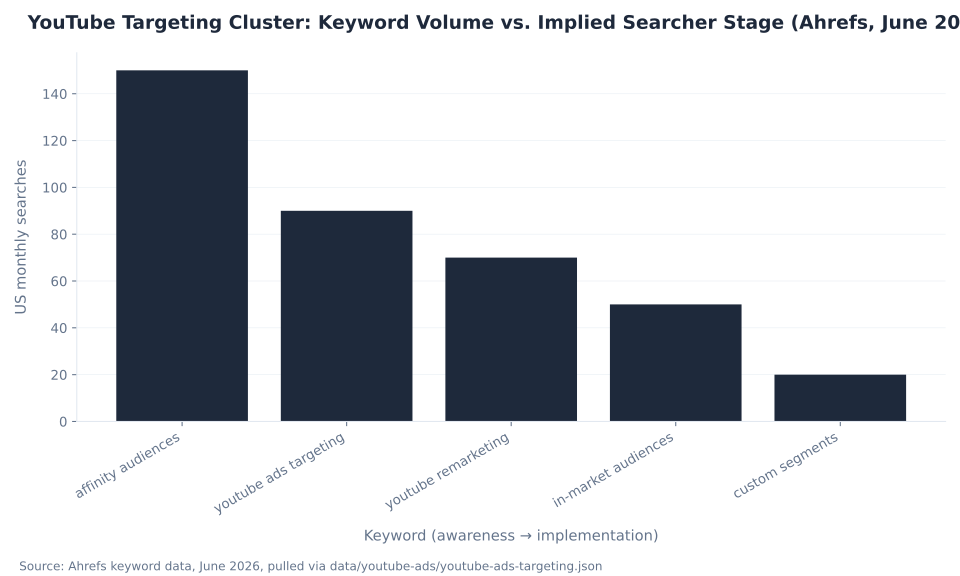
"affinity audiences" leads cluster search demand at 150 US monthly searches (Ahrefs, June 2026, KD 6) — the awareness entry point. The head term this pillar is built to own, "youtube ads targeting," runs 90/mo at KD 3, the lowest difficulty in the cluster and the primary rank target once the page is indexed. At the other end, "custom segments" draws only 20 searches a month but carries a $16.00 CPC — nearly 27× the $0.60 CPC on "affinity audiences." The cluster spans the full range from curiosity to commercial readiness.
| Keyword | US Monthly Vol. | Global Vol. | KD | CPC (USD) | Searcher intent |
|---|---|---|---|---|---|
| affinity audiences | 150 | 450 | 6 | $0.60 | Highest-volume cluster term; awareness / interest entry point |
| youtube ads targeting ★ | 90 | 150 | 3 | $4.50 | ★ Pillar head term; KD 3 — the primary rank target |
| youtube remarketing | 70 | 150 | 4 | $3.00 | Old vocabulary — current platform term is "your data" |
| in-market audiences | 50 | 200 | 5 | $8.00 | Strong buyer signal; global demand 4× US |
| custom segments | 20 | 50 | 5 | $16.00 | Lowest volume, highest CPC — platform-literate, commercially ready |
Source: Ahrefs keyword data, June 2026 (US monthly volume, 12-month average), pulled via data/youtube-ads/youtube-ads-targeting.json. The cluster head term "youtube ads" runs 19,000/mo US. GSC footprint of the seven absorbed pages: 0 clicks, 1 impression across the 90-day window (Mar 31–Jun 29, 2026) — a near-total zombie cluster. These are keyword-auction figures, not mbadv performance data.
"youtube remarketing" (70/mo, $3.00 CPC) is the tell that a large share of searchers still reach for the old vocabulary; the pillar earns the click and then corrects the term to "your data." "in-market audiences" shows a 4-to-1 global-to-US volume ratio (200 vs 50), a sign the concept is cross-channel rather than YouTube-specific, so the page is written for a US advertiser without losing international relevance. The combined US cluster volume is modest at 380 a month, but the value mix is the point: low-volume, high-CPC terms like "custom segments" mark the most commercially valuable, platform-literate searchers.
YouTube Ads Targeting: US Monthly Search Volume by Audience-Term (Ahrefs, June 2026)
The chart above sorts the five cluster keywords by US monthly volume. Near-zero keyword difficulty (KD 3–6 across all five) means low competition and strong early-ranking potential once the page is indexed. The strategic read is to serve all five entry points — from the curious "affinity audiences" searcher to the implementation-stage "custom segments" buyer — while routing every reader toward the WHO × WHERE framework and the rename corrections.
Affinity, Custom Segments & In-Market: Interests, Intent, and the Merge
The three interest-and-intent segment types are where most prospecting budgets land. Affinity segments are Google-predefined groups built from long-term interests, lifestyle, and habits — the broadest reach and the lowest commercial intent, ideal for an upper-funnel awareness layer. In-market segments describe people actively researching or comparing to buy a category right now — the strongest off-the-shelf buyer signal Google offers. Between them sits the type advertisers most often get wrong.
Custom segments are the merged type. Since the 2021 merge there is one custom audience, not two: you build it from keywords, URLs, and apps, and Google's AI blends interest and intent signals automatically. The old "custom affinity" and "custom intent" distinction is gone. Custom segments serve on Display, Gmail, Demand Gen, and Video; on Performance Max they act as a signal only, not a hard target. For a B2B advertiser, a custom segment built from competitor URLs and industry search terms is the core of a YouTube prospecting build — the kind of structure our team builds inside B2B PPC engagements. Source: Google Ads Help, “About custom segments”.
Commercial Intent Signal: CPC by Audience-Targeting Keyword (Ahrefs, June 2026)
The CPC chart reframes the same keyword cluster as a commercial-intent gradient. CPC is a proxy for how much advertisers are willing to pay for each kind of searcher, not a YouTube ad cost. The 27× spread from $16.00 ("custom segments") down to $0.60 ("affinity audiences") tracks the funnel: a "custom segments" searcher knows the current Google vocabulary and is likely mid-implementation, while an "affinity audiences" searcher is further from a buying decision. MB Adv Agency reads this gradient as a content instruction — serve the curious affinity reader a clear definition, and serve the custom-segments implementer the precise build steps and the merge correction they came for. For how targeting breadth moves actual auction cost, see how much YouTube ads cost.
Your Data: Remarketing on YouTube and the Channel-Link Gate
Your-data segments — the category formerly called "remarketing" — are real and powerful on YouTube, and they come in three sub-types: website and app visitors, uploaded Customer Match lists (hashed first-party data), and YouTube-channel engagement. The first two need the Google tag in place; the third has a prerequisite that Search remarketing does not, and it is the single most common reason a YouTube remarketing campaign comes up empty.
To build a segment from people who engaged with your videos — viewed any or a specific video, viewed your video as an ad, subscribed, visited your channel page, liked a video, or added one to a playlist — your YouTube channel must be linked to the Google Ads account. Two more limits decide whether a segment is usable: it needs at least 100 active users to serve, and membership lasts up to 540 days. Source: Google Ads Help, “Reach people who interacted with your YouTube channel” and “About your data segments”.
| Fact | Value | Why it matters |
|---|---|---|
| Prerequisite | YouTube channel must be linked to the Google Ads account | No link, no channel-engagement segment — the single most common reason a build comes up empty |
| Minimum size to serve | ≥100 active users | Below this, the segment exists but cannot deliver impressions |
| Maximum membership | Up to 540 days | Caps how long a past engager stays in the segment |
| Interactions counted | Viewed any/specific video, viewed your video as an ad, subscribed, visited channel page, liked a video, added one to a playlist | "Shared a video" was removed as a segment-building event |
| Forward-looking | Automatic channel↔Ads linking rolling out ~Apr–Jun 2026 (opt-out) | Can change which channel feeds your engagement segments — audit the linked-channel setting |
Site/app visitor segments and Customer Match are also "your data" and do not require the channel link — they need the Google tag instead. Sources: Google Ads Help, “Reach people who interacted with your YouTube channel”; “About your data segments”.
MB Adv Agency sequences this deliberately: link the channel before you plan your-data audiences, because a segment that depends on engagement events cannot backfill history it never had permission to collect. The forward-looking note to audit now is the automatic YouTube-channel-to-Ads linking rolling out around April to June 2026 on an opt-out basis — it can silently change which channel feeds your engagement segments. Because your-data and Customer Match segments also depend on tracking being in place — the Google tag, the channel link, and Consent Mode v2 in the EU and UK — set the measurement foundation first via YouTube ads metrics and measurement and a clean server-side tracking setup.
Content & Contextual Targeting: The WHERE/WHAT
The second half of YouTube targeting describes where the ad runs, not who sees it. Content targeting has four types: placements (specific channels, videos, apps, or sites), topics (broad subject categories of videos and channels), keywords (words and phrases tied to video content), and exclusions (the negatives that keep the ad off the wrong inventory). This is the half the "choosing the right placements" searcher came for, and it carries two structural rules that reshape how it behaves.
| Content type | What you target | Granularity | Typical use |
|---|---|---|---|
| Placements | Specific YouTube channels, individual videos, apps, or websites | Most precise — pick exact inventory | Run next to known, vetted content |
| Topics | Broad subject categories of videos/channels (e.g. "Autos," "Beauty") | Broad — whole content themes | Scale contextual reach by theme |
| Keywords | Words/phrases tied to video content, related to your product/service | Medium — content-keyword match | Contextual relevance (Display/Video) |
| Exclusions | Placements, topics, keywords, or content types to keep the ad off | Negative — brand safety | Protect the brand from wrong context |
★ Structural rule: content targeting (placements/topics/keywords) cannot be added to conversion/action video campaigns (auto-removed since early 2023) — it is for reach/awareness builds. Digital content labels (DL-G/PG/T/MA) no longer apply to YouTube ads (since Sept 2024) — only Display/app inventory. Sources: Google Ads Help, “About content targeting for Video campaigns”; “About content suitability / inventory modes” (content labels off YouTube since Sept 2024).
The first structural rule is the one that surprises Search marketers porting a playbook to video: content targeting cannot be added to conversion or action video campaigns. It has been auto-removed since early 2023, because those campaigns let Google's AI find converters rather than pinning the ad to fixed content. Placements, topics, and keywords are for reach and awareness builds. The second is that the old digital content labels (DL-G, DL-PG, DL-T, DL-MA) no longer apply to YouTube ads — since September 2024 they only affect Display Network and app inventory. Source: Google Ads Help, “About content targeting for Video campaigns”.
The practical model for the WHERE half: use placements, topics, and keywords plus exclusions to shape reach and awareness campaigns; use the inventory mode plus exclusions for brand safety everywhere; and do not expect content targeting to survive on a conversion build. The objective sets the rules here, which is why the campaign types and objectives pillar is the companion read for this section.
Content-Suitability Inventory Modes: The Brand-Safety Layer
Brand safety on YouTube in 2026 runs on the content-suitability inventory mode, and the names changed. Maximum (formerly Expanded) gives the widest reach across the most content, including some sensitive material. Moderate (formerly Standard) is the recommended default and excludes the most sensitive content. Limited (unchanged) is the strictest, excluding most sensitive plus some borderline content. The mode sets how much sensitive content your ads can appear next to, and it trades reach against filtering.
| Inventory mode (2026) | Former name | What it does | Trade-off |
|---|---|---|---|
| Maximum | Expanded inventory | Widest reach; shows on the most content, incl. some sensitive | Most reach, least content filtering |
| Moderate (recommended default) | Standard inventory | Balanced — excludes the most sensitive content | Google's recommended balance |
| Limited | Limited inventory (unchanged) | Strictest; excludes most sensitive + some borderline content | Most brand-safe, least reach |
Accounts that never picked a mode default to Maximum from May 2026 — review this setting on existing accounts. Source: Google Ads Help, “About inventory modes / content suitability” (Maximum was Expanded; Moderate was Standard and recommended; Limited unchanged). Brand safety = inventory mode + exclusions; digital content labels no longer gate YouTube.
The setting that needs an audit on existing accounts is the default. Accounts that never picked a mode default to Maximum from May 2026 — the widest, least-filtered tier — so a brand that assumed it was running on the old "Standard" balance can find itself on the broadest inventory without having changed anything. Brand safety is the inventory mode plus placement and topic exclusions working together; the digital content labels that once gated YouTube do not anymore. Source: Google Ads Help, “About inventory modes / content suitability”.
Inventory mode is a campaign-wide control; exclusions are the surgical layer on top. A clean brand-safety build sets Moderate as the floor, then adds placement exclusions for specific channels or videos and topic or keyword exclusions for subjects the brand will not sit next to. For advertisers running across many verticals at once, the inventory mode plus exclusion list is the part of the structure that protects the brand without collapsing reach — the everyday work of PPC campaign management.
What Replaced Similar Audiences: The Expansion Stack
"Similar audiences" are gone, and the modern replacement is not one feature but three, each for a different job. Optimized targeting looks beyond your selected segments for likely converters using real-time conversion data, and it is on by default for action campaigns — your segments become a seed, not a hard cap. Audience expansion finds more people similar to your segment to grow reach and views through a reach slider, and it is not for conversions. Demand Gen Lookalike segments are a distinct, current feature built from a seed list.
| Tool | What it does | When it applies | Key facts |
|---|---|---|---|
| Optimized targeting | Looks beyond your selected segments for likely converters using real-time conversion data | Conversion / action goals (Display, Demand Gen, Video action) | On by default; your segments are a seed/hint, not a hard cap |
| Audience expansion | Finds more people similar to your segment to grow reach/views (holds CPM/CPV) | Reach / awareness goals (Video reach) | Controlled by a reach slider; not for conversions |
| Demand Gen Lookalike segments | Reaches new people resembling a seed list (Customer Match / your data) | Demand Gen only | Tiers Narrow ~2.5% / Balanced ~5% / Broad ~10% of geo; seed ≥100 matched; as of Mar 15 2026 act as AI signals, not hard caps |
| ★ Similar audiences / segments | Deprecated — removed from all campaigns Aug 2023 | No longer creatable or serving | Use the three tools above instead |
Sources: Google Ads Help, “About optimized targeting” (beyond-seed conversion-driven; on by default); “About audience expansion” (reach slider; reach/views, not conversions); “About Lookalike segments” (Demand Gen; Narrow/Balanced/Broad tiers; seed ≥100 matched; Mar 15 2026 → AI-signal not constraint). Similar-segments sunset announced Nov 3 2022, removed Aug 2023.
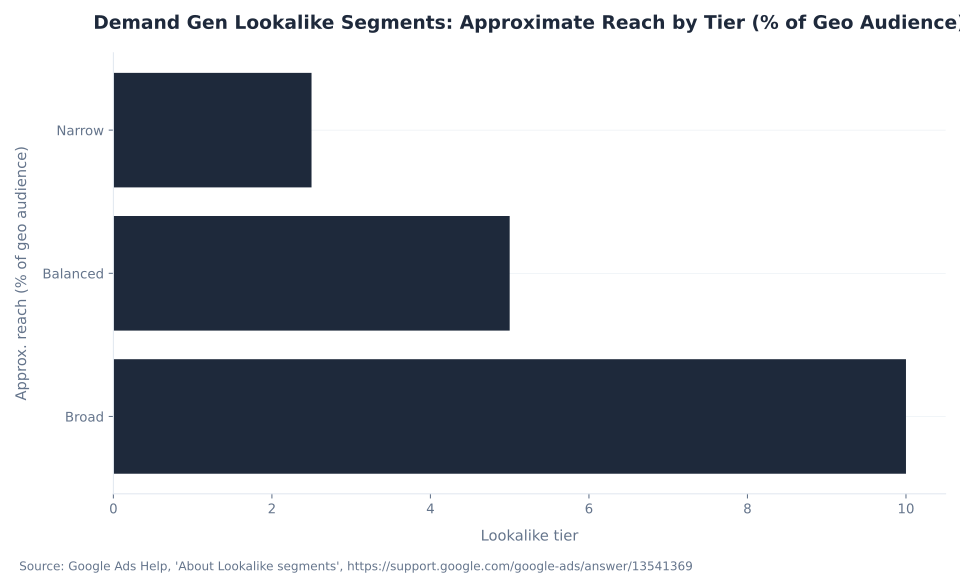
The honest correction is "do not look for a similar audience — pick the right one of the three replacements for your objective." Optimized targeting for conversions, audience expansion for reach, Demand Gen Lookalike segments when you are in Demand Gen and seeding from Customer Match or your data. Lookalike segments come in tiers — Narrow at about 2.5%, Balanced at about 5%, and Broad at about 10% of the geo audience — with a documented seed floor of 100 matched users. Sources: Google Ads Help, “About optimized targeting”, “About audience expansion”, and “About Lookalike segments”.
Demand Gen Lookalike Segments: Approximate Reach by Tier (% of Geo Audience)
The reach-tier chart shows how the three Lookalike tiers scale as a share of the geo audience. As of March 15, 2026, Demand Gen Lookalike segments act as AI signals that prioritize conversions rather than as hard targeting caps; advertisers can opt out to keep the legacy constraint behavior. MB Adv Agency treats Lookalike segments as a Demand-Gen-only expansion lever — never as a stand-in for the removed similar audiences. The "1,000-plus seed" figure that circulates is practitioner advice, not Google's floor; the documented minimum is 100 matched users. How all of this AI automation fits together with bidding and creative is the subject of YouTube ads optimization and AI.
Detailed Demographics and Life Events: Targeting Who Someone Is
Detailed demographics describe long-term facts about a person rather than a fleeting interest, and Google documents five categories: parental status, marital status, education, homeownership, and employment. Four of the five — parental status, marital status, education, and homeownership — are available for Video and Demand Gen targeting. The fifth, employment, is Search-only, so it cannot be added to a YouTube Video campaign. Building a Video targeting plan that assumes employer-size or industry targeting on YouTube is a common error that this distinction prevents. Source: Google Ads Help, “About detailed demographics”.
Life events sit beside detailed demographics in the "who they are" and "researching" framework. They capture milestones — moving, graduating, marrying, starting a business — and they matter because receptivity spikes at a transition moment. A person who just moved is briefly in-market for a long list of categories at once, which is why life-event targeting pairs naturally with an in-market or your-data layer rather than standing alone. Life events serve on Video, Display, Gmail, and Demand Gen.
The intent-group framing is the through-line. Detailed demographics and life events answer "who they are"; affinity answers "interests and habits"; in-market and life events answer "researching or planning"; your data answers "how they interacted." A full-funnel build for a brand in real estate or fitness and gym marketing layers an interest or affinity segment with an in-market or life-event layer and lets the campaign intersect them — the WHO × WHERE logic applied inside the WHO half itself. The verticals differ, but the layering discipline is horizontal across all of them.
Restricted Targeting: The Compliance Guardrails
Two categories of restricted targeting are hard rules, not best-practice advice — they decide whether a campaign is legal to run. Sensitive categories — health, financial hardship, alcohol, gambling, political content, race and ethnicity, sexual orientation, religion, and similar — allow no advertiser-curated audiences at all. HEC — Housing, Employment, and Credit, in the US and Canada — forbids targeting by gender, age, parental status, marital status, or ZIP code, and requires any location radius to be at least 1 km.
| Category | Restriction | Scope |
|---|---|---|
| Sensitive categories (health, financial hardship, alcohol, gambling, political, race/ethnicity, sexual orientation, religion) | No advertiser-curated audiences allowed for these categories | Global |
| HEC — Housing, Employment, Credit | Cannot target by gender, age, parental status, marital status, or ZIP code; location radius must be ≥1 km | US & Canada only |
These are compliance requirements, not best-practice advice — a HEC campaign running ZIP-code or gender targeting is in policy violation. Source: Google Ads Help, “About audience segments” (personalized-ads restrictions).
A HEC campaign that runs ZIP-code targeting or gender targeting is in policy violation, full stop. The sensitive-category restriction applies globally; the HEC guardrails specifically cover Housing, Employment, and Credit advertising in the US and Canada. These rules sit on top of the inventory mode and exclusion controls, and they cannot be overridden by a custom segment or a your-data list — the restriction is on the targeting dimension itself, not on the audience source. Source: Google Ads Help, “About audience segments” (personalized-ads restrictions).
For regulated advertisers, the targeting plan starts from the restrictions and works inward, not the other way around. A lender or an employer running lead-gen on YouTube builds the audience from broad contextual and interest layers that stay inside the HEC rules, then leans on optimized targeting and Smart Bidding to find converters without the prohibited demographic levers. That is the core of compliant PPC lead generation work for advertisers in SaaS and software and other regulated-adjacent categories.
Layering Targeting: How the Pieces Combine
Layering is the whole point of the system, and it behaves as an intersection: AND across types, OR within a type. Add an affinity segment and a placement list to the same ad group, and a person must match the affinity segment and appear on a targeted placement to be eligible. Add three affinity segments, and matching any one of them qualifies. The recommended build sequences the WHO, the WHERE, and the AI expansion layer deliberately rather than piling every control into one ad group.
- Link the channel first. Link your YouTube channel to the Google Ads account so channel-engagement your-data segments can build at all — before you plan any your-data audience.
- Choose audience segments by intent. Affinity for interests and habits, in-market and life events for active buyers, custom segments from your own keywords/URLs/apps, detailed demographics for life facts (remember Employment is Search-only).
- Add your data. Site and app visitors, Customer Match uploads, and YouTube-channel engagers (at least 100 active users, up to 540 days).
- Layer content targeting only on reach and awareness builds. Placements, topics, and keywords shape the WHERE — but not on conversion campaigns, where they are auto-removed.
- Set the inventory mode and exclusions. Moderate is the recommended default; add placement, topic, and keyword exclusions for brand safety.
- Let the right AI expansion run. For conversions, leave optimized targeting on (it is on by default); for reach, use audience expansion's slider; in Demand Gen, seed Lookalike segments.
- Respect restricted targeting. No advertiser-curated audiences for sensitive categories; no gender, age, parental, marital, or ZIP targeting for Housing/Employment/Credit in the US and Canada.
YouTube Targeting Cluster: Keyword Volume vs. Implied Searcher Stage (Ahrefs, June 2026)
Read the keyword chart left to right as a funnel: "affinity audiences" and "youtube remarketing" reflect early-stage curiosity and outdated vocabulary, "youtube ads targeting" is the head-term intent, and "in-market audiences" and "custom segments" mark implementers researching specific mechanisms. MB Adv Agency builds these layered, brand-safe structures for advertisers across the full funnel — the work of turning the audience-segment menu and content-targeting controls into one coherent build is exactly what PPC campaign management and optimization and AI cover, for verticals from travel and luggage to SaaS.
YouTube Targeting, Built and Run
The right WHO, the right WHERE, the right AI expansion on top
YouTube ads are bought inside Google Ads. Our team layers audience segments with content targeting, keeps the restricted-targeting rules straight, and lets optimized targeting and Demand Gen Lookalike segments expand reach to likely converters.
PPC campaign management →What Is Changing in 2026: Auto-Linking, AI Signals, and Inventory Defaults
Google renames and restructures YouTube targeting constantly, and four 2026 changes are worth auditing now because each one can shift behavior without an advertiser touching a setting. The pace is the reason the rename map exists: training-data drift on these products is measured in months, so the durable skill is checking the live Audience manager rather than trusting a year-old guide.
Four changes to audit: (1) automatic YouTube-channel-to-Ads linking rolls out ~Apr–Jun 2026 on opt-out; (2) Demand Gen Lookalike segments became AI signals rather than hard caps on Mar 15, 2026; (3) accounts without a chosen inventory mode default to Maximum from May 2026; (4) digital content labels stopped applying to YouTube ads in Sept 2024.
The auto-linking change is the quiet one. When channel-to-Ads linking happens automatically, the channel that feeds your engagement segments can change, which alters who lands in a your-data audience — so the linked-channel setting belongs on every account audit this year. The Lookalike-segment shift means a tier that once hard-capped reach now feeds Google's AI as a conversion signal; the slider still exists, and an opt-out preserves the legacy constraint. The inventory-mode default to Maximum widens reach for any account that never made a choice. Sources: Google Ads Help, “About Lookalike segments” and “About inventory modes”.
The throughline across all four is that automation is absorbing manual targeting controls. The advertiser's job shifts from picking every dial to setting good seeds, clean exclusions, and accurate conversion signals, then auditing the automated layers. That is the measurement-first posture covered in metrics and measurement and the automation logic in optimization and AI.
How to Build a YouTube Targeting Structure
A reliable YouTube targeting structure follows a fixed order: foundation, audience, your data, context, brand safety, expansion, and compliance. Building in that sequence keeps the WHO and the WHERE from colliding and stops the two most common failure modes — an empty your-data segment and a conversion campaign that silently dropped its content targeting.
- Link your YouTube channel to the Google Ads account. This is the gate for channel-engagement your-data segments; without it, those segments cannot build. Do it before planning any your-data audience. See metrics and measurement for the tracking foundation.
- Choose audience segments by intent. Affinity for interests, in-market and life events for active buyers, custom segments from your own keywords, URLs, and apps, and detailed demographics for life facts — with Employment left out of Video targeting because it is Search-only.
- Add your data. Site and app visitors, Customer Match uploads, and YouTube-channel engagers, remembering the at-least-100-active-users floor and the up-to-540-day membership window. Source: Google Ads Help.
- Layer content targeting on reach and awareness builds only. Placements, topics, and keywords narrow the WHERE — but they are auto-removed from conversion and action video campaigns, so do not plan around them there.
- Set the inventory mode and exclusions. Moderate is the recommended default; add placement, topic, and keyword exclusions for brand safety on every campaign.
- Turn on the right expansion. Leave optimized targeting on for conversions (it is on by default), use audience expansion's slider for reach, and seed Demand Gen Lookalike segments where Demand Gen applies.
- Respect restricted targeting. No advertiser-curated audiences for sensitive categories, and no gender, age, parental, marital, or ZIP targeting for Housing, Employment, or Credit in the US and Canada.
MB Adv Agency runs this sequence as a checklist on every YouTube build, because the order is what prevents the silent failures — a your-data segment that never serves because the channel was not linked, or a "placement" plan that evaporates the moment the campaign is set to conversions. For B2B and lead-gen advertisers, the custom-segment and your-data layers carry most of the weight; that is the core of our B2B PPC work, and the place to start a conversation is a quick consult about the right WHO, WHERE, and expansion for your account. The same checklist anchors campaign routing in campaign types and objectives.
YouTube Ads Targeting FAQ
B2B & Lead-Gen YouTube Targeting
Custom segments, your data, and AI expansion that finds converters
For B2B and lead-gen advertisers, custom segments built from competitor URLs and industry terms, plus in-market and your-data layers, are the core of a YouTube prospecting build. Our team structures and runs them end to end.
B2B PPC agency →Get in touchMethodology
This pillar consolidates seven absorbed YouTube Ads glossary pages (demographic-targeting-in-youtube-ads, using-interest-based-targeting-for-youtube-campaigns, custom-intent-and-affinity-audiences-how-to-use-them, what-are-in-market-audiences-and-life-events, using-google-audience-signals-in-youtube-ads, choosing-the-right-placements-for-your-youtube-ads, remarketing-with-youtube-ads), all near-total zombies with 0 clicks and 1 impression across the 90-day window. Every segment type, intent group, serving surface, content-targeting type, inventory mode, expansion tool, and restricted-targeting rule is sourced from Google Ads Help, verified June 29, 2026: audience segments, custom segments, your data segments, and Lookalike segments. Search volume and CPC data: Ahrefs, June 2026. GSC data: Google Search Console, project 8261895, 90-day window March 31 to June 29, 2026. No mbadv client metrics are used; POV stays qualitative. Reviewed by MB Adv Agency, June 2026.

As a Google Ads expert, I bring proven expertise in optimizing advertising campaigns to maximize ROI.
I specialize in sharing advanced strategies and targeted tips to refine Google Ads campaign management.
Committed to staying ahead of the latest trends and algorithms, I ensure that my clients receive cutting-edge solutions.
My passion for digital marketing and my ability to interpret data for strategic insights enable me to offer high-level consulting that aims to exceed expectations.
Google Partner Agency
We're a certified Google Partner Agency, which means we don’t guess — we optimize withGoogle’s full toolkit and insider support.
Your campaigns get pro-level execution, backed by real expertise (not theory).

4.9 out of 5 from 670+ reviews on Fiverr.
That’s not luck, that’s performance.
Highly recommend Matteo to set up your server side tracking. He has a deep understanding of e-commerce tracking and will go above and beyond to make sure everything is set up correctly and working 100%. If you are scaling your store this set up is non-negotiable in my opinion and there isn't many people who have this much knowledge or put the effort in to get it right. Thanks again!

avorodesign.com
I can only recommend Matteo! He was very patient, professional and very knowledgeable about GA4, Consent Mode v2, and GDPR compliance. Communication was clear, and the setup was done professionally and efficiently. Highly recommend him for anyone needing reliable tracking implementation.

www.natureiki.life
Matteo shines in the realm of online professionals. His work is not only deep in data but also complemented by his proactive communication and cooperation, setting a new standard for freelancers. If you want someone who truly exceeds expectations, look no further. Highly recommended!

www.omanbeverlysmyth.com
Exceptional Service Beyond Expectations - Outstanding Service Impeccable depth, flawless delivery, and exceptional language fluency—this service exceeded all expectations. Highly recommended. Matteo truly ROCKS!!!

ium-paris.com
Top-notch, always highly value working with Matteo. An absolute Google Ads Genius. This is approximately the 8th time I have hired him and he's helped us get 6-7 ROAS. We are excited in continuing to improve our lead flow. Hire this guy if you need Google Ads help. Thanks Matteo!

www.dleeventgroup.com
I finally found the guy who can setup server side tracking and all the ecosystem properly. I definitely recommend Matteo. He is very responsive, kind and wants to dig into things. He configured GA4, Meta, Google Ads, Outbrain and google consent v2 with Cookiebot. Thanks Matteo.

inomega.fr
MB Adv delivered exceptional work with outstanding professionalism and lots of patience, taking time to see effects of changes made and not just do the work and submit it. The proactive communication and video summaries of the work completed made working with Matteo a pleasure, as he consistently went above and beyond. Highly recommended for web analytics projects! We are already working on another project.

www.withnellsensors.co.uk
Working with Matteo on my Google Ads was a game-changer. He's not just a strategist, he's a true partner. He understood my goals and tailored a campaign that perfectly reached my target audience. I'm grateful for his expertise and dedication.

dccargo.com
Click-driven mind
with plastic-brick obsession.
We build Google Ads campaigns with the same mindset we use to build tiny brick worlds: strategy, patience, and zero tolerance for wasted pieces.
Data is our blueprint. Growth is the only acceptable outcome.